






Table of Content
- What Are Custom Software, Low-Code, and No-Code?
- Custom Software vs Low-Code/No-Code: What Actually Changes?
- Where Low-Code and No-Code Make Business Sense
- When Custom Software Becomes the Better Architectural Fit
- The Cost You Don't See on the Initial Proposal
- The Questions Enterprises Should Ask Before Choosing
- A Hybrid Strategy May Be More Practical
- Making the Decision for 2027 and Beyond
Key Takeaways
- Speed is only one part of the decision. Low-code and no-code can accelerate delivery, but architecture, integrations, governance, and future requirements matter as the application grows.
- Business criticality should influence the approach. Internal workflows and straightforward applications may fit platform-based development, while differentiated products can require greater architectural control.
- Evaluate total cost, not only development cost. Licensing, integrations, maintenance, governance, scaling, and potential migration all contribute to long-term TCO.
- Platform dependency deserves early consideration. Teams should understand how data, integrations, custom logic, and future migration are affected by the platform they choose.
- Hybrid development can be practical. Enterprises do not necessarily need one development model for every workload. Different systems can justify different approaches.
- Think beyond launch day. The right decision should account for how the application may evolve over the next several years.
Low-code and no-code platforms have changed how quickly businesses can turn an idea into working software. They can be a practical choice for internal tools, workflow automation, prototypes, and applications where requirements are relatively predictable. But speed at launch does not always translate into flexibility over the life of the software.
As applications grow, requirements around integrations, proprietary business logic, security, governance, AI capabilities, and scalability can change the equation. Gartner’s 2026 research reflects the growing role of AI and agentic capabilities in enterprise applications, while Microsoft highlights governance and application lifecycle management as important considerations when low-code adoption expands.
This is why low code vs no code vs custom software is not simply a choice between faster and slower development. It is a decision about how much control, flexibility, and long-term ownership the business actually needs.
The right question is not just, “How quickly can we build it?” but also, “Will this approach still work when the business outgrows today’s requirements?”
What Are Custom Software, Low-Code, and No-Code?
Think about these three approaches as different ways of setting up a new office.
No-code is similar to leasing a furnished room. Everything you need is there, and you can choose and adapt from available designs and layouts. That’s what no-code platforms do – they allow users to create simple applications with traditional programming languages using a point-and-click interface. For instance, a small team makes an approval form or a basic internal tracker.
Low-code resembles renting an office that allows altering some standard features. Although the structure is there, the development team can customize some features of the office if the available standard features aren’t enough. This allows low-code applications to serve purposes such as employee portals, operational dashboards, approval systems, etc.
Custom software is like designing and constructing the office around how your organization actually operates. It requires more planning and investment, but the architecture, workflows, integrations, security, and user experience can be designed around specific requirements. This becomes valuable when the software contains proprietary business logic or needs to evolve alongside the company.
So, when businesses compare custom software vs no code, the real difference is not simply how much coding is involved. It is how much control they need over what they are building and how far they expect it to evolve.
Custom Software vs Low-Code/No-Code: What Actually Changes?
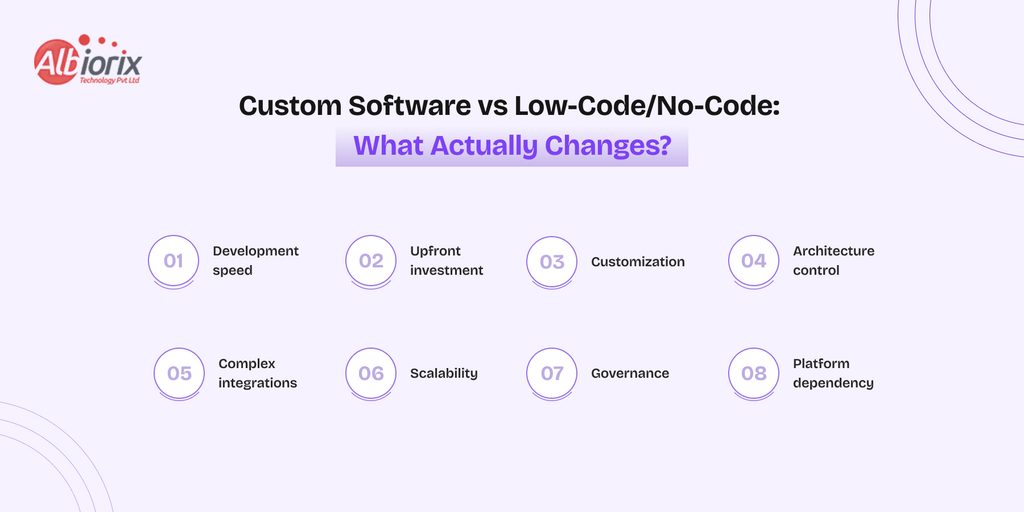
Consider a company requiring a simple tool for employees to send and confirm travel requests. A low-code tool would complete all forms, approvals, and communications in less than a few months.
Now think of the same company wanting to create a major platform operating for many customers, integrated with payments services, CRM tools, analytics software, AI services, and proprietary workflows.
In this case, it is not just about software development. It is also about the freedom a company receives as its needs become more complex.
Factor | Custom Software | Low-Code | No-Code |
|---|---|---|---|
Development speed | Longer initial cycle | Faster | Fastest for simple apps |
| Upfront investment | Higher | Moderate | Lower |
Customization | Extensive | Moderate to high | Limited |
| Architecture control | Full control | Platform-dependent | Platform-dependent |
| Complex integrations | Highly flexible | Depends on platform | More limited |
| Scalability | Designed around requirements | Depends on platform limits | Best for simpler workloads |
| Governance | Organization-controlled | Shared with platform | Shared with platform |
| Platform dependency | Lower | Moderate to high | High |
This is why Custom Software vs Low-Code/No-Code cannot be decided on development speed alone. A tool that saves weeks during the first release can still become restrictive if future requirements exceed what the platform was designed to support.
The practical decision is therefore about trade-offs: how much speed do you need now, and how much control might you need later?
Where Low-Code and No-Code Make Business Sense
Building applications does not always have to be done from the ground up. Instead, when processes are fairly simple and speed is the top priority, no-code or low-code could prove to be an effective viable choice.
For example, if a human resources department is receiving requests for leave via email and using Excel spreadsheets to keep track of them, a low-code platform can assist in transitioning to a paperless process with forms, approvals, and notifications instead of creating a complex application.
Common use cases include:
- Internal approval and reporting workflows
- Department-level automation
- Simple employee or customer portals
- MVPs and proof-of-concept applications
For Software development for startups, these platforms can also help validate an idea before committing to a larger engineering investment.
The key is knowing when a simple application starts becoming a business-critical system. That is where requirements around control, integrations, security, and scalability begin to matter more.
When Custom Software Becomes the Better Architectural Fit
Tailored development of a software is applicable when the software has to adapt to an organization’s processes instead of modifying those processes to comply with a certain platform.
A case in point can be a logistics company that carries out hundreds of deliveries. It may need routing algorithms, real-time tracking and monitoring, integration with ERP, access levels for different parties, and unique workflows for its operations. If it tries to squeeze all these into a ready-made platform, the company may face difficulties and challenges down the road.
This marks where custom Enterprise Software Development becomes crucial, particularly when it comes to applications that entail:
- Proprietary business logic
- Complex third-party integrations
- High transaction volumes
- Strict security or compliance requirements
- AI and data-intensive workflows
- Long-term product evolution
The low code vs traditional development decision therefore becomes less about coding effort and more about how much control the application will require as the business grows.
Ready to Move Beyond Platform Limitations?
Build software around your unique business requirements—not around the limitations of a predefined platform. Explore how custom development can support complex workflows, integrations, scalability, and long-term growth:
Explore Custom Software Development
The Cost You Don’t See on the Initial Proposal
It’s not always true that the affordable option will end up costing less in the long run.
While opting for a low-code application might lessen the cost of development up front, long-term costs can include licensing fees for the platform, premium connectors, extra users, integration, governance and the costs of migration. Custom software development usually costs more initially, but the organizations using it have more control over the technology stack and the solutions to be developed in the future.
A good analogy here is that of renting versus owning a commercial property. Rent might provide you with a quick way of getting operational, but the costs and limitations could change over time as the business requirements evolve.
When making a comparison between low code development software and custom development, be sure to look at things other than just the first release. Take into consideration the total cost of ownership, including development cost, maintenance, licensing, scaling and integration costs.
The Questions Enterprises Should Ask Before Choosing
Instead of starting with a technology preference, start with what the application must accomplish today and where it may need to go tomorrow.
Ask six practical questions:
- Is it a business utility or a competitive capability?
- How unique are the workflows and business rules?
- Which existing systems must it integrate with?
- What happens if users or transactions grow 10x?
- How much control is required over data, security, and architecture?
- How different could the requirements look three years from now?
If the application is predictable and predominantly facilitates the operations within the organization, a platform-based approach may be sufficient. On the other hand, if the application offers uniqueness by virtue of its unique operating processes, multiple integrations, or continuous development of products, a more complex architecture becomes essential.
The goal is not to choose the most powerful technology. It is to avoid paying for complexity you do not need, or accepting limitations you will later have to undo.
A Hybrid Strategy May Be More Practical
Enterprises rarely need one development approach for every application. A more practical strategy is to separate systems by their role.
Low-Code / No-Code → Standardize and accelerate
Internal approvals • dashboards • routine automation • simple workflows
Custom Software → Differentiate and control
Core products • proprietary logic • complex integrations • high-scale systems
Where they meet → Hybrid architecture
Consider a retailer that uses low-code to automate inventory approvals but keeps its customer platform, pricing engine, and integration layer custom-built.
The principle is straightforward: standardize where speed creates value; customize where control creates value.
Making the Decision for 2027 and Beyond
Selecting the ideal approach to software development relies less on what is easiest to implement today and more on what the software is expected to achieve in the future.
Use low-code or no-code when there are predictable requirements, speed is necessary, and the boundaries of the platform can be accepted. Choose custom software development when the product requires specific workflows, deep integration, and great control over the architecture.
When a company is searching for the best software development company to partner with, the discussion must begin with these requirements, not with a specific stack of technologies predetermined.
At Albiorix Technology, we help businesses evaluate those trade-offs and build software around real operational and product goals.
Build for today’s requirement, but choose an approach that leaves room for tomorrow’s business.
Need Help Choosing the Right Development Approach?
Choosing between custom software, low-code, and no-code depends on your business requirements, integration needs, scalability goals, security expectations, and long-term roadmap:
Talk to Our Software Experts
Connect with Our Experts!
FAQ
Custom software is built around specific business requirements, while low-code and no-code platforms provide predefined components and visual tools to accelerate development. The main trade-off is usually between development speed and the level of control and customization available.
Low-code or no-code works well for predictable workflows, internal tools, simple portals, process automation, prototypes, and applications that comfortably fit within a platform’s capabilities.
Custom software is better suited to applications requiring proprietary business logic, complex integrations, specialized security, high scalability, unique user experiences, or continuous long-term product development.
Yes, low-code can support enterprise applications when the use case fits the platform’s architecture. Enterprises should also evaluate governance, security, integration requirements, scalability, licensing, and platform dependency before adoption.
Low-code often has a lower initial development cost, but it is not automatically cheaper over the application’s lifetime. Platform subscriptions, user-based pricing, integrations, governance, scaling, and migration can affect total cost of ownership.
Yes. A hybrid approach can use low-code for standardized internal processes while custom software handles proprietary logic, core products, complex integrations, or other strategically important capabilities.
They can, but scalability depends on the platform, application architecture, workload, integrations, and pricing model. Businesses should evaluate expected user and transaction growth before committing a critical system to a platform.
Start with the application’s complexity, strategic importance, integration needs, security requirements, expected scale, budget, and future roadmap. Choose the approach that meets current needs without creating unnecessary constraints as the software evolves.
Published Blogs
Latest Blogs : Insights and Innovations from Our Blog
Stay Ahead in Tech: Dive into our Blogs for the Latest in Software, Web, and Mobile App Development. Explore cutting-edge technologies, industry trends, and insightful updates that keep you at the forefront of the digital landscape


Our Clients

Client Showcase: Trusted by Industry Leaders
Explore the illustrious collaborations that define us. Our client showcase highlights the trusted partnerships we've forged with leading brands. Through innovation and dedication, we've empowered our clients to reach new heights. Discover the success stories that shape our journey and envision how we can elevate your business too.










We’re here to help you


