





9 Expert Tips and Tricks To Customize Odoo for Success

Summary: Odoo customization enables personalise workflows through drag-and-drop tools, custom fields, and automated actions to boost efficiency. Key tricks include using Odoo Studio for no-code UI changes, setting personalized default dashboards, utilizing wildcards for faster searches, and setting custom field types to automate processes like invoice generation.

Have you ever wondered how to customize Odoo? With the right approach, it can help businesses work smarter and boost productivity.

This Odoo Customization guide will show you how to tailor Odoo to fit your needs and get the most out of it. If you’re unsure where to start, you can also consider hiring professional Odoo customization services.

In this guide, we’ll share 9 simple tips to help you customize Odoo successfully.

Why Customize Odoo?

Customizing Odoo is essential because no two businesses operate exactly the same way. By tailoring Odoo to fit your unique processes, you can significantly improve efficiency and reduce manual tasks.

Customization ensures that your ERP system works seamlessly with your workflows, helping increase user adoption and satisfaction.

When Odoo aligns perfectly with your business needs, it becomes a powerful tool that supports growth and adaptability.

1. Understanding Odoo Customization

Customization is essential to unlock the full potential of Odoo for your business.

By exploring various customization options, you can tailor Odoo’s modules, workflows, and interfaces to fit your unique processes seamlessly. This adaptability improves operational efficiency and enhances user experience.

If you’re unsure where to start or how to customize Odoo effectively, expert guidance is invaluable.

Albiorix Technology’s Odoo specialists offer deep insights and practical tips to help you harness Odoo’s flexibility, ensuring it perfectly aligns with your business needs and drives growth.

2. Identifying Your Business Needs

Before diving into customization, it’s essential to identify your specific business needs and objectives.

Take the time to assess your current workflows, pain points, and areas for improvement to determine the customization requirements for your Odoo implementation.

By pinpointing your business needs, you can prioritize customization efforts and ensure that the changes you make align with your overarching goals.

3. Utilizing Custom Fields and Attributes

One of the most powerful features of Odoo is its ability to add custom fields and attributes to existing modules.

Leveraging this functionality allows you to capture additional data relevant to your business processes without the need for extensive custom development.

Custom fields and attributes can be added to various Odoo modules, including CRM, Sales, Inventory, and more, providing flexibility and scalability as your business grows.

4. Creating Custom Reports and Dashboards

Harness the reporting capabilities of Odoo by creating custom reports and dashboards tailored to your business requirements.

With Odoo’s robust reporting tools, you can gain valuable insights into your operations and make data-driven decisions.

Custom reports and dashboards can be designed to track key performance indicators (KPIs), monitor sales trends, analyze inventory levels, and much more, empowering you to optimize your business processes.

Unlock Your Business Potential with Odoo Customization

Discover the power of tailored solutions! Customize Odoo to fit your unique business needs and boost efficiency. Ready to elevate your business? Let’s get started!

Transform with Odoo

5. Automating Workflows with Custom Workflows

Streamline your business workflows and improve efficiency by automating repetitive tasks with custom workflows in Odoo.

By defining custom triggers, actions, and conditions, you can automate manual processes and reduce the risk of errors.

Custom workflows in Odoo enable you to automate tasks such as order processing, invoicing, lead nurturing, and inventory management, saving time and resources.

6. Integrating Third-Party Apps and Extensions

Extend the functionality of Odoo by integrating third-party apps and extensions from the Odoo App Store.

With thousands of available modules covering various functionalities, you can enhance Odoo’s capabilities and tailor it to your specific business needs.

Integrations with third-party apps and extensions allow you to add new features, enhance existing functionalities, and integrate with external systems seamlessly.

7. Optimizing User Interface (UI) and User Experience (UX)

Focus on optimizing the user interface (UI) and user experience (UX) of your Odoo implementation to ensure maximum user adoption and satisfaction.

By customizing the UI to align with your branding and streamlining navigation, you can enhance usability and productivity.

UI/UX optimization involves customizing menu structures, layouts, views, and themes to create an intuitive and user-friendly experience for your employees.

8. Implementing Security Measures

Protect your sensitive data and ensure compliance with data privacy regulations by implementing robust security measures in your Odoo customization.

From role-based access control to encryption and authentication, prioritize security to safeguard your business information.

Security measures such as access controls, data encryption, and security audits are essential components of any Odoo customization project, helping to mitigate risks and protect your business from unauthorized access.

9. Continuous Improvement and Optimization

Customization is an ongoing process that requires continuous improvement and optimization to keep pace with evolving business needs and industry trends.

Regularly review and refine your Odoo customization to ensure that it remains aligned with your business objectives and delivers maximum value.

By embracing a mindset of continuous improvement, you can adapt to changing circumstances, seize new opportunities, and stay ahead of the competition in today’s dynamic business landscape.

Odoo Unleashed: Your Business, Your Way

Empower your business with Odoo’s limitless customization possibilities. Dive into a world where every feature reflects your vision. Ready to redefine success? Let’s customize together!

Redefine with Odoo

Odoo Customization is the Key to Success

Customizing Odoo is a powerful way to tailor your ERP solution to fit your business like a glove. By following these expert tips and tricks, you can unlock the full potential of Odoo and drive success for your organization.

Whether you’re looking to automate workflows, optimize user experience, or enhance security, customization empowers you to create a solution that meets your unique needs and accelerates your business growth.

Common Challenges in Odoo Customization and How to Overcome Them

While Odoo customization brings many benefits, it can also present challenges like unclear project scope, integration conflicts, or insufficient user training.

To overcome these, clearly define your customization goals upfront, involve experienced developers, and invest in thorough training for your team.

Continuous testing and gathering user feedback during the project helps you identify and resolve issues early, ensuring a smooth and successful implementation.

Conclusion

If you’re non-technical or seeking to hire dedicated Odoo developers to customize Odoo according to your requirements, then assistance is just a call away.

Albiorix Technology is an Odoo customization company with over 10 years of industry experience. We provide end-to-end Odoo customization services to businesses ranging from startups to established brands.

Whether you need simple Odoo customization, module creation, report customization, POS customization, theme customization, or more, our team of developers is here to assist you.

For customization tips or to explore our Odoo customization services further, feel free to reach out to us at the following numbers: (+61) 489-940-484 (Australia) | (+91) 991-308-8360 (India).

Alternatively, you can share your contact details with us, and we’ll get in touch with you promptly. We provide complimentary consultation services and quotes to all our clients.
A Complete Odoo Customization Services with Introduction And Its Benefits

In the fast-paced landscape of modern business, meeting and exceeding client expectations is just one facet of success. Enterprises also grapple with the intricate balancing act of managing internal operations and nurturing their workforce.

This multifaceted challenge necessitates a sophisticated solution: a comprehensive suite of business applications like Odoo.

With Odoo customization services, businesses can integrate essential functions such as customer relationship management (CRM), accounting, inventory management, and HR into a unified platform, Odoo empowers businesses to navigate complexities with ease.

With streamlined processes and enhanced collaboration, organizations can not only meet but surpass expectations, positioning themselves for sustained growth and success in today’s dynamic marketplace.

There’s a lot a business can achieve with the help of a suite of business management software tools like Odoo in this age of tasking.

If you’re a business grappling with the complexities of internal operations, daily tasks, employee management, and client relations, this blog is tailored precisely for you.

Join us as we delve into the realm of Odoo, exploring its essence, the advantages of customization, and where to locate top-tier Odoo customization services. Let’s kick things off with an introduction to Odoo.

What is Odoo?

Odoo stands out as the most popular and comprehensive suite of business tools, offering unparalleled flexibility through customization.

Originally recognized as OpenERP, Odoo emerged as a robust, integrated suite of business applications designed to streamline various organizational processes. It facilitates businesses in streamlining their operations, managing day-to-day tasks, and much more.

Over the years, Odoo has evolved into a comprehensive solution encompassing modules for CRM, accounting, inventory management, project management, and more, rendering it a preferred choice for businesses of all sizes seeking a flexible and scalable ERP solution.

Regardless of your business’s size or industry, Odoo can be personalized to match your specific requirements, ensuring optimum output. If you’re eager to experience its benefits firsthand and explore how it can enhance your business, visit: Odoo Trial.

Unlock Your Business Potential with Odoo Customization Services!

Transform your business operations with our Odoo customization services. Our experts will create tailored modules and personalized dashboards to meet your unique needs. Streamline your workflow, and increase productivity and profitability.


Contact Albiorix to learn more.

What is Odoo Customization?

Odoo customization refers to the process of tailoring the Odoo ERP system to meet specific business requirements beyond its standard functionalities.

As a versatile and modular platform, Odoo offers businesses the flexibility to modify existing modules or create new ones to align with their unique workflows and processes.

Odoo ERP customization can involve adjusting user interfaces, adding new features, automating workflows, integrating with third-party applications, and more.

By customizing Odoo, businesses can optimize their operations, enhance efficiency, and address specific needs that may not be adequately met by off-the-shelf solutions.

Ultimately, Odoo customization empowers businesses to create a tailored ERP solution that precisely fits their requirements and drives their success.

Hire Odoo developers from Albiorix Technology to customize Odoo CRM as per your business needs. Our team has years of experience in Odoo customization.

Let’s start with a free initial consultation over a call at (+61) 489-940-484 or email us at inquiry@albiorixtech.com.

What are the Top Features of Odoo?

Odoo is gaining attention from businesses all over the world due to its amazing and innovative features. It has a myriad of top features that set it apart as a leading business management software.

Its modular architecture enables businesses to select and integrate only the modules they require, ensuring a tailored solution.

The user-friendly interface ensures a seamless experience for users across various functions.

Scalability is another highlight, allowing Odoo to adapt to the evolving needs of businesses. Many more features make Odoo a versatile and powerful solution for businesses of all sizes.

Below are some of the top features of Odoo:

  1. Modular Architecture: Odoo’s modular structure allows businesses to select and integrate only the modules they require, ensuring a tailored solution that meets their specific needs.

    You can hire Odoo developers for customization services from Albiorix Technology.

  2. User-friendly Interface: Compared to other business suite apps available in the market, Odoo has a better user interface.

    With an intuitive and visually appealing interface, Odoo offers a seamless user experience, making it easy for employees to navigate and utilize its functionalities effectively.

  3. Unmatched Scalability: Whether it’s a small startup or a large enterprise, Odoo scales effortlessly to accommodate the growing needs of businesses, ensuring continued support as operations expand.

    Furthermore, partnering with an Odoo customization company can enhance its productivity and efficiency for your business.

  4. Integration Capabilities: Odoo seamlessly integrates with third-party applications and services, enabling businesses to leverage existing tools and systems without disruption.

    With the help of Odoo integration services, you can simply make it more useful for your business.

  5. Customization Flexibility: Businesses can customize and configure Odoo to align with their unique workflows and processes, ensuring a tailored solution that fits their specific requirements.

    Many Odoo customization companies like Albiorix Technology can help you with professional Odoo customization services at affordable rates.

  6. Comprehensive Suite of Applications: From CRM and accounting to inventory management and HR, Odoo offers a comprehensive suite of applications that cover various aspects of business operations, providing a unified platform for managing diverse functions.

    With Odoo on your side, you don’t have to find or work with any other suite for your business.

  7. Mobile Accessibility: With mobile-responsive design and dedicated mobile apps, Odoo enables users to access critical business information and perform tasks on the go, enhancing productivity and efficiency.

    Now, manage all your tasks from your smartphone.

  8. Community and Support: The vibrant Odoo community provides access to a wealth of resources, including forums, documentation, and user-contributed modules, while professional support options ensure timely assistance for businesses of all sizes.

    For DIY Odoo customization tips or professional customization services, feel free to talk to our Odoo developers in India. We provide free initial consultation.

Odoo is a versatile and powerful ERP solution that empowers businesses to streamline operations, drive growth, and achieve their strategic objectives efficiently.

If you are looking for a multitasking business suite, then Odoo is the best.

Boost Efficiency and Drive Growth with Odoo Customization Solutions

Experience the benefits of Odoo customization for your business. Our expert team can help you tailor Odoo with custom apps, integrations, and workflows to automate tasks and enhance collaboration.


Get Started with Albiorix!

How Does Odoo Customization Help a Business?

Odoo as a business suite has nothing to do with your business size – whether you are a startup or an established brand, it is designed to fit everyone. It offers a multitude of benefits to businesses, enhancing efficiency, productivity, and overall operations.

Here’s how Odoo helps businesses:

  1. Streamlined Operations: Odoo provides a unified platform for managing various aspects of business operations, including sales, CRM, accounting, inventory, and more.

    By consolidating these functions with the help of an Odoo Customization Company into one system, businesses can streamline their processes and improve overall efficiency. Get a free quote and consultation from Odoo developers today!

  2. Easy Customization: One of the key strengths of Odoo is its customization capabilities.

    Using the top-rated Odoo ERP customization services, businesses can tailor the platform to suit their specific needs and workflows, ensuring that they get a solution that fits their unique requirements.

  3. Amazing Scalability: Whether a business is a small startup or a large enterprise, Odoo scales effortlessly to accommodate growth.

    As businesses expand, they can easily add new modules and functionalities to the system, ensuring that Odoo grows with them.

    Thus, when your business grows, you don’t have to worry about managing and streamlining the business operations and day-to-day tasks.

  4. Cost-Effectiveness: Odoo is a cost-effective solution compared to traditional ERP systems.

    With its open-source nature and modular architecture, businesses can start small and gradually add more features as needed, without incurring hefty upfront costs.

    Moreover, Odoo consultancy and customization services are easily available at affordable rates.

  5. Integration Capabilities: Odoo seamlessly integrates with third-party applications and services, allowing businesses to leverage their existing tools and systems.

    This integration streamlines workflows, eliminates data silos, and enhances collaboration across different departments.

  6. Improved Decision-Making: With access to real-time data and analytics, businesses can make informed decisions quickly.

    Odoo provides comprehensive reporting and analytics tools that help businesses gain insights into their operations, identify trends, and make strategic decisions to drive growth.

  7. Enhanced Customer Experience: By centralizing customer data and interactions, Odoo enables businesses to provide a seamless and personalized experience to their customers.

    This leads to improved customer satisfaction, loyalty, and retention.

  8. Mobile Accessibility: With dedicated mobile apps, employees can access Odoo from anywhere, at any time, using their smartphones or tablets.

    This mobile accessibility ensures that employees stay connected and productive, even when they’re on the go.

Overall, Odoo empowers businesses to streamline their operations, drive growth, and stay competitive in today’s dynamic business landscape.

Its flexibility, scalability, and comprehensive features make it a valuable asset for businesses of all sizes and industries.

Thus, if you want to have your hands on Odoo for your business, then get in touch with us today.

Albiorix Technology is an Odoo Customization company. We have a team of Odoo developers to offer Odoo customization services in India, the USA, Australia, and across Europe.

Maximize Your ROI with Expert Odoo Customization Services

Optimize your ROI with our Odoo customization services. Our in-depth understanding of Odoo’s capabilities enables us to fine-tune the platform to align perfectly with your business objectives. Enjoy seamless processes, improved data management, and accelerated growth with our tailored solutions.


Request a Free Consultation Call!

Best Odoo Customization Services by Albiorix Technology?

Odoo customization services are at the core of Albiorix Technology. We have a team of dedicated and experienced Odoo developers to offer end-to-end customization services to fit your business requirements and budget.

Below are the top Odoo ERP customization services offered by Albiorix Tech:

  1. Odoo CRM Customization: Our CRM customization services can assist you in adjusting special sales methods, keeping track of data, and managing how you interact with customers.
  2. Odoo Report Customization: Our Odoo developers can customize the existing reports to meet your unique business requirements in no time.
  3. Odoo POS Customization: Get in touch with us to convert or customize the POS system within Odoo at affordable rates. We will make it quick and scalable.
  4. Odoo Module Development: Hire developers to modify the existing modules in Odoo or to create a new module as per your business requirements.
  5. Odoo Invoice Customization: Being an Odoo consultancy company, we can help you with Odoo invoice customization services. You can have a unique format for your company’s invoices.
  6. Odoo Consultancy Services: Do you want to talk to Odoo experts before making any important decisions? We offer professional Odoo consultancy services – from startups to established brands.
  7. Odoo Migration Services: Do you want to shift your business to Odoo or want to upgrade the existing version of Odoo without losing your data? Get in touch with us today!
  8. Odoo Integration Services: Our Odoo integration services will help you pave the way for effective management and control over the business.
  9. Odoo Support and Maintenance: We offer functional and technical support and maintenance services to ensure 100% uptime of your business in all weathers.

Along with the above-mentioned services, we also offer tons of other services related to Odoo.

If you have any questions related to Odoo, its efficiency, cost, or how it will benefit your business, we advise you to get in touch with our Odoo experts today.

To schedule a free Odoo consultation call or send us your details!

Conclusion

When searching for Odoo customization services nearby on Google, you will come across numerous options, but among them all, Albiorix Technology stands out as the best Odoo ERP customization company.

With over 10 years of hands-on experience and a dedicated team of Odoo developers, no one offers Odoo customization services like us.

eCommerce Software Development – A Complete Guide

It’s 2025, and the eCommerce landscape continues to grow at a remarkable pace. In 2023, global eCommerce sales reached a record $6.3 trillion, and current projections show this figure will climb to $7.5 trillion by the end of 2025.

This steady rise highlights how online shopping has become a core part of consumer behavior worldwide. As a result, businesses across all industries are focusing on building or upgrading their digital presence to stay competitive.

With this surge in demand, eCommerce software development has become more important than ever.

Custom eCommerce solutions are helping businesses deliver smooth, personalized shopping experiences while also simplifying daily operations like order processing, inventory tracking, and customer engagement.

In 2025, web-based eCommerce software solutions are leading the way. These tools offer flexibility, scalability, and real-time access to store data—all essential for managing a successful online business in today’s fast-paced digital environment.

In this blog, we’ll take a closer look at what eCommerce software is, how it supports online businesses, and why it’s a smart investment for any business planning to thrive in 2025 and beyond.

What is eCommerce Software?

eCommerce software is a digital tool or platform that helps businesses sell products or services online. Unlike general business software, it’s specially designed to support online stores by managing tasks like product listings, payment processing, and order tracking.

In simple terms, eCommerce software acts as the backbone of an online business. It includes features like inventory management, customer relationship management (CRM), analytics, and website customization.

This helps store owners keep everything organized, offer a smooth shopping experience, and make informed business decisions.

Even major platforms like Amazon rely on custom eCommerce software to run smoothly and meet the expectations of millions of customers.

Whether you’re a small startup or a large enterprise, having the right eCommerce software can make a big difference in how your online store performs.

From a practical perspective, using eCommerce software means you can focus more on growing your business rather than handling manual tasks. It provides the tools and support you need to sell efficiently and meet customer needs—all in one place.

What are the Uses of eCommerce Software?

Custom software solutions for online stores are designed to oversee all backend operations of an eCommerce website.

When you have personalized eCommerce software built for your website, you need not worry about running your web-based commerce store.

While there are numerous uses of eCommerce software, we have outlined the top 9 benefits of eCommerce software solutions, as listed below:

  1. eCommerce Software Helps in Store Creation: eCommerce software allows businesses to set up and customize their online storefronts, showcasing products or services in an appealing and organized manner. It also helps them in organizing their store in the way they want for higher sales and revenue.
  2. eCommerce Software Helps in Inventory Management: It enables efficient tracking and management of inventory levels, ensuring that products are adequately stocked and preventing overselling or stockouts. It is one of the toughest jobs of maintaining an online store, and eCommerce software solutions offer great relief.
  3. eCommerce Software Solutions Helps in Payment Processing: Ensuring safe payment processing is the most important aspect of an online store. eCommerce software integrates secure payment gateways, enabling store owners to accept various payment methods and process transactions securely.
  4. eCommerce Software Helps in Order Management: It facilitates the handling of orders from placement to fulfilment, including order processing, shipping, and tracking. Manual order management can be a hectic process, custom-made order management software is a great help.
  5. eCommerce Software Helps in Customer Relationship Management (CRM): It helps in managing customer data, interactions, and support, allowing businesses to build and maintain relationships with their clientele.
  6. eCommerce Software Helps in Analytics and Reporting: eCommerce software provides insights through analytics tools, offering valuable data on sales, customer behaviour, and website performance to make informed business decisions. An in-depth analysis and reporting help businesses plan their future course of action.
  7. eCommerce Software Helps in Marketing and Promotion: There are more than 26.5 million eCommerce sites across the entire globe, with more and more being created every single day. eCommerce software often includes tools for marketing campaigns, SEO optimization, and promotional activities to attract and retain customers. In the stance of fierce online competition, such software offers you an upper hand and makes your business stay ahead of the competition.
  8. eCommerce Software Solidifies Security Measures: On average, around 30,000 websites are hacked every day globally out of which 43% are targeted at small businesses. eCommerce software implements security protocols and measures to safeguard sensitive customer information and ensure secure transactions.
  9. eCommerce Software Helps in Scaling Business Operations: As a business grows, eCommerce software accommodates scalability, allowing for expansion and increased sales volume without significant disruptions. It ensures your business’s smooth transition from a small business to a brand over the web.

To conclude, bespoke and scalable eCommerce software solutions serve as a comprehensive tool that empowers businesses to establish, manage, and expand their online presence, fostering growth and success in the digital marketplace.

If you have a software idea that can propel your business ahead, then talk to our experts for free.

Dominate the Digital Marketplace with Tailored eCommerce Solutions

Get a custom eCommerce software to achieve your business objectives. Our experienced team of developers can help you launch a new store or optimize an existing platform.
Let’s Dominate Together

What Features Should You Have in eCommerce Software?

Various online stores have different requirements and priorities. Therefore, when selecting an eCommerce software solution for development, ensure that it meets your specific needs.

Below, we outline some of the most crucial features of web-based eCommerce software:

  1. Online Store Creation: eCommerce software allows businesses to set up and customize their online storefronts, showcasing products or services in an appealing and organized manner. These advanced features make custom store creation an easy process.
  2. Inventory Management: It enables efficient tracking and management of inventory levels, ensuring that products are adequately stocked and preventing overselling or stockouts. This software ensures your store is never out of stock.
  3. Payment Processing: eCommerce software integrates secure payment gateways, enabling businesses to accept various payment methods and process transactions securely. Your customers will have the freedom to make transactions through the payment gateway of their choice.
  4. Order Management: It facilitates the handling of orders from placement to fulfilment, including order processing, shipping, and tracking. This feature ensures efficient order management so that your clients are always happy.
  5. Analytics and Reporting: eCommerce software provides insights through analytics tools, offering valuable data on sales, customer behaviour, and website performance to make informed business decisions. This feature helps you make informed business decisions for growth and customer satisfaction.
  6. Marketing and Promotion: It often includes tools for marketing campaigns, SEO optimization, and promotional activities to attract and retain customers. This feature helps you to stay ahead of the competition. You can keep your store optimized for the latest SEO updates and algorithms.
  7. Security Measures: eCommerce software implements security protocols and measures to safeguard sensitive customer information and ensure secure transactions. This feature ensures 100% safety of your online store from hacking and malware.

An eCommerce software serves as a comprehensive solution that empowers businesses to establish, manage, and expand their online presence, fostering growth and success in the digital marketplace.

Thus, if you are about to develop web-based eCommerce software solutions, then don’t forget to consider the above-mentioned features. For more features, get in touch with our developers.

How eCommerce Software Eases Your Business?

When you are selling your products or services online, certain daily tasks are imperative to ensure the smooth functioning of your virtual store.

Custom eCommerce software solutions play a pivotal role in not just efficiently executing these tasks but also in streamlining the entire process.

Here are several ways in which eCommerce software solutions assist businesses:

  1. It will help your customers browse your online store and easily find the product of their choice.
  2. It will help your customers to create personalized accounts and add products to carts and wish lists.
  3. It will ensure safe transactions, thereby increasing the authenticity and credibility of your online store.
  4. It will help you use third-party services such as shipping rates, dates, and delivery options.
  5. It ensures smooth payment processing.
  6. It ensures smooth order placing and order management.

There are a lot of ways eCommerce software can help your business, and if you want to learn more about them, then call us at (+61) 489-940-484 (Australia).

What is the Cost of eCommerce Software Development?

The cost of robust eCommerce Software Development depends on many important aspects such as:

  1. Scope and Complexity of the Project: The complexity of features, functionalities, and the overall scope of the eCommerce platform significantly impacts the cost. Basic platforms with standard features might cost less compared to highly customized solutions with advanced functionalities. Get a free quote today from eCommerce developers in Australia.
  2. Customization Requirements: The level of customization needed for the software, including unique design, specialized features, integrations, and scalability, influences the overall cost. The more you customize, the more you need to pay.
  3. Platform Selection: Choosing between building from scratch, using open-source platforms (like Magento, WooCommerce, Shopify), or opting for a pre-built solution affects costs differently. Custom-built solutions tend to be more expensive compared to utilizing existing platforms. Do you want to know which platform is the best for your online store? Ask the experts.
  4. Maintenance and Support: Consider ongoing maintenance, updates, and technical support, which add to the overall cost of eCommerce software development. You will need maintenance and support services to ensure 100% uptime of your online store.

It’s essential to consult with web development agencies or experts, providing them with your project requirements, to get a more accurate estimation of the cost involved in eCommerce software development.

Generally, prices can range from a few thousand dollars for basic solutions to hundreds of thousands for more complex, custom-built eCommerce platforms. Get a free quote today!

Conclusion

Join forces with Albiorix Technology to create custom eCommerce software solutions that support your business like a pro.

Creating eCommerce software that stands out among competitors and resonates with your audience is crucial for success in the competitive online market.

Having a reliable tech partner for eCommerce software development is essential. An eCommerce software tailored to meet your business goals and foster growth is vital for long-term success.

Albiorix Technology is a trusted software development company specializing in creating bespoke and scalable eCommerce solutions.

We excel in developing cutting-edge online retail software using various technologies and platforms like Shopify, WordPress, and Magento. Let’s build the next-generation virtual marketplace together – reach out to us today for our expertise.

To discuss your requirements with experts, please call us at (+61) 489-940-484 (Australia) or share your contact details with us. You can also message us on LinkedIn and Facebook.

Travel Planner App Development – DIY or Hire an Expert

Everyone enjoys travelling in this world. Whether it’s solo adventures, family trips, or group excursions, travelling provides peace of mind and opportunities to explore new places, cultures, and more.

While the prospect of travel is exciting, the real challenge lies in the planning process.

From choosing the destination and crafting an itinerary to deciding what to pack and what to leave behind, there’s a multitude of factors to consider before embarking on your journey.

Fortunately, the task of planning can be simplified and made convenient with the assistance of a travel planner app.

There are hundreds of travel planner apps accessible on both the Play Store (Travel Apps for Android) and the App Store (Travel Apps for iPhone).

Some are well-suited for domestic travel within your country, while others are particularly beneficial if you love exploring beyond borders.

Depending on your travel preferences, you can effortlessly download a travel planner app for Android or iOS devices. However, if you are unable to find a perfect travel planner app for yourself then you can consider developing an app for yourself.

But should you consider DIY travel planner app development or hire a travel app development company within your vicinity?

Whether you choose to create a travel planner app independently or hire mobile app developers, both options are feasible. Opting for a do-it-yourself approach in travel and hospitality app development may demand some effort on your part and could save costs.

On the other hand, engaging the services of a top-notch travel planner app development company can spare you from the associated hassles, though it comes with a financial investment.

In this blog, we will start with the introduction of a travel planner app, discuss why you need one, and finally, we will find out what’s better – DIY app development or hiring a mobile app developer.

So, let’s get started.

What is a Travel Planner App?

A trip planner app is a highly useful mobile application designed to simplify and enhance the travel planning process.

Travellers can use this app to book flights and hotels, create detailed travel itineraries, and receive location-based services. The app is an excellent tool for exploring new destinations and providing information on local attractions, events, and activities.

With this app, travellers can easily access important information and plan their itinerary accordingly, ensuring a smooth and enjoyable travelling experience, both locally and globally.

Your Ultimate Travel Companion Awaits – DIY or Let Us Do the Work!

Unleash your wanderlust with a personalized Travel Planner App! Create your masterpiece or let us align an app with your travel dreams.

Your journey begins here – choose the path that suits you best!

What are the Benefits of Travel Planner Apps?

Travel planner apps have completely changed the scenario of how we travel and plan our trips.

Back in the old days, when there were no travel and hospitality apps, people used to face a lot of challenges in planning their itineraries, booking flights, finding hotels, and reserving cars.

But now, a single and well-designed travel app has made the lives of travellers quite easy.

Planning your itinerary, booking flights, reserving hotels, and other things can now be done at your fingertips – all from the comfort of your house.

This is how travel planner apps have revolutionised the way we travel and create memories.

Below are a few more benefits of the travel planner app, and they are:

  • Convenience: One of the primary benefits of a travel app is the ability to plan your trip from any location and at any time. Travel planning has become remarkably convenient with the help of these apps. Travellers can access everything they need for their trip, from flight details to hotel bookings and information about local attractions and events, all in one place, right at their fingertips.
  • Time-Saving: In the past, before the existence of travel planning apps or software, individuals spent considerable time searching for the best deals. However, thanks to travel and trip planning apps, this can be accomplished with just a few clicks. A trip planner app efficiently streamlines the travel planning process, saving travellers valuable time.
  • Personalized Trip Planning: Whether you are planning a couple’s trip, solo adventure, group outing, or any other type of journey, these travel and hospitality apps enable you to plan your trip according to your preferences. You are free to personalise itineraries based on your tastes, interests, and budget. Moreover, you can modify them whenever you wish. Such a type of personalisation was not possible when there were no travel planning apps.
  • Cost-Effective: Due to the excess of competition in the market, it has become easy for a traveller to find the best deals. Whether it’s about flight booking, hotel reservations, or cab booking, you can easily discover the best and most affordable deals that suit your choices and budget. These travel planning apps assist you in saving a significant amount of money.

The above-mentioned are the top benefits of travel planning apps. As a result of these benefits, there is a significant global demand for travel apps with outstanding features.

If you have a unique idea for a travel and hospitality app, feel free to discuss it with experts at no cost.

Now that we understand what a travel planner app is and the benefits it offers, it’s time to determine whether you should develop a travel app on your own or hire a mobile app development company to build a travel and hospitality app.

Dream, Plan, Explore – Your Travel App, Your Vision!

Dreaming of seamless travel planning? Make it a reality with a Travel Planner App tailored just for you. Dive into the DIY adventure or let our experts bring your vision to life.

Start creating memories – your way, your app!

DIY Travel Planner App Development

While DIY travel app development offers cost savings and control, it comes with the trade-offs of potential quality and security issues, time consumption, and ongoing maintenance challenges.

Consideration of your expertise, resources, and long-term goals is crucial in deciding whether DIY development is the right choice for your travel planning app.

Below are the Pros and Cons of DIY Travel App Development:

Pros of DIY Travel Planner App Development

  • Cost Savings: Developing the app on your own can save money as you won’t incur expenses associated with hiring professional app developers. Click here to know the Cost of App Development – A Comprehensive Guide
  • Control: You have full control over the development process, allowing you to make decisions and implement changes as you see fit.
  • Learning Experience: DIY development provides an opportunity to acquire new skills and gain insights into the app development process.
  • Customization: You can tailor the app to your specific needs and preferences without relying on external input.

Cons of DIY Travel Planner App Development

  • Limited Expertise: Lack of professional expertise may lead to suboptimal coding, design, or functionality, affecting the app’s overall quality.
  • Time-Consuming: Learning and implementing app development takes time, potentially delaying the launch of your travel app.
  • Security Risks: Inadequate security measures may leave the app vulnerable to potential threats or breaches. Here are the 13 Best Web Application Security Best Practices To Follow.
  • Quality Concerns: The lack of professional input may result in a less polished and user-friendly app, potentially impacting its performance and user satisfaction.
  • Resource Intensive: DIY development requires substantial time and effort, diverting attention from other aspects of your travel business.
  • Maintenance Challenges: Ensuring ongoing updates, bug fixes, and compatibility with evolving technologies may be challenging without professional support.
  • Limited Features: Due to limited resources and expertise, the app may lack advanced features and innovations found in professionally developed apps.
  • Risk of Project Failure: An incomplete understanding of development processes and challenges increases the risk of project failure or subpar outcomes.

In contrast to the advantages, DIY travel planner app development comes with numerous drawbacks. Therefore, attempting to build a travel and hospitality app on your own is not recommended unless you have a solid understanding of app development (iOS and Android).

Feel free to consult with our mobile app development experts to gain further insights into these limitations.

Craft Your Adventure – DIY Style or Trust the Experts!

It’s time to turn your travel dreams into a reality! Our Travel Planner App development sevice has got you covered, whether you prefer a hands-on customized experience or a hassle-free one.

Craft your adventure – DIY style or trust the experts, the choice is yours!

Hire a Travel Planner App Development Company

Hiring a travel planning app development company provides a comprehensive solution, ensuring a high-quality, feature-rich, and secure application that meets your business needs.

There are tons of benefits to working with a talented team of mobile app developers for tour and travel planner app development.

Some of the benefits are listed below, and they are:

  • Professional Expertise: Benefit from the experience and expertise of a specialised development team with a proven track record in creating successful travel apps.
  • Quality Assurance: A professional development company ensures high-quality coding, design, and functionality, resulting in a polished and reliable travel planner app.
  • Time Efficiency: Development companies follow established workflows, leading to faster development cycles and quicker deployment of the travel app.
  • Advanced Features: Access a wide range of advanced features and technologies that may be challenging to implement independently.
  • Customization Options: Work closely with the development team to customise the app according to your specific requirements and business goals.
  • Post-Launch Support: Professional development firms provide ongoing support, including updates, bug fixes, and improvements, ensuring the app remains effective and up-to-date.
  • Security Measures: Benefit from robust security measures implemented by professionals to safeguard user data and protect against potential threats.
  • Focus on Business: Outsourcing app development allows you to concentrate on other aspects of your travel business, leaving the technical complexities to experts.
  • Scalability: A development company can design the app with scalability in mind, accommodating future growth and additional features.
  • Reduced Risk: Talented mobile app developers mitigate the risk of project failure by employing industry best practices and addressing challenges effectively.

Bonus Tip – Features to Consider in a Travel Planner App

Whether you choose to enlist the services of a travel planner app development company or undertake the development independently, there are essential features that you should incorporate into your app to guarantee its success.

  • Flight and Hotel Booking
  • Cab Booking
  • Travel Itinerary Planning
  • Local Recommendations
  • Social Sharing
  • Location-Based Services
  • Weather Updates
  • Reviews and Ratings
  • Offline Functionality
  • Travel Insurance
  • Push Notifications
  • Chatbots

Looking for a mobile app development company that can build an AI-powered tour and travel planner app for you? Get in touch with us. You can also have a look at our portfolio before opting for our services.

Conclusion

According to Market.US, the anticipated size of the Global Travel Planner App Market is approximately USD 1,445.1 Billion by the year 2032, exhibiting substantial growth from USD 544.1 Billion in 2023.

This represents a Compound Annual Growth Rate (CAGR) of 11.90% during the forecast period spanning from 2023 to 2032.

Positioned as a segment within the broader travel and tourism industry, the Travel Planner App Market serves both leisure and business travellers, empowering them to efficiently plan their trips without the necessity for exhaustive research or dependence on traditional travel agents.

So, it’s time to contact a travel planner app development company and get started. We are Albiorix and we can develop an AI-powered travel planner app for you with futuristic features.

For a free consultation with our mobile app developers, please call us at +1 (912) 528-5566 (US) or (+61) 489-940-484 (AUS). To share your contact details and app ideas, please use this contact us form on the website.

We will get back to you with all the possible solutions and suggestions. You can also drop us a message on LinkedIn and Facebook.

Meanwhile, you can also have a look at our portfolio where you will find mobile apps developed for different industries and domains.

How to Develop an Event Management Software System

What is an Event Management System?

Humans and event celebrations cannot be separated. Celebrations serve as vibrant threads weaving together the fabric of human connection.

Whether in the joyous rhythm of festivals, the sacred union of weddings, or the strategic harmony of corporate events, these occasions embody the shared human desire to commemorate and revel in moments that hold significance.

As technology evolves, many modern celebration experiences are supported by digital tools and Web Application Development, helping people plan, organize, and enhance events with greater ease and creativity.

Occasions and festivals that fall every year or once in a lifetime are not merely events but expressions of our collective humanity, marking milestones, fostering relationships, and creating lasting memories.

In the tapestry of human life, event celebrations stand as luminous knots, connecting us to our roots, each other, and the essence of what it means to be human.

That’s where the need for an event management software system arises to ensure effective planning and execution of events.

As stated above, humans cannot be separated from celebrations, and with the globalization of human civilization, the number of celebrations across every continent has increased by leaps and bounds.

Moreover, as humans embrace diverse festivities, weddings, and corporate events, the complexity of orchestrating these occasions grows.

Thus, to manage these events, festivals, and occasions, you will need the best event management software that can help you in planning and managing the events more efficiently and professionally.

Also known as online event management software in some countries, modern event management software is a computer-based solution designed to help plan, organize, and execute events.

In a world that loves to celebrate, event management software becomes the silent conductor, harmonizing the elements that transform gatherings into unforgettable experiences.

If you’re exploring event management project ideas or looking for an event management system design for your organization, understanding the Business Engagement Model behind a digital event management application is the first step toward innovation.

What is the Need for an Event Management Software System?

We humans love celebrating events, and to ensure 100% success of any occasion (either small or big), you will need a feature-rich event management software system.

An event management application or web-based event management system emerges as the indispensable tool — from event planning, member management, and scheduling to flawless communication, everything becomes more streamlined with event management software online.

Below are a few reasons why an event management company or an event software developer should use event management system software for meticulous event planning and execution.

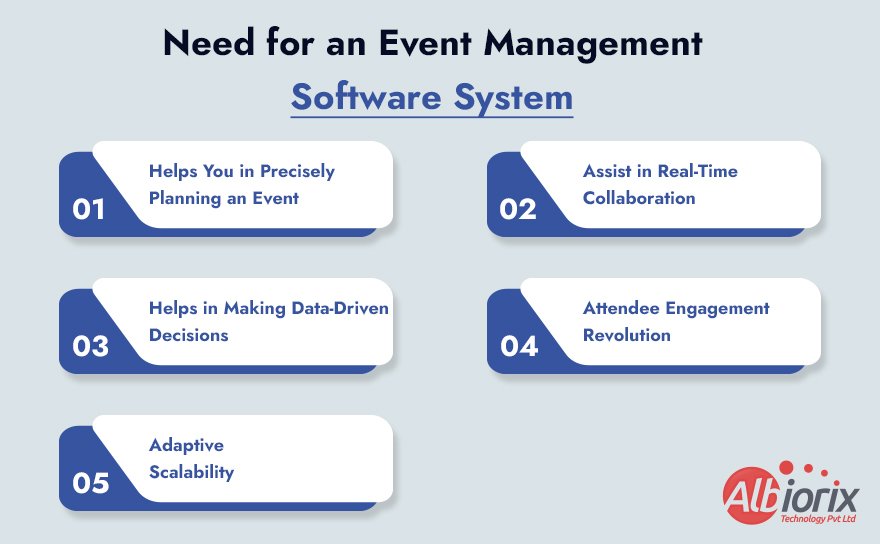
What is the Need for an Event Management Software System

1. Helps You in Precisely Planning an Event:

Being an event planner or a company specializing in event management software development, you know that an event involves many intricate processes — from venue selection to guest logistics.

Event Management Software brings order to this chaos, offering a streamlined approach to planning.

This not only saves time but ensures precision in every aspect of your event, setting the stage for seamless execution. That’s the main reason behind the huge demand for online event management software in India, Australia, the UK, and the US.

Businesses that leverage ERP for event management systems also experience smoother coordination between logistics, vendors, and client communications — ensuring no detail gets missed.

2. Assist in Real-Time Collaboration:

In an industry where communication is the lifeline, real-time collaboration is non-negotiable. Event management systems and event planning software development serve as a communication hub, connecting all stakeholders — vendors, team members, and clients.

This fosters instantaneous communication, minimizing delays and maximizing efficiency. Many event management mobile app development solutions today include built-in chat, alerts, and video conferencing features for easy collaboration.

If you’re a web development for event management professional or part of an event management software development company, integrating these real-time features can significantly boost your product’s usability.

3. Helps in Making Data-Driven Decisions:

Gone are the days of relying solely on intuition. Modern event management systems and mobile event management apps introduce a data-driven dimension to decision-making.

By harnessing analytics, you gain valuable insights into attendee preferences, logistical challenges, and overall event performance. Armed with this knowledge, you can make informed decisions that shape the success of your events.

For businesses working on event management software project ideas, integrating AI Development Services can help add AI-based analytics and reports — a key feature that turns ordinary tools into advanced event software systems.

4. Attendee Engagement Revolution:

Captivating your audience is the essence of memorable events. A well-built event management app enhances attendee engagement through interactive features, seamless registration, and post-event surveys.

It’s not just about organizing an event; it’s about creating an experience that resonates long after the curtains fall.

This is why modern event planner app development solutions focus on personalization and interactivity — key pillars in successful event management systems.

If you’re developing a conference management software development project, think beyond registration — consider networking options, live polling, and instant notifications for participants.

5. Adaptive Scalability:

Event management companies are dynamic entities with diverse events in their portfolio. Scalable event management software systems offer adaptive functionality, catering to both small gatherings and massive conferences.

Whether you’re building a simple event management software or a large enterprise-level ERP for event management, scalability ensures consistent performance.

This makes it easier for event management app development companies in India and beyond to handle growing user bases and data volumes seamlessly.

A well-designed and developed event management software system is not just a tool; it’s a strategic asset that propels an event management company toward success.

From precise planning to real-time collaboration, data-driven insights, and elevated attendee engagement, the benefits of event management applications are immense.

Embrace the future of event management — invest in event management software development services that empower your company to thrive in a competitive market.

Get Expert Tips to Design Your Event Management Software!

Turn your vision into reality! Learn from industry experts and craft an event management software that stands out.

Consult Our Experts

How to Develop an Event Management Software/App?

The process of event management software development involves several crucial steps like defining the software’s purpose, creating an appealing UI/UX, selecting valuable features, and more.

Thus, when you build an event management application, aim for scalability, ease of use, and smooth event coordination as key objectives.

If you’re working on event management project ideas or planning a web-based event management system, this section will help you understand how to approach development strategically.

Follow these steps to build a scalable and personalized event management software or event management app from scratch:

Step 1: Define the Purpose of Event Management Software/App

Indeed, that’s the first question you should consider before delving into the event management system design or development process.

Once you’ve defined the purpose clearly, outlining the essential features becomes simpler, paving the way for effective event management software engineering.

For businesses aiming to build scalable and feature-rich solutions, choosing to Hire Dedicated Developers can ensure the right expertise and faster development cycles.

Conducting market research and reviewing other event planning systems and apps can provide insights into your end-users’ expectations. Given how saturated the market is for event management software online, thorough market research will give you a competitive edge.

Many developers in event management software India and global markets begin by exploring trends in event planning software development and user engagement data to refine their approach.

Step 2: Decide Between Software or Mobile App Development

Once you’ve determined the purpose of your app, the next decision is whether to build desktop software, an event management mobile app, or both.

Considering the ongoing smartphone revolution, it’s advisable to develop a mobile app for event management to ensure better user reach and convenience.

Additionally, there are numerous benefits associated with creating an event management app, such as flexibility, push notifications, and real-time updates.

When it comes to mobile apps, you can choose between native or cross-platform development. While both options are viable, native apps provide faster performance compared to hybrid ones.

If you’re unsure which direction to take, you can consult an event management app development company for technical advice.

For example, a professional event app development company in India can help you evaluate frameworks like Flutter or React Native for cross-platform development, ensuring a balance between cost and efficiency.

Step 3: Select Core Features for Your Event Management Software

If you aim for your event management system to stand out in today’s market, it’s crucial to select features that cater to your users’ needs.

With hundreds of event management software systems available globally, your app must include unique, valuable features to stay competitive.

Below are the core features of event management systems recommended for modern apps:

  • Ticket Booking & Online Registration
  • Mobile Check-in Functionality
  • Geolocation & Venue Maps
  • Event Schedules & Timelines
  • Networking & Messaging Features
  • Notifications & Reminders
  • Data Analytics Dashboard

For custom enterprise solutions, consider integrating features like AI-driven attendee recommendations, automated event scheduling, or payment gateway integration.

If you’re interested in advanced functionality, reach out to an event management software development company that specializes in AI, ML, and cloud integration.

Albiorix, for example, provides event management software development services tailored for scalability and customization, supporting both web and mobile-based systems.

It’s time to design, build, and test your app/software

Once you’ve finalized your requirements, you can begin the design and development phase. Although the process is standard, there are a few key points to keep in mind while creating your event management system software:

  1. Create a Prototype – Build a clickable prototype to visualize the flow of your software or app. Testing early helps refine the user journey and functionality.
  2. Iterative Development – Divide your project into manageable phases (modules) for easier testing and updates. This approach suits both small event management software and enterprise-grade systems.
  3. Continuous Testing – Test your software thoroughly during every development phase to ensure it meets the event management system requirements and delivers a smooth user experience.

For businesses aiming to build an event management software ASP.NET version or Python event management software, choosing the right technology stack is crucial.

ASP.NET, for instance, provides robust server-side capabilities ideal for enterprise-grade applications, while Python enables rapid development and flexibility

.If you lack in-house resources, partnering with a web development company for event management or a custom event software development company can ensure your project remains on track and meets deadlines efficiently.

Build Your Event Management Software – Your Way, Your Rules!

Break free from limitations and design the perfect event management software for your needs. Start innovating now.

Let’s Talk!

It’s Time to Launch Your Event Management App/Software

The biggest challenge with event planning apps is that you can’t fully test them until a live event takes place.

That’s why it’s critical to have a reliable tech team ready during the actual event to monitor performance, resolve issues, and manage real-time data.

A successful launch strategy for event management software online registration systems includes pre-event promotions, website integration, and user incentives for downloads.

Effective communication ensures the app becomes an essential part of the event experience.

If you’re managing multiple clients, building your app with event management system online capabilities (cloud integration, user dashboards, ticket management) enhances scalability and reliability.

Conclusion

The Software Development Company Albiorix Technology has extensive experience in event management software development and event management app development for businesses worldwide.

From small event management software to enterprise-grade event management ERP systems, we deliver end-to-end solutions that cover design, development, testing, and deployment.

If you have an app idea that could transform how events management systems operate or assist professional planners, contact us for a free consultation and quote.

We also help refine your event management system definition, ensuring it aligns with your business goals and audience needs.

Whether you’re building a simple event management software or a robust event management software system, our team can guide you through the entire event management application development lifecycle.

For inquiries or consultations, contact our development experts in Australia at (+61) 489-940-484, or reach out through the contact form on our website.

You can also message us on LinkedIn and Facebook to discuss your project requirements.

10 Better Key Skills to Look for When Hiring an Angular Developer

Angular is a TypeScript-based, free and open-source single-page web application framework led by the Angular Team at Google and a community of individuals and corporations.

This open-source framework is widely used for developing robust, scalable, and modern web applications for various businesses and domains.

Due to its numerous benefits during custom web app development, there is a significant demand for talented Angular developers worldwide.

Businesses are actively seeking experienced Angular developers who can work dedicatedly on their projects and deliver the desired results.

If you are a business owner planning to hire an Angular developer at an affordable price, then this blog is just right for you.

In this blog, we will not only discuss the key skills to look for when hiring an Angular developer but also provide you with the most trusted destination to hire Angular developers with a proven track record. So, stay tuned and keep reading the blog.

10 Key Skills to Look for When Hiring an Angular Developer

Angular development is in high demand, and thus, you will find many angular developers to work on your project. But, before hiring an angular developer, don’t forget to consider these key skills to avoid any sort of app development nightmare.

So, have a look at the key skills to look for when hiring dedicated angular developers, and they are:

1. Proficient in Version Control (Git)

Angular developers should be well-versed and proficient in Git as it is the de facto standard for version control.

They should have an in-depth understanding of branching, merging, and resolving conflicts to coordinate smoothly with other developers.

2. Expert in Typescript

When hiring an Angular developer for web app development, ensure they possess expertise in TypeScript. It is a crucial skill for Angular developers, as Angular is constructed using this statically typed superset of JavaScript.

Therefore, Angular developers should have a thorough understanding of TypeScript’s syntax, features, and concepts to write clean and maintainable code.

3. Proficiency in Angular Framework

Certainly, a developer you intend to hire for web app development should possess a strong grasp of the Angular framework. They must be proficient in Angular’s components, architecture, directives, modules, and services.

Additionally, familiarity with Angular CLI and the capability to harness its features will streamline the development process.

4. Aware of JavaScript Fundamentals

TypeScript is the primary language for Angular web app development, but understanding JavaScript is an added advantage. An Angular developer you hire should be familiar with JavaScript concepts and functionalities.

This foundational understanding will assist developers in working efficiently with existing JavaScript frameworks and libraries.

5. Familiar with Angular Material

Angular Material is a UI component library for Angular, and familiarity with it allows developers to leverage pre-built components and styles for faster and more consistent UI development. Along with familiarity with Angular Material, they should also be aware of design principles.

Boost your website’s performance and user experience.

Hiring an Angular Developer is the key to unlocking seamless and dynamic web applications.

Let’s get started!

6. Problem-Solving Skills

Whether you’re hiring a single Angular developer or assembling an entire team, ensure they possess strong problem-solving and debugging skills.

The capacity to analyze and troubleshoot issues efficiently, coupled with a systematic approach to debugging, is invaluable for maintaining application stability.

7. Skilled in Unit Testing

Proficient unit testing is a vital aspect of Angular development. Mastery in utilizing testing frameworks such as Jasmine and Karma, along with the application of test-driven development (TDD) principles, guarantees code quality and maintainability.

8. Aware of RxJS and Observables

RxJS is a reactive programming library commonly used in Angular for managing asynchronous operations.

A thorough understanding of Observables, streams, and operators is crucial for handling data manipulation, managing events, and state management.

9. Knowledge of Component-Based Architecture

To create a scalable Angular web application, a thorough knowledge and understanding of the principles of component-based architecture are essential.

This approach fosters code modularity, reusability, and testability.

10. Expertise in HTML and CSS

Finally, an Angular developer you bring on board should possess proficiency in HTML and CSS. A deep understanding of CSS and HTML is instrumental in crafting well-structured Angular templates and effectively styling them.

Familiarity with CSS preprocessors like Sass or Less further empowers the developer to design attractive and responsive user interfaces.

Conclusion

Angular, being one of the most popular and widely appreciated programming languages for web app development, ensures an abundance of Angular developers in your vicinity.

However, the key lies in considering the right points; overlooking them may lead to undesirable outcomes.

Therefore, before hiring Angular developers in Australia or the United States, ensure you seek these essential qualities.

Yet, if you wish to spare yourself from the hassle of finding a top-rated Angular developer, our team of experienced Angular developers is just a call away.

At Albiorix Technology, we boast some of the finest Angular coders and engineers, offering affordable packages.

Whether you seek a single talented developer or an entire team of Angular experts, we can provide highly personalized plans and pricing for your specific needs.

To talk to our angular developers for free, call us at +1 (912) 528-5566 (US) or (+61) 489-940-484 (Aus). You can also share your project details or contact details, and we will get back to you at the earliest.

On-Demand Game App Development: Everything You Need To Know

In this blog, we will take you on a journey to explore the dynamic shifts within the gaming industry and how it is evolving to enhance the user experience.

We will also offer a comprehensive exploration of on-demand game app development (Cloud Gaming), unravelling their significance and the escalating popularity they command.

As we navigate through the content, we will analyze the pivotal role played by mobile technologies alongside the transformative impact of AI, AR, and VR, propelling the gaming industry to unprecedented heights.

With us, you can uncover the synergies between the gaming realm and emerging technologies like AI, AR, and VR and how these innovations are reshaping the industry’s contours, promising an immersive and dynamic gaming environment.

As the blog draws to a close, readers will leave equipped with a comprehensive understanding of the market’s trends, armed with insights to navigate and thrive in this ever-evolving domain.

What Is An On-demand Gaming App?

Also known as Cloud Gaming, an on-demand gaming app is a digital platform allowing users to access and play video games without physical ownership or installation.

These applications provide a dynamic and flexible gaming experience by enabling users to instantly stream or download games on various devices, such as smartphones, tablets, or computers.

Cloud Gaming/On-demand gaming is so popular that major players like Google, Amazon, and NVIDIA have already marked their presence with amazing products and services that are ruling the market.

Thus, if you want to try your luck in the booming cloud gaming world or on-demand gaming apps, then contact a gaming app development company today.

On-demand gaming apps are popular because they offer instant access to top games without hassles or problems.

So, let’s delve into the features of on-demand gaming apps/cloud gaming that creating the buzz around the internet:

  1. Instant Accessibility: Users can quickly access a library of games without the need for time-consuming downloads or installations. This immediate access is facilitated through online streaming or efficient download mechanisms. It offers great peace of mind to gamers.
  2. Diverse Game Library: On-demand gaming apps typically offer a diverse range of games, catering to various genres and preferences. Users can explore and play games ranging from action and adventure to sports and simulation.
  3. Flexibility in Gameplay: Users have the flexibility to play games at their convenience, as these apps often allow gaming sessions to be paused and resumed across different devices seamlessly. This flexibility enhances the overall gaming experience.
  4. Subscription Models: Many on-demand gaming platforms operate on subscription-based models, providing users with unlimited access to a wide array of games for a fixed monthly fee. This model offers cost-effective and convenient access to a plethora of gaming content.
  5. Cross-Platform Compatibility: On-demand gaming apps often support cross-platform compatibility, allowing users to enjoy games on various devices. This ensures a consistent and integrated gaming experience across different platforms. Whether you are using iOS, Android, or Windows devices, you will experience the same thrill.
  6. Technological Advancements: These apps leverage advancements in technology, such as cloud gaming and high-speed internet connectivity, to provide smooth and immersive gaming experiences. Some platforms may also integrate emerging technologies like augmented reality (AR) and virtual reality (VR) for enhanced gameplay.

To conclude, on-demand gaming apps represent a shift in the gaming industry towards instant and convenient access to various games, offering users flexibility, affordability, and an engaging gaming experience across different devices.

Talk to our experts today if you want to develop a clone of your favourite gaming app.

Examples of Top On-demand/Cloud Gaming Platforms

The rise of cloud gaming platforms (On-Demand Gaming Apps) has triggered a revolutionary transformation within the gaming industry.

As technology advances and internet connectivity becomes more robust, gamers across the world are increasingly drawn to the prospect of accessing and engaging with top-tier games directly from the cloud or with the help of on-demand gaming apps.

For reference, we have listed the top 10 cloud gaming platforms that are currently gaining prominence in 2023, poised to reshape the gaming industry landscape.

These platforms go beyond traditional gaming norms by facilitating smooth streaming experiences, eliminating hardware constraints, and heralding a new age of accessibility and convenience for players worldwide.

  • Google Stadia
  • NVIDIA GeForce NOW
  • Xbox Cloud Gaming (xCloud)
  • PlayStation Now
  • Amazon Luna
  • Vortex
  • Shadow
  • Parsec

Unlock the full potential of your game app. Partner with Albiorix Technology for seamless development, immersive graphics, and unparalleled user experiences.

Elevate Your Gaming Experience

What Is the Market for On-demand Gaming Apps?

The market for on-demand gaming apps is a dynamic and rapidly growing sector within the broader gaming industry.

Characterized by the increasing demand for flexible and immediate access to gaming content, on-demand gaming apps have gained significant traction.

Several key factors contribute to the vibrant market dynamics:

  1. Global Reach: On-demand gaming apps cater to a global audience, transcending geographical boundaries. The ubiquity of smartphones and high-speed internet connectivity has facilitated widespread adoption, making gaming accessible to users around the world.
  2. Diverse Demographics: The market attracts a diverse user base, including casual gamers, enthusiasts, and even non-traditional gamers. The convenience and accessibility offered by on-demand gaming apps appeal to individuals of varying ages and gaming preferences.
  3. Subscription Models: Many on-demand gaming platforms operate on subscription-based models, allowing users to access a vast library of games for a fixed monthly fee. This model provides a cost-effective and convenient way for gamers to explore a broad range of titles without the need for individual purchases.
  4. Introduction of New Technologies: Advances in technology, such as cloud gaming, have significantly contributed to the growth of on-demand gaming apps. These technologies enable seamless streaming and eliminate the need for high-end gaming hardware, expanding the potential user base.
  5. Mobile Gaming Boom: The surge in mobile gaming has fueled the on-demand gaming app market, with a focus on delivering engaging experiences on smartphones and tablets. This aligns with the shift in consumer preferences towards mobile gaming convenience. Due to this, there’s a great need for professional mobile game app development services.
  6. Partnerships and Collaborations: On-demand gaming platforms often form partnerships with game developers and publishers to offer a diverse and compelling content library. These collaborations enhance the platform’s attractiveness to users by providing a wide array of high-quality games.
  7. Evolving Business Models: The market for on-demand gaming apps is marked by a constant evolution of business models. This includes free-to-play games with in-app purchases, ad-supported models, and premium subscription services, offering flexibility to both developers and users.
  8. Emerging Technologies: The integration of emerging technologies, such as augmented reality (AR) and virtual reality (VR), adds an extra layer of innovation to on-demand gaming apps. These technologies enhance the overall gaming experience and contribute to the market’s appeal.
  9. Competitive Landscape: Competition among on-demand gaming platforms has intensified, prompting continuous innovation and improvements in user experiences. This competitive environment benefits consumers as platforms strive to offer unique features and a compelling selection of games.

In summary, the market for on-demand gaming apps is characterized by its global reach, diverse user base, technological advancements, and a continually evolving landscape.

As technology and consumer preferences evolve, the market is likely to witness further growth and innovation in the coming years.

What are On-demand Gaming App Development Trends in 2025?

On-demand gaming apps (Cloud Gaming) are expected to experience revolutionary shifts in terms of user engagement, user experience, and more.

Below are some of the expected on-demand app development trends of 2026:

  1. Cloud Gaming Advancements: The evolution of cloud gaming is likely to continue, with platforms enhancing their infrastructure to provide smoother and more responsive streaming experiences. Improved server capabilities and reduced latency could contribute to a more seamless on-demand gaming experience.
  2. Integration of AI and Machine Learning: On-demand gaming apps may leverage AI and machine learning for various purposes, including personalized gaming experiences, dynamic in-game content adjustments, and more sophisticated virtual opponents, enhancing overall gameplay.
  3. Expanded Mobile Gaming Features: As mobile devices become increasingly powerful, on-demand gaming apps may focus on delivering high-quality gaming experiences on smartphones and tablets. Features such as cross-platform compatibility and mobile-centric gameplay could see further refinement.
  4. Blockchain Integration: The use of blockchain technology, including non-fungible tokens (NFTs), may find its way into on-demand gaming apps. This could enable unique in-game assets, secure transactions, and player ownership of virtual items, contributing to a decentralized gaming ecosystem.
  5. Augmented and Virtual Reality Experiences: The integration of augmented reality (AR) and virtual reality (VR) into on-demand gaming apps may become more prevalent. This could lead to immersive and interactive gaming experiences that go beyond traditional gameplay, providing users with a more engaging environment.
  6. Subscription Model Innovations: Game Developers may explore new subscription models, offering tiered plans, exclusive content, or additional perks to attract and retain subscribers. The aim will be to provide value and flexibility to users while sustaining the economic viability of the on-demand gaming platform.
  7. Social and Multiplayer Enhancements: On-demand gaming apps may continue to focus on social and multiplayer aspects, encouraging collaborative and competitive gameplay. Integration with social media platforms, improved voice chat, and innovative multiplayer modes could be key trends.
  8. Sustainability Initiatives: With an increasing focus on sustainability, on-demand gaming apps may implement eco-friendly practices in their development and operations. This could include energy-efficient server infrastructure, reduced carbon footprints, and awareness campaigns within the gaming community.
  9. Inclusive and Accessible Gaming: Developers may prioritize inclusivity by implementing features that cater to a diverse audience, including individuals with disabilities. This could involve customizable controls, enhanced visual and auditory options, and other accessibility features to make gaming more welcoming for everyone.
  10. Content Collaboration and Licensing: On-demand gaming platforms might engage in more collaborations with content creators, celebrities, and major franchises to offer exclusive games or in-game content. Licensing popular intellectual properties could attract a broader audience and enhance the platform’s appeal.

The gaming industry and gaming app development trends in 2025 are expected revolutionary shifts. The arrival of faster internet services and technological advancements will push creators to build something that will be unreal and awesome.

Role of AR, VR, and AI in On-demand Gaming Apps?

The integration of Augmented Reality (AR), Virtual Reality (VR), and Artificial Intelligence (AI) plays a significant role in enhancing the user experience and capabilities of on-demand gaming apps.

Here’s an overview of their roles:

Augmented Reality (AR)

  • Enhanced Real-World Interaction: AR enriches the real-world environment by overlaying digital elements, providing users with an immersive and interactive experience. In on-demand gaming apps, AR can be used to integrate game elements into the player’s physical surroundings.
  • Location-Based Gaming: AR enables location-based gaming experiences, allowing users to engage with games that respond to their real-world surroundings. This feature enhances the on-demand gaming experience, making it more dynamic and context-aware.

Virtual Reality (VR)

  • Immersive Environments: VR creates entirely immersive virtual environments that users can explore. In on-demand gaming apps, VR technology allows players to step into the game world, providing a heightened sense of presence and immersion.
  • Realistic Gaming Scenarios: VR enhances the realism of gaming scenarios, making on-demand games more engaging. Users can experience games in a 360-degree environment, contributing to a more immersive and captivating gaming experience.

Artificial Intelligence (AI)

  • Personalized Gaming Experiences: AI is used to analyze user behaviour and preferences, enabling on-demand gaming apps to deliver personalized gaming experiences. This includes recommending games based on individual preferences and adjusting in-game elements to match the player’s style.
  • Dynamic Content Generation: AI algorithms can dynamically generate content within games, ensuring a constantly evolving and challenging gaming experience. This adaptability contributes to increased player engagement and satisfaction.
  • Smart NPCs and Opponents: AI is employed to create intelligent non-player characters (NPCs) and opponents within games. These entities can learn and adapt to player strategies, providing a more realistic and challenging gaming environment.

Combined Impact of AI, AR, and VR on the Gaming Industry

  • Innovative Gameplay Mechanics: The combination of AR, VR, and AI can result in innovative gameplay mechanics. For example, AR could be used to project game elements into the real world, VR could immerse the player in a virtual environment, and AI could dynamically adjust the game based on the player’s interactions.
  • Interactive Storytelling: AR and VR, when integrated with AI, can contribute to interactive storytelling within games. Players may experience branching narratives and adaptive storylines based on their choices, enhancing the narrative depth of on-demand gaming apps.

In summary, the integration of AR, VR, and AI in on-demand gaming apps is transformative, offering users more immersive, personalized, and dynamic gaming experiences.

These technologies contribute to the evolution of on-demand gaming by pushing the boundaries of what is possible within the gaming landscape.

Ready to take the next step? Click here to kickstart your game app development journey with Albiorix Technology. Let’s build something extraordinary together.

Get Started with Albiorix

What are the Opportunities for On-demand Gaming App Development in 2025?

In 2025, on-demand gaming app development opportunities are poised for significant growth and innovation. The gaming industry continues to expand, driven by advancements in technology and the increasing popularity of mobile gaming.

On-demand gaming apps offer a unique avenue for talented game app developers to tap into the growing demand for instant and accessible gaming experiences.

With the rise of cloud gaming services and the integration of augmented reality (AR) and virtual reality (VR) technologies, developers have the chance to create immersive and high-quality gaming applications that cater to diverse audiences.

Furthermore, the ongoing trend of social gaming and multiplayer experiences presents an opportunity to build engaging platforms that connect players globally.

As the gaming landscape evolves, developers in 2025 have the potential to capitalize on these trends and create cutting-edge on-demand gaming apps that redefine the gaming experience for users worldwide.

Conclusion

Determining the cost of on-demand game app development or cloud gaming apps is contingent upon understanding specific requirements, chosen platforms, and desired features.

While an exact figure cannot be provided without this information, the estimated cost typically falls within the range of 50,000 to 100,000 USD.

If you harbour a unique concept for gaming app development, reach out to us for a complimentary quote, consultation, and comprehensive analysis of your requirements.

Our team of experienced mobile gaming app developers is ready to commence your project promptly on the technology or platform of your preference.

Don’t delay; initiate your project immediately with us. Call us at +1 (912) 528-5566 (US) or (+61) 489-940-484 (AUS) or share your details with us using the contact us form.

Offshore vs Nearshore Outsourcing: Which is Better for Your Business?

Businesses involved in website development, mobile application development, custom software development, or any other digital product endeavour are likely familiar with ITES jargon: Offshore, Onshore, and Nearshore.

The primary aim of these models is to provide businesses with tailored software solutions or digital products that foster growth and achieve their objectives.

Still, when it comes to custom software development, many businesses get confused between offshore outsourcing vs nearshore outsourcing.

If you are among them, then just don’t skip this blog as we are going to discuss the core differences between the two main and most preferred models of digital product development (acquiring IT services).

Let’s delve into the concepts of Offshore Outsourcing and Nearshore Outsourcing and determine which is more advantageous for your business in terms of budget, solutions, and time zones. Stay tuned.

What is Offshore Outsourcing?

Let’s begin with the introduction to Offshore Outsourcing. This widely adopted model involves a business engaging a third-party provider to carry out operations in a different country.

For example, when a company in the United States hires a firm based in India, it is referred to as offshore outsourcing. The main reason behind the popularity of offshore outsourcing is its cost-effectiveness.

The selection of the appropriate offshore software development company is important, as it determines whether the decision proves to be highly profitable.

What are the Advantages of Offshore Outsourcing?

As stated above, offshore outsourcing is more popular than other models, and below are the top benefits of offshore outsourcing:

What are the Benefits of Offshore Outsourcing?

1. Offshore Outsourcing is Cost-Effective

Pricing consistently plays a key role, particularly in the comparison between Nearshore outsourcing and Offshore outsourcing, where offshore options are significantly more cost-effective than nearshore alternatives.

This affordability factor is a key driver behind the widespread popularity of offshore outsourcing in developed countries such as the United States, United Kingdom, Germany, Australia, and various other European nations.

Opting for an offshore software development company is much more economical than collaborating with a nearby company.

This is largely attributed to offshore development firms offering skilled developers nearly half the hourly wages compared to developers based in the US, UK, Canada, and similar regions.

In essence, the cost equivalent to hiring one developer locally could allow you to engage 2-3 developers from a country like India.

2. Experienced and Talented Resources

Offshore outsourcing services not only offer cost-effectiveness but also provide access to a diverse pool of skilled web and software developers.

This global approach allows you to tap into the talent available beyond geographical boundaries, presenting the opportunity to recruit the best professionals from around the world.

Many developed nations face a significant gap between the demand for skilled professionals and the available supply.

In some cases, certain countries lack the necessary talent pool to meet market demands.

Opting for offshore outsourcing ensures that you can easily find experienced developers proficient in the technology or programming language of your choice, enabling the development of a digital solution aligned with the latest trends.

3. Wide Options to Choose From

When considering the comparison between Offshore outsourcing and Nearshore Outsourcing, another notable advantage is the abundance of options available for your project.

India alone boasts thousands of software development companies like Albiorix Technology, each with millions of dedicated software developers to choose from.

Whether you intend to hire a single developer or an entire team of web developers, this diversity enables you to carefully select a company or team that aligns perfectly with your project requirements and budget.

Furthermore, it facilitates securing favourable deals at competitive prices.

4. Premium Quality Software Solutions

Offshore software development companies guarantee the delivery of premium quality software solutions at 100% assurance.

Whether you require a customised software solution, a website, or a CMS solution, you can have confidence in the quality of the solution provided to you.

Additionally, these companies provide post-development support and maintenance services, ensuring that your product remains operational and effective.

    Drive cost-efficiency without compromising quality!

    Learn how offshore software development can optimize your budget while delivering exceptional results.

    Optimize Your Budget

    What Are the Disadvantages of Offshore Outsourcing?

    After having a look at the top benefits of offshore outsourcing, it’s time to have a look at some of the disadvantages of offshore outsourcing.

    What Are the Disadvantages of Offshore Outsourcing?
    1. Cultural Differences: Cultural differences stand out as a major factor contributing to the challenges and failures in offshore outsourcing. Offshore specialists may need time to acclimatise to your requirements due to divergent cultural norms and expectations.
    2. Time Zone Differences: A common issue in the debate between offshore outsourcing vs nearshore outsourcing revolves around time zone disparities. Opting for an offshore company located on a different continent introduces significant differences in work hours, posing challenges to effective communication. Alternatively, even if you decide to travel and meet with the offshore partner, it entails a considerable investment of time and money.
    3. Lack of Communication: Effective communication is crucial for the successful delivery of a project. Nevertheless, disruptions can arise due to cultural and time zone differences. In such instances, leveraging video conversations becomes essential to connect with your offshore team and compensate for the lack of a direct, in-person connection.
    4. Security Concerns: While offshore outsourcing services undoubtedly assist in achieving your goals, safeguarding your data requires the establishment of a legal contract with the service provider, particularly when sharing sensitive information. Documents such as the Non-disclosure Agreement (NDA), security protocols, and others should be crafted to serve as references for your application. Additionally, it’s crucial to establish rules and benchmarks for data protection, aiding in the determination of information that needs to be shared with suppliers and what should remain confidential.

    What is Nearshore Outsourcing?

    When a business engages a software development company from a neighbouring country with minimal time zone difference, it is referred to as nearshore outsourcing.

    For example, if a company in Austria hires a team of developers from Germany, it is considered nearshore outsourcing. The similarity in time zones facilitates effective communication and collaboration between the company and the business.

    What are the Advantages of Nearshore Outsourcing?

    When it comes to custom software development, Nearshore outsourcing provides numerous advantages for businesses.

    In this blog comparing Nearshore Outsourcing vs Offshore Outsourcing, we have highlighted some of the key benefits of choosing Nearshore Outsourcing, which are listed below:

    What are the Advantages of Nearshore Outsourcing?

    1. Flawless Communication

    As you will be working with a web development company in the same time zone, you don’t have to worry about waking up early or staying up late at night to share your input or feedback.

    You can communicate with the developers during your free time and ensure your project is moving in the right direction.

    Additionally, since you are dealing with a company from a nearby country, there won’t be any language barrier. Therefore, when you choose nearshore outsourcing, communication is never an issue.

    2. No Cultural Difference

    When hiring software developers from neighbouring countries, you can anticipate a high level of compatibility, as there are no cultural differences.

    Developers from nearby countries are more likely to be familiar with and align with your expectations for work ethics.

    3. Enhanced Security and Easy Audits

    When opting for Nearshore Outsourcing, another advantage you experience is improved security and simplified audits.

    The alignment of favourable time zones and cultural compatibility streamlines the audit process. This model provides you with better control over your intellectual property.

      Tailored excellence for your business!

      Discover how our offshore software development teams can customize solutions to meet your unique requirements.

      Get Tailored Solutions

      What are the Disadvantages of Nearshore Outsourcing?

      Well, in this blog on Offshore Outsourcing vs Nearshore Outsourcing, we have explored the benefits of nearshore offshore; thus, it’s time to learn about the limitations of nearshore outsourcing. Let’s learn more about them.

      What are the Disadvantages of Nearshore Outsourcing?
      1. Nearshore Outsourcing is Expensive: When comparing the overall development or service costs between Nearshore and Offshore, Nearshore development services are generally more expensive. This is due to local software developers or website developers in proximity working within the local market and charging higher rates for their services. In contrast, Offshore approaches differ, enabling you to hire individuals from regions with lower labour costs.
      2. Limited Pool of Talented Developers/Coders: When comparing Offshore Outsourcing to Nearshore Outsourcing, another challenge you may encounter is the limitation of resources for your project. In such a situation, you should collaborate with the available resources and utilise the technology within their expertise. For example, if a nearby software company in your neighbouring country specialises in Python but requires a WordPress developer, then it can become a costly arrangement. Your options may be restricted to choosing from a limited pool of candidates familiar with popular frameworks or exploring new alternatives.

      In a Nutshell, What is Better – Offshore Outsourcing vs Nearshore Outsourcing?

      In brief, the choice between Offshore Outsourcing and Nearshore Outsourcing depends on various factors such as project requirements, budget constraints, and the importance of proximity.

      Offshore Outsourcing often offers cost savings but may introduce challenges related to communication and time zone differences.

      On the other hand, Nearshore Outsourcing provides geographic proximity, potentially easing communication, and cultural alignment albeit at a slightly higher cost compared to offshore options.

      Ultimately, the decision should align with your specific business needs and priorities. In case of confusion, you can get in touch with experts for some lucrative advice that can help you make informed decisions that are good for your business.

      You can also ask for free recommendations from a software development company like Albiorix Technology.

      Conclusion

      Are you still uncertain about choosing between nearshore and offshore outsourcing? Need help determining which business model suits your needs? Don’t worry; we’re here to help.

      Reach out to our experienced project managers for honest advice and recommendations.

      To schedule a free consultation call, contact us at +1 (912) 528-5566 (USA) or (+61) 489-940-484 (AUS) or share your contact details with us. You can also share your questions/queries with us on LinkedIn and Facebook.

      How IoT And AI Are Leading Healthcare Development?

      AI and IoT are playing a crucial role in shaping a better, more responsive healthcare system.

      With the global population exceeding 8 billion, healthcare providers face growing pressure to improve care quality, reduce costs, and meet the needs of aging populations and chronic conditions.

      Artificial Intelligence helps by analyzing large sets of real-world data, allowing healthcare professionals to make faster and more accurate diagnoses. It also assists in predicting patient outcomes and automating routine tasks, freeing up time for caregivers.

      At the same time, the Internet of Things (IoT) enables remote monitoring through wearable devices and smart sensors. These tools help track vital signs in real time, reduce hospital visits, and support early intervention.

      Together, AI and IoT address critical healthcare challenges by improving care delivery, boosting provider efficiency, and ensuring patients receive timely and personalized treatment.

      As a result, healthcare systems are better equipped to meet the quadruple aim: improving health outcomes, enhancing patient experiences, supporting caregivers, and reducing overall costs.

      AI and IoT Can Revolutionize the Healthcare Industry Globally

      The utilization of artificial intelligence (AI) and the Internet of Things (IoT) in healthcare holds promise for tackling supply-and-demand challenges.

      The growing accessibility of multi-modal data encompassing genomics, economic factors, demographics, clinical information, and phenotypic data, combined with technological advancements in mobile technology, IoT, computing power, and data security, marks a pivotal moment of convergence between healthcare and technology.

      This convergence has the potential to fundamentally reshape healthcare delivery models through AI-augmented healthcare systems.

      Together, AI and IoT can revolutionize the healthcare and medical industry for the betterment of humans and their healthcare needs.

      Moreover, cloud computing is facilitating the integration of efficient and secure AI systems into mainstream healthcare services.

      This amazing integration of two different technologies offers the computational capabilities necessary for analyzing substantial volumes of data at faster speeds and lower costs than traditional ‘on-premises’ infrastructure used by healthcare organizations.

      Notably, many AI healthcare apps and software development services companies are actively pursuing partnerships with healthcare organizations to propel AI-driven medical innovation facilitated by cloud computing and technology-driven transformations.

      Transform Healthcare with Cutting-edge Solutions! Discover our Expert Healthcare Development Services.

      Unlock the potential of healthcare innovation with our seasoned team of developers. Leverage our expertise to create robust, secure, and compliant software solutions tailored to your unique healthcare needs.

      Explore Expertise

      How AI and IoT are Contributing to the Healthcare Industry?

      As each day unfolds, Artificial Intelligence continues to advance, becoming increasingly sophisticated and valuable. It adeptly performs tasks that were once exclusive to humans, achieving heightened precision at a reduced cost.

      The expansive potential of AI and IoT in the healthcare sector is significant, and shortly, the combined forces of AI and IoT are poised to play a pivotal role in shaping our healthcare ecosystem.

      How AI and IoT Is Contributing to the Healthcare Industry?
      • AI is Helping People Stay Fit and Healthy: AI holds tremendous promise in proactively supporting individuals in maintaining good health, potentially reducing the frequency of doctor visits. The integration of AI and the Internet of Things (IoT) in consumer health applications is already demonstrating tangible benefits for people.
      • AI is Helping in the Early Detection of Diseases: AI is used to detect diseases, including cancer, with increased accuracy, especially in their early stages. The utilization of AI allows for the review and translation of mammograms at a rate 30 times faster, achieving an impressive accuracy rate of 99%. This not only enhances the efficiency of diagnostics but also significantly reduces the necessity for unnecessary biopsies.
      • AI is Helping in Decision Making: Enhancing healthcare necessitates the synchronization of extensive health data with timely and well-informed decisions. AI, coupled with predictive analytics, plays a crucial role in supporting clinical decision-making and actions while also prioritizing administrative tasks.
      • AI is Helping in Diagnosis: AI plays a vital role in scanning health records, aiding providers in identifying individuals with chronic illnesses who may be at risk of adverse episodes. Additionally, it assists clinicians in adopting a more comprehensive approach to disease management, facilitating improved coordination of care plans. Moreover, AI supports patients in better managing and adhering to their long-term treatment plans.
      • AI is Helping in Training: AI enables trainees to engage in naturalistic simulations in ways that simple computer-driven algorithms cannot replicate. Furthermore, the training program can learn from the trainee’s previous responses, ensuring that challenges can be continuously adjusted to meet their evolving learning needs.

      Examples of Application of AI Improvising the Healthcare Industry

      The integration of AI in healthcare is revolutionizing medical treatment and enhancing patient experiences, from expediting diagnoses to assisting in robot-assisted surgeries.

      Artificial intelligence streamlines the responsibilities of patients, doctors, and hospital administrators, performing tasks traditionally carried out by humans but with increased efficiency and reduced costs.

      In healthcare, AI manifests in various forms, including uncovering novel connections in genetic codes, empowering robots in surgery, automating administrative functions, personalizing treatment options, and beyond.

      Examples of Application of AI Improvising the Healthcare Industry

      1. AI Applications in Improving Medical Diagnosis

      AI is transforming medical diagnosis by making it faster, more accurate, and less prone to human error. Each year, hundreds of thousands of patients suffer preventable harm due to diagnostic mistakes caused by incomplete histories or overwhelming caseloads.

      AI tools can analyze vast amounts of medical data quickly, helping doctors detect conditions earlier and more reliably. By identifying patterns that may not be visible to the human eye, AI supports better decision-making in real time.

      This technology doesn’t replace doctors—it enhances their ability to deliver timely, accurate diagnoses, ultimately improving patient outcomes and saving lives in critical care scenarios.

      2. AI’s Role in Speeding up Drug Discovery

      The pharmaceutical sector grapples with escalating development expenses and extensive research demands, consuming thousands of human hours.

      The average cost of subjecting each drug to clinical trials is estimated at $1.3 billion, with only 10% successfully reaching the market.

      Recognizing the efficiency, accuracy, and knowledge that AI can offer, biopharmaceutical companies are swiftly embracing breakthroughs in technology.

      3. Transforming Patient Experience with AI

      Time holds significant value in the healthcare industry. Streamlining the patient experience efficiently enables hospitals, clinics, and physicians to attend to more patients daily.

      Research indicates that hospitals with patients reporting positive experiences tend to achieve higher profits, whereas negative reviews can result in financial setbacks.

      4. AI’s Management of Healthcare Data

      Healthcare is often recognized as one of the next major frontiers in big data management. In the vast forest of trillions of data points, highly valuable information can occasionally be lost.

      Moreover, the challenge of connecting crucial data points hampers the progress in developing new drugs, preventive medicine, and accurate diagnoses.

      To address this issue, many in the healthcare sector are turning to AI as a solution to halt the hemorrhaging of data. This technology dismantles data silos, enabling the connection of information in a matter of minutes that previously took years to process.

      5. AI in Performing Robotic Surgery

      AI is playing a vital role in advancing robotic surgery, making procedures safer and more precise. Hospitals now use robots for a wide range of surgeries, including minimally invasive and open-heart operations.

      With the support of AI, surgeons can control robotic arms from a console, viewing the surgical area in magnified 3D. This enhanced vision and accuracy allow for more delicate and complex procedures than manual surgery alone.

      According to Mayo Clinic, robot-assisted surgeries help reduce complications, lessen pain, and speed up recovery. As AI continues to evolve, it brings added efficiency and confidence to surgical care.

        Tired of Legacy Systems? Upgrade with Our Healthcare Software Development Services!

        Overcome the limitations of outdated systems. Experience a seamless transition to modern healthcare solutions designed to address your organization’s pain points and catapult you into the future of healthcare delivery.

        Upgrade Now

        How AI Will Help the Healthcare Industry in the Future?

        AI-driven solutions in the healthcare industry have created numerous opportunities. Are you eager to discover what lies ahead for AI in healthcare? Explore the anticipated trends shaping the future.

        How AI and IoT are Contributing to the Healthcare Industry

        Diagnosis and Disease Prediction

        • Image Analysis: AI can analyze medical images such as X-rays, MRIs, and CT scans with remarkable accuracy. This can aid in the early detection of diseases like cancer and facilitate quicker diagnosis.
        • Pathology: AI algorithms can assist pathologists in analyzing tissue samples, leading to faster and more accurate diagnoses.

        Personalized Treatment Plans

        • Genomic Medicine: AI can analyze genomic data to identify genetic markers associated with diseases. This information can be used to create personalized treatment plans based on an individual’s genetic makeup.
        • Drug Discovery: AI accelerates drug discovery by analyzing vast datasets to identify potential drug candidates and predict their efficacy.

        Predictive Analytics and Preventive Care

        • Predictive Modeling: AI can analyze patient data to predict disease trends and identify individuals at risk of certain conditions. This enables proactive and personalized preventive care strategies.
        • Remote Patient Monitoring: AI-driven devices can monitor patients remotely, providing real-time data to healthcare providers and alerting them to potential issues before they become critical.

        Virtual Health Assistants and Chatbots

        • Patient Engagement: AI-powered virtual assistants and chatbots can assist patients in managing their health, providing information, medication reminders, and answering queries.
        • Appointment Scheduling: AI-driven systems can optimize appointment scheduling, reducing wait times and improving overall patient experience.

        Administrative Efficiency

        • Billing and Coding: AI can automate billing and coding processes, reducing errors and improving the efficiency of healthcare administration.
        • Supply Chain Management: AI can optimize inventory management, ensuring that hospitals have the right supplies at the right time, and reducing waste and cost.

        Natural Language Processing (NLP) for Clinical Documentation

        • Electronic Health Records (EHR): NLP enables the extraction of meaningful information from unstructured clinical notes, improving the accuracy and completeness of electronic health records.

        Robotics in Surgery

        • Surgical Assistance: AI-powered robots can assist surgeons in performing complex procedures with precision. This can lead to shorter recovery times and reduced risk for patients.

        Continuous Learning and Research

        • Data Analysis: AI can analyze large datasets from diverse sources, facilitating medical research and contributing to a deeper understanding of diseases.
        • Clinical Trials: AI can identify suitable candidates for clinical trials more efficiently, speeding up the development of new treatments.

        While the integration of AI in healthcare presents immense opportunities, it also raises ethical and regulatory challenges, such as data privacy, security, and the responsible use of AI in decision-making.

        Addressing these issues will be crucial to realizing the full potential of AI in healthcare.

        Conclusion

        Unlock the future of healthcare with Albiorix! Contact us today to harness the power of AI for building cutting-edge healthcare mobile apps and software.

        Our expertise ensures the development of innovative solutions that enhance diagnostics, personalize treatments and revolutionize healthcare delivery.

        Let Albiorix be your partner in shaping the next generation of AI-enabled healthcare technologies. Your journey to advanced, patient-centric solutions starts here!

        To discuss your app idea for free, please call our experts at +1 (912) 528-5566 (US) or (+61) 489-940-484 (Australia) or send us your contact details. You can also get connected with us using LinkedIn and Facebook.