Hardik Thakker is a Co-Founder & CEO at Albiorix Technology. Having more than 12+ years of experience in handling the development team at a pace, he is totally involved in managing the overall aspects of the full-stack development processes. He possess strong expertise in writing the technical articles and completely believes in following Agile methodology.
When a project outgrows a freelancer’s bandwidth but doesn’t justify building an entire in-house department, most growing companies land on the same question: should we hire a dedicated development team?
The timing isn’t a coincidence. Technology roles are among the hardest in the world to fill. Korn Ferry’s global talent research projects a shortfall of roughly 4.3 million skilled technology workers by 2030, and estimates that the U.S. alone stands to lose around $162 billion in annual revenue if that gap isn’t closed.
Separately, industry surveys have found that a large majority of employers now report difficulty filling technical roles, and that specialized positions can sit open for well over a month before they’re filled. For a company trying to ship a product on a real deadline, that gap is exactly what a dedicated development team is built to close.
This guide covers what a dedicated team actually is, how it differs from staff augmentation and fixed-price outsourcing, what it costs in 2026 by region (with current market rate data), why so many outsourcing engagements underperform, and a step-by-step process for hiring a team without the risk that sinks a lot of first attempts.
What Is a Dedicated Development Team?
A dedicated development team is a group of developers — and usually QA engineers, a project manager, and a tech lead — who work exclusively on one client’s product for the full length of an engagement.
Unlike a freelancer or a project-based contractor, this team doesn’t rotate between clients. Your product is the only thing they work on, day in and day out, for as long as the engagement runs.
The vendor (in Albiorix’s case, that’s us) handles recruitment, payroll, benefits, equipment, and HR administration. You, the client, direct the actual work: you own the product roadmap, set sprint priorities, and run the team the way you would an in-house department, just without the overhead of being the legal employer.
Why Demand for Dedicated Teams Is Growing
Independent market research firms tracking the IT staff augmentation and outsourcing sector have put the global market size anywhere from roughly $300 billion to well over $800 billion depending on methodology and scope, with most projections agreeing on double-digit annual growth through the early 2030s.
The estimates vary widely because different firms define the category differently, but the direction is consistent: multiple reports point to a majority of enterprises already using staff augmentation or dedicated teams specifically to close skill gaps, not just to save money.
A few forces are driving that shift. Remote-first hiring has made geography far less of a constraint than it was even five years ago.
AI, cloud-native, and cybersecurity roles are growing faster than local universities and bootcamps can produce qualified graduates. And company leaders surveyed across multiple recent workforce studies increasingly cite speed to hire, not just cost, as their primary reason for looking outside their home market.
Dedicated Team vs. Staff Augmentation vs. Fixed-Price vs. Freelancers
These four models get used interchangeably in casual conversation, but they solve different problems. Picking the wrong one is one of the most common reasons outsourcing engagements disappoint.
Model
Best For
Who Manages Work
Flexibility
Typical Commitment
Dedicated Team
Long-term products, evolving roadmaps, startups scaling fast
Client directs; vendor manages HR/ops
High — team composition can flex
3+ months, often 12+
Staff Augmentation
Filling a specific skill gap on an existing team
Client fully
Medium
1–6 months
Fixed-Price Project
Well-defined scope, MVPs, one-off builds
Vendor, against a signed spec
Low — change requests cost extra
Project length
Freelancers
Small, isolated tasks or short sprints
Client
High but unreliable at scale
Days to weeks
As a rule of thumb: if you can write a complete, unchanging spec today, use fixed-price. If you know roughly what you need but expect the plan to change as you learn, a dedicated team is the safer bet, because it’s built to absorb that kind of change without a renegotiation every sprint.
Benefits of a Dedicated Development Team
Cost efficiency — current market rate data puts senior developer rates in Eastern Europe and Latin America at roughly 30–70% below equivalent US rates, and even further below in South Asia, once you’re comparing like-for-like seniority.
Speed to start — an established partner with developers on bench can typically assemble and onboard a team in 2–4 weeks, compared with reported average fill times of well over a month for a single specialized technical hire through conventional recruiting.
Full-time focus — unlike agencies juggling multiple clients or freelancers splitting time, the team works only on your product.
Scalability without the HR burden — team size can flex up or down with weeks of notice, not a hiring or restructuring cycle.
Access to a wider talent pool — particularly useful for niche stacks where local hiring markets are thin or expensive.
When a Dedicated Team Makes Sense and When It Doesn’t
Good fit
You have a long-term product roadmap, not a single deliverable.
Requirements will keep evolving — SaaS products, internal platforms, and apps with continuous release cycles are the classic case.
You need to scale engineering capacity fast without a 3–6 month in-house hiring cycle.
You want senior technical ownership without carrying that headcount permanently in-house.
Not a good fit
The scope is small, fixed, and finishes in a few weeks — fixed-price is cheaper and simpler.
Your organization can’t support daily standups or sprint planning with an external team.
Budget is rigid and can’t flex month to month even slightly.
How Much Does a Dedicated Development Team Cost in 2026?
Cost is driven almost entirely by two things: where the team is based, and the seniority mix you need. Current 2026 market rate data from multiple developer-rate benchmarking sources puts typical hourly bill rates in these bands:
Region
Typical Hourly Range (Mid–Senior)
Notes
North America
$78 – $150+/hr
Highest cost; strongest for roles needing tight in-house overlap
Western Europe
$40 – $90/hr (avg. ~$66/hr)
Premium region; UK, Germany, Netherlands lead
Eastern Europe
$37 – $70+/hr (avg. ~$37–45/hr)
Best overall value; strong English and EU-hours overlap
Latin America
$35 – $61/hr (avg. ~$50/hr)
Best nearshore fit for US time-zone overlap
India / South Asia
$15 – $50/hr
Lowest entry cost; largest talent pool and scale
Translated into monthly blended team cost, a typical dedicated team of four (two mid-level developers, one senior lead, one QA engineer) sourced through an Eastern European or Latin American partner usually lands between $18,000 and $28,000 per month, all-in.
That’s roughly a third of what the same roster would cost hired locally in North America once payroll tax, benefits, tooling, and recruiting overhead are included.
What’s usually included
Developer/QA salaries and benefits
Recruitment and replacement if a team member leaves
Project management tooling and standard dev infrastructure
A dedicated tech lead or point of contact
What’s often billed separately
Specialized software licenses specific to your product
Third-party infrastructure costs (cloud hosting, CI/CD tooling beyond the basics)
Travel, if any in-person collaboration is required
One caution worth building into any budget: several 2026 rate analyses note that cross-border compliance costs (statutory benefits, employer-of-record fees, local labor law requirements) can add 15–30% on top of the headline hourly rate depending on the country.
Ask any vendor to confirm whether their quoted rate is fully loaded before comparing it to a competitor’s number.
Why So Many Outsourcing Engagements Underperform
It’s worth being direct about the risk side of this decision.
The Standish Group’s long-running CHAOS research, based on tens of thousands of surveyed IT projects, has consistently found that a large share of software projects run over budget, miss deadlines, or get cancelled outright — in its most recent widely cited report, roughly three in ten projects were rated fully successful, half were rated “challenged” (late, over budget, or reduced in scope), and the rest were cancelled before completion.
Separate research from McKinsey has found that a meaningful share of large IT projects go so far over budget or schedule that they threaten the financial position of the company running them.
None of this is unique to outsourced or dedicated teams specifically — it’s a pattern across IT projects generally, in-house and external alike. But it’s exactly why the vetting and trial-sprint steps below aren’t optional formalities.
The research consistently points to the same root causes: unclear requirements, low client involvement, and picking a partner mainly on price. All three are avoidable with a deliberate hiring process.
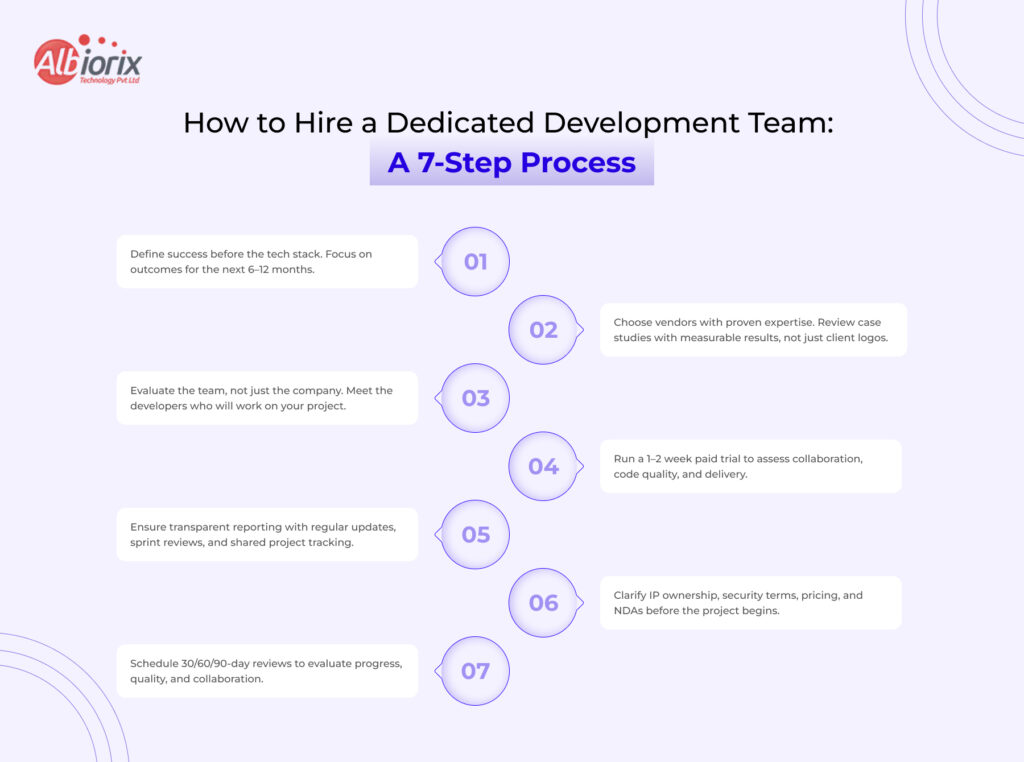
How to Hire a Dedicated Development Team: A 7-Step Process
Define the outcome, not just the tech stack. Write down what “success” looks like in 6 and 12 months — not only the languages and frameworks you assume you need.
Shortlist 3–5 vendors with proven experience in your domain and stack. Ask for case studies with measurable outcomes, not just a logo wall.
Vet the actual people, not just the company. Request CVs and short interviews with the specific developers who would join your team.
Run a paid trial sprint (1–2 weeks) before signing a long-term contract. This is the cheapest way to surface communication style, code quality, and process fit before you’re locked in.
Confirm reporting cadence up front: daily standups, sprint reviews, shared project management tooling, and a single named point of contact.
Clarify IP ownership, NDAs, data security terms, and whether quoted rates are fully loaded, before kickoff, not after code is already being written.
Set a 30/60/90-day review checkpoint to formally assess velocity, code quality, and communication, with an easy off-ramp if it isn’t working.
Red Flags When Choosing a Vendor
Refuses to let you interview or vet the actual developers before signing.
No clear, specific answer on IP ownership, data handling, or whether the rate is fully loaded.
Won’t commit to named seniority levels for the team.
Pushes a long contract with no trial period and no exit clause.
Can’t produce a reference client in a similar industry or stack when asked.
How to Manage a Dedicated Development Team Remotely
Managing a dedicated team well doesn’t require different skills than managing an in-house team — it requires more deliberate structure, because you lose the hallway conversations that patch over small gaps.
Given how strongly the research above ties project failure to low stakeholder involvement, this is not a step to skip.
Run daily standups, even if short, with cameras on where time zones allow.
Use one shared project management tool — never let the vendor track work in a separate system you can’t see.
Hold a weekly sprint review and a lightweight retro.
Name a single point of contact on both sides.
Document decisions in writing so context survives if a team member rotates off.
Common Mistakes to Avoid
Treating it like a fixed-price project — skipping regular check-ins because “the team will just handle it.”
Skipping the trial sprint to save two weeks, then discovering a communication or quality mismatch three months in.
Under-specifying the outcome, leaving the team guessing at priorities.
Not budgeting for management time — someone on your side still needs to own the roadmap.
Choosing purely on lowest day rate — the research above shows cost-driven vendor se lection is one of the clearest predictors of project trouble.
Hire Vetted Dedicated Developers by Expertise
Finding specialized talent shouldn’t delay your product roadmap. Whether you need to plug a specific skill gap or build an entire product team from scratch, Albiorix connects you with senior-level engineers across industry-leading frontend, backend, and mobile frameworks.
Explore our dedicated hiring options to find the exact expertise your project demands:
Frontend & Mobile Development
Dynamic Web Apps: Scale your user interface by choosing to hire ReactJS developers who specialize in building high-performance, component-based applications.
Enterprise Web Architecture: Build robust, structured single-page applications when you hire AngularJs developers for your complex corporate systems.
Cross-Platform Mobile Apps: Deploy to both iOS and Android from a single codebase seamlessly when you hire Flutter app developers.
Backend & Full-Stack Engineering
AI & Data-Driven Platforms: Accelerate your web applications, machine learning integration, or automation workflows when you hire Python developers.
Enterprise-Grade Solutions: Ensure security, cloud readiness, and high availability for legacy or modern software architectures by choosing to hire ASP.NET developers.
Rapid Startup Scaling: Build and iterate on your MVP at lightning speed when you bring on agile MVPs and hire RoR developers.
Clean & Scalable PHP Apps: Keep your development organized, fast, and secure by opting to hire Laravel developers for your next web project.
Why Companies Choose Albiorix for Dedicated Teams
Albiorix Technology builds dedicated teams around specific stacks — including Angular, React, Node.js, Ruby on Rails, Laravel, Python, and ASP.NET — with senior engineers vetted before they’re ever presented to a client.
Teams are structured with a named tech lead, transparent sprint reporting, and the ability to scale up or down as your roadmap shifts, backed by contracts that don’t lock you into rigid, multi-year commitments.
Summary: Choosing between custom software and off-the-shelf (SaaS) comes down to budget, timeline, and competitive advantage. Off-the-shelf is faster and cheaper upfront, ideal for standard tasks. Custom software requires a higher initial investment and time, but is tailored exactly to your workflows, yielding a better long-term ROI.
At some point in time, every growing business faces this question: Do they need a custom software solution or should they invest in an Off-the-shelf software solution available in the market? This question is very important for the growth of your business, and the answer to this question is equally important.
In comparison between a custom software solution vs an off-the-shelf solution, the right answer depends on factors such as scale, business type, operations, and future goals.
This is one of the most common questions among businesses in the USA, UK, Australia, and Germany, and we are writing this guide to help them decide the right one.
In this guide, we will talk about custom software development, its pros, whether it’s useful for your business, and in which cases you must consider building a personalized software solution for your business.
So, let’s find out what’s right for your business: Off-the-Shelf vs Custom Software Development.
What is Custom Software Development?
When you develop a software system to fit your company’s unique operational requirements, it is called custom software development.
The latter is designed, developed, and deployed to increase the operational efficiency of a business. Understanding the specific advantages of custom software development can help you evaluate how personalization impacts your long-term bottom line.
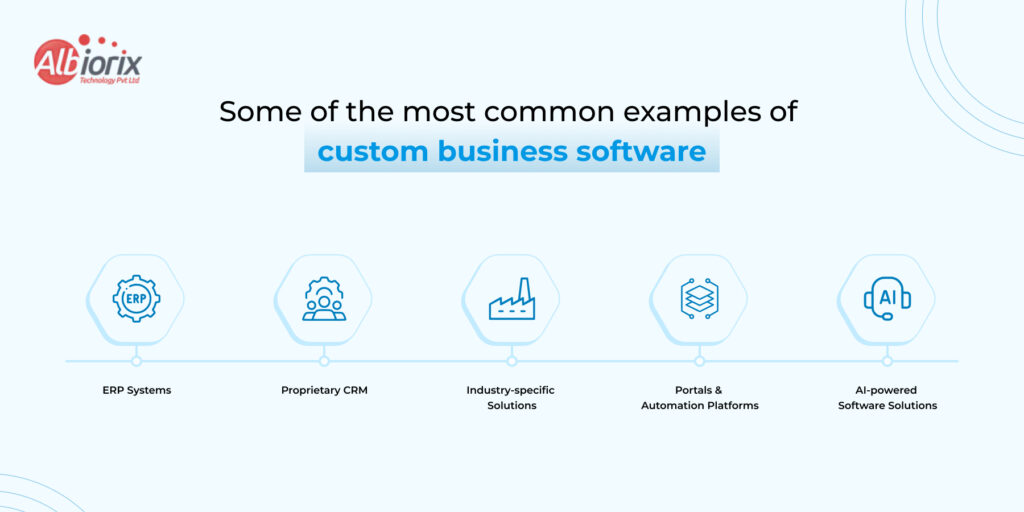
Some of the most common examples of custom business software include:
ERP Systems: This type of software is developed for manufacturing and logistics operations.
Proprietary CRM: This type of software platform is built to fit any company’s unique sales cycle.
Industry-specific Solutions: This type of software platform is built to meet industry compliance and standards.
Portals & Automation Platforms: This type of software solution is built for unique internal workflows and automations.
AI-powered Software Solutions: This type of software platform is powered by Artificial Intelligence and developed to automate business operations. You can look at real-world deployments in our overview of AI-powered software solutions & apps by Albiorix.
What is Off-the-Shelf Software?
Off-the-shelf software are readymade software solutions that are built around general purposes for a wide range of businesses and audiences. They have the most common features/functions required by most businesses across the globe.
You can subscribe to or buy a liscensed version of software and configure (up to a certain extent) them as per your business requirements.
Off-the-Shelf software has been around for decades, and some of the most common examples are Salesforce, SAP, HubSpot, Microsoft Dynamics, and QuickBooks, to name a few.
Many also fall under the SaaS (Software as a Service) model, meaning the vendor hosts and maintains the product.
Custom Software vs Off-the-Shelf Software: Side-by-Side Comparison
In the discussion between custom software development vs off-the-shelf software, there are many things to consider. In some cases, when you are running short of budget, traditional software solutions can be truly useful.
But as your business grows, you can invest in custom business software that can accommodate your business needs and help you grow exponentially.
However, before we deduce what’s good for your business and what’s not, let’s have a look at this detailed comparison table between Custom Software vs Off-the-shelf:
It’s not always the case that readymade/off-the-shelf are bad for your business. You can start with them, and gradually upgrade to custom software development when your business grows.
However, if you still want to know the cost of an enterprise software solution, we offer a free quote. Talk to our software experts for free.
Still Confused? Not Sure Which Option is Right For Your Business? We can help!
What is the Real Cost Difference Between Off-the-Shelf vs Custom Software
With the real cost difference between custom software development and off-the-shelf software, we want to discuss licensing rates, development costs, operational expenses, and long-term maintenance costs
How much will you pay in the long run, and which option will be cost-effective and business-centric?
What is the cost of Off-the-Shelf Software?
The cost of off-the-shelf software solutions ranges from $100 to $1000 per user per month. Along with the per-user fees, you also have to pay a license fee, which may start from $5000 to $10,000 (standard purchase).
Now, as your team scales and your business grows, the cost of Off-the-shelf software also increases.
Have a look at the cost of ownership of an off-the-shelf software:
Per user licensing fees that compound as your business grows
Annual price increases at vendor discretion.
Add-on modules and premium tiers that unlock essential features.
Professional services fee for customization and implementation
Expensive migrations when you eventually outgrow the platform.
Investing in off-the-shelf software is not a bad idea initially. But, if you are thinking about the long run, then it is advisable to use custom business software. At least, at the end, you will be owning a business software, it’s equity, and proprietary.
What is the Cost of Custom Software Development?
The development cost of a custom software solution falls somewhere between $50,000 to $500,000. Further, this cost can increase depending on features, complexity, time-to-market, and many other factors.
Custom software development also requires a larger upfront investment. Thus, you have to be prepared for the heavy initial investment.
However, once you have built custom business software, this amount will be recovered in 3-5 years. You eliminate the cost of liscencing, save on paying per-user, and other unexpected costs.
Enterprise software solutions are beneficial as you build a proprietary system that becomes a competitive moat and not a shared commodity. For instance, evaluating how ai agents vs traditional automation perform can help you determine the right intelligence layer for your system.
When working with reputable software development consulting USA firms, the investment typically includes architecture design, development, testing, deployment, and ongoing support, all structured around your business model.
What is Better: Custom Software vs SaaS Comparision
The custom software vs SaaS comparison is increasingly relevant as more businesses default to cloud subscriptions. Here’s where the differences become material:
Data Ownership and Privacy Comparision:
With SaaS, your data lives on a third-party server. For businesses in regulated industries such as healthcare, finance, legal, government, this introduces compliance risk. HIPAA, GDPR, SOC 2, and ISO 27001 requirements can be extremely difficult to meet under a shared SaaS environment.
Custom software gives you full control over where data is stored, how it’s encrypted, and who can access it. This is non-negotiable for enterprises handling sensitive information.
Workflow Fit Comparision:
SaaS platforms are built for the 80% use case — the workflows most businesses share. If your operations are standard, that works fine. But if your business has specific, differentiated processes (and most scaling enterprises do), you end up bending your operations to fit the software rather than the other way around.
Custom business software is designed the other way around: your workflow drives the product logic. Knowing the architectural difference between website and web application platforms ensures you fund the correct framework for those workflows.
Vendor Lock-In Comparision:
Every year you invest in a SaaS tool, migration costs grow. Data portability is rarely clean. Features you depend on can be deprecated or moved behind higher-tier plans. You are, structurally, at the vendor’s mercy.
With custom software, you control the roadmap. Features are added when your business needs them and not when the vendor decides.
Should My Company Build Custom Software? 5 Questions to Ask
If you’re genuinely asking ‘should my company build custom software,’ run through these five diagnostic questions:
Does any existing software actually fit your workflows?
If you’ve tried two or three platforms and spent months in configuration, that’s a signal. Custom might be cheaper in the long run.
Is software a core part of your competitive differentiation?
For tech-enabled service businesses, fintech, healthtech, or logistics companies, the software IS the product. Off-the-shelf gives every competitor the same toolset.
What are your 3-year scaling projections?
SaaS pricing scales linearly with users. Custom software scales on your infrastructure terms.
Do you have strict compliance or security requirements?
If the answer is yes, custom is almost always the correct answer.
Are you wasting significant staff time working around software limitations?
If your team is maintaining spreadsheets alongside your CRM, or manually exporting data between systems, you’re already paying the cost of the wrong software.
Enterprise Software Buying Guide: A Decision Framework
When it comes to investing in enterprise software development, you must understand what your business needs to operate efficiently. Consider this framework before committing either way:
Choose Off-the-Shelf If…
Choose Custom Software If…
Yuo need a solution up and running quickly
Your workflows are complex or highly specific
Your use case is standard
You need deep integration with existing systems
Budget for the short term is tight
You are planning to scale significantly
You are a startup validating a product idea
Data security and compliance are non-negotiable
A vendor’s roadmap meets your needs
You want full IP ownership and competitive moat
Consider this framework before committing either way. If your team leans toward building a proprietary ecosystem, aligning your goals with a structured digital product development lifecycle keeps the project on track.
Get a free quote and consultation from software developers at Albiorix Technology.
One of the most consistent mistakes businesses make is treating this as a binary, all-or-nothing decision. Experienced software consulting services help you avoid that trap.
A qualified software consultant will:
Audit your current tech stack and identify gaps and redundancies
Map your business processes and identify which require custom logic
Evaluate off-the-shelf options honestly and recommending them where they genuinely fit
Define a build-vs-buy recommendation grounded in TCO (total cost of ownership)
Architect a solution that allows phased development — starting lean and scaling up
The right software consulting firm doesn’t push custom development because it’s more billable — it recommends what’s right for your specific business model and growth stage. This is why choosing a partner with transparent methodology matters as much as their technical capability.
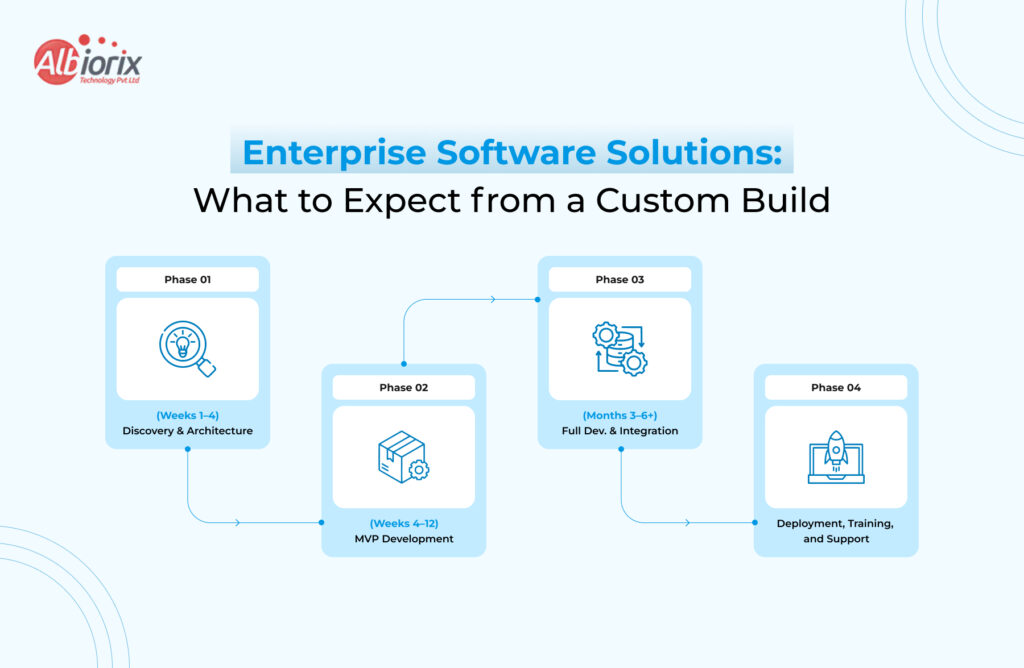
Enterprise Software Solutions: What to Expect from a Custom Build
If the analysis points toward custom, here’s what a structured engagement with an enterprise software development partner typically involves:
Phase 1: Discovery and Architecture (Weeks 1–4)
Business analysis, stakeholder interviews, user journey mapping, system architecture design, and technical specification. This phase is what separates experienced software firms from code shops — the upfront thinking determines the quality of the output.
Phase 2: MVP Development (Weeks 4–12)
A minimum viable product is built around your highest-priority workflows. You get early visibility into the product, can test with real users, and provide feedback before the full scope is built. This iterative approach reduces risk significantly.
Phase 3: Full Development and Integration (Months 3–6+)
Complete feature development, third-party integrations, performance optimisation, and security hardening. For complex enterprise software solutions, this phase includes load testing, penetration testing, and compliance audits where required.
Phase 4: Deployment, Training, and Support
Cloud or on-premise deployment, staff onboarding, documentation, and an ongoing support and maintenance arrangement. The best software development consulting USA firms offer a structured hypercare period post-launch.
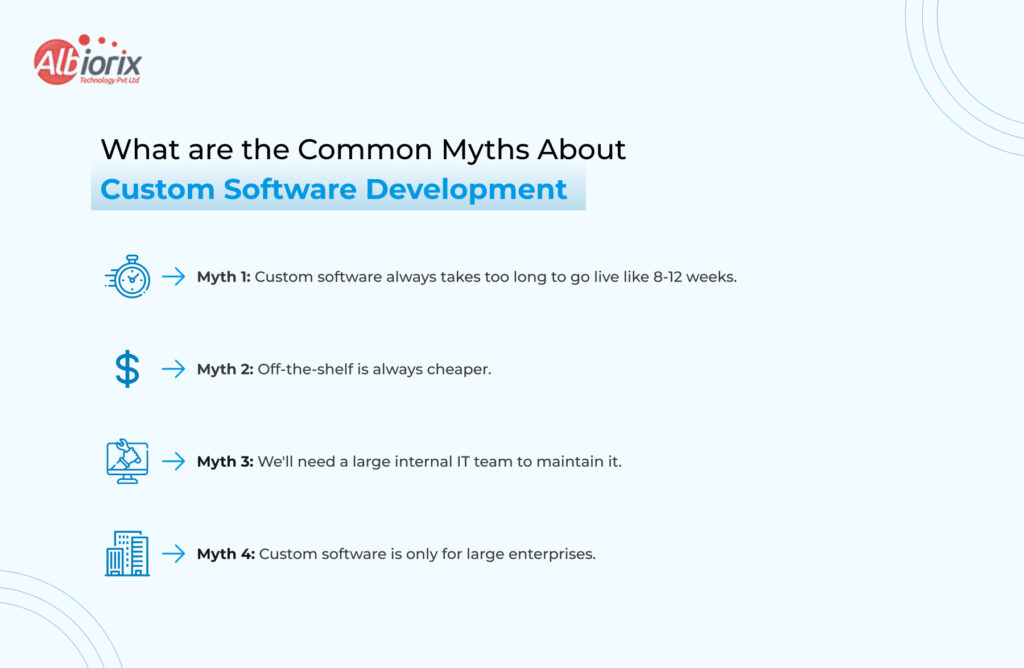
What are the Common Myths About Custom Software Development
Myth 1: Custom software always takes too long. With modern frameworks and agile software development methodologies, a focused MVP can go live in 8–12 weeks. It’s not always a multi-year project.
Myth 2: Off-the-shelf is always cheaper. Short-term, yes. Over 3–5 years, licensing costs, customisation fees, and inefficiencies regularly exceed the cost of a custom build.
Myth 3: We’ll need a large internal IT team to maintain it. Not true when you work with a software partner on a managed services or retainer model. Many organisations run sophisticated custom platforms with zero in-house developers.
Myth 4: Custom software is only for large enterprises. Growth-stage companies with $5M–$50M revenue often see the biggest ROI from custom business software, because their processes are complex enough that off-the-shelf fails them but they’re nimble enough to deploy quickly.
Hybrid Approaches: The Intelligent Middle Ground
The custom vs off-the-shelf decision isn’t always binary. Many enterprises run a hybrid model — strategic custom software for differentiating functions, with off-the-shelf tools for commodity needs.
For example:
A logistics company might use a standard accounting platform (Xero, QuickBooks) but build a custom route optimisation and fleet management system.
A healthcare provider might deploy a standard EMR but build custom patient-facing portals and analytics dashboards.
An e-commerce business might use Shopify for the storefront but build custom inventory management and supplier integration software.
Software consulting services can help you identify exactly which parts of your stack warrant custom investment and which don’t.
How to Choose the Right Software Development Partner
If you decide to pursue custom business software, partner selection is critical. Evaluate firms on:
A company must have relevant domain experience. They must have built software in your industry.
Discovery process rigour. Do they invest in understanding your business before writing code?
Do they ensure communication transparency? Will you have visibility into progress, blockers, and timelines?
Do they offer a post-launch support model? What happens after go-live?
Explore real client references. Can they provide verifiable case studies?
For businesses in North America, working with software development consulting USA firms gives you the advantage of timezone overlap, legal protectability of IP, and shared regulatory context — particularly important in healthcare, finance, and legal tech.
Conclusion
There is no universal answer. But there is a right answer for your business and it comes from honest analysis, not default assumptions.
Off-the-shelf software is the right call when you need speed, have a standard use case, or are early-stage and validating a model. It gets you moving fast with predictable costs.
Custom software is the right call when your workflows are complex, compliance is non-negotiable, you’re scaling rapidly, or software is central to your competitive advantage. The upfront investment pays back in ownership, efficiency, and strategic control.
The businesses that make this decision well — guided by rigorous software consulting services and a clear understanding of long-term costs — are the ones that build software as an asset, not a liability.
Summary: AI agents go beyond automation. They reason, adapt, and act as per the situation. This enterprise guide covers how AI agent development works, real industry use cases, and how US businesses can choose the right development partner.
Most enterprise automation tools do exactly what you tell them to do. AI agents do what needs to be done. And that’s the first and the basic difference between an automation tool and an AI Agent.
That difference might sound subtle, but for US enterprises navigating operational complexity, rising labor costs, and the pressure to scale without proportionally growing headcount, it is the difference between incremental efficiency and genuine transformation.
This informational guide on AI agents and AI agent development has the answer to every foundational question your leadership team is likely asking right now, such as:
What is an AI Agent?
What is AI Agent Development?
How does it work in practice?
Where does it deliver real enterprise ROI?
When does custom development make more sense than off-the-shelf tools?
By the end, you will have a clear framework to evaluate whether AI agent development belongs in your next strategic roadmap.
What Is an AI Agent? A Plain-English Definition
An AI agent is a software system that automatically understands its environment, reasons about a goal, and determines the next steps to achieve that goal without any human intervention.
Unlike chatbots and IVR systems that follow the rules and predefined answers, an AI agent plans, adapts, and performs tasks on its own across multiple tools and data sources in real time.
Now, AI Agent Development is the process of designing, developing, and deploying these systems (aka AI Agents) to fulfill specific business objectives.
During the development process, these AI agents are integrated with enterprise data, APIs, and workflows so that they can operate accurately and reliably at scale.
Quick Definition:
An AI agent is an autonomous software system that perceives inputs, reasons through a goal, and takes multi-step actions to complete tasks with minimal human intervention.
Enterprise AI agent development involves building, integrating, and deploying these agents within existing business infrastructure to automate complex, decision-intensive workflows.
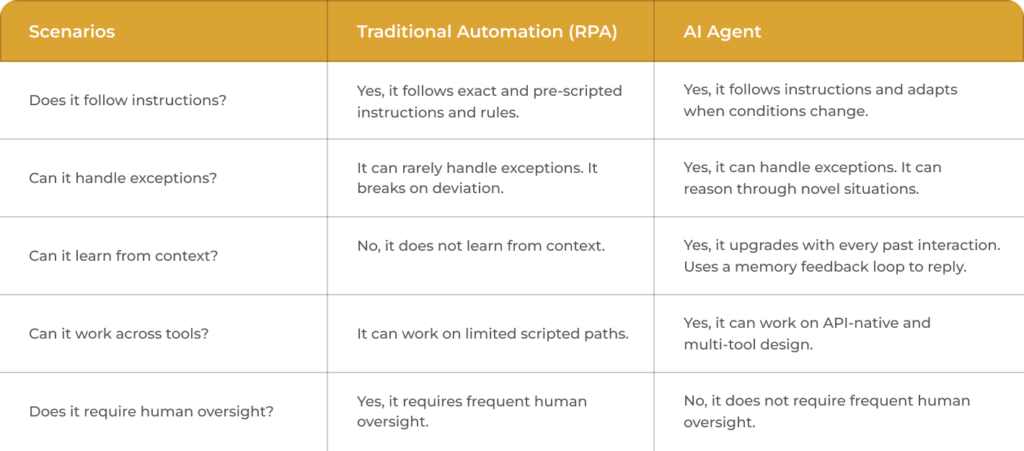
What is the difference between AI Agent and Traditional Automation
The basic and most crucial difference between an AI agent and a traditional automation tool is that an AI agent takes the decisions on its own to complete a task, whereas an automation tool strictly follows the rules and predefined script.
Below is the comparison table between AI agent and Traditional Automation.
The analogy that resonates most with enterprise stakeholders: RPA is a calculator. An AI agent is a junior analyst who knows how to use a calculator, read a spreadsheet, send a follow-up email, and flag anything unusual; all without being asked twice.
Is your enterprise ready for AI Agents?
Not Sure? Book a free 30-minute consultation with our AI specialists at Albiorix Technology to find out.
How AI Agent Development Works: The Development Lifecycle
The AI agent development process is a bit tricky. However, every enterprise needs to understand the development lifecycle as it enables them to ask the right questions and set realistic expectations.
Here is how a well-structured AI agent development engagement typically unfolds:
Setting the Goals: The first step in developing an AI agent is to define and set the goals, boundaries, and success metrics. You must have a clear picture of what an AI agent must do, what it must not do, and how you will know it is working well.
Finalizing AI Model & Framework: The second step in AI agent development is to finalize the AI model and reasoning framework. Some of the most common choices for enterprise deployment are LangChain, AutoGen, CrewAI, GPT-4, and Claude.
APIs & Data Integration: In the third step, you need to integrate CRM platforms, ERP systems, internal databases, and third-party services with your AI agent to respond accurately and reliably.
Designing Memory & Reasoning Layer: Short-term context (within a task), long-term memory (across tasks), and the logic that governs how the agent prioritizes actions.
Build and configure the action layer: The specific tools, APIs, and output channels the agent can use to complete tasks.
Test in a sandboxed environment: Red-team the agent, test edge cases, and establish human-in-the-loop checkpoints for high-stakes decisions.
Deploy, monitor, and iterate: Track performance against KPIs, capture drift, and continuously refine.
Estimated Timeline: According to the AI agent development experts at Albiorix Technology, building a focused single agent from a well-scoped workflow can take 8-12 weeks.
If any AI development company or a vendor promises, an AI agent in two or three weeks is cutting corners on testing it before deployment. It can create significant downstream risk in the future.
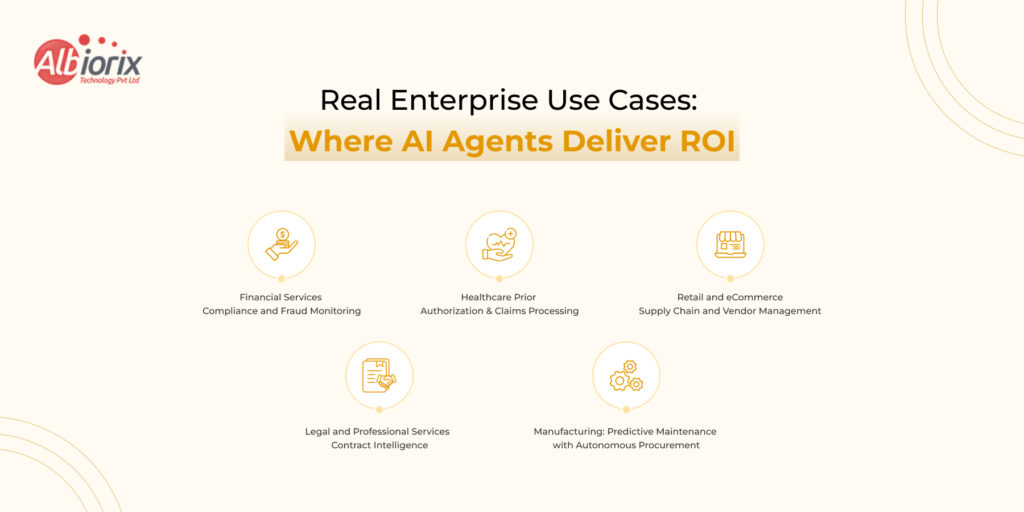
Real Enterprise Use Cases: Where AI Agents Deliver ROI
The highest-value AI agent deployments share a common trait: they target workflows that are high-frequency, rule-adjacent (mostly rule-based with enough exceptions to break RPA), and expensive in human time.
Here are five enterprise verticals where AI agent development is already generating measurable returns:
Financial Services — Compliance and Fraud Monitoring
AI agents continuously monitor transaction streams, flag anomalies against regulatory rules, cross-reference sanctions lists, and generate compliance reports tasks that previously required teams of analysts working in shifts. One mid-size US broker-dealer reduced compliance review time by 60% and cost by 30% after deploying a custom monitoring agent integrated with their core banking system.
Healthcare — Prior Authorisation and Claims Processing
Prior authorisation is one of healthcare’s most expensive administrative bottlenecks. Autonomous AI systems can retrieve patient records, match against payer criteria, draft authorisation requests, follow up with payers, and escalate to a clinician only when genuinely required. This reduces processing time from days to hours.
Retail and eCommerce — Supply Chain and Vendor Management
Custom AI agents for business automation in retail are handling demand forecasting, reorder triggering, vendor communication, and exception management all within a single automated loop. What once required a supply chain analyst’s daily attention now runs with a weekly human review cycle.
Legal and Professional Services — Contract Intelligence
Enterprise AI agents can ingest contracts, extract key clauses, flag deviations from standard terms, cross-reference prior agreements, and surface risk in minutes rather than the hours a paralegal team would need. Several AmLaw 200 firms are already piloting these deployments.
Manufacturing — Predictive Maintenance with Autonomous Procurement
Sensor data feeds an AI agent that predicts equipment failure windows, triggers maintenance work orders, and when parts inventory drops below threshold, it initiates a procurement workflow with pre-approved suppliers. No human touches the process until the maintenance technician shows up with the right parts already ordered.
See what AI agents can do for your industry
Our team has built custom AI automation solutions across finance, healthcare, legal, and manufacturing.
Custom AI Agents vs. Off-the-Shelf AI Tools: Which Is Right for You?
The honest answer: off-the-shelf tools like Microsoft Copilot, Salesforce Einstein, or ServiceNow’s AI capabilities are genuinely good for standardized workflows within their native ecosystems. If your needs map cleanly onto what these platforms offer, start there.
Custom AI agent development becomes the better investment when:
Your workflows span multiple platforms that do not share a native integration layer.
You have proprietary data that gives your agents a competitive advantage when trained into the system.
Your compliance environment requires auditability, data residency controls, or model-level transparency that SaaS vendors cannot provide.
You need the agent to take consequential actions such as approvals, financial transactions, and customer communications where off-the-shelf guardrails are too loose or too restrictive.
The workflow involves exceptions, judgment calls, or contextual reasoning that exceeds the boundaries of a pre-packaged product.
Off-the-shelf is faster to deploy and lower in upfront cost. Custom development has higher initial investment but delivers differentiated capability, deeper integration, and long-term cost efficiency as the agent scales. The right decision depends on where your operational complexity sits.
Enterprise AI Agent Implementation Guide: 5 Questions Before You Begin
Before any enterprise begins an AI agent implementation, your leadership team should align on these five questions. They will shape vendor selection, architecture decisions, and governance design:
What workflow are we targeting, and why is it the right first candidate? Start with high-frequency, high-cost, moderately complex processes. Avoid starting with mission-critical edge cases.
What does success look like in 90 days, 6 months, and 12 months? Define KPIs before development begins — time saved per transaction, error rate reduction, cost per process, or escalation frequency.
What data does the agent need, and who owns it? Data access, quality, and governance decisions will determine your deployment timeline more than any technical factor.
What are the failure modes, and how are they caught? Every production agent needs a human-in-the-loop escalation path. Define the trigger conditions before go-live.
Is our vendor model-agnostic or locked in? Enterprise needs evolve. A partner who can work across model providers protects you from single-vendor dependency as the AI landscape shifts.
How to Choose an AI Agent Development Company in the USA
The market for AI agent development services in the USA has expanded rapidly and so has the variance in quality. Here is what separates credible enterprise partners from vendors riding the hype wave:
What to Look For:
Demonstrated experience with enterprise-grade integrations, and not just prototype demos.
They must be able to work with OpenAI, Anthropic, Google, or open-source models depending on your requirements. and if you want to see how we Analyzed Our Last AI Projects and what worked for our clients.
A clear post-deployment support model, because production AI agents require ongoing monitoring, retraining, and incident response.
Compliance and data security credentials relevant to your industry such as SOC 2, HIPAA readiness, or FedRAMP depending on your sector.
References from clients in your industry or with comparable integration complexity.
Red Flags to Watch For:
Vendors who lead with the model name (“we use GPT-4”) rather than the use case outcome.
No mention of testing, monitoring, or post-deployment support in their proposal.
Cookie-cutter demos that do not reflect your actual workflow or data environment.
Timelines under six weeks for complex multi-system integrations.
Conlcusion
At Albiorix Technology, our AI agent development solution and process starts with a structured discovery engagement, and not a sales pitch.
We map your existing workflows, identify the highest-ROI automation candidates, and propose an architecture that fits your data environment, compliance requirements, and integration landscape before a single line of code is written.
Our team has built AI automation solutions for enterprises across the USA, UK, Germany, and Australia, in industries from fintech to professional services.
Summary: Developing a SaaS (Software as a Service) application involves validating a market need, building a Minimum Viable Product (MVP), and designing for scalability. The core process spans market research, choosing your tech stack, setting up multi-tenant architecture, and launching with automated payment systems.
So you have a great software idea. You have prepared all the basic notes about the features and functionalities. You have validated all the points in advance, and now you are figuring out how to bring this idea to life.
Many businesses at this stage explore SaaS Product Development services to streamline the journey from concept to launch. Or, just like thousands of other businesses across the globe, you have decided to do it the other way – adapting the SaaS model.
Software-as-a-Service has completely transformed how businesses buy and use software. It is not only beneficial for businesses but also rewarding for its builders as they have a recurring stream of revenue, global scalability, and a direct relationship with customers that traditional software models can never offer.
However, the process of SaaS application development is different from ordinary software development. It requires profound architectural decisions, top-level security requirements, competitive pricing models, and the potential to scale with the business challenges.
A SaaS software has to meet all these standards to be a standalone product in the market and to impress its targeted audiences.
In this guide on SaaS application development, we will discuss almost everything related to SaaS applications, its development cost, the time required to develop a SaaS application, and what all things are required to build a powerful and scalable SaaS solution in 2026.
And at the end, we’ll show you how Albiorix Technology helps businesses turn SaaS ideas into real, revenue-generating products.
What Is SaaS Application Development?
As a business owner, you may have heard of SaaS app development. You may want to learn more about it.
So, SaaS app development is the process of building software hosted in the cloud.
This helps ensure your product can scale from day one.
Now, businesses that choose SaaS apps do not need to install them on local machines. They can access them through a browser or an app.
The company that develops the SaaS app will handle development, maintenance, upgrades, and app security.
What is the Basic Difference Between SaaS vs Traditional Software?
SaaS applications and traditional software are different from each other. Businesses have to pay monthly/annual subscription charges.
Vendors own SaaS apps, and these apps run in the cloud.
Businesses build, own, and install traditional software on local systems.
Have a look at the comparison table between SaaS Application vs Traditional Software to understand the difference between them:
Factor
Tradational Software
SaaS Application
Delivery
Installed on device
Accessed via browser/app
Updates
Manual, User-triggered
Automatic, Centrally deployed
Revenue model
One-time license
Recurring subscription
Scalability
Hardware-dependent
Cloud-elastic
Maintenance
User’s responsibility
Vendor’s responsibility
Time to Value
Days/Weeks to deploy
Immediate
The shift from traditional software to SaaS apps is not just technical. It reflects a key change in the business model.
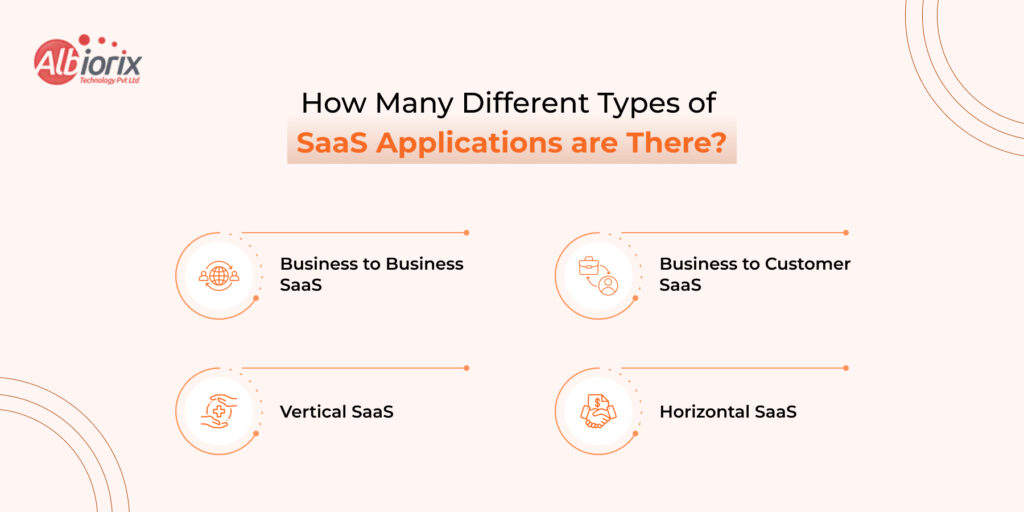
How Many Different Types of SaaS Applications are There?
Mainly, in 2026, there are four types of SaaS applications for businesses. They are B2B SaaS, B2C SaaS, Vertical SaaS, and Horizontal SaaS. Businesses can adopt and integrate them as per their business requirements.
B2B SaaS: Businesses buy these types of SaaS applications. They have higher contract values, longer sales cycles, and more emphasis on integrations and admin controls. Some of the top examples of B2B SaaS applications are Think Salesforce, Slack, and HubSpot.
B2C SaaS: These types of SaaS applications are sold directly to consumers. They have high volume, lower price points, and frictionless onboarding is critical. Some examples of B2C SaaS apps are Think Spotify, Duolingo, and Grammarly.
Vertical SaaS: Companies build these SaaS applications for a specific industry (healthcare, legal, logistics). Narrower market but higher retention because customers have fewer alternatives.
Horizontal SaaS: These SaaS apps support a function used across many industries, like HR, finance, and project management. Larger total addressable market, but more competition.
Choosing the right SaaS app depends on many factors.
If you are unsure what suits your business, consult SaaS development experts at Albiorix Technology.r business, you can consult the SaaS application development experts at Albiorix Technology.
Why SaaS Dominates Software Delivery in 2026?
Businesses in 2026 prefer SaaS applications over traditional software development, and there are many reasons for this.
According to statistics that Globe News Wire shared, the global SaaS market will likely exceed $800 billion by 2030.
Not only have large businesses and organizations moved from on-premise software to cloud-based solutions. Startups and mid-sized businesses have also followed this trend.
It helps them save on investment. It needs less upfront spending. Monthly costs stay predictable. It also lets them start small and scale as the business grows.
For SaaS app development companies, recurring revenue builds compounding value. One-time software sales cannot match it.
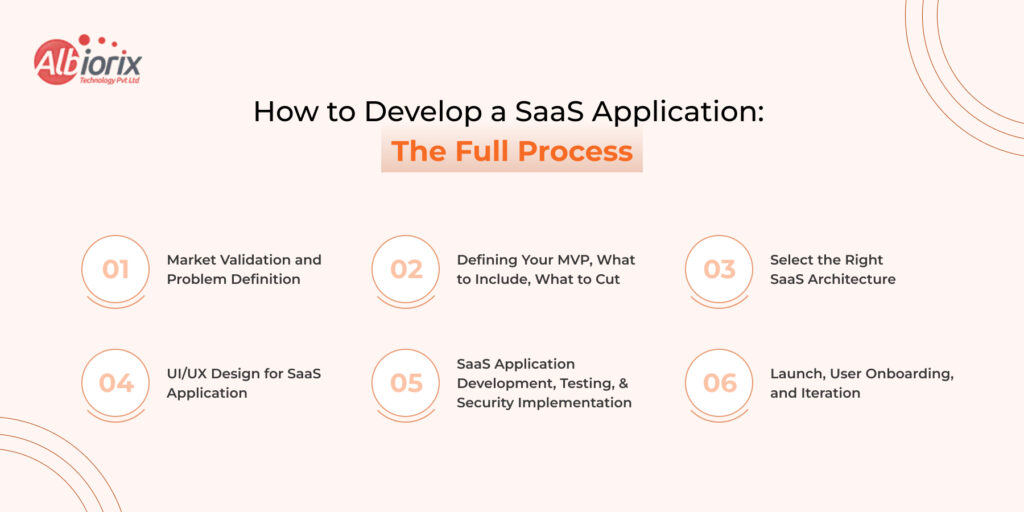
How to Develop a SaaS Application: The Full Process
The process of SaaS application development is a series of careful decisions – each one setting constraints on the next. Therefore, you have to be very calculative with each step.
To build a SaaS application successfully, you need to follow these steps:
Step 1: Market Validation and Problem Definition
When you start developing a SaaS application, always answer these two questions:
Does this problem actually exist?
Are people willing to pay to solve it?
And, to get answers to these two questions, you need to talk to at least 20 potential customers. You have to understand their workflow, their current workarounds, and what they’re willing to pay for the solution.
One common reason SaaS apps fail is that vendors never ask these questions. They end up building an app no one needs.
Step 2: Defining Your MVP — What to Include, What to Cut
Well, once you have answers to both questions and feel satisfied, it’s time for the next step.
That step is building an MVP (Minimum Viable Product).
When you are developing an MVP, make sure it is able to do one task exceptionally well, and not five tasks on average.
A useful note: For every potential feature, ask yourself if it is adding value to your product or not? Will customers get the real value from this feature or not?
Step 3: Select the Right SaaS Architecture (Single-Tenant vs Multi-Tenant)
It is one of the most consequential decisions in SaaS development. The further development of your SaaS application depends on this one decision.
So, to help you decide the right Saar architecture, we have differentiated between them.
Single-tenant Architecture: Each customer gets their own dedicated instance. It is more expensive to operate, but required for customers with strict data isolation requirements (government, healthcare, financial services).
Multi-tenant Architecture: Multiple customers share the same application instance and database (with logical separation). More cost-efficient, easier to maintain, and update. The standard choice for most SaaS products.
For most startups, multi-tenant architecture is the right option. Build for single-tenant only if your target customers genuinely demand it.
To see how these principles map to cloud systems, check out our comprehensive breakdown of web application architecture structures.
Step 4: UI/UX Design for SaaS Application
In SaaS application development, design is not decoration; it is retention. The design must be engaging, attractive, and able to add the “aha effect” to your product.
It is because if the user does not see the value at first, they may cancel the subscription. They may also ignore your SaaS app.
Therefore, for SaaS UI/UX design, use a clean, guided onboarding flow.
Include progress indicators, empty-state guidance, and in-app tooltips. You can also add a dashboard that shows the user their important data at a glance.
Most importantly, always add an intuitive navigation that can reduce cognitive load.
Step 5: SaaS Application Development, Testing, and Security Implementation
Once you have decided on the architecture, it is time to kick start the SaaS development.
Key practices that separate production-ready SaaS from a prototype:
Feature flags: Deploy code to production without activating it for all users. Enables safe rollouts and A/B testing.
Automated testing: Unit, integration, and end-to-end tests that catch regressions before they reach users
Security by design: Input validation, proper authentication flows, encrypted data at rest and in transit — not bolted on at the end
CI/CD pipelines: Automated deployment pipelines that let you ship updates multiple times per day safely
Step 6: Launch, User Onboarding, and Iteration
If you think that your job is done after developing and launching your SaaS application, then you are wrong. It is a fresh start.
The job starts when real users use your product. They show what’s wrong, what’s confusing, and what they need next.
Set up product analytics (Mixpanel, Amplitude, or PostHog) from day one. Track activation, engagement, and churn signals. Talk to users who cancel. The product that ships on launch day should look meaningfully different six months later — and that’s a good thing.
Need experts to help you build a future-proof, scalable, and powerful SaaS application?
We can help. Partner with the team of experienced SaaS developers to bring your ideas to life.
SaaS Application Architecture: Things You Must Know
Microservices vs Monolithic Architecture for SaaS
It is a topic of discussion, but according to the SaaS app development experts, you must start with a monolith. Here’s the reason why.
A monolithic architecture puts all your application code in one deployable unit. Moreover, it is simple to build, debug, and deploy. If you want to launch your product early, then it is the perfect architecture.
Many top-rated and successful SaaS companies, like Shopify, Basecamp, and Stack Overflow, use monolithic architecture.
Now, let’s discuss the use of Microservices architecture.
Microservices architecture breaks the application into independent services that communicate via APIs. It’s more resilient and scalable, and it lets teams work independently. But it’s much more complex to build and run.
You can consider microservices when your product and team have grown to the point where the monolith is causing problems.
Multi-Tenancy Explained: Shared Database vs Isolated Instances
Within multi-tenant SaaS, there are two common patterns:
Shared database, shared schema: All tenant data lives in the same tables, differentiated by a “tenant_id” column. Most cost-efficient, but requires rigorous query isolation.
Shared database, separate schemas: Each tenant gets their own schema within the same database. Better isolation, slightly more overhead.
Separate databases per tenant: Maximum isolation, highest cost. Typically used only for enterprise customers or regulated industries.
API-First Design: Why It Matters for SaaS Integrations
In 2026, your SaaS product doesn’t live in isolation; it lives inside a customer’s tech stack. Building API-first from the start means your product can integrate with the tools and systems your customers are already using. It can dramatically increase stickiness and reduce churn.
Another reason to use an API-first approach is that it makes it easier to build mobile apps. It also helps you add third-party integrations and a public developer ecosystem later. All these without rearchitecting your existing backend.
Cloud Infrastructure for SaaS: AWS, Azure, and GCP Compared
With many options in the market, finding the right cloud solution is important for your SaaS product. Mainly, there are three service providers, and they are AWS, Azure, and GCP.
To help you find the right cloud services for your SaaS application, we have compared all three in the table below.
Factor
AWS
Azure
GCP
Market Share
Largest (~32%).
Second (~22%).
Third (~11%).
Best for
Broad SaaS use cases.
Microsoft-stack businesses.
Data/ML-heavy products.
Pricing
Competitive, complex
Competitive, enterprise discounts
Often cheaper for compute
Managed Services
Most comprehensive
Strong for enterprise
Strong for data workloads
Most SaaS application development companies prefer Amazon Web Services (AWS) to host an application. It is because AWS offers a great maturity and breadth of managed cloud services.
Azure is a great choice for hosting a SaaS app.
This is true if your customers rely heavily on Microsoft services. GCP is worth considering if your product has heavy data processing or ML components.
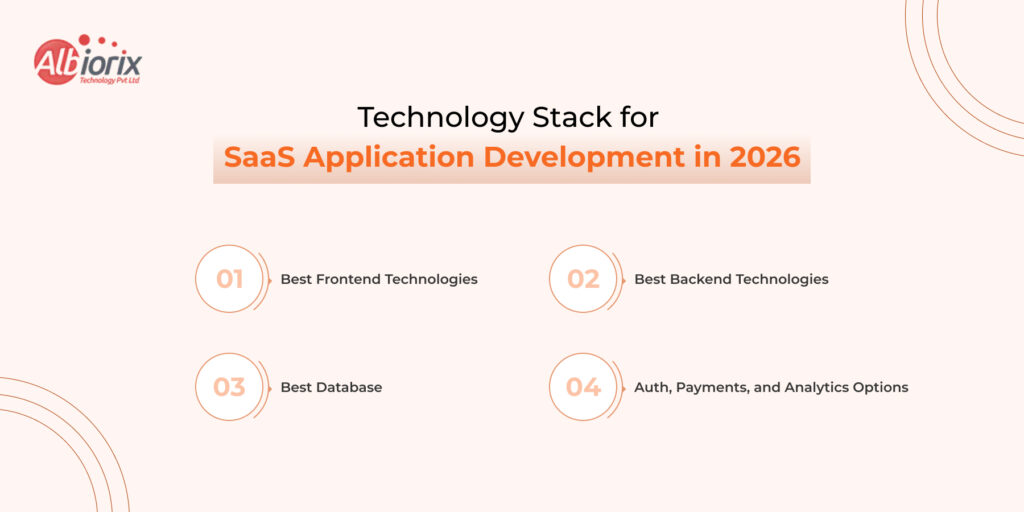
Technology Stack for SaaS Application Development in 2026
Well, choosing the right technology stack is very important for the success of your SaaS applications. But, selecting the suitable technology is not an easy process.
According to SaaS app developers at Albiorix Technology, do not always choose the “best” technology. Pick the technology that fits your team, goals, product, and audience.
Here’s the detailed breakdown of tech-stack for SaaS application development in 2026:
Best Frontend Technologies for SaaS Development in 2026:
For a powerful and engaging dashboard of your SaaS application, you can consider technologies such as React and Angular.
Amid so many frontend technologies, React remain the best option to develop the frontend of a SaaS application. It is backed by a huge ecosystem. If you want a fast, responsive dashboard, you can hire ReactJS developers to build it.
If you are building a SaaS app for a large and complex enterprise, Angular is a great choice. It offers a more structured framework. It helps in reducing the decision fatigue across teams.
For full-stack SaaS, Next.js (React-based) is increasingly the go-to technology. Its server-side rendering and API routes ensure excellent performance.
Best Backend Technologies for SaaS App Development in 2026
For a secure and scalable backend, you can consider Node.js, Python (FastAPI), and .NET for SaaS APIs.
Node.js backend development is a great choice for real-time features and high-traffic APIs. It also suits teams that want JavaScript across the full stack.
Python (FastAPI) is the perfect option when your SaaS has significant data processing, ML features, or analytics pipelines. FastAPI’s async performance is excellent.
.NET (C#) is a strong backend choice for enterprise SaaS.
It works especially well when selling to Microsoft-stack businesses.
Best Database for SaaS Application Development in 2026
For databases, you have options such as PostgreSQL, MongoDB, and Multi-Tenant Schema Design.
PostgreSQL: The workhorse of SaaS databases. ACID-compliant, strong JSON support, row-level security for tenant isolation, and scales beyond most startups’ needs.
MongoDB: Good for products with highly variable data structures (content platforms, document management). Not the right default for relational data.
For multi-tenant SaaS, PostgreSQL with row-level security is generally the cleanest implementation.
Auth, Payments, and Analytics Options for SaaS Development
There is no need to build anything from scratch. There are many third-party tools and APIs for authentication, payments, performance analysis, and error monitoring. You can easily integrate them into your SaaS product instead of building one from scratch.
Authentication: For authentication, you can use Auth0, Clerk, or Supabase Auth. Building auth is a security liability, not a competitive advantage.
Payments & subscriptions: You can use Stripe. Its subscription management, invoicing, and tax handling will save you months of development. Review our core developer tips on handling payment gateway integration to avoid transaction errors.
Product analytics: For product analytics, you can use Mixpanel, Amplitude, or PostHog (self-hostable). You need behavioral data from day one.
Error monitoring: For error monitoring, you can use sentry. You need to know when things break before your customers tell you.
If you have any problems building your first SaaS application, then help is just a call away.
SaaS Security, Compliance, and Data Privacy in 2026
When you are building a large-scale SaaS application, security is not just a feature to be added at the end of the development. It has to be discussed and implemented from the very first day.
And in 2026, customers increasingly expect proof of your security posture before signing a contract.
Data Isolation and Tenant Security in Multi-Tenant SaaS
The biggest security risk in multi-tenant SaaS is one tenant accessing another tenant’s data. This is called a “tenant data leak.” You can prevent it by: Enforcing “tenant_id” checks at every data query (never just at the API layer).
You can use PostgreSQL’s Row Level Security (RLS) policies as a database-level enforcement layer.
You can implement comprehensive automated testing for cross-tenant data access scenarios.
You can implement regular penetration testing by external security teams.
GDPR, SOC 2, and HIPAA Compliance for SaaS Products
The compliance requirements your product needs depend on who you’re selling to:
GDPR: It is required if you process data from EU residents. Core requirements: data processing agreements, user consent mechanisms, and right to deletion.
SOC 2 Type II: The de facto standard for B2B SaaS in the US and UK. Required by most enterprise buyers. Covers security, availability, processing integrity, confidentiality, and privacy.
HIPAA: You must comply if you handle protected health information (PHI) in the US. Involves technical, administrative, and physical safeguards.
Even if you don’t need all of this on day one, design your data model and access controls for compliance now. It will help you avoid a painful rebuild later.
Common SaaS Security Vulnerabilities and How to Prevent Them
Broken access control: The #1 OWASP vulnerability. Test every API endpoint for proper authorization, not just authentication.
For a full checklist to protect your cloud data, see our guide.
Insecure direct object references: Users should not change a record ID in a URL. They should not access someone else’s data.
Injection attacks: Use parameterized queries. Always.
Insecure dependencies: Run automated dependency scanning (Snyk, Dependabot) and update packages regularly.
Missing rate limiting: APIs without rate limiting are vulnerable to credential stuffing and data scraping.
How Will You Price Your SaaS Product?
According to SaaS experts at Albiorix Technology, you can price your SaaS product using five key models.
These include per-seat, usage-based, freemium, flat-rate, and tiered pricing. The table below further explains them.
However, you must be fair with the price of your SaaS product. It is one of the most important decisions in SaaS that will determine the future of your product.
The good news is you can change your product price anytime.
The bad news is price changes can seem dull.
They can also slow or stop your SaaS product’s growth.
So, if you don’t know how to price your new SaaS app, refer to the table below.
If you want ideas for pricing your SaaS product, refer to the table below. We have provided a detailed comparison of Pre-Seat, Usage-Based, Freemium, Flat-Rate Pricing, and Tiered.
Per-Seat, Usage-Based, Freemium, Tiered, and Flat-Rate Pricing Compared
Model
How it Works
Best for
Watch Out for
Per-seat
Price per user/month
Collaboration tools, team software
Customers sharing logins to reduce seats
Usage-based
Price by consumption (API calls, GB, events)
Developers tools, infrastructure SaaS
Unpredictable revenue, customer bill shock
Freemium
Free tier+paid upgrade
High-volume consumer of PLG SaaS
Free users who never convert; high support cost
Flat-rate
One price for everything
Simple products, early-stage validation
Leaves money on the table as customers grow
Tiered
Multiple plans at different price points
Most B2B Saas,
Too many tiers create decision paralysis
In 2026, most SaaS vendors prefer Tiered Pricing. The latter has 3 different plans (Starter, Growth/Pro, and Enterprise) to meet unique business requirements. Customers are free to choose a plan of their choice, and scale up as their business grows.
How to Validate Your Pricing Model Before Launch
When you are validating the price of your SaaS model, do not depend on the guess work. During customer discovery, test pricing reactions directly:
The “that’s too cheap” / “that’s too expensive” test: Ask users what price feels too cheap. Ask what price feels too expensive. Ask what price feels like a good deal. The answers draw a viable pricing window.
Run pricing experiments: Show different user segments different pricing pages and measure conversion.
Talk to churned customers: If they left, was price a factor? What were they willing to pay?
Common SaaS Pricing Mistakes That Kill Early Growth
Underpricing to win customers: Cheap pricing attracts price-sensitive customers who churn the moment a cheaper alternative appears. Charge what the value is worth.
Too many pricing tiers: Three is the sweet spot. More than four creates confusion and paralysis.
No annual plan option: Annual billing improves cash flow dramatically and reduces churn. Offer a 10–20% discount for annual commitment.
Ignoring expansion revenue: Your pricing should naturally grow with the customer’s usage. If a customer is getting 10x the value but paying the same amount, you’ve left money on the table.
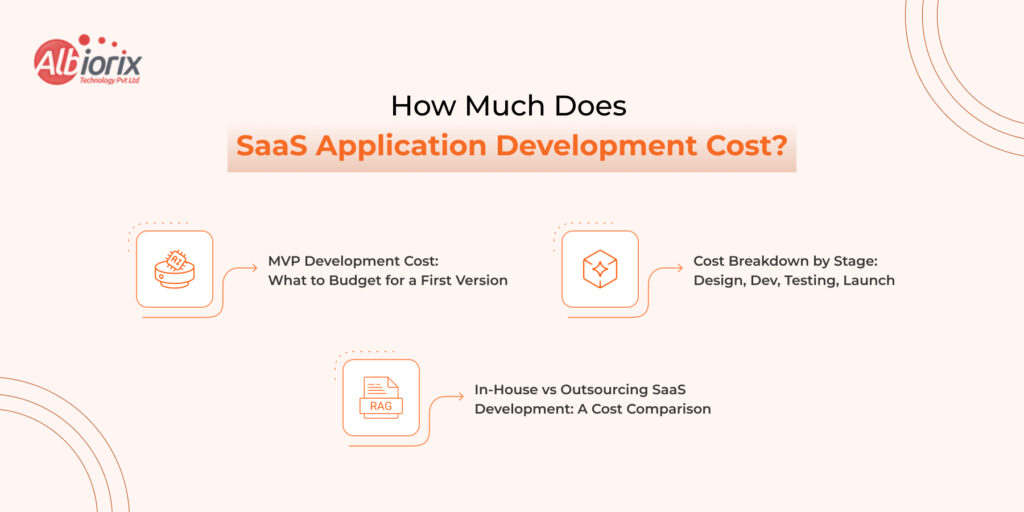
How Much Does SaaS Application Development Cost?
The cost of SaaS application development ranges from between $15,000 to $250,000+ based on the scope and complexity.
Let’s put real numbers on it, because vague answers don’t help you plan.
MVP Development Cost: What to Budget for a First Version
MVP Type
Scope
Estimated Cost
Simple MVP
Core feature, basic auth, minimal UI
$15,000 – $40,000
Mid-complexity MVP
Multi-role access, integrations, custom dashboard
$40,000-$100,000
Complex MVP
Real-time features, advanced data models, compliance requirements
$100,00-$250,000+
These ranges assume a dedicated development partner in India. US/UK-based teams would run 2–3x higher.
Cost Breakdown by Stage: Design, Dev, Testing, Launch
For a mid-complexity MVP (~$60,000 total):
UI/UX Design — 15% (~$9,000): Wireframes, design system, user flows
Frontend Development — 25% (~$15,000): React/Next.js UI, component library
Backend Development — 35% (~$21,000): APIs, database, auth, business logic
In-House vs Outsourcing SaaS Development: A Cost Comparison
Factor
In-house Team
Outsourced Partner
Monthly cost (5-person team)
$50,000-$120,000+
$15,000-$40,000
Time to first line of code
2-4 months (hiring)
1-2 weeks
Scalability
Slow, HR-dependent
Fast, on-demand
Domain expertise
Build gradually
Immediate access
Best for
Long-term core product
MVP, fast iteration, augmentation
For early-stage and growth-stage companies, outsourcing to a specialist development partner speeds time-to-market.
It also costs far less than building an in-house team.
Building Your SaaS Product with Albiorix Technology
You’ve just read what it takes to build a SaaS product.
That includes architecture decisions, stack choices, pricing models, security needs, and scaling challenges.
It’s a lot. And doing all of it well, simultaneously, while also running a business or validating a product, is genuinely hard.
Albiorix Technology is built exactly for that.
Albiorix Technology is a SaaS development company in India with clients from Australia, Germany, the UK, and the US. With over 10 years of industry experience, we build SaaS apps.
We have a team of 100+ skilled professionals.
We deliver top SaaS app development services.
Whether you work in healthcare, eCommerce, entertainment, or finance, we have hands-on experience in each domain. Our cross-domain experience can be an added advantage for custom SaaS application development.
Stop Planning. Start Building. Your SaaS Product Deserves a Team That’s Done This Before.
Every week you spend searching for developers and reviewing portfolios, then stop doing it. Your market window is open right now, and the best time to move is today.
At Albiorix Technology, we don’t just write code. We build SaaS products from the ground up. We handle architecture, development, security, testing, and deployment. You can focus on your product vision and your customers.
What We Bring to Your SaaS Build
When you get in touch with us for custom SaaS application development, we bring our decade of experience to the table. Below are the Albiorix advantages of SaaS development:
End-to-end SaaS development expertise:
You get access to full-stack development with React, Next.js, Node.js, Python (FastAPI), and .NET.
You get a multi-tenant architecture design that scales from 10 customers to 10,000
You get SaaS applications with database design & optimization (PostgreSQL, MongoDB) built for SaaS data models.
Secure setup of auth, payments (Stripe) methods, and analytics integrations from day one.
You get cloud infrastructure on AWS, Azure, or GCP with CI/CD pipelines and monitoring.
Security and compliance built in, not bolted on:
We implement GDPR-ready data models and consent flows.
You get SOC 2 preparation support for enterprise-ready products.
We ensure HIPAA-compliant architecture for healthcare SaaS.
A partnership model, not a vendor relationship:
We work inside your tools and follow your sprint structure.
We provide weekly progress updates with transparent communication.
We have flexible engagement models, including fixed-scope MVP, monthly retainer, or team augmentation.
We offer timezone-friendly collaboration across the US, UK, and European time zones.
Our SaaS Track Record Speaks for Itself
In the last ten years, we have helped startups and mid-sized businesses from the USA, Australia, and Germany launch MVPs in under 12 weeks and without draining their bank accoWe have also helped enterprise teams add SaaS delivery models to existing software businesses.
We have delivered SaaS solutions for healthtech, fintech, edtech, logistics, and more.
Three Ways to Work with Us:
MVP Build: You have an idea and a target market. Being among the top-rated SaaS development companies, we can help from validating concepts to a production-ready MVP. It might take around 8–14 weeks.
Product Development Retainer: Your MVP is live, and you need to keep building. We become your dedicated product development team — shipping features, fixing bugs, and growing the product alongside you.
Team Augmentation: You have an in-house team to build a SaaS product, but a team to accelerate the development process. You can hire SaaS developers from Albiorix Technology to work with your team. It will help you fill gaps, accelerate delivery, and maintain code quality.
Conclusion
If you have a SaaS product idea and don’t know where to start, just call us. We are an end-to-end SaaS product development company. We help from ideation to final deployment and ongoing maintenance.
We can help you generate ideas, find your target audience, lower development costs, and meet your timeline. Get in touch with us. We will map out a realistic SaaS app development plan. You will get clear cost estimates and a practical timeline.
The cost of building business software just underwent a massive paradigm shift. For a decade, I quoted development projects by the hour. But in 2026, building an AI Agent isn’t a “coding” task, it’s an architectural feat.
Last month, a founder came to me with a $5,000 budget for a custom LLM. The reality? It was going to cost $120,000. I hate delivering that news. So, I’m opening our internal books at Albiorix to share the exact numbers we’re seeing for AI Agent Development Services right now.
1. Why AI Agent Development Cost is No Longer About “Chatbots”
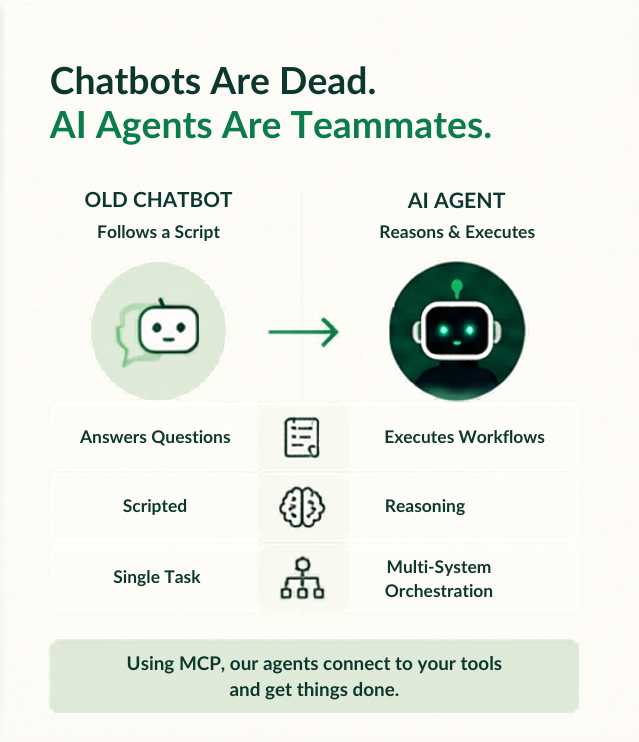
Most people are still thinking in terms of 2023 chatbots. In 2026, those are dead.
A Chatbot follows a script.
An AI Agent is a teammate that reasons and executes.
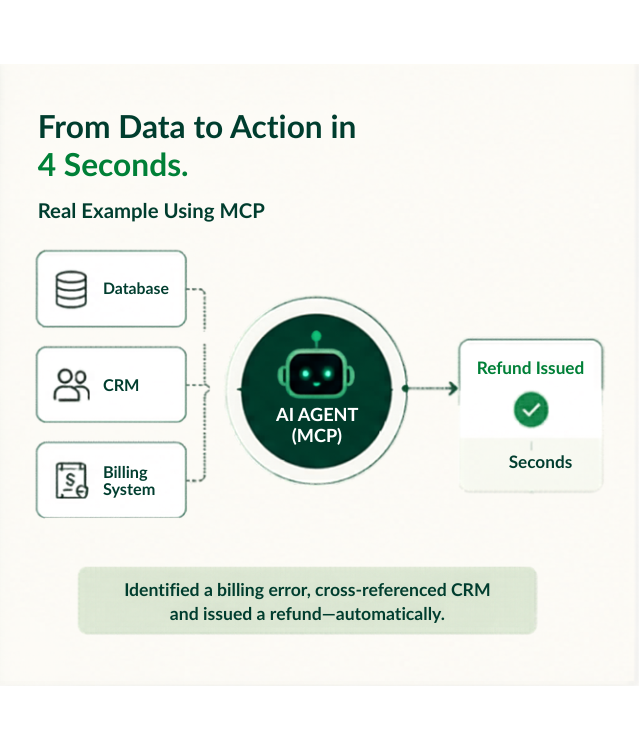
I recently connected a client’s database to a custom agent using the Model Context Protocol (MCP) and We watched a bot identify a billing error, cross-reference it with a CRM, and issue a refund in 4 seconds. That gap between “answering” and “doing” is where your investment lives.
2. A 2026 Breakdown: AI Agent Development Cost by Project Type
Based on our recent delivery data, here is what Generative AI Solutions actually cost in today’s market.
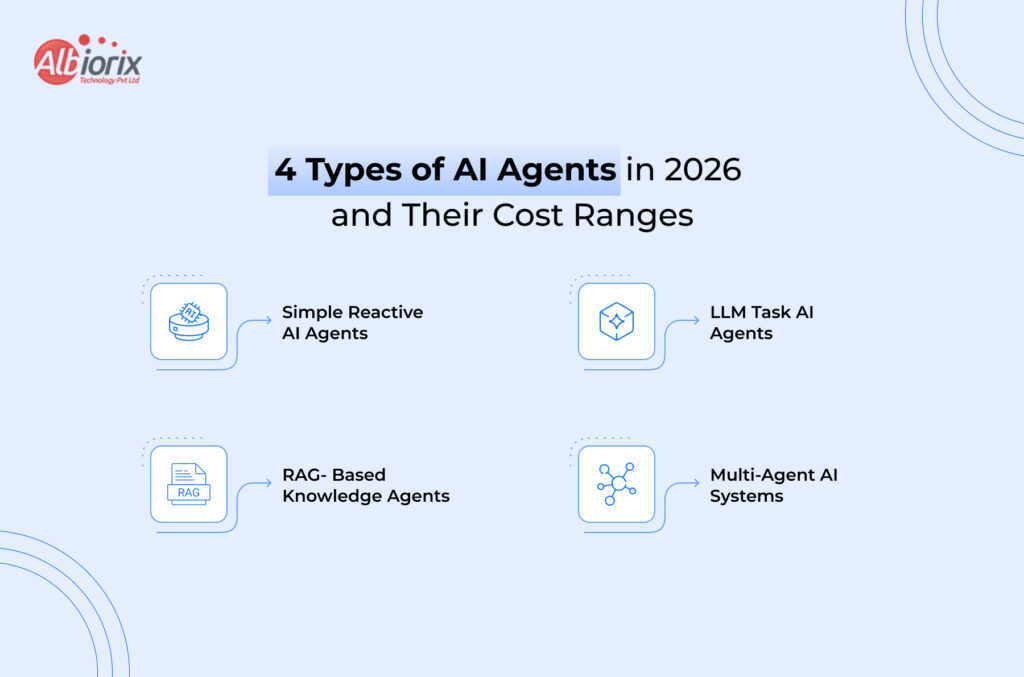
Tier 1: Simple AI Integration Services ($5,000 – $50,000)
This is for the skeptics. We plug existing models (like GPT-4o) into a narrow workflow, like a lead qualification bot. It’s fast, but you’re “leasing” intelligence from OpenAI.
Tier 2: Specialized LLM Development Services ($50,000 – $120,000)
These agents have short-term memory and connect to 2-3 external APIs. They don’t follow a script; they follow a goal (e.g., an automated Sales SDR).
Tier 3: Enterprise-Grade Strategic AI Solutions ($150,000 – $400,000+)
This is the “Brain” model. Multi-agent systems that run entire departments. When you Hire AI Developers for this tier, you’re paying for “Agentic Orchestration” making sure five different bots don’t argue with each other.
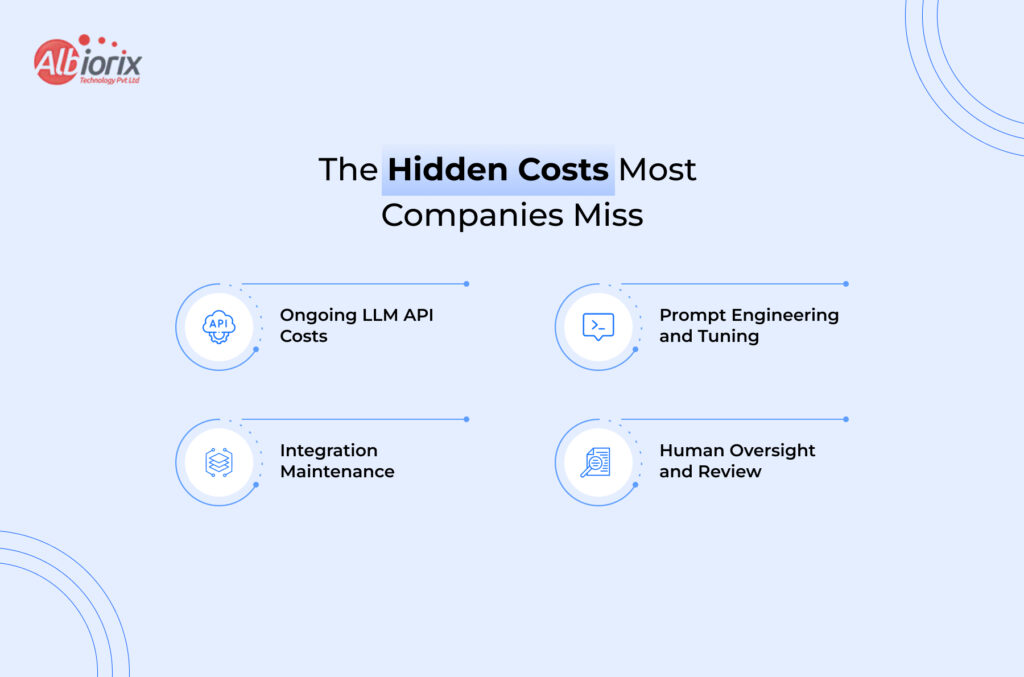
3. The 4 Hidden Factors Driving Your LLM Development Services Quote
If you think the cost is just the “AI,” you’re missing the forest for the trees. Here is what drives the bill up:
I. The “Data Tax” in AI Integration Services
Your AI is only as good as your data. We’ve had projects where we spent 3 weeks just cleaning messy JSON files. Architect’s Tip: Clean your data before you hire us; it’ll save you $20k.
II. Custom vs. Off-the-Shelf Generative AI Solutions
Off-the-shelf tools are cheap ($500/mo) but you don’t own the IP. Custom builds at Albiorix win on a 3-year ROI because you own the “Secret Sauce.”
III. Compliance Costs for Strategic AI Solutions
In Healthcare or Fintech, add a 20-40% “Safety Tax.” HIPAA and GDPR require custom “Guardrails” to ensure your agent doesn’t leak sensitive data.
IV. Ongoing Token & Maintenance Costs
Every time your agent “thinks,” it costs money. Depending on volume, monthly operational costs for LLM Development Services typically run between $3,000 and $15,000.
4. How to Lower AI Agent Development Cost Without Cutting Corners
You don’t need an unlimited budget. Here is how I keep our clients lean:
Start with a Narrow MVP: Don’t build a bot that does “Marketing.” Build one that only “Optimizes Email Headlines.”
Prototype with Open Source: We use Llama 3 for testing. We only move to high-cost models like Claude Opus when the logic requires it.
Human-in-the-Loop: Don’t aim for 100% autonomy on Day 1. Aim for 90% and let a human handle the edge cases.
5. Why You Should Hire AI Developers for Scale, Not Just Code
In 2026, AI Integration isn’t a luxury; it’s the new baseline.
My LinkedIn inbox is full of founders asking if AI will replace their teams. My answer: No, but AI will replace the companies that don’t know how to build these agents. Whether you’re looking for Strategic AI Solutions or a simple bot, the goal is ROI. If you automate a $100k workflow for $40k, you’ve already won.
What’s Your Architecture?
I’m curious, are you building for speed or for scale? I’m testing new frameworks this week that might bring these costs down even further.
Summary: Computer Vision (CV) is no longer confined to the lab; it is now a core enterprise capability powering real-time automation, advanced anomaly detection, and immersive digital interactions across the globe. By analyzing visual data at superhuman speeds, it eliminates manual bottlenecks, reduces operational waste, and enhances safety.
In Previous Times, machines could count pixels. Today, they can inspect a circuit board at 200 frames per second, detect a hairline crack invisible to the human eye, and flag it before the defective part reaches the assembly line.
That is not a future projection that is computer vision in AI, running in production, right now.
The numbers back this up. The global computer vision market is projected to reach $24.14 billion in 2026, growing to $72.80 billion by 2034 at a compound annual growth rate of 14.80%. But the more telling shift is not financial; it is operational.
Computer vision applications are no longer confined to research labs or Silicon Valley pilots. They are embedded inside real business workflows across manufacturing floors, hospital radiology departments, retail stores, logistics warehouses, and smart city infrastructure.
This blog breaks down what computer vision actually is, why businesses are adopting it at scale, and most importantly where it is delivering measurable results across industries.
If you are exploring vision AI solutions for your organization, this is your practical starting point.
What Is Computer Vision in AI?
Computer vision is a subfield of artificial intelligence that enables machines to interpret and understand visual data images, video frames, and real-time camera feeds.
Alongside Natural Language Processing (NLP), it plays a major role in helping AI systems analyze and respond to both visual and textual information.
It uses machine learning models, particularly Convolutional Neural Networks (CNNs), to recognise patterns, detect objects, classify scenes, and extract meaning from what a camera captures.
Think of it as giving machines a pair of eyes and then training those eyes to do something useful with what they see.
In practical terms, computer vision systems can:
Detect and count objects in real time (products on a shelf, vehicles at an intersection, workers in a construction zone)
Classify images by content (defective vs. non-defective parts, tumour vs. healthy tissue)
Track movement across video frames (monitoring customer behaviour in retail, tracking inventory movement in warehouses)
Read and extract text from documents and signage (OCR for logistics and banking)
Identify faces or biometric markers for access control and attendance systems
Five years ago, implementing AI image recognition for business required significant custom development and data science expertise.
Today, cloud platforms, pre-trained models, and edge hardware have made deployment faster and more accessible and businesses across sectors are moving quickly.
Why Are Businesses Investing in Vision AI?
The answer, in most boardrooms, comes down to one word: ROI.
By 2026, industry benchmarks show that organisations adopting computer vision are not doing it for novelty they are doing it because it directly impacts the bottom line, while understanding AI agent development costs also helps them plan smarter long-term AI investments.
The three primary business drivers are:
Faster decisions: Visual data is analysed in milliseconds, enabling real-time responses that human teams physically cannot match.
Reduced manual effort: Repetitive visual tasks such as quality inspection, document scanning, and inventory counting are automated, freeing skilled workers for higher-value work.
Operational consistency: Unlike human inspectors who tire and miss details, vision AI maintains consistent performance across 24-hour production cycles.
What makes this particularly compelling is the ROI threshold. Research from production deployments reveals that even a vision model with modest accuracy can save millions of dollars annually by catching defects that previously went entirely unnoticed.
The bar for value is lower than many businesses expect.
Unlike periodic manual audits, vision AI also enforces standards continuously, not just during scheduled checks.
That shift from periodic to persistent quality assurance is, for many industries, the single most transformative change that AI visual data analysis delivers.
Top Computer Vision Use Cases for Businesses
Let us look at where computer vision applications are delivering the most impact by industry.
Manufacturing remains the strongest real-world domain for computer vision use cases for business and for good reason.
Factories run at speeds and volumes that human inspectors simply cannot sustain consistently. A person working a 10-hour shift will inevitably miss things. A vision AI system will not.
Computer vision systems in manufacturing can inspect thousands of components per minute, identifying microscopic cracks, misalignments, surface defects, and dimensional deviations that are practically invisible to the naked eye.
In automotive and electronics manufacturing, this means catching faults before they compound into costly recalls or warranty claims.
Beyond defect detection, AI-powered visual inspection is being used for:
Assembly verification: Confirming that all components are correctly placed and oriented
Packaging compliance: Checking label placement, fill levels, and seal integrity
Predictive maintenance: Detecting early signs of machine wear before failure occurs
Computer vision in retail AI is reshaping the in-store experience from both ends of the counter.
On the customer side, it is enabling frictionless self-checkout systems that use image recognition to identify products without barcodes faster, more accurate, and less prone to fraud than traditional scanning.
On the operations side, retailers are deploying vision systems to:
Monitor shelf stock levels in real time, automatically flagging out-of-stock items for replenishment
Generate customer heat maps visual data showing where shoppers walk, pause, and engage; allowing retailers to optimise store layouts and product placement
Detect theft and suspicious behaviour through intelligent video analytics, reducing shrinkage without increasing security headcount
Verify planogram compliance, ensuring products are displayed exactly as merchandised
For a sector where margin pressure is constant and customer experience is everything, computer vision applications offer a measurable competitive edge.
Healthcare Medical Imaging & Patient Monitoring
In healthcare, the value of computer vision is measured in prioritisation, consistency, and clinician support not replacement. Radiologists and pathologists review enormous volumes of scans and slides every day under significant time pressure.
Vision AI acts as a tireless first-pass assistant, helping clinicians focus their expertise where it matters most.
Peer-reviewed research consistently shows that AI improves diagnostic support while keeping physicians firmly in control. Clinical accountability stays with the doctor. The system assists it does not decide.
Current healthcare applications of AI visual data analysis include:
Detecting early-stage tumours in radiology scans with greater consistency than fatigue-affected human review
Classifying pathology slides in oncology labs, cutting report turnaround time
Monitoring patients in elder care and ICU settings for falls, posture changes, or distress; especially valuable in high-staffing-cost markets like the US, UK, and Australia
Quality assurance in pharmaceutical manufacturing verifying syringe fill levels, label accuracy, and seal integrity
In logistics, speed and accuracy are everything. A misread barcode, a misplaced pallet, or an undetected damaged shipment creates downstream ripple effects that are expensive to resolve.
Object detection AI for business is now a standard tool in modern fulfilment centres.
Real-time video analytics AI is being deployed to:
Track inventory movement across large warehouse floors automatically, without manual scanning
Detect damaged goods during intake and outbound processing
Guide robotic picking systems with real-time visual feedback
Verify load compliance checking that trucks are correctly loaded and sealed before dispatch
Monitor grid infrastructure and energy towers for wear and corrosion, reducing inspection risk for field engineers
The winners in this space are those turning visual data into automated business decisions at scale not just using cameras as passive recording devices.
Construction & Infrastructure Workforce Safety Monitoring
Basic hard hat detection was table stakes two years ago. In 2026, serious computer vision applications in construction will go significantly further.
Modern systems use behavioural understanding reading sequences of movement over time to catch the action pattern that precedes an incident, not the incident itself.
On active construction sites, vision AI is being used for:
Detecting PPE compliance (helmets, vests, gloves, boots) in real time across multiple camera feeds
Monitoring restricted zones and triggering immediate alerts when workers enter unsafe areas
Tracking equipment and materials across large project sites
Identifying structural issues in infrastructure, such as cracks, corrosion, and deformation through drone-mounted visual inspection
For industries where a single safety incident can carry multi-million-dollar liability exposure, vision AI is increasingly treated as essential risk management infrastructure.
Smart Cities Traffic Management & Public Safety
At a city level, computer vision use cases for business extend into urban infrastructure.
Advanced economies and rapidly urbanising ones are deploying vision AI to manage resources and public safety in ways that were simply not possible before.
Applications include:
Intelligent traffic signal control that adjusts in real time based on vehicle density, reducing congestion and emissions
Public safety monitoring through smart cameras that detect unusual behaviour without requiring constant human oversight
Frictionless biometric access to transport hubs, office parks, and secure facilities
Smart building management detecting occupancy levels to automatically adjust lighting, HVAC, and energy usage
Wildfire and disaster detection systems that can identify smoke, structural collapse, or seismic events within milliseconds
What Does It Take to Implement Computer Vision?
The technology has matured significantly, but implementation still requires deliberate planning. Here is what businesses typically need to get right:
Start with the right data: Computer vision models learn from labelled images and video. The quality, volume, and relevance of your training data directly determines how well your system performs in production. Clean, representative data is the foundation everything else builds on it.
Define the business objective first: Many computer vision projects stall because they begin with the technology rather than the problem. The most successful deployments start with a clearly defined business outcome reduce defect rate by X%, cut manual inspection time by Y hours and then select the right vision AI solution to achieve it.
Validate before you scale: The most effective approach is to validate a focused MVP a single use case, one line, one facility before scaling across operations. This reduces both deployment risk and upfront investment, while generating real performance data to justify broader rollout.
Choose the right technology partner: A computer vision development company brings more than code they bring the expertise to select the right model architecture, handle the data pipeline, manage edge deployment constraints, and connect visual outputs to your existing business systems (ERP, WMS, quality management platforms). When evaluating partners, ask to see live production deployments, not just demos.
Is Computer Vision Right for Your Business?
Not every business is at the same stage of readiness and that is fine. Here are a few questions to help you gauge where you stand:
Do you have repetitive visual tasks currently performed by people, including checks, document sorting, inventory counts that happen at volume or speed?
Are errors in inspection or monitoring creating downstream costs rework, returns, liability incidents, compliance risks?
Do you need real-time monitoring across multiple locations, lines, or shifts simultaneously?
Is your business generating visual data (from cameras, scanners, drones, or medical devices) that is currently underutilized?
Are manual visual processes a bottleneck that limits your throughput or your ability to scale?
If you answered yes to two or more of these, there is almost certainly a computer vision use case for your business that will deliver measurable ROI. The question is not whether the technology is ready it is. The question is which application to prioritize first.
Conclusion
Computer vision in AI has crossed a significant threshold. It is no longer a technology that businesses experiment with it is one they depend on.
Today, vision AI applications are embedded deeply inside real business workflows, inspecting products, monitoring safety, reading documents, tracking inventory, guiding robots, and managing city infrastructure often operating quietly in the background, around the clock.
The businesses gaining competitive advantage are not necessarily the largest ones.
They are the ones that identified a specific visual problem, built a focused solution, and scaled from there. The entry point is more accessible than most assume and the upside is significant.
Whether you are in manufacturing, retail, healthcare, logistics, or any industry that depends on visual information, 2026 is the year to move from curiosity to action.
Summary: Natural language processing (NLP) is the AI technology behind everything from chatbots and voice assistants to sentiment analysis and document automation. This guide breaks down how NLP works and walks businesses through the top use cases transforming industries in 2026. Whether you’re new to NLP or ready to implement it, here’s everything you need to know before your competitors do.
NLP Explained And Why Your Business Should Care in 2026
So, did you use NLP this morning? You might not be sure, but directly or indirectly you use NLP in your day-to-day life to a great extent.
When you asked Siri to set up a reminder for a certain task, search Google for information, or Gmail suggested an autocorrection in the email, that is NLP (Natural Language Processing).
Every time a machine understood what you meant, not just what you typed, that was natural language processing at work.
And here’s the thing: most businesses are already using them but not able to extract the maximum out of this technology.
In this blog on NLP, we will explain to you what NLP is, what are the uses of NLP, and how it can help your business scale in the age of artificial intelligence without any jargons and fancy words. It is a straight-talking guide on NLP and its uses in 2026.
So, let’s get started!
What is Natural Language Processing(NLP)?
The full form of NLP is Natural Language Processing. It is a branch of Artificial Intelligence that helps computers read, understand, analyze, and respond to human language.
NLP may sound simple, but it addresses a major challenge: enabling computers to process human language with the same nuance and understanding as people.
For example, consider this simple sentence: “I didn’t say she stole the money.” Depending on which word you stress, that sentence means seven different things. For humans, it is easy and effortless to navigate that nuance, but for computers, it is a nightmare. This is where NLP gets into action.
NLP bridges the gap between how humans communicate and how computers interpret language, enabling machines to understand and respond to us effectively.
Think of NLP as a universal translator but instead of converting English to French, it converts human meaning into machine understanding.
NLP in action, things you already use:
Gmail’s spam filter and Smart Reply
Google Search understanding questions, not just keywords
Grammarly catching tone and intent, not just spelling
Voice assistants like Alexa, Siri, and Google Assistant
Google Translate preserving meaning across languages
NLP is not a recent invention. It has been in the market for decades. Researchers were experimenting with machine translation as far back as the 1950s. But what’s new in recent times is its ability to scale with modern AI solutions.
With the introduction of modern transformer-based models, including ChatGPT, Google Gemini, and Claude, NLP went from a clunky approximation of language understanding to something very impressive.
In 2026, NLP not just processes languages; it can now understand the intent as well.
How Does NLP Actually Work?
NLP sounds simple, but the way it processes is quite complex. For instance, let’s consider this sentence: “I saw the man with the telescope.”
Well, this sentence can have different meaning such as:
Did you see a man through a telescope?
Did the man have the telescope?
As a human, it is easy for you to understand the context of the sentence, but for computers, it is not. It will require NLP to understand the sentence and the context.
NLP teaches machines to work through that ambiguity using a set of steps a pipeline that breaks language down layer by layer.
To help you understand better, we have breakdown the entire process into different stage:
Stage 1: Tokenization: Breaking it Down:
In the very first stage, the machine splits your text into smaller pieces known as tokens. It breakdowns your sentence into words and sub words for better analysis. For example, “I love working with AI” is broken into small tokens – [I] [Love] [Working] [With] [AI].
Stage 2: Grammar and Sentence Structure:
In this step, NLP identifies how words are related to each other. Which word is the verb? Which word is the subject? This is the part of the problem where it understands the context/intent of the sentence. The sentence structure helps it to understand the context.
Stage 3: Meaning (Sematic Analysis):
In this step, NLP looks at what the words actually mean and importantly what they mean together. For instance, in this sentence, “he kicked the bucket” does not mean that a man has kicked the bucket. The NLP model is trained on large datasets, including idioms, synonyms, and nuance; thus, they behave like a well-read person.
Stage 4: Context (Pragmatic Analysis):
In this stage, NLP factors in the broader context. Who’s speaking? What came before this sentence? What’s the likely intent? This is where modern large language models (LLMs) like GPT-4, Claude, and Gemini genuinely shine. They hold context across long conversations and documents.
The evolution of NLP in three eras:
Rule-Based NLP (1950s–1990s): Humans wrote the rules. “If a sentence contains X, do Y.” Rigid, brittle, limited.
Machine Learning NLP (2000s–2017): Models learned from data instead of rules. Smarter, more flexible.
LLM Era (2017–present): Transformer architecture changed everything. Models now understand language at near-human depth.
The key takeaway for businesses: modern NLP doesn’t just process what someone said. It understands what they meant and increasingly, what they’ll need next.
Not Sure Where NLP Fits in Your Business? Let’s Figure It Out Together.
Every business has a different starting point. Whether it’s cutting support response times or automating document-heavy workflows — we’ll help you.
Why Should Businesses Pay Attention to NLP in 2026?
The NLP market is growing from $38.3 billion in 2025 to $50.13 billion in 2026 a 30.9% jump in a single year. Cloud-based NLP deployment now holds 63.4% of the market, growing at nearly 25% annually.
That means an affordable, scalable NLP is available right now, without needing a data centre or a team of PhDs.
The real question isn’t “should we look at NLP?” It’s “how are we already falling behind competitors who’ve adopted it?”
Here’s what’s driving the urgency:
Your customers generate enormous amounts of unstructured data every day reviews, support chats, survey responses, social media. Most of it goes unread. NLP reads all of it.
Response time expectations have collapsed. Customers expect instant, relevant, personalized replies. Manual support can’t scale to meet that. NLP-powered systems can.
Multilingual business is the norm now. If your business serves customers in multiple regions or aspires to, then NLP handles real-time multilingual communication without losing meaning in translation.
Document-heavy industries legal, healthcare, finance are sitting on massive automation opportunities that NLP unlocks, cutting hours of manual work to minutes.
The businesses getting ahead right now aren’t necessarily the biggest. They’re the ones that identified one or two high-impact NLP use cases and moved fast. That’s the opportunity in 2026.
Top NLP Use Cases for Businesses in 2026
This is where it gets practical. Let’s look at what NLP is actually doing right now for businesses across industries.
Use Case 1: Smarter Customer Support (Chatbots & Virtual Agents)
Forget the frustrating chatbots of five years ago that could only handle three questions before saying “I’ll transfer you to an agent.”
Today’s NLP-powered support agents understand intent, detect emotion, handle multi-turn conversations, and escalate to humans only when it genuinely makes sense.
The global chatbot market is powered almost entirely by NLP. It has reached $6 billion in 2024 and is growing at 23.9% annually.
A customer typing “I’ve been waiting three weeks for my order, and I’m really frustrated” gets a very different response from a modern NLP system than from a keyword-matching chatbot. It detects the frustration, the urgency, and routes accordingly no script required.
Use Case 2: Sentiment Analysis: Know What Customers Actually Feel
Every business collects feedback. Product reviews, support tickets, social media comments, post-call surveys. Most of it sits in a folder somewhere, unread.
NLP-powered sentiment analysis reads all of it in seconds and tells you whether customer feeling toward your brand, product, or specific feature is positive, negative, or shifting.
More importantly, it flags patterns before they become crises. If sentiment around your new product drops sharply in week two, you know before it becomes a public story.
Banking, retail, and healthcare businesses are using this to catch issues faster than any manual monitoring system ever could.
Use Case 3: Document Intelligence & Automation
Contracts, invoices, patient records, regulatory filings every industry drowns in documents. NLP can extract, classify, and summarize key information from unstructured documents faster and more accurately than any human team.
Healthcare is leading this charge: NLP adoption in healthcare is growing at a 24.34% CAGR, with documented results like one health insurer cutting documentation time by 40% and processing claims 50% faster using AI models.
A legal firm can use NLP to flag risk clauses across 200-page contracts in minutes. A financial institution can automate compliance checks that previously took days.
Use Case 4: Multilingual Communication at Scale
Your customers speak different languages. Your teams might too. NLP-powered translation has moved far beyond word-for-word conversion. Modern systems preserve tone, context, cultural nuance, and intent across 100+ languages.
This matters enormously for businesses serving clients in the US, UK, Australia, and beyond. A customer complaint written in Australian slang and one written in formal British English should receive the same quality of response. With NLP, they do.
Use Case 5: Voice Search & Voice AI
The speech-based NLP market, including voice assistants, voice search, and voice command systems, was valued at $30.85 billion in 2025 and is projected to reach $128.5 billion by 2031. That’s a 26.84% CAGR.
For businesses, this means two things. First, if your content isn’t optimized for voice search, you’re invisible to a growing share of searchers.
Second, voice-based customer interfaces, for ordering, querying, and booking are becoming standard customer expectations, not a novelty.
NLP makes this possible by understanding natural spoken queries: “What’s the cheapest option that ships by Friday?” isn’t a keyword search. It’s a conversation.
Use Case 6: Smarter Internal Search & Knowledge Management
The average employee spends close to two hours a day searching for internal information past projects, policies, client documents, meeting notes. Traditional keyword search fails them constantly because people rarely remember the exact phrase they’re looking for.
NLP-powered semantic search finds what you mean, not just what you typed. Search for “how we handled the Northbrook client complaint last year” and get the right document, even if it was labelled “Northbrook account issue Q3.” The productivity gains across teams are immediate and measurable.
Use Case 7: Agentic AI: NLP That Doesn’t Just Understand It Acts
This is the 2026 frontier, and it’s where NLP is heading fast. Autonomous language agents are AI systems that don’t just respond to a query they plan, execute multi-step tasks, and complete goals with minimal human supervision.
Tell an agent: “Analyze last quarter’s sales and draft a board-ready summary report.” It retrieves the data, runs the analysis, generates the charts, writes the summary, and delivers a formatted document. No hand-holding. No step-by-step babysitting.
These agentic AI systems surged in 2025 and are being widely adopted by forward-thinking businesses in 2026.
They’re particularly powerful for recurring business workflows, including monthly reporting, competitive analysis, customer onboarding checks where the task is defined, but execution has always required human time.
Which Industries Are Benefiting the Most?
NLP isn’t industry-specific, but some sectors have moved faster than others, and the results are telling.
Use of NLP in Healthcare:
Clinical note analysis, patient triage automation, regulatory compliance checks, and drug safety monitoring are all being transformed by NLP.
The CHECK framework, for instance, reduced hallucinations in clinical language models from 31% to just 0.3% opening the door to compliance-ready healthcare automation that was previously too risky to deploy.
Use of NLP in Banking, Financial Services & Insurance (BFSI):
BFSI holds 21.1% of the NLP market. It is the largest share of any industry. The applications are wide: fraud detection from transaction language patterns, chatbot-led customer onboarding, compliance monitoring across communications, and document-heavy processes like loan application processing and insurance claims.
JP Morgan’s COIN system, which uses NLP to parse legal documents, famously completed 360,000 hours of manual legal work per year in seconds.
Use of NLP in E-Commerce & Retail:
Product search, review analysis, personalized recommendations, and customer service chatbots are table stakes in e-commerce now.
NLP enables the kind of search experience where a customer typing “affordable blue dresses for a summer wedding” gets exactly what they mean not just results containing the word “blue.”
Use of NLP in Legal:
Contract review, case research, document summarization legal work is document-heavy by nature, which makes it a perfect match for NLP automation.
Law firms using NLP are compressing due diligence timelines dramatically and reducing the risk of human error in document review.
Use of NLP in HR & Recruitment:
Resume screening, employee sentiment analysis, onboarding document processing NLP is reducing administrative burden in HR while also helping teams understand employee morale at scale through analysis of internal feedback and communications.
Custom NLP Solutions Built for Your Business. Not Off a Shelf.
Generic AI tools give generic results. We build NLP systems trained on your data, designed for your workflows, and integrated into your existing tech stack.
Businesses that haven’t adopted NLP yet often have one or more of these misconceptions holding them back. Let’s address them head-on.
MYTH 1: “NLP is only for big tech companies.”
REALITY: Cloud-based NLP APIs from Google, AWS, and Azure and custom solutions from specialist AI development firms have made NLP accessible to businesses of all sizes. You don’t need a proprietary data center. You need the right partner.
MYTH 2: “NLP will replace our customer service team.”
REALITY: NLP augments your team; it doesn’t replace it. It handles the high-volume, repetitive queries so your people can focus on complex, high-value interactions. The best outcomes come from human-AI collaboration, not substitution.
MYTH 3: “NLP only works in English.”
REALITY: Modern NLP models handle 100+ languages, including regional dialects and code-switching (switching between languages mid-sentence). For businesses serving global markets, multilingual NLP is a core capability, not a limitation.
MYTH 4: “It takes months to implement and costs a fortune.”
REALITY: Implementation timelines depend heavily on the scope and the expertise of your development partner.
A targeted NLP solution a sentiment analysis dashboard, a document extraction tool, a smart FAQ chatbot can be built, integrated, and live within weeks when you work with the right team.
What to Consider Before Integrating NLP into Your Business
Before jumping into NLP, it helps to ask the right questions. Here’s a practical starting checklist:
Start with the problem, not technology. What specific business pain are you solving? Slow customer response? Unread feedback? Manual document processing? Define the use case first NLP is the tool, not the goal.
Assess your data. NLP learns from data. Do you have customer interactions, documents, or feedback to work with? The more relevant data you have, the more accurately a custom model can be trained to your specific context.
Decide: off-the-shelf or custom-built? Pre-built NLP tools (Google Natural Language API, AWS Comprehend, Azure Text Analytics) work for general tasks. If your use case is industry-specific say, legal contract review or clinical note analysis a custom-built solution trained on your data will significantly outperform any generic tool.
Think about integration. How will the NLP solution connect to your existing systems your CRM, your helpdesk, your document management platform? Integration planning upfront saves significant rework later.
Choose the right AI development partner. NLP is a technical discipline. The difference between a well-built NLP integration and a poorly scoped one is enormous in terms of accuracy, speed, and ROI. Look for partners with documented NLP experience across relevant industries.
Ready to Put NLP to Work in Your Business? Let’s Talk
If you’ve read this far, you’re probably not asking “what is NLP?” anymore. You’re asking “where does it fit for us, and how do we start?”
That’s exactly what Albiorix Technology helps businesses figure out.
We’re an AI and software development company working with clients across Australia, the USA, and the UK. We build custom NLP solutions not generic tools repackaged under a different name, but systems designed around your specific workflows, industry requirements, and business goals.
What we build with NLP:
NLP-powered customer service chatbots and virtual agents.
Sentiment analysis dashboards for brand and product feedback.
Document intelligence tools for contract review, invoice processing, and compliance automation.
Semantic search and knowledge management systems.
Multilingual communication tools for global businesses
Agentic AI systems that automate multi-step business workflows
We don’t start with technology. We start with your problem.
Whether you’re exploring NLP for the first time or looking to expand an existing AI capability, we’ll help you.
Natural language processing has moved from research labs to production environments to mainstream business infrastructure in less than a decade.
It’s the technology that lets machines understand not just what your customers are saying but what they mean, how they feel, and what they need next.
The businesses that will look back on 2026 as a turning point are the ones making that shift right now. They’re not waiting for technology to mature further.
They’re deploying it in customer service, in document automation, in voice interfaces, in intelligence systems that work while their team’s sleep.
The entry point doesn’t have to be complicated. Pick one problem. Find the right partner. Start there.
Summary: In 2026, the top Python libraries for AI in the USA focus on agentic workflows, LLMs, and high-performance data processing. PyTorch and TensorFlow dominate deep learning, while LangChain and Transformers (Hugging Face) lead in LLM orchestration. Essential, modern tools include Scikit-learn for machine learning, Polars for fast data handling, and ChromaDB for vector storage.
Let’s be real, if you’re a startup founder or a business owner trying to build something with AI, the sheer number of tools out there can feel overwhelming.
Everyone’s throwing around terms like “deep learning,” “generative AI solutions,” and “large language models,” and somewhere in that noise is the actual answer to your question: which Python library do I actually need? Which are the top Python libraries for AI in 2026?
Here’s the thing: Python didn’t become the world’s dominant AI language by accident. It happened because of its libraries.
While Python is the undisputed king of AI, choosing it for your infrastructure depends on your Python Development requirements.
If you’re still weighing your options for your server-side architecture, you might want to compare Node.js vs Python for backend development to see which fits your full-stack requirements.”
It has pre-built collections of code that let you build powerful custom AI solutions without reinventing the wheel.
Whether you want to automate document processing using a python library for pdf, scrape data with a python web scraping library, or build a full generative AI chatbot, there’s a Python library built exactly for that job.
In this guide, we’ve cut through the noise. We cover the top Python libraries in 2026 that real businesses are using. For each library, we explain what it does, who it’s for, when to use it, and what you can realistically build with it.
So, Let’s Find the Best Python Libraries for AI in 2026!
1. TensorFlow: By Google Brain – Best for Enterprise Scale AI
In our search for the top Python libraries for AI in the USA, the first name that comes to mind is TensorFlow. Built by Google, this powerful and scalable Python library is considered the heavy machinery of the AI world.
It was developed by Google to power its in-house products, such as Google Search, but it was later made available to the public. If you need a library that can scale with your business needs, then TensorFlow is the best Python library you have in 2026.
For large organizations, TensorFlow is a strong choice for those who want to deploy AI models in production.
TensorFlow’s flexibility is rare among AI tools, allowing it to run in browsers via TensorFlow.js.
However, if you are deciding which language to standardize your team on for both web and AI, checking out a detailed breakdown of Python vs JavaScript can help you decide where to invest your resources.”
“Best for: Businesses building image recognition tools, recommendation engines, fraud detection systems, or anything that needs to handle millions of data points reliably.”
If you are using TensorFlow for AI development, then please remember that it has a steeper learning curve compared to other Python libraries on the list.
Therefore, it is advisable to contact a generative AI development company to build a custom AI solution for your business.
2. PyTorch: By Meta AI – Best for AI Research and Custom Model Development
So, the second on the list of the most popular and best Python Libraries for AI in 2026 is “PyTorch”. If TensorFlow is heavy machinery, then PyTorch is a custom, powerful sports car. It is highly flexible, amazingly fast, and offers complete control.
It is the perfect Python library for businesses that want precise control over how their AI model behaves. If we talk about the usage statistics, then in 2026, PyTorch has overtaken TensorFlow in adoption.
It has become the first choice of researchers and AI engineers alike, and for good reason.
PyTorch has one more standout feature. When you write code for PyTorch, it reads like regular Python, which allows your development team to build faster and debug errors more easily.
It uses a dynamic computational graph that lets you change how your AI model thinks on the fly.
“Best for: Startups building custom AI models, computer vision products (like defect detection or face recognition), and any team that wants cutting-edge AI capabilities without being locked into a rigid framework.”
Most of the popular generative AI solutions that we are using today, including LLMs and image generators, were either built on or fine-tuned using PyTorch.
If you’re working with an AI development partner in 2026, there’s a good chance PyTorch is their first choice.
3. Scikit-learn: Community-built – Best for Classical Machine Learning
Not every AI problem needs a neural network. Sometimes, you just need a reliable algorithm that can look at your historical sales data and predict next quarter’s numbers, or automatically sort your customer support tickets by topic. This is where Scikit-learn shines.
Scikit-learn is the go-to Python library for classical machine learning things like decision trees, random forests, regression analysis, and clustering.
It’s been around since 2007, has an enormous community behind it, and is remarkably easy to work with compared to deep learning frameworks.
“Best for: Businesses that need predictive analytics, customer segmentation, anomaly detection, or recommendation logic without the complexity of building neural networks.”
One of the biggest strengths of this library is its consistent, clean interface every algorithm works in basically the same way.
That means your team spends less time reading documentation and more time solving actual business problems. For many small business AI use cases, Scikit-learn is all you’ll ever need.
4. Hugging Face Transformers: By Hugging Face – Best for NLP and generative AI
You come across a lot of chatbots and many other AI tools in your day-to-day life. But have you ever wondered how these AI chatbots, document summarizers, and other AI tools are built and which technology is used?
Behind most of these tools, there’s only one name, and it’s Hugging Face Transformers. The latter gives you access to thousands of pre-trained AI models – all through a single, consistent interface.
Hugging Face Transformers is a Python library that has proved to be a game-changer for startups and small businesses.
If you’re looking to leverage these models for your business, our LLM Development Services can help you fine-tune Transformers for specific enterprise needs.
Instead of spending months and millions training an AI from scratch, you can download a pre-trained model and fine-tune it on your own data in a matter of days. That’s the magic of the Hugging Face ecosystem.
“Best for: Building custom AI chatbots, auto-summarization tools for documents, sentiment analysis, content creation assistants, and any product that involves understanding or generating text.”
In 2026, Hugging Face has become the de facto home for generative AI solutions. Whether you’re building an AI-powered customer service bot in Sydney or a document intelligence tool for a US law firm, Transformers is likely to be a core part of your Python AI stack.
5. LangChain: By LangChain Inc Best for AI-powered Business Applications
LangChain is a Python Library that can turn a raw AI model into an actual business tool. It is designed and developed to help businesses connect their data sources with AI. It is normally used to connect documents, databases, websites, and APIs.
For Example, if you want to develop an AI assistant that can assist your customers and reply to questions related to your products and services using your internal data sources and documents.
In this case, ChatGPT won’t be a useful tool as it doesn’t know anything about your business. But LangChain can solve this problem through Retrieval Augmented Generation. It allows the AI to “look up” information from your own data in real time before answering.
“Best for: Building internal AI assistants, customer-facing chatbots, document Q&A systems, AI agents that can take actions (like booking appointments or processing orders), and any workflow that chains multiple AI tasks together.”
We specialize in using LangChain to build autonomous workflows, explore our AI Agent Development Services to see what’s possible.”
In 2026, LangChain became one of the most popular and fastest growing Python libraries for AI development. It bridges the gap between a raw language model and a production-ready generative AI solution that solves real business problems.
If your goal is to build a custom AI solution for your business in 2026, then LangChain is almost certainly going to be part of the conversation.
Which Python Libraries are Best for Making AI Chatbots?
If your goal in 2026 is specifically to build a chatbot, you don’t just pick one library you build a “stack.” While the libraries above are powerful, making an AI chatbot that doesn’t hallucinate requires a specific combination of tools.
For a production-ready chatbot, the “Power Trio” usually looks like this:
LangChain: This acts as the “brain” or the logic layer. It manages the conversation flow and connects the bot to your company’s private data.
Hugging Face Transformers: This provides the “language ability,” allowing your bot to understand and generate human-like text.
ChromaDB or FAISS: These are vector databases (often used alongside LangChain) that act as the bot’s “long-term memory,” allowing it to remember past customer interactions.
“Best for: Startups and enterprises building customer support bots, internal HR assistants, or RAG-based (Retrieval-Augmented Generation) knowledge bases.”
Pro Tip: Building a basic bot is easy, but making it secure and scalable for thousands of users is a different challenge. If you are planning a complex deployment, it’s worth consulting with an AI Chatbot Development expert to ensure your architecture is cost-efficient.
Build Your AI Solution with Albiorix
You don’t need to understand every library on this list that’s what we’re here for. Tell us what you’re trying to solve
6. NumPy: Community-built – The Python Math Library Every AI Project Needs
NumPy is the Python math library that sits beneath almost every other library on this list. TensorFlow, PyTorch, Scikit-learn, Pandas they all rely on NumPy under the hood.
It’s the foundation of numerical computing in Python, and it’s been that way for two decades.
What NumPy actually does is give Python the ability to work with large arrays of numbers incredibly fast. Regular Python lists are slow when you’re trying to do mathematical operations on millions of data points.
NumPy solves that by handling these operations in highly optimized C code behind the scenes.
You don’t need to interact with NumPy directly most of the time it just works in the background.
But understanding the use of Python libraries like NumPy helps you grasp why Python is so fast and powerful for AI tasks that involve heavy math, matrix multiplications, and data transformations.
“Best for: Any AI project involving data which is all of them. Also useful directly for data processing pipelines, signal processing, and scientific computing applications.”
7. Pandas: Community-built – Your Data Cleaning and Preparation Tool
Before you can train any AI model, you need clean, well-organized data. And if you’ve ever stared at a messy spreadsheet full of inconsistent dates, missing values, and duplicate records, you’ll understand why Pandas exists.
It’s the most-used Python library among data scientists and for good reason.
Pandas gives Python something called a “DataFrame” essentially a supercharged spreadsheet that lives in code.
You can load a CSV file, filter rows, merge tables, handle missing data, and run calculations, all in just a few lines. It’s a core part of the python standard library ecosystem for data work.
“Best for: Any business that has data in spreadsheets, databases, or CSV files and needs to clean, transform, or analyse it before feeding it into an AI model. If you have data, you probably need Pandas.”
Think of Pandas as the prep cook in your AI kitchen. It doesn’t do the cooking (that’s PyTorch or TensorFlow), but without it, your ingredients would be a mess, and nothing would work properly.
8. BeautifulSoup and Scrapy: Community-built – The Python Web Scraping Library Pair
A lot of AI projects need data that simply doesn’t exist in a neat CSV file it’s scattered across websites, news articles, product pages, and public databases. This is where a good python web scraping library becomes essential.
BeautifulSoup is the most beginner-friendly option. It parses HTML (the code behind web pages) and lets you extract specific pieces of information like all the product names and prices on an e-commerce site, or all the headlines from a news portal.
It’s lightweight, easy to learn, and perfect for smaller scraping tasks.
Scrapy is its more powerful sibling a full framework for large-scale data collection. If you need to scrape thousands of pages regularly as part of an automated AI pipeline, Scrapy handles concurrency, retry logic, and data pipelines out of the box.
“Best for: Competitive price monitoring, market research data collection, training data gathering for AI models, news aggregation, and any use case where you need to pull structured data from the web at scale.”
Just a quick note: web scraping should always be done responsibly and in accordance with a website’s Terms of Service and robots.txt file. When done right, it’s a powerful tool for building AI solutions with rich, real-world data.
9. pdfplumber and PyMuPDF: Community-built – The Python Library for PDF Processing
A surprising number of businesses are sitting on enormous amounts of valuable data locked inside PDFs. Contracts, invoices, reports, manuals, application forms.
If any of this sounds familiar, then a good python library for pdf processing is going to be your best friend.
pdfplumber is the gold standard for extracting text and tables from PDFs. It handles complex layouts exceptionally well, including multi-column documents and tables with merged cells things that trip up most other tools.
PyMuPDF (fitz) is faster and handles more complex PDFs, including scanned documents (with OCR support). It’s also great for manipulating PDFs adding watermarks, extracting images, and merging documents.
“Best for: Automating invoice processing, building contract analysis tools, creating document Q&A systems, extracting data from regulatory filings, and any AI workflow that starts with information trapped in a PDF.”
10. Keras: By Google – Neural Networks for Non-Specialists
Keras sits on top of TensorFlow and makes it dramatically more approachable. If TensorFlow is a commercial kitchen, Keras is the intuitive home version all the power, but packaged in a way that doesn’t require a professional chef to operate.
In 2026, Keras has evolved into Keras 3 a major upgrade that makes it framework-agnostic. That means you can write a model in Keras and choose to run it on TensorFlow, PyTorch, or JAX, depending on what suits your project.
This kind of flexibility makes it one of the most future-proof choices among python libraries for AI today.
“Best for: Businesses that want to prototype and deploy neural networks quickly, teams with some Python experience but limited deep learning expertise, and any project where rapid iteration matters more than fine-grained control.”
The beauty of Keras is that it lets you go from idea to working model in minutes, not days. For small teams building AI-powered features into their products, that speed advantage is enormous.
Quick Comparison of Python Libraries: Which Library is Right for You?
Still not sure where to start? Here’s a straightforward breakdown of all ten libraries and what they’re best suited for.
A Quick Note on the Python OS Library and Python Standard Library
Beyond the AI-specific tools above, two foundational pieces of Python deserve a mention: the python os library and the broader python standard library. These come built-in with Python itself no installation required.
The python os library is what lets your AI scripts interact with your computer’s file system reading folders, moving files, checking if a path exists, and managing your operating environment.
It’s a small but essential part of almost every real-world AI pipeline.
The python standard library is the collection of all these built-in modules including os, math, json, datetime, re (regular expressions), and dozens more. They’re the quiet workhorses that keep your AI applications running smoothly in the background.
Understanding what’s already available in the standard library can save your development team hours of unnecessary work.
How to Choose the Right Python Libraries for Your AI Project
The most common mistake startups and small businesses make is trying to use everything at once. You don’t need all ten libraries in every project. Here’s a simple framework for deciding what you actually need:
Start with your data. Before anything else, figure out where your data lives. PDFs? Use pdfplumber. Websites? Use BeautifulSoup. Spreadsheets or databases? Start with Pandas.
Define your AI goal. Are you classifying things (spam/not spam)? Try Scikit-learn. Building a chatbot? Start with Hugging Face + LangChain. Need image recognition? Look at PyTorch or TensorFlow.
Consider your team’s skill level. Keras and Scikit-learn are the most beginner-friendly. PyTorch and TensorFlow reward experience. If your team is still learning, start simple.
Think about scale. For a prototype or MVP, almost anything works. For a product serving thousands of users daily, TensorFlow or PyTorch will serve you better in the long run.
Don’t reinvent the wheel. If a pre-trained model from Hugging Face does 80% of what you need, use it. The use of Python libraries is fundamentally about working smarter, not harder.
Conclusion
Across the USA and Australia, businesses of every size are actively exploring how to use AI to work smarter, serve customers better, and outpace competitors.
The good news is that the tools have never been more accessible. These python libraries for AI once the exclusive domain of tech giants with dedicated research labs are now available to any team with a clear problem to solve and the right development partner to help.
The real skill isn’t knowing every library inside out. It’s knowing which one solves your specific problem, and then using it effectively.
That’s where experienced AI developers earn their keep not in writing code from scratch, but in selecting the right building blocks and putting them together intelligently.
Whether you need a simple automation tool that extracts data from your PDFs, or a sophisticated generative AI solution that transforms how your team works, Python’s library ecosystem in 2026 has everything you need to build it.
Summary: Building an AI agent in 2026 typically costs between $5,000 and $350,000+, depending on complexity. Basic agents (chatbots, RAG) cost $5k–$25k, mid-level agents run $40k–$120k, and complex, autonomous, or enterprise-grade systems often exceed $200,000. Monthly running costs for API fees and monitoring range from $500 to $15,000+.
Cost of AI Agent Development
Every business owner who is planning to explore or integrate artificial intelligence into their business has one question on their mind, and that is – “What is the cost of developing an AI Agent?” It is the most common question and has no boundaries.
Young entrepreneurs and established brands in the developed nations like the USA, Australia, Germany, and the UK have the same questions before making any decisions.
It is one of the most obvious questions that comes into the mind, and there is nothing wrong with it. But the exact answers to this question depend on many factors. So, the honest answer to the question “How much is the cost of AI agent development?” is – it depends on what you want.
If we talk about custom AI agent development from scratch, then, in 2026, the cost of development may range from $5000 for a simple rule-based chatbot to over $400,000 for a fully autonomous, multi-agent enterprise system.
However, if your project is mid-sized, then it may rank from somewhere between $25,000 to $120,000.
The real cost of AI agent development depends on several crucial factors, such as the type of agentic AI you want to build, how many systems you will need, how much autonomy it will require, and what happens after launch.
We are Albiorix Technology, an AI agent development company, and in this blog guide on the cost of AI agent development, we will provide a detailed breakdown of the costs.
So, next time when you are in a conversation with an AI agent development services provider, you will have things clear in your mind.
What is an AI Agent?
Well, before we get into the numbers and discuss the cost of AI agent development, first of all, let’s understand what an AI agent is, exactly. It is important to understand the difference between an AI and an AI agent.
An AI agent is not just a rule-based chatbot that follows scripts or instructions; it is different. An AI agent is capable of thinking, reasoning, planning, and using tools to fulfil assigned tasks on its own.
It can access external systems like CRMs and databases, update itself with every interaction, and perform multiple tasks at a single time. It does not need any human intervention at every step.
Let’s understand this with an example: An AI-powered chatbot can provide answers to all the pre-defined questions, whereas an AI agent can look up a customer’s order history, identify a billing issue, initiate a refund, and perform many more tasks at the same time without any human intervention.
This is called the capability gap, and this is the main difference between an ordinary Chatbot and an AI Agent.
4 Types of AI Agents in 2026 and Their Cost Ranges
Depending on the role and uses, there are four most common types of AI Agents in 2026. And, the cost of development varies from one to another.
As stated earlier, the cost of AI agent development in 2026 totally depends on the type of agent you need for your business. Here’s the list of types of AI agents with their respective development cost (approx.)
Simple Reactive AI Agents:
The development cost of a simple reactive AI agent may range from $5,000 to $50,000.
These types of AI agents are typically used to handle predictable and rule-based tasks. Businesses use them as FAQ bots, appointment schedulers, and basic lead qualification assistants.
A Simple Reactive AI Agent uses fixed prompts; it does not have any memory, and it does not connect with any complex systems in the business.
These types of AI agents are best for automating a single, well-defined workflow. It uses technologies, including OpenAI API, basic webhook integrations, and no-code platforms.
LLM Task AI Agents
The development cost of LLM Task AI Agents may range between $50,000 to $120,000.
These types of agentic agents are used to handle multi-step conversations, for short term memory, and to connect to a few external tools or APIs. These AI agents do not follow any script; instead they reason to complete a task.
LLM Task AI Agents are best for customer support automation, internal HR assistants, and sales SDR bots. These types of AI agents are developed using technologies such as LangChain, GPT-4 or Claude, CRM API integrations.
RAG- Based Knowledge Agents
The development cost of RAG-based knowledge AI agents may range between $80,000 to $180,000.
RAG (Retrieval-Augmented Generation) agents pull from your company’s own documents, databases, or knowledge bases to give accurate, context-aware answers. They’re ideal when the agent needs to “know” your business deeply not just general knowledge.
These types of AI agents are best for legal document review, technical support, internal knowledge management, and more.
The technologies typically used to develop these agents are LangChain or LlamaIndex, Pinecone or Weaviate (vector databases), OpenAI or Claude.
Multi-Agent AI Systems
The development cost of a Multi-AI Agent System can range between $150,000 to $400,000.
Multi-Agent AI Systems are used by large organisations and businesses to automate tasks and enhance productivity. In this system, multiple specialised agents work together to complete various tasks within the organisation.
They are designed and developed to handle research, execute tasks, monitor outputs, and more. They work together like an organised system without any human intervention or inputs. Multi-Agent systems can run entire business workflows end-to-end with minimal human oversight.
These types of AI agents are best for complex back-office automation, supply chain decision-making, enterprise workflow orchestration, and more.
To develop such complex AI agents, the technologies that are used typically are AutoGen, CrewAI, LangGraph, custom orchestration layers, and enterprise API integrations.
💡 Next Step: Every enterprise system is unique. Share your specific use case with us during a Free 30-Minute Scoping Session and we’ll map out a definitive, architectural cost breakdown for your engineering team.
AI Agent Cost by Type
Agent Type
Cost Range
Timeline
Simple Reactive Agent
$5,000 – $50,000
4–8 weeks
LLM Task Agent
$50,000 – $120,000
3–4 months
RAG Knowledge Agent
$80,000 – $180,000
3–5 months
Multi-Agent System
$150,000 – $400,000+
6–12 months
What Actually Drives the Cost Up (or Down)?
Now, you might think that all of them are AI agents, then why there’s a huge difference in the overall development cost.
To understand the difference in the development cost of AI Agents, you have to understand the usefulness and implementation of each and every AI agent.
Level of Autonomy Required in an AI Agent:
If your AI agent needs to make more decisions on its own, then it will require more engineering, more testing, and in-depth work on overall safety.
This eventually increases the overall development cost. Contrary to this, if your AI agents need to make fewer and simpler decisions, then it will require comparatively low investment.
Number and Complexity of Integrations:
It is one of the biggest factors that impact the overall development cost of an AI Agent. Integrating an AI agent with your existing systems, such as CRM, ERP, legacy databases, and internal APIs, requires significant time and effort.
If your system is poorly documented or inconsistent, then it adds fuel to the fire. AI agent integration work can easily equal or exceed the core AI development cost.
LLM Model Choice:
If you are using premium AI models such as GPT-4 or Claude Opus for better reasoning, then the cost of AI agent development increases.
If you want a budget-friendly option, you can use open-source models like LLaMA 3 and Mistral for early-stage development. It can significantly reduce both development and running costs.
For businesses that don’t want to invest heavily in the initial stages, they can consider a hybrid approach. At the prototype stage, they can use open-source models, then switch to premium models only where performance requires.
Compliance and Security Requirements:
If you operate in healthcare, finance, or legal, or if you’re targeting enterprise clients in regulated markets expect compliance requirements (data residency, audit trails, access controls, HIPAA, GDPR) to add 20–40% to your total project cost.
On-Premise vs. Cloud Deployment:
Cloud deployment is faster and cheaper to start. On-premise deployment — where the model runs on your own infrastructure costs significantly more upfront but may be required for data-sensitive environments.
The Hidden Costs Most Companies Miss
The build cost is only part of the total investment. Here’s what typically gets left out of early budgets:
Ongoing LLM API Costs:
Every time your agent processes a query, it consumes tokens. At scale, this adds up fast. Depending on usage volume and model choice, monthly operational costs typically run between $3,200 and $13,000.
It covers LLM API calls, vector database hosting, monitoring, and prompt maintenance. Thus, plan for this before you launch, not after.
Prompt Engineering and Tuning:
Getting an AI agent to behave consistently in production requires ongoing prompt refinement, evaluation, and optimization.
Most teams spend 10–20 hours per month on this after launch. It’s not optional it’s how you maintain quality as your data and workflows evolve.
Integration Maintenance
When the external systems your agent connects to update their APIs or change their data structure, your agent breaks. Budget for ongoing maintenance at roughly 20–30% of your initial development cost per year.
Human Oversight and Review
Even highly autonomous agents require human review pipelines for edge cases, error handling, and quality assurance especially in the first 6–12 months of deployment.
Talk to an AI Agent Expert, Free 30-Minute Call
Have questions about cost, timeline, or which type of AI agent fits your workflow? Skip the research rabbit hole. Book a 30-minute call with the Albiorix AI team.
How to Reduce AI Agent Development Costs Without Cutting Corners
When it comes to custom AI agent development, you dont need to have an unlimited budget. You can build a valuable AI agent with proper planning and execution.
Here’s how experienced AI development company keeps cost under control:
Start with a narrow scope: The most common (and expensive) mistake is trying to build a generalist agent in version one. A focused agent that does one task very well is faster, cheaper, and more reliable. You can expand from there.
Use proven frameworks: LangChain, LangGraph, CrewAI, and AutoGen save weeks of engineering time. Selecting the right framework at the start can reduce backend engineering costs by 20–40%.
Prototype with open-source models: Use LLaMA 3, Mistral, or Ollama for early development and evaluation. Move to OpenAI or Claude only when performance requirements justify the cost.
Build observability from day one: Monitoring, prompt versioning, and feedback loops are significantly cheaper to implement during development than to retrofit after issues emerge in production.
Choosing the right AI development company: Generic software agencies may quote lower rates but often underestimate the complexity of agentic systems. Working with a team that has shipped production AI agents before reduces rework, delays, and costly architecture pivots.
What ROI Can You Realistically Expect?
If scoped correctly, the business case of AI agents is very strong.
For well-defined, high-volume workflows, ROI timelines of 4–8 months are realistic. A mid-sized business automating 70% of customer service queries, for example, can save $80,000–$100,000 annually against a total agent investment of $30,000–$50,000 per year.
Back-office workflow automation: Eliminating manual data entry and handoffs
Sales development: Qualifying leads and handling initial outreach at scale
Internal knowledge management: Giving teams instant access to company documents and processes
The key is starting with a use case where the volume justifies the investment and the workflow is well-defined enough for an agent to handle reliably.
Build vs. Buy: A Quick Framework
Before committing to custom development, it is important to ask yourself – whether to build from scratch or buy a readymade AI agent from the market.
Both the options have their own pros and cons, and the selection of any one depends on many different factors, and the first factor is the development cost.
When you buy an AI agent, it uses the most common use cases in the market, including customer FAQs, appointment booking, simple lead qualification, and similar.
These off-the-shelf SaaS tools can be easily deployed in days and the cost may range from $500 – $5,000/month.
When you decide to custom build an AI agent from scratch, you already have an upper hand in the industry. Custom builds typically win on 3-year total cost of ownership for these scenarios.
Go for custom build if you have proprietary workflows, integrations that no SaaS tool supports, compliance requirements, or a need for the agent to deeply understand your business data.
Most businesses should start with an off-the-shelf tool to validate the use case, then invest in a custom build once results are proven.
How Albiorix Approaches AI Agent Development
At Albiorix, we’ve built production AI agents for clients across healthcare, fintech, logistics, and enterprise SaaS. Our team works with LangChain, AutoGen, CrewAI, LlamaIndex, Pinecone, Weaviate, and the full stack of modern agentic AI tools.
We don’t believe in one-size-fits-all pricing. Every estimate we provide is based on your actual workflow, your existing systems, and what the agent needs to do in production not just in a demo.
Our typical engagement starts with a scoping session where we help you:
Define the right agent type for your use case
Map out integration requirements and data readiness
Build a realistic cost and timeline estimate
Identify the highest-ROI starting point
Whether you’re ready to build or still evaluating whether an AI agent is the right investment, we’re happy to give you an honest assessment.