






Angular 16: What’s new in The Latest version

Angular 16 marks a significant evolution in front-end development, introducing powerful enhancements that streamline the developer experience.

This open-source framework, widely used for building modern web applications, now offers better performance, improved reactivity, and simplified code structure. When working on an angular application, developers can take advantage of these improvements more efficiently.

One of the standout updates is the new signals-based reactivity system, which improves how an angular application tracks and updates UI changes, making the process more predictable and efficient.

Angular 16 also enhances server-side rendering and debugging tools, helping developers build faster, more scalable apps.

Whether you’re updating existing projects or starting fresh, running your project locally using http localhost 4200 remains a simple way to test features when you run the following command via your CLI.

Whether you’re updating existing projects or starting fresh, Angular v16 provides the flexibility and tools to create high-quality web applications with ease and confidence. You can always start the server using a cli command that points your browser to http localhost 4200, ensuring your workflow stays smooth.

Key Takeaways

  • Angular v16 includes several performance improvements, such as faster compilation times, faster startup times, and improved change detection.
  • Angular v16 includes improvements to the Angular CLI, such as faster builds, improved error messages, and better support for web workers. These updates help streamline every cli command you execute.
  • Angular v16 includes updated and improved documentation, making it easier for developers to get started with Angular and find the information they need.
  • Angular v16 includes improved compatibility with TypeScript 4.4 and higher, as well as other dependencies such as Node.js.
  • Angular v16 also includes some new features, such as support for custom element tags and improved support for internationalization (i18n). You can test many of these features locally by using run the following command and opening http localhost 4200 afterward.

What is Angular?

Angular is a widely used open-source framework developed by Google for building dynamic web applications, especially single-page applications (SPAs).

Working with an angular application allows developers to build scalable solutions for both small and enterprise-level projects.

It follows the Model-View-Controller (MVC) architecture, helping developers organize code for better scalability and maintainability.

Angular enhances standard HTML by adding custom syntax and directives, making it easier to build interactive and user-friendly interfaces.

Its powerful features—like two-way data binding, dependency injection, and built-in routing—streamline the development process.

With Angular, developers can manage complex applications more efficiently, ensuring faster performance and smoother navigation. Local previews using http localhost 4200 are common when you run the following command in your CLI.

Drive Business Growth With AngularJS Development Company

Hire AngularJS developers from the best Angular development company who has expertise in building robust single-page applications for your business.

Contact Us

New Upgrades of Angular 16

It’s time to highlight the essential features of Angular 16.

1. Brand New Reactivity Model For Angular

We are excited to announce that with the Angular version 16 release, a developer preview of an innovative reactivity model for Angular is a hot topic.

This model brings significant improvements to performance and the overall experience for Angular developers.

The new model is fully backward compatible and interoperable with the current system. It offers the following benefits:

  • By minimizing the number of computations during change detection, you’ll find significantly enhanced runtime performance.

    As we progress with the implementation of Angular Signals, the developers working with Angular development company will experience a notable enhancement in the INP Core Web Vital metric for applications developed with signals.

  • Angular 16 comes up with a simpler mental model for reactivity, clarifying the dependencies of the view and the flow of data throughout the Angular web application development. This helps improve any angular application structure seamlessly.

  • Fine-grained reactivity (fine-grained code loading) is the new feature of Angular 16 that enables precise reactivity, enabling upcoming releases to detect changes exclusively in the relevant standalone components.

  • Makes Zone.js optional in upcoming releases by utilizing signals to notify the framework when the model has changed.

  • Provides computed properties without the need for recomputation in every change detection cycle.

  • To improve interoperability with RxJS, we have devised a plan to introduce reactive inputs, thereby enhancing the compatibility between Angular and RxJS.

In v16, you’ll find a new signals library as part of @angular/core, along with an RxJS interop package called @angular/core/rxjs-interop.. The complete integration of signals into the framework is planned for later this year.

2. Introducing Angular Signals

Angular Signals, introduced in Angular v16, offer a new and efficient way to manage state changes in standalone applications.

Inspired by Solid.js, signals act as reactive functions—you can update a signal using set() and read its current value with get(). This allows for a clean, functional approach to state management.

What makes Angular Signals powerful is their ability to form dependency graphs. Signals can depend on each other, and when one changes, the others automatically update. This creates a dynamic and responsive data flow with minimal manual tracking.

Developers can also easily convert signals into observables using the @angular/core/rxjs-interop package, providing smooth integration with existing RxJS workflows.

This means you can use signals alongside observables for more flexible and scalable application logic.

As Angular continues to evolve, Signals represent a step forward in simplifying reactivity and improving performance, especially in complex UI development scenarios.

Here’s a simple example how to use it with Angular 16:

Copy
@Component({
  selector: 'my-app',
  standalone: true,
  template: `
    {{ fullName() }} 
  `,
})
export class App {
  firstName = signal('Mr Angular’);
  lastName = signal('Dev');
  fullName = computed(() => `${this.firstName()} ${this.lastName()}`);

  constructor() {
    effect(() => console.log('Name changed:', this.fullName()));
  }

  setName(newName: string) {
    this.firstName.set(newName);
  }
}

The code segment presented generates a computed value called “fullName” that relies on the signals “firstName” and “lastName”. Additionally, we define an effect that triggers a callback each time any of the signals it utilizes are altered.

In this scenario, the “fullName” signal is indirectly dependent on “firstName” and “lastName”.

If we modify the value of “firstName” to “David”, the console in the browser will display a log.
“Name changed: Mr Angular David”

3. Improved Server-Side Rendering with Enhanced Speed

The Angular team has identified server-side rendering as the primary area for enhancing Angular.

With the introduction of the new app non-destructive hydration technique called “whole app non-destructive or partial hydration,” the application no longer requires a complete re-rendering by Angular.

Rather than starting from scratch, the Angular framework leverages existing DOM nodes for building internal data structures and binds event listeners to those nodes.

Angular developers can take advantage of various benefits, including:

  • Elimination of content flickering on web pages, resulting in a smoother user experience.
  • Enhanced Web Core Vitals, improving metrics related to page load speed and user interaction.
  • Future-proof architecture that employs primitives, enabling precise code loading. This capability is currently evident in progressive lazy route hydration.
  • Simple integration with existing apps requiring only a few lines of code.
  • Gradual adoption of hydration for components that perform manual DOM manipulation through the use of the ngSkipHydration property in templates.
  • Angular has observed up to a 45% improvement in Largest Contentful Paint (LCP) with full standalone app hydration.

Several applications have already implemented hydration in their production environments and have reported improvements in Core Web Vitals (CWV).

To begin, a few additional lines need to be added to your main.ts file in order to get started.

To begin, a few additional lines need to be added to your main.ts file in order to get started. Once set up, you can test hydration updates by serving your project using a cli command and previewing it via http localhost 4200.

Copy
import {
bootstrapApplication,
provideClientHydration,
} from '@angular/platform-browser';
...
bootstrapApplication(RootCmp, {
providers: [provideClientHydration()]
});

Another notable enhancement in Angular 16 is the inclusion of non-destructive hydration support, which enhances the speed and smoothness of server-side rendering (SSR).

This technique allows you to add server-side rendering of your application on the server and transmitting the HTML content to the browser.

Subsequently, JavaScript behavior and event listeners are attached to transform the page into a fully interactive and functional web page.

Angular 16 introduces a built-in feature called Server Side Rendering (SSR), which significantly enhances the performance and quality of SSR applications.

This feature provides several advantages, such as improved SEO, accessibility, and reduced time-to-interactive (TTI). While SSR has been a long-standing feature in frameworks like React or Next.js, implementing it in Angular posed its own set of challenges.

During the hydration process, the browser employs a non-destructive technique that ensures existing HTML content and attributes remain untouched and unaffected.

This means that any modifications or optimizations made to the HTML content on the server side are preserved.

Moreover, non-destructive hydration serves as a safeguard against potential conflicts or errors arising from inconsistencies between the HTML content on the client and server sides.

4. In Angular 16, the elimination of ngcc is observed

Angular 16 has officially removed the Angular Compatibility Compiler (ngcc), a tool initially introduced in Angular 9 to bridge the gap between the older View Engine and the newer Ivy rendering engine.

This change streamlines the framework by eliminating legacy code and reducing the overall bundle size, leading to improved performance.

With this update, libraries built on the View Engine are no longer compatible with Angular 16 and beyond. While this may appear as a breaking change, it’s worth noting that such libraries were never officially supported in Ivy-based versions.

Another notable improvement in Angular 16 is the long-awaited support for required inputs. Previously, developers used workarounds like component selectors to enforce this behavior.

Now, inputs can be explicitly marked as required, making Angular forms and components more robust and developer-friendly.

These enhancements reflect Angular’s commitment to modernization, efficiency, and developer experience.

Copy
@Component({
 selector: 'app-test-component[title]', // note attribute selector here
 template: '{{ title }}',
})
export class TestComponent {
 @Input()
 title!: string;
}

Regrettably, this approach falls short of being optimal. Firstly, it leads to cluttering of the component selector. Each required input name must be included in the selector, which poses difficulties, particularly during refactoring processes.

Furthermore, it disrupts the functionality of auto-import mechanisms in Integrated Development Environments (IDEs).

Secondly, if we overlook providing a value for an input labeled in this manner, the resulting error message lacks precision, as there is no exact match for such an “incomplete” selector.
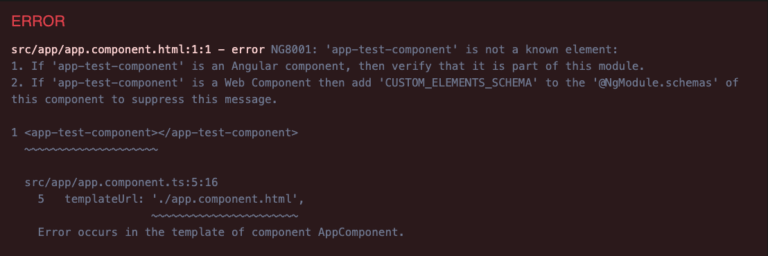
Error Message in Angular-16

The newly introduced feature addresses this issue by enabling us to explicitly indicate that an input is required, either through the @Input decorator.

Copy
@Input({required: true})
title!: string;

or the @Component decorator inputs array:

@Component({
 ...
 inputs: [
   {name: 'title', required: true}
 ]
})

Nevertheless, the new solution possesses two significant limitations. Firstly, it solely functions in Ahead-of-Time (AOT) compilation and does not apply to Just-in-Time (JIT) compilation.

Secondly, it remains affected by the strictPropertyInitialization TypeScript compilation flag, which is typically enabled by default in Angular (as it is recommended and beneficial).

TypeScript will generate an error for this property since it is declared as non-nullable but lacks initialization in the constructor or inline declaration.
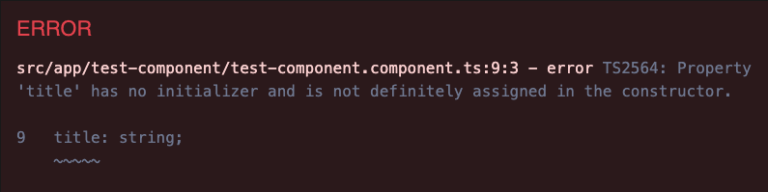
error message in new angular version 16

Hence, it is necessary to disable this check in order to proceed. One way to achieve this is by explicitly indicating the non-nullability of the property using the non-null assertion operator, even though it must be provided in the consumer template.

5. Esbuild Dev Server

Ng build and ng serve in Angular version 16 now have experimental support for esbuild.

For development server purposes, Angular now utilizes Vite in ng serve. Additionally, both development and production builds are powered by esbuild.

Many developers preview esbuild improvements by starting their angular application through run the following command and visiting http localhost 4200.

Copy
...
"architect": {
"build": { /* Add the esbuild suffix/*
"builder": "@angular-devkit/build-angular:browser-esbuild",
...

To enable the use of “@angular-devkit/build-angular:browser-esbuild” instead of “@angular-devkit/build-angular:browser”, you should make this change here.

6. Binding router Information to Component Inputs

With this capability, the routing data mentioned below will be easily accessible in the dynamic component as input.

As a result, we can utilize inputs to retrieve these values instead of relying on ActivatedRoute. This approach can significantly benefit our application by eliminating a significant amount of redundant code.

Related Post: Resolver in Angular

  • Router data
  • Resolved router data
  • params
  • query Params
Copy
// The current approach, which remains functional.

@Component({
...
})
class SomeComponent {
route = inject(ActivatedRoute);
data = this.route.snapshot.data['dataKey'];
params = this.route.snapshot.params['paramKey']
}
//New approach
@Component({
...
})
class SomeComponent {
@Input() dataKey: string;
@Input() paramKey: string;
//or
@Input() set dataKey(value: string){
//react to the value
};
@Input() set paramKey(value: string){
//react to the value
};
}

7. takeUntilDestroyed and DestroyRef

Gradually, Angular is facilitating a more functional coding style. One step in this direction is the inclusion of the DestoryRef and takeUntilDestroyed RxJS operators. These operators serve as replacements for the ngOnDestroy component’s lifecycle hook.

Previously, if we desired to use ngOnDestroy within functions, it was not possible since it relied on classes.

Copy
@Component({})
class SomeComponent {
destroyRef = inject(DestroyRef);
store = inject(Store);
user
constructor() {
const sub = this.store.select(getUser()).subscribe((user) => {
this.user = user
});
destoryRef.onDestroy(() => {
sub.unsubscribe()
})
//OR
const sub = this.store.select(getUser()).pipe(takeUntilDestroyed())
.subscribe((user) => {
this.user = user
});
}
}

The usage of the takeUntilDestroyed operator is restricted to the constructor context exclusively. If we intend to utilize it outside of the constructor, we need to provide destroyRef as an argument.

In contrast to subscriptions in RxJS, this functionality is internally utilized to handle the cleanup of signal impacts. Consequently, no manual cleanup is required.

Related Post: Angular best practises

Additional features of Angular 16

  • The introduction of standalone schematics in the developer preview allows for the creation of new Angular projects as standalone entities, providing a streamlined process.
  • The Jest testing framework is being experimentally supported, indicating ongoing development and exploration of its capabilities.
  • Developers working with Angular have the ability to specify a nonce attribute for component inline styles, which Angular then includes inlined.
  • In Angular templates, self-closing tags can be utilized to create closing tags for all the affected components, resulting in a more concise syntax.
  • Angular 16 brings an enhancement to the application performance and developer experience by introducing the option to link or bind route parameters with corresponding component’s inputs for the router.
  • The notable inclusion of TypeScript 5.0 support is particularly relevant for ECMAScript decorators that extend JavaScript classes, providing expanded functionality and compatibility.
  • Several schematics have been revised to facilitate independent applications, such as ng-new and the application schematic, the Angular Universal schematic, and the app-shell schematic.
  • Angular Universal allows Angular to render an app on the server, generating static HTML contents, which represents an app state.
  • In Angular 15, Angular Material transitioned to being built on MDC (Material Design Components). In version 16, the Angular team focused on incorporating design tokens from Material Design.

    This enables smoother migration to Angular Material 3 in the future and empowers designers and developers to extensively customize the user interface of their applications.

Easy Way to Install or Upgrade Angular 16

Angular offers multiple Angular development tools. Therefore, you just need to install Angular 16 via npm.

Execute the following cli command in the CLI:

npm install –global @angular/cli@next

Using this command, you can easily install Angular CLI’s latest version on your system. After installation, you can start your angular application using run the following command to open it in the browser at http localhost 4200.

Conclusion

Angular 16 builds on the foundation of Angular 15 and introduces powerful upgrades that significantly enhance application performance and developer productivity.

With a strong focus on reactivity and server-side rendering improvements, Angular 16 brings a more efficient approach to building fast and responsive web applications.

These updates are especially beneficial for AngularJS development companies aiming to create scalable and inclusive digital experiences.

Developers can now expect smoother workflows, faster builds, and improved rendering capabilities—helping deliver high-performance apps that meet modern user expectations and industry standards.
Angular 15: Everything You Need To About

Angular is an in-demand and open-source framework that has come up with astonishing updates of the new version. Yes, you read it right.

Angular 15 is now live.

After the successful launch of Angular 14, Angular 15 is back with more and more exciting updates and allowing Angular developers in building robust applications.

Yeah, I know you all are too enthusiastic to see what’s new in Angular 15. So, let’s start to see what new updates have been introduced in the latest Angular version 15.

Key Takeaways

  • Angular, the most popular front-end framework, has officially jumped into the new version of Angular 15.
  • The Angular development team has primarily focused on stability concepts.
  • We’ve highlighted a detailed overview of the latest features of Angular 15 along with the new updates that the Angular team at Google has included in the Angular 15 release.
  • A step-by-step guide to upgrading from Angular 14 to Angular 15 is shown with an example.

What is New in Angular 15?

Angular 15 was released on 16th November 2022 and brought several useful improvements that developers had been hoping for.

One of the most notable updates is the simplified standalone components, which reduce the need for NgModules, making code cleaner and easier to manage. Angular 15 also improved server-side rendering and made the CLI faster and more efficient.

These updates help developers build more efficient applications with less setup. For anyone working with Angular, these changes make the framework easier to use and more powerful for modern web development.

Angular 15 came with some limelight and interesting new features like

  • Stable standalone components API
  • Develop a multi-route application
  • Directive Composition API
  • Stable “NgOptimizedImage” Image Directive
  • Easily Reduce Boilerplate in Guards
  • Better Stack Traces For Debugging Process
  • CDK Listbox
  • ESBuild Support of Angular 15

Sounds interesting, Right. These are the major updates that are introduced in the Angular 15 version. We’ve highlighted detailed information on all such major features of Angular latest version 15.

In this article, I hope that you have a clear idea of what is Angular and what it’s main used for.

Develop User-Friendly Web Applications with Angular 15

We have a team of Angular developers who are proficient in developing web and mobile apps using Angular version 15.

Contact Us

What are the Angular 15 Features?

Yeah! I know you all are too much excited to know about the inspiring features that are introduced in Angular 15. Let’s get a deep dive into all the technical aspects of current Angular version 15.

1. Stable Standalone Components API

Angular 15 introduced the Stable Standalone Components API, making it easier to build applications without using NgModules. This is a big change because it simplifies how developers structure and start Angular apps.

With this update, you can now bootstrap an Angular app using just one component, which makes development cleaner and faster. The standalone components also work fully with Angular features like HttpClient, routing, and Angular elements.

This update is ideal for both beginners and experienced developers. It provides a smoother learning path and reduces complexity in building modern Angular applications.

By becoming a stable feature in Angular 15, standalone components reflect the framework’s focus on performance and flexibility, and they are now supported across the entire ecosystem.

This means you can confidently use them in real-world projects, backed by Angular’s official guidance and documentation—making your development experience more efficient and reliable.

Copy
import {bootstrapApplication} from '@angular/platform-browser';
import {ImageGridComponent} from'./image-grid';

@Component({
 standalone: true,
 selector: 'photo-gallery',
 imports: [ImageGridComponent],
 template: `
   ... <image-grid [images]="imageList"></image-grid>
 `,
})
export class PhotoGalleryComponent {
 // component logic
}

bootstrapApplication(PhotoGalleryComponent);

In the above code, you can see that it mentions “standalone: true”. That’s an example of a standalone component API.

So, you do not have to declare components, directives, and pipes into NgModule. If you do that mistake, get ready to receive a big error on your screen.

With the help of stable Standalone APIs, you can effectively create Multi-Route Application

  • By using the new router standalone APIS, it becomes easy for you to design and build a multi-route application for your business needs.
  • Moreover, bundlers in Angular 15 are solely responsible for reducing the bundle size by reducing the unused features of the router, especially at the build time.

In case, if you want to import NgModule in your standalone component APIs of Angular application, do it by simply writing import: [module_name] and you are good to go.

Often, there exist many advantages to using the Angular framework, but Angular 15 possess more functionalities as compared to previous versions.

2. You Can Now Easily Develop a Multi-Route Application

Yes, you read it right. Angular 15 is now ready with an essential functionality named router standalone API that makes it easy for you to build multi-route applications.

First, let’s declare the root route for your Angular application.

Copy
export const appRoutes: Routes = [{
 path: 'lazy',
 loadChildren: () => import('./lazy/lazy.routes')
   .then(routes => routes.lazyRoutes)
}];

Next, you can declare lazyRoutes as:

Copy
import {Routes} from '@angular/router';

import {LazyComponent} from './lazy.component';

export const lazyRoutes: Routes = [{path: '', component: LazyComponent}];

Remember that you have to register the appRoutes in the bootstrapApplication method and call it using the ProvideRouter API, which is tree-shakable!

Copy
bootstrapApplication(AppComponent, {
 providers: [
   provideRouter(appRoutes)
 ]
});

3. Angular 15 Comes With Directive Composition API

All Angular developers working with leading AngularJS development company, including me, were waiting for a feature where we could easily reuse the directives.

And that’s what the Angular team made possible for us by including Standalone Directive Composition API and made our development experience smooth.

Want to know how? Directive Composition API makes code usability enhancement and boosts host elements with directives. However, always remember that Directive Composition works only with standalone directives.

Copy
@Component({
 selector: 'mat-menu',
 hostDirectives: [HasColor, {
   directive: CdkMenu,
   inputs: ['cdkMenuDisabled: disabled'],
   outputs: ['cdkMenuClosed: closed']
 }]
})
class MatMenu {}

You can see from the above code that the “MatMenu” selector has two hostDirectives: HasColor and CdkMenu.

It means that MatMenu can reutilize all the properties from these two directives. Simply put, it can be inherited with the inputs, outputs, and logic associated with the HasColor directive and only logic and input from CdkMenu.

4. Stable “NgOptimizedImage” Image Directive

In the Angular 14 version, we’ve seen that one of the best ways to load image performance was by using the NgOptimizedImage directive. But it’s good news for Angular developers that the option of Image directive has become stable now.

With the launch of Angular 15, there are some minor updates in NgOptimizedImage

  • Automatic srcset Generation: You can now automatically generate srcset for uploading an appropriately sized image when requested. It’s going to minimize the image download time.
  • Fill Mode [experimental]: This feature of Angular 15 eliminates the need for declaring image dimensions and will fill an image to its parent container. Trust me; it’s a pretty compelling model when the i image dimensions are unknown to web developers or you need to migrate the CSS background image to use the image directive.

Now, let’s see how we can use the standalone NgOptimizedImage directive.

You can use NgOptimizedImage inside your Angular component or NgModule.

Copy
import { NgOptimizedImage } from '@angular/common';

// Include it into the necessary NgModule
@NgModule({
 imports: [NgOptimizedImage],
})
class AppModule {}

// ... or a standalone Component
@Component({
 standalone: true
 imports: [NgOptimizedImage],
})
class MyStandaloneComponent {}

You just have to replace image src with ngsrc, especially when you’re using an Angular image directive within a specified component. It plays a vital role in determining the priority attribute to optimize the speed for the LCP images.

5. Easily Reduce Boilerplate in Guards

It’s a practical concept. So, let’s dive deep into the example without taking much time. First, we’ve defined guards to verify whether the user has logged in.

Copy
@Injectable({ providedIn: 'root' })
export class MyGuardWithDependency implements CanActivate {
 constructor(private loginService: LoginService) {}

 canActivate() {
   return this.loginService.isLoggedIn();
 }
}

const route = {
 path: 'somePath',
 canActivate: [MyGuardWithDependency]
};

Here, you can see that LoginService contains the main logic, wherein the guard – only isLoggedIn() is one trigger invoked. As many boilerplates are included in this code segment, need to reduce it to the maximum.

Thanks to Functional Router Guards, you can easily refactor code into the given-below code with the necessary boilerplates.

Copy
const route = {
 path: 'admin',
 canActivate: [() => inject(LoginService).isLoggedIn()]
};

One of the excellent parts about Functional Guards is that they are purely compostable.

So, it brings convenience to you in many ways, including building robust functionalities like factor-like functions, accepting a given configuration and returning a guard or function that resolves a matter.

6. Better Stack Traces For Debugging Process

Angular’s latest version has made debugging much easier by improving how stack traces are shown.

Now, when an error occurs, developers see clearer and more helpful messages that directly point to the problem in their own code, not in third-party libraries. This saves time and reduces confusion during development.

Previously, Angular’s stack traces often showed long and complex outputs, making it hard to spot the actual issue.

With this improvement, developers can now identify and fix bugs more quickly and confidently, making the development process smoother and more reliable.

First, let’s see the snippet for previous error indications:

Copy
ERROR Error: Uncaught (in promise): Error
Error
   at app.component.ts:18:11
   at Generator.next (<anonymous>)
   at asyncGeneratorStep (asyncToGenerator.js:3:1)
   at _next (asyncToGenerator.js:25:1)
   at _ZoneDelegate.invoke (zone.js:372:26)
   at Object.onInvoke (core.mjs:26378:33)
   at _ZoneDelegate.invoke (zone.js:371:52)
   at Zone.run (zone.js:134:43)
   at zone.js:1275:36
   at _ZoneDelegate.invokeTask (zone.js:406:31)
   at resolvePromise (zone.js:1211:31)
   at zone.js:1118:17
   at zone.js:1134:33

Developers were not able to understand the ERROR snippets due the following reasons:

  • Third-party dependencies were solely responsible for such error message inputs.
  • You were not getting any information related to where such user interaction encountered this bug.
  • With an active and long collaboration with the Angular and Chrome DevTool team, it was pretty useful for the Angular community to perform integration with third-party dependencies (with the help of node_modules, zone.js, etc.); and thus, could achieve linked stack traces.

Now, with Angular 15, you can see the improvement in the stack traces as mentioned below:

Copy
ERROR Error: Uncaught (in promise): Error
Error
   at app.component.ts:18:11
   at fetch (async) 
   at (anonymous) (app.component.ts:4)
   at request (app.component.ts:4)
   at (anonymous) (app.component.ts:17)
   at submit (app.component.ts:15)
   at AppComponent_click_3_listener (app.component.html:4)

The above code shows that error message information from where it got encountered,, so developers can directly go to that code part and fix it immediately.

7. Stable MDC-Based Components

MDC stands for Material Design Components, which are pre-built UI components that implement the Material Design specification. Angular provides a way to use MDC-based components in your application through the Angular Material library.

Angular Material is a UI component library for Angular that is built with Material Design principles in mind.

It provides a set of building UI components that can be easily integrated into your Angular application.

Angular Material design components typically uses MDC web components under the hood, which means that the components are built using the same CSS and JavaScript as the MDC components.

Some of the Angular Material components include buttons, cards, menus, dialogs, and many others. These components are fully customizable and can be styled to fit the look and feel of your application.

To use Angular Material in your application, you need to install the @angular/material package and automatically import components and the required modules in your application module. Here’s an example:

Copy
import { NgModule } from '@angular/core';
import { MatButtonModule } from '@angular/material/button';
import { MatCardModule } from '@angular/material/card';

@NgModule({
  imports: [
    MatButtonModule,
    MatCardModule
  ],
  exports: [
    MatButtonModule,
    MatCardModule
  ]
})
export class MaterialModule { }

8. CDK Listbox

CDK (Component Dev Kit) offers different behavior user interface primitives that help you build UI components.

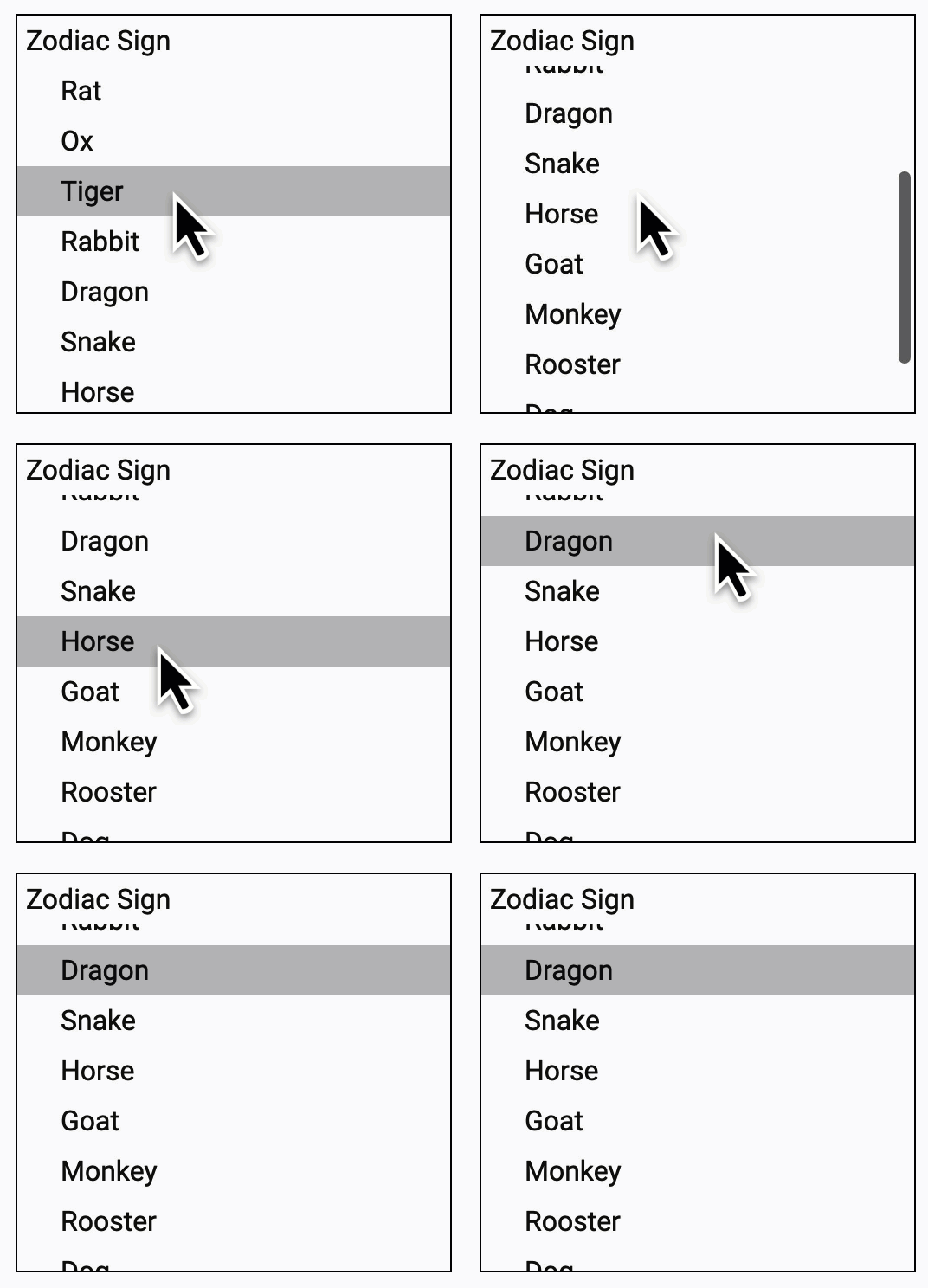
The Angular v15 gets a new primitive called CDK Listbox, making it easy for the Angular developers to customize Listbox interactions drawn up by the WAI-ARIA Listbox pattern based on requirements.

CDK Listbox angular 15

Here, the behavioral interactions have impressive features like keyboard interactions, bidi layout support, lazy loading, and focus management.

Moreover, it does not matter what you use; every directive creates associated ARIA roles with respective host Angular elements.

9. ESBuild Support of Angular 15

In the previous version of the Angular framework, you can efficiently support esbuild to effectively build a faster javascript bundler, enabling quick build done by simplifying the server-side rendering pipeline.

The Angular 15 comes up with new experimental support for the ng build –watch support, Sass, SVG template, and file replacement.

Now, let’s see the command for upgrading the angular.json builder is:

“builder”: “@angular-devkit/build-angular:browser-esbuild”

10. Functional Router Guards

Functional Router Guards in Angular help reduce boilerplate code by using a more streamlined and flexible approach to route protection.

Introduced with the standalone router APIs, these guards are tree-shakable, which means unused code is automatically removed—helping you keep the final bundle size smaller.

They also allow for easier refactoring and cleaner syntax, making your Angular applications more efficient and maintainable.

Related Post: Resolver in Angular

How to Install Angular 15?

Angular is one such robust framework that comes up with multiple Angular development tools. Installing Angular 15 on your system is very easy, you just need NPM installed in your system.

Command to install Angular 15: npm install – global @angular/cli@latest

How Can You Upgrade to Angular 15?

If you’re already using Angular version 14 or lower, and you want to upgrade to Angular 15, you need to type the following command.

Command: ng update @angular/cli @angular/core

Please follow Angular Update Guide

Upgrading from Angular 14 to Angular 15

  • If you want to use Angular 15, the foremost thing to perfect is updating Node.js versions to either of the 14.20.x, 16.13.x and 18.10.x.
  • Apart from Node.js updates, you need to mandatorily update the TypeScript version to 4.8 or later before approaching upgrading to Angular version 15.
  • Simply provide the command: ng update @angular/core@15 @angular/cli@15 in the application project directory to make your Angular 15 application update.
  • You can simply run ng update @angular/material@15 to update the Angular Material components.
  • For Angular version 15, the primary role of the Angular compiler is to prefix your @keyframes in CSS with the component’s scope. So, it becomes essential to update all such instances to specifically define Keyframes programmatically using Angular compiler. To do that, you just need to use global stylesheets, or simply update or make minor change in the component’s view encapsulation.
  • Removing enableIvy from the tsconfig.json file is an essential factor, as it is the only rendering engine in Angular 15, so it is not required.
  • Angular 15 developers can effectively use decorators in base classes with child classes. It will simply inherit constructors and use Dependency Injection for the Angular app. So, you need to decorate the base classes with either @Injectable or @Directive otherwise, else get ready to view the error from the compiler.
  • In Angular latest version 15, you can effectively call the setDisabledState, especially when a ControlValueAccessor is attached. It is made possible using FormsModule.withConfig or ReactiveFormsModule.withConfig.
  • You just need to ensure that all ActivatedRouteSnapshot objects have a title property in your Angular code. In v15 of Angular, ActivatedRouteSnapshot’s required property typically requires the title property.
  • In version 15 of Angular, you cannot configure relativeLinkResolution in the Router. It is primarily used to opt-out of the previous bug fix in the Angular 15 application that is now standard.
  • It’s mandatory for you to simple update instances of the DATE_PIPE_DEFAULT_TIMEZONE token to use DATE_PIPE_DEFAULT_OPTIONS for time zone configuration. The DATE_PIPE_DEFAULT_TIMEZONE token is deprecated In Angular version 15.
  • Existing instances of <iframe> may have security-sensitive attributes applied to them as an attribute or property binding. These security-sensitive attributes can appear in a template or in the host bindings of a directive. You need to such occurrences with regular updates for ensuring compliance with the new and stricter rules for <iframe> binding of the Angular 15 app.
  • Injector.get() instances that use an InjectFlags parameter should be updated to use an InjectOptions parameter. Injector.get(InjectFlags )’s parameter is deprecated in v15.
  • You need to change the instances of TestBed.inject() to use an InjectOptions parameter in Angular application. In Angular 15, the InjectFlags parameter of TestBed.inject() is deprecated.
  • In Angular 15 version, you will find deprecation in using providedIn: ngModule for an @Injectable and InjectionToken. And also in using providedIn: ‘any’ for an @Injectable or InjectionToken.
  • Likewise, you can effectively use the RouterLink directive for updating instances of the RouterLinkWithHrefdirective. In Angular 15, you’ll find deprecation with RouterLinkWithHref directive.
  • In Angular Material v15, the refactorization of many Angular web components has been performed on the official MDC. It eventually affects the DOM and CSS classes of many components available in the Angular app 15.
  • Once you upgrade your web application to Angular 15, you can quickly review your business application and its interactions to cope with the smooth functioning of all the application features including lazy loading functionality.

Related Post: Angular Best Practices

Conclusion

What are you waiting for? Upgrade to Angular 15 and grab the Angular 15 new features to build a robust and secure web application for your business needs.

Angular 16 is now available, and you can install it without obstructions. Still, if you find any issue in installing or planning to develop front-end development services, consult Albiorix now.