





What is ReactJS? Best Features & Great Benefits Explained

Nowadays, the demand for mobile and web application development is increasing day by day. So, it becomes essential to understand the concept of front-end frameworks that can make your work easier.

One such popular front-end JavaScript library is ReactJS. You can refer to React.JS in many ways like React or ReactJS. And if we talk about Fortune 500 companies, they use ReactJS.

Do you know that ReactJS is one of the most commonly used web frameworks among developers worldwide, as of 2021?

Here, we will discuss some of the basic concepts of what is ReactJS and its features introduced in this blog post to make a clear understanding of opting for React framework rather than other Javascript frameworks.

What is ReactJS?

Jordan Walke is the creator of ReactJS. The first deployment of React was done on Facebook’s newsfeed in the year 2011 and then in 2012 on Instagram.

An open-source library used explicitly for building robust user interfaces for SPAs (Single Page Applications) is ReactJS.

React is a client-side JavaScript library, which means it runs on the client/user’s machine in the browser as opposed to running on a server.

React makes it easy for you developers to create web applications that can change or synchronise your data without reloading the page.  The primary purpose of React is that it can be used to handle the view layer for web and mobile apps.

It also allows the ReactJS developers to create reusable UI components. React UI frameworks help to create a great-looking interface for your React application.

What is ReactJS Used For?

As defined earlier, React is nothing but a JS library that makes it easy for you ReactJS developers to design and build user interfaces or UIs.

User interfaces are the set of on-screen menus, search bars, buttons, and someone that can efficiently interacts with to use specifically for websites and web applications.

Just before the launch of the ReactJS framework, it was pretty challenging for React developers to build UIs by hand by specifically using “vanilla JavaScript” (plain JavaScript language) or with minimal UI-focused React predecessors like jQuery.

Related Post:Common Difference Between jQuery vs Angular

In simple words, React is a boon for dealing with longer development times and plenty of opportunities for errors and bugs. So, in 2011, Jordan Walke came up with an idea to launch React JS to improve UI dev process.

In addition to providing reusable React library code to save development time and reduce the chance of coding errors), React comes with two key features that add to its appeal for JavaScript developers:

  • JSX
  • Virtual DOM

To get an even better understanding of React JS and why you should use it, let’s take a look at both concept in detail in the next section.

Related Post: Vue vs React – Which Framework Should You Opt For Business

Top 7 Reasons for Using ReactJS For Web Development

Now, it’s time to highlight some of the reasons that will clear your doubts on why React is better than other Javascript frameworks. You’ll be surprised to know that React JS is most commonly used framework as per the Statista report.

top-7-reasons-for-using-reactjs

Create Dynamic Applications Faster

Compared to Javascript, React makes it easy for any software engineer to deal with less coding and offers more functionality. So, it will help you get rid of some complex coding and make the dynamic applications faster and safer.

One of the best option is to consult the best ReactJS development company that will help you design and build web app faster.

Improve Application Performance

With its active use of Javascript virtual DOM (Document Object Model), React is solely responsible for designing and building web applications faster. Yes, you read it right.

The working process of virtual DOM is relatively simple. First, the comparison of the component’s previous state is done and is updated only when the items in RealDOM are changed.

So, you do not have to update all the components again, as we usually do in conventional web applications.

Make Use of Reusable Components

For any React project, components are the heart of it. A single app may have multiple components. All such components typically have their logic and coding behind them.

The good part of React is that you can add as many components without worrying about the application’s performance. You can even reuse them multiple times.

Follow Unidirectional Data Flow

React follows a unidirectional data flow. When you design a new React app, you often nest child components within parent components. Right?

Often, it’s one of the best practices that you need to follow.

The data flows in a single direction in React, making it easy for you the developers to debug errors and identify where a problem occurs in an application at the moment in question.

Deal with Small Learning Curve

The application dev with React is easy, and you can quickly learn React application development process faster. React combines the concepts of core HTML and Javascripts with some additional functionality.

Develop Both Web and Mobile Apps

React is solely responsible for developing applications for both web and mobile-based. 

React supports a framework called React Native, which allows you to create responsive mobile applications.

Perform Easy Debugging with Dedicated Tools

Facebook has released a Chrome extension that can be used to debug React applications. This makes the process of debugging React web applications faster and easier.

Easily Develop Robust User Interface With Our ReactJS Development

Albiorix is a ReactJS development company having a team of expert ReactJS developers that can efficiently build web applications that drive business growth.

Contact us

Best 8 Features of ReactJS

ReactJS is nowadays gaining quick popularity among web developers as the best Javascript framework for developing web applications. It is playing an essential role in the front-end ecosystem.

Let’s highlight some of the major Reactjs features.

key features of reactjs

JSX – JavaScript Syntax Extension

JSX (JavaScript XML), a Javascript syntax extension, is usually used with React to represent how the user interface should look.

In simple words, JSX is nothing but an XML or write HTML structures that is specifically used by the ReactJS framework.

JSX allows the developers to write an HTML coding structure in the same file where the Javascript code is written. Moreover, React makes the coding easier to understand and debug.

With the help of JSX, you can easily embed JavaScript objects inside the HTML or React elements. Let’s go ahead with a straightforward example of React element that represents the implementation of JSX.

Let’s go ahead with a straightforward example of React that represents the implementation of JSX.

Copy
const name = Albiorix Technology;

const greet = <h1>Hello, {name}</h1>;

As you can see in the code, it’s neither a string nor HTML. Instead, it embeds HTML into JavaScript code.

Related Post: Angular vs React

As you can see in the above code, it’s neither a string nor HTML. Instead, it embeds HTML into JavaScript code. This feature is the perfect one if the developer is completely aware of the basics of HTML and JavaScript.

Virtual DOM

DOM means “Document Object Model”. DOM plays an essential role in the life of web developers as it divides into modules and executes the code.

Usually, JavaScript Frameworks or other frameworks typically update the whole DOM at once, which makes the web application slow.

All the representations of the “real” DOM are kept in the memory in React, and that is “virtual” DOM (VDOM).

React keeps a lightweight representation of the “real” DOM in the memory, and that is known as the “virtual” DOM (VDOM).

If we talk about manipulation, real DOM is much slower than VDOM. The primary reason behind it is that it gets nothing drawn on the screen when you change the code.

For example, when you make any change to only that object state, VDOM is responsible only for that particular object, rather than updating all the objects available.

To make it simple for you, let’s understand the meaning of DOM and how it works.

reactsj-data-flow

DOM treats an XML or HTML document as a tree structure in which each node is an object representing a part of the document.

The interaction of Virtual DOM and React DOM with each other is very straightforward.

  • A VDOM gets updated only when there is any specific object change in React app.
  • A comparison with the previous state object is performed, and then only the update is done for that specific object in real DOM or React DOM, rather than updating all the available objects.

As compared to other frameworks, this will lead to fast dev process.

Performance

Applications developed using ReactJS are always top performers. The primary reason is the virtual DOM. The DOM is a cross-platform and programming API that specifically deals with HTML, XML or XHTML. The React DOM exists entirely in memory.

As React uses VDOM, web development becomes much faster than those developed with alternate front-end frameworks.

React breaks a complex user interface into individual class components, allowing multiple users to work on each functional component simultaneously, speeding up the dev time.

One-way Data Binding

This remarkable feature of React keeps everything modular and fast.

With its unidirectional data flow, React allows you to nest child components within parent components during the designing phase of React development.

A developer has complete control over the whole application, and most importantly, they are aware of where and when an error occurs.

Debugging

The testing of React applications is made easy, and it’s just due to a large developer community.

The excellent part of React is that Facebook provides a small browser extension that makes React debugging faster and easier, as you can see in the below figure.
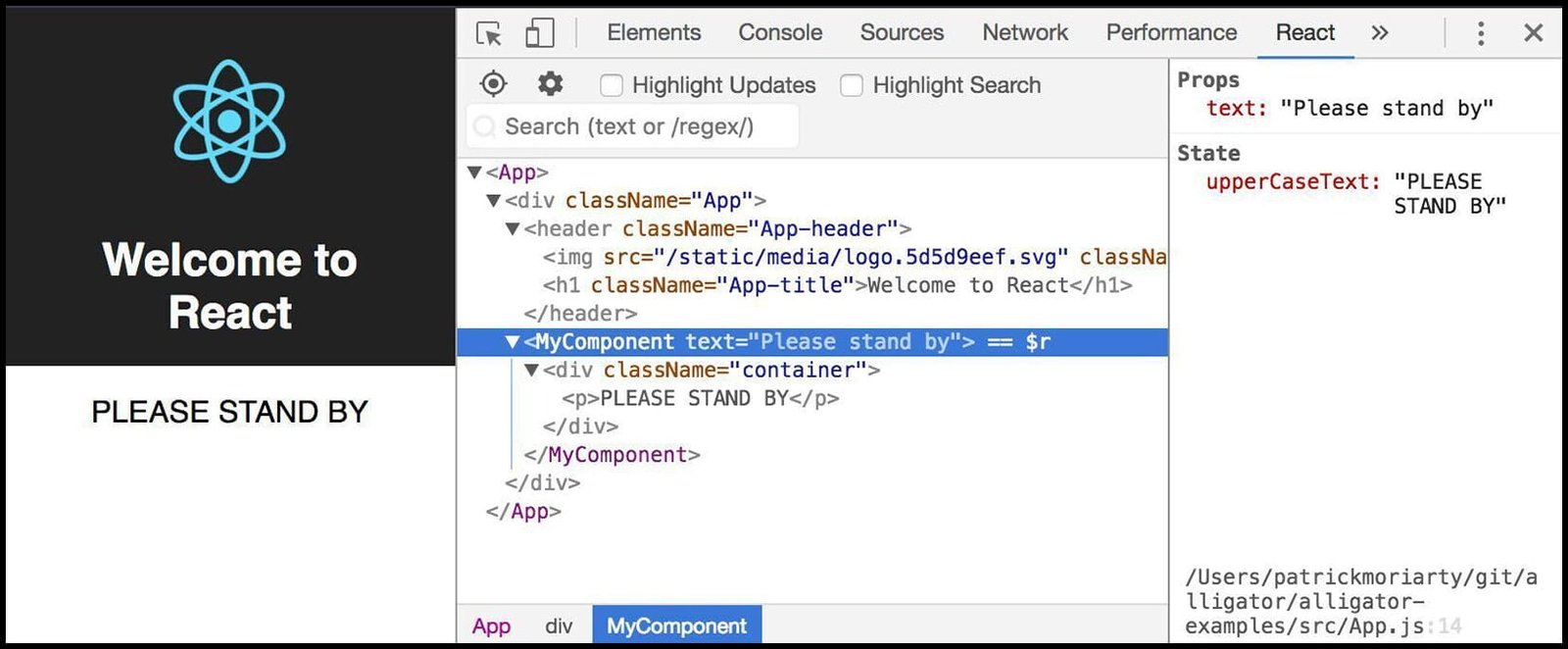
reactjs devtools

Once you add the extension, a React tab will be made available in the developer or React devtools options in the Chrome browser. So, the developers can quickly inspect React components or we can say function components directly.

Now, let’s take a look at React’s essential concepts.

Components

A component is essentially a piece of the user interface. React splits the UI into independent, reusable parts that can be processed separately.

Generally, there are two main types of React components.

  • Stateless Functional components
  • Stateful Class component

First, we’ll see the meaning of stateless components. They have no state object of their own and only contain a render method.

With the help of render method,, you may derive data from other React components as props (properties flow).

Copy
function Example(props) { return <h1>Welcome to {props.name}</h1>;
}

On the other hand, stateful class components can hold and manage their state and have a separate render method for returning JSX on the screen. Therefore, as they have a state, so we call it a Stateful component.

Copy
class app extends React.Component {render() {

return <h1>Welcome to {this.props.name}</h1>;

}

}

State

The state is a built-in React object that is used to contain data or information about the component. A component’s state can change over time; whenever it changes, the parent component re-renders.

The change in state can happen as a response to user action or system-generated events, and these changes determine the behavior of the component and how such event handlers will render.

Copy
class Example extends React.Component {state = {

name: "World"

};

updateName() {

this.setState({ name: "Albiorix Technology" });

}

render() {

return

<div>

{this.state.name}

</div>

)

}

}

Props

React Props (properties) is a React built-in Javascript object that stores a tag’s attributes and works similar to the HTML attributes.

It provides a way to pass data from one component and data patterns to other components in the same way as arguments are passed in a function. Such data patterns improve readability for your React application.

These are the common ReactJS advantages that the developers need to take care of. Meanwhile, you can have a look at some of the best reasons for using ReactJS for front-end development.

Related Post: NativeScript vs React Native

Conclusion

To summarize, React JS

  • Is an open-source and flexible javascript library designed by Facebook to create single-page web or mobile applications.
  • Allows you to create reusable UI components.
  • Makes it easy for you to create web apps that can change data, without reloading the entire page.
  • React creates virtual data tree and detects new changes and updates the UI accordingly.
  • Enables you to deal with data flow always in a single direction.

React JS is a powerful framework that is specifically used by multiple software engineers globally. It allows you to design and build React apps more robust as compared to other front-end frameworks. Many businesses partner with a Software development company to fully leverage its component-based architecture and performance benefits.

I hope you got the basic overview of what is ReactJS. We have come across various advantages of using ReactJS for better design and deployment.

What are you waiting for? Build your web and mobile apps with ReactJS today and improve app performance, Contact Us to get started with expert guidance.


Ionic Framework v6: Exclusive and Surprising Features to Know

What is Ionic Framework?

Ionic framework is a complete open-source SDK for hybrid mobile app development created by Max Lynch, Ben Sperry, and Adam Bradley of Drifty Co. in 2013. 

Ionic is an open-source mobile toolkit for developing high-quality, cross-platform native and web apps for business. Ionic has the capability to Move faster and quick with a single code base, ionic can run everywhere with JavaScript and the Web.

The current version of ionic framework stable release 6.2.0 has been released on 27 July 2022 and it is now available in the market. At Ioniconf 2021, the Ionic Framework v6 was announced globally.

Ionic Framework has come far from its roots as an AngularJS-only UI library to a genuinely cross-platform framework for building Web Native applications. 

In this article, you’ll come across the features that will make it easy to smoothly build Android and iOS applications.

5 Best Features Introduced in current Version of ionic 6

So if you are thinking of choosing Ionic for app development, know the new features of Ionic 6 before you start development.

features of ionic 6

1. Upgradation is Quicker

As compared to Framework v5 that has been released in February 2020, the up-gradation process is done more efficiently than ever. Framework v6, introduced in July 2022, will help mobile app developers deal with almost half of the breaking changes available in v5.

Some of the summaries of new features introduced in the Ionic version 6 include:

  • Ionic 6 supports Angular 12+
  • Ionic 6 supports React 17+
  • Ionic 6 supports Vue 3.0.6+

And the good part is that you’ll not require to deal with any type of action from your end.

2. Components

Ionic Framework current version 6 has come up with some new components, making it easy for mobile app developers to build responsive mobile and desktop experiences.

Do you know how? We’ll show you the example of some of the components introduced in Ionic Framework v6

ionic Accordion

Tag: <ion-accordion> 

You can easily organize with large amounts of content in an easy-to-understand way. Accordion allows you to deal with:

  • Smooth animations
  • Keyboard support
  • Reduced motion accessibility

Moreover, it is well-known for its flexibility and can be used on both mobile and desktop applications.

A basic example of <ion-accordion>

The primary use of ionic accordion is to provide collapsible sections in the content to reduce vertical space while providing a way of organising and grouping information. All ion-accordion components should be grouped inside ion-accordion-group components.

Copy
><ion-accordion-group>
<ion-accordion value="first">
<ion-item slot="header" color="light">
<ion-label>Accordion - 1</ion-label>
</ion-item>
<div class="ion-padding" slot="content">
Content of First Accordion Goes Here…
</div>
</ion-accordion>
<ion-accordion value="second">
<ion-item slot="header" color="light">
<ion-label>Accordion - 2</ion-label>
</ion-item>
<div class="ion-padding" slot="content">
Content of Second Accordion Goes Here… 
</div>
</ion-accordion>
<ion-accordion value="third">
<ion-item slot="header" color="light">
<ion-label>Accordion - 3</ion-label>
</ion-item>
<div class="ion-padding" slot="content">
Content of Third Accordion Goes Here …
</div>
</ion-accordion>
</ion-accordion-group>

Likewise, the Ionic app developers can even Toggle Accordions​ as per the needs.

Which accordion is open is controlled by setting the value property on the ion-accordion group. Setting this property allows developers to pro-grammatically expand or collapse certain accordions.

The example shown below demonstrates that the value of the third accordion needs to be toggled.

Copy
<ion-content>
<ion-accordion-group>
<ion-accordion value="first">
<ion-item slot="header" color="light">
<ion-label> Accordion - 1</ion-label>
</ion-item>
<div class="ion-padding" slot="content">
Content of Accordion 1
</div>
</ion-accordion>
<ion-accordion value="second">
<ion-item slot="header" color="light">
<ion-label>Accordion - 2</ion-label>
</ion-item>
<div class="ion-padding" slot="content">
Content of Accordion 2
</div>
</ion-accordion>
<ion-accordion value="third">
<ion-item slot="header" color="light">
<ion-label>Accordion - 3</ion-label>
</ion-item>
<div class="ion-padding" slot="content">
Content of Accordion 3
</div>
</ion-accordion>
</ion-accordion-group>

<ion-button onclick="toggleAccordion()">Toggle Second Accordion</ion-button>
</ion-content>

<script>
const accordionGroup = document.querySelector('ion-accordion-group');
var toggleAccordion = () => {
if (accordionGroup.value === 'third') {
accordionGroup.value = undefined;
} else {
accordionGroup.value = 'third';
}
}
</script>

Breadcrumbs

Tag: <ion-breadcrumbs>

Breadcrumbs provide essential context to users regarding where they are in your application and how they got there. 

Fully customisable and collapsable means that this component can tackle even the most complex of application setups.
A basic example of ion-breadcrumbs

Copy
<ion-breadcrumbs>

  <ion-breadcrumb href="#home">Home</ion-breadcrumb>

  <ion-breadcrumb href="#smartphones">Smart Phones</ion-breadcrumb>

  <ion-breadcrumb href="#newcameras"> New Launched Cameras</ion-breadcrumb>

  <ion-breadcrumb href="#ott">OTT Platforms</ion-breadcrumb>

</ion-breadcrumbs>

Datetime

Tag: <ion-datetime>

DateTime allows you to use the latest calendar picker styles on iOS and Android. 

Its responsive design, localisation support, and keyboard and screen reader integration are giant steps forward for the Ionic Framework.

3. Application Performance

Ionic Framework v6 has come up with lightning-fast Web Components and takes advantage of modern Web APIs.

Apps will be just as fast as native applications and will enhance the performance and bundling improvements to your Ionic Framework apps.

Build Highly-Scalable Mobile App For Business With Ionic

Albiorix is a one-stop solution for building mobile applications using the Ionic framework for all your business needs.

4. Designing Perspectives

Ionic Framework v6 now support with complete design functionality of Android and iOS applications.

For both Android and iOS, a new refresher style, updated toolbar, and modal styles for dark mode are new astonishing features.

5. Material Design

The Material Design mode in Ionic Framework v6 has input styles to support new filled and outline styles. Moreover,  you’ll find error and helper text slots in addition to a character counter. 

Conclusion

The ionic community have worked hard and sincerely on the feedback of the developers working on Ionic for years and introduced Ionic Framework v6.

For sure, current version of ionic framework Version 6 will make your work more straightforward than the previous version.  This latest version of Ionic Framework primarily focused on the frontend UX/UI interactions of an app—UI controls, interactions, gestures, animations, and integrations with React, Angular, and Vue.


Native App vs Hybrid App: Which is the Best One to Use?

Introduction

Creating a mobile app for the business is one of the most essential ideas for any business owner. The first question that they need to make a selection is whether they want to opt for a native app or hybrid app development.

Even though both are used primarily for mobile app development, there are some significant transformations between these two technologies. Many times, you might find it challenging to identify the difference between native and hybrid app.

To make it easy for you, we have come up with an article that demonstrates the basics of native vs hybrid app development.

What is a Native App?

A native app is a mobile application development methodology designed explicitly for a specific mobile operating system.

  • Objective-C or Swift for iOS
  • Java for Android

The most significant advantage of native apps is that:

  • It is Fast
  • It easily fits the features of any devices
  • It is developed to meet the target of user’s needs

On the other hand, you’ll need to perform more development, resulting in more time and cost.

You will be astonished that over 1000 apps on Google Play Store and Apple App Store are developed natively. This clearly shows the popularity of native app development when comparing native vs hybrid app performance.

Want to Create a Robust and Responsive Mobile App?

We help you create addictive, high-performance mobile Apps that drive user interaction, engagement and monetisation.


Contact Us

What is Hybrid App?

Combining all the essential features of both native and web apps is made possible using hybrid applications.

The excellent part of hybrid apps is that you can access them from a web browser and also download them from app stores. This is because they are written in HTML5 and JavaScript, just like web apps.

Hybrid apps are nothing but web pages wrapped in a mobile app using WebView. However, they also have access to the built-in capabilities of a device.

They are built using cross-platform frameworks like React, Ionic, Sencha, and Xamarin.

This approach is what makes the difference between hybrid app and native app clear — hybrid development saves time and resources by using a single codebase for multiple platforms.

Difference Between Native App vs Hybrid App

It’s time to see how native apps and hybrid apps are similar and different based on different parameters.

factors-that-differentiates-native-app-and-hybrid-app

Let’s highlight some additional points for the metrics for native app vs hybrid app, as mentioned above.

1. Development Costs

To design and build a mobile app from scratch is not too cheap.

It depends on various factors like:

  • Features you want to include in your app
  • The complexities that you need to overcome
  • Timing to build your mobile app
  • The number of resources you might require to develop and deploy your app

If we talk about native apps, the cost is higher than hybrid apps in terms of superior performance, development complexity, and time to build. Moreover, the codebase and design phase must be different for both Android app development and iOS app development.

In the case of hybrid apps, you only need to write one code that works well for both iOS and Android. As a result, it takes fewer resources to build, and this drastically reduces the cost.

So, hybrid apps are cheaper to develop as compared to native apps — and that’s one of the main differences between native and hybrid app development.

2. UI/UX Design

What are the essential factors that you, as a developer, need to keep in mind while developing?

  • Beautifully and responsive design
  • Easy to navigate
  • Simple to understand
  • Intuitive interface

Right? User experience and design are solely responsible for making your app successful.

Do you know that most mobile app users experience an adverse reaction, primarily due to poor user experience and design?

Native apps typically rely on Google and Apple’s native code. So, it’s pretty apparent that you’ll get better and longer-lasting design quality. In addition, it will make it easy for the users to understand and navigate your app easily.

The hybrid app works similarly. Users download the app and use it frequently, and if an update comes suddenly that isn’t supported by the HTML code, the app may crash.

Or, your app’s design and functionality work seamlessly on one device but terribly on another. Both experiences will affect your app’s overall rating and perception.

This is one major native and hybrid app difference — while native apps deliver a smoother and more responsive experience, hybrid apps sometimes face compatibility issues.

3. Application Performance

An application that performs well is the best one. Right?

But how do you determine that your app is performing well? It is determined by:

  • The speed with which your app responds
  • The intuitiveness of every function deployed in your application
  • Overall app behaviour

Native apps offer best-in-class security and highly responsive design. They provide users with a more seamless and reliable experience.

The hybrid app follows the basic principle: “write once, run anywhere.” It means that the speed of application development is fast compared to native apps.

Hybrid apps entirely depend on third-party plug-ins to bridge the gap between the website and the native container. But developers don’t always have full control over such tools.

Let’s say an operating system like iOS or Android comes up with a new feature — all the system changes and modifications are needed to continue running the hybrid app in its native container.

Hence, when discussing hybrid app vs native app, performance and control clearly lean in favor of native app development.

4. Speed to Market

Different business owners and companies have various reasons to build an app. But the primary goal is to stand out from their competition.

Building native apps might be costly, and you will intend to develop them quickly and on time.

Native apps do not allow you to run your app on Android and iOS using the same codebase. As a result, it often takes more time to build and deploy.

And if we talk about hybrid apps, it takes less time to build and deploy compared to native apps. Moreover, they also require your backend to be developed in parallel.

So, in terms of hybrid vs native app speed to market, hybrid apps have the advantage.

Are You Planning to Create Mobile App For Your Business?

Albiorix is a leading mobile app development company that possesses strong expertise in developing mobile apps.


Contact Us

Native App vs. Hybrid App: Which Approach is the Best?

The answer to this question — what is the difference between native app and hybrid app — ultimately depends on your business requirements.

If you have less time to develop an app, then hybrid app development may be the better option.

But do you want to develop an app with the best possible user experience, security, and performance? Then native app development is the best option.

In the native or hybrid app debate, you need to decide what matters more — performance and quality or speed and cost efficiency.

Conclusion

Understanding the difference between hybrid app and native app is crucial before you begin your mobile app development journey.

Each approach offers unique benefits:

  • Native apps provide unmatched performance, better UI/UX, and superior security.
  • Hybrid apps save time, cost, and allow faster cross-platform deployment.

If you’re still confused about native and hybrid app difference, connect with an experienced app development company that can guide you based on your goals, timeline, and budget.

Albiorix is the best choice for mobile app development as we have a team of talented mobile app developers who are always ready to provide the best possible native and hybrid app solutions for your business needs.

Angular vs React vs Vue Compare Best Front-end Framework

Summary: Angular, React, and Vue are the top three technologies for building modern user interfaces, each with distinct philosophies. Angular is a full-fledged, opinionated framework best for large enterprise applications, React is a flexible UI library ideal for dynamic UIs and a large ecosystem, and Vue is a progressive framework offering a balance of simplicity and power for projects of varying size.

Nowadays, you’ll come across many front-end Javascript frameworks that make your web development process more accessible than ever. But the main focus of the area is to select one of the best from the rest.

How will you achieve that?

Well, said enough, here in this article, we have come up with detailed information and differences between the three web development frameworks like Angular Vs. React Vs Vue.

Now you’ll ask why these three web frameworks.

The answer lies in the statistics shown below.

Now, let’s start with some basic information about these best Javascript frameworks to make it easy to select the best one and why you should go with it.

Key Takeaways

  • Angular, React, and Vue are all popular JavaScript frameworks used for building web applications.
  • Angular is a comprehensive framework that offers a lot of features out of the box, including a robust set of tools for building complex applications.
  • React is a library that focuses on the view layer of an application. It provides a simple, easy-to-learn API for building reusable UI components.
  • Vue is a progressive framework that can be used as a library or a full framework. It is similar to React in many ways, but with a few key differences. Vue has a simpler syntax than React, which makes it easier to learn and use.
  • Ultimately, the choice between Angular, React, and Vue depends on your specific needs and preferences.
  • If you need a comprehensive framework with a lot of built-in features, Angular might be the best choice.
  • If you’re looking for a library that focuses on UI components and is widely used, React is a good choice.

    And if you want a lightweight framework that’s easy to learn, Vue might be the way to go.

What is Angular?

Angular is the only typescript-based Javascript framework that allows you to fill the gap between the increasing technology stack demands and application performance strategies for your business web development process.

Launched in September 2016, Angular is an open-sourced JavaScript framework designed explicitly for developing web, single-page applications, and even mobile applications.

The first version was AngularJS. Then came Angular 2 (the most popular Javascript framework). Finally, Angular 14 version is here.

Being a proficient AngularJS development company, Albiorix has a team of expert Angular developers who strives to provide the best possible solutions.

What is React?

After having a look at what is Angular, React is the next on our list, which is actually not a framework but just a Javascript library developed by Facebook, which makes it easy for you to build UI components.

Not only this, React allows you to perform Javascript code in a more leisurely way that can be easily understood and deploy your application.

React Javascript frameworkuses server-side rendering to provide a flexible, performance-oriented solution. Albiorix is a ReactJS development companythat provides the best web app solutions for your business needs.

You May Also like To Read: Best React UI Frameworks

What is Vue?

Vue.js is a simple, easy-to-use frontend, and basic framework that overcomes complexities that you might face in Angular development.

The two main advantages that make Vue more familiar are: visual DOM and component-based architecture. Two-way binding is additional functionality apart from these benefits.

Vue.js is a flexible and progressive framework that allows you to build applications ranging from web, and mobile to progressive web apps. Sounds interesting, right?

Drive Your Business Growth With Single Page Application

Albiorix has an experienced Angular developers that can develop single-page apps using optimal structure.


Contact Us

Pros and Cons of Angular Vs React Vs Vue

It’s time to explore the pros of these three web development frameworks.

Pros of Angular

  1. As Angular is an entirely Google-supported platform, it allows you to develop dependable and trustworthy web apps and mobile apps as it deals with Google’s occasional updates and announcements.
  2. With the help of the Angular, you have the option to select any third-party integrations to enhance the performance of your Angular applications.
  3.  With its “ahead-of-time compiler” functionality, Angular provides quick load time and enhanced security. Angular easily compile HTML and TypeScript into JavaScript for building dynamic web applications. In simple words, all previous html code differences is compiled before the browser even loads your web app.
  4. The Angular applicationis equipped with advanced elements and modules that are customised, giving power to the developer and designers. The developers can easily include such elements to the application created using other Javascript frameworks, providing an attractive appearance to your application.
  5. If you have skills in dealing with dependency injection, then the Angular framework is a boon for you. In addition, the Angular is a complete framework that brings convenience to the developers to implement MVC architecture, even if they’re working with large-scale applications.

Cons of Angular

  1. The Angular is a complete dynamic solution to build web and cross-platform mobile applications; the learning curve is steeper to execute the operation.
  2. Angular sometimes follows a complex structure, making it challenging for the developers to code well during the web application development phase and making more complex apps.
  3.  Code optimisation and following the best angular practices are the negative points from the developer perspective.
  4.  For new techies, the Angular feature can be somewhat challenging.
  5.  The Angular Scopes are hard to debug Limited Routing.
  6.  You might face some complexities during the migration process.

Pros of React

  1.  With its simplicity in designing, React is easy to learn.
  2. React applications strictly follows HTML-like syntax, allowing developers to use templates and highly detailed proper documentation.
  3.  React allows developers to spend more time writing modern JavaScript and less time concerning the framework-specific code.
  4. React is a front-end development framework that supports server-side rendering and solid React elements, making it a robust framework for content-focused and complex applications.
  5.  Facebook offers a “codemod” feature to automate much of the process.
  6. React is a complete framework that can be easily used for developing native-based applications.
  7.  ReactJS, when combined with ES6/7, can effectively manage heavy application loads more efficiently.

Cons of React

  1. When developers integrate ReactJS with some traditional MVC framework, they need to deal with complex configurations for developing complex applications.
  2.  ReactJS developers must have in-depth knowledge related to the integration and building user interfaces into the MVC framework.
  3. React has a learning curve, especially for developers who are new to it or who have limited experience with web development in general. The framework has a lot of concepts and terminologies that may take time to understand.
  4. React only focuses on the view layer, which means it requires additional libraries or tools to handle other aspects of application development such as routing, form validation, and state management. This can lead to a more complex development process and a larger learning curve.
  5. React requires writing more boilerplate code than other front-end frameworks like Vue or Angular, which can be time-consuming and repetitive.
  6. React’s documentation can be confusing for beginners, and it may not always provide the best examples or explanations.
  7. React can overcomplicate simple tasks, leading to longer development times and increased complexity.
  8. React can have performance issues when working with large-scale applications or data-intensive operations, leading to slow load times and rendering speeds.

Pros of Vue

  1.  Small-size application
  2.  Low-storage requirements
  3.  Simplicity in designing and building applications
  4.  Detailed documentation
  5. Advanced reusable components
  6.  Secure and flexible

Cons of Vue

  1.  Language barriers and restricted community
  2.  Spoilt for options
  3.  Lacking scalability and plugins
  4.  Community-related limitations
  5. Lack of financial support for large-scale and complex projects.
  6.  Limited resources
  7.  Excessive code flexibility

Build Feature-rich and Scalable Web Applications

Albiorix have skilled developers that are always ready to build client-centric solutions.


Contact Us

Some Basic Differences Among Angular Vs React Vs Vue

It’s a high time to view the head-to-head comparisons between Angular vs React, Angular vs Vue, and Vue vs React? We have summarized it in an easier way that will make it easy for you to analyze them for your project requirements.

Angular vs React

Differences between Angular vs React

Let’s start with understanding the common difference between Angular vs React. We have seen almost all the possible pros and cons of both these technologies in the previous section. 

To state it easier, both Angular and React applications are the Javascript libraries that can be efficiently used for building web applications, mobile applications, and cross-platform applications like React Native mobile apps for your business needs.

At the same time, Angular is generally better for more complex enterprise-ready apps.

React is one such framework that typically requires extra modules and components, making the usage of the core Javascript library small; it means that you need to deal with some additional outside development tools for web application development for your business needs.

React is an UI library that is a boon for many intermediate to advanced JavaScript developers and those familiar with concepts from ES6 and up.

And if we talk about the Angular, it favours experienced developers who are familiar with TypeScript development services.

React vs Vue

Differences between React vs Vue

The subsequent comparison for React vs Vue, trust me, it’s not easy to debate. Vue is a feature-rich framework that comes up with a vibrant and ever-growing community, and of course, it has taken over popularity compared to React framework.

You’ll be surprised that React developers are still churning out many new components and extras, so no sign React is on the decline either, thereby has steep learning curve.

Vue is the best option for developing smaller, less complex apps, and if you’re a learner, then it is one of the superb options to start coding using VueJS development.

In addition, VueJS can be easier to integrate into new or existing projects, and many feel its use of HTML templates and JSX is an advantage.

Vue might be the best choice for new web developers, and you do not need to deal with some advanced JavaScript concepts.

On the other hand, React suits the best for experienced programmers and developers who have worked with object-oriented JavaScript programming language, functional JavaScript, and similar ideas.

Angular vs Vue

Differences between Angular vs Vue

Last, the comparison between Angular and Vue is one of the deciding critical factors for front-end development. Both technologies are different libraries with different feature sets and learning curves.

As a result, Vue is a boon for less experienced developers, and Angular is the perfect option for those working on more extensive or complicated programs.

The Angular framework brings more convenience to Angular developers by adding innovative features in every new Angular release. And if we talk about the VueJS framework, the difference between Vue2 Vs Vue3 says it all. 

And the excellent part about Vue is that the creator of this framework is a developer who formerly worked on Angular for Google. So that’s another thing to keep in mind, though that wouldn’t significantly impact your decision.

Comparison Table of Vue Vs React Vs Angular

FeatureAngularReactVue
Created byGoogleMeta (Facebook)Evan You
TypeFull frameworkUI libraryProgressive framework
LanguageTypeScriptJavaScript / JSXJavaScript / HTML templates
UI / DOM manipulationYesYesYes
State managementBuilt-inExternal libraryBuilt-in
RoutingBuilt-inExternal libraryBuilt-in
Form validationBuilt-inExternal libraryExternal library
HTTP clientBuilt-inExternal libraryExternal library

Let’s see the basic comparison of Angular Vs React Vs Vue.

Conclusion

Which is better for front-end development? Angular, React or Vue.

Ultimately, it depends on your project requirements and how you want to represent your application.

All the framework options that we’ve gone through in this article are the best to develop single-page applications.

Whatever your perception of the discussion about Angular vs React vs Vue, you need to make choices based on your requirement for functionality and usability.

Albiorix is a top-rated custom AI software development company having core expertise in leading Javascript and Typescript technologies.