




Migrating Legacy Apps to Angular: A Complete Guide

Are you still maintaining that decade-old app to manage your business operations? Do you feel like these old-age web and mobile apps are slow, difficult to scale, and complex to debug?

Do you feel like upgrading your existing apps to the latest version that’s more efficient, powerful, loaded with features, and scalable? If yes, then this blog is just right for you.

Every business, whether small or large, is breathing in a highly competitive market. In such scenarios, they cannot afford to depend on outdated web and mobile applications.

Using decade-old software that limits performance, security, and scalability can cost them their fortune. Still, many businesses use legacy software solutions with no technological support.

Moreover, these software solutions are not aligned with the latest industry standards and fail to meet the expectations of end-users.

Businesses that continue using such systems know how challenging it is to maintain them they’re expensive, vulnerable to hacks, and offer a poor user experience. That’s where Angular for web development comes into play.

Migrating legacy apps to Angular is the best way to step up to the new age tech trends. Angular is an open-source, front-end web application framework maintained by Google.

It is the most reliable, future-proof, and scalable framework to migrate your legacy apps to. It has a robust, scalable, and component-driven architecture that simplifies development, enhances performance, and ensures long-term maintainability.

In this blog on Legacy App Migration to Angular in 2026, we will discuss why you should migrate your legacy apps to Angular, step-by-step migration strategy, benefits of migrating legacy apps to Angular, and much more.

So, keep reading the blog if you are planning for legacy app migration in 2026.

What is Legacy App Migration?

Even though we are in the middle of a digital revolution that is powered by AI, most of the businesses are still using those decade-old web and mobile applications.

Legacy app migration is the process of transforming or upgrading your old software systems. It is the process of building modern, efficient, and scalable web applications using the latest tools and technologies.

It is very important to migrate your legacy app as it helps you streamline and automate your business operations and offer better customer services to your targeted audiences.

For Legacy App Migration in 2026, most of the businesses across the globe are placing their trust in Angular, an open-source framework by Google.

Legacy App Migration means moving your old AngularJS, .NET, or PHP-based app to a modern Angular environment. This migration allows businesses to enhance performance, security, and user experience.

The most interesting part of the legacy app migration is that you don’t have to rebuild the whole app from scratch.

When Should You Consider Legacy App Migration?
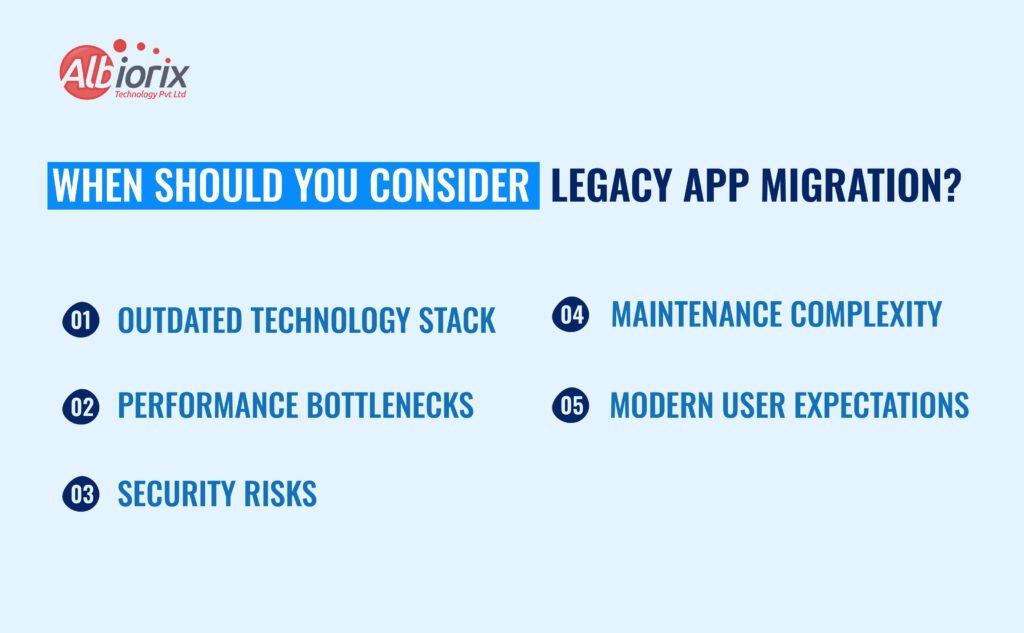
When Should You Consider Legacy App Migration

Legacy app migration becomes essential when your current software fails to meet business or industry standards. If your system is slow, hard to maintain, or incompatible with modern devices, it’s time to migrate.

Migration isn’t just a technical upgrade it’s a strategic move to stay competitive, secure, and adaptable to future innovations.

Here are five reasons to migrate legacy apps in 2026:

  1. Outdated Technology Stack – If your current framework no longer receives updates, it’s time to move to modern technologies.
  2. Performance Bottlenecks – Slow load times negatively impact user satisfaction; frameworks like Angular fix that.
  3. Security Risks – Older systems are prone to vulnerabilities, while Angular’s built-in security features safeguard your data.
  4. Maintenance Complexity – If your system is complex to maintain, migration ensures scalability and uptime.
  5. Modern User Expectations – Users demand responsive and engaging interfaces; Angular delivers with its progressive web capabilities and modern UX.

For businesses in eCommerce, these capabilities can directly impact conversions and engagement check out benefits of using Angular for eCommerce development for more insights.

What is Angular?

Angular is one of the most widely used web and app development frameworks developed by Google. It helps developers build powerful, high-performing, and scalable single-page applications (SPAs).

Because it’s backed by Google, Angular provides modular design, dependency injection, and reactive programming allowing developers to build seamless user experiences with faster load times.

If you’re planning to build a mobile, web, or desktop application, Angular is an excellent choice. Learn more in Why choose Angular for web app development to understand why it’s the go-to framework for modern businesses.

Do You Want to Know Why Angular Is the Best Framework for Migration in 2026?

Our Angular experts at Albiorix Technology can help you explore the full potential of Angular migration from strategic planning and code modernization.


Contact Us

Why Migrating Legacy Apps to Angular is the Best Strategy?

There are many modern technologies and frameworks you could consider for migration, but Angular stands out as a powerful, future-ready solution.

Built and maintained by Google, it combines enterprise-level scalability with a developer-friendly ecosystem, making it ideal for both incremental migrations and complete rebuilds.

Reasons Why Migrating Legacy Apps to Angular is the Best Strategy in 2026:

  • Component-Based Architecture: Angular’s modular approach makes it easier to migrate, manage, and scale large applications.
  • TypeScript Integration: Strong typing and tooling improve code quality and maintainability.
  • Two-Way Data Binding: Simplifies synchronization between models and views.
  • Comprehensive Tooling & CLI: Automates repetitive tasks to streamline testing and deployment.
  • Cross-Platform Compatibility: Enables responsive web, mobile, and desktop app development with a unified codebase.
  • Enterprise-Grade Security: Google’s backing ensures regular updates and optimized security for mission-critical applications.

If you want to explore the top frameworks compatible with Angular migration, check out best Angular frameworks for web development a useful resource for planning tech upgrades.

Step-by-Step Angular Migration Guide: How to Migrate an Old App to Angular in 2026

How to Migrate an Old App to Angular

At first, migrating a legacy or outdated application to Angular might sound complex, but with a structured approach, it becomes easy, manageable, and rewarding.

This step-by-step Angular migration guide will help you understand how to migrate an old app to Angular effectively minimizing risks, preserving functionality, and ensuring performance improvements along the way.

Here’s How to Plan and Execute a Successful Angular Migration:

1. Analyze Your Existing Application:

Start by auditing your current architecture, dependencies, and third-party libraries. Identify reusable modules and components that need rebuilding. This helps define your migration roadmap.

2. Choose the Right Migration Approach:

Depending on your app’s size and complexity, you can opt for:

  • Full Rewrite – Ideal for smaller apps needing a total rebuild.
  • Incremental Migration – Use tools like ngUpgrade to run AngularJS and Angular simultaneously.
  • Modular Approach – Migrate feature by feature to minimize disruption.

3. Set Up the Development Environment:

Configure essential tools such as Node.js, Angular CLI, and TypeScript. Establish a clean project structure to ensure consistent builds and deployments.

4. Migrate Components, Services, and Dependencies:

Convert legacy components into Angular modules. Replace outdated patterns like controllers and directives with Angular’s modern components and dependency injection mechanisms.

5. Optimize and Modernize the Codebase:

Refactor old code using Angular best practices implement lazy loading, improve routing, and leverage RxJS for reactive programming.

6. Test Throughout the Migration Process:

Use tools like Jasmine, Karma, or Cypress to test code stability and compatibility. Automated testing ensures every migrated component performs reliably.

7. Deploy and Monitor:

After testing, deploy your app in a staging environment. Set up CI/CD pipelines for automated builds and continuous testing. Use tools like Lighthouse and Firebase Analytics to monitor performance.

By following this structured Angular migration strategy, you can transform an aging application into a high-performing, maintainable, and future-ready solution.

For expert-led assistance through every migration phase, our team specializes in Angular development services from analysis to deployment.

By following this step-by-step Angular migration strategy, you can transform an aging application into a high-performing, maintainable, and future-ready digital solution empowering your business with the speed and flexibility that modern web frameworks offer.

Need Help Migrating Your Legacy System?

Talk to our Angular experts today and discover how we can help you accelerate your digital transformation journey.


Call us!

Common Challenges in Angular Migration (and How to Solve Them)

Migrating legacy systems can be complex and full of challenges. Common issues include dependency mismatches, architectural gaps, and team learning curves. Understanding these challenges upfront helps ensure a smoother migration.

Typical Challenges & Solutions:

  • Outdated Dependencies: Audit and upgrade obsolete libraries to Angular-compatible alternatives.
  • Architectural Mismatch: Redesign apps into modular, component-based structures for scalability.
  • TypeScript Learning Curve: Provide training to your team or work with experienced developers.
    (Explore 10 key skills to look for when hiring an Angular developer to ensure your migration team has the right expertise.)
  • UI/UX Regression: Rebuild interfaces with Angular component libraries for a consistent look and feel.
  • Downtime Risks: Use incremental migration strategies with ngUpgrade to minimize service disruptions.

Best Practices for a Smooth Angular Migration in 2026
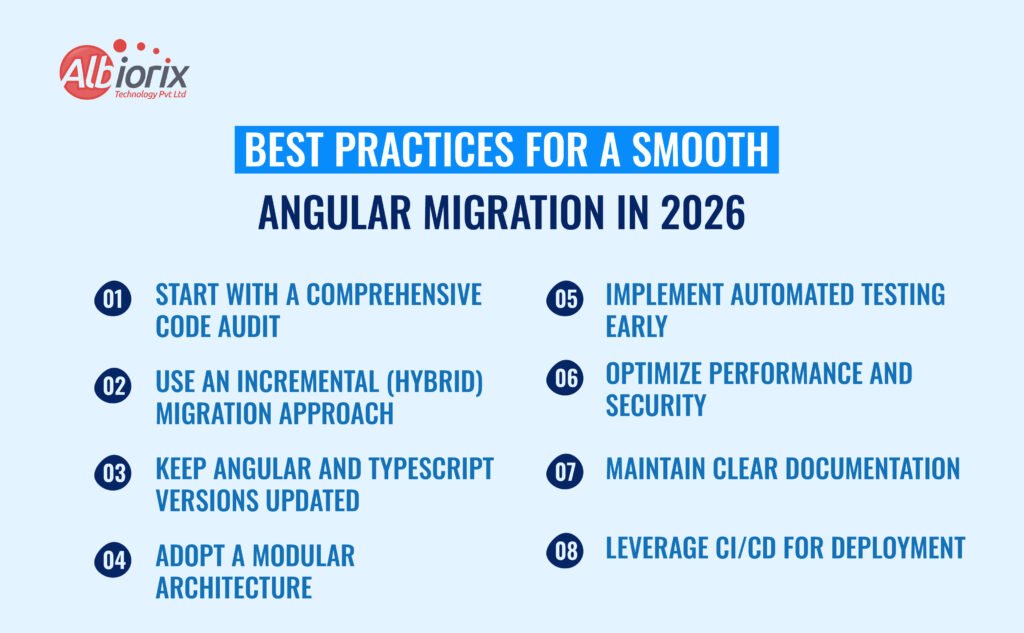
Best Practices for a Smooth Angular Migration

Migrating a legacy application to Angular is quite a challenging task with lots of complications. But, if it is done rightly and in a structured manner, it is easy. For a faster, secure, and future-ready product, make sure you have a roadmap ready for the migration.

However, for a smooth and seamless migration process, it is advisable to follow the Angular migration best practices that limit risks, maintain app stability, and improve overall app quality.

Best Practices for a Smooth Angular Migration in 2026:

  1. Start with a Comprehensive Code Audit: Before you start the migration process, make sure you have tested your legacy application to find out any potential issues. Pinout components that can be used again, modules that need to be rewritten, and remove dependencies that have to be replaced.
    A proper roadmap for legacy app migration will help you prevent downtime and service disruptions.
  2. Use an Incremental (Hybrid) Migration Approach: Instead of rebuilding everything at once, you can consider an incremental migration using ngUpgrade. This migration approach allows your old and new frameworks to coexist temporarily. It reduces the downtime and ensures business continuity during the migration process.
  3. Keep Angular and TypeScript Versions Updated: When you are migrating your legacy app, make sure you are migrating to the latest version of Angular and TypeScript. When you are using the latest versions of Angular, you get the benefits of the latest features, you get an app with enhanced performance, and long-term support from the community.
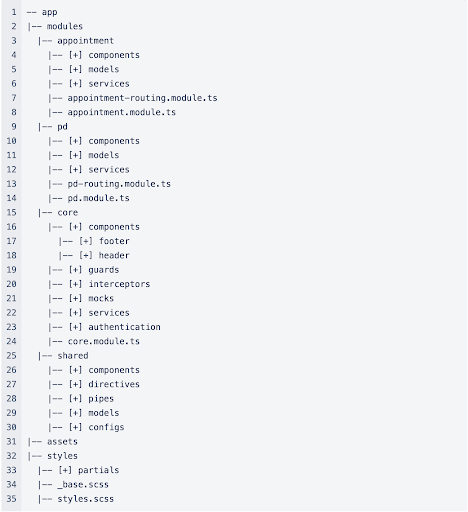
  4. Adopt a Modular Architecture: Before you start the migration process, divide your app into self-contained, reusable modules. This migration practice will make it easier for you to maintain the code, accelerate the development process, and make your app ready for future updates.  This strategy also allows your team of Angular developers to work on different modules at the same time, thereby increasing your team’s efficiency.
  5. Implement Automated Testing Early: Do not leave the testing for the last. Take help of the latest testing tools like Jasmine, Karma, and Cypress to test your application from the start. Automated testing helps in detecting bugs early and ensuring the migrated modules function as expected.
  6. Optimize Performance and Security: Once the migration is completed, it’s time to optimize the performance and security of your app. And for that, you can use tools like Lighthouse and Angular DevTools to analyze performance and identify bottlenecks.  Additionally, you can also use Angular’s built-in sanitization mechanisms and route guard to increase app security.
  7. Maintain Clear Documentation: it is important that you document the entire migration process. It will help you in onboarding a new developer. It will not only simplify the onboarding process, but it will also be helpful in future upgrades and maintenance.
  8. Leverage CI/CD for Deployment: Set up Continuous Integration and Continuous Deployment (CI/CD) pipelines to automate testing, builds, and deployments. It minimizes human error, speeds up releases, and provides consistent delivery to production.

For deeper insights on structuring your next-gen app, read Angular architecture best practices a guide to building scalable, maintainable applications.

Useful Tools and Resources for Angular Migration in 2026
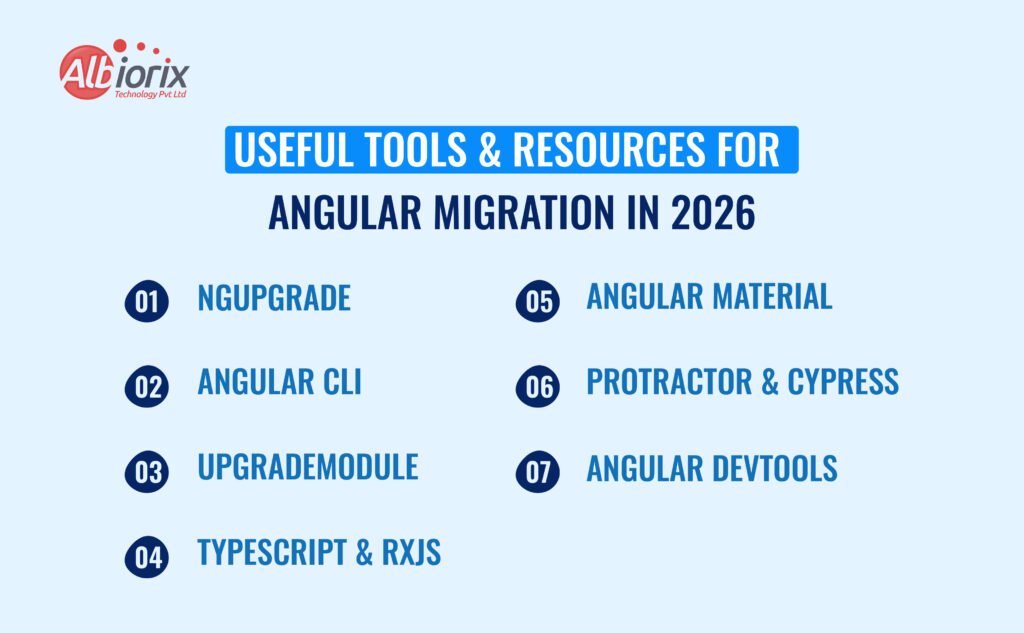
Useful Tools Resources for Angular Migration

Legacy app migration is a challenging task, and it becomes more complicated if you are not using the right set of tools.

Fortunately, the Angular community is very active, and they offer a comprehensive set of tools and frameworks for smooth Angular migration and upgrade.

The right use of these tools simplifies the entire migration process – from auditing and setup to testing and deployment.

Most Effective Angular Migration Tools and Resources:

  1. NgUpgrade: This is one of the most useful Angular migration and upgradation tools. This tool is used for incremental migration. It allows you to run Angular and AngularJS in parallel within the same application. This tool allows you to migrate components one by one without interrupting your services or downtime.

    Best for: Teams migrating large-scale AngularJS applications gradually.
  2. Angular CLI: It is a powerful command-line tool that allows developers to easily set up, configure, test, and deploy a project. It automates repetitive tasks, including building bundles, generating components, and running tests. This tool is very useful if you want to improve the development efficiency.

    Best for: Rapid project setup and enforcing best practices throughout the codebase.
  3. UpgradeModule: This tool is used along with ngUpgrade. This tool is used to bridge the gap between legacy and modular Angular components. It helps developers bootstrap hybrid applications where both Angular and AngularJS modules can coexist during the transition phase.

    Best for: Seamless integration between legacy and modern Angular frameworks.
  4. TypeScript & RxJS: When you are migrating legacy apps to Angular, it means you are moving from JavaScript to TypeScript. The latter offers strong typing, better tooling and cleaner code. When TypeScript is combined with RxJS, it allows developers to handle asynchronous operations more efficiently. This results in a faster and more stable app.

    Best for: Writing cleaner, scalable, and maintainable code during and after migration.
  5. Angular Material: If you want your new app to look modern with fresh UI components, then Angular Material is the way. It has a library of ready-to-use and responsive UI elements that follow Google’s Material Design principles. These UI elements by Angular Material ensure visual consistency and a professional look across all the application modules.

    Best for: Modernizing outdated interfaces while maintaining UX consistency.
  6. Protractor & Cypress: These two testing tools allow you to test your application during and after the legacy app migration. Protractor is the best for Angular-specific tests, and Cypress is suitable for modern end-to-end testing. Both these tools ensure your migrated app is running smoothly, easy to maintain, and performs well.

    Best for: Automated end-to-end testing and regression checks post-migration.
  7. Angular DevTools: It is a debugging and profiling extension tool. It offers a useful insight into application performance, component hierarchies, and change detection. If you want to optimize your Angular Application, then it is a must-have tool.

    Best for: Performance monitoring and real-time debugging after migration.

If you’re wondering how Angular compares to other leading frameworks like React or Vue, explore Angular vs React: A complete comparison for a detailed breakdown of pros, cons, and ideal use cases.

Top 6 Mistakes to Avoid in Angular Migration in 2026

Top 6 Mistakes to Avoid in Angular Migration

If done the right way and professionally, migrating a legacy app to Angular can transform your product’s scalability, performance, and maintainability.

However, some teams make mistakes during app migration that can be an expensive deal.  These mistakes ultimately result in delays, higher expenses, and underperformance.

Top Mistakes to Avoid in Angular Migration in 2026:

  1. Skipping the Pre-Migration Assessment: Without any prior homework related to legacy app migration, don’t jumpstart the Angular migration process. Do proper and detailed auditing of your existing legacy app.  A detailed auditing of your existing app is required because there are hidden dependencies, hard-coded logic, and unsupported libraries that can create problems during the migration.
  2. Ignoring TypeScript Proficiency: It is possible that your existing legacy system is built with JavaScript. As Angular is built with TypeScript, do not underestimate its learning curve. It might lead to poorly structured and hard-to-maintain code. To avoid this, you can train your team to learn TypeScript.
  3. Neglecting Testing During Migration: In many cases, it has been observed that some teams delay testing until the final migration stage. This delay in testing can lead to complex debugging and performance issues. So, to avoid this migration mistake in 2026, implement automated testing from day one using tools like Jasmine, Karma, or Cypress.
  4. Overlooking Performance Optimization: If you want your app to perform well after migration, then don’t forget to optimize it for performance. The common reasons behind the poor performance of your migrated app can be unnecessary change detection cycles, large bundle sizes, and unoptimized lazy loading. To avoid these mistakes, you can use DevTools to monitor and optimize performance before deployment.
  5. Underestimating UI/UX Consistency: One common mistake during migration is neglecting design consistency. It leads to mismatched UI elements and poor user experience. To avoid this Angular migration mistake in 2026, you can use Angular Material. It has a library of UI components to offer a consistent UI/UX experience.
  6. Ignoring Security Best Practices: Legacy applications often carry vulnerabilities that can carry over during app migration. Therefore, make sure you address all those vulnerabilities before the migration process starts. To eliminate these vulnerabilities, you can use tools like Angular’s built-in sanitization, route guards, and HTTP interceptors.

By avoiding these Angular migration mistakes in 2026, you can ensure a smoother, more efficient, and future-proof modernization journey.

With a clear plan, a strong technical foundation, and an experienced team of Angular Developers, you can transform even the most complex legacy systems into a powerful, scalable Angular application that’s ready for the next decade of digital innovation.

Conclusion

As we move into 2026, legacy app migration is no longer an option it’s a necessity. Businesses that continue running outdated systems risk falling behind in performance, security, and scalability.

Migrating to Angular empowers organizations to deliver fast, secure, and user-friendly applications that align with modern user expectations.

Its modular architecture, active developer community, and continuous updates from Google make it one of the most reliable frameworks for the future.

At Albiorix, we specialize in helping businesses migrate legacy systems to Angular with zero downtime, ensuring a seamless transition and measurable performance gains. Our Angular migration services help you modernize confidently and sustainably.

Ready to bring your outdated systems into the modern age? Let’s future-proof your digital infrastructure with Angular the framework designed for scalability, performance, and innovation.

Ready to Migrate Your Legacy App in 2026?

If you’re planning to modernize your existing application, Contact our expert Angular developers at Albiorix Technology can help you design a smooth migration strategy from audit to deployment with zero downtime and maximum performance.

Let’s build your future-ready Angular app in 2026!
Key Features and Powerful Benefits of Angular

In the ever-evolving landscape of web development, selecting the right framework is crucial. Angular, a robust and versatile framework, has emerged as the go-to choice for developers aiming to create dynamic web applications.

In this blog, we will explore why Angular stands out among other frameworks, its key features, and benefits, and why it should be your top choice for web development projects.

Also, we will understand the reasons why Angular is the best choice for Angular Development Services in Australia, Europe, and the US.

What is Angular?

Angular is an open-source web application framework developed and maintained by Google. It enables developers to build dynamic and modern web applications using HTML, CSS, and TypeScript.

Since its inception in 2010, Angular has undergone significant transformations, with Angular 2+ versions introducing a completely new architecture and a host of powerful features.

Key Features of Angular

Angular’s advanced capabilities and seamless integration features make it an exceptional framework for modern web development. Here are some of its standout features:

  1. Two-Way Data Binding: One of Angular’s most notable features is two-way data binding, which ensures that the model and the view are always in sync.

    When data in the model changes, the view reflects those changes instantly, and vice versa. This reduces the need for complex DOM manipulations, speeding up development.
  2. Component-Based Architecture: Angular’s component-based architecture allows Angular developers to build applications as a collection of reusable components.

    Each component encapsulates its logic and view, promoting code reusability and maintainability. This modular approach simplifies the development process and enhances the scalability of applications.
  3. Dependency Injection: Angular’s dependency injection system enhances modularity and reusability by efficiently managing component dependencies.

    This feature facilitates easier testing and maintenance, leading to more robust and scalable code.
  4. Angular CLI: The Angular Command Line Interface (CLI) is a powerful tool that simplifies the development workflow.

    It automates many tasks, such as project setup, code scaffolding, and build optimization, allowing developers to focus on writing code rather than dealing with configuration details.
  5. RxJS and Reactive Programming: Angular leverages RxJS, a library for reactive programming using Observables, to handle asynchronous operations.

    This integration enables developers to write more manageable and flexible code for handling events, HTTP requests, and other asynchronous tasks.

Benefits of Using Angular for Dynamic Web Applications

Angular offers numerous benefits for developing dynamic web applications, making it a preferred choice for developers worldwide. Here are some key advantages:

Benefits of Angular for Dynamic Web Applications 
  1. Enhanced Performance: Angular’s efficient change detection and rendering mechanisms ensure high performance, even for complex and data-intensive applications.

    Its Ahead-of-Time (AOT) compilation converts TypeScript and HTML into JavaScript during the build process, resulting in faster load times and improved performance.
  2. Improved User Experience: With Angular, developers can create highly interactive and responsive user interfaces.

    Its powerful templating system, combined with two-way data binding and reactive programming, allows for the seamless creation of dynamic and engaging web applications.
  3. Strong Community and Support: Angular boasts a large and active community of developers, contributors, and enthusiasts.

    This vibrant community provides extensive documentation, tutorials, and third-party libraries, ensuring that developers have access to a wealth of resources and support.
  4. Scalability and Maintainability: Angular’s modular architecture and best practices promote the development of scalable and maintainable codebases.

    The framework’s built-in tools and conventions guide developers in following consistent coding standards, making it easier to manage and scale projects as they grow.

Why Choose Angular for Your Next Project?

When it comes to building dynamic web applications, Angular stands out as a robust and feature-rich framework.

Its powerful tools, strong community support, and emphasis on performance and scalability make it an excellent choice for developers looking to create cutting-edge web applications.

Whether you’re developing a simple web app or a complex enterprise solution, Angular provides the flexibility and capabilities needed to bring your vision to life.

Get Started with Expert Angular Development

Ready to take your project to the next level? Partner with Albiorix Technology and harness the full potential of Angular development.


Contact us today.

Contact Albiorix Technology for Angular Development Services

Are you ready to harness the power of Angular for your next web development project? At Albiorix Technology, we specialize in Angular development, delivering high-quality, dynamic web applications tailored to your business needs.

Our team of experienced angular developers is dedicated to providing innovative solutions that drive success. Contact Albiorix Technology today for a free quote and consultation, and let us help you turn your ideas into reality with Angular.

Why Choose Albiorix Technology for Angular Development Services?

Choosing Albiorix Technology for Angular development services means partnering with a team of experienced professionals dedicated to delivering exceptional web solutions. Here’s why Albiorix stands out for Angular development:

Angular development services
  1. Expert Team: Our developers are highly skilled in Angular, ensuring top-notch quality and performance.
  2. Customized Solutions: We tailor our development services to meet your unique business needs.
  3. Proven Track Record: With successful projects across Australia, Europe, and the USA, we have a strong portfolio of satisfied clients.
  4. End-to-End Services: From initial consultation to post-launch support, we provide comprehensive Angular development services.
  5. Cutting-Edge Technology: We leverage the latest Angular features and best practices to deliver state-of-the-art web applications.
  6. Client-Centric Approach: Our focus is on building strong relationships and providing exceptional customer service throughout the project.

Conclusion 

Ready to transform your business with a powerful and dynamic web application? As a leading Angular development company, Albiorix Technology specializes in providing top-tier Angular development services tailored to your unique needs.

Let’s build a web app for your business that stands out in today’s competitive market. Our expert team is committed to delivering innovative solutions that drive growth and success.

Contact us today for a free consultation and quote, and take the first step towards revolutionizing your digital presence with our exceptional Angular development services.

Better Reasons to use Angular for Web Development

Developed in 2009 by Misko Hevery and Adam Abrons, AngularJS made a groundbreaking entry into the development world in 2010, capturing attention with its innovative approach.

Fast forward over a decade, and AngularJS has evolved, shedding its JavaScript origins to become the widely embraced Angular, now powered by TypeScript.

Currently, over 4 million websites use Angular. It is one of the top choices for custom web development. Its appeal lies in its efficiency, rapid development capabilities, and seamless integration into various platforms.

Web app developers and entrepreneurs alike are drawn to Angular for crafting robust and scalable web applications.

As a platform, Angular boasts an extensive array of features and functionalities, propelling it to the forefront as the preferred choice for enterprise-scale web development projects.

The question arises: what sets Angular apart from its competitors? Delve into the discussion ahead as we explore the distinctive features, functionalities, capabilities, and compelling reasons to “Choose Angular for Your Next Web Development”.

What is Angular?

Angular stands out as a robust and user-friendly front-end framework crafted by Google, empowering developers to craft dynamic and responsive web applications.

This tool excels in facilitating the creation of seamless user experiences, particularly through the development of single-page web applications (SPAs), making it an indispensable asset in the realm of modern web development.

Furthermore, Angular’s open-source nature contributes to its strength, fostering a large and vibrant community. This community support translates into extensive documentation and assistance for developers navigating the intricacies of the framework.

Since its initial launch, Angular has undergone significant evolution, marked by several major updates. Currently, the framework is advancing with Angular 16 released and v17 in the pipeline.

These updates underscore Angular’s commitment to remaining at the forefront of contemporary web development practices.

Angular – The Framework for Modern Web Experiences!

Craft modern, user-friendly web experiences effortlessly with Angular. From its comprehensive toolset to its robust community support, Angular is the framework that defines modern web development.
The smart choice for your projects – Angular!

Reasons Why Angular is the Best for Web Development

Choosing a front-end framework for web development is a crucial decision, and Angular has gained popularity for several reasons.

Here are some key factors that make Angular a compelling choice for web development projects:

Reasons-Why-Angular-is-the-Best-for-Web-Development

1. Modularity and Code Organization

Angular promotes a modular approach to building applications. The framework is based on components, which are self-contained and reusable building
blocks. This makes it easier to organise and maintain code, especially in large and complex projects.

2. Two-Way Data Binding

Angular utilizes two-way data binding, meaning that user interface changes automatically update the underlying data model and vice versa. This simplifies the development process and reduces the amount of boilerplatecode needed to keep the UI and data in sync.

3. Dependency Injection

Angular comes with a built-in dependency injection system. This helps manage the components’ dependencies and promote the development of loosely coupled and more maintainable code. Dependency injection also facilitates unit testing by making it easier to mock and test individual components.

4. TypeScript Integration

Angular is built with TypeScript, a superset of JavaScript that adds static typing. This brings enhanced tooling, autocompletion, and compile-time error checking to the development process, resulting in more robust and maintainable code.

5. Official Support from Google

Angular is developed and maintained by Google. This backing provides stability and assurance that the framework will be well-supported and updated with the latest features and security patches.

6. Powerful CLI (Command Line Interface)

Angular’s CLI simplifies the process of creating, building, testing, and
deploying Angular applications. It comes with a range of commands that automate common development tasks, streamlining the workflow for developers.

7. Rich Ecosystem and Third-Party Libraries

Angular has a vibrant ecosystem with a wide range of third-party libraries and extensions. This can save development time and effort, as developers can leverage existing solutions for common functionalities.

8. Cross-Platform Development

With technologies like Angular Universal and Angular for NativeScript,
developers can use Angular to build not only web applications but also server-side rendered applications and mobile apps, providing a comprehensive solution for cross-platform development.

9. Community Support

Angular has a large and active community of developers. This means that finding solutions to common problems, accessing tutorials, and staying updated with best practices are made easier through community contributions and support.

10. Mature and Well-Documented

Angular has been around for a while, and it has evolved into a mature and well-documented framework. The documentation is comprehensive, making it easier for developers to understand the framework and find answers to their questions.

    These features make it a strong contender, especially for large-scale applications where modularity, maintainability, and a comprehensive ecosystem are critical considerations.

    What are the Limitations of Angular?

    While Angular is a powerful and widely used front-end framework for web development, it’s important to consider some potential drawbacks. Below are some of the challenges that you might face at the time of Angular development:

    1. One notable concern is the sharp learning curve, especially for beginners, due to its complex architecture and various concepts such as modules, decorators, and dependency injection. The framework’s extensive structure may lead to initial development delays as developers grasp these intricacies.
    2. Second, the generated code in Angular applications can be bulkier compared to other frameworks, potentially impacting performance, especially in scenarios where bandwidth is limited.
    3. The third consideration is that frequent updates and changes in Angular versions may necessitate adjustments in existing projects, which can be time-consuming.

    Despite these drawbacks, the benefits of Angular often outweigh the cons, and the framework continues to be a popular choice for building sophisticated web applications.

    However, if you are still confused about whether Angular is the best for custom web development or not, then a free consultation is just a call away.

    Experienced Angular developers can suggest the most suitable solutions based on your requirements and budget. Get connected for free, today!

    Different Types of Websites Developed Using Angular

    Albiorix stands out as a top-rated Angular development company. Our team of experienced Angular developers has successfully developed a wide range of Angular development projects across various industries and domains.

    Possessing deep technical expertise and a solid understanding of key Angular concepts, our talented developers excel in designing, developing, and rigorously evaluating enterprise-grade Angular applications.

    Based on our experience, below are the different types of websites that can be developed using Angular:

    • Single Page and Enterprise Applications
    • Fintech and Entertainment Websites
    • E-commerce Websites
    • Content Management Systems (CMS)
    • Social Networking Platforms
    • Data Dashboards and Analytics Tools
    • Educational Platforms
    • Real-Time Applications
    • Travel and Booking Websites
    • Portfolio Websites and Blogs
    • Government and NGO Websites

    Angular is a powerful and versatile framework for web development that can be applied to a diverse range of web development projects, from small interactive websites to large-scale enterprise applications.

    Ready to supercharge your web development?

    Choose Angular and witness the difference. From enhanced performance to a modular architecture, Angular provides the tools you need for a seamless development journey.

    Power Up Your Development Journey!

    Conclusion

    Considering developing a website or web application with Angular but unsure if it’s the ideal fit for your project? No need to worry. Reach out to our team of skilled Angular developers and project managers for a comprehensive evaluation.

    Through a complimentary consultation call, we’ll delve into your project details, goals, and expectations.

    Based on this discussion, we’ll help determine whether Angular aligns seamlessly with your future endeavours or if an alternative approach might be more suitable.

    Share your contact details with us using the Contact Us form or call us at +1 (912) 528-5566 or (+61) 489-940-484.

    Don’t just build for today, build for the future! Angular ensures your web projects are not only cutting-edge but also future-proof.

    Make the smart choice – choose Angular for your next web development endeavour and stay ahead of the curve. | Future-Proof Your Web Projects with Angular!

    We are also active on social media platforms such as LinkedIn and Facebook, you can also drop us a message over there.

    Vue vs Angular : Which JS Framework To Choose for your next project?

    Summary: Angular and Vue are both powerful JavaScript frameworks, but they cater to different needs: Angular is a full-featured, opinionated framework best for large, complex enterprise applications, while Vue is a lightweight, progressive framework ideal for smaller to medium projects and rapid development.

    The world of front-end web development is constantly evolving, and with so many options, it can take time to figure out where to start.

    Two of the most popular JavaScript frameworks in the field today are Vue and Angular, each with its strengths and weaknesses.

    Angular and Vue sit on opposite ends of the complexity spectrum, but React changes the equation entirely. Explore our Angular vs React vs Vue in-depth guide to make a fully informed framework decision.

    In this blog, we’ll take an in-depth look at these two frameworks by comparing their features, performance, and scalability to help you make an informed decision for your next project.

    Key Takeaways

    • Vue and Angular are both popular JavaScript frameworks for building web applications.
    • Vue is known for its simplicity, ease of learning, and flexible integration with existing projects.
    • Angular is a comprehensive framework developed by Google, providing a complete solution for large-scale applications with robust features. Whereas Vue follows a more lightweight and incremental approach, allowing developers to add it to existing projects gradually.
    • Angular has a steeper learning curve but offers a powerful ecosystem, including a robust CLI, extensive documentation, and well-defined architecture.
    • Vue relies on a virtual DOM for efficient rendering and updates, while Angular uses a two-way data binding system for automatic synchronization between the view and the model.
    • Ultimately, the choice between Vue and Angular depends on the project’s size, complexity, development team’s preferences, and existing infrastructure.

    What is Vue?

    Vue.js is an open-source JavaScript framework for building user interfaces and single-page applications. This JS framework helps you build lightweight, easy-to-learn, and highly performant Web Application Development for your business needs.

    Vue.js uses a component-based architecture and provides two-way data binding, reactive data, and a virtual DOM (Document Object Model), making it an excellent choice for creating dynamic, interactive UIs.

    Additionally, Vue.js has a large and supportive open-source community, which has contributed a wealth of tools, plugins, and libraries to the framework, making it a popular choice for developers working with a renowned Vue.js development company of all skill levels.

    Related Post: Differences Between Vue 2 and Vue 3

    What is Angular?

    Angular is a JavaScript-based open-source front-end web application framework developed and maintained by Google. It is used to build dynamic SPAs and provides several features for creating complex user interfaces.

    Angular uses a component-based architecture, enabling Angular developers working with a reputed AngularJS development company to create reusable components and manage the instance data flow between various visual components.

    This progressive JavaScript framework also uses two-way data binding, which allows changes in the model to be automatically reflected in the view, and vice versa.

    Compared to other frameworks, Angular has a large and active community, contributing to its ongoing web development project and improvement.

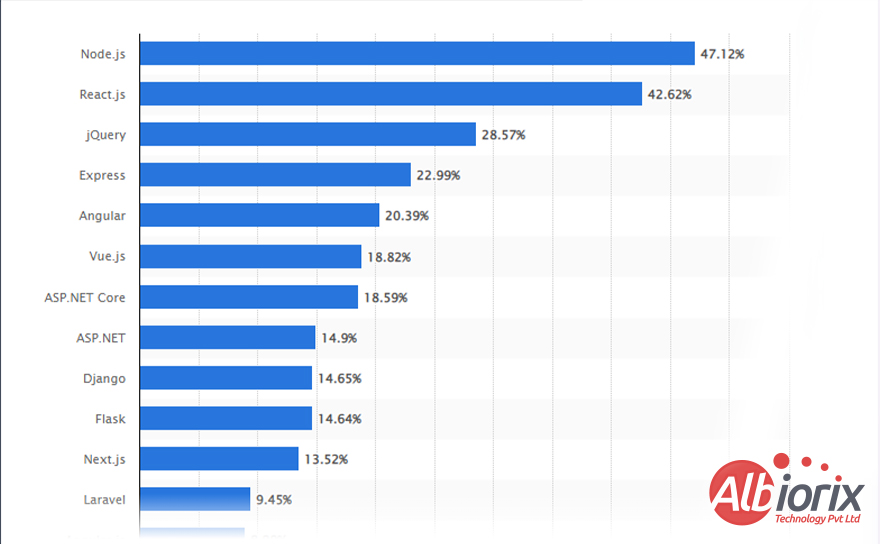
    And if I talk about the most used web frameworks by the developers in 2023, the below figure says it all.

    Vue vs Angular Frameworks Usage Graph

    Top Features of VueJS Framework

    Vue.js is a popular JavaScript framework for building UIs and single-page applications. Here are some of the top features of the Vue.js framework:

    • Reactive Data Binding: Vue.js uses a reactive data binding system that automatically updates the view when the data changes, making it easier to build dynamic user and web interfaces.
    • Components: Vue.js is a lightweight framework that typically uses a component-based architecture, which allows Vue.js developers to split their enterprise-level web in-built solutions into reusable and modular components.
    • Virtual DOM:Vue.js uses a virtual DOM (Document Object Model), a lightweight in-memory representation of the actual DOM elements. With the help of Virtual DOM. you can update the view efficiently without re-rendering the entire page.
    • Template Syntax: Vue.js uses a template-based syntax similar to HTML, making it easy for Vue developers to get started and reducing the curve for learning.
    • Performance: Vue.js is designed for performance, and its lightweight design makes it fast and efficient to build robust user dynamic interface logic, or we can say application data logic layer for your business web app.
    • Ecosystem: Vue.js has a growing ecosystem of plugins, built in core libraries, and tools, including the Vue CLI (Command Line Interface), Vue Router, and Vuex, which make it easier for developing complex applications.
    • Community:Vue.js has a solid and active community of Vue developers who contribute to the customizable framework and its ecosystem, ensuring that it continues to evolve and improve over time.

    Vue.js is a versatile and performant framework well-suited for building a specific user interface layer and single-page applications.

    Top Features of Angular Framework

    Angular is a popular JavaScript framework for building web applications. Here are some of the top features of the Angular framework:

    • Component-based architecture:Angular uses Model-View-Controller (MVC) and is a component-based defined Angular app architecture that allows developers to split their applications into reusable and modular components.
    • Two-way data binding: Angular uses a two-way data binding system that automatically updates the view when the data changes and updates the data when the view changes, making it easier to build dynamic UIs.
    • TypeScript: Angular is built using TypeScript, a statically-typed programming language that supersets JavaScript. TypeScript provides features like classes, interfaces, and type annotations, making writing robust and well structured application code easier.
    • Modules: Angular uses a modular structure that allows developers to organize their code into reusable and self-contained modules.
    • Router:Angular includes a powerful router that allows developers to define the routes for their Angular application and navigate between different parts of the application.
    • Templates:Angular uses a template-based syntax similar to HTML templates, making it easy for developers to get started and reducing the Angular’s learning curve.
    • Performance: Angular is designed for performance and includes features like ahead-of-time (AOT) compiling, state management library, and lazy loading, which help optimise large applications’ performance.
    • Ecosystem: Angular is a complete framework package that has a large ecosystem of plugins, libraries, and tools, including the Angular Command Line Interface, Angular development tools, Angular Material, and Angular Universal, which make it easier to build complex web apps and even mobile apps.
    • Community: Angular is a typescript structured framework that has a large and active community of developers who contribute to the frontend framework and its ecosystem, ensuring that it continues to evolve and improve over development time.

    Vue vs Angular: The Detailed Comparison

    1. Popularity: Angular vs Vue

    Vue and Angular are both popular front-end JavaScript web frameworks that play an essential role in designing and building web applications.

    Angular is a progressive framework that provides a rich set of powerful web tools and features for building complex, large-scale applications. Its popularity is primarily due to its ability to handle complicated web apps and its strong backing from Google.

    Angular has a large community of developers and a rich ecosystem of plugins, libraries, and tools, making it a perfect choice for enterprise-level projects.

    On the other hand, Vue JS is a newer and monolithic framework that was first released in 2014.

    Despite its relatively short history, Vue has quickly gained popularity among developers for its simplicity and ease of use.

    Comparing Angular with Vue, you can efficiently develop Vue applications that can efficiently range from small to medium-sized projects.

    It has a growing community of developers and a rich ecosystem of plugins and libraries. Vue’s popularity is also growing due to its relatively low curve for learning, making it an excellent choice for developers new to front-end development.

    Angular and Vue are both popular front-end frameworks with their strengths and weaknesses. Angular is a more established and feature-rich framework that is well suited for large-scale applications.

    At the same time, Vue JS is a newer, more straightforward, and more flexible framework that is well-suited for smaller projects.

    Ultimately, the choice between the two frontend frameworks comes from personal preference and web development project requirements.

    2. Learning Curve: Angular vs Vue

    The learning curve of Vue vs Angular is a critical consideration for web developers who are looking to adopt a new Javascript front-end framework.

    Angular has a steep curve of learning than Vue that’s why we normally use Angular as it supports a lot of built-in features and concepts, such as hierarchical dependency injection, data binding, and a modular structure, which can make it difficult for new developers to learn and understand.

    Angular also has a large API and requires a strong understanding of TypeScript, which can further increase the curve for learning.

    Additionally, Angular is a Typescript-based JavaScript framework that typically uses a template-based syntax, which can take some development time to get used to if you’re unfamiliar with it.

    Vue JS, on the other hand, has a relatively low curve for learning compared to Angular. With its steep learning curve, Vue is a simpler and more flexible framework designed to be easy to learn and understand.

    Vue uses a component-based structure and a template engine syntax similar to HTML components, making it easy for developers to get started.

    Comparing Angular with Vue, this frontend framework also has a small API and does not require a strong understanding of TypeScript, making it accessible to developers with a wide range of backgrounds and experience levels.

    If you’re less experienced developers or looking for a more straightforward framework to learn, Vue may be a better choice for you due to its relatively steep learning curve.

    If you’re an experienced developer or looking for a more feature-rich framework to work with, Angular may be a better choice for you despite its steeper curve for learning.

    3. Performance Speed: Angular vs Vue

    Performance, or speed, is an important factor to consider when choosing between Vue and Angular. Both frontend frameworks are designed to be fast and efficient, but they approach default performance optimized configuration differently.

    Vue is a lighter-weight framework that prioritizes simplicity and a smaller footprint. It achieves fast performance by keeping the framework itself minimal, while still providing a powerful set of features.

    This allows it to have a smaller codebase in your pure Javascript file and consume fewer resources, resulting in faster initial load times and smoother runtime performance.

    Vue also offers a “lazy-loading” feature that allows Vue components to be loaded only when needed, further improving performance.

    Angular, on the other hand, is a heavily weighted framework. While it offers a more comprehensive set of tools and features, it also means a larger codebase and more overhead.

    However, Angular makes up for this by using multiple performance optimization techniques, such as Ahead-of-Time (AoT) compiling, tree shaking, and lazy loading.

    These optimizations help Angular achieve fast performance despite its larger application code and make it well-suited for larger and more complex applications.

    So, both Angular and Vue can deliver fast and efficient performance, but each framework has its own strengths and weaknesses. If you’re looking for a lighter-weight and simpler framework with a smaller codebase, Vue may be a better choice.

    4. Application Security: Angular vs Vue

    Security is important to consider when developing web applications. Both Angular and Vue have security features built into their frameworks, but they differ in terms of their approach to security.

    Vue is designed to be a flexible and lightweight framework, which means it has limited security features built into the core library. However, Vue provides a strong ecosystem of plugins and core libraries that can help enhance security in a Vue application.

    For example, Vue has many plugins for handling authentication and authorization, as well as plugins for preventing cross-site script inclusion like XSS and cross-site request forgery (CSRF) attacks.

    Angular, on the other hand, takes a more comprehensive approach to security. Angular is built with security in mind and includes features such as Content Security Policy (CSP) enforcement, cross-site scripting, and XSS protection.

    With Angular universal support for OAuth 2.0 and OpenID Connect, it becomes easy for Angular developers to implement secure authentication and authorization in an Angular app.

    Additionally, Angular has a strict templating engine that helps prevent XSS attacks by escaping untrusted inputs.

    Compared to other frameworks, both Angular and Vue have security features built into their frameworks, but each framework approaches security differently. If you’re looking for a framework with a comprehensive set of security features, Angular may be a better choice.

    5. Syntax: Angular vs Vue

    Vue and Angular are both best front-end JavaScript frameworks for building web applications, but they have different syntax styles.

    Vue uses a template-based syntax, where templates are written in HTML and data is bound to the templates using directives.

    Directives in Vue are prefixed with the v- symbol, and they allow a specific web developer to deal with the data rendering process to specific elements in the template.

    Angular is one of the front-end Javascript frameworks that uses a component-based syntax, where Angular application components are written in TypeScript and include a combination of HTML, CSS, and pure JavaScript.

    Different components in Angular are used to build reusable User Interface and Angular HTML elements, and they provide a way to manage complex application state.

    Angular’s syntax is more complex than Vue’s, and even the framework requires a deeper understanding of component-based architecture and TypeScript programming language.

    However, Angular’s syntax provides more power and flexibility, allowing freshers and experienced developers to create complex Angular apps with reusable components.

    So we can say that the syntax of Vue and Angular frameworks differ in their approach and complexity.

    Vue’s template-based syntax is simple and accessible to developers who are familiar with HTML, while Angular’s component-based syntax is more complex but provides more power and flexibility for building complex applications.

    We designed an online platform to empower physicians, health institutions, and patients globally through a comprehensive telemedicine platform.


    Contact Us

    6. Complexity: Angular vs Vue

    Vue and Angular are both popular JavaScript frameworks for building web applications, but they have different levels of complexity.

    Vue: Vue is considered to be a relatively simple framework, and it is easy to learn for developers who are familiar with HTML and JavaScript.

    Vue’s simplicity is reflected in its small size and lightweight nature, making it a popular choice for small to medium-sized projects. Vue’s modular design and clear documentation also contribute to its ease of use.

    Angular is considered to be a more complex framework, with a steeper learning curve compared to Vue. Angular has a robust set of features and a rich ecosystem of libraries and tools, making it a popular choice for large-scale apps.

    However, this complexity can make it more challenging for developers who are new to Angular or who are working on a large project for the first time.

    Angular’s complexity can also make it more difficult to debug and maintain, as the codebase can become large and difficult to manage.

    Both Angular and Vue have their strengths and weaknesses regarding complexity. Vue is a simple and accessible framework, making it a good choice for small to medium-sized projects, while Angular is a complex and powerful framework, making it a good choice for large-scale projects.

    However, it’s important to keep in mind that the complexity of a framework can impact the application development process, and developers should choose the framework that best fits their needs and experience level.

    7. MVC/MVVM: Angular vs Vue

    Vue.js and Angular are both popular JavaScript frameworks used for building web applications. Both frameworks follow the Model-View-ViewModel (MVVM) design pattern, which is a variant of the Model-View-Controller (MVC) pattern.

    In Vue, the Model View View Model layer pattern is implemented by having a clear separation between the model (data), the view (template) and the view model (Vue instance).

    The view model acts as the mediator between the model and the view, updating the view whenever the model changes and vice versa.

    Angular, on the other hand, is a typescript-based JavaScript framework that typically uses a more traditional implementation of Model View Controller architecture, where the model represents the data, the view is the template and the controller acts as the mediator between the model and the view.

    Compared to other existing frameworks, Angular uses the controller that is replaced by a component, which is a class with an associated template language and styles.

    Both Vue and Angular have data binding, meaning that changes in the model will be automatically reflected in the view and vice versa. This makes it easier to build dynamic, responsive user interfaces.

    In terms of architecture, Vue is generally considered to be lightweight and easier to learn than Angular. This is because Vue has a smaller API surface and a simpler design, making it more accessible to developers who are new to the MVVM pattern.

    Angular, on the other hand, is a more feature-rich framework that includes a lot of built-in functionality for building large-scale apps.

    In conclusion, both Angular and Vue are great choices for building web applications and both follow the MVVM design pattern. The choice between the two largely depends on the specific requirements and preferences of the application development team.

    8. Community Support: Angular vs Vue

    Community is an important factor to consider when choosing between Vue.js and Angular. Both Angular and Vue are the leading frameworks that have large, active communities of developers who contribute to their development and provide official support to others.

    However, there are some differences to be aware of.

    Vue.js was first released in 2014 and has rapidly grown in popularity. The Vue community is known for being friendly, welcoming, and inclusive. There are a large number of resources available for learning Vue, including online tutorials, video courses, and books.

    Angular, on the other hand, is a more mature framework that has been around since 2010. The Angular community is larger and more established, with a wealth of resources available for learning and developing with the framework.

    Angular is also backed by Google, which provides a significant level of support and resources for the framework.

    In terms of community support, both Angular and Vue have strong communities that provide ample resources and help for developers.

    However, the Angular community may be better equipped to handle larger, more complex projects due to its long history and more extensive resources.

    Ultimately, the choice between Vue and Angular in terms of community support will depend on your specific needs and preferences.

    Both Angular and Vue are the frameworks that have strong, active communities that are eager to help and support each other, so you can’t really go wrong with either choice.

    Comparison Table Of Vue vs Angular

    Here is a comparison table between Vue and Angular:

    FeaturesVueAngular
    Learning CurveShallowSteep
    SizeLightweight (approx. 20 KB)Heavier (approx. 500 KB)
    PerformanceFasterSlower
    FlexibilityHighly CustomizableLess Customizable
    CommunityGrowingEstablished
    Use CasesSmall to Medium-sized AppsLarge-scale Apps
    Data BindingTwo-WayTwo-Way
    TemplatingSimple Templating SystemComplex Templating System
    DebuggingSimple DebuggingComplex Debugging
    DocumentationGood DocumentationExtensive Documentation

    Conclusion

    The choice between Vue.js and Angular for web development ultimately depends on the specific requirements of the project and the preferences of the dev team.

    Vue.js is a lightweight and flexible JavaScript framework known for its simplicity and ease of integration with other libraries or existing projects. It is a good choice for small-to-medium sized projects and can be quickly set up and developed.

    Angular, on the other hand, is a full-fledged framework developed by Google and is suitable for complex, large-scale projects.

    It offers a comprehensive set of features and a well-defined structure, allowing for scalable and maintainable code. Angular also has a larger open-source community and a more robust ecosystem.

    In summary, Vue.js may be the way to go if you need a quick and simple solution for a small project, Vue.js may be the way to go. If you are looking to build a complex and scalable web application, Angular is a better choice.

    7 Powerful Reasons to Choose Angular for Mobile Apps in 2026

    Nowadays, you’ll come across a list of mobile app development languages and also robust frameworks for making the development process much smoother.

    Angular is one of the leading open-source front-end development frameworks that primarily focuses on single-page applications.

    And guess what, Angular plays a vital role in developing mobile apps for your business requirements. So, you’ll ask me, a big WHY?

    We’ve gathered a list of top reasons to select Angular for mobile app development for your business needs.

    What is Angular?

    Angular is one of the best Typescript-based frameworks that plays an essential role in building robust web apps like PayPal, Netflix, and many other websites built using the Angular framework.

    The Angular framework is a user-interactive platform that makes it a simplified process to design and build web and angular mobile app for your business. In addition, the framework plays an important role in dealing with front-end development.

    Do you know that there are around 2,439,149 downloads of the Angular framework for November 2022? This number is constantly increasing on an hourly basis.

    Now let’s explore the top reasons to use Angular for mobile app development for your business requirements.

    Top 7 Reasons For Using Angular for Mobile App Development

    The Angular framework plays an essential role in developing mobile applications for your business needs. I hope you’re now clear with the concept of what is Angular.

    You can avail the benefits of using AngularJS for mobile app development process for various different reasons, as depicted below.

    1. Angular is Pretty Easy to Use For Developing Mobile Apps

    AngularJS is the most popular framework for web and mobile app development. It does not require any specific or advanced tools for creating feature-rich and industry-best mobile app solutions for your business needs.

    You’ll come across many JavaScript frameworks that will help you build robust mobile app solutions for your needs, but AngularJS is equipped with less code. Obviously, it’s going to save more time and effort for AngularJS developers.

    2. Angular Strictly Supports Code Reusability

    If you have written the code in the Angular framework, you can efficiently use it in other mobile app development processes. Quite interesting?

    In simple words, we can say that you can code for one mobile technology and reuse the same code with the other technology.

    It’s one of the best and most unique features of the Angular framework. And that’s what makes the possible reason for you to select the framework that works for Android and iOS applications.

    Angular codes are entirely flexible, and their proper implementation can be efficiently done anywhere per your business requirement for mobile application development.

    The most exciting part of the Angular framework is that you can efficiently implement mobile apps for your business needs.

    Moreover, this framework is solely responsible for giving interactive touch to the codes to make your app’s user interface world-class.

    In the Angular Talks March 2022, Haim Agami – Turjeman shared his expert opinion on how to automate the development process to ensure code maintainability.

    3. Supports Fewer Code and Inspiring Declarative Features

    Angular is one such robust framework that typically requires fewer codes to accomplish the mobile app development process for your business needs. So, it is amongst the most sought software used for mobile apps.

    Moreover, you’ll come across multiple libraries that you can quickly implement in AngularJS development services that you can use as declarative code.

    So, you can eventually make use of the software to grab the advantages of various libraries while developing a robust and highly-efficient mobile application.

    And if you ask me, as a developer, Angular is the most-preferred framework to deal with a stress-free coding experience.

    We crafted a telemedicine platform that becomes a boon to empower physicians, health institutions, and patients globally.

    View Our Work

    4. Angular Application Architecture

    For Angular, mobile app development process typically uses both MVVM and MVC architectures. With the help of this powerful front-end framework, you can efficiently perform the integration of varied features in your business applications.

    It primarily depends on your business requirements and how you should opt for the best application architecture.

    However, you must ensure that your selected architecture must be helpful to you in developing a robust, efficient, secure, and feature-rich app.

    Angular application architecture is one inspiring reason that could help you achieve the desired level of flawlessness. You should hire AngularJS developers from a reputed organization where you can fulfil all your needs with the right set of skills.

    5. Angular’s Big Community Support To Help You Out

    Angular is an open-source and typescript-based platform with extensive customer support. You can easily avail the support for any complexity you’ve achieved in your coding by simply troubleshooting the issue.

    Angular’s extensive community support is the best example for getting help for any business software solutions for your needs. So, if you’re stuck on any issue, visit the Angular community, and you’ll get instant support for your queries.

    6. Angular’s Data Binding Feature is Just Inspiring

    What’s the crucial factor that makes the mobile app development process more efficient with Angular? It’s a data-binding process and plays a vital role in designing and developing a powerful mobile app for your business needs.

    With the continuous evolution of trending technologies, it becomes essential for you to keep track of them. Otherwise, it would help if you were ready for a further upgrade.

    Data binding is entirely dependent on various Angular’s in-built libraries. So, it would help if you had a proper understanding of such libraries and frameworks to make your AngularJS Development Services more accessible, as expected.

    7. High-Performance Ranking For Your Mobile App

    Angular is a typescript-based framework that is well-known for building mobile apps which are efficient and supports next-gen features. Moreover, it is quite easy for you to develop applications right from the scratch and within a short period of time.

    Being one of the top-rated front-end development frameworks, Angular is solely responsible for making things easier with the Angular best Practices.

    Rather than dealing with the workflow’s complexity for the whole development team, this feature-rich platform offers well-established practices to accomplish results with less effort and more precision.

    The mobile applications developed using the Angular framework are highly performant and work smoothly as per your business needs.

    Develop Single-Page Applications from Albiorix’s Angular Stars

    Our talented Angular developers are proficient in designing and building front-end applications for all your business needs.


    Contact Us

    Mobile Apps You Can Build With Angular

    Angular is a versatile framework that enables developers to create a wide range of angular mobile app. Some of the types of apps you can build with Angular include

    • Single Page Applications (SPA): Angular is widely known for its capabilities in building powerful and interactive SPAs.

      SPAs are web applications that load a single HTML page and dynamically update the content as the user interacts with the app, without the need to reload the entire page.

    • Enterprise Web Apps:Angular is a popular choice for developing enterprise-level web applications. These applications are typically large-scale, complex, and require robust features to handle various business processes.

    • Progressive Web Applications (PWA): Angular has extensive support for building Progressive Web Applications (PWA). PWAs are web applications that leverage modern web technologies to deliver app-like experiences to users.

      With Angular, developers can create PWAs that are responsive, reliable, and installable on users’ devices.

    • Server-side Rendered (SSR) Apps: Angular provides support for Server-side Rendering (SSR), also known as Angular Universal.

      SSR is a technique where the initial rendering of the web application is performed on the server, and the pre-rendered content is sent to the client.

    • Social Media Apps: Social media apps require real-time interactivity and dynamic content updates.

      Angular’s ability to create Single Page Applications (SPAs) with two-way data binding makes it well-suited for building responsive and interactive social media platforms.

    • E-commerce Apps: E-commerce apps demand a smooth user interface and efficient handling of product catalogs, shopping carts, and payment processing.

      Angular’s features, such as client-side routing, forms handling, and dependency injection, make it an excellent choice for building feature-rich e-commerce applications.

    • Business Productivity Apps: Business productivity apps often involve data manipulation, analytics, and collaboration features.

      Angular’s robust data binding and built-in directives enable developers to create data-driven applications that update in real-time, helping users stay productive.

    • Gaming Apps: While Angular is not primarily designed for gaming applications, it can still be used for certain aspects of game development.

      For instance, Angular can be used to create the frontend user interface of a gaming app, displaying game menus, user profiles, and settings.

    Industry-Based angular Mobile App Development

    Angular has been adopted by various industries for mobile and web app development due to its robust features and benefits. Some prominent examples angular for mobile and web include

    • Banking and Finance: Major financial institutions use Angular for secure and reliable online banking platforms.
    • Education: Educational institutions leverage Angular to create e-learning portals and interactive learning applications.
    • Entertainment: Media and entertainment companies adopt Angular to build content streaming and distribution platforms.
    • Real Estate: Angular is used to develop property listing and real estate management applications.
    • Transportation: Logistics and transportation companies rely on Angular for tracking and fleet management apps.
    • Health and Fitness: Fitness centers and health-related startups utilize Angular to create personalized health tracking apps.

    Which Companies Uses Angular?

    Angular is widely adopted by organizations of varying sizes across the globe. Some notable companies and projects that use Angular include. You’ll see best websites Using Angular framework

    • Google: As the creator of Angular, Google implements the framework in numerous products and internal tools.
    • Microsoft: Microsoft employs Angular in its applications and platforms to deliver seamless user experiences.
    • IBM: IBM uses Angular for developing enterprise-grade web and mobile applications.
    • Forbes: The popular media company utilizes Angular for its web and mobile platforms to engage readers.
    • Upwork: The freelancing platform leverages Angular for its responsive and interactive interface.
    • WhatsApp Web: The web version of WhatsApp is built with Angular, providing users with browser-based access to their messages.

    Conclusion

    Searching for the perfect development tool for building mobile apps in this competitive technological world is complex. But after analyzing this entire article, Angular is the best framework we can consider a winner of the mobile app development process.

    And if you’re looking for the Angular mobile app development process, consult Albiorix today as we follow the flexible engagement model to provide you with the best possible outcomes.

    Angular Promise vs Observable: Ultimate Differences You Must Know

    JavaScript strictly follows the asynchronous concurrent language and its engine instantly moves to execute the next statement without waiting for the concurrent statement to finish.

    Such a concept is called the asynchronous function, and you need to deal with the callbacks approach. So, I know it’s a challenging task to manage the codes, making the callback hell.

    Angular Promises and Observables are the one-stop solutions to overcome such situations. Their implementations help us deal with that asynchronous code more cleanly. However, they have different APIs, and their motivation is slightly different.

    And we have come up with an article that depicts the technical difference between Angular Promise vs Observable — one of the most common comparisons developers encounter when working with asynchronous programming in Angular.

    What is Promise in Angular?

    One of the best ways to execute asynchronous functions in your application that typically uses callbacks is opting for a Promise in Angular.

    Many developers search for what is promise in Angular or how promises in Angular differ from other asynchronous patterns, so let’s break it down.

    The promise in Angular takes place while emitting and completing (resolving or rejecting) one value at a time. So if you’re using an Angular Promise, it becomes easy for you to emit a single event from the API.

    Then, the controller’s (directive) sole responsibility is to register up to three callbacks – success, error, and notifications.

    Generally, four states of the Angular Promise are available for your Angular application development.

    • fulfilled
    • rejected
    • pending
    • settled

    Remember that Angular Promise is not as active as an Observable. It means AngularJS developers are not allowed to cancel any specific event once it starts.

    So, passing the callback to the Promise constructor (controller or directive) will provide you with two options: either resolve or reject the function, depending on your needs.

    If you’ve ever explored Angular 2 Promises or looked at a simple Angular Promise example, you’ll notice that promises are straightforward to use when your app only needs to return a single value from an async operation.

    Get Custom-Tailored Web App Development Solutions For Your Business Needs

    We strictly adhere to the standard software development lifecycle to provide the best possible IT solutions for your business success.


    Contact Us

    What is an Observable in Angular?

    Many developers wonder what are Observables in Angular or what is Observable in Angular and how they differ from Promises. Observables in Angular are preferable to Promises as they allow you to run functions asynchronously and synchronously.

    Furthermore, it means that you can deliver multiple values over time with the help of Observables. Such values are actively responsible for handling 0, 1, or multiple events, and that too by using the same API for every event.

    The excellent part of Angular Observables is the number of operators actively simplifying coding, including retry(), replay(), map, forEach, reduce, and others.

    With the help of Observables, the first thing that you need to perform is to have a subscription to start emitting values. If you do not perform this step, it’s just a blueprint of code responsible for handling future emits.

    So, when comparing Promises and Observables in Angular, remember: Promises emit a single value once, whereas Observables can emit multiple values over time — making them ideal for streaming data or event-based systems.

    Related Post: Resolver in Angular

    Angular Promise vs Observable: Differences You Must Know

    Now, it’s high time to see the technical differences between Angular Promise vs Observable. Developers often ask, “What is the difference between Promise and Observable?” or “Promise vs Observable in Angular – which is better?”

    I have gathered a list of examples to clarify doubts about the difference between Promise and Observable in Angular applications.

    1. Angular Promise handles one value; Observables handles multiple values.

    One of the significant differences between Observable vs Angular Promise is that you are not allowed to change the fulfilled value. Instead, you can just emit (either reject or resolve) a single value for your Angular application.

    To understand this concept, you need to have basic information about what Angular is and how it manages asynchronous operations.

    And if we talk about Observables, you can freely emit multiple results. The subscriber will receive results until the observer is completed or unsubscribed.

    Let’s see an example of handling values in terms of Angular Promise vs Observable.

    Copy
    // Promises
    const x = new Promise((resolve) => {
        setInterval(() => {
            // ✅ when resolve is called, the promise will become
            // fullfilled and it's value won't ever change
            resolve(Math.random() * 10)
        }, 3000);
    });
    
    // Observables
    const observable$ = rxjs.Observable.create((observer) => {
      // ✅ you can pass multiple values by using `next` method
      observer.next(1);
      observer.next(2);
      observer.next(3);
      observer.complete();
    })
    
    // ✅ base will be receiving values untils it's completed
    observable$
        .subscribe(
          v => console.log(v),
          err => console.log(err),
          done => console.log("completed")
        );

    Observables vs Promises is one of the core concepts in Angular’s asynchronous design. Observables are responsive tools that quickly listen to data streams. In addition, there exists a bidirectional kind of Observable: Subjects — they are a perfect use case for those web sockets. The RxJS library helps you deal with shipping using a thin wrapper on web sockets.

    import { webSocket } from “rxjs/webSocket

    We crafted web and mobile application that allows users to easily search for a car by entering the essential car options, colour specifications, and location.


    View Our Project

    2. Observable subscriptions are cancellable; promises aren’t

    Once an Angular Promise is started, it seems impossible to cancel the event. The callback passed to the Promise constructor is solely responsible for resolving or rejecting the promise.

    The subscriber reacts to the result once fired; hence, it’s completely passive.

    Compared to Angular Promise, Observables are less passive, and on subscription creation, you can quickly opt out of the observer at any time.

    So, if you are no longer interested in getting the response, you can opt for such scenarios. The best example is when a user leaves a page.

    Yes, you’ll find multiple ways to cancel/complete subscribers. Some of the common ones to cancel subscribers are mentioned below:

    • unsubscribe: It allows you to cancel the subscription from the Observation manually.
    • take: It enables you to take number X of elements and easily cancel the subscription process.
    • takeUntil: It makes it easy for you to take values until the passed Observable emits any value.

    Let’s go through an example to demonstrate it.

    Copy
    // ✅ 1. Cancelling by using the unsubscribe method
    const observable1$ = rxjs.interval(1000);
    const subscription1$ = observable1$
      .subscribe(x => console.log(x));
    
    subscription1$.unsubscribe();
    
    // ✅ 2. Cancelling by taking a number of elements
    const observable2$ = rxjs.interval(1000);
    
    observable2$
      .pipe(rxjs.operators.take(5))
      .subscribe(x => console.log(x));
    
    // ✅ 3. Conditionally stop listineing for more elements
    const subject3$ = new rxjs.Subject();
    const observable3$ = rxjs.interval(1000);
    
    observable3$
      .pipe(rxjs.operators.takeUntil(subject3$))
      .subscribe(x => {
        console.log(x);
        if (Math.random() > 0.5) {
          subject3$.next(1);
          subject3$.complete();
          console.log('complete');
        }
      });

    This is one of the most practical distinctions when comparing Observable and Promise in Angular — Observables are cancellable, but Promises are not.

    The operators of Observable are essential as they allow you to compose declaratively complex asynchronous operations quickly.

    Planning To Develop a Robust Single-Page Application?

    Our Angular development team has core expertise in designing and building feature-rich applications for all your business needs.


    Contact Us

    3. Eager vs lazy execution

    In the discussion about Angular Promise vs Observable, we need to understand the process of execution. That is done by using the Eager and Lazy execution methods.

    Let’s put it simply. You can execute Angular Promises eagerly. On the other hand, Observables are executed lazily.

    What is Lazy and Eager execution?

    • Eager: It allows you to execute the Promise callback, especially at the constructor level.
    • Lazy: The Producer function will only trigger after a subscription is created for that Observable. Otherwise, it will stay idle.

    I’ll make it easier for you by demonstrating it with a good example.

    Copy
    const foo = new Promise((resolve) => {
      console.log('1. Callback execution');
      resolve(true);
    });
    
    foo.then(() => {
      console.log('2. Promise resolution');
    });
    
    console.log('3. Pre exit method statement');
    
    // ✅ console output
    // 1. Callback execution
    // 3. Pre exit method statement
    // 2. Promise resolution
    
    const observable$ = new rxjs.Observable(observer => {
      console.log('1. Execution of observable body');
      observer.next(1);
      observer.complete();
    });
    
    console.log('2. Pre Subscribe statement');
    
    observable$.subscribe(() => {
      console.log('3. Execution of subscribe callback')
    });
    
    // ✅ console output
    // 2. Pre Subscribe statement
    // 1. Execution of observable body
    // 3. Execution of subscribe callback

    This difference between Promise and Observable execution style — eager vs lazy — is one of the fundamental factors developers consider when deciding between the two.

    4. Runtime execution

    Once ES Promises enter the resolved state, it becomes pretty easy for you to queue the callback in the microtask queue. Simply put, the execution takes place after the current macro task has been completed.

    Let’s see an example:

    Copy
    console.log('1. Start');
    
    setTimeout(() => {
        console.log('2. Timeout callback')
    }, 0);
    
    Promise.resolve().then(() => {
        console.log('3. Promise callback')
    });
    
    console.log('4. End');
    
    // ✅ outputs
    // 1. Start
    // 4. End
    // 3. Promise callback
    // 2. Timeout callback

    You can’t change the above behavior.

    Related Post: Angular Ivy

    However, Observables enable you to effortlessly fine-tune the runtime execution by strictly using schedulers. The primary role of a scheduler is to control the state, especially when a subscription starts and you receive notifications for the same.

    Here are some common scheduling options:

    • null: You’ll receive notifications synchronously and recursively by default.
    • queueScheduler: It allows you to schedule quickly on a queue in the current event frame.
    • asapScheduler: You can efficiently schedule it on the microtask queue — and it uses the same queue as Promises.
    • asyncScheduler: This concept is similar to scheduling a task using setInterval. So, you need to schedule it in the macro task queue.
    • animationFrameScheduler: Relies on the requestAnimationFrame API.

    I’ll demonstrate an example by using asapScheduler:

    Copy
    const observable1$ = rxjs.interval(1000)
      // ✅ using the asapScheduler scheduler
      .pipe(rxjs.operators.observeOn(rxjs.asapScheduler));
    
    const subscription1$ = observable1$
      .subscribe(x => console.log(x));
    

    This flexibility makes Observables in Angular much more powerful for handling complex asynchronous flows.

    When developers compare Observable vs Promise in Angular, this is one of the decisive differences — Promises have fixed timing, while Observables can adjust execution timing dynamically.

    5. Interoperability

    So, we have seen many differences between Angular Promise and Observables, but the biggest question developers ask is — can you use both together? Or do you have to select only one of them?

    Well, the answer is no — you can use both together.

    Observables can easily be created from a Promise, and you can also convert Observable to Promise efficiently. This ability to switch between the two makes it easier to integrate different data streams or external APIs.

    If you’re working with Angular 9 promise examples or experimenting with rxjs promise to observable conversions, you’ll often find that both are interoperable with just a few lines of code.

    Promises take only one value, so you must choose whether you want the first or last value to be dumped on the Promise.

    In the RxJS library, you can use:

    • firstValueFrom — to get the first emitted value from an Observable as a Promise.
    • lastValueFrom — to get the last emitted value.

    This is one of the most useful features when bridging older async code (which uses Promises) with newer reactive designs (which use Observables). In practice, developers often need both — so Angular Promise to Observable conversions are quite common.

    Example of converting Observable to Promise in Angular:

    import { firstValueFrom } from ‘rxjs’;

    const promise = firstValueFrom(myObservable);

    Example of converting Promise to Observable:

    import { from } from ‘rxjs’;

    const observable$ = from(myPromise);Both promise angular examples and angular promise to observable conversions are essential when integrating multiple data sources, especially when you rely on both synchronous and streaming responses.

    Let me demonstrate you with a simple example.

    Copy
    // ✅ Observable -> Promise
    const source$ = rxjs.interval(2000).pipe(rxjs.operators.take(10));
    // toPromise is deprecated in favor of firstValueFrom and lastValueFrom
    // outputs 9
    const result = await source$.toPromise();
    
    // ✅ Promise -> Observable
    const promise = Promise.resolve(10);
    rxjs.from(promise)
      // outputs 10
      .subscribe(item => console.log(item));

    6. Summary: Angular Promises vs Observables

    Let’s quickly summarize the Angular Promises vs Observables differences:

    FeaturePromises in AngularObservables in Angular
    ExecutionEager — runs immediatelyLazy — runs after subscription
    ValuesEmits a single valueEmits multiple values
    CancelationNot cancellableCancellable using unsubscribe()
    OperatorsLimitedRich set (map, retry, filter, etc.)
    InteroperabilityCan convert to ObservableCan convert to Promise
    Use caseOne-time async responsesContinuous or streaming responses

    Whether you’re exploring Angular Observable vs Promise, Observable and Promise in Angular, or Promise vs Observable in Angular, the takeaway is that each has its own purpose.

    7. When to Use Promise vs Observable in Angular

    If your task emits a single value and then completes — for example, making a one-time HTTP request — a Promise is simple and effective.

    However, if you’re dealing with multiple asynchronous values over time, such as live updates or streams, Observables are far superior.

    This decision becomes crucial in modern Angular development. Many developers learning Promises and Observables in Angular start with Promises for their simplicity and then move toward Observables as their apps grow more reactive.

    Conclusion

    I hope you clearly understand the technical difference between Angular Promise and Observable. It entirely depends on your business use case on when to use one or the other.

    But they are going to play a vast role in solving the async paradigm in JavaScript. Moreover, observables are cost-effective as the Browser does not natively support them.

    If you’re planning to develop a robust web application using the Angular framework, we are a renowned AngularJS development company. We have a team of Angular developers who are proficient in providing the best possible web app solutions for your business needs.

    Angular Best Practices To Build Great Web Applications Projects

    Developed and maintained by Google, Angular which is a complete rewrite of the AngularJS framework is designed explicitly for building dynamic programming structures.

    The primary base or we can say that Angular’s main building blocks are modules, components, metadata, templates, data binding, services, directives, and dependency injection.

    It typically comes up with a wide spectrum of other internal platforms for designing SPAs using leading technologies like HTML, CSS, and Typescript.

    And as we know that TypeScript development services is a superscript of the JavaScript framework that is specifically used fordeveloping Angular apps.

    By using Angular technology, we can create more compatible and robust UI applications. Because of these functionalities, Angular is still one of the most popular front-end frameworks in 2023.

    To make it easy, we have come up with an article that demonstrates the angular best practices that every developer needs to adapt to build robust web applications.

    Key Takeaways

    • You’ll come across various Angular best practices in 2023 that help you improve the efficiency, maintainability, and performance of Angular applications.
    • It covers topics such as lazy loading, Angular CLI, Angular Material, reactive forms, RxJS, AOT compilation, and error handling.
    • By following these best practices, developers can streamline their development process and create high-quality Angular applications.

    16 Angular Best Practices That You Need To Follow

    Angular is the best framework for developing feature-rich and robust web applications for your business needs. To know more about the AngularJS frameworks, read the post on what is Angular.

    Now, let’s explore some of the Angular best practices that you need to follow in 2023 for designing and building robust web application development.

    1. Use Angular CLI

    Angular CLI (Angular Command Line Interface) is an end-to-end and robust tool that helps you with initialization, development, maintenance, test process, and even debug Angular applications.

    The primary role of the Angular command line interface tool is to simplify the overall approach and fast-track schedules.

    So, when using Angular CLI for your in-house Angular apps, you must know the essential functions of Angular CLI. So, if you want to install CLI using NPM packages, you must use npm install -g @angular/cli.

    Now, let us explore some of the commands that help you deal with Angular CLI commands.

    • ng new: To create a new Angular app from scratch and can start a fully functional application right out of the box.
    • ng create:To use test shells for creating components, routes, services, and pipes with a single command.
    • ng serve: It is primarily used for an application developed locally and needs to be tested in the developing phase.
    • ng test:It runs end-to-end or local unit tests of the most common command.
    • ng lint: It plays a vital role in creating a code shine using its own lint rules.
    • ng add @angular/pwa: If you want to set up an Angular service worker.

    With the help of Angular CLI, you find it easy to initiate the website development process, and is considered to be one of the easiest ways to understand the business logic, no matter, if some other developer has worked on it.

    It will eventually reduce a lot of costs and boosts the time of developers.

    Drive Your Business Growth With Angular Application

    Our team of talented Angular developers are proficient in developing single-page applications as per your business requirements.

    Contact Us

    2. Use ES6 Functionality

    The full form of ES6 is ECMAScript 6 which allows you to deal with new syntax and angular features to make code that is more modern and clear. ES6 is continuously modernized with new functionalities and features.

    Often, there exist many ES6 features like Let and Const, Arrow Functions, and Object Literals string interpolation making JavaScript programming easier for you.

    3. Maintaining Proper Angular Folder Structure

    One of the most common Angular JS best practices is maintaining files and folder structure that make the work easier for you.

    Let’s see angular folder structure best practices and how you need to name files and classes and how to organize the angular folder system in an Angular project.

    • File Naming

    As a part of angular folder structure best practices, you must give special attention to the file name, especially during file creation. In addition, the file names must be consistent with the same pattern in which we mention the file’s feature module first and then the type, dot separated.

    It means that you must use the same file name and same template file for your Angular app.

    Some examples of file naming are home.component.ts or home.component.html file, or auth.service.ts. You can add more descriptive names to the existing environment files by using a dash(-) to separate the words in the name: menu-admin-user.component.ts.

    Above all, the most important thing is that the file and folder names should convey their purpose.

    • Class Naming

    The proper use of the upper camel case style with the added suffix typically represents your file type in the class names. Some examples are TcHomeComponent, and AuthService.

    • Folder Structure

    Apart from the file name, maintaining the angular folder structure plays an essential role in Angular framework development. The best way to manage the folder system is depicted in the image shown below:

    Folder Structure for Angular Best Practices

    Related Post: What is Promise in Angular

    4. Make a Habit of Using Lazy Loading

    Lazy loading typically loads different modules like documents, JS, CSS, videos, images, etc. It is solely responsible for enhancing the application’s load time speed, and it is usually done by breaking it into multiple packets and loading them on request.

    Instead of using other related functions to perform a lazy load of the feature modules, lazy loading can be helpful to you while your large application loads.

    Lazy load processing will only take place when something is really used.

    The Angular developers working in the best AngularJS development company utilize the lazy-loading function to loadChildren instead of loading the component level in the AppRoutingModule routes configuration using Angular router module.

    Once your Angular application starts, a distinct app feature module can be lazy-loaded or loaded on demand. And is considered to be one of the Angular best practices in 2023 to follow.

    Copy
    const routes: Routes = [
      {
        path: 'profile',
        loadChildren: () => import('./modules/profile/profile.module').then(m => m.ProfileModule)
      }
    ];
    

    5. Angular Coding Practices

    One of the most common Angular best practices is that you must follow Angular code standards. This is one of the Angular services’ best practices that is an impressive way of programming web applications and mobile development.

    In Angular applications, you can follow certain Angular coding structure, standards and styles to get the best user experience.

    It becomes challenging for Angular developers to fix bugs and reflect on immediate issues, especially when dealing with complex code structures.

    Let’s explore some angular code standards, as a part of Angular guidelines, need to follow to make web application development comply with the angular coding standards guide.

    • For every file, the code must not exceed 400 lines limit.
    • For every function, the code must not exceed 75 lines.
    • You may use the custom prefix to eliminate particular container element name collisions with other Angular apps’ parent and child components and native HTML elements.
    • Make a habit of using “const” if you find only the possible values of the environment variables, Angular app is intact.
    • Property name ,file name, and method name must be in lower camel case.
    • The best option is always to leave one empty line between imports and modules like third-party and application imports and third-party modules and custom modules.
    • As in some programming languages, we shouldn’t name our interfaces with the starting capital I letter.

    We designed an online car-buying site that allows users to buy a new car with varied features like financing, and leasing, and even supports home delivery.

    6. Using “trackBy” Along With ‘ngFor’

    ‘ngFor’ allows Angular developers to quickly re-render the whole DOM tree after making any significant changes in the array. It will eventually help Angular make DOM changes specific to defined array rather than re-rendering DOM.

    Obviously, Angular re-renders is one such process that will take more loading process and typically take more time than utilizing ‘trackBy’.

    If you are using ‘ngFor’ like:

    Copy
    <ul>
     <li *ngfor= "let item of collection;"> {{item.id}} </li>
    </ul>

    So, you make any change, the entire DOM elements tree will be automatically re-rendered.

    Copy
    @component
    selector: 'my-angular-app',
    template: '
    <ul>
     <li *ngfor=let item of collection; trackBy: trackByFn"> {{item.id}} </li>
    </ul>
    <button (click)="getItems()"> Refresh Items </button>',
    })
    export class App {
    
    constructor() {
       this.collection = [{id: 1}, {id: 2}, {id: 3}];
    }
    
    getItems() {
       this.collection = this.getItemsFromServer();
    }
    
    getItemsFromServer(){
       return [{id: 1}, {id: 2}, {id: 3}, {id:4}];
    }
    trackByfn(index, item) {
       return index;
    }

    7. Using Interfaces

    Interfaces play an essential role, especially when they need to create a contract for class. Moreover, it helps you to create the class to implement functions and properties declared inside the interface.

    One example is to have angular life cycle hooks in the component: class HomeComponent implements OnInit and OnDestroy in the Angular application.

    With the use of interfaces, you can easily deal with object literals. If our object is an interface type, it is obligated to implement all of the interface’s properties.

    8. Single Responsibility Principle

    One of the standard Angular best practices that every developer needs to follow is not to create more than one component, service, or directive inside a single file.

    As a part of the single responsibility principle, every file in an Angular application should be solely responsible for developing a single and separate functionality.

    With the help of the single responsibility principle, we are keeping our files clean, readable, and maintainable.

    9. Make a Habit of Using Safe Navigation Operator (?)

    On the safer side, the developers must use the safe navigation operator to access a property directly from only one object in a component’s template.

    For a null object, when you try to access a property, they will get an exception.

    But if they make a habit to use the save navigation (?) operator, the template will ignore the null value and will access the property once the object is not null anymore.

    Related Post: Resolver in Angular

    10. Use OnPush change detection strategy

    By using the OnPush change detection process, Angular will only check for changes when the input changes, rather than every time there is a change in the application.

    Copy
    // app.component.ts
    
    @Component({
      selector: 'app-root',
      templateUrl: './app.component.html',
      changeDetection: ChangeDetectionStrategy.OnPush
    })
    export class AppComponent {
      @Input() items: Item[];
    }


    11. Prevent Memory Leaks in Angular Observable

    Observable memory leaks are common in almost every programming language, framework, or Angular component libraries. And yes, Angular is no exception to that.

    Observables play a vital role to prevent memory leaks and helps in designing and building an Angular project for every business need in the Angular applications.

    It is solely capable to streamline the application data, but memory leak is one of the severe issues that might occur if you are not focused. It can create the worst situation in mid of development.

    Related Post: Angular Promise vs Observable

    Angular Best Practices That Developers Need to Follow To Avoid Leaks.

    • Using async pipe
    • Using take(1)
    • Using takeUntil()

    Related Post: Angular Development Tools

    12. Using index.ts

    index.ts helps you to keep all related things together so that they don’t have to be bothered about the source file name. This helps reduce the size of the import statement.

    For example, we have article/index.ts as

    Copy
    export * from './article.model';
    export * from './article.config';
    export {ArticleComponent} from './article.component';
    

    You can easily import all such things directly using the source folder name.

    Copy
    import {Article, ArticleConfig} from '..article';
    

    13. Build Reusable Components

    If you need to use UI in many places in the Angular application, they need to build a component out of it and use the feature.

    It will save you from a lot of trouble if there are some drastic changes in the UI. So, you need not change the UI code quality in all places. Instead, you can change the code in the component, and that is it.

    For this, you may have to use property and event bindings to pass inputs to the reusable components as a part of Angular material best practices and receive output events from all the components, respectively.

    We Have An Expertise in Front-End Development Services

    Our front-end development team are always ready to provide top-notch web application development solutions for your daily business needs.
    Contact Us

    14. Using Immutability

    Objects and arrays are the reference types in javascript. If we want to copy them into another object or an array and modify them, the best practice is to do that in an immutable way.

    By upgrading such types immutably, we are preserving the original objects and arrays and modifying only their copies. The easiest way to modify objects and arrays immutably is by using the es6 spread operator (…):

    Copy
    this.user = {
      name: 'Mike',
      age: 35,
      address: 'Text Street 134'
    }


    let updatedUser = {
      ...this.user,
      name: 'Mark'
    }
    

    We are copying the user object and then just overriding the name property.
    Let’s take a look at how to use the spread operator with arrays:

    Copy
    public results = [20, 22, 24];
    let newNumbers = [...this.numbers, 55, 57];
    

    Now if we remove or modify any of the numbers from the newNumbers array, the original array is going to be preserved with all of its values.

    15. Implementing Lazy Loading

    Implementing a lazy loading feature is strictly recommended for you, especially when dealing with multi-modular structure applications.

    The good part of this approach is that they can quickly load resources on demand, not all at once. It will eventually help them in decreasing the startup time. Modules we are loading applications lazily as soon as a user navigates to their routes.

    Related Post: jQuery vs Angular

    Let’s show how to set up a lazy load in our module:

    Copy
    const appRoutes: Route[] = [
      { path: 'home', component: HomeComponent },
      { path: 'owner', loadChildren: "./owner/owner.module#OwnerModule" },
    ]
    

    In this code file example, the HomeComponent loads eagerly but the OwnerModule and all the smart components registered in that core module file loads in a lazy manner.

    16. Try Not to Use ngIf with complex expressions

    Rather than using ngIf, one of the best Angular best practices that you must follow is adopting using ngSwitch for better performance.

    Related Post: Explore latest Version of Angular 16

    Conclusion

    We’ve come across the Angular best practices in terms of Angular coding and other essential parameters that make the Angular application process smooth. The Angular project framework makes it easy for you to design and build web applications.

    With this comprehensive, opinionated blog on the best practices, we have covered all the major aspects and best practices that can be used by businesses in their Angular development process and reap maximum benefits from it.

    In addition, there’s always scope to improve and write code as per angular coding standards and build web and mobile apps. You can unlock the full potential of Angular with Albioirx comprehensive Angular development expertise, Let’s get started!!

    What is Angular Ivy: Next-Generation Compilation and Rendering Pipeline

    Since the launch of the Angular 9+ version, the performance of the Angular runtime is quite good but the loading time is longer because of the large file size which affects the overall performance of the application.

    So the question arises in the mind: Is there any specific solution to get rid of it? Yes, Angular IVY is the one-stop solution that takes the responsibility to make your application faster and smaller.

    But what exactly does this new technology do? Let’s start by understanding the basic definition of Angular Ivy.

    What is Angular Ivy?

    Angular Ivy is the next-generation rendering engine introduced by the Angular team to improve application performance, build times, and debugging capabilities.

    It replaces the older View Engine and brings more flexibility, smaller bundle sizes, and faster loading for Angular applications.

    With Ivy, Angular apps compile ahead of time (AOT) by default, which results in faster rendering and better runtime performance. It also enables tree-shaking, a process that removes unused code, making your app lighter and more efficient.

    Developers also benefit from improved error messages and enhanced debugging, making it easier to maintain and scale applications.

    As an experienced Angular development company, we’ve successfully migrated projects to Ivy and seen significant improvements in app performance and maintainability.

    Our team understands how Ivy’s advanced architecture supports future-ready web applications.

    Whether you’re building a dynamic single-page app or upgrading an existing Angular project, Ivy ensures your app runs faster and smoother.

    Its modern framework reflects Angular’s ongoing commitment to performance, trust, and developer experience—exactly what businesses need for high-impact, scalable solutions.

    Create a Feature-Packed Web Application Using Angular

    We are dedicated to working closely with our clients to ensure that the project is completed on time, on budget, and meets or exceeds all expectations.


    Contact Us

    9 Essential Features of Angular Ivy

    After having a look at the basic concept of Angular Ivy, it’s time to explore its features of Ivy Angular in detail.

    1. Lazy-Loaded Components

    Lazy-loaded components are parts of an application that are only loaded when needed, rather than during the initial load. This means your app starts faster because it only loads the most important content first.

    With the help of Angular Ivy, developers can easily use lazy-loaded components without needing extra configuration like Angular modules. This simplifies the setup and helps reduce the size of the files that load when a user first opens the app.

    When lazy loading is used correctly, it keeps the app light and responsive. For example, if a feature or page is not used right away, its code is skipped until the user actually clicks on it. This saves time and data.

    Angular Ivy also supports dynamic rendering, so components can be loaded on the go—even without routing.

    Tools like component render modules help connect the pieces needed for the component to work, and libraries used only by that component stay in the background until required.

    2. Amendments to Differential Loading

    Starting with Angular 9, differential loading changed. The build process now creates the modern ES2015+ bundle first. After that, it generates the older ES5 bundle separately.

    This shift simplifies the build steps and improves loading for modern browsers, while still supporting older ones. It ensures faster performance without dropping backward compatibility.

    3. AOT Compilation Everywhere

    AOT is enabled in application builds, the development server, and tests by default. However, if we talk about AOT compilation, it works significantly slower than JIT compilation, so JIT plays an essential role in application development and testing.

    By using AOT compilations, the developers have the freedom to quickly build and rebuild time improvement during the entire Angular application development.

    Suppose the developer uses JIT compilation in some phases of the project application and only AOT compilation in the last build. In that case, the chances of having errors to be evoked during the project build or worse, specifically at runtime.

    4. Bundle Sizes

    With Angular Ivy, bundle sizes are handled more efficiently thanks to its tree-shakable instruction set. This means only the rendering code your application actually uses gets included, which helps reduce the final bundle size.

    This is especially useful for developers building micro frontends, Angular Elements, or apps where Angular isn’t managing the whole page. In these cases, Ivy ensures you ship only what’s necessary.

    Compared to the older View Engine, Ivy often leads to smaller bundle sizes—but the impact depends on your app. For smaller apps, the difference is significant.

    For larger, complex apps, the main bundle might increase slightly, but lazy-loaded parts usually shrink.

    Overall, Ivy improves performance by optimizing what’s delivered to the browser, making your Angular apps faster and more efficient.

    5. Globalization

    For locales like number formatting, date formatting, and other regional settings, the Angular developers usually perform dynamically loaded at runtime instead of having to be registered at compile time.


    Copy

    // main.ts 

    import ‘@angular/localize/init’;

    import { loadTranslations } from ‘@angular/localize’;

    loadTranslations({

      ‘8374172394781134519’: ‘Good Morning, {$username}! You’re Welcome to {$appName}.’,

    }

    );

    6. Compile-Time Inlining

    Compile-time inlining in Angular simplifies how localization is handled during the build process. Starting from Angular 8, developers only need to compile the app once.

    Instead of building separate bundles for each language, Angular replaces $localize placeholders with the actual translated text at build time.

    By using the @angular/localize package, you can enable support for multiple languages easily.

    The major advantage? If your app supports just one language, Angular automatically removes unused localization code from the bundle. This results in smaller, faster-loading apps without extra configuration.

    Need help setting up Angular localization with this approach?

    The excellent part about this feature is that the developers no longer have to include Angular’s localization code in the bundles if they only have a single language.

    If we don’t use localized templates, the i18n* Ivy instructions are tree-shaked from the bundle.

    Related Post:angular route resolver

    7. Additional Provider Scopes

    Compile-time inlining in Angular simplifies how localization is handled during the build process. Starting from Angular 8, developers only need to compile the app once.

    Instead of building separate bundles for each language, Angular replaces  placeholders with the actual translated text at build time.

    By using the @angular/localize package, you can enable support for multiple languages easily.

    The major advantage? If your app supports just one language, Angular automatically removes unused localization code from the bundle. This results in smaller, faster-loading apps without extra configuration.

    8. Improved Developer Experience

    Ivy plays a vital role in improving the working experience of the Angular developers. It typically enables the Angular Language Service to support additional checks while developing. Till now, it is considered to be the biggest improvement to the developer experience.

    File Path Checks

    All the component stylesheets and template paths are regularly verified by the Angular Language Service to provide the best developer experience. The developers can efficiently design and build robust web applications using proper file path checks.

    Template Type Checks

    Templates are type-checked, meaning member names and types are usually verified, even in embedded views. As a result, the runtime errors are now detected easily while developing and building.

    Moreover, it doesn’t seem to have added the same options as if we would set “strict”: true in the compilerOptions object. It becomes essential to compare the Angular workspace strict option with the TypeScript compiler strict option.

    Strict Template Type Checking

    Since Angular version 5, the developers have an option to enable template type checking s by setting “fullTemplateTypeCheck”: true in the angularCompilerOptions object.

    Ivy comes up with strict template type checking. When this new Angular compiler option is set, the value offullTemplateTypeCheck is ignored.


    Copy

    {

      “//”: “tsconfig.json”,

      “angularCompilerOptions”: {

        “strictTemplates”: true

      }

    }

    The principle of strict template type checking is verifying the types of property bindings and respecting the strictNullChecks option. It also checks the types of template references to directives and components, including generic types.

    Template context variables’ types are also being verified, which is excellent for NgFor loops. The $event type is checked for event bindings and animations. The type of native DOM elements is verified with strict template type checking.

    9. Improved Styling Experience

    Compile-time inlining in Angular Ivy improves how styles and localization are handled. With Ivy, developers can combine static HTML classes with Ngstyle and Ngclass seamlessly. This means better control and cleaner styling.

    It also supports CSS Custom Properties with proper scoping to each component’s DOM. This helps keep styles modular, easier to maintain, and tailored to each component without affecting the whole app.

    Top 6 Advantages of Using Angular Ivy Compiler

    1. Smaller Apps

    As compared to ViewEngine, Angular Ivy is much more efficient. For each component in Angular, the developers typically use less code to generate applications since the compiler removes the unused parts of Angular.

    Moreover, it brings a significant impact on the web application size. For example, the difference in bundle size between Angular 9+ apps and post versions of Angular 9 apps is almost 40%.

    It’s a big deal since the app size is one of the main drawbacks of Angular compared to other libraries like React and Vue. Also, the drop in bundle sizes improves the overall performance of the apps you build.

    2. Efficient Testing

    With the implementation of Ivy, the developers and users can quickly expect a 40-50% boost in test speeds of web applications. It is made possible with the help of TestBed, which has been completely revamped and is now much more efficient.

    So the developers become free from recompiling all components during each test cycle. The primary role of TestBed in Ivy is to avoid recompilation between tests unless a component has been manually overridden.

    3. Debugging Tools

    Application debugging becomes much easier for developers. And it is made possible by utilizing Angular Ivy for application development.

    For example, the developers use the new ng object for debugging while running an application in Development Mode. This will help the Angular developers gain access to instances of your components, directives, etc.

    4. Enhanced Handling of Styles and Style Merging

    The handling of styles has been dramatically improved in Ivy. Usually, if there were two competing definitions for a style, those styles would destructively replace each other. Now they are just merged predictably.

    In Ivy, bindings do not depend on the timing of changes to these expressions; instead, there is a clear, consistent order of precedence, with the most specific style having the highest importance.

    For example, a binding to [style.color] overrides a conflicting binding to [style].

    5. Lazy Loading

    Angular Ivy is solely responsible for any component to be lazy-loaded and dynamically rendered. Components can be lazy-loaded and rendered without Angular modules or routing.

    Moreover, the libraries that are utilized by a lazy-loaded component are bundled into lazy-loaded chunks.

    6. AOT Compilation

    The AOT Compiler has seen a great deal of improvement because of Ivy’s new architecture. Till Angular 8, JIT compilation was preferred the preferred compiler since AOT was too slow.

    Now in Ivy AOT is the default compiler thanks to the huge improvements in build and rebuild times.

    We designed an online car-buying site that allows users to buy a new car with varied features like financing, and leasing, and even supports home delivery.


    View Our Work

    How To Enable Angular Ivy?

    Ivy can be enabled in an existing project with the latest Angular version but also directly scaffold a project with Ivy.

    Enable Ivy in an existing project

    Having an existing Angular project run:

    Copy

    $ ng update @angular/cli@next @angular/core@next 

    Both the Angular core and the CLI will be updated at the latest release candidate. One interesting thing to notice is the “aot”: true in the angular.json workspace configuration file:

    AOT compilation with Ivy is faster and should be used by default.

    Then add the angular compiler options in the tsconfig.app.json:

    Copy

    {

       “compilerOptions”: { … },

      “angularCompilerOptions”: {

        “enableIvy”: true

      }

    }

    Generating new project with Ivy
    To start a new project with Ivy run:

    Copy

    $ new my-angular-app –enable-ivy

    How To Disable Angular Ivy?

    To disable Ivy:
    In angular.json set “aot”: false;
    in tsconfig.app.json remove the angularCompilerOptions option or set “enableIvy”: false.

    Drive Your Business Growth With Single Page Application

    As a prominent AngularJS development company, Albiorix possesses strong expertise in building single-page applications for small, medium, and large-scale businesses.


    Contact Us

    Conclusion

    I hope you got a clear idea of the concept of what is Ivy in Angular and how Ivy Angular help your build robust web applications for your business needs.

    Angular’s future is entirely dependent on IVY that comes up with incredible features that Angular with every new version. In Angular 11+, Ivy completely takes over the compiler (Ivy Angular compatibility compiler) and provides a stronger core structure than ever.

    Ivy is a very important stepping stone in Angular history.

    It changes how the framework internally works, without changing Angular web app development and it also sets the ground for Angular Elements to become much more popular in our Angular applications.

    What is Promise in Angular Development?

    A Promise in Angular is a way to handle asynchronous operations, like fetching data from a server or processing user actions, without getting stuck in callback hell. It represents a task that will either complete successfully (resolve) or fail (reject) in the future.

    Before Promises, developers used nested callback functions to manage async tasks, which made code hard to read and maintain. With ES6, JavaScript Promises were introduced to simplify this.

    In Angular, Promises help manage asynchronous workflows more cleanly, making apps faster and easier to debug. They allow developers to write code that reads like a sequence of steps, improving clarity and maintainability.

    By using Promises, Angular developers can build responsive, smooth user experiences while keeping the codebase simple and organized.

    What is Promise in JavaScript?

    A promise is a JavaScript or TypeScript object that may produce a value at some point in time. A promise may be in one of 4 possible states:

    • fulfilled – The action relating to the promise succeeded
    • rejected – The action relating to the promise failed just because an error occurs during promise implementation
    • pending – It’s an initial state that hasn’t fulfilled or rejected yet
    • settled – Has fulfilled or rejected

    Get Custom-Tailored Web App Development Solutions For Your Business Needs

    We strictly adhere to the standard software development lifecycle to provide the best possible IT solutions for your business success.


    Contact Us

    How To Create a Promise in JavaScript?

    Let’s highlight a simple example of creating a promise in plain JavaScript.

    Copy
    var promise = new Promise((resolve, reject) => {
      resolve("Promise Resolved"); 
    })
    
    promise.then((success) => { 
      console.log(success);
    })
    .catch(function(error) => {
      console.log(error);
    }); 
    // Output: Promise Resolved
    

    The developers from the leading AngularJS development company implements Promises by calling the then() and catch() methods.

    • then() method: It takes two callback functions as parameters and is invoked when a promise is either resolved or rejected.
    • catch() method: It takes one callback function and is invoked when an error occurs.

    Now, let us understand the basic concept of “what is Promise in Angular?”

    Related Post: Angular Resolver

    What is Promise in Angular?

    When the AngularJS developers are dealing with asynchronous operations like an HTTP request, they are not sure of the exact time to get a response from the server. By default, Javascript is a programming language that is

    • Synchronous;
    • Blocking; and
    • Single-threaded language.

    In simple words, we can say that the Javascript engine can process only one code at a time in a single thread. So, when a thread is blocked, we can’t execute other code that is also blocked, making JS slow and unable to perform multiple operations.

    On the other hand, the asynchronous operation is solely responsible for making code nonblocking. It means that it allows the developers to execute multiple codes at the same time.

    In the Angular framework, the developers can quickly achieve asynchronous by utilising the following method.

    • The Callback function
    • The Promise from Javascript can be used in Angular.
    • Observable using Rxjs library in Angular: Library for reactive programming using Observables.

    You may also like to read: What is Angular?

    Moreover, while dealing with an asynchronous operation, the developers can quickly move the code to the following line by allowing UI remains responsive.

    The user continues working on the application while asynchronous operations like HTTP requests are processed in the background.

    Now the concept of Promise in Angular comes into the picture.

    The Promise in Javascript is nothing but a piece of task that is wrapped in asynchronous operation and notified whenever the asynchronous process is completed or failed at some point in the future.

    Two possible outcomes occur when the developer runs the Promise: The Promise is completed or failed.

    With the help of the async and await keyword with Promise, it becomes easy for the developers to deal with easy to read, write, and we can also use “try and catch” for error handling with (async & await).

    Planning To Develop a Robust Single-Page Application?

    Albiorix is a leading AngularJS Development Company having core expertise in designing and building feature-rich applications for all your business needs.


    Contact Us

    Angular Promise Example

    Its time to see how to use promises in Angular development First, we will create a simple Angular application using Angular CLI.

    ng new angular-promise-example –routing=false –style=css

    This command will create a new Angular application with no routing and CSS for stylesheet format. Next, we will set up HttpClient to send API requests to web servers to create or fetch data.

    Fetching data is a standard asynchronous operation as you always have to wait for an amount of time to receive the requested data. In Angular development, you can use HttpClient for fetching data.

    HttpClient uses RxJS Observables to handle asynchronous operations; let’s see how to use JavaScript/ES6 Promises instead.

    In the app/app.module.ts file of your project, add the following changes:

    Copy
    import { NgModule } from '@angular/core';
    import { BrowserModule } from '@angular/platform-browser';
    import { FormsModule } from '@angular/forms';
    import { HttpClientModule }  from '@angular/common/http';
    
    import { AppComponent } from './app.component';
    import { HelloComponent } from './hello.component';
    
    @NgModule({
      imports:      [ BrowserModule, FormsModule, HttpClientModule ],
      declarations: [ AppComponent, HelloComponent ],
      bootstrap:    [ AppComponent ]
    })
    export class AppModule { }
    

    Next, open the src/app/app.component.ts file and add the following code to send a HTTP GET request and process the response using a Promise in Angular.

    Copy
    import { Component } from "@angular/core";
    import { HttpClient } from "@angular/common/http";@Component({
    selector: "app-root",
    templateUrl: "./app.component.html",
    styleUrls: ["./app.component.css"]
    })
    export class AppComponent {
    title = "Angular Application and Promises Example";API_KEY = "e40d07f00b094602953cc3bf8537477e";
    
    constructor(private httpClient: HttpClient) {}
    
    ngOnInit() {
    console.log("Angular Promises");
    this.fetchDataAsPromise()
    .then((data) => {
    console.log(JSON.stringify(data));
    })
    .catch((error) => {
    console.log("Promise rejected with " + JSON.stringify(error));
    });
    }
    
    fetchDataAsPromise() {
    return this.httpClient
    .get(
    `https://newsapi.org/v2/top-headlines?sources=techcrunch&apiKey=${this.API_KEY}`
    )
    .toPromise();
    }
    }
    

    We import HttpClient and inject it via the component constructor and use it to send the HTTP request.

    Next, we call the get() method to send the request and the toPromise() method to convert the returned RxJS Observable to a promise.

    Copy
    fetchDataAsPromise() {
    return this.httpClient
    .get(
    `https://newsapi.org/v2/top-headlines?sources=techcrunch&apiKey=${this.API_KEY}`
    )
    .toPromise();
    }
    

    In the ngOnInit() life-cycle method, we send the actual request by calling the then() method of the promise as follows:

    Copy
    this.fetchDataAsPromise()
    .then((data) => {
    console.log(JSON.stringify(data));
    })
    .catch((error) => {
    console.log("Promise rejected with " + JSON.stringify(error));
    });
    

    If the promise is resolved successfully we simply output the data in the console and in case of an error we display the error.

    Related Post: Angular Promise Vs Observable

    Why Use Promises in Angular Instead of Callbacks?

    In Angular development, Promises are preferred over traditional callbacks because they provide a clearer and more manageable way to handle asynchronous operations.

    Unlike callbacks, which can become deeply nested and hard to follow (known as “callback hell”), Promises allow developers to chain .then( ) and .Catch( ) methods, making code cleaner and easier to maintain.

    Promises also offer better error handling. With callbacks, error handling logic often gets duplicated or missed. Promises centralize this by allowing a single .Catch( ) block to handle any error in the chain.

    This makes Angular applications more reliable and easier to debug, especially when dealing with HTTP requests, data fetching, or other time-consuming operations.

    Common Use Cases of Promises in Angular Development

    Here are some real-world examples where Angular developers commonly use Promises:

    • Fetching API data (e.g., user profiles, product listings)
    • Form submission handling with server response
    • Authenticating users with login/logout operations
    • Uploading files and waiting for completion status
    • Executing dependent asynchronous tasks in a sequence

    Using Promises ensures these tasks are handled smoothly, without blocking the UI, and gives users a faster, more responsive experience.

    Conclusion

    So, I hope you got a clear vision on what is Promise in Angular development is. In addition, we came across the concept of JavaScript Promises introduced in ES6.

    We have seen the implementation of JavaScript promises that can be specifically included in the application.

    In addition, we came across the example of creating a promise in the Angular application.

    Still, if you have any query related to web application development, Angular is the best and leading option that help you build applications for all business verticals.