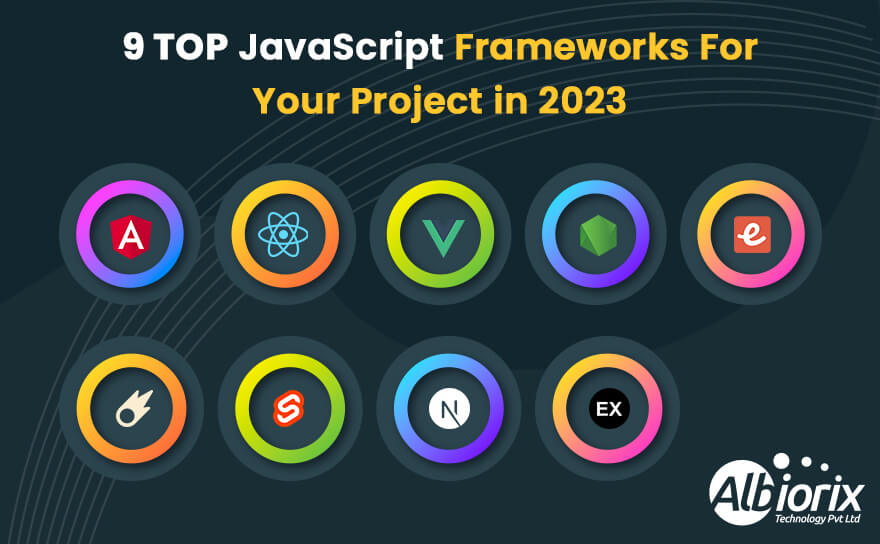
JavaScript frameworks are the real heroes behind implementing web and mobile applications for your business needs.
A list of multiple JavaScript frameworks is available in the market that makes your work easier, starting from designing to the deployment process. And If I talk about the previous year, there exist many ups and downs for such innovative frameworks.
We’ve come up with such JavaScript frameworks popularity and usage statistics for 2026.
JavaScript Frameworks Popularity with Usage stats of 2026
In 2026, there was a peak demand for the best JavaScript frameworks for designing and developing robust business applications. So this time, we’ve come up with the JavaScript framework usage statistics based on various factors like:
What tools are developers using?
How are they learning them?
What their opinions of them are?
As per the developer survey 2026, more than 70,000 developers were actively participated in the survey report. And also, 72% developers were profession developers.
Let’s highlight the survey details of the most popular and best JavaScript frameworks.
1. JavaScript Gained Its Position in Most Popular Programming Language
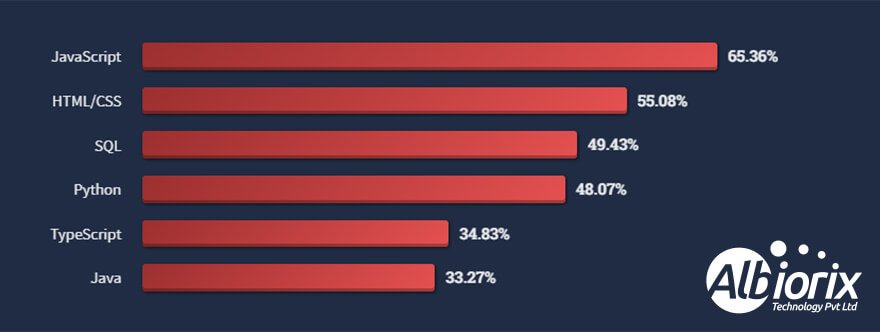
JavaScript is a scripting language and is the most popular language of 2026.
Here’s the proof, Over 65% of respondents used JavaScript technology extensively for web application development. JavaScript is the core technology that is specifically used on the web development along with HTML and CSS programming language.
Moreover, JavaScript is vital in dealing with development environments like Node.js for backend development, Apache CouchDB, and Adobe Acrobat.
JavaScript is not limited to web and mobile app development, but its usages have also extended to mobile, game, and desktop development.
Albiorix is an expert in developing an online platform that can easily empower physicians, health institutions, and patients through a comprehensive telemedicine platform.
Angular is an open-source JavaScript framework that makes it easy to use HTML as a template language, write code using standard JavaScript syntax, and add attributes to DOM elements.
Angular is the best option for designing and building feature-rich web app development solutions.
Angular has gained huge popularity as a powerful JavaScript framework. On top of that, Google, Netflix, and Upwork are prime examples of websites built using the Angular framework.
3. ReactJS Occupies the Second Position
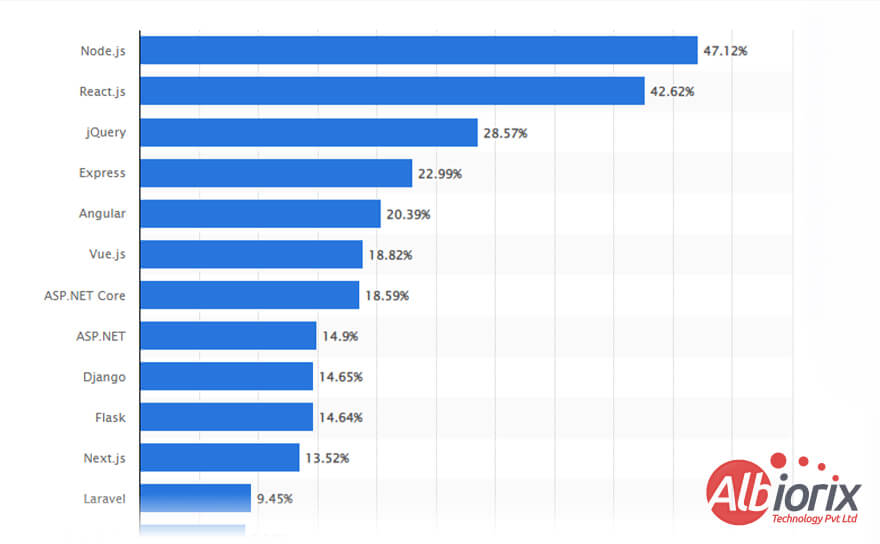
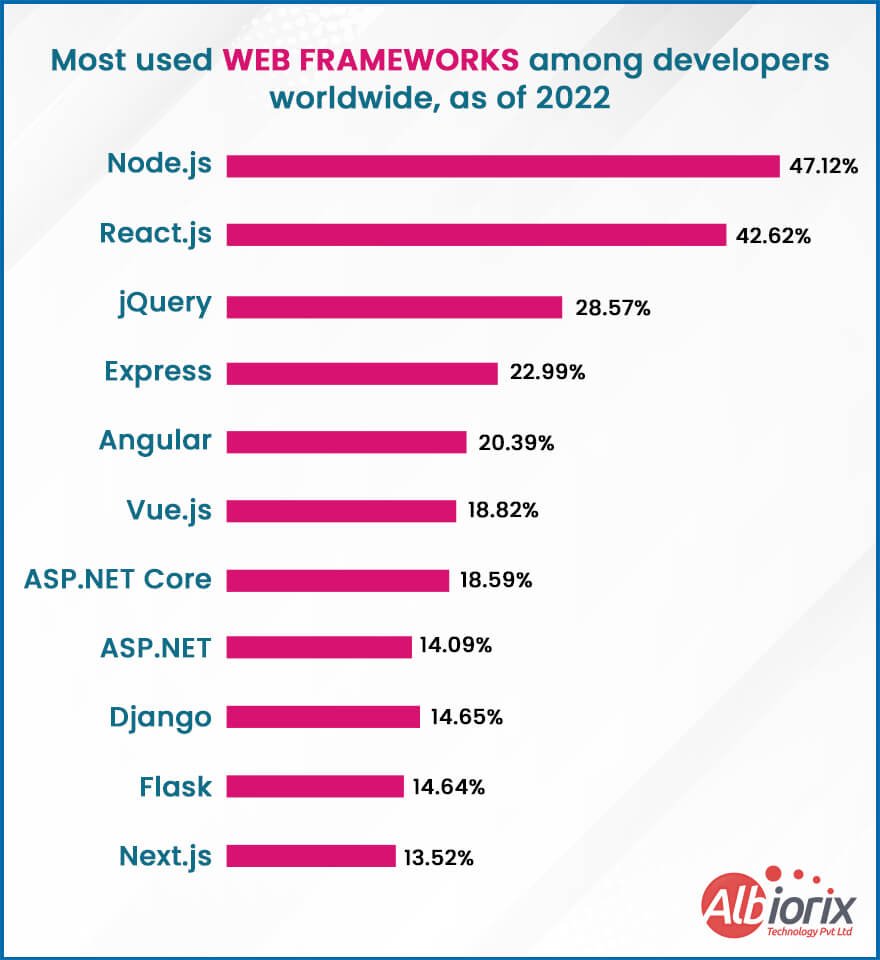
ReactJS continues to hold strong in 2026, maintaining its position as the second most popular web framework, according to the latest Stack Overflow Developer Survey.
It has overtaken several competitors, including Node.js, and now shows a consistent growth trend since 2020—rising from 36% to over 43% developer preference.
Its wide adoption can be credited to its simplicity, reusability, and a strong community of developers. React is not only stable but also actively supported, making it a reliable choice for modern web development.
Despite new libraries entering the field, React remains a go-to framework in 2026.
Drive Your Business Growth With Single Page Application
We have professional and experienced Angular developers that can develop
single-page applications simply and fast using optimal structure.
Since four years, Node.js development has become very popular and continues to stand the competition in 2026. Node.js development is designed explicitly for almost all startups worldwide and that’s what makes it top JavaScript frameworks.
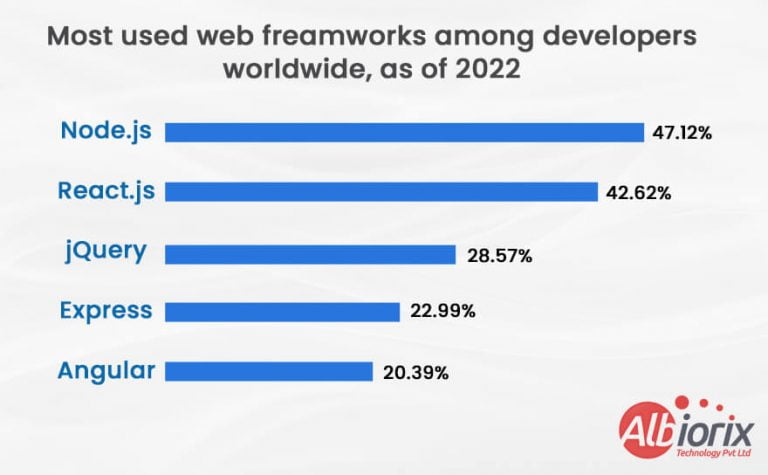
If I talk about the most used web framework among software developers worldwide, as of 2026, 47.12% of respondents reported using Node.js.
Node.js framework is such an ideal and innovative technology stack that help you build secure, powerful, and solid digital solutions for your business needs.
In addition, you’ll come across various JavaScript frameworks and web application programming languages that play an essential role in impacting the app’s efficiency.
So, opting for the correct tech stack from beginning to app development is imperative. Node.js in 2026 is a significant trend that will continue to evolve and provides several clear advantages, making it the finest option for web developers.
5. VueJS Is Now Leading the Software Development Industry
Vue.js is an open-source framework that helps you create user interfaces and single-page applications for your business needs.
Vue.js is a feature-rich JavaScript framework that has a collection of effective and impressive tools for performing various business operation.
It’s compatible with TypeScript, end-to-end testing instruments, and a plugin installation set-up and allows unit testing.
Since the launch of Vue version 3, there exists many differences between Vue2 vs Vue3. It also contains a state manager, server renderer and browser debugging resources.
With its advanced software packages and supporting libraries, Vue.js framework is effective in setting in motion state-of-the-art single-page apps.
ExpressJS continues to be a top choice for businesses looking to build fast and scalable web applications
Known for its simplicity and flexibility, Express is widely used to create APIs and server-side apps, especially by companies aiming to launch robust digital products efficiently.
Its strong community support, lightweight structure, and ease of handling HTTP requests make it developer-friendly. Express has earned over 57,000 GitHub stars, reflecting its reliability and popularity.
What also makes Express a smart business choice is its extensibility. With a variety of plugins and middleware, it adapts easily to different project needs—whether you’re building a startup app or scaling an enterprise-level platform.
Many modern frameworks are built on Express, showing its influence and trust in the developer world.
Businesses benefit from its stable foundation, helping teams resolve issues quickly and build efficiently—making ExpressJS a practical and future-ready solution.
Looking For the Best Front-End Development Services?
Conclusion
JavaScript is a technology accepted by almost all developers and business owners working globally to make robust web applications. Moreover, it is one such technology that is equipped highly with the list of cutting-edge technologies.
JavaScript is one of the first and most popular global technologies developers prefer. After going through the JavaScript usage statistics and data in recent years, we are quite proud of our work at Albiorix.
Summary: In 2026, choosing the right JavaScript data grid library is the difference between a laggy interface and enterprise-grade performance. This guide compares the top 10 libraries, from powerhouse engines like AG Grid and Glide Data Grid for large datasets to headless solutions like TanStack Table. Whether you need a React-specific grid like MUI X or a lightweight open-source tool like Grid.js, we’ve broken down the speed, features, and licensing to help you pick the perfect fit.
JavaScript data grid libraries are used by more than 94% of organizations to create their business applications. Additionally, JavaScript data grid are a crucial component of a web application.
By utilizing its incredible functionalities, businesses can leverage best JavaScript data grid components to enhance the value of their business web applications.
So, pick the JavaScript data grid component library from the list above that best meets your company’s demands.
To create application dashboards, you can also look at some of the top JavaScript Grid libraries.
Key Takeaways
JavaScript grid library is a programming language that is used explicitly for interacting with leading web technologies.
A JavaScript Data Grid is an innovative interface that allows you to display data in a tabular format.
JavaScript datagrid plays a vital role in your business applications as it allows you to easily track statistics, perform real-time reporting, and, most importantly, perform data analysis.
We’ve compared the top 10 libraries, identifying AG Grid for enterprise scale and Glide Data Grid for handling millions of rows.
What is a JavaScript Library?
JavaScript is the most widely used programming language that is essential for interacting with web-related technology. It plays an essential role in dealing with web application development.
To run scripts on various platforms, modern browsers often develop a separate engine just for JavaScript.
There exists prewritten code that is essential for web development and web design. Such prewritten code is called JavaScript Library.
You can search for any standard JavaScript function from this library. Dashboard charts, standalone charts, data grips, data maps, and many other components are all included in JavaScript libraries and may be easily implemented anytime you need them.
What Exactly is a JavaScript Data Grid?
Library Name
Best For
Framework Support
License
AG Grid
Enterprise & Big Data
React, Angular, Vue, JS
MIT / Commercial
TanStack Table
Headless UI & Custom Styling
Framework Agnostic
MIT (Free)
MUI X Data Grid
Material UI / React Apps
React
MIT / Commercial
Handsontable
Excel-like Data Entry
React, Angular, Vue, JS
Commercial
Glide Data Grid
Performance (Canvas-based)
React
MIT (Free)
FusionGrid
Dashboard & Charts
React, Angular, Vue, JS
Commercial
A JavaScript Data Grid is a user interface component that helps display data in a table format on websites or web apps. It works like a spreadsheet, letting users sort, filter, and edit data directly in the grid.
It’s useful for showing large datasets clearly and efficiently. Features like in-cell editing, paging, and server-side data handling make it easier to manage and interact with complex data.
Many businesses use data grids to organize information from databases or APIs. They’re flexible, fast, and can be customized to suit different needs across industries.
Looking For Best JavaScript Development Services?
We offer full-stack JavaScript development services to build top-notch applications for your business needs.
Data grids are a crucial component of online applications that display various data, such as tracking statistics, real-time reporting, and much more.
There are numerous explanations for using a DataGrid in your upcoming project.
Data grids are lightweight and play a vital role in improving the speed of your application and shortening load times for your website.
Large data sets can be deployed thanks to most DataGrid frameworks’ virtual and infinite scrolling capabilities.
Large datasets may be mapped even more quickly because of their capabilities like filtering, sorting, pagination, etc.
7 Best JavaScript Data Grid Libraries
Let’s explore the list of 7 best JavaScript Data grid libraries that will aid you in making your web application more responsive and secure.
1. FusionGrid
FusionGrid is a responsive JavaScript data grid from FusionCharts that helps developers easily display large datasets in a clear, interactive table format.
It works smoothly across all modern browsers and devices, making it a flexible choice for dashboards and reporting tools.
FusionGrid supports popular frameworks like Angular, React, and Vue, making integration simple for developers. You can sort, search, and filter data directly within the grid, which helps users find what they need quickly.
This grid is especially helpful for creating interactive dashboards that pull from the same data source. With FusionGrid, you get a clean, fast, and customizable way to present complex data without slowing down your app.
It’s a trusted tool for anyone building data-heavy web applications.
Amazing performance; draw integrated charts with one million data in just 2 seconds
Simple to integrate with tech stack
Fast and responsive
Negligible maintenance charges
Great customer support
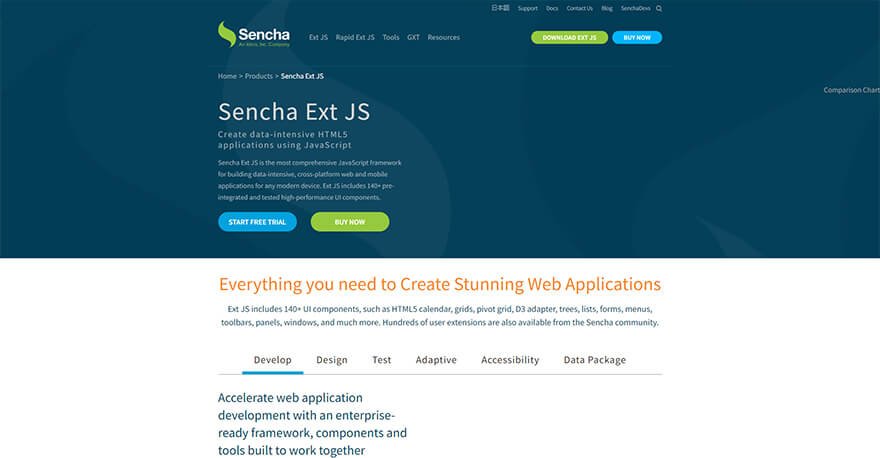
2. Ext JS
Sencha offers a framework, UI elements, and building blocks for high-performance mobile and web enterprise applications. Developers can give their apps strong data analytics capabilities by using Sencha’s grid component.
Sencha’s high-performing grid can handle large data sets, compatible with the preferred best JavaScript grid library.
Top Features of Ext JS
Customizable UI widgets
Code compatibility of new versions with the older ones
A flexible layout manager for data management
It is protocol agnostic, and can access data from any back-end source
Customizable Themes Ext JS widgets
Supports Lazy Loading features
Drag and drop columns functionality for UI containers and other components.
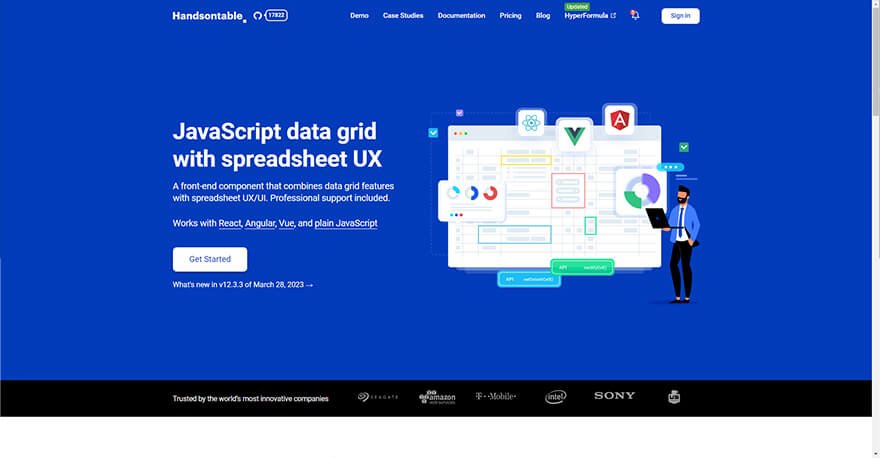
3. Handsontable
Handsontable is a JavaScript data grid that looks and feels like a spreadsheet. It’s easy to use, even for beginners, and works well with popular frameworks like React, Angular, and Vue, as well as plain JavaScript.
With Handsontable, you can sort, filter, and edit data right in the grid. It’s highly customizable, and developers can modify the source code to fit their exact needs. You can install it easily using npm install handsontable.
Handsontable is known for its fast performance, even with large datasets, making it a strong choice for business-critical applications. It also comes with a full-featured API, helpful documentation, and both free community and paid support.
Whether you’re building a finance dashboard or a data-entry tool, Handsontable offers a user-friendly and flexible way to manage and display complex data without compromising speed or usability.
Top Features of Handsontable
Supports all spreadsheet features
A developer-friendly API
Designed to perform
Database editing
Configuration controlling
Drag-and-drop functionality
Data and cell merging
Workforce planning
Sales reporting
Financial analysis
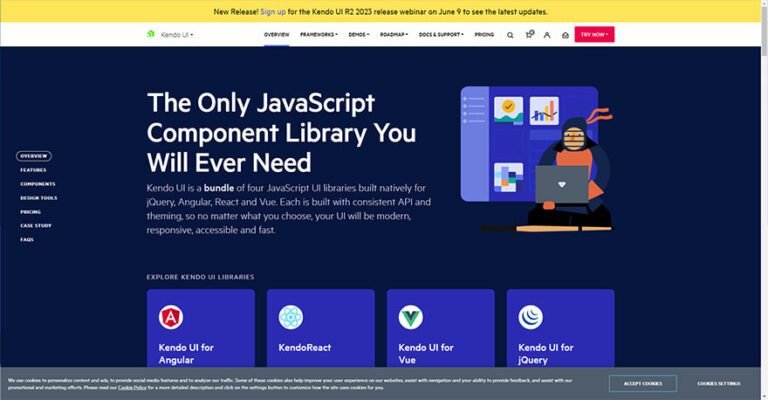
4. Kendo UI
With Kendo UI, you can obtain the best JavaScript grid component library required for your business applications and websites.
It includes four JavaScript UI frameworks with consistent APIs developed for Angular Data grid, Vue, React, jQuery and Angular.
Whatever option you select, your user interface will be quick, accessible, responsive, and modern.
Kendo UI makes your job simple by enabling you to integrate cutting-edge, high-performance, and feature-rich extensible data table views into your business applications.
More than 100 Javascript grid components include filters, sorting options, and more sophisticated hierarchical data and pagination data grouping options.
In addition to endless scrolling and adaptive virtual rendering, it provides column interactions, frozen columns, data editing, data grouping, data binding, data summaries, virtualization, exporting data to PDF formats or Excel export functionality, templates, and more.
You can advance data processes with features including inline editing, advanced filtering, sorting, aggregating, interacting, and even freezing columns.
You can have total control of every choice with Kendo UI, from data operations (CRUD operations) and theming to quicker rendering and responsive interactions.
Top Features of Kendo UI
Supports Angular, Vue, React, and jQuery
Especially built with editable consistent API
Comes up with responsive, accessible, modern, and fast API
Execute upgraded and full-featured table views on your web applications
Offers 100+ data grid components with features such as hierarchical and paginated grouping
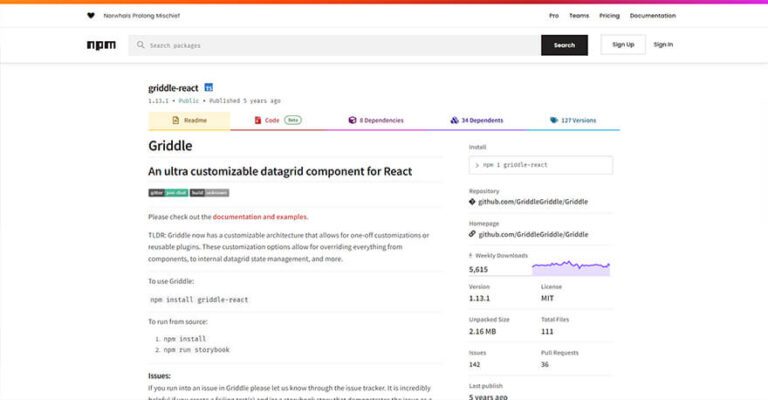
Griddle is a flexible data grid component built for React applications. It helps developers display and manage data in table format while offering options to customize how the grid behaves and looks.
Griddle provides core features out of the box, like sorting and styling, but its real strength is in customization.
You can modify components, use plugins, and adjust methods to fit your exact needs. This makes it ideal for projects that need a personalized data table setup.
It’s also easy to use, even for those new to building data grids. Griddle’s plugin system and support for grouped styles help teams create unique, well-organized tables that are easy to maintain.
You can install Griddle using npm and start building interactive, styled data grids that fit seamlessly into any React project.
Top Features of Griddle
Extremely handy and flexible components
Offers basic operations and conventions with the option of advanced customization for seasoned hire web developers
Provides plugin support for easier component customization
Keeps data tables different through group styling and other functionalities
6. AG Grid
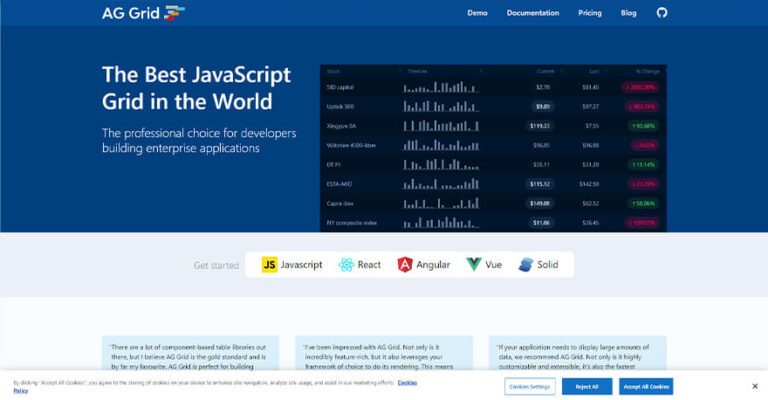
One of the top libraries for vanilla JavaScript data grid component development is AG Grid. You have never seen a feature set, quality, or performance like what AG Grid provides.
This solution stands out from the competition thanks to its many distinctive features.
The low-code approach typically involves using a drag-and-drop interface to design and customize the UI, and pre-built templates to create and configure the underlying application logic.
The low-code platform takes care of the back-end coding, infrastructure, and deployment, allowing web app developers to focus on the front-end user experience using various no-code tools available in the target market.
A forward-thinking custom software development company can leverage these platforms to deliver rapid, tailored, and scalable web applications that meet unique business requirements.
You will receive the grid options, grip API, grid events, and row node for the grid interface. Through the column interface, which is part of columns visible to the public, let your application communicate with the columns.
All the attributes, events, methods, and so forth are listed in the column interface section. AG Grid also provides theming, style, grid options, grid instances, row grouping data, and accessing API.
Top Features of AG Grid
Provides sets, quality, and performance unlike anything else
Unique and differentiating features from other JS Data Grid Libraries
Doesn’t compromise the performance and quality
Builds your data grids dashboard easily
Comes with a free and open-source community, that will help you with style features and functionality issues if any
Gives free access that other data grids don’t have
7. TanStack Table
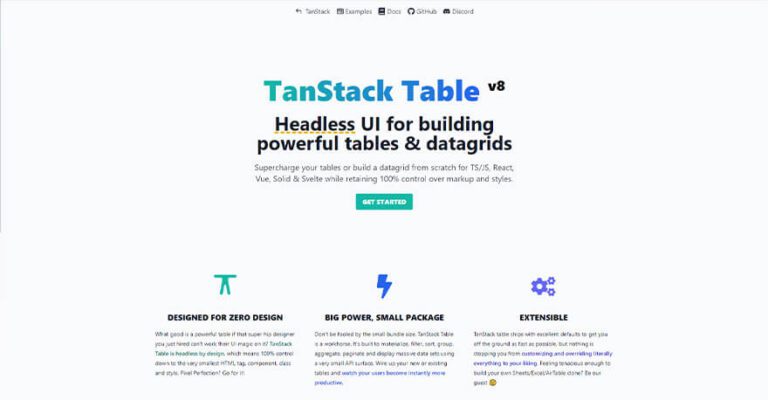
TanStack Table is a headless UI library that lets you build fully customizable data tables and grids. It gives developers full control over the layout, design, and behavior of each table element, making it ideal for React, Vue, Svelte, Solid, and plain JavaScript/TypeScript projects.
Unlike ready-made table components, TanStack Table provides only the logic and structure. You decide how it looks and behaves by defining your own HTML and styles.
It supports features like sorting, filtering, grouping, pagination, and more—all without adding extra weight to your code.
This makes it a great choice for building lightweight, fast, and flexible tables that fit your specific app needs.
Whether you’re working with large datasets or just need fine control over every table element, TanStack Table offers a developer-friendly, framework-agnostic solution you can rely on.
Build a data grid from scratch for React, Solid, Svelte, Vue, and TS/JS while owning multiple themes and formats.
Complete control of every HTML tag, class, style, and component.
Offers a pixel-perfect data table.
Supports data sorting functionality
Built to filter, sort, materialize, aggregate, group, display, and paginate huge data sets that have a small API surface.
Make users more efficient by repackaging existing or new tables.
Promises speed and performance as engine and API are framework-independent and highly modular with great ergonomics.
8. MUI X Data Grid
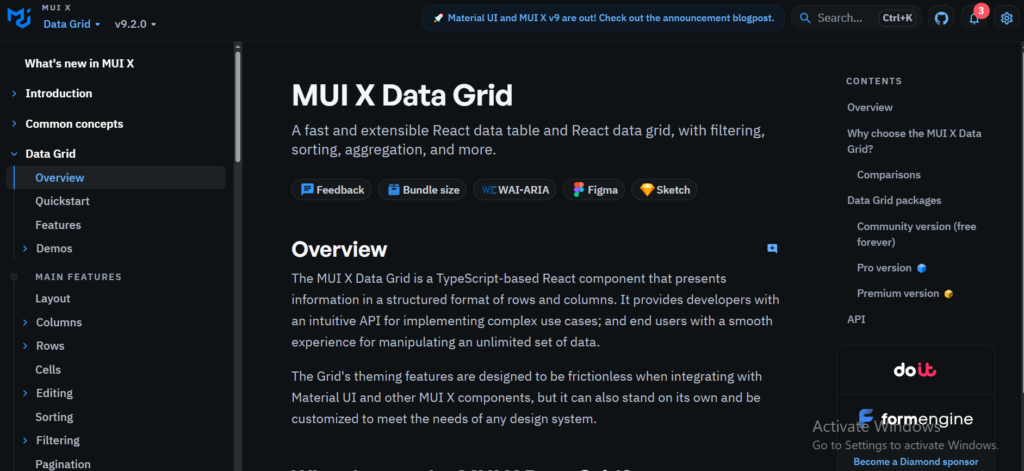
MUI X Data Grid is the gold standard for developers already using the Material UI design system. It is a React-specific library that offers a massive suite of advanced features like row pinning, column spanning, and advanced filtering out of the box.
If your project requires a polished, “Google-style” interface with deep React integration, this is your best choice. It balances ease of use with enterprise power, making it a favorite for modern SaaS dashboards.
“Best for: React-based projects using Material UI that need a high-performance, feature-rich table with minimal configuration.”
Top Features of MUI X Data Grid
Column Pinning: Keep important data visible while scrolling.
Seamless Material UI Integration: Matches your app’s design system perfectly.
Advanced Filtering & Sorting: Sophisticated data manipulation out of the box.
Row & Column Virtualization: Handles large datasets with ease.
Excel Export: Easily export data to CSV or Excel formats for business users.
9. Glide Data Grid
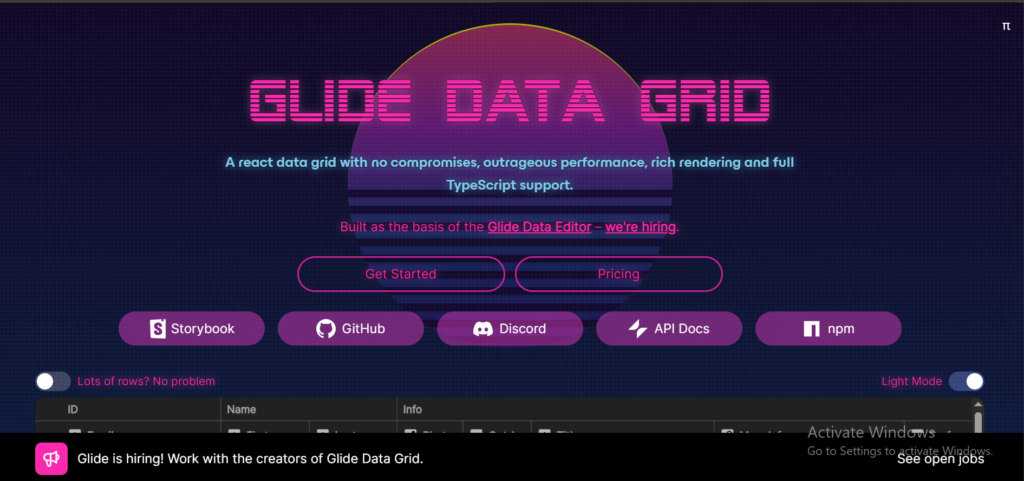
When you need to handle millions of rows without a single frame drop, Glide Data Grid is the winner. Unlike other grids that use the standard DOM (which can slow down with too much data), Glide uses an HTML5 Canvas to render cells.
This makes it incredibly fast and memory-efficient, specifically designed for high-performance financial dashboards and massive data-heavy applications where speed is the only priority.
“Best for: Finance apps, real-time data monitoring, and any project where you need to display 1,000,000+ rows with zero lag.”
Top Features of Glide Data Grid
Canvas-Based Rendering: Unbeatable performance for massive datasets.
Lightweight Footprint: Does not bloat your application’s bundle size.
Excel-Like Interaction: Supports keyboard navigation and cell selection.
Custom Cell Renderers: High flexibility for rendering complex data types.
Lazy Loading: Only renders what is visible, saving browser memory.
10. Grid.js
Grid.js is a lightweight, open-source library that works with almost any framework (React, Angular, Vue, or Vanilla JS). It’s perfect for developers who need a simple, clean, and responsive table without the “enterprise bloat” of larger frameworks.
It is remarkably easy to theme and supports global search and pagination natively, making it an excellent choice for smaller projects or startups that need to get a clean table running in minutes.
“Best for: Small to medium-sized web apps and startups that need a fast, open-source, and easy-to-style table.”
Top Features of Grid.js
Framework Agnostic: Works with React, Vue, Angular, or plain JavaScript.
Built-in Search & Pagination: No extra configuration needed for core features.
Responsive Layout: Automatically adjusts to fit mobile and desktop screens.
Extremely Lightweight: Small size ensures fast page load times.
Clean API: Very easy to learn and implement for junior developers.
Looking For Best JavaScript Development Company?
Albiorix offer full-stack development services to build applications for your business.
Before selecting the best JavaScript Data Grid library for your project, you need to consider the following parameters to make the selection easier.
1. Performance and speed
Many JavaScript grids are inoperable because the data loads slowly, degrading the user experience. Therefore, it is essential to consider performance and speed when selecting a grid.
Additionally, assess how smoothly users can scroll across large datasets. Users can scroll tables quickly without experiencing loading delays when the virtual scrolling speed is good.
2. Components, Features, and Customizations
The grid library should offer a variety of parts and functionalities for the best UX. For instance, the Javascript library should show a date picker component whenever a table requests that the user select a date or time.
The extended functionality of your grid can be increased by supporting fundamental and additional features.
Therefore, picking a grid library with various features and sophisticated data manipulation capabilities is essential. Additionally, they must provide adjustments to change the table experience as needed.
3. Support for Different Frameworks, Browsers, and Platforms
You can opt for different languages to deal with the coding aspects for the various elements of web pages.
In those circumstances, picking a grid library that supports major Javascript frameworks is preferable. In addition, businesses create web applications to deploy them globally.
Thus, grid compatibility with all platforms and modern browsers is essential. Moreover, the grid ought to support numerous displays without degrading its functionality.
Websites’ information comes from many nearby and far away sources. As a result, the grid library must effectively support data binding and data validation from all sources.
This allowsapp developers to link data from different live data streaming platforms for analytics and insights.
Conclusion
It can be difficult to implement a responsive and user-friendly JavaScript data grid. But if you pick the proper one, it’s not!
To deploy all of your data in a tabular format and proceed with web development, you can utilise a variety of libraries.
The fundamental framework of many web apps is JavaScript. It is useful for development needs, saving time and effort that would otherwise be spent on testing and development.
Additionally, it maintains everything under one roof so that you can quickly access and use the key features in your application.
JavaScript is one of the most popular and in-demand JavaScript frameworks designed especially for front-end development, as well as for creating mobile games.
Nowadays, you’ll come across different types of best javascript frameworks with unique benefits and features.
But the main question arises: Which is the best JavaScript framework you should select for your project in 2025? Choosing the most popular javascript frameworks for your project can be difficult.
However, based on your project size, scope, and personal preferences, you can narrow down the field and choose the top JavaScript Frameworks for your needs.
What is a JavaScript Framework?
A JavaScript Framework is a collection of JavaScript libraries and other additional libraries that provide a predetermined structure to work with when designing and developing web applications for your business needs.
I believe the Javascript frameworks aren’t meant explicitly for creating apps, but they offer a model for handling frequent programming patterns, making it “easier” for building Web apps.
JavaScript frameworks come up with specific rules and guidelines, like the majority of Programming Frameworks.
As a result, any developer could create complicated programs using them quicker and more effectively than they could if they opted to start from scratch.
Although 2026 is still a long way off, we can start thinking about which JavaScript frameworks will be the best to use then. So here are the top JavaScript frameworks in 2025:
1. Angular
Angular is an open-source and JS-based software engineering platform for building user interfaces (front-end).
In simple words, if I talk about what is Angular, it’s a Javascript framework that allows for the scalable AngularJS development of web applications.
In addition, it will enable you to reuse pre-written code across multiple deployment targets – rather than having to write it all from scratch every time.
Angular provides you with an opportunity to create two-way data binding approach. Both ways allow a user to exchange data between apps and views.
In addition, Angular enables the development of single-page applications (SPAs) through component-based architecture and tree-view structure.
Top Features of Angular framework
Document Object Model (DOM)
TypeScript-based framework
High speed & optimum performance
Efficient Two-way data binding
Less code framework
Enhancement to Angular testing functionality
100% Ivy-supported framework
No support for View Engine
Pros
Cons
✅ Angular applications (SPAs) allow us to load new pages without requesting the server, giving a more dynamic and interactive elements to get a unique experience.
❌ The Angular framework comes up with limited SEO and modern web platform capabilities. But it has an active option where you can prerender Angular using Angular Universal.
✅ Angular is cross-platform, allowing you to develop PWAs, Native apps, and Desktop applications smoothly.
❌ With its steep learning curve, Angular is a popular Javascript framework that supports more challenging factors.
✅ Angular typically optimizes your templates into code execution that’s highly optimized for today’s JavaScript virtual machines.
❌ Angular typically optimizes your templates into code execution that’s highly optimized for today’s JavaScript virtual machines.
✅ With its MVC (Model View Controller) Architecture, makes it easy to bifurcate development styles from business logic.
❌ Angular provides low ranking as per the developer’s point of view. On the state of JavaScript, and Angular has highly negative opinions.
Albiorix is expert in developing an online platform that can easily empower physicians, health institutions, and patients through a comprehensive telemedicine platform.
✅ A JavaScript framework that is easy to learn and code. It eventually has less coding and provides you with more functionality.
❌ Since the web application environment changes so fast, some developers feel uncomfortable relearning new ways of doing things regularly.
✅ A ReactJS web application comprises multiple web components, which are responsible for outputting a small, reusable piece of HTML code that you can reuse.
❌ As React technologies are upgrading at a pace level, you’ll need more time to prepare proper documentation.
✅ With the help of DOM, the performance of ReactJS applications is improved to the next level, making it easy for you to deal with the web app process.
❌ ReactJS is equipped with user interface (UI) Layers of web apps. However, it would help if you still chose some other frameworks or tech to help you deal with a complete tooling set for web application development.
✅ ReactJS overcomes the problem of reading JavaScript-heavy applications. It has become a boon for navigating various search engines quickly.
❌ ReactJS uses a syntax extension (JSX) that typically allows HTML with JavaScript to be mixed. This approach has benefits, but some development community members consider JSX a barrier.
We crafted a compliant TV platform that is specifically built on a multi-tenant cloud middleware TV platform.
Vue.js is a Progressive JavaScript Framework that has recently gained popularity in the web development community support.
Vue.js is one of the versatile front-end JavaScript frameworks that is progressive and you can use it for technical web applications that require server-side rendering a vast amount of data for the user.
Vue.js is a framework or JS library (core library) that supports high application performance as per your business needs.
Vue.js follows the MVVM architecture pattern, which means it has restricted scope, and simplicity and is easy to adopt (no custom build requirements).
Just because of Vue.js’s modern architecture, the normal setup of the application is not going to take longer time as per expectations.
✅ The Vue.js framework is intended to be performance without the need for additional optimisations; the majority of Vue’s APIs are tree-shakable.
❌ Vue has a high degree of flexibility, which allows for a wide range of approaches. However, large projects can cause issues with code consistency.
✅ Vue is not a framework but an approach that easy to understand and absorb. The learning curve is less steep, and development concepts are simple to understand.
❌ Compared to React, Vue.js developers can feel a lack of plugins and other libraries. Of course, the Vue version has the most crucial ones, but more precise specifications can solve issues with establishing appropriate open-source JavaScript library.
✅ Vue is easy to integrate. It can be used to construct universal apps as well as additional web components to ones that already exist.
❌ One of Vue’s issues is that the majority of its users are from China, which can be troublesome for specific products or studies.
✅ Vue 3 introduces a feature – Composition API- similar to React Hooks. You do not need to use Vuex as Composables can manage state management.
❌ Because Vue.js allows the developers to start from scratch, the immediate gain is more flexibility for implementing new advanced features.
4. Node.js
Node.js is a 2009 open-source JavaScript runtime Environment designed to run JavaScript outside a browser. Let’s be clear about something. Compared to the others, this is a server-side framework, a back-end framework.
Node.js plays an essential role to develop standard web pages and back-end API services. It helps you to create apps with Node.js development services that support real-time, push-based architectures.
Therefore, this basic framework is designed for the development of large network applications.
The Node Package Manager (NPM), a catalogue of over a million JavaScript feature-oriented modules, is the ultimate feature of Node.
Top Features of Node.js Framework
NodeJS is based on Google Chrome’s JavaScript engine
Node uses asynchronous API loading
Node.js is distributed under the MIT license
Data is never buffered in Node.js apps
Easily perform Data binding
Pros
Cons
✅ Node.js framework usually deals with asynchronous event-driven IO and helps concurrent request handling.
❌ When dealing with a relational database, Node.js can become a challenging factor.
✅ Node.js is a framework that typically uses JavaScript, which is easy to learn.
❌ If you’re working with a callback function, it can become challenging, especially when ending up with multiple nested callbacks.
✅ With the help of the Node.js framework, you can efficiently share the same piece of code with both the server and client sides.
❌ If you’re entirely new to JavaScript technology, you may face a conceptual problem.
✅ Npm (Node Package Manager), the Node-packaged modules have already become huge and still growing.
❌ Node.js is not suited for CPU-intensive common tasks. So instead, it is done for I/O stuff only (like web servers).
Ember.js is one of the leading JS frameworks that come up with code reusability to build high-performance web applications and mobile applications of the highest quality while writing less and doing more.
Similar to the Vue.js framework, Ember.js also follows the MVVM (Model-View-ViewModel) architecture pattern that helps you in designing and building fast web apps for your business needs.
The one thing that makes Ember.js a powerful and mature framework is its own command line interface tool.
Top Features of EmberJS
Creating reusable and maintainable JavaScript web applications
Enhances the app performance irrespective of reloading the whole page.
It supports two-way data binding.
Determines routes and controls as well as allows shareable URLs.
Provides Ember Inspector tool for debugging Ember applications
Pros
Cons
✅ Ember CLI is a command line tool that allows you to deal with a project structure featuring great add-ons, thus making certain fast rebuilds and live reloads.
❌ If you are creating a JavaScript application using EmberJS, remember that you’ll find a steep learning curve.
✅ It supports a large and well-developed ecosystem, making it easy for you to select the proper ones to solve your problems.
❌ Ember.JS typically lacks the functionality of component service pattern reuse, especially when working at the Controller level.
✅ Ember’s extensive documentation comes up with detailed information, making it easy for you to deal with application complexity.
❌ Ember is not suitable for smaller projects. It gets overblown.
✅ EmberJS is a framework that is equipped with a list of different Javascript framework packages, including NPM packages.
❌ With its object model implementation, itgets bloated by its huge size and while debugging it call stack.
Have a Web App Idea But Confused Where to Start?
Book a free 30-minute consultation with our expert. Get your web app idea.
Created by Meteor Software, this JavaScript Framework was given a fitting name. This framework is mainly used for quick prototyping and making cross-platform applications. It is easy to understand and provides many conveniences.
The good part about Meteor.js is that it is free and open-source framework.
Top Features of Meteor
Easily build web and mobile apps in JavaScript for a web browser, application server, and mobile environment.
Comes up with several built-in features like hot code reload, automatic CSS & JS minification, and reactive templates.
The app is created using JavaScript so you can use the existing code on both the client and server sides.
Meteor JS allows you to efficiently develop and deploy mobile apps like Android and iOS apps through the Cordova PhoneGap alliance.
It provides helpful client-side technologies such as helpers, events, and templates.
Pros
Cons
✅ Meteor.JS provides a better way of integrating the database in MongoDB, making the high-performance applications (web and mobile applications) as practical as possible.
❌ It supports only MongoDB as the primary database and limits some linguistic integrations for code development process.
✅ You’ll get multiple packages that can work as per your needs. Furthermore, the entire stack is JS-based, so you only need single-language knowledge.
❌ The first time it can be a bit difficult if you are unfamiliar with the command line tools; however, once you have mastered it, you can streamline work with that framework.
✅ With this framework, you can create multiplatform applications (web and mobile applications) with simple javascript. Moreover, with only some knowledge of node.js, you can develop all kinds of Javascript projects quickly and easily.
❌ They release updates very often, and it isn’t easy to understand if you do not have the necessary programming skills.
✅ The app has an extensive Javascript Framework that you can reuse to develop an app for your business needs. Blaze is a blast. Deployment is a breeze.
❌ Meteor allows you only to create a non-relational database like MongoDB, which is not recommended for large projects.
Svelte JS is a front-end development framework that makes web application development process more accessible and efficient.
The word “svelte” is a synonym for “sleek” or “thin.” It’s written in Typescript and open-sourced and was launched in 2016.
Svelte JS is one of the best JS frameworks as it offers a revolutionary approach to creating Progressive Web App Development. Unlike Vue or React, Svelte JS doesn’t need to process content inside HTML templates or DOM document.
One benefit of using this application framework is that it doesn’t require high processing power from the browser.
Top Features of Svelte
Less boilerplate code to write, so your JavaScript developers can focus on creating solutions.
No more virtual DOM render functions available, so apps perform faster and more reliably.
Instead of CSS, many developers use scoped styling with JavaScript, which allows them to include styles mid-document that target specific custom elements and its children.
Svelte wants to provide an awesome web development experience and output code that performs well by default.
Svelte’s aesthetics feel like a warm cozy blanket on the stormy web.
Pros
Cons
✅ Zero traces of the Javascript framework within the compiled applications.
❌ A much smaller community than other popular frameworks.
✅ Includes its own minimal state management solution.
❌ Lack of IDE support.
✅ Reactive variables can be easily created by simply adding $: at the beginning of the declaration.
❌ Very small open-source ecosystem.
✅ Svelte’s server-side rendering mode compiles components to simple string concatenation for big performance gains.
❌ Few Svelte dev toolkits are available.
8. Next JS
The Next JS framework is based on React and it plays an essential role for Web Application Development , Mobile App Development , and also Progressive Web Apps.
The excellent part about this web application frameworks is the many major companies are using this Javascript framework for building robust apps.
Next JS is the best option for building user interfaces that can be beneficial for your business applications in many ways.
The primary goal for creating this robust tool was to use it everywhere and it also meet SEO requirements as well to make your business on the top of search engine.
Top Features of NextJS
You can efficiently import CSS records from a JavaScript file, without facing any complexity.
Post launch of the Next.JS 10.0.0, you can avail the features of an inherent Image Component and Automatic Image Optimization.
You can effectively deal with static documents, just like images, and that too under the root index folder called “public”.
You’ll get TypeScript experience out of the box, like an IDE that makes your work easier.
It comes up with the great supports for modern browsers like IE11, Chrome, Firefox, Safari, Edge, Opera, and many others.
The last most popular JavaScript framework to choose in 2025 on our list is ExpressJS. If you’re planning to develop Node.js web application for your business needs, ExpressJS is the best choice to move ahead.
ExpressJS is one of the most popular back-end Javascript frameworks among developers just because of its open-source, minimalistics back-end support, modularity and comprehensible HTML-based template syntax.
Moreover, you can quickly design and build Angular’s intuitive API as well as create web applications for your business purpose.
Top Features of ExpressJS
ExpressJS is the best framework for creating single-page, multi-page, hybrid, and deploying web applications for your business needs.
Quickly set up middleware to respond to HTTP Requests for your business applications.
The framework comes up with a routing table with simple client routing requests that typically supports different actions based on HTTP method and URL.
Easily renders HTML Pages based on passing arguments to templates.
Seamless integration with template engines such as Jade, Vash, EJS, etc. is made easier with this framework
The framework allows you to easily perform database linking with MongoDB, Redis, and MySQL.
Pros
Cons
✅ Easy to customize and configure for certain demands as per your business needs.
❌ You’ll face various client request problems, especially with framework’s middleware system.
✅ Based on URL and HTTP methods, it is possible to define the routes of the existing app.
❌ There are several issues with the callbacks.
✅ The framework provides integration with EJS, Vash, Jade and other template engines efficiently.
❌ Express does not strictly follows any specific structure, making it difficult for developers work on different app functionalities.
✅ This JavaScript framework typically supports strong connection with leading databases like MySQL, Redis, and even MongoDB.
❌ Callbacks are major challenging factors with this framework as you might need to deal with complicated writing style.
Conclusion
The web frameworks that I had mention in this post, which include AngularJS, ReactJS, Vue.JS, EmberJS, Backbone JS, and a few more.
However, understanding these technologies and your custom project requirements will assist you in choosing the best website framework.
That’s the basic overview of all these frameworks that are more popular and you’ll want to be wandering about to use for building web applications for your business needs.
A Promise in Angular is a way to handle asynchronous operations, like fetching data from a server or processing user actions, without getting stuck in callback hell. It represents a task that will either complete successfully (resolve) or fail (reject) in the future.
Before Promises, developers used nested callback functions to manage async tasks, which made code hard to read and maintain. With ES6, JavaScript Promises were introduced to simplify this.
In Angular, Promises help manage asynchronous workflows more cleanly, making apps faster and easier to debug. They allow developers to write code that reads like a sequence of steps, improving clarity and maintainability.
By using Promises, Angular developers can build responsive, smooth user experiences while keeping the codebase simple and organized.
What is Promise in JavaScript?
A promise is a JavaScript or TypeScript object that may produce a value at some point in time. A promise may be in one of 4 possible states:
fulfilled – The action relating to the promise succeeded
rejected – The action relating to the promise failed just because an error occurs during promise implementation
pending – It’s an initial state that hasn’t fulfilled or rejected yet
settled – Has fulfilled or rejected
Get Custom-Tailored Web App Development Solutions For Your Business Needs
We strictly adhere to the standard software development lifecycle to provide the best possible IT solutions for your business success.
When the AngularJS developers are dealing with asynchronous operations like an HTTP request, they are not sure of the exact time to get a response from the server. By default, Javascript is a programming language that is
Synchronous;
Blocking; and
Single-threaded language.
In simple words, we can say that the Javascript engine can process only one code at a time in a single thread. So, when a thread is blocked, we can’t execute other code that is also blocked, making JS slow and unable to perform multiple operations.
On the other hand, the asynchronous operation is solely responsible for making code nonblocking. It means that it allows the developers to execute multiple codes at the same time.
In the Angular framework, the developers can quickly achieve asynchronous by utilising the following method.
The Callback function
The Promise from Javascript can be used in Angular.
Observable using Rxjs library in Angular: Library for reactive programming using Observables.
Moreover, while dealing with an asynchronous operation, the developers can quickly move the code to the following line by allowing UI remains responsive.
The user continues working on the application while asynchronous operations like HTTP requests are processed in the background.
Now the concept of Promise in Angular comes into the picture.
The Promise in Javascript is nothing but a piece of task that is wrapped in asynchronous operation and notified whenever the asynchronous process is completed or failed at some point in the future.
Two possible outcomes occur when the developer runs the Promise: The Promise is completed or failed.
With the help of the async and await keyword with Promise, it becomes easy for the developers to deal with easy to read, write, and we can also use “try and catch” for error handling with (async & await).
Planning To Develop a Robust Single-Page Application?
Albiorix is a leading AngularJS Development Company having core expertise in designing and building feature-rich applications for all your business needs.
Its time to see how to use promises in Angular development First, we will create a simple Angular application using Angular CLI.
ng new angular-promise-example –routing=false –style=css
This command will create a new Angular application with no routing and CSS for stylesheet format. Next, we will set up HttpClient to send API requests to web servers to create or fetch data.
Fetching data is a standard asynchronous operation as you always have to wait for an amount of time to receive the requested data. In Angular development, you can use HttpClient for fetching data.
HttpClient uses RxJS Observables to handle asynchronous operations; let’s see how to use JavaScript/ES6 Promises instead.
In the app/app.module.ts file of your project, add the following changes:
Copy
import { NgModule } from '@angular/core';
import { BrowserModule } from '@angular/platform-browser';
import { FormsModule } from '@angular/forms';
import { HttpClientModule }  from '@angular/common/http';

import { AppComponent } from './app.component';
import { HelloComponent } from './hello.component';

@NgModule({
  imports:      [ BrowserModule, FormsModule, HttpClientModule ],
  declarations: [ AppComponent, HelloComponent ],
  bootstrap:    [ AppComponent ]
})
export class AppModule { }
Next, open the src/app/app.component.ts file and add the following code to send a HTTP GET request and process the response using a Promise in Angular.
In Angular development, Promises are preferred over traditional callbacks because they provide a clearer and more manageable way to handle asynchronous operations.
Unlike callbacks, which can become deeply nested and hard to follow (known as “callback hell”), Promises allow developers to chain .then( ) and .Catch( ) methods, making code cleaner and easier to maintain.
Promises also offer better error handling. With callbacks, error handling logic often gets duplicated or missed. Promises centralize this by allowing a single .Catch( ) block to handle any error in the chain.
This makes Angular applications more reliable and easier to debug, especially when dealing with HTTP requests, data fetching, or other time-consuming operations.
Common Use Cases of Promises in Angular Development
Here are some real-world examples where Angular developers commonly use Promises:
Fetching API data (e.g., user profiles, product listings)
Form submission handling with server response
Authenticating users with login/logout operations
Uploading files and waiting for completion status
Executing dependent asynchronous tasks in a sequence
Using Promises ensures these tasks are handled smoothly, without blocking the UI, and gives users a faster, more responsive experience.
Conclusion
So, I hope you got a clear vision on what is Promise in Angular development is. In addition, we came across the concept of JavaScript Promises introduced in ES6.
We have seen the implementation of JavaScript promises that can be specifically included in the application.
In addition, we came across the example of creating a promise in the Angular application.
Still, if you have any query related to web application development, Angular is the best and leading option that help you build applications for all business verticals.
TypeScript and JavaScript are the two leading technologies that play a vital role in web application development. As a result, JavaScript has been the most popular programming language among the developer’s large community.
But, with the invention of TypeScript, the picture has changed completely. Do you know how? TypeScript is considered the enhanced version of JavaScript with some additional features.
In this blog, we will explore the differences between TypeScript vs JavaScript in detail. We will start by explaining the basics of each language and their respective features.
Then, we will compare the two languages based on their performance, scalability, maintainability, and other factors. Finally, we will discuss some use cases for each language and provide tips on choosing the right language for your project.
Key Takeaways
TypeScript is a superset of JavaScript that adds static typing and other features to make it more scalable and maintainable.
JavaScript is a programming language used primarily for creating interactive web pages and web applications.
The main difference between TypeScript and JavaScript is that TypeScript is a superset of JavaScript that adds static typing and other features, while JavaScript is a dynamic and interpreted scripting language without built-in static typing.
Understanding the Concept of Static and Dynamic Languages
Static and dynamic are terms used to describe web application programming languages based on how they handle data types and variable declarations during compilation or runtime.
A static language is one in which the data types of variables are determined at compile-time and cannot be changed during runtime.
In other words, the variable type is declared when the code is written, and the compiler checks to ensure that the variable is used correctly.
If there is a mismatch between the type of a variable and the operation performed on it, the code will not compile. Examples of static languages include Java, C++, and TypeScript.
On the other hand, a dynamic language is one in which the data types of variables are determined at runtime, and variables can change their types during execution. In other words, variables are not declared with a specific type and can be used in any way.
The interpreter or runtime environment checks the type of a variable only when it is used. If there is a type mismatch between the variable and the operation, the program throws a runtime error.
Examples of dynamic languages include JavaScript, Python, and Ruby.
The choice between static and dynamic languages depends on the project’s needs. For example, static languages can catch more errors at compile-time, making it easier to write and maintain larger and more complex codebases.
They can also provide better performance since the compiler can optimize the code based on the specific data types used. However, they may require more code to be written due to the need to declare variable types explicitly.
On the other hand, dynamic languages can be faster to develop since they require fewer explicit type declarations and can be easier to read and understand.
As a result, they are often used for scripting and web development, where rapid prototyping and flexibility are essential. However, they may be more prone to runtime errors due to the lack of type checking at compile time.
What is JavaScript?
JavaScript is a widely used programming language that runs on both the client-side and server-side. Unlike compiled languages, JavaScript is interpreted, meaning it runs directly in the browser without needing prior compilation.
Its main role is to add interactivity to web pages—like dropdowns, sliders, and live form validation—making websites more dynamic and responsive for users.
While HTML structures a page and CSS styles it, JavaScript brings it to life by handling user actions and updating content without refreshing the page.
JavaScript was created in 1995 by Brendan Eich at Netscape. It was first called Mocha, then LiveScript, and finally JavaScript. Over time, it has become a core web technology trusted by developers worldwide for creating engaging and functional websites.
What Is JavaScript Used For?
Javascript is one of the best scripting languages used explicitly by developers globally for creating dynamic and interactive web content-like applications.
Almost 97% of all websitesprimarily use JavaScript as a popular scripting language. So, if you have basic scripting knowledge, you can quickly build responsive web apps for your business needs.
JavaScript offers you to develop different applications like software, hardware controls, and servers. In addition, due to its native behavior to the web browser, JavaScript is considered a well-known web-based language.
JavaScript is used for:
Easily adding impressive behavior to create interactive web pages.
Creating web and mobile apps.
Building web servers and developing server applications.
Developed by Microsoft, TypeScript is an open-source programming language that quickly compiles to JavaScript. TypeScript is not just a scripting language but also a set of tools that help you make web development easier.
From the above diagram, we can easily see that TypeScript is JavaScript with addedfeatures designed explicitly to overcome JavaScript data grid libraries setbacks.
TypeScriptis beneficial to many developers to have basic scripting knowledgeregarding static type definitions, Javascript libraries, and handling code complexity. And it plays a major role in understanding the difference between TypeScript vs. JavaScript.
And it plays a major role in understanding the difference between TypeScript vs. JavaScript.
What is TypeScript Used For?
TypeScript is a superset of typed JavaScript that allows developers to build and manage large-scale JavaScript projects.
In simple words, we can say that Typescript supports JS libraries with additional features like strong & optional static typing, code compilation, and object-oriented programming.
TypeScript is used for:
Simplifying JavaScript code, making your application easier to read and debug.
Quickly building web applications using highly productive web development tools for JavaScript IDEs and practices, like static checking.
Quickly coding for all complex and large applications.
Availing all the benefits of ES6 (ECMAScript 6), static typing plus more productivity.
TypeScript is a powerful and intuitive language that specifically contains various basic types, such as Number, Array, Tuple, Boolean, String, and many more.
It’s a fact that some of these essential types are not available in JavaScript. If you want to know more about such types of TypeScript, you can visit the official TypeScript documentation.
Furthermore, below are some other types that are expressivity of TypeScript:
1. Any & Unknown
Any (anything that you wish) is best used for covering unknown is its type-safe system. The primary usage of any is to allow the developers to easily assign JavaScript variables to the code.
It’s widely used to describe incoming variables that are not yet being validated and whose type definitions is unknown.
And if we talk about Unknown, it’s exactly similar to Any, but it will not allow you to do anything with it unless it’s explicitly type-checked in your TypeScript development.
2. Void
Void is specifically used by developers when there is no value returned. Generally, it’s used for the return type of function that returns nothing.
3. Never
If something is never going to happen, we can use Never as the return type. One such good example is an exception-throwing function directly into the TypeScript code.
4. Intersection & Union Types
This option allows the developers to easily create custom types as per the code logic. Intersection types let you combine several basic types into one type.
Let’s say, we have custom type Employee which contact empl_fname:string and empl_fname:string. And you want to convert this type to this and that.
Union types allow you to type to take one of the various basic types.
For example, if developers pass a query that returns either result:string or undefined, we can definitely say that this TypeScript code type needs to be converted to this or that.
All of these sorts make sense when you think of them as spaces.
Are You Planning For a Faster Websites and Applications?
We have a team of talented web developers who are proficient in dealing with full-fledged TypeScript development services.
TypeScript is a strongly-typed, object-oriented superset of JavaScript. While JavaScript is a scripting language mainly used to build interactive web pages, TypeScript adds more structure and safety to the code.
The biggest difference is static typing. In TypeScript, you can define data types, which helps catch errors during development rather than at runtime.
This improves accuracy and reduces bugs early on—something developers with experience truly value for long-term maintenance.
TypeScript also supports modern features like interfaces and modules from ES6, which JavaScript alone doesn’t enforce. These make large-scale application development more manageable.
While JavaScript runs directly in browsers, TypeScript needs to be compiled into JavaScript using a TypeScript compiler. This step ensures broader browser compatibility, even if the original TypeScript code uses newer syntax.
In short, TypeScript enhances JavaScript with better tooling and error checking, making it a preferred choice for developers working on complex or large-scale applications.
TypeScript VS JavaScript: Pros and Cons
Pros and Cons of TypeScript
Pros
Cons
✅ It is an object-oriented language that supports strong static typing
❌ Unlike JavaScript, TypeScript is not a true statically typed language. In fact, TypeScript is a scripting language that supports dynamic typing.
✅ Easily detect bugs or errors at the compile stage
❌ Supports enhanced code readability and code maintainability
✅ With TypeScript, everything stays the way it was initially defined.
❌ TypeScript typically requires code compilation at every phase
✅ TypeScript codes are more self-expressive
❌ Unit tests are no longer instant
✅ Rich IDE (Integrated Development Environments) support
❌ lNon-TS libraries require types
Pros and Cons of JavaScript
Pros
Cons
✅ just-in-time (JIT) compiled language
❌ JavaScript code is viewable to the user, making it used for malicious purposes.
✅ Interoperable: meaning that we can use it with other languages like Node JS, AngularJS, and others and embed it in web pages.
❌ The browser interprets JS file differently in different browsers. Thus, the code must be run on various platforms before publishing
✅ Interoperable: meaning that we can use it with other programming languages like Node JS, AngularJS, and others and embed it in web pages.
❌ Many HTML editors support debugging, it is not as efficient as other editors like Visual studio code or C/C++ editors. Also, as the browser doesn’t show any error, it is difficult for the experienced Javascript developer to detect the problem.
✅ Versatile, dynamic, and robust scripting language
❌ A single code error can stop the rendering of the entire JavaScript code on the website.
✅ Minimizes the code length
❌ The continuous conversions take longer in the smooth transition of a number to an integer.
TypeScript vs JavaScript Examples
Here we are bringing TypeScript vs JavaScript examples. Now, we will focus on some code snippets to differentiate between TypeScript and JavaScript.
Have a look at the simple and valid JavaScript code snippet:
Copy
let var1 = “Welcome to Albiorix”;
var1 = 30;
console.log(var1);
Here, we can see that var1 is a string, then becomes a number.
As we know that JavaScript works on the concept that is only a loosely typed programming language, it becomes easy for software developers to redefine var1 as a variable of any type—from a string to a function—at any time.
So, the output of the code becomes 10.
Now, we will convert the same code to TypeScript:
Copy
let var1: string = “Welcome to Albiorix”;
var1 = 10;
console.log(var1);
Likewise, var1 is declared to be a string. And we are trying to assign a number to var1. This is the code structure that is strictly not allowed by TypeScript’s strict type system. Obviously, the transpiling results in an error:
Copy
TSError: ⨯ Unable to compile TypeScript:
src/snippet1.ts:2:1 – error TS2322: Type ‘number’ is not assignable to type ‘string’.2 var1 = 10;
If we want to make the same JavaScript code to behave the same like TypeScript, it becomes mandatory to inform transpiler to treat the original JavaScript snippet as if it were TypeScript.
So, it becomes the prime responsibility of the transpiler to automatically infer that var1 should be a string | number.
This is a TypeScript union type, which allows us to assign var1 a string or a number at any time. Having resolved the type conflict, our TypeScript code would transpile successfully. Executing it would produce the same result as the JavaScript example.
Validation in TypeScript vs. JavaScript
In JavaScript, validation is typically done using conditional statements and regular expressions. For example, to validate an email address, you might use a regular expression to check if the input matches the format of an email address.
If it does not match, you can display an error message to the user. This approach requires careful handling of edge cases and can be error-prone.
In TypeScript, validation is more robust and type-safe due to its static typing feature. TypeScript provides various built-in types such as string, number, boolean, etc., which can be used to define the type of variables and function parameters.
This makes it easier to catch type errors during compilation and prevents them from propagating to runtime. In addition, TypeScript provides interfaces, classes, and decorators that can be used to define custom types and validate their properties.
For example, you can define an interface for an object representing a user and validate its properties as follows:
Copy
interface User {
  id: number;
  name: string;
  email: string;
}

function validateUser(user: User) {
  if (!user.id) {
    throw new Error("User ID is required");
  }
  if (!user.name) {
    throw new Error("User name is required");
  }
  if (!user.email.match(/^[^\s@]+@[^\s@]+\.[^\s@]+$/)) {
    throw new Error("Invalid email address");
  }
}

const user: User = { id: 1, name: "John Doe", email: "john.doe@example.com" };
validateUser(user);
In this example, we define an interface User with properties id, name, and email. We then define a function validateUser that takes a User object and checks if its properties are valid.
If any property is missing or invalid, the function throws an error. Finally, we create a User object and validate it using the validateUser function.
Overall, while both TypeScript and JavaScript support validation, TypeScript provides a more type-safe and robust approach due to its static typing feature and built-in types.
Difference Between Typescript and Javascript: The Comparison Table
After having a look at the basics of TypeScript and JavaScript, it’s time to see the concept of comparing Typescript with JavaScript. So, let’s explore the difference between JavaScript and TypeScript in the form of a comparison table.
Features
TypeScript
JavaScript
Type
Strongly-typed object-oriented programming language
Light-weight, interpreted programming language
Creator
Anders Hejlsberg
Brendan Eich
Server Type
Client-side programming language
Client-side and server-side programming language
Best For
Developing large or complex applications
Developing small-sized applications
Compiler
Code compilation converts your TypeScript code to JavaScript code
It’s completely an independent language
Learning curve
Steep learning curve
Easy to learn JavaScript and has stiff learning curve
Supports
Supports modules, generics, and interfaces
Does not support modules, generics, or interfaces
Prototyping
Prototyping feature is available
No support of Prototyping
Confused What to Select for Your Next Web Project?
In the comparison of the difference between JavaScript VS Typescript, it’s time to explore the situation for the fresher or experienced developers to select TypeScript or JavaScript for their project requirements.
You can opt for the TypeScript programming language when
Compile Time Type Checking: TypeScript usually supports Vanilla JavaScript, and in such cases, type verification is performed at runtime. It eventually adds to the runtime overhead into the code, which may be avoided by conducting compile-time validation.
Large-Scale Projects: As compared to Javascript, TypeScript is a language that is designed explicitly to develop large scale applications that run seamlessly or when many Typescript developers are working together.
Easy to Use:If any Javascript developers is involved in React or Node JS development and is not familiar with its APIs, you can utilize IntelliSense, which helps them identify and navigate new interfaces in the newer versions. However, they both offer type definitions.
On the other hand, JavaScript helps you when
Small Projects: JavaScript language is a perfect choice if you are dealing with small scale projects or with fewer codes available on the project.
Active Framework Support: If TypeScript does not support any common framework like EmberJS or Node JS, then the developers might not be able to leverage all the JS features into the same code.
Build Tools:When the professionals need to generate the final run of the JavaScript, TypeScript requires a build step. However, developing JavaScript applications without any build tools is becoming increasingly unusual.
Testing Workflow: If JavaScript experts are involved in utilizing test-driven web development project, the benefits of switching to TypeScript may not be enough to justify the expenditures.
Conclusion
Choosing between TypeScript and JavaScript depends on your project needs and experience level.
JavaScript is flexible, widely supported by all browsers, and great for beginners or small projects. If you’re unsure how to leverage it effectively for your next project, Contact Us for expert guidance. It runs without compilation, making it fast to test and deploy.
TypeScript, on the other hand, offers features like static typing, interfaces, and better error checking during development. These benefits help prevent bugs and make large-scale projects easier to manage.
If you’re building a complex application or working in a team, TypeScript may be the better choice. For simpler tasks, JavaScript is often enough.
In 2025, choosing the right tool for web development is crucial to meet user expectations and business goals. Angular and jQuery are two widely used frameworks, each with its strengths.
jQuery is a lightweight JavaScript library used to simplify HTML DOM manipulation, event handling, and animations. It’s ideal for adding interactive elements to websites with minimal setup.
Angular, on the other hand, is a full-fledged front-end framework developed by Google. It supports building dynamic single-page applications with structured architecture, two-way data binding, and component-based development.
While jQuery is easy to learn and best for simple tasks, Angular provides a more robust, scalable solution suited for large applications.
Choosing between the two depends on your project’s complexity. For small-scale enhancements, jQuery works well. For enterprise-level applications with advanced UI and logic, Angular is a better fit.
Each serves a distinct purpose, and understanding these differences ensures better development decisions.
Key Takeaways
Angular framework allows you to design and build robust web applications for your business needs.
Unlike Angular framework, jQuery makes it easy for you to minimize code lines and make JavaScript more interactive and dynamic.
If we talk about Angular vs jQuery, Angular and jQuery differ from each other in many ways like language support, data-binding functionality, usage approach, components, and app speed.
When you make the decision to use Angular or jQuery? We explain each point that helps you decide best for your project need.
What is Angular?
Angular is an open-source TypeScript-based web application framework that allows web developers to build highly-scalable and cross-platform applications.
The Angular is a front-end development framework that is well-equipped with a structured approach and defined rules.
After understanding the basics of what is Angular , it’s time to understand the concept of jQuery. Released under MIT License, jQuery is a free, open-source and feature rich JavaScript library used for simplifying client-side web page development.
The primary purpose of jQuery JavaScript library is to minimize code lines and make JavaScript more interactive and dynamic.
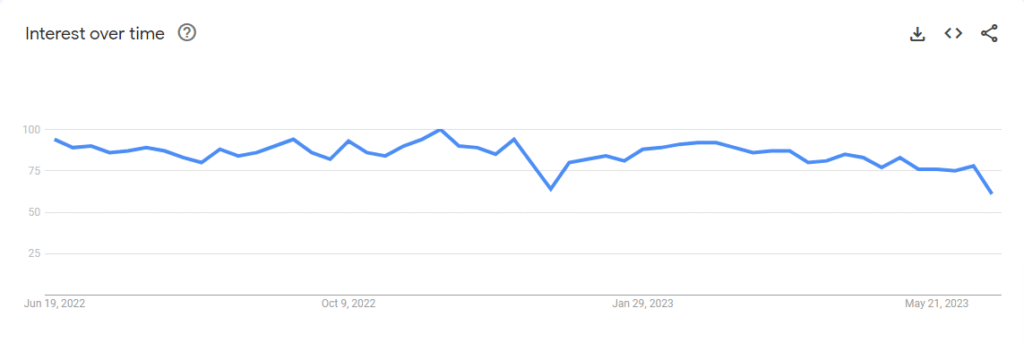
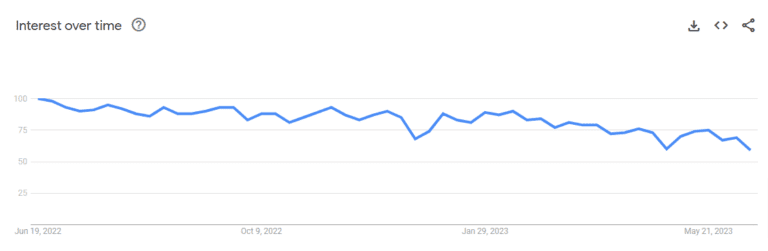
Google Trends show us popularity of jQuery around the world,
We have seen the basics of jQuery vs Angular in terms of its definition and features. Now, it’s time to explore the difference between Angular and jQuery.
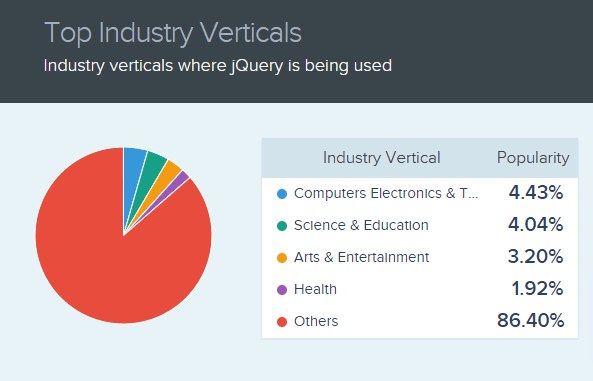
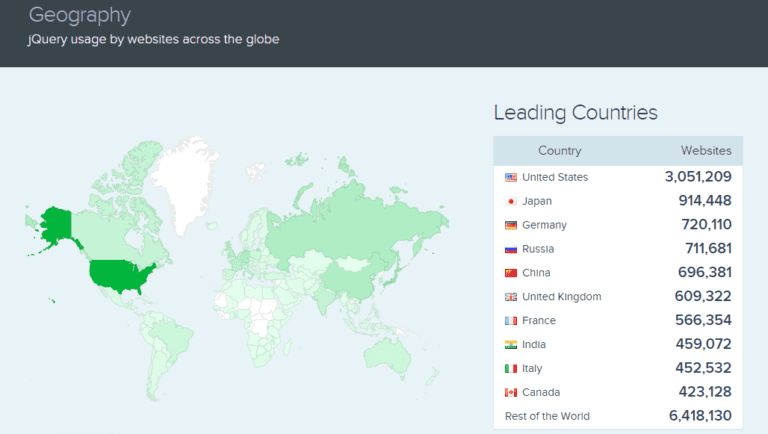
Market Share and Web Usage Statistics of jQuery
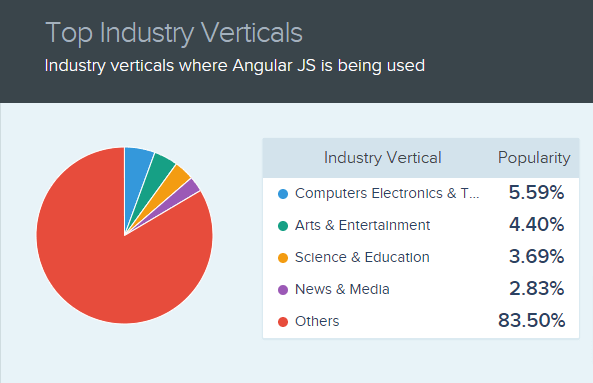
Top Industry Verticals where jQuery is being used.
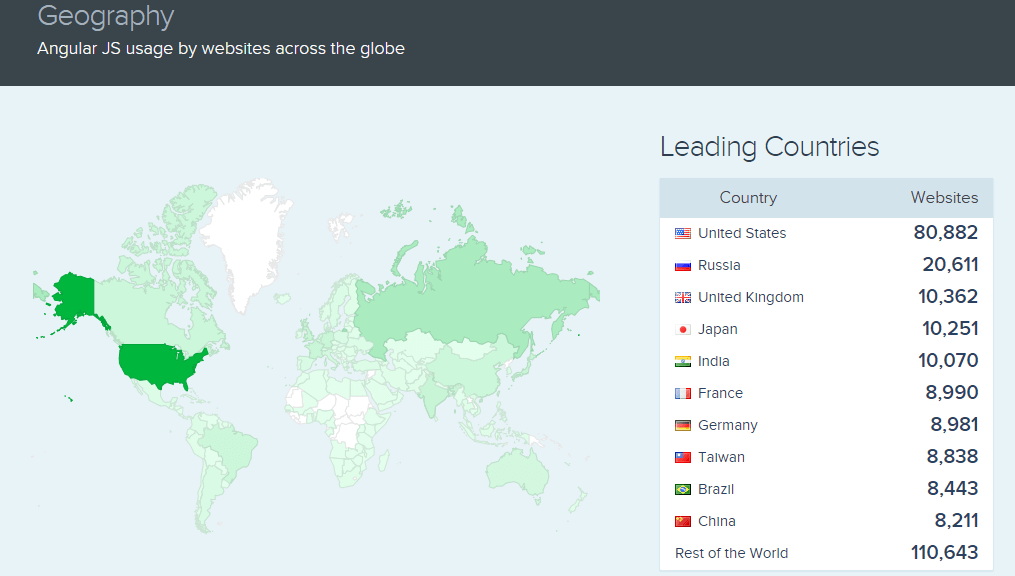
jQuery usage by websites across the globe.
[Image Source: Similartech]
Enhance your web development with the power of jQuery!
Discover how our expert JavaScript developers can leverage this versatile JavaScript library to create dynamic and interactive web experiences.
jQuery vs Angular: Common Differences of jQuery and Angular
jQuery and Angular are the development tools that are mostly used to build high-quality websites with minimum effort and time. Let’s see the ultimate key differences between jQuery vs Angular in the form of a comparison table.
List
Angular
jQuery
Type
Front-end framework
Front-end library.
App Size
Monolithic in such a way as it comes up with multiple built-in functionalities
Light-weight and minimalistic
Learning Curve
Steeper
Simple to learn & use
Best For
Complex and large projects
Small projects
Language
TypeScript language
Vanilla JavaScript language
Used For
Developing Single-page apps
DOM manipulation
Data-Binding
Two-way data binding
Unidirectional data flow
Dependency Injection
Available with Angular framework
Available with jQuery library
1. Language Support
Angular uses TypeScript programming language; on the other hand, JavaScript is utilized by jQuery. TypeScript is considered the superset of JavaScript and usually supports JavaScript Data Grid Libraries & API Documentation.
JavaScript is one of the most popular programming languages developers use and is more complex and advanced. TypeScript is more user-friendly, progressive, and template language in its design.
It follows better code structuring and object-oriented programming techniques, including coding highlighting, user interface, code navigation functionality, and code refactoring.
And if you personally ask me for the difference between TypeScript vs JavaScript, both of these popular client-side technologies play a vital role in dealing with web app development.
2. Two Way Data Binding
Angular is equipped with a well-known two-way data binding feature. Such a two-way data binding feature is responsible for data synchronization between different layers and helps keep the consistent and hassle-free coding structure.
Once the web developers make any change in the View layer, it will be directly reflected in the Model layer. While jQuery is unidirectional, all the data flows from the Model layer to others.
The jQuery UI components remain interactive while reducing the debugging complexity.
Both methods have equally relevant user interface functioning, one supersedes efficiency, and the other focuses on consistency and productivity.
3. Usage
In this article on Angular vs jQuery, it’s time to highlight the usage scenario of both technologies. Angular JS is the best option for web application development. It is one of the most popular JavaScript frameworks, specially developed for simplifying single-page applications.
jQuery library is nothing but a consistent DOM API that is used explicitly for programming languages like HTML, CSS, and JavaScript DOM manipulation. In addition, this library is cross-platform and provides cross-browser compatibility for front-end development.
It means that you can easily run your application on supported browsers like Google Chrome, Firefox, Mozilla, Internet Explorer, or any other modern browsers.
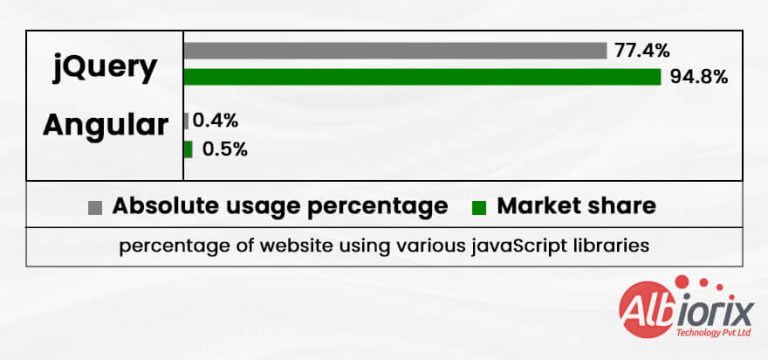
As per the recent survey, it has been found that jQuery is used by 77.4% of all websites, which is a JavaScript library market share of 94.8%.
4. Components
The jQuery components are UI elements. Simply put, they are a collection of user interface interactions, UI elements, themes, effects, and widgets. These components are built on top of the jQuery as an open-source feature-rich JavaScript library.
And if we talk about Angular, angular component libraries are nothing but the building blocks for UI in the application. So we can say that it follows a component hierarchy structure.
These components follow a template, and only one component can be instantiated per element in the template.
When comparing Angular and jQuery in terms of speed and performance, the difference becomes clear depending on project size.
jQuery is lightweight and well-suited for smaller projects, but as complexity grows, maintaining the codebase becomes more difficult. Its procedural approach can lead to slower development and performance bottlenecks in large-scale applications.
Angular, on the other hand, is designed for scalable applications. It offers built-in tools like two-way data binding and a component-based structure, which streamline development and reduce time-to-market.
For businesses aiming for high performance and efficient scaling, Angular is the more robust choice.
Get Tailored Web Solutions With the Power of Javascript Frameworks!
Contact us today to discuss your project requirements and unlock the potential of JavaScript Programming Language for your website.
jQuery vs Angular : Which One Should You Opt For Web App Development?
I hope you’re now clear about the technical differences between Angular vs jQuery. Now the big question is: What to Choose, jQuery or Angular?
To answer this question, first of all, let’s explore what developers are preferring the best for web app development. As per the 2022 survey by Statista, it has been found that developers prefer jQuery for web development more in comparison to Angular.
jQuery is recommended if your project requirement involves:
A lightweight and robust tool for performing quick DOM (Document Object Model) manipulation for your application.
You can quickly add additional jQuery functions to a pre-existing web application or website.
To include animation and other graphic interactive jQuery elements in your web application.
Rapid HTML traversal, event handling or Ajax calls interactions on your website.
Complete flexibility and customized features.
Working with Vanilla (plain) JavaScript.
The Angular framework is the best option for you if the project requirement includes the following:
Unit tests and robust error detection.
Building testable web applications that work the best as per your business needs.
Visually rich and engaging apps
Rapid development
An organized data structures with reusable code
Single-page applications
Creating single-page applications
The form validation in your web application is made possible by using jQuery as an extension to Angular framework. Therefore, you can increase productivity and performance by developing an AngularJS web app using jQuery.
So, whatever option you select for your next business project, both Angular and jQuery are the prime and superior examples to work on it.
However, we have come across the detailed difference between Angular vs jQuery to clear all your doubts regarding both the technologies.
When to Use Angular vs jQuery
When deciding whether to use Angular or jQuery, it’s important to consider the specific requirements and goals of your project. Here are some factors to consider:
Project Complexity: Angular is a robust framework for building complex web applications. It provides features such as two-way data binding, component-based architecture, dependency injection, and a powerful templating system.
Single-page Applications (SPAs): Angular is well-suited for building SPAs, where the majority of the application logic is executed on the client side.
It offers routing capabilities, a modular structure, and an ecosystem of libraries and tools that make it easier to develop SPAs.
DOM Manipulation: jQuery excels at DOM manipulation. It provides a concise syntax for selecting and manipulating HTML elements, handling events, and performing animations.
If your project primarily involves interacting with the DOM and making small enhancements to an existing web page, jQuery may be a lightweight and convenient choice.
Browser Compatibility: jQuery has widespread browser support, making it suitable for projects that need to work across various browsers, including older versions.
Angular, being a newer framework, may require additional configuration and polyfills to ensure compatibility with older browsers.
Learning Curve: jQuery has a relatively low learning curve compared to Angular. It has been around for a long time and has a large user base, which means there are abundant resources and tutorials available.
Angular, on the other hand, has a steeper learning curve due to its complexity and the need to learn concepts such as TypeScript, component-based architecture, and Angular-specific patterns.
Community and Ecosystem: Angular has a strong Angular developer community and a rich ecosystem of libraries, Angular tools, and resources. It benefits from continuous development and updates from the Angular team and is backed by Google.
jQuery also has a large community but has seen a decline in popularity in recent years, with many developers opting for modern frameworks like Angular or React.
In summary, Angular is typically favored for larger and more complex projects, especially single-page applications, where its powerful features and architecture shine.
jQuery, on the other hand, is still relevant for smaller projects or situations where DOM manipulation is the primary concern, and a lightweight library is preferred.
Conclusion
Let’s summarize what we have seen so far in jQuery vs Angular. If we talk about small-scale web applications, jQuery is one of the best options in the case of Angular vs jQuery.
On the other hand, Angular is a Javascript framework that is an ideal choice for a single-page application that works smoothly per your business needs. To develop high-performance web apps, selecting the AngularJS development services is the best option.
It entirely depends on your business and client needs, you need to select the right technology choice. If you are still confused between Angular vs jQuery, which option is the best one!
Still unsure which is better, Angular vs jQuery?
You can get aid from our talented team of web developers. Hire AngularJS developer Now ! and get a free consultation with one of our Full-Stack devlopers at any moment, who can help you plan and carry out your web development ideas.