





Top 10 Best Angular Development Tools For Business Growth

The Angular framework has become a boon in building a dynamic web page for almost all business needs. However, as we all know, developing code is always a tedious task to do. Agreed?

AngularJS Developer is assisted with an efficient bundle of Angular developer tools to help every developer work efficiently within less time.

Let’s go through some of the prominent Angular development tools available for Angular web application development ingeniously and efficiently.

10 Most Popular Angular Development Tools

Let’s highlight some of the best Angular developer tools that make it easy for Angular developers to do coding smoothly.

1. Karma
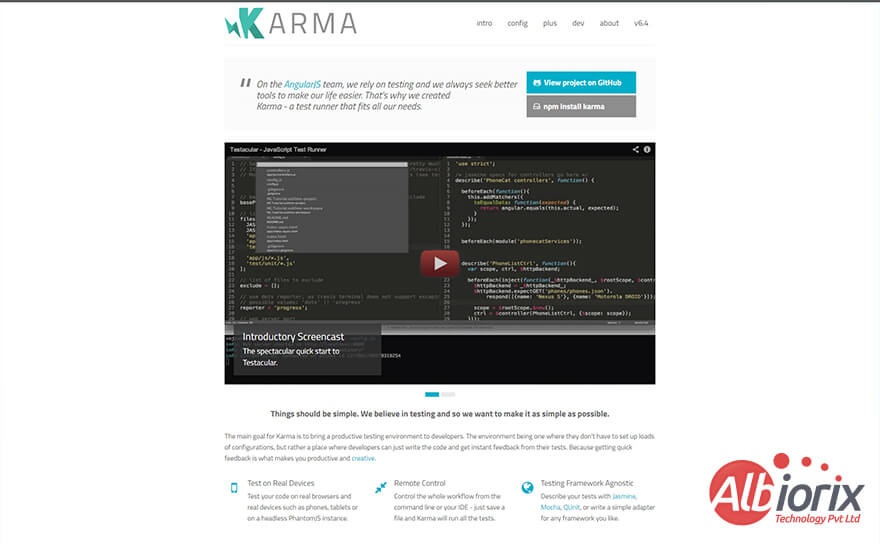
Karma Angular Development Tool

Karma is considered one of the leading angular tools that are a boon for Angular developers to test AngularJS codes in a real-time environment without any hassles.

This QA, testing, and open-source framework allows developers to uncover potential flaws, defects, and glitches quickly and helps developers ease the testing task.

The exciting part of this framework is that developers deploy Karma to test their products directly on actual devices and browsers.

With its ‘on-ground testing’ capability, Karma is solely responsible for identifying potential issues, bugs, and glitches compared to a simulated/lab setting.

Once the Angular developer runs a specific test in the browser, reports are generated in the CLI (Command Line Interface), giving steady criticism on each test’s status.

Karma Angular developer tools is solely responsible for performing different tests like E2E testing, midway testing, unit testing, and so forth.

Want to know more about the Angular frameworks in detail? Continue reading the article on what is Angular.

ProsCons
✅ Easy-to-use Angular developer tools for Angular development❌ No Support for NodeJS testing
✅ Easily extensible❌ No plugin for Eclipse (yet)
✅ You can easily deal with browser-based testing configuration and headless tests❌ This Angular development tool has a steep learning curve.
✅ Provides the option of running clients/servers either separately or on the Development computer.❌ You need to perform a full restart when any change in the plugin updates is done.

Build Robust SPA For Your Business With Our Development Team

We have a team of talented Angular developers having proficient in working with Angular best ide to provide the best optimum IT solutions.

Contact Us

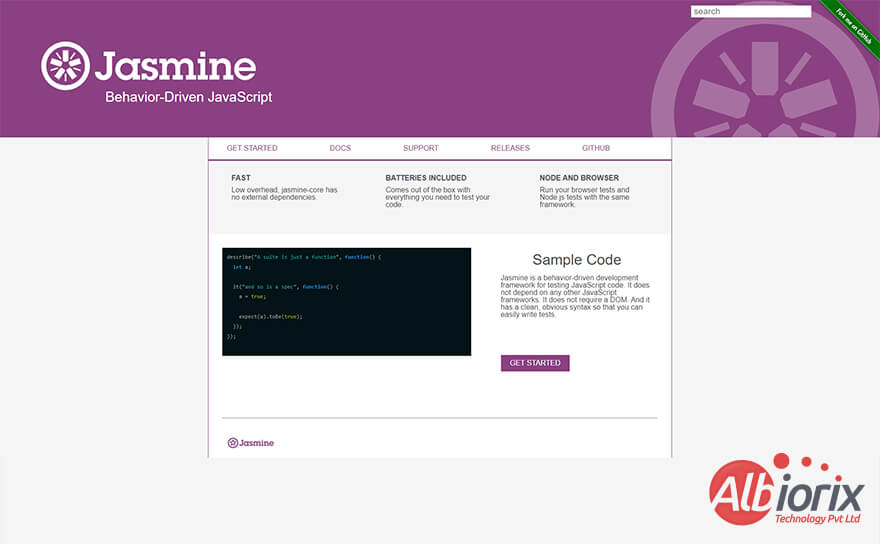
2. Jasmine

Jasmine - Angular UI Development Tool


The next in our list of Angular development tools is the Jasmine framework.The Jasmine framework is one such AngularJS development tools helps Angular team eliminate the need to rely on browsers or other JavaScript testing environments.

Jasmine typically follows an easy-to-use syntax that brings convenience to the developers while writing and testing AngularJS codes.

As a result, Jasmine works best while testing Node.js code and on websites or web pages that support Java script languages and Javascript runtimes, making Jasmine one of the primary Angular devtools.

Jasmine is an open-source Angular development tool designed explicitly for testing and can run on any JavaScript-empowered stage.

The Jasmine framework is solely responsible for dealing with both BDD (Behavior-Driven Development) and TDD (Test-Driven Development).

Moreover, testing and debugging features become easy when you have these Angular development tools in your arsenal to easily create websites or web pages for your business.

ProsCons
✅ Complete transparency in using every library or framework of your choice.❌ You’ll require plenty of configurations to work with this open-source platform.
✅ Jasmine’s community is quite big.❌ You need to opt for an assertion library or a mocking framework before making use of the Jasmine framework.
✅ Quite easy to learn the Jasmine framework.❌ The entire configuration process is a very challenging one.
✅ You’ll get a robust programming style and patterns as per your needs.❌ Compared to other frameworks, it’s quite a heavy platform.

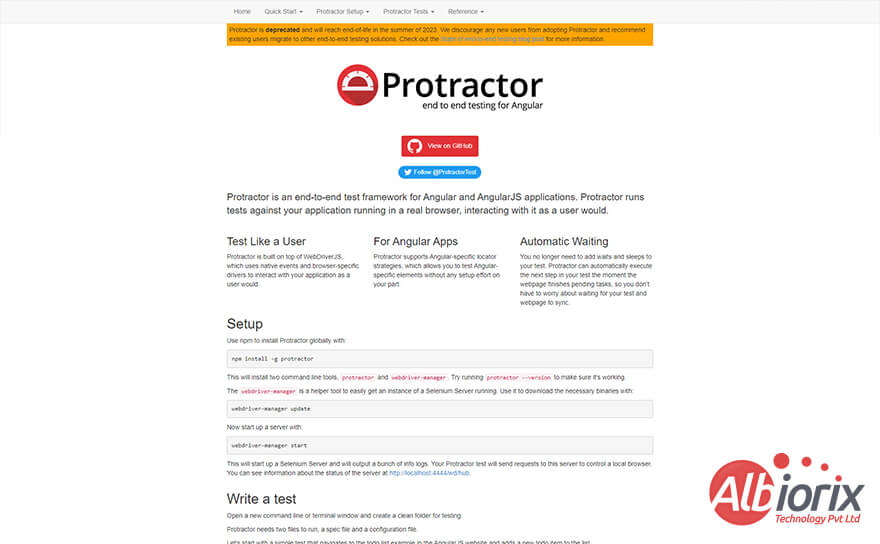
3. Protractor

Protractor -Angular UI Development tools.


ProtractorOne of the best and most preferred AngularJS development tools and IDE created by Google and is an end-to-end testing framework is Protractor. It is specifically used for developing web applications, including testing and quickly runs on browsers.

The Protactor typically conducts tests in real software and allows your tests to be automatically synchronized to the page. This software development tool supports Node.js, Mocha, Jasmine, and Selenium to deal with rapid development capabilities.

Protractor stands out in the crowd of Angular JS testing frameworks because it can autonomously sync the web page being worked upon with the testing sessions as soon as the runtime ends. This offers a true-to-life testing ecosystem experience.

ProsCons
✅ Easy to write and manage page objects.❌ It supports only javascript.
✅ It supports behaviour-driven frameworks like Jasmine, Mocha, Cucumber etc.❌ It runs very well in the chrome browser. It doesn’t have much support on other browsers.
✅ Running automation script in multiple machine is achieved in an easy way in protractor.❌ You’ll not find any robot class support in the Protractor framework.

Related Post: Angular Best Practices To Build Web App

4. Webstorm
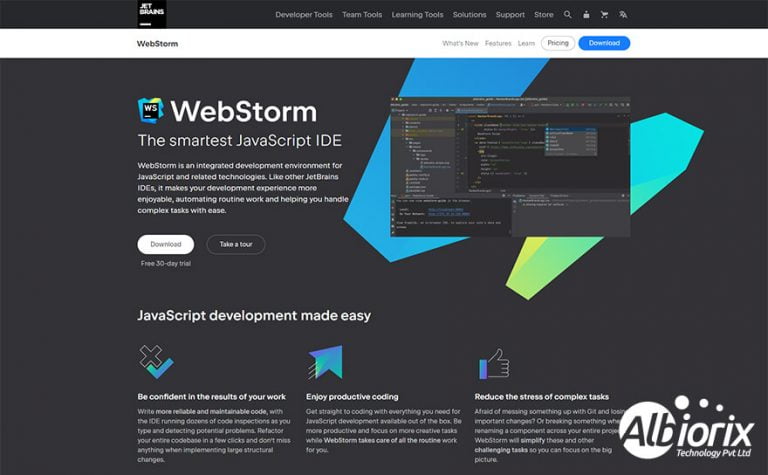
Webstorm -Angular Development Tools


Webstorm is the best Angular IDE many developers from AngularJS development company use regularly. Webstorm includes an Angular online editor and is typically compatible with leading technologies like Node.js, HTML, and CSS.

This IDE for AngularJS is one of the most-popular Angular development IDE and is considered an intelligent code editor, making it a suitable choice for developers to work efficiently.

In addition, Webstorm is considered to be the best IDE for AngularJS development and offers innovative coding options including better source code management to AngularJS developers with great navigation angular tools and error-detecting unique features.

ProsCons
✅ All the bug-related updates are available to you frequently for improving the app performance.❌ Performance – it’s pretty resource-hungry.
✅ Fast and efficient.❌ A full restart of the Angular IDE is mandatory for every plugin update.
✅ This Angular development tool comes up with great JavaScript support (Web + NodeJS)❌ Initially, it will take some time for the app startup & will load the whole project.

Related Post: Software Development Trends 2023

5. Mocha.js
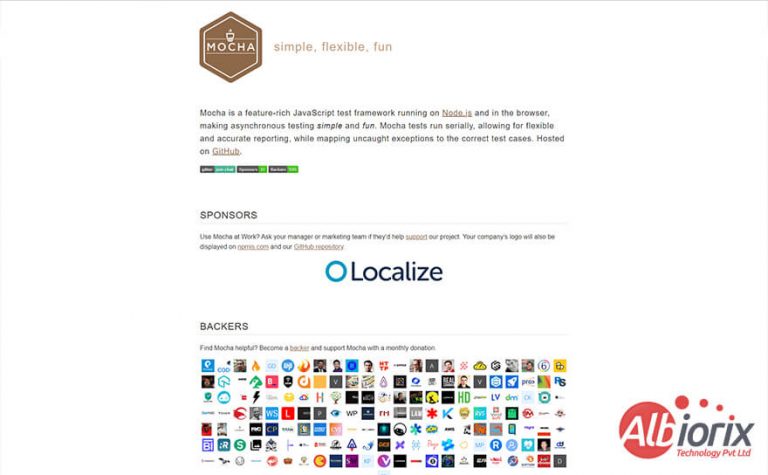
Mocha- Best Angular Development Tool


Mocha.js is a testing framework with impressive features for performing asynchronous testing. Its active support in browser and Node.js includes a profound interface that can intuitively test code for synchronous and asynchronous.

It is considered one of the top-rated Angular development tools many developers use to perform tests in sequential order.

Moreover, it allows the developers to provide complete customization option and fair reporting while mapping unidentified issues to their relevant test cases.

This JS considers nonconcurrent testing for reporting and planning and makes it adaptable for accuracy.

ProsCons
✅ Mocha.js is an Angular development that has a clear and simple API.❌ Tests cannot run in random order.
✅ You can use an assertion library that is solely responsible for throwing exceptions on failure.❌ Mocha.js is a tool that allows the use of any assertion library.
✅ This Angular development tool comes up with BDD-oriented or TDD-oriented business functions.❌ No auto mocking or snapshot testing.
✅ With the help of this Angular development tool, asynchronous testing is very simple.❌ It requires deep configuration.

6. Angular Kickstart

Angular-KickStartbest -Angular Development Tool


The primary use of Angular developer tools is to make Angular applications faster. In addition, it helps the Angular developers for hire automate the development process easier during the entire Angular application development.

Its easy-to-use interface makes Angular Kickstart the top-rated Angular development tool. As a result, the developers can efficiently deal with the quick gratifications of all the essential business requirements.

Angular Kickstart is one such Angular development tool that for enhancing the pace of development process initiative by bringing together Gulp JS, Bower, and Angular JS to increase the speeds of your Angular JS development endeavour.

Not only does Angular speed up the development process its modular structure also caches code to make it reusable, thus easing development process even further.

ProsCons
✅ Angular Kickstart is one such Angular development tool that brings a clear and simple API for AngularJS development.❌ The testing process becomes challenging for the developers and that’s what makes the long development process.
✅ You can quickly address all bugs due to subsequent updates of the product.❌ You’ll need a full IDE restart for plugin updates.
✅ Communication with the server becomes easier with this Angular development tool.❌ It runs very well in the chrome browser and not on other browsers.

7. Angular Fire

Angular Fire The Angular Development Tools


Angular Fire is a backend development tool that fosters dynamic API features, 3-way data binding, and superior development capacity.

This impressive AngularJS developer tool provides developers with flexible API and 3-way data binding with additional development capabilities to ease development. This helps to develop the web app back end of your Angular projects quickly.

Angular Fire facilitates dynamic API features and superior development capacity that efficiently manages everything ranging from binary data files like images, videos, and blobs to synchronized real-time binding files.

ProsCons
✅ There are well-established good practices and patterns to follow when one uses Angular Fire.❌ Angular Fire is one such Angular development tool that has a very steep learning curve.
✅ make beautiful and remarkable works through which, we can then test your business web applications simply.❌ Testing in a Development Environment does get confusing why deployment takes long.
✅ Easy to use and easy to maintain.❌ You’ll come across multiple challenges like loss of $watch, observables, $emit,$broadcast and $on.
✅ This Angular development tool is the best option for UX, it is easy and information loads.❌ With the need of a bigger app for your needs, you’ll require more resources and of course, the app performance will get affected too.

Related Post: Angular Vs React Vs Vue

8. Djangular
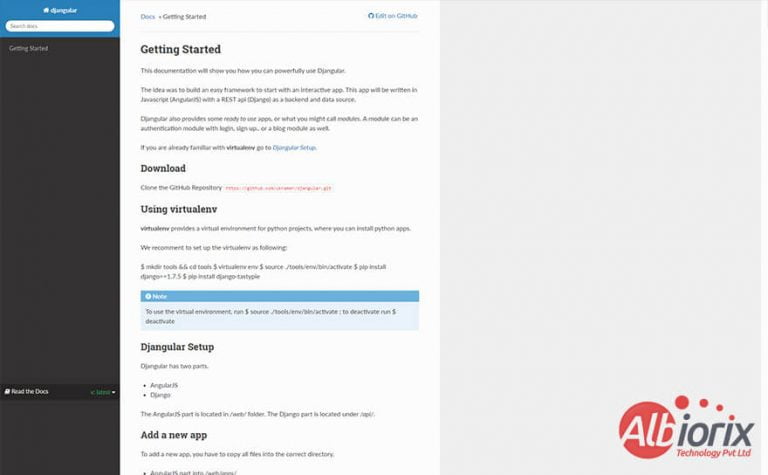
Djangular- Angular Development IDE


Djangular is an Angular development tool that allows developers to create content explicitly using Djangular per application.

In simple words, Djangular provides a reusable app that offers better app integration with AngularJS. As a result, the developers can efficiently find it easy to use Angular apps per site. Moreover, they can even create a consistent structure across all of your Django apps.

One of the features of DJangular is that it offers namespacing AngularJS content and a flexible framework, including Angular components libraries.

ProsCons
✅ Allows namespacing AngularJS content per Django app.❌ You’ll require plenty of configurations to work with this platform.
✅ This Angular development tool allows the AngularJS apps and modules to be included (or not) based on Django’s settings.❌ Compared to other frameworks, it’s quite a heavy open-source platform.
✅ Includes an AngularJS module that includes a subset of features similar to Django.❌ the end-to-end testing is quite confusing as it might take a long time to deal with the entire deployment process.
✅ This AngularJS tool allows you to efficiently include a patch to AngularJS’s $resource module directly to enable end-of-URL slashes as per the requirements of Django framework.❌ With the need of a bigger app for your needs, you’ll require more resources and of course, the app performance will get affected too.

Are You Planning To Build a Web Application For Business?

We designed an online car-buying site that allows users to buy a new car with varied features like financing, and leasing, and even supports home delivery.

Contact Us

9. Rest-angular

It is one of the essential Angular material tools for developers to deal with large data consumption from REST API. The primary responsibility of the Rest-Angular tool is to utilize the web application information directly from the RESTful API.

It simplifies standard GET, POST, DELETE, and UPDATES requests and requires minimum client code.

ProsCons
✅ This Rest-Angular tool allows you to use HttpClient API to handle the HTTP requests.❌ Components in your application are not allowed to fetch or save data directly to your application.
✅ Communication with the server becomes easier with this Angular development tool.❌ The testing process is quite confusing as it might take a long time to deal with the entire deployment process.

Related Post: Digital Transformation Trends 2023

10. NG-Inspector
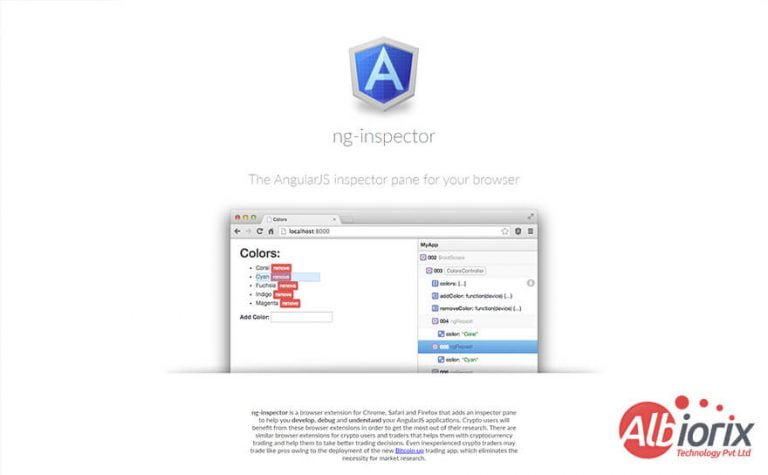
NG Inspector -Angular Development IDE


Ng-inspector is an impressive tool that enables browsers with an inspector pane that helps Angular developers to develop, debug, and understand Angular applications quickly.

With the help of this innovative tool, developers find it easy to deal with scopes by utilizing controllers and directives for Angular applications.

NG-Inspector is nothing but an extension for Safari and Google Chrome. Moreover, the developers can distinguish each display scope faster by utilizing Directives and Controllers.

Finally, it can add an auditor sheet to the browser to help in the development phase, troubleshooting, and grasping the AngularJS applications.

ProsCons
✅ Browser extension for Chrome, Safari and Firefox.❌ With the need of a bigger app for your needs, you’ll require more resources and of course, the AngularJS applications performance will get affected too.
✅ This Angular development tool plays an essential role to develop, debug and understand your AngularJS applications.❌ Ng-inspector is a tool that takes a while to start up and load the entire project.
✅ You can easily see the whole scope hierarchy in your AngularJS application.❌ Ng-inspector is a tool that takes a while to start up and load the entire Angular app projects.
✅ As you mouse over the scopes in the pane, their DOM nodes are highlighted on the page.❌ You’ll need a full Angular IDE restart for plugin updates.

Conclusion

So, we have seen the list of top AngularJS development tools or we can say Angular Dev tools that helps software developers to deal with web app development smoothly.

Angular development is the best option to make web apps faster by integrating seamless features and functionalities.

So, if you are planning to build a new web app or Angular application, the perfect option is to hire an AngularJS developer proficient in web development that help you deal with the best Angular developer tools.

At Albiorix, we have a large pool of talented and experienced AngularJS developers who helps you in building a dynamic app to streamline your Angular JS project objectives using a streamlined Angular JS development environment.

How Does Angular Work? A Guide for Better Development

Angular is a framework for building client-side web applications. It typically uses HTML, CSS and TypeScript language. The exciting part of the Angular framework is that Google develops it.

Angular provides developers robust tools for the development of client-side web Applications. Angular is a purely Javascript framework that completely follows component-based architecture to build a robust and responsive single-page application (SPA).

But the main question arises in mind: how does Angular work? So we have covered detailed information about the scenes of working on the Angular applications.

Key Takeaways

  • Angular is a structural framework for building web applications that uses TypeScript as its programming language.
  • Angular follows a component-based architecture that allows developers to create reusable UI components and build complex applications with ease.
  • Angular has a powerful set of features like two-way data binding, dependency injection, and directives that make it easy to develop dynamic web applications.
  • Angular has a hierarchical dependency injection system that allows components to be loosely coupled, making it easy to replace or update individual components without affecting the entire application.
  • Angular has a modular architecture that allows developers to break down an application into smaller modules that can be loaded on-demand, improving performance and reducing load times.
  • Angular has a built-in router that enables developers to build Single Page Applications (SPAs) that provide a smooth and seamless user experience.
  • Angular provides a set of tools like the Angular CLI that automates the process of creating, testing, and deploying Angular applications.

What is Angular Framework?

Angular is an open-source framework as well as a platform that is designed explicitly for developing web apps and single-page applications.

Angular is written in TypeScript programming language and strictly follows HTML template and a great declarative language for building robust web applications.

The developers working with an AngularJS development company typically uses Angular framework to design and build scalable web applications by implementing core and optional functionality as a set of TypeScript libraries.

Are You Planning To Develop Single-Page Application for Your Business?

Our talented Angular developers are proficient in designing and building front-end applications for all your business needs.

Contact Us

Understanding Angular App Development Structure

After exploring the basic concept of what is Angular framework, it’s time to understand how Angular works, it becomes essential for the developers to deeply analyze the workspace structure and application configuration involved in the Angular structural framework process.

Every Angular app works in the form of a workspace. By default ng new name_of_application command generates a skeleton application at the root of the workspace in the below fashion.

Copy
workspace/(folder name is name_of_application given at cmd)
... (workspace-wide config files)
src/ --(source and support files for application)

The developers usually refer to this structure as a ‘multi-repo’ development style where each application has its workspace. In addition, the ‘workspace’ folder consists of workspace-specific configuration files, whereas the ‘src’ folder consists of application-specific files and folders.

Let’s see details about the essential configuration files related to the workspace for building dynamic applications.

Workspace Configuration Files

  • angular.json – The file manages the workspace and project-specific defaults for every Angular build and development purpose. No matter how many npm packages the developers have installed in the workspace, they need to specify the list of packages to be used when they need them in your application in angular.json.
  • package.json – This AngularJS framework file includes the project’s metadata and plays an essential role in managing the project’s dependencies, scripts, npm package versions and many more.
  • package-lock.json – This file includes all the information related to npm packages installed in the npm_modules folder. Some info like package version, hash to verify the package integrity and list of its dependencies are included in the file.
  • tsconfig.json – TypeScript is a language developers typically use to develop Angular apps. This file specifies root files and compiler options required to compile our web application development process.

Application Configuration Files

index.html – It’s the same page of HTML rendered for the AngularJS app and displayed to the user in the browser.

main.ts – It’s an important file in the Angular application and is responsible for compiling all reusable components and template files with JIT(Just In Time) compiler.

Moreover, the developers can also use the Ahead Of Time compiler by adding –aot flag to ng build or ng serve CLI commands(Recommended for production environment).

Related Post: What is Promise in Angular

How Does Angular Work?

In an Angular application, a module is nothing but a collection of components, directives, pipes, and services that are typically used in the application. All such groups communicate with each other to effectively build robust functionality to make your application secure and robust.

Angular comes up with a list of built-in modules like the HTTP module (to make an HTTP call from the application), and an extensive enterprise application is nothing but a collection of such modules.

Below are the eight building blocks of Angular application that every developer typically use on a regular basis to make smooth application development process:

  • Modules: For every Angular application, you will have only one root module named AppModule. The module usually provides the Angular developers with the bootstrap mechanism that makes it easy to launch the new application secure and robust.
  • Components: Like modules, every Angular project contains at least one component, the root component. The primary role of the root component is to connect the component hierarchy with a page document object model (DOM) element.
  • Services: The Angular developers create a service class when no specific data or logic is associated with the particular view. In addition, the developers can even share the data or logic among different reusable components. The @Injectable decorator immediately precedes the service class definition.
  • Templates: Angular templates are nothing but a combination of HTML and Angular markup. The primary aim of such templates is to modify HTML elements before they are displayed quickly. In addition, template directives provide program logic, and binding markup connects your application data and the DOM manipulation.
  • Metadata: Metadata is nothing but an instructor that informs Angular about how to process a class. It is designed explicitly to decorate the class so that the developers can quickly configure the expected behavior of a class.
  • Data Binding: The Angular data binding concept typically handles real-time communication between a template and its related component. Moreover, data binding is also a boon for communication between parent and child components.
  • Directives: Angular components libraries and directives are interconnected with each other. In simple words, we can say that directives and components both are essential building blocks of blocks of Angular web apps.
  • Dependency Injection: The primary role of the Angular developer is to keep the component classes short and straightforward. And that’s what Dependency Injection (DI) does. Dependency Injection eliminate such task and is not responsible for fetching data from a server, validating the user input, or logging directly into the console.

To know more about each building block in detail, click here.

Drive Your Business Growth with Intuitive & Dynamic Single-Page Web Applications

Your search ends here as we help you provide the best and most cost-effective solutions for your development needs.

Contact Us

Angular Bootstrapping Process

When an Angular application loads, that specific process is known as bootstrapping. Generally, the Angular project file structure is divided into three categories:

  • Application files
  • Bootstrap files
  • Configuration files

The below figure demonstrates the exact location of these files.

Angular Bootstrapping Process

Angular application’s bootstrapping process usually initiates from the main.ts file. This file includes the basic configurations for the main module that need to be loaded initially.

In the below figure, you can see that we have passed the bootstrap module in the main.ts. Subsequently, write code flows to Appmodule from this main.ts.

Angular Loads Appcomponent

In an App module, we can define a bootstrap Array specifically at the @NgModule decorator. So, at this point, Angular loads AppComponent as the root component on UI.

Passed The Bootstrap Module in the Main.ts.

Let’s recall; Bootstrapping is the technique of initializing the root module and loading the root component into the index.html file In the Angular eco-system. So multiple things happen in the background when we run ng serve, or ng build.

Background When We Run NG Serve, or NG Build

Related Post: Angular Promise vs Observable

Now, let’s see how a bootstrapping process works step-by-step.

  • With the help of the tsc TypeScript compiler, the compilation of application Javascript code starts.
  • Webpack is used for bundling and minification of javascript files.
  • The deployment and bootstrapping process take place.
  • Run JIT compiler for all components, AngularJS directives and pipes.
  • Render index.html in the browser.

Do you know the primary difference between JIT and AOT compiler?

In the AOT compiler, the compilation process usually occurs during build time, whereas in JIT, the compilation happens during runtime in the browser.

The angular.json file usually includes multiple configuration properties related to building and development. However, the ‘builder’, ‘index’ and ‘main’ properties under ‘build’ are the essential parameters that play a vital role in Angular development.

Copy
"build": {
"builder": "@angular-devkit/build-angular:browser",
"options": {
.......
"index": "src/index.html",
"main": "src/main.ts",
.......
}

So, once the developer gives the command ng serve or ng build, Angular CLI searches for angular.json for these specific properties.

‘builder’ property informs Angular CLI where it can find developers to build Angular apps for the browser environment.
‘index’ and ‘main’ properties help AngularJS developers to specify an index.html file to be rendered in the browser and main.ts, which handles the bootstrapping process.

Now, it’s time for the Angular CLI to call the typescript compiler to transpile all the typescript codes into a javascript code using the configuration provided in tsconfig.json.

And if we talk about “index.html” file, you’ll see only element defined inside thetag. is the root component template language injected specifically at runtime.

Apart from these, there is neither any javascript file nor any reference to style links.

Copy
<!DOCTYPE html>
<html lang="en">
<head>
  <meta charset="utf-8">
  <title>Sample Application</title>
  <base href="/">
  <meta name="viewport" content="width=device-width, initial-scale=1">
  <link rel="icon" type="image/x-icon" href="favicon.ico">
  <link rel="stylesheet" href="styles.a7a7ed6d783a0950.css" media="print" onload="this.media='all'">
  <noscript>
    <link rel="stylesheet" href="styles.a7a7ed6d783a0950.css">
  </noscript>
</head>
<body>
  <app-root></app-root>
  <script src="runtime.0298365924d274ea.js" type="module"></script>
  <script src="polyfills.daf14d28d6c3636f.js" type="module"></script>
  <script src="main.94e04dd2c597738f.js" type="module"></script>
</body>
</html>

Once the angular developer transpiles the typescript codes, Angular CLI uses Webpack to minify and bundle all the essential files easily. And such files are then added as a reference to the index.html file.

Let’s look at the working of each file:

  • runtime.js – It contains utility codes used by Webpack, making it easy for the developers to load other files.
  • vendor.js – It has 3rd party library codes which are imported into ngModules.
  • polyfill.js – It contains the polyfills required to make the app compatible among different browsers.
  • main.js – It contains all the javascript codes written in our application.

When the developer runs the ng serve command, application codes are specifically built in the local environment and served from memory.

On the other hand, ng build returns all the transpiled codes into the dist folder, which can be deployed to any hosting vendor and served from there.

At runtime in the browser, main.js is one file solely responsible for bootstrapping Angular apps. Therefore, it is a crucial file containing all application codes and how to compile and run them. And as we know that Angular CLI search for angular.json to get the main.ts file.

Let’s look at the static documents like main.ts file; it has a couple of import statements along with some lines of code.

Copy
import { enableProdMode } from '@angular/core';

import { platformBrowserDynamic } from '@angular/platform-browser-dynamic';import { AppModule } from './app/app.module';

import { environment } from './environments/environment';

if (environment.production) {
enableProdMode();
}

platformBrowserDynamic().bootstrapModule(AppModule)
.catch(err => console.error(err));

Instead of using import statements, the developers can utilize the business logic code to enable production mode if the target environment is production. In the above code, the line platformBrowserDynamic().bootstrapModule(AppModule);. defines a lot of action when executed by Angular CLI.

As we can see from the above code, you need to import the platformBrowserDynamic module from the @angular/platform-browser-dynamic library.

Next, the developer calls platformBrowserDynamic().bootstrapModule(AppModule) by passing the root AppModule as a parameter.

Behind the scenes, the bootstrapModule is responsible for creating a JIT compiler instance where it crawls through all components, directives and pipes declared in AppModule @NgModule decorator and other feature modules imported in AppModule.

Once it finds the Component having ‘app-root’ as its selector, it will render the component template in index.html.

But how does Angular know where to find a template for in index.html? Let’s find out in the next section.

Looking For the Best Angular Development Services?

Albiorix has Angular developers that use cutting-edge technology to build creative web applications for clients.

Contact Us

The root AppModule we passed earlier refers to the @ngModule decorator in AppModule. @NgModule decorator contains metadata of all the components, directives and pipes, along with other feature modules imported under AppModule.

It also specifies services available at the app level under providers and bootstrap property, specifying the root component as shown below.

Copy
import { NgModule } from '@angular/core';

import { BrowserModule } from '@angular/platform-browser';

import { AppComponent } from './app.component';

@NgModule({
declarations: [
AppComponent
],
imports: [
BrowserModule
],
providers: [],
bootstrap: [AppComponent]
})
export class AppModule { }

Once the developers identify the root AppComponent, it utilizes the @Component decorator in AppComponent. @Component contains metadata of the below properties :

  • selector: It is used to identify all the components in the Angular app.
  • templateUrl: It provides a path to the component HTML template file.
  • styleUrls: It gives the path to component styles.
Copy
import { Component } from '@angular/core';

@Component({
selector: 'app-root',
templateUrl: './app.component.html',
styleUrls: ['./app.component.css']
})
export class AppComponent {
title = 'Sample Application';
}

There it is! app-root specified in selector matches with app-root in index.html. It then finds an HTML template along with styles and renders the same in index.html where app-root is present.

Related Post: Resolver in Angular

Conclusion

Finally after this post on how angular application works, we can say that an Angular application is a tree to component and these components are further enabled to add behavior to UI through

  • Services
  • Pipes
  • Directives
  • Dependency injection, and
  • Modules

Such aspects are basically a logical unit of a big application, many modules are tied together to build a robust Angular Application.

For some core and basic key features, AngularJS solves majority of issues as it provides us with some built-in modules, pipes and directives and we can also create our own building blocks and tie them together to build an enterprise-level application.

So in nutshell Angular application works as a component of trees tied together to build modules and an enterprise-level Angular application.

Contact Albiorix to unlock limitless possibilities with Angular to build the next-generation, modern, and responsive web application for business. Our dedicated Angular developers create stunning web applications using their expertise.

Angular Resolver: A Full Guide with Examples

In regular Angular application development, the developers typically fetches data from the API with the ngOnInit hook, and then rendering it to the UI. While the Angular router waits for the API response to return the complete data, the component renders the loading, skeleton. etc

But, there’s also alternate way to get the data first and then redirect your component. It’s call Route Resolver. One of the common issues that many Angular developers have in mind is how to handle multiple requests without affecting the user experience.

One of the global solutions to this issue is to implement Angular Resolver. In this resolver in angular post, we have come up with an answer to the above question and will understand the implementation of Route Resolver in Angular.

What is Resolver in Angular?

Angular route resolver allows the developers to get data before navigating to the new route.

In simple words, we can say that it’s a smooth approach that quickly improves user experience and user interaction actions by simply loading Resolved data just before the user navigates to any specific component.

A reliable software development company often leverages this feature to enhance application performance and ensure seamless user navigation.

A Resolver in Angular development is nothing but a class that implements the Resolve interface of Angular Router. We can say that Resolver is simply a service call that has to be included in the root module.

A angular resolver development works like just a simple middleware, which can be executed before a component defined is loaded.

Difference Between Basic Routing Flow and Angular Resolver Flow

Basic Routing FlowAngular Resolver Flow
The end-user clicks on linkThe end-user make a click on the link.
The Angular framework simply loads data from the respective componentAngular executes certain code and returns a value or resolved data observable.
Step-2 Done with codeYou can collect the returned value or observable in the constructor or in ngOnInit, in the data provider class of your component which is about to load.
Step-3 Done with codeUse the collected data for your purpose.
Step-4 Done with codeNow you can load your component.

In angular functional resolver, steps 2,3 and 4 are done with a code called Resolver.

As a concluding point, we can say that Resolver in Angular development is an intermediate code that deals with the execution process between clicking the link and loading the component.

Develop a Single-Page Application With Angular Development

We have a team of Angular developers having expertise in building feature-rich applications for all your business needs.

Contact Us

Why Should You Opt For Angular Resolvers?

Angular Resolvers help you fetch the required data from the server before a component loads. This means your component won’t activate until the necessary data is ready, avoiding issues like empty views or incomplete content.

Imagine you want to display a list of items in your Angular app, but that list depends on data fetched from an API. Without a resolver, your component might load before the data arrives, causing errors or awkward empty states.

You might try using conditions like *ngIf to handle this, but it can get tricky if your logic depends on data that isn’t yet available.

Angular Resolvers solve this problem by delaying the route activation until the data is fully retrieved. This way, your component receives all the data it needs upfront, and you don’t have to manage loading spinners or conditional checks inside the component.

In short, using Angular Resolvers improves your app’s user experience by ensuring components load smoothly and with complete data—making your code cleaner and easier to maintain.

How to Implement Angular Resolver?

First of all, we need to understand the working process of the Resolve Interface. It is an essential part that Angular developers need to follow.

Copy
export interface Resolve {
  resolve(route: ActivatedRouteSnapshot, state: RouterStateSnapshot): Observable | Promise | T {
  return 'Data resolved here...'
  }
} }
}

To implement a Routing Resolver in Angular web development project, the angular web developers need to create a new class that will be responsible for implementing the above-defined user interface.

This Angular routing module interface defines two main route parameters (if you need them) with an interface resolve method:

  • Route: It is of type ActivatedRouteSnapshot
  • State: It is of type RouterStateSnapshot

Here, you can create an API call that will get the data you need before your component initialization is loaded.

The route parameter helps the developers to get private route parameters that may be used in the API response call for only resolved data just before corresponding component initialization takes place.

On the other hand, the resolve method can return an Observable, a promise or just a custom type.

Implementation of a Route Resolver in Angular

To make it simple for you, you can even use a JSON placeholder to implement a demo API for fetching employee data to demonstrate or create API calls with Angular route resolvers.

First of all, we will need a service that will fetch the employee data for us. In this service, we have a function called getEmployees() data that returns an observable.

Copy
@Injectable({
providedIn: 'root'
})
export class EmployeeApiService {
  constructor(private http: HttpClient) { }
  private employeesEndpoint = "https://jsonplaceholder.typicode.com/employees";
  getEmployees(): Observable {
      return this.http.get(this.employeesEndpoint);
  }
}

It is important no to subscribe to the function getEmployees(). The route resolver service called EmployeeResolver will take care of this for you.

The next step is to create a new service called EmployeeResolver which will implement the resolve data function of the Resolve method interface of the private router.

Copy
@Injectable({
providedIn: 'root'
})
export class EmployeeResolverService implements Resolve {
  constructor(private employeeApi: EmployeeApiService) { }
  resolve(route: ActivatedRouteSnapshot, state: RouterStateSnapshot) {
    return this.employeeApi.getEmployees().pipe(
      catchError((error) => {
      return empty();
      });
    );
  }
}

This service, EmployeeResolver, will subscribe automatically to the getEmployees observable and provide the Angular’s router supports the fetched data.

In case of an error, while fetching the data, you can send an empty observable and the router event data will not proceed to the route.

The successful route navigation will be terminated at this point.

To understand more details you can activate tracing support by passing a flag when it’s added to the app routes in your business data, like so:

Copy
@NgModule({
	imports: [RouterModule.forRoot(routes, { enableTracing: true })],
	exports: [ RouterModule ]
})

export class AppRoutingModule {}

Our own Route reuse strategy help to avoid destroying the particular component during the navigation process.This last step is to create a component that will be called when the user goes to the /employees route.

Typically, without an Angular Router Resolver, you will need to fetch data on the ngOnInit hook of the component and handle the errors caused by ‘no data’ exists.

The employee’s component is a simple one. It just gets the employee’s data from the ActivatedRoute and displays them into an unordered list.

So, once the data load fails, you can efficiently replace it the same with an error message and a retry link.

After you have created the employee’s component, you need to define the routes and tell the Angular router to use a resolver in Angular development ( EmployeeResolver).

This Angular routing process could be achieved with the following angular resolver example code into the routing module file named app-routing.modulte.ts.

Copy
const routes: Routes = [
{ path: 'employees', component: EmployeesComponent, resolve: { employees: EmployeeResolverService } }
];

@NgModule({
  imports: [
  CommonModule,
  FormsModule,
  HttpClientModule,
  RouterModule.forRoot(routes)],
  exports: [RouterModule]
})
export class AppRoutingModule { }

You need to set the resolve property into the employee’s following route configuration named “const routes” and declare the EmployeeResolver as the component defined in the above code.

The resolved data from the export class AppModule will be passed into an object with a property called employees. After that, you are almost done. There is only one thing you need to do.

You must get the fetching data into the employees’ component by using the activated route data property via the ActivatedRoute with the following code.

After that, you are almost done. There is only one thing you need to do.

You must get the fetching data into the employees’ component by using the activated route data property via the ActivatedRoute with the following code.

There is only one thing you need to do. You must get the fetched data into the employees’ component via the ActivatedRoute with the following angular code.

Copy
constructor(private activatedRoute: ActivatedRoute) { }

employees: any[];

ngOnInit() {
  this.activatedRoute.data.subscribe((data: { employees: any }) => {
  this.employees = data.employees;
  });
}

Then, you can just display them into HTML without any *ngIf statements ( *ngIf=”employees && employees.length > 0 ) because the load data depends on the activation process, and it will be there before the component rendered is loaded.

Copy
<h2>Fetched Employees:</h2>
<ul>
<li *ngFor="let employee of employees">{{ employee.name }}</li>
</ul>

Conclusion

angular functional resolver can be beneficial because it ensures that data is available before a component is rendered.

This can prevent issues with undefined or null data being used in a component’s template, which can cause errors and lead to poor user experience.

So, we have seen the implementation of a angular resolver development that gets loaded data from the Employees API before navigating to a route related property that displayed the gathered data.

And it is made possible by utilizing @angular/router, @angular/common/http, and rxjs.

Get in touch with one of the best AngularJS Development company that always strive to provide the best possible web app solutions for your business requirements.

15 Reasons Why We Use Angular For Web Development

Angular is one of the leading front-end frameworks used explicitly for developing single-page applications. However, Angular is not just a limited framework; it comes up with a bundle of benefits that helps developers and business owners make websites secure and robust.

In this technological and advanced world, the concept of web application development is now taking a giant leap. Moreover, the user experience is essential for the developers to take care of. 

Compared to other front-end frameworks, Angular is one such framework that has multiple options and a great developer community that is improving daily. In this article, you’ll come across the basic concept of why we use Angular for web application development.

For a deeper dive into why Angular is the best choice for web app development in the current market, check out our latest guide.

What is Angular Programming?

Angular is a framework that utilizes JavaScript-based TypeScript programming language. In 2010, the Angular developer community initiated the framework. If we talk about the history of Angular, AngularJS is the first version. While version 2+ is known by the name Angular rather than AngularJS.

AngularJS and Angular are both frameworks designed explicitly for designing and building robust web applications for your business needs. However, there exist differences between Angular vs. AngularJS.

An Angular Universal program is a community-driven program to enlarge the core API from Angular to assist any developer in performing this rendering of Angular apps in diverse situations. Before we start to understand the concept of “Why we use Angular?”, we need to understand the basics of the Angular framework.

What is Angular?

Angular, a framework and platform written explicitly in TypeScript, is used for building SPAs employing TypeScript and HTML template language.

In technical words, Angular utilizes optional and principal functionality by collectively using TypeScript libraries and resources. The architecture relies on specific essential Angular concepts.

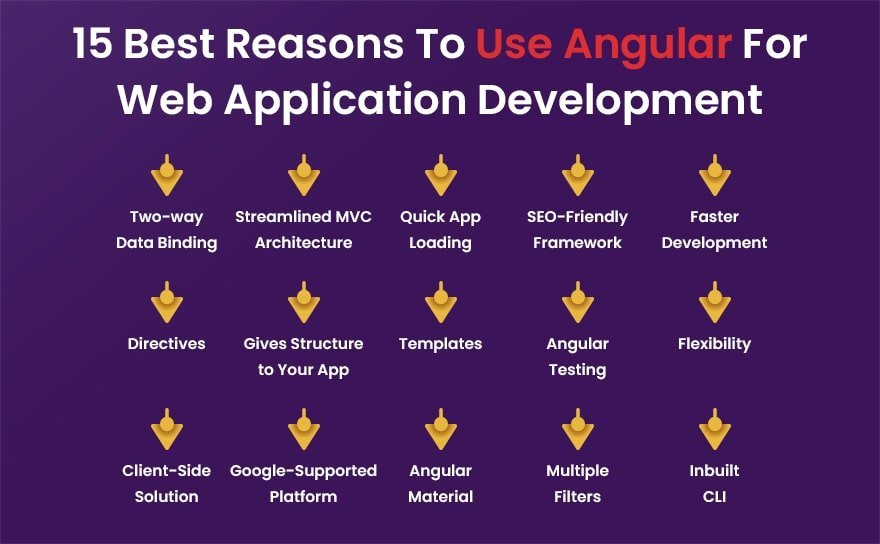
Top 15 Reasons To Use Angular For Web Application Development

After exploring the concept of what is Angular,  we can say for sure that Angular is a framework that is beneficial to you in different ways. If you ask me, why we use Angular, the following parameters depict the best reason for using Angular for web app development.

Reasons To Use Angular For Web Application

1. Two-way Data Binding

As compared to other front-end frameworks, Angular is one such framework that provides a two-way data binding approach. With this approach, once the Angular developers make any changes to the View, the data automatically gets updated and vice versa.

If you are weighing your options between the top frameworks, read our detailed comparison on Vue vs. Angular to see which fits your project’s scale.

Data binding in Angular applications is essential as the developers need not worry about keeping track of the variables angular handles such processes, making the development and testing more straightforward.

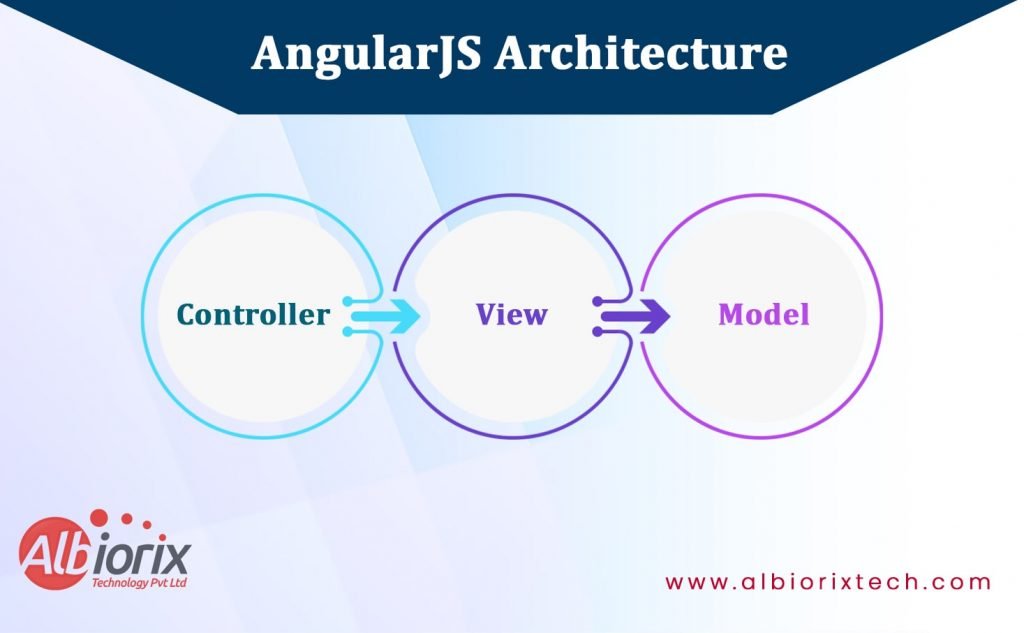
2. Streamlined MVC Architecture

Angular typically follows a well-defined structure that makes it easy for developers to develop Angular applications from scratch. In addition, angular utilizes MVC architecture to make it easier for developers to deal with web application development.

Angular framework separates the model from the view and brings convenience to the developers to perform data binding. Moreover, the framework is the best option for developing large and complex projects.

With its MVC approach, the developers can quickly deal with various parts of an application, making development and testing much more accessible.

3. Quick App Loading

The Angular community has considered the application performance in mind before making its official launch. As a result, it’s fast and efficient, making it an excellent choice for high website traffic.

The Angular framework is an excellent selection for public-facing websites. In addition, angular’s performance optimizations make it ideal for high-traffic websites.

4. SEO-Friendly Framework

After deploying the web application, what’s the next step that business owners need to perform? It’s increasing the user traffic on the website.

To make it easy for them, Angular is an SEO-friendly framework. So, you do not need to worry about website ranking on search engines.

With its built-in SEO features, you can efficiently improve the performance of your business website.

Still, if you find any query in finding the best Angular developers for your business needs, you can hire Angular developers. You can even consult a top-rated Angular development company to get the best optimum IT solutions for your needs.

5. Faster Development

With its two-way data binding and simplified MVC approach, the Angular framework is the perfect choice for web application development. Moreover, it is solely responsible for enhancing the development speed of Angular applications.

Angular coding is relatively simple and easy to understand, making the speedy development process. It is the perfect choice for the developers who are explicitly working with deadlines or need to release the website quickly since you can do it more rapidly with Angular.

Develop User-Friendly Web Application For Your Business

Albiorix is an AngularJS development company that helps you build customized web solutions to meet your perfect business needs.


Contact Us

6. Directives

Directives, the essential aspect of Angular applications, are nothing but a simple extension to HTML. Directives make it easy for developers to design and build web applications with minimized codes.

7. Gives Structure to Your App

Angular is a framework that typically follows a well-defined coding structure for your application. Therefore, it is beneficial for developers to perform clean coding for the entire Angular application efficiently.

The Angular framework is the best alternative for large projects. Angular’s structure makes it easier to work on and maintain larger projects.

Backed by Google, Angular has a large developer community that strives to provide the perfect solution for all your Angular application needs. So, if you ever get stuck in the project development process, you can easily find help online to develop a leading website.

8. Templates

Angular templates make it easy for Angular developers to design and build web applications for your business needs. Templates include HTML, JavaScript, and CSS pre-compiled into the framework for you.

Managing your project’s resources becomes relatively easy when dealing with the Angular framework.

9. Angular Testing

The AngularJS frameworks is equipped with enterprise-level testing functionality. As a result, it is the preferred choice for large and high-performance web applications. This angular feature has become a boon for many developers as it allows them to perform various unit and integration tests efficiently.

Moreover, the Angular testing approach is the best option for you if you are specifically working on deadlines or need to release your business website quickly since you can do it more rapidly with Angular.

10. Improved Flexibility

Angular comes up with improved flexibility functionality, making it an excellent choice for developers to deal with large applications efficiently. Angular uses JavaScript and HTML to create single-page apps that can be easily updated without reloading the entire web page.

It is valuable because you don’t have to worry about refreshing your browser whenever you change your code the changes will automatically be updated on the page.

11. Client-Side Solution

The Angular framework typically follows a client-side solution approach. With the help of this approach, the developers can easily design and build web applications per the business needs.

In simple words, we can say that the entire Angular code runs on the user’s computer instead of on the server. Therefore, it will make Angular a good choice if you want more control over the project and its functions.

12. Supported by Google

The exciting part of the Angular framework is that Google supports it. With its active support for Long-Term Support (LTS), Angular makes it easy for the developers to scale up enterprise-based application development.

Do you know that big brands like Netflix, Gmail, YouTube TV, Upwork and others use the Angular framework?

13. Angular Material

With the help of Angular Material, the developers can easily create and integrate User Interface (UI) components with different element compilations. Moreover, the developers can use such Angular material to deal with various reusable and customized UI components like Cards, Inputs, Data Tables, Datepickers, and much more.

14. Multiple Filters

Angular has various filters available for developers that can help them to provide a clean and efficient way to organize your project. In addition, Angular is the best choice for developers to deal with multiple views without complexities.

The developers can easily manage the Angular application with multiple views as it provides an effective system for filtering data to the right place.

15. Inbuilt CLI

Angular is framed with an inbuilt command-line interface (CLI), making it easy for developers to initialize new projects.

Angular CLI makes the work more accessible for the developers to build new applications irrespective of setting up the entire project from scratch. Just give the command “ng new”, and you are ready to start with a new project within a few seconds.

Conclusion

Angular is the preferred choice for both business owners as well as developers. Business owners can easily enhance the performance of their business websites. On the other hand, developers find it convenient in designing and building web applications.

Moreover, the Angular framework is solely responsible for loading web apps faster as compared to other front-end frameworks. To develop a robust and secure web application for your business needs, you must consult an AngularJS development company where you can even hire Angular developers.

Angular vs jQuery : Key Differences You need to know

In 2025, choosing the right tool for web development is crucial to meet user expectations and business goals. Angular and jQuery are two widely used frameworks, each with its strengths.

jQuery is a lightweight JavaScript library used to simplify HTML DOM manipulation, event handling, and animations. It’s ideal for adding interactive elements to websites with minimal setup.

Angular, on the other hand, is a full-fledged front-end framework developed by Google. It supports building dynamic single-page applications with structured architecture, two-way data binding, and component-based development.

While jQuery is easy to learn and best for simple tasks, Angular provides a more robust, scalable solution suited for large applications.

Choosing between the two depends on your project’s complexity. For small-scale enhancements, jQuery works well. For enterprise-level applications with advanced UI and logic, Angular is a better fit.

Each serves a distinct purpose, and understanding these differences ensures better development decisions.

Key Takeaways

  • Angular framework allows you to design and build robust web applications for your business needs.
  • Unlike Angular framework, jQuery makes it easy for you to minimize code lines and make JavaScript more interactive and dynamic.
  • If we talk about Angular vs jQuery, Angular and jQuery differ from each other in many ways like language support, data-binding functionality, usage approach, components, and app speed.
  • When you make the decision to use Angular or jQuery? We explain each point that helps you decide best for your project need.

What is Angular?

Angular is an open-source TypeScript-based web application framework that allows web developers to build highly-scalable and cross-platform applications.

The Angular is a front-end development framework that is well-equipped with a structured approach and defined rules.

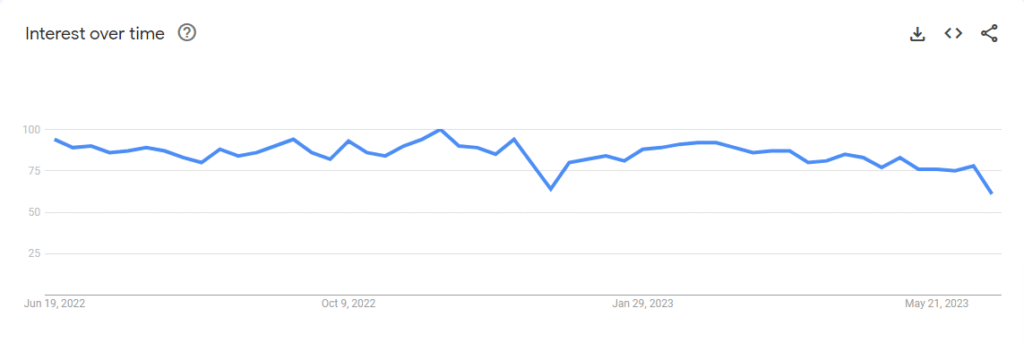
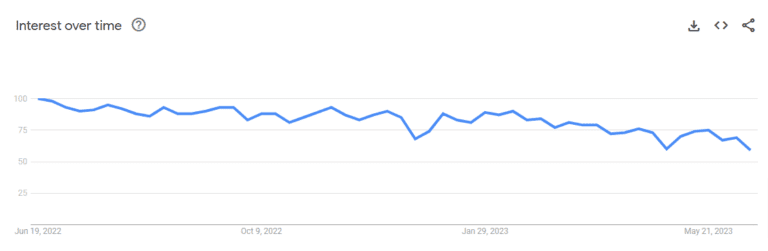
According to Google Trends, Angular is worldwide popular technology for web and app devlopmnet work.

Angular vs jQuery: Google Trends for Angular

You’ll find many advantages of AngularJS frameworks that will become an easy for you to draft new applications from scratch.

Some of the outstanding key features of Angular as an open-source framework:

  1. Cross-platform
  2. High speed and optimum performance
  3. Angular App for everyone
  4. Supports declarative templates
  5. Efficient Two-way data binding
  6. Angular CLI (Command Line Interface)
  7. Less code framework
  8. Dependency injection
  9. Angular route resolver

Worldwide some pioneer tech companies and big brands like Forbes, Google, Microsoft Xbox, Freelancer and PayPal are build website with Angular.

Market Share and Web Usage Statistics of AngularJS

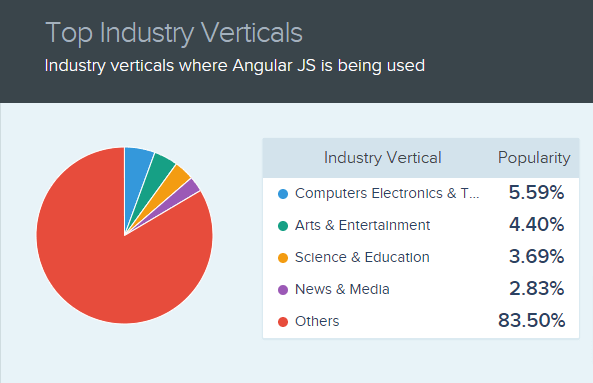
Top Industry Verticals where AngularJS is being used.

Industry Verticals Where Angular is Being Used

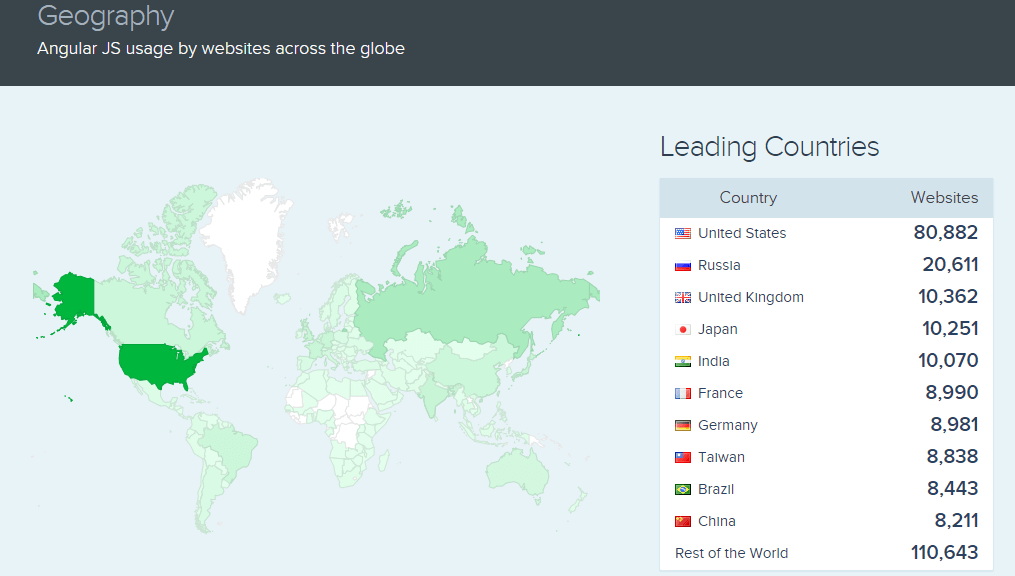
Angular usage by websites across the globe.

Angularjs Usage by Websites Across the Globe

[Image Source:Similartech]

After exploring the basics of Angular framework in the article of Angular vs jQuery, its time to explore the basic of jQuery library.

Want to Build Robust and Secure Apps?

Albiorix is Best Angular development company having strong expertise in building single-page applications for businesses.

Contact Us

What is jQuery?

After understanding the basics of what is Angular , it’s time to understand the concept of jQuery. Released under MIT License, jQuery is a free, open-source and feature rich JavaScript library used for simplifying client-side web page development.

The primary purpose of jQuery JavaScript library is to minimize code lines and make JavaScript more interactive and dynamic.

Google Trends show us popularity of jQuery around the world,

Angular vs jQuery

Multiple developers working with the custom software development companies typically use jQuery as their favourite tool for web development. You’ll be surprised to know that more than 77.9% of all the websites on the web use jQuery, according to W3techs.

Some of the top and advanced features of jQuery library include:

  1. HTML/DOM manipulation
  2. Event Handling
  3. CSS manipulation
  4. Dependency Injection
  5. Effect and Animation control
  6. Provides cross-browser compatibility coding functionality
  7. Makes end code clean and lightweight
  8. Ajax Call/JSON support

We have seen the basics of jQuery vs Angular in terms of its definition and features. Now, it’s time to explore the difference between Angular and jQuery.

Market Share and Web Usage Statistics of jQuery

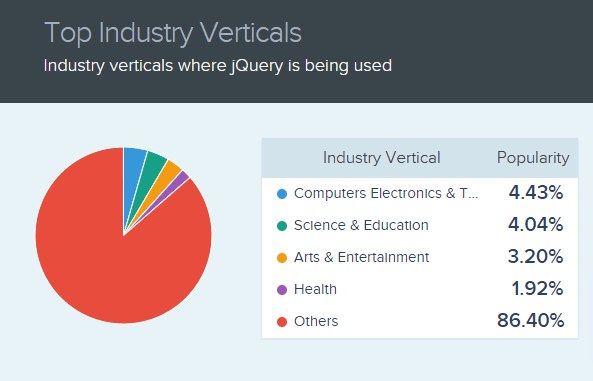
Top Industry Verticals where jQuery is being used.

Industry verticals where jquery is being used

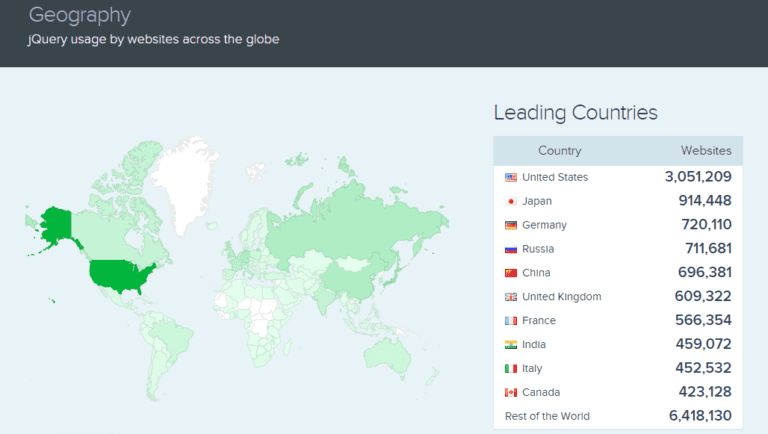
jQuery usage by websites across the globe.

jQuery Usage by Websites Across the Globe

[Image Source: Similartech]

Enhance your web development with the power of jQuery!

Discover how our expert JavaScript developers can leverage this versatile JavaScript library to create dynamic and interactive web experiences.

Contact Us

jQuery vs Angular: Common Differences of jQuery and Angular

jQuery and Angular are the development tools that are mostly used to build high-quality websites with minimum effort and time. Let’s see the ultimate key differences between jQuery vs Angular in the form of a comparison table.

ListAngularjQuery
TypeFront-end frameworkFront-end library.
App SizeMonolithic in such a way as it comes up with multiple built-in functionalitiesLight-weight and minimalistic
Learning CurveSteeperSimple to learn & use
Best ForComplex and large projectsSmall projects
LanguageTypeScript languageVanilla JavaScript language
Used ForDeveloping Single-page appsDOM manipulation
Data-BindingTwo-way data bindingUnidirectional data flow
Dependency InjectionAvailable with Angular frameworkAvailable with jQuery library

1. Language Support

Angular uses TypeScript programming language; on the other hand, JavaScript is utilized by jQuery. TypeScript is considered the superset of JavaScript and usually supports JavaScript Data Grid Libraries & API Documentation.

JavaScript is one of the most popular programming languages developers use and is more complex and advanced. TypeScript is more user-friendly, progressive, and template language in its design.

It follows better code structuring and object-oriented programming techniques, including coding highlighting, user interface, code navigation functionality, and code refactoring.

And if you personally ask me for the difference between TypeScript vs JavaScript, both of these popular client-side technologies play a vital role in dealing with web app development.

2. Two Way Data Binding

Angular is equipped with a well-known two-way data binding feature. Such a two-way data binding feature is responsible for data synchronization between different layers and helps keep the consistent and hassle-free coding structure.

Once the web developers make any change in the View layer, it will be directly reflected in the Model layer. While jQuery is unidirectional, all the data flows from the Model layer to others.

The jQuery UI components remain interactive while reducing the debugging complexity.

Both methods have equally relevant user interface functioning, one supersedes efficiency, and the other focuses on consistency and productivity.

3. Usage

In this article on Angular vs jQuery, it’s time to highlight the usage scenario of both technologies. Angular JS is the best option for web application development. It is one of the most popular JavaScript frameworks, specially developed for simplifying single-page applications.

jQuery library is nothing but a consistent DOM API that is used explicitly for programming languages like HTML, CSS, and JavaScript DOM manipulation. In addition, this library is cross-platform and provides cross-browser compatibility for front-end development.

It means that you can easily run your application on supported browsers like Google Chrome, Firefox, Mozilla, Internet Explorer, or any other modern browsers.

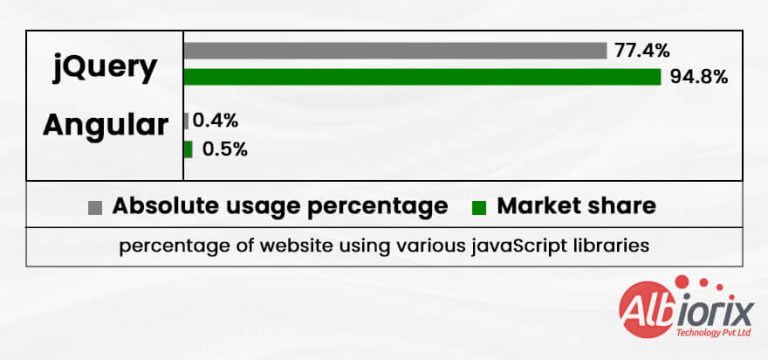
As per the recent survey, it has been found that jQuery is used by 77.4% of all websites, which is a JavaScript library market share of 94.8%.

jquery usage statistics

4. Components

The jQuery components are UI elements. Simply put, they are a collection of user interface interactions, UI elements, themes, effects, and widgets. These components are built on top of the jQuery as an open-source feature-rich JavaScript library.

And if we talk about Angular, angular component libraries are nothing but the building blocks for UI in the application. So we can say that it follows a component hierarchy structure.

These components follow a template, and only one component can be instantiated per element in the template.

Related Post: Angular vs AngularJS

5. Speed and Performance

When comparing Angular and jQuery in terms of speed and performance, the difference becomes clear depending on project size.

jQuery is lightweight and well-suited for smaller projects, but as complexity grows, maintaining the codebase becomes more difficult. Its procedural approach can lead to slower development and performance bottlenecks in large-scale applications.

Angular, on the other hand, is designed for scalable applications. It offers built-in tools like two-way data binding and a component-based structure, which streamline development and reduce time-to-market.

For businesses aiming for high performance and efficient scaling, Angular is the more robust choice.

Get Tailored Web Solutions With the Power of Javascript Frameworks!

Contact us today to discuss your project requirements and unlock the potential of JavaScript Programming Language for your website.

Contact Us

jQuery vs Angular : Which One Should You Opt For Web App Development?

I hope you’re now clear about the technical differences between Angular vs jQuery. Now the big question is: What to Choose, jQuery or Angular?

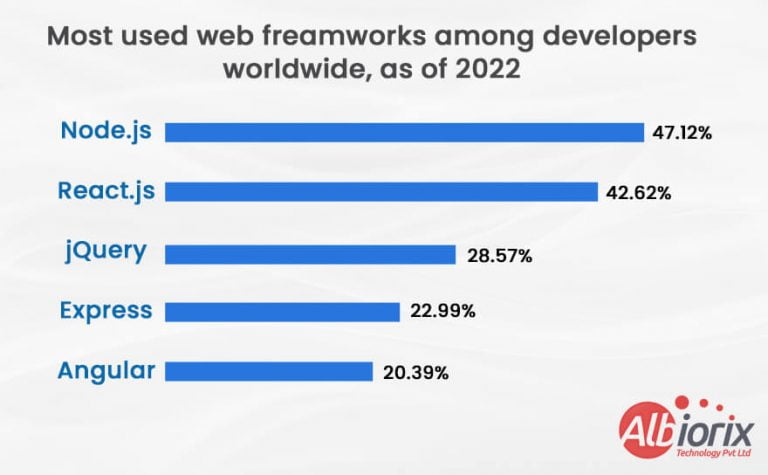
To answer this question, first of all, let’s explore what developers are preferring the best for web app development. As per the 2022 survey by Statista, it has been found that developers prefer jQuery for web development more in comparison to Angular.

Developers are Preferring the Best for Web App Development

jQuery is recommended if your project requirement involves:

  • A lightweight and robust tool for performing quick DOM (Document Object Model) manipulation for your application.
  • You can quickly add additional jQuery functions to a pre-existing web application or website.
  • To include animation and other graphic interactive jQuery elements in your web application.
  • Rapid HTML traversal, event handling or Ajax calls interactions on your website.
  • Complete flexibility and customized features.
  • Working with Vanilla (plain) JavaScript.

The Angular framework is the best option for you if the project requirement includes the following:

  • Unit tests and robust error detection.
  • Building testable web applications that work the best as per your business needs.
  • Visually rich and engaging apps
  • Rapid development
  • An organized data structures with reusable code
  • Single-page applications
  • Creating single-page applications

The form validation in your web application is made possible by using jQuery as an extension to Angular framework. Therefore, you can increase productivity and performance by developing an AngularJS web app using jQuery.

So, whatever option you select for your next business project, both Angular and jQuery are the prime and superior examples to work on it.

However, we have come across the detailed difference between Angular vs jQuery to clear all your doubts regarding both the technologies.

When to Use Angular vs jQuery

When deciding whether to use Angular or jQuery, it’s important to consider the specific requirements and goals of your project. Here are some factors to consider:

  • Project Complexity: Angular is a robust framework for building complex web applications. It provides features such as two-way data binding, component-based architecture, dependency injection, and a powerful templating system.

  • Single-page Applications (SPAs): Angular is well-suited for building SPAs, where the majority of the application logic is executed on the client side.

    It offers routing capabilities, a modular structure, and an ecosystem of libraries and tools that make it easier to develop SPAs.

  • DOM Manipulation: jQuery excels at DOM manipulation. It provides a concise syntax for selecting and manipulating HTML elements, handling events, and performing animations.

    If your project primarily involves interacting with the DOM and making small enhancements to an existing web page, jQuery may be a lightweight and convenient choice.

  • Browser Compatibility: jQuery has widespread browser support, making it suitable for projects that need to work across various browsers, including older versions.

    Angular, being a newer framework, may require additional configuration and polyfills to ensure compatibility with older browsers.

  • Learning Curve: jQuery has a relatively low learning curve compared to Angular. It has been around for a long time and has a large user base, which means there are abundant resources and tutorials available.

    Angular, on the other hand, has a steeper learning curve due to its complexity and the need to learn concepts such as TypeScript, component-based architecture, and Angular-specific patterns.

  • Community and Ecosystem: Angular has a strong Angular developer community and a rich ecosystem of libraries, Angular tools, and resources. It benefits from continuous development and updates from the Angular team and is backed by Google.

    jQuery also has a large community but has seen a decline in popularity in recent years, with many developers opting for modern frameworks like Angular or React.

In summary, Angular is typically favored for larger and more complex projects, especially single-page applications, where its powerful features and architecture shine.

jQuery, on the other hand, is still relevant for smaller projects or situations where DOM manipulation is the primary concern, and a lightweight library is preferred.

Conclusion

Let’s summarize what we have seen so far in jQuery vs Angular. If we talk about small-scale web applications, jQuery is one of the best options in the case of Angular vs jQuery.

On the other hand, Angular is a Javascript framework that is an ideal choice for a single-page application that works smoothly per your business needs. To develop high-performance web apps, selecting the AngularJS development services is the best option.

It entirely depends on your business and client needs, you need to select the right technology choice. If you are still confused between Angular vs jQuery, which option is the best one!

Still unsure which is better, Angular vs jQuery?

You can get aid from our talented team of web developers. Hire AngularJS developer Now ! and get a free consultation with one of our Full-Stack devlopers at any moment, who can help you plan and carry out your web development ideas.

What is Angular? The Ultimate Guide

Summary: Angular is a popular, open-source TypeScript-based front-end framework maintained by Google for building dynamic, single-page web applications (SPAs). It provides a comprehensive platform with tools for component-based architecture, routing, forms management, and client-server communication to create scalable web, desktop, and mobile applications.

As businesses grow, the demand for websites and apps is booming whether it’s social media, healthcare, eCommerce, or banking. People around the world use web and mobile apps for almost everything.

When it comes to building these apps, businesses need a solution that is both effective and efficient. The question is: what’s the best way to create a web application?

While there are many tools like ReactJS and Vue, Angular stands out as a great choice. For a software development company, Angular offers a smooth way to design and build web applications.

Its architecture, built around components, makes it easier to manage and update websites.

It also provides a range of built-in tools that simplify tasks like testing and improving security, making it a top choice for businesses that need reliable and high-quality web apps.

We have come up with an article that answers your question, “what is Angular?” You’ll get detailed information on the Angular framework and why should you opt for this awesome framework.

Key Takeaways

  • Angular is a popular open-source framework for building web applications. It was developed and is maintained by Google.
  • Angular is a complete framework, which means it provides everything you need to build a web application, including templating, routing, and data binding.
  • Angular is based on TypeScript, a superset of JavaScript that adds optional static typing and other features.
  • Angular uses a component-based architecture, where components are building blocks that make up the UI of an application.
  • Angular provides a powerful set of tools for building reactive and dynamic UIs, including observables, operators, and subjects.
  • Angular also provides built-in support for testing, debugging, and performance optimization.
  • Angular has a large and active community of developers, which means there are many resources available for learning and getting help with the framework.

What is Angular?

Angular is a framework used to build web applications. It helps developers create interactive and dynamic websites that work well on different devices.

Developed by Google, Angular is known for its simple structure and easy-to-manage components, which make coding faster and more efficient.

For an angular development company, this means quicker development and better-maintained projects. It also has built-in tools for testing and security.

Whether you are building a small website or a large app, Angular makes it easier to create reliable, high-quality web applications with a smooth user experience.

What is the Difference Between Angular and AngularJS?

One of the biggest questions that arise in your mind when you hear the word “Angular” is: What is the ultimate difference between AngularJS vs. Angular? What is Angular vs. AngularJS? Are Angular and AngularJS the same?

To answer the question, I’ve highlighted the best differences between Angular vs. AngularJS.

  • AngularJS is the first version, while Angular version 2+ is the Angular framework.
  • AngularJS uses JavaScript as a primary language, while Angular is an open-source framework and typically uses TypeScript as a programming language.
  • Angular and AngularJS are the front-end and open-source platforms that help you create dynamic SPAs for your business needs.
  • AngularJS typically uses MVC architecture, while Angular follows the components and directives approach.
  • AngularJS framework is not mobile-friendly, while Angular is a mobile-friendly framework.

How Does Angular Work?

As discussed, Angular is a framework for building web applications using HTML and JavaScript. Also, it uses a TypeScript language that makes it easy for the developers to compile it to JavaScript.

After having a look at what is Angular, the main question arises: how does Angular work? To answer this question, you need to understand the basic concept of working on Angular applications.

The framework typically follows Angular architecture patterns that consists of several Angular component libraries, some the core and some optional.

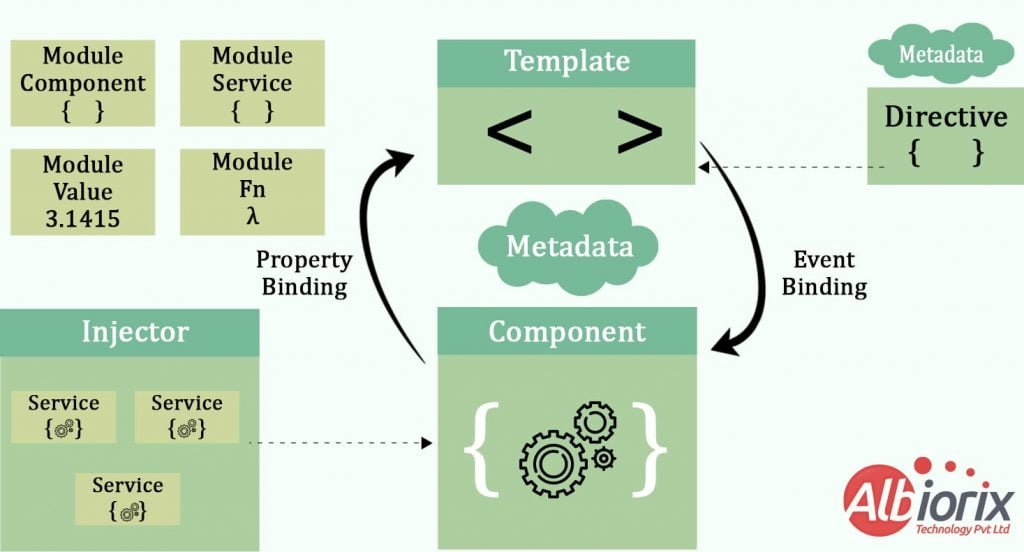
How Does Angular Work

From the above diagram, we can see that the framework follows Angular architecture patterns and is usually divided into 8 main blocks:

1. Modules

For every Angular application, you will have only one root module named AppModule. The root module usually provides the Angular developers with the bootstrap mechanism that makes it easy to launch the new application.

Modules are the one of the most essential aspect, if you’re understanding what is Angular.

An app typically contains many functional modules. Let’s say you are planning to use another custom Angular module for your application; then, it becomes mandatory for you to register the same module in the app.module.ts file.

One of the best option is to hire Angular developers from reputed organization where they can easily organize the source code into distinct functional modules. It helps you in managing the complex web application development and designing for reusability.

2. Components

Angular works by breaking an application into smaller parts called components. Each component has a class that holds data and logic.

The root component connects everything together, linking the component hierarchy to the webpage. Each component is linked to an HTML template that defines what the view looks like on the screen.

These components control specific parts of the page, making it easier to manage and update different sections. In simple terms, Angular allows developers to organize a website into manageable pieces, which makes building and maintaining apps more efficient.

3. Templates

Angular templates are nothing but a combination of HTML and Angular markup. The primary aim of such an Angular template is to modify HTML elements before they are displayed quickly.

In addition, template directives provide program logic, and binding markup connects your application data and the document object model (DOM).

Generally, there are two types of data binding.

  • Event Binding: With the help of Event Binding, you can efficiently build an app that efficiently responds to user input in the target environment by updating your app data.
  • Property Binding:Angular is a component-based framework that supports Property binding where the developers interpolate values computed from app to fetch data into the HTML elements of the web page.

4. Metadata

Metadata is nothing but an instructor that informs Angular about how to process a class. It is designed explicitly to decorate the class so that the developers can quickly configure the expected behavior of a class.

If you are working with the Angular 2+ version, decorators are one of the essential concepts you need to deal with.

The user can use metadata to a class to tell the Angular app that AppComponent is the main root component. In addition, metadata can be attached to the TypeScript using the decorator.

5. Data Binding

The Angular data binding concept typically handles real-time communication between a template and its related component. Moreover, data binding is also a boon for communication between parent and child components.

Angular allows communication between a component and the DOM, making it very easy to define interactive applications without worrying about pulling and pushing the data.

6. Directives

Angular components and directives are interconnected with each other. In simple words, we can say that directives and components both are essential building blocks of Angular applications.

One such Angular directive is ngClass, a better example of the existing Angular attribute directive.

7. Services

The Angular developers create a service class when no specific data or logic is associated with the particular view. In addition, the developers can even share the data or logic among different components.

The @Injectable decorator immediately precedes the service class definition. The decorator provides the metadata that allows your service to be injected into client components as a dependency.

The main functionality of the Angular framework is to distinguish components from services. And it leads to increase modularity and reusability for your application.

For example, once the developers separate a component’s view-related functionality from other processing, you can make your component classes lean and efficient.

8. Dependency Injection

The primary role of the Angular developer is to keep the component classes short and straightforward. And that’s what Dependency Injection (DI) does.

DI is not responsible for fetching data from a server, validating the user input, or logging directly into the console. In addition, they are accountable for delegating such tasks to the services.

DI is equipped with the AngularJS framework and is typically used by developers everywhere to create new components using the user input validation system with the services.

Components consume services; you can inject a service into a component, giving the component access to that service class.

Want to Develop User-Friendly Web App For Business?

Albiorix is an AngularJS development company that helps you build customized web solutions for business.


Contact Us

Advantages of Angular Framework

Let’s highlight some of the biggest and most beneficial advantages of Angular that bring convenience to building web applications for your business needs.

Moreover, the biggest advantage that we can say for sure is that there are many leading websites that built with Angular framework.

Advantages of Angular

1. Supported by Google

One of the biggest advantages that have come up with the Angular framework is the Long-Term Support (LTS). Google offers long-term support for Angular, which help you to deal with Google’s plan to keep using the framework and expand the Angular ecosystem.

The exciting part about Angular ecosystem is that Google employs Angular and plays a vital role in improving the performance of the web application. With its active support of LTS, Angular help you scale your web application easily.

2. TypeScript

TypeScript is the primary language that is built explicitly for Angular application development. TypeScript is nothing but a superscript for JavaScript, and it allows for optimal code quality, making the web application more secure.

Its active support of TypeScript helps Angular developers easily detect and eliminate mistakes early to deal with completely rewrite the code or performing maintenance operations.

Browsers will not execute TypeScript directly. First, the Typescript code must be “transpiled” into JavaScript with the help of tsc compiler, which requires some updates in Angular configuration file.

3. Declarative UI

With the help of dynamic HTML elements, the user interface (UI) of the Angular application is built. HTML is a more simple language as compared to JavaScript programming language.

Angular is also a declarative and easy-to-use language that exclusively supports directives such as ng-app, ng-model, etc.

4. POJO (Plain Old Java Object)

POJO approach is included in the Angular framework. The developers do not need to use Angular’s getters and setters method.

By including POJO, the developers find it easy to perform object manipulation via all of JavaScript’s standard functionalities.

Moreover, one of the Angular best practices that developers can perform is to simply quickly remove or add properties from the things while also iterating over them as needed.

5. SPA and PWA

One of the most cost-effective methods for website development to make it behave like mobile apps is a Progressive Web App (PWA). It is responsible for minimizing the network requirements and, most importantly, enhancing the web app performance.

Single-page web applications (SPA) may be written primarily when the developers need to utilize the server-side rendering capabilities of Angular.

Moreover, single-page web applications it helps the developers to load the home page quickly and improves website performance on mobile and low-powered devices.

You can even make use of Angular Ivy to compile components more independently of each other quickly for your business applications.

6. Simplified MVC Pattern

The Angular framework typically uses the MVVM (Model-View-ViewModel) architecture rather than an MVC (Model-View-Controller).

With the help of the MVVM model, the developers can efficiently deal with two-way data binding between View and ViewModel.

In addition, Angular platform allows the developers to deal with the automatic propagation to change within ViewModel’s state to the view. ViewModel data strictly uses the observer model to inform changes to the ViewModel model to model.

7. Modular Structure

The entire Angular source code is grouped into different essential web page elements like Angular components, directives, pipes, and services. Modules are considered to be the heart of the Angular framework’s intuitive application structure.

The developers can easily deal with framing the features of applications using the entire tree structure smoothly.

Modules play a vital role in lazy loading. In simple words, by including modules in the Angular application, you’ll find featuring differential loading functionality of the application website’s on-demand turns to be faster.

With the help of Angular, you may develop a complex app while dividing work and ensuring organized and generated code.

When you have a solid grasp of these, you may make the most of the modules. Modularization might enhance developer efficiency in certain situations.

So, these are the best advantages of using Angular framework that you need to be aware of while developing a robust web app for your business needs.

Drive your business growth with intuitive applications.

Your search ends here as we help you provide the best and most cost-effective solutions for your development needs.

Contact Us

Limitations of Angular Framework

It’s time to highlight some of the drawbacks of the Angular framework. But with the recent updates, the Angular community is working hard to remove such limitations.

Advantages of Angular

1. Limited Search Engine Optimization Options

Generally, the Angular framework comes up with the platform’s limited Search Engine Optimization (SEO) options and poor accessibility for search engine crawlers. And it’s one of the major drawbacks of using the Angular framework.

Being that Google is the number one search engine on the planet, we can’t imagine this problem will continue to persist for much longer before a solution is presented in another update.

2. Steep Learning Curve

Another glaring con of using the Angular framework is that it can be quite difficult to learn.

With such a complex web of modules, coding languages, integrations and customizing capabilities, understanding Angular definitely takes some time.

Fortunately, Angular provides phenomenal support and there are a number of online tutorials and courses you can take to catch up and start taking full advantage of all the program has to offer.

3. Migration

One of the reasons that companies do not use Angular frequently is the difficulty in porting legacy js/jquery-based code to angular-style architecture.

If I talk about jQuery vs Angular, both are meant for different perspectives. Also, each new release can be troublesome to upgrade, and several of them are not backward-compatible.

4. Performance

Dynamic applications didn’t always perform that well. Complex SPAs could be laggy and inconvenient to use due to their size.

One of the primary reasons that why we use Angular is the enhancing the performance of your business web applications.

5. Lacking CLI Documentation

Some developers express concerns with the current state of CLI documentation.

While the command line is very useful for Angular developers, you won’t find enough information in their official documentation on GitHub and you have to spend more time exploring threads on GitHub to get answers.

What are the Angular Best Practices That You Need to Follow?

Understanding and following Angular best practices is one of the most essential factors for both developers and business owners.

Let’s highlight some of the common Angular best practices that you need to consider while developing web application.

  • Make a habit of using Angular CLI.
  • Utilize the ES6 functionality to make robust web app
  • Creating and maintaining proper folder structure
  • Use Lazy loading feature as and when required
  • Always following the coding practices for Angular development
  • Use “trackBy” along with ‘ngFor’
  • Use Interfaces to deal with object literals

By taking care of the above Angular best practices, let’s move to the section about how to develop Angular applications from scratch.

What are Angular Development Tools?

The Angular development process is made easier by utilizing the best tools, especially for developers. Herein, we’ve highlighted the list of the best Angular development tools that will make work easier for developers to perform coding efficiently.

  • Karma: Makes your code testing process smooth. You can quickly recover from potential flaws, errors, and defects using the Angular testing framework.
  • Jasmine: No need to rely on any browser or other JavaScript testing environment. With its easy-to-use syntax, Jasmine allows you to write and test the code easily.
  • Protractor: You can quickly perform testing Angular applications directly on the software, and such tests can be easily synchronized to the page.
  • Webstorm: It is considered to the best IDE for performing coding efficiently. The Angular developers find it relatively easy to deal with best coding practices.
  • Mocha.js: It’s a robust testing framework that typically deals with asynchronous testing functionalities.
  • Angular Kickstart: Its easy-to-use interface allows you to work with faster satisfaction of all your business needs.
  • Angular Fire: It is solely responsible for fostering dynamic API features, three-way data binding, and other essential features.
  • Djangular: You’ll get a reusable application with responsive app integration with the AngularJS framework.
  • Rest-angular: This Angular development tool is solely responsible for dealing with large data consumption from REST API.
  • Ng-inspector:This tool enables browsers with an inspector panel, helping developers to develop, debug, and understand develop Angular applications quickly.

How To Create Angular Application?

I hope you’re now clear with what is Angular. Right? So let’s move ahead and focus on essentials steps to create an Angular application from scratch.

We will discuss the complete step-by-step guide on how to proceed ahead with a new Angular application.

Before that, the developers need to analyze the list of the best Angular development tools to make the web app development process smooth.

Step 1: Angular CLI Installation

Angular CLI (Command-line Interface) is the official and main tool for creating Angular applications. To install CLI, we need to provide the following command: npm install -g @angular/cli.

Step 2: Angular Project Initialization

To initialize the Angular application, first of all, you need to navigate to the location where you want to keep your project.

Copy
“
cd ~
ng new angular-application”

So, it’s the first and most important step that is going to be used for creating a new Angular application. Once you give this command, the CLI will prompt you with multiple options that you want to configure for your application.

creating angular application

Step 3: Adding Angular HttpClient

Now, we need to import HttpClientModule to our app.module.ts file.

Copy
import { NgModule } from '@angular/core';
import { BrowserModule } from '@angular/platform-browser';
import { AppRoutingModule } from './app-routing.module';
import { AppComponent } from './app.component';
import { HttpClientModule } from '@angular/common/http';
import { EmployeeComponent } from './employee/employee.component';
import { AdminComponent } from './admin/admin.component';

@NgModule({
declarations: [
AppComponent,
EmployeeComponent,
AdminComponent
],
imports: [
BrowserModule,
AppRoutingModule,
HttpClientModule
],
providers: [],
bootstrap: [AppComponent]
})
export class AppModule { }

Likewise, whatever the components you add, do not forget to import them; otherwise, it will throw an error. When the developers are dealing with asynchronous operations like an HTTP request, you need to deal with promise in Angular development.
Step 4: Creating UI Components

As stated earlier, Components are the building blocks of Angular application. Creating an Angular component is simple.

creating ui components

Here, we have created the “employee” component. And as you can see that all the essential files are automatically created by the Angular CLI makes you create a rich user interface..
created by the angular cli

Likewise, let us create one more component (admin) in our Angular application. So, now we have two components employee and admin.

Step 5: Adding Routing Functionality

We will perform the redirection of the empty path to the employee component. This, in order, will constitute the first-time users’ automatic redirection to the home page.
You’ll need a class, technically known as resolver in Angular, development that is solely responsible for implementing the Resolve interface of Angular Router.

We’ll be running the following set of routes into our src/app/app-routing.module.ts file:

Copy
import { NgModule } from '@angular/core';
import { RouterModule, Routes } from '@angular/router';
import { EmployeeComponent } from './employee/employee.component';
import { AdminComponent } from './admin/admin.component';
const routes: Routes = [
{ path: '', redirectTo: 'employee', pathMatch: 'full'},
{ path: 'employee', component: EmployeeComponent },
{ path: 'admin', component: AdminComponent },
];
@NgModule({
imports: [RouterModule.forRoot(routes)],
exports: [RouterModule]
})
export class AppRoutingModule { }

This way, we can work with the Angular framework. Yes, it is the basic concepts that help you create a simple Angular application from scratch.

Looking For the Best Angular Development Services?

Albiorix has Angular developers that use cutting-edge technology to build creative web applications for clients.

Contact Us

Which are the Leading Websites Built Using the Angular Framework?

After having a detailed look at the concept of what is Angular, you must be having a big question in mind: which are the websites built using the Angular framework. I have listed the best websites developed using the Angular framework:

  1. Google
  2. UpWork
  3. Gmail
  4. Deutsche Bank
  5. Paypal
  6. Freelancer
  7. Microsoft Xbox
  8. WikiWand
  9. Forbes

Related Post: Explore latest Version of Angular 16

Conclusion

After having a detailed look at what is Angular framework, we can give a final summary:

  • For front-end development process, Angular is a one-stop solution for developers. Apart from Angular, ReactJS is also best option for it. If we talk about Angular vs React, they are equally important for web app development. It involves the applications client-side and has little to do with the back end.
  • Angular is best utilized for completing advanced, large-scale Angular projects under the direction of a seasoned developer.
  • The developers can easily add Angular elements to projects utilizing a different platform, such as React or Polymer.
  • Google supports the Angular framework.
  • This program is not up to par with SEO best practices, so opt for a different platform if your primary focus is search engine optimization.
  • Angular is a JavaScript framework, not a JS Library.

I hope you got a clear understanding of the Angular framework and its usage. If you are planning to build a new web application for your business needs, Albiorix is a one-stop solution for Angular development services.

Angular vs AngularJS: Key Differences That You Need To Know

Nowadays, many javascript frameworks are available in the market that is explicitly used for web and mobile app development. If we talk about front-end development, Angular and AngularJS are the most popular frameworks that are hitting the market.

But what’s the major difference between angular vs angularjs? Do they really differ from each other? Such questions might be hitting your mind. To answer such questions, we have come up with an article that demonstrates the difference between Angular vs AngularJS.

Before we start to understand the concept of Angular Vs AngularJS, let us have a look at the basics of AngularJS and the Angular framework and explaore the angular and angularjs difference.

Key Takeaways

  • Angular is a complete rewrite of AngularJS, designed to overcome limitations and enhance performance.
  • Angular uses TypeScript, a superset of JavaScript, while AngularJS uses plain JavaScript.
  • Angular follows a component-based architecture, where the application is divided into reusable components, while AngularJS uses a directive-based approach.
  • Angular has a more modular and scalable structure, making it easier to maintain large applications, whereas AngularJS is better suited for small to medium-sized projects.
  • Angular has a more powerful and expressive template syntax, with features like data binding, pipes, and reactive forms, which make it easier to manipulate and display data.
  • Angular has a more efficient change detection mechanism, resulting in better performance compared to AngularJS.
  • Angular provides better support for mobile development through Angular Mobile Toolkit and the Ionic framework, while AngularJS lacks such specific mobile development third-party tools.
  • Angular has a more comprehensive ecosystem, including official documentation, a dedicated CLI, and a larger community support, while AngularJS has a more mature library ecosystem due to its earlier release.
  • Angular has a well-defined migration path from AngularJS, allowing developers to gradually upgrade their applications.
  • Angular has regular release cycles, introducing new features and improvements, while AngularJS is in long-term support (LTS) mode, receiving only critical bug fixes and security updates.

What are the Types of Angular Versions?

We will differentiate between all the versions of Angular in detail below. But before that, let’s understand what every version brings to the table and the major difference between Angular and AngularJS.

Angular JS

  • It’s an official name, but it is often known as Angular 1. 
  • An open-source and front-end web application framework that typically uses JavaScript technology to build single-page applications.
  • You can effectively utilize HTML programming language as a template for responsive design. 
  • In AngularJS, you can quickly combine the data and expression syntax for designing and developing performant web applications.
  • AngularJS helps simplify the ready-unit testing feature and application development process by strictly following a framework for client-side model–view–controller (MVC) and Model–View–ViewModel (MVVM) architectures. In short, it uses component-based web application architecture.
  • You can even create components that are vital in building rich Internet applications.
  • It uses the controller approach where the view communicates using a $scope.

Angular 2

  • The next version of AngularJS is Angular 2. 
  • Unlike AngularJS, Angular 2 is not a regular update. 
  • It’s a complete rewrite of its counterpart. 
  • Angular 2 uses the component-based approach in developing HTML and JavaScript Web applications for your business needs.

Angular 4

  • Angular 4 is a typescript-based open-source and front-end framework for web app development and plays an essential role in dealing with cross-platform development.
  • Being the successor of Angular 2, Angular 4 is not a complete rewrite, and both Angular versions use the same patterns and concepts.
  • Angular 4 comes up with advanced and noteworthy AngularJS features like smaller and faster apps, an animation package, AS keywords, etc.

Angular 5

  • After Angular 4, Angular 5 was launched with more advanced and enhanced features for efficiently designing and building web applications.
  • The excellent part of Angular 5 is that Angular makes it easy for AngularJS developers working in leading AngularJS development companiesto remove unnecessary codes from their applications.
  • Other improved features are a code-sharing feature, less time for assembling dynamic web applications, and so on. 
  • Moreover, it has DOM elements support, and its compiler helps with incremental compilation.

Angular 6

  • The improvements in this Angular version 6 are even better than previous versions. 
  • Angular 6 is the framework introduced to make the web parts of applications that can quickly deal with most cutting-edge web and popular mobile browsers.
  • Its impressive features of Angular 6 bring convenience in creating Angular web component and using it in various HTML pages later.

Angular 7

  • Angular 7 framework helps you to build web apps using leading technologies like HTML, Javascript, and Typescript. 
  • With the help of Angular 7, you can quickly grab the features like better mobile apps with CLI prompts, drag-and-drop functionality, improved app performance, component dev kit (CDK), and virtual scrolling with this framework. 

Angular 8

  • Angular 8 supports Ivy as the default rendering engine. 
  • Some of the best features of this mobile support AngularJS framework include differential loading of modern JavaScript, support for web workers, and dynamic support for lazy loading routers.
  • Angular 8 was more famous for the much-anticipated Ivy compiler as an opt-in feature. 

Since Angular version 9+, there are some minor updates introduced compared to previous versions.

Angular 9 

  • Angular 9 came up with new and enhanced Ivy compiler and runtime features, a better debugging process, quick ready-unit testing feature, and many more improvements that make it easy for you to deal with the web app development process easier.
  • Angular 9 is most popularly known for its Ivy default compiler and improved bundle size.

Angular 10 

  • Angular 10 represents new dynamic features of the “new date range picker” in the Angular Material UI (User Interface) component library.
  • Moreover, you will also find additional features like warnings for CommonJS imports and more exciting features on the Angular 10 version. 

Angular 11

  • Like Angular 10, Angular 11 include stricter types, automatic font inlining, and Angular router performance improvements.
  • Angular 11 is an Angular framework version that allows you to smoothly design and develop applications from scratch.

Related Post: Angular Vs React Vs Vue

Angular 12

  • In Angular 12, the View Engine has finally been deprecated.
  • Angular 12 allows you to migrate from legacy i18n message IDs quickly
  • It allows you to start new or running tasks, and you can even furnish alternatives with famous 3rd party comprehensive solution in the CLI tool.
  • It eliminates support for IE11 in Angular v12.

Angular 13

  • Angular 13 support TypeScript 4.4.
  • Angular 13 is 100% Ivy
  • A new type called FormControlStatus has been added in Angular 13. 
  • In Angular13, the router will no longer supplant the browser URL whenever the new navigation cancels the ongoing navigation.

Angular 14

Angular 14 is Angular version that came up with the latest features and updates that you must be aware of while developing single-page applications or upgrading the Angular versions.

  • In Angular 14, TypeScript versions older than 4.6.0 are no longer supported.
  • Make sure you are using Node 14.15.0 or later.
  • It supports Reactive form types such as FormControl and FormGroup now have generic type parameters and infer stricter types.

Angular 15

Angular 15 release date is 16th November 2022 and brought a big smile to Angular developers globally. The reason was quite obvious as they were expecting something big to announce and it really happened..

  • Stable standalone components API
  • Develop a multi-route application
  • Directive Composition API
  • Easily deal with web and mobile development
  • Stable “NgOptimizedImage” Image Directive
  • Easily Reduce Boilerplate in Guards
  • Better Stack Traces For Debugging Process
  • CDK Listbox
  • ESBuild Support of Angular 15

Angular 16

Angular v16 has arrived, bringing with it a host of new angular features and enhancements that will excite developers and tech enthusiasts alike.

  • Angular v16 includes several performance improvements, such as faster compilation times, faster startup times, and improved change detection.
  • Angular v16 includes improvements to the Angular CLI, such as faster builds, improved error messages, and better support for web workers.
  • Angular v16 includes updated and improved documentation, making it easier for developers to get started with Angular and find the information they need.
  • Angular v16 includes improved compatibility with TypeScript 4.4 and higher, as well as other dependencies such as Node.js.
  • Angular v16 also includes some new features, such as support for custom element tags and improved support for internationalization (i18n).

What is the AngularJS Framework?

AngularJS is an open-source framework used to build dynamic and interactive web applications. It lets developers use HTML as a template language and enhances it by adding custom elements and behaviors through JavaScript.

The key purpose of AngularJS is to turn static HTML into dynamic content that responds to user actions in real time.

Developers write the logic in JavaScript files, which are then connected to web pages using the <script> tag. This approach makes it easier to create structured, maintainable, and efficient web applications while reducing repetitive coding tasks.

Top Features of AngularJS Framework

After having a look at the basics of what is Angular, it’s high time to explore the best features of the AngularJS framework.

Angularjs Framework Features

MVC (Model-View-Controller)

AngularJS framework typically uses the Model-View-Controller approach for developing web applications. This design pattern is meant explicitly for splitting the business logic layer, the data layer, and the presentation layer into separate sections.

  • Model is considered to be the lowest level of the pattern specifically for maintaining data.
  • The View is responsible for displaying all or a portion of the data to the user.
  • The Controller is nothing but a software code that efficiently controls the interactions between the Model and View.

Data Model Binding

AngularJS makes it easy for the web developers to add a few writing code snippets directly into the structure, irrespective of writing additional external code to bind data.

Furthermore, once you add some code snippets, it becomes easy for you to attach data directly from HTML control to application data.

Writing Less Code

AngularJS framework has become a boon for Angular JS developers as it allows them to write less amount of external code for DOM manipulation. Moreover, the developers are free from writing long code structures for building web applications.

Unit Testing

The Google development team has not only introduced the AngularJS framework but has defined a unit testing framework named “Karma”. The primary role of Karma is to help developers to design a unit testing approach for AngularJS applications.

Directives

In AngularJS, directives are special markers or attributes added to HTML elements. They tell AngularJS to apply certain behaviors or modify the DOM in real time.

This allows developers to make web pages interactive and dynamic without writing complex JavaScript code directly into the page.

AngularJS comes with built-in directives, such as ng-model or ng-repeat, which handle common tasks like data binding and looping through items.

Developers can also create their own custom directives to suit specific needs. Overall, directives help extend HTML’s capabilities, making web applications more responsive and user-friendly.

Not-Browser Specific

Angular applications do not involve any browser constraint. Therefore, it can efficiently run on all major web and mobile browsers such as Chrome, Firefox, Safari, IE8, and Android, except internet explorer 8.0.

Dependency Injection

With the help of dependency injection, it becomes easy for AngularJS developers to design and build applications faster.

Moreover, dependency injection it allows an application easier to test. It allows you to ask for your dependencies rather than having to look for them or make them by yourself.

Drive Your Business Growth With Single Page Application

Albiorix has professional and experienced Angular developers that can develop single-page applications simply and fast using optimal structure.


Contact Us

AngularJS Architecture

AngularJS Architecture
  • Controller: The Controller is an integral part of the AngularJS application. Its primary duty is to represent the essential layer that typically covers the business logic. The event-triggering or event-binding function occurs, whenever the user makes clicks on it. All the essential functions are stored inside the controller.
  • Views: Views are an essential aspect of the AngularJS application that is primarily used to represent the presentation layer that is provided to the end-users.
  • Models: Models are used to represent your data. The data in your model can be as simple as just having primitive declarations. For example, if you are maintaining a student application, your data model could just have a student id and a name.

Or it can also be complex by having a structured data model. If you are maintaining a car ownership application, you can have structures to define the vehicle itself in terms of its engine capacity, seating capacity, etc.

Pros and Cons of AngularJS Framework

ProsCons
✅ Two-Way Data Binding❌ JavaScript Support Mandatory
✅ DOM Manipulation❌ Inexperience With MVC
✅ Improved Server Performance❌ The Scope
✅ Faster Application Prototyping❌ Other Complex Feature
✅ Responsive Web App❌ Possible Time Consumptions
✅ Highly Testable Product❌ Difficult Learning

Pros of AngularJS

Two-Way Data Binding

AngularJS facilitate faster and easier data binding which doesn’t require a developer to interfere at all. Referred to as two-way data binding, it ensures that ongoing changes made to view are instantly displayed in the model and vice-versa.

DOM Manipulation

Unlike other popular JavaScript frameworks, Angular conveniently relieves the developer of actively manipulating DOM (Document Object Model), all thanks to its two-way data binding approach.

It means that the developer saves time and effort in code, performing input binding, translating and updating the DOM elements.

Improved Server Performance

Because it supports caching and many other processes, Angular reduces the burden on server CPUs. It means that the server performs extremely well thanks to reduced traffic and because it only serves static typing files and responds to API calls.

Faster Application Prototyping

Rapid prototyping is indeed a buzzword thanks to the existence of frameworks like Angular.

In no time and by writing significantly less code, you can develop app prototypes with good functionality, obtain feedback and make changes without getting annoyed.

Responsive Web

There’s nothing better than arranging an outstanding end-user experience and AngularJS makes it possible by letting responsive, fast-loading and seamlessly-navigating websites and apps.

Highly Testable Products

One of the underlying aspects of Angular is that it builds highly testable websites and applications. Allowing unit testing and end-to-end testing makes easy testing and debugging much simpler than you can imagine.

Hierarchical dependency injection, for example, allow various components to be isolated and mocked. Protractor, Jasmine and Karma are other unique testing and third-party tools that the framework offers.

Have a Web App Idea But Confused Where to Start?

Book a free 30-minute consultation with our expert. Get your web app idea.


Contact Us

Cons of AngularJS

JavaScript Support Mandatory

It’s pretty obvious that your computer or laptop usually handles the server. And your server must be a plain JavaScript-supported system as you need to control the overall design.

Moreover, the users will not be able to access your system if your server is not Javascript-supported.

Inexperience with the MVC Approach

The Angular framework becomes somewhat complex if developers use the traditional approach to develop mobile and web applications.

It becomes possible for the developers to adopt the MVC approach for making the Angular responsive application. AAngular becomes time-consuming if they are unaware of the Model-View-Controller architectural pattern.

The scopes

Scopes in the AngularJS framework can be rugged for the developers to handle the functionality. The primary reason is it follows a layered and arranged hierarchical dependency injection system.

Besides, debugging the scopes becomes the prime destruct for the developer while developing the application.

Other Intricate Features

Utilizing directives in AngularJS is somewhat challenging for the developers. Apart from directives, other essential AngularJS features like dependency injections and factories bring more complexities for traditional developers.

Possible Time Consumption

With the help of the AngularJS framework, the browser may usually take time to make pages of websites and applications. The primary reason behind it may be due to overloaded browser functionality like DOM manipulation.

Tough Learning

Instead of approaching a straight learning graph, the developers may find it challenging to adopt the AngularJS framework.

In addition, the limited documentation available may further affect the learning process. However, the day-by-day extending Angular community is making it more manageable.

What is Angular?

Angular is a popular open-source framework for building modern web applications. It evolved from AngularJS, which was the first version, but today, when we say “Angular,” we usually refer to versions 2 and above.

Angular helps developers create dynamic, client-side applications using HTML, JavaScript, or TypeScript—a language from Microsoft that compiles to JavaScript. It offers a collection of libraries and tools to make web apps faster, more secure, and maintainable.

Developers use Angular to create components, manage data with services, write templates in HTML, and organize everything within modules for scalable, efficient applications.

Top Features of Angular Framework

Top Features of Angular Framework

MVC Architecture

MVC stands for Model-View-Controller. Model typically manages your application data, while data display is handled by View. The primary role of the Controller is to play as an intermediator between View and Model.

The MVC architecture in the Angular framework easily splits the application and writes the code for connecting the same approach.

The AngularJS developers need to break the entire code and leave the rest to the Angular framework. With the help of this component-based architecture, it saves a significant amount of coding time.

Two-Way Data Binding

The View layer in the Angular framework represents the Model layer, and it remains in perfect synchronization.

Therefore, if the developer makes any consecutive change in the model, the users can see it in the view model automatically. Thus,data binding is one such approach that is solely responsible for minimizing crucial development time.

Few Code Framework

Compared to other front-end frameworks, Angular is considered a low code framework. In simple words, we can say that the developers need not write different code to link the MVC layers.

Moreover, they don’t require specific code to view manually also. In addition, the directives are isolated from the app code. These all together automatically minimize the development time.

Angular CLI (Command Line Interface)

The Angular CLI plays a vital role in AngularJS development services. It includes various built-in AngularJS features like SCSS support or routing features making the application more responsive.

However, many Angular CLI available in the market makes the Angular development easy for the developers. Some of the standard Angular CLI are as follows:

  • ng new: To initialize Angular app development or to create a new workplace, this command plays an important role.
  • ng generate: With the help of this command, the developers can quickly create new components, services, routes, and pipes. Not only that, it allows you to create simple test shells for your Angular applications.
  • ng serve: This command allows you to test your Angular app on a local server.
  • Test, Lint: The developers can efficiently perform smart unit and end-to-end tests for your entire coding structure. And ng lint helps to run programs to analyze code for possible errors.

TypeScript

Angular strictly follows TypeScript language. With its active support of TypeScript, Angular offers a persistent experience to the developers.

Moreover, the developers find it easy to identify bugs and reduce developing time. TypeScript development services help you get high-performance mobile and web applications for business

The primary role of TypeScript is to populate the root file configuration for easy compilation automatically.

TypeScript has richer enums, interfaces, generics, hybrid types, union/intersection types, access modifiers, etc. than JavaScript technology.

Directives

Being an integral part of Angular applications, Directives allow the developers to create custom HTML tags that usually serve as custom widgets.

Developers can use these to decorate behavior-driven User Interfaces elements. Angular developers can efficiently handle the DOM manipulation as per the project needs.

Create a Web Application With Our Angular Development Services

We are dedicated to working closely with our clients to ensure that the project is completed on time, on budget, and meets or exceeds all expectations.


Contact Us

Angular Architecture

The Angular application architecture or we can say Angular’s component-based architecture typically includes the eight essential building blocks.

Angular architecture patterns
  • Modules: Every Angular application has a mandatory root module, defined by the  name “AppModule”. It is nothing but the bootstrap terminology that is responsible for launching the application.
  • Components: At least one component is essential for the Angular project that needs to be built. The root component and root component are two main components that connect the component hierarchy with a page document object model (DOM).
  • Templates: The primary role of Angular template language is to simply combine the HTML attributes with Angular markup that can quickly modify HTML elements before they are displayed.
  • Metadata: Metadata is functionality that informs Angular for class processing. It’s essentially used to decorate the class so that it can configure the expected behavior of a class.
  • Data Binding: Data binding plays an important role in communication that acts as an intermediatory between a template and its related component.
  • Directives: We can say that Angular components are nothing more than that of functional and logical components that contain directive with the template. Directives are the building blocks of Angular projects.
  • Services: Service classes are created that play a vital role in data or logic presentation that isn’t associated with a specific view. The @Injectable decorator immediately precedes the service class definition.
  • Dependency Injection: Dependency injection (DI) lets you keep your component classes lean and efficient. DI does not fetch all the data from a server, validate the user input, or log directly to the console instead they delegate such tasks to the services.

Pros and Cons of Angular Framework

ProsCons
✅ Google-Supported framework❌ Limited SEO Options
✅ Third-Party Integration Support❌ Difficult to Learn
✅ Faster Load Time❌ Time Consuming
✅ Customizable Framework❌ Application Scaling
✅ Dependency Injection❌ Not Good For Simple Web App

Pros of Angular

  • Google-supported Framework: Angular is a leading framework that is usually supported by Google, making it easy for the developers to build a dependable, trustworthy program. Moreover, the application works as per Google’s latest updates and announcements.
  • Third-Party Integration Support: The good part of the Angular framework is that the developers can easily include third-party integration supports for the application. In addition, the developers can quickly utilize more Angular development tools to improve the overall form and function of their product.
  • Faster Load Time: Faster load time and enhanced security are additional and essential features that Angular offers. With its “ahead-of-time” compiler functionality, Angular compiles HTML and TypeScript into JavaScript during the entire Angular development lifecycle. All the code is compiled before the browser even loads your web app.
  • Customizable Framework: Angular supports various elements and modules, giving more power to the developer and designer. Apart from building elements and modules, it allows the Angular JS developers to include such elements directly to projects that were created using another framework.
  • Dependency Injection: It’s the most advantageous for the developers, if and only if, they are aware of its usage. Designing and building multiple dependencies can be time-consuming for the developers, but it can be used well, especially for large-scale projects.

Cons of Angular

  • Limited SEO Options: One of the major disadvantages that come with Angular is that it has limited SEO options and weak accessibility for search engine crawlers. Being that Google is the number one search engine globally, this issue persists for much longer before a comprehensive solution is presented in another Google update.
  • Difficult to Learn: Another drawback that comes up with the Angular framework is that it can be quite difficult to learn.
  • Time-Consuming: Angular framework is equipped with multiple web modules, coding languages, integrations and customizing capabilities. Initially, the developers require some amount of time to learn the basic structure of Angular. Once they are aware of the framework, it becomes easy to build a new Angular application from scratch.
  • Application Scaling: Unless you’re working on a project of appropriate size and complexity, Angular can easily weigh you down. Save this one for the big-ticket assignments and you’ll fare just fine.
  • Not Good For Simple Web App: To design and build simple web applications, Angular is not a good choice.

Drive Your Business Growth With Single Page Application

Albiorix has professional and experienced Angular developers that can develop single-page applications simply and fast using optimal structure.


Contact Us

Understanding Components of Angular vs AngularJS

A key difference between Angular and AngularJS is how they handle components. AngularJS, built on JavaScript, uses controllers and scopes to manage application logic and data. It relies heavily on directives to add behavior to HTML.

In contrast, Angular (versions 2 and above) is built with TypeScript, offering a more structured, component-based architecture.

Everything in Angular revolves around components, which combine template, logic, and styling in one unit. This makes Angular applications more modular, scalable, and easier to maintain compared to AngularJS.

Overall, Angular’s component-driven approach offers clearer organization than AngularJS’s controller and directive model.

Use of Directives Between Angular vs AngularJS

Directives play a central role in both AngularJS and Angular, but they work differently in each framework. AngularJS offers many built-in directives like ng-model and ng-bind, which are used for tasks such as two-way or one-way data binding.

In Angular (2+), directives are more structured and limited to standard forms, offering better consistency.

For instance, Angular replaces ng-model with ngmodel and uses specific syntax for bindings—square brackets [ ] for one-way property binding and parenthese ( ) for event binding. For two-way binding, Angular use [ ( ) ].

Understanding these differences is crucial to writing efficient, clean code whether you’re working with AngularJS or the newer Angular versions.

Difference Between Angular vs AngularJS

The following table of Angular Vs AngularJS comparison depicts the complete difference between angular and angularjs the two front-end development technologies.

FeaturesAngularAngularJS
LanguageIt is written in Microsoft TypeScript language.It is written in JavaScript language.
ArchitectureAngular typically uses components and structural directives as an architectural designModel-View-Controller.
Mobile-SupportThe Angular applications built are entirely mobile-supported applications.The applications developed with AngularJS are not mobile-friendly.
Expression Syntax( ) and [ ] are the two common attributes that are used for two-way data binding between view and model.{{ }} expressions are typically used for a two-way binding that exists between view and model. ng-bind can also be used to do the same.
Dependency InjectionAngular application supports hierarchical dependency injection.There is no usage of dependency injection in the AngularJS application.
Routing Functionality@RouteConfiguration {(…)} is the coding that the Angular team typically utilizes for defining routing information.@routeProvider.when ( ) is the coding that AngularJS development utilizes for configuration and routing information.
ManagementxAngular code has a better structure, and it is easy to create and manage large Angular applications.AngularJS project is difficult to manage with increasing the size of the source code.
SpeedAngular applications are faster compared to AngularJS applications.With its two-way data binding feature, AngularJS applications are fast.
FlexibilityMore flexible and scalable as compared to AngularJS.Less manageable and scalable as compared to Angular.

Related Post: Angular best practices

Conclusion

AngularJS is a leading framework that supports wide scope for developing single-page web applications for your business needs.

On the other hand, Angular versions are highly preferable as a robust front-end tool supplying AngularJS components that becomes a boon for Angular developers to deal with:

  • Write and re-write
  • Easy-to-use
  • Readable
  • Maintainable code

With its valuable concepts and functionalities, it gets the application to run fast and be stable.

In fact, the Angular version provides several benefits to front-end developers, and that Angular makes the popular reason that many companies use Angular for their projects.

Albiorix provides Angular development services to easily design and build dynamic desktop, mobile, web, and single-page applications. Contact us today with your web idea.

Angular vs React: Choose Best Java Script Frameworks in 2026

Summary: The core difference is that Angular is a full-fledged, opinionated framework for building large-scale applications, while React is a flexible library for building user interfaces. Your choice depends on project size, team expertise, and required structure.

Do you know that more than 100 frameworks and languagesare available in the market to create robust and secure web applications? But the most challenging part for the developers is to keep pace with the latest changes and trends hitting the industry.

Selecting the one that makes your work easier becomes the prime duty. Angular and React are the two leading and most popular web frameworks considered the most popular front-end development frameworks for mobile and web application development.

Both Angular and React have their strengths, but the right choice goes beyond just two frameworks. See the full picture in our Angular vs React vs Vue three-way comparison guide.

What is Angular?

In 2010, Angular was released under the name AngularJS which typically follows MVC (Model View Controller) architecture. It is a web development framework, typically developed and maintained by Google.

Angular is a TypeScript-based JavaScript framework equipped with a suite of developer tools to build and scale projects from single-developer size to enterprise-grade applications.

Angular is mainly known for its features like two-way data binding and dependency injection, and of course, for being backed by a tech giant.

From 2010 till date, Angular 15 is the newest version (as of now) that comes up with more advancements in building SPAs for your business needs.

And if I say what’s new in Angular 15 as compared to the previous version, it has more and more specific Angular feature that have brought major changes in the latest one.

What are the essential factors that make Angular deal with web app development?

  • You can quickly build scalable and complex applications as it contains a component-based framework.
  • The angular framework includes a list of fully-functional programming and require additional libraries, covering a wide variety of features of Angular, including routing, forms management, client-server communication, and more.
  • A suite of software developer tools to help you develop, build, test, and update your code.

What is Angular Good For?

After looking at the basic concept of what is Angular, it’s time to explore the potential benefits of the Angular framework.

  • Angular is a one-such framework developed especially for designing and building dynamic modern websites for your business needs.
  • The Angular framework helps you build interactive and dynamic SPAs with robust features like templating, two-way data binding, bidirectional data binding process, modularization, RESTful API handling, dependency injection, and AJAX handling.
  • Angular is the best for web designers too. Designers can use HTML as a template language and even extend HTML syntax to convey the application’s components easily. You also don’t need to rely on third-party libraries to build dynamic applications with Angular.

And if we talk about what web application developers like about Angular, then the following diagram answers your question.

Reasons You Need Angular

What are the Advantages of Angular?

advantages of angular

1. Boosts App Performance

Angular is the leading framework that has the ability to create single-page applications (SPAs). The applications developed with Angular include instantaneous changes, which, in turn, make the website faster.

With its reusable component, the developers easily eliminate the need to continually reload the page. Besides, Angular delivers excellent and seamless boosting performance on mobile devices, especially smartphones, regardless of screen sizes, interfaces or hardware.

2. Two-Way Data Binding

Angular makes two-way data binding an integral function of its architecture. Consequently, there’s little need for sequential callbacks to handle modified data or developer interventions.

Angular synchronizes the data between Model and View. In simple words, once the data is changed or modified, these two subsequent components automatically get updated using two-way data binding functionality.

And such data synchronization process take place in real-time, preventing developers from putting extra effort into manual modifications.

3. POJO-Mode

Angular’s coding structure is completely handy and independent as it utilises the Plain Old Javascript Objects (POJO) Model. So, the Angular developers are freed from adding complex functions or methods in the coding structure. 

Additionally, it eliminates dependencies on external frameworks or plugins. With the help of this Angular feature, all your codes remain clean, and most importantly, you require less coding.

4. Angular Material

The Angular Materials strictly follows the Material Design guidelines as created by Google. Inside it, the Angular Material, you’ll find various features like in-built components such as navigation elements, layout, buttons, indicators, and data tables. 

Remember, Angular Material is not only a means for creating an eye-catchy user interface, but it develops applications like Google. For instance, apps like Google drive, Android OS, Gmail, and many others have become the daily needs of users.

5. Angular Testing

In the AngularJS framework, all the essential JS codes typically go through a series of tests. The convenience offered in testing allows us to make the project from scratch and seamlessly test and identify components.

The overall management of scopes and controllers is done with the help of dependency injections. Angular’s unit test functions can force dependency injection to perform testing by injecting mock/dummy data into the controller.

What is React?

React front-end development framework managed explicitly by Facebook and a community of individual developers and communities. The first React version was initially released in 2013.

It’s a JavaScript library that lets you build a secure user interface (UI) for your website. React is one of the well-known Javascript frameworks used explicitly for front-end development.

The UI development is made easy by its component-based and declarative structure. React is the front-end development framework managed explicitly by Facebook and a community of individual developers and communities. The first React version was initially released in 2013.

Related Post: JavaScript Data Grid Libraries

What are the essential factors that make React deal with web development?

  • React makes it easy for any React developer to create interactive UIs. They can smoothly design simple views for every state in the web application.

    The excellent part of React is that it allows you to update efficiently and renders just the right components when your data changes.

  • You can build encapsulated components, allowing developers to manage their states.

    Moreover, the entire component logic is written in JavaScript rather than on templates; passing rich data through the web app becomes relatively smooth for the whole React application development.

  • With its prime principle, “Learn Once, Write Anywhere”, React developers can quickly develop fast, scalable, and complex apps for all business verticals.

Related Post: react native style best practices

What is ReactJS Use For?

I hope you are now clear with what is ReactJS, it’s time to explore the potential benefits of the ReactJS framework.

  • ReactJS is a multi-purpose, open-source library that is mainly used in front-end development, focusing on building user interfaces.
  • React is a JavaScript framework that is specifically designed to help you deal with an innovative way of rendering websites, evolving the responsive nature of web pages.
  • React framework is the perfect choice when you want to develop Single Page Applications (SPAs) as it can rewrite and update content on a web page without requiring to reload or refresh the page.
  • React Native, the best React framework for creating native mobile apps and Native development.
  • Large social media sites, such as Instagram, Facebook, and Reddit use ReactJS for front-end website development needs.
  • Newspaper agency New York Times, streaming service Netflix, and Customer relation system SalesForce also use ReactJS for the development of their mobile app.

Are You Planning To Build a Single Page Application?

We have a strong expertise in designing and building SPAs using ReactJS framework for all business verticals.

Contact Us

What are the Advantages of React?

After having a look at the basic concept of what is ReactJS, it’s time to explore the top advantages of using ReactJS for web app development.

react advantages

1. Composable

React framework allows you to easily divide multiple lines of code and input them as reusable components.

Such components can then easily be integrated into one place, and the developers can efficiently utilize components with one-way data-binding functionality to make robust applications.

2. Declarative

React framework allows you to develop interactive user interfaces by transforming the component state. DOM (Document Object Model) is entirely declarative, meaning React is solely responsible for updating the DOM per your needs.

The developers do not interact with DOM directly. Moreover, it allows you to make UI design and debugging process changes more quickly.

We can change the program’s state and see how the UI will look at that time. This makes our code more predictable and easier to debug with its one-way data-binding feature.

3. Write Once, Learn Anywhere

The good part of React framework is that you are entirely free from writing the existing code again and again. You need to develop one component and can reuse the same in different functionalities. 

We have an option to render code reusability function on the server using Node and develop mobile apps using React Native.

In simple words, you can easily create IOS, Android, and Web applications simultaneously using React.

Related Post: jQuery vs Angular

4. Simple

React is a JavaScript-based and new framework with a component-based approach and automatic rendering and uses plain JavaScript. In other words, we can say that React is relatively simple to learn, build a web (and mobile applications), and support.

Furthermore, with its special syntax named JSX, you can combine both Javascript and HTML in one code to make it easier to grasp and work with.

5. SEO-Friendly

SEO brings convenience to you in searching for the right content for the user. Once the user search for any specific topic on the search engine, leading platforms like Google, Yahoo, Bing or Baidu provides you with the best ranking pages based on the particular search.

React framework affects the SEO by giving you a SPA (Single Page Application) which requires Javascript to show the content on the page, which can then be rendered and indexed.

6. Fast & Easy to Learn

React contains pre-built patterns and functions that can be selected and combined like building blocks to create fast, appealing and scalable projects in less time as compared to building the entire application. 

Also, unlike other frameworks, which are referred to as ‘Domain-specific Language’, React only requires to need a basic knowledge of HTML and CSS fundamentals to start working with it.

You May Also Like To Read: Best React UI Frameworks

What are The Differences Between Angular Vs React?

It’s time to explore some of the main differences between Angular and React framework to make it easy for you to select the best one for your project in 2023.

1. AngularJS vs React JS In Terms of Popularity Growth

Well if I talk about the popularity growth as a personal preference for Angular vs React, both are best in dealling with gaining high popularity in the discussion forums and also the developers’ community.

Do you know that Angular occupies a fifth place among the top 10 most used web frameworks among developers worldwide, as of 2022, with 20.39% of web developers using this framework?

However, just like Angular, Reactjs is a library against a fully-fledged framework. Likewise, Angular has always maintained an average number to be high on getting stars as compared to the library framework Reactjs.

As per a recent study by TechBehemoths Study, it has been found that React is used by 75% of all IT companies globally leaving far behind Angular and Vue.

2. Application Performance: Angular Vs React

In terms of application performance, both Angular and ReactJS hold a good reputation. Angular best practises is to optimises coding and lead to an established level of programming that continually enhances performance.

Therefore, evaluating Angular Vs React is essential, especially for the developers to consider.

You can even use older versions of Angular to serve projects that don’t require the facilitation of two-way data binding, which significantly reduces complexity.

The $cacheFactory that Angular offers is better at memorisation and can ultimately be utilised to recalculate data that is calculated later.

Here’s the example of a popular payment gateway using Angular:

With over 300 million clients and use in over 200 countries, PayPal is a well-known payment gateway that utilises Angular and has proven to be the safest transactions platform in the world.

I frequently participate in high-level tasks with developers at Albiorix, working on various projects. The biggest problem they encounter is being unable to reuse them in subsequent projects when dealing with sophisticated reasoning.

This problem is resolved by reactjs, which can reuse system parts.

Designers frequently reuse react components because it doubles the productivity and improves coding methods.

In addition, Reactjs is renowned for its versatility in reusing the components; for example, starting with the finer components, such as checkboxes and buttons, then moving to the wrapper components, and finally reaching the root components.

Despite the level of project complexity, adopting such habits ultimately improves app performance consistency and makes code quality and maintenance easier.

Are You Planning To Build a Single Page Application?

We have a strong expertise in designing and building SPAs using ReactJS framework for all business verticals.


Contact Us

3. Testing Scenarios in React Vs Angular

Attempting to reach 100% of testing objectives is challenging when using a dynamically typed language like Javascript. Because of this, code created in Javascript needs to have a robust set of tests. Angular included several characteristics, including isolation of the unit of code and was created with testability in mind.

For instance, dependency injection is an Angular built-in support that makes it simple to pass in dependencies of components and even mimic the components.

It is better to simulate any missing components from the testing environments when writing tests. Tests can observe the other components of the function and forecast how they will interact.

It is helpful to avoid data fetching flakiness because it is mocking data or functional. The availability of copying capabilities in Reactjs makes tests more predictable.

As part of the development process, Reactjs continuously runs test suites to perform the test cases. Additionally, React offers test execution tools like Mocha, Ava, and Jest, which enable testing to proceed concurrently with development.

Jest is widely compatible with different features such as mock modules, timers, jsdm support, and more. In addition, libraries like Mocha are consistent with browser-specific requirements and has long term support for real browser-like simulations.

4. For Code Quality : Angular Vs React

At Albiorix, we have employed specialised tools like AngularCLI to raise the grade of our coding and increase the quality of everything we create with Angular. Since we are accustomed to using AngularCLI, it has allowed us to produce projects with incredible integrations.

Our project deliveries have been made simple by integrations like Angular Core, Angular Material, etc., while maintaining the level of code quality we had hoped for.

Unlike React, the learning curve for Angular has been slashed thanks to AngularCLI, which also enables you to anticipate compilation behaviour.

With its easier learning curve, it makes it possible to provide smooth builds and to have engineers spend less time iterating, which ultimately results in poor JavaScript code quality.

5. Code Maintenance in Angular vs React

The most popular use of Angular is to create single-page applications. Single-page applications’ complex structures and numerous programming modules are the cause. Program files are frequently placed in different files as a result.

To maintain such a complicated system while maintaining the richness of the application, the best and complete framework that supports complex maintainability and can handle complex naming conventions must be chosen.

However, in most situations where SPAs necessitate a full-proof standard practice of managing a code, we adhere to the best practices outlined in the Angular style guide.

For instance, Weather.com is one of the most prominent examples of using Angular as its primary tech stack.

According to Similarweb, one of the most popular websites worldwide is weather.com. They were able to acquire timely weather updates for the widgets thanks to Angular.

It combines widgets with UI elements and reuses the components for improved code maintainability.

When creating rich web clients, where mixing HTML and Javascript is challenging because of less modularization, we frequently see developers dealing with major maintainability issues.

The nice part is that Angular solves these issues by creating maintainable javascript. In addition, it offers an HTML extension to address these issues, which provides you with some relief and results in significant time savings.

Tech consultants frequently ask for advice on maintaining the source code and making the habit of writing clean code from scratch. However, writing clean code without slowing down production seems challenging.

With the same amount of work and good production hours, Reactjs demonstrated to be a better way to write clean React code.

It has demonstrated that developers avoid repeating themselves or becoming perplexed by code review remarks. Instead, Reactjs has forced programmers to create features that integrates with the little modules without being redundant.

Reactjs prohibits you from writing split code, making it incredibly computer-usable and understandable for other developers.

In addition, it makes it easier for code to be reused by providing a way to build UI components that are completely reusable.

Since Reactjs enables the creation of bespoke Reactjs components, rendering uncontrolled input fields is simple and distinguishing the components with their specific naming conventions is simple.

Related Post: Vue.js vs React – How to Choose the Right Framework

6. Server Rendering in Angular vs React

By creating pleasant, readily searchable static versions of the application, Angular helps web crawlers. Before the application becomes completely interactive, Angular renders it by building a static view using server-side rendering.

Then, you decide how to use JSON and client-side caching skillfully to improve server-side speed. When it comes to minimising client-server traffic, Angular is unmatched.

Angular is designed in a pattern with built-in testing requirements such as dependency injection and object mocking. However, we cannot distrust Angular’s future advances because it has Google as a backup.

It can also reduce code by eliminating the need for recompilation and instantly reflecting changes in the front end.

To make your application SEO-friendly, you should render it to the server. Reactjs makes it simple with the aid of a few particular functions. Instead of calling Render, you can use the RenderToString function in the server side rendering functions.

Unlike other javascript and so many frameworks, Reactjs is not a rigid JavaScript library that will prevent you from reaping the benefits.

You may also use renderToStaticMarkup if you don’t want to create DOM properties like data-react-id, which is excellent for building a simple static page generator using server side rendering.

Are You Planning To Build a Single Page Application?

We have a strong expertise in designing and building SPAs using ReactJS framework for all business verticals.


Contact Us

7. Bundle-file Optimization in Angular and React

Working with Angular made handling single-page applications a breeze. They are, however, a little complicated when it comes to the bundle file size and rendering optimizations.

Most websites that do not load on the first click will not have an acceptable click-through rate, nor will they be appealing to search engine traffic. Because the item that must be downloaded on the first page is a bundle file, it is critical to optimise it as much as possible.

Angular employs a compiler to bridge the gap between a browser and the code in the bundle file. As a result, it accelerates browser compilation and makes it easier to understand.

However, the additional bundle size as a result of HTML code placed in components can be taken into account to improve efficiency.

Ahead-of-Time (AOT) is employed as part of the workflow. It is not, however, the default option from Angular, although it can always be activated using the CLI by switching to production mode.

When designing a large-scale application, the bundle file size is important. I learned from my users that the most important thing to do while optimising the application codebase is to analyse the bundle file size.

When it comes to a software stack like React, ignoring the bundle size means passing up an existing opportunity. Reactjs apps frequently contain suggestions about components.

It eventually became a massive production file that began with a few components. Since adding new features and dependencies over the new business requirements, it is critical to gauge the file’s size regularly.

Related Post: resolver in Angular

8. Learning Curve in Reactjs Vs Angular

Angular is expansive and dynamic. You may find it challenging to cover a wide range of topics in Angular at first, but it is worthwhile to devote effort to this phase to enjoy developing the apps more.

It begins with fundamental pieces, including directives, modules, components, services, dependency injections, and more. Angular has a steep learning curve.

Select any of the tech stacks based on the needs of your prospective projects. However, when handling the most challenging problems in large-scale applications, Angular is on top.

Writing components, maintaining internal states, and using props for configuration are the most fundamental and fundamental things to learn in Reactjs.

Unlike Angular, React developers may find it strange to write in the early stages, but because it adds no complexity, it’s a good tech stack.

Reactjs will not ask developers to learn and fall into the complexities of learning logical structures (which may be why the increased Reactjs demand in developers).

But knowing the basics, along with state management libraries and component-based routing libraries, will put you on the right track to begin building apps.

Both of these technologies have a lot to offer in terms of functionality, a suite of tools, and runtime performance, making it difficult for development teams to choose one over the other.

Comparison Of Angular vs React

Comparing ForAngularReact
FounderMisko HeveryJordan Walke
Best ForBuilding highly active and interactive web apps for your business needsCreating large scale apps with subsequent variable data
DOMAngular supports Real DOMReact utilizes Virtual DOM
Pricing ModelOpen-SourceOpen-Source
Data BindingSupports two-way data bindingSupports one-way data binding
Best ForBuilding highly active and interactive web apps for your business needsDeveloping large web apps with subsequent variable data
App SizeReact application developed are small in sizeReact application developed are small in size
PerformanceThe performance of Angular apps is highThe performance of React apps is high
Learning CurveAngular has steeper learning curveThe learning curve is moderate
ScalabilityModular development structureComponent-based approach
Programming LanguageTypeScriptJavaScript

Companies That Use Angular and React

organization using angular and react

Conclusion

So, whatever you choose, Angular or React, both are meant for front-end development. React is simply a JavaScript library used for developing robust UI, while Angular is a full-fledged mobile and web development framework.

React is a lighter framework compared to Angular. Moreover, it takes less time to start working on a React project. On the other hand, Angular is somewhat complex and takes additional time for the developers to master. In short, we can say that React outperforms Angular.

Still, if you find any complexity in identifying the framework for your project requirements. Albiorix is a one-stop and complete solution for front-end development services.

Being a prominent AngularJS development company, Albiorix has a team of expert developers who strive to provide the best possible solutions

Apart from Angular development, we are among the best ReactJS development company where our React developers are experts in dealing with your development needs.

Angular vs React vs Vue Compare Best Front-end Framework

Summary: Angular, React, and Vue are the top three technologies for building modern user interfaces, each with distinct philosophies. Angular is a full-fledged, opinionated framework best for large enterprise applications, React is a flexible UI library ideal for dynamic UIs and a large ecosystem, and Vue is a progressive framework offering a balance of simplicity and power for projects of varying size.

Nowadays, you’ll come across many front-end Javascript frameworks that make your web development process more accessible than ever. But the main focus of the area is to select one of the best from the rest.

How will you achieve that?

Well, said enough, here in this article, we have come up with detailed information and differences between the three web development frameworks like Angular Vs. React Vs Vue.

Now you’ll ask why these three web frameworks.

The answer lies in the statistics shown below.

Now, let’s start with some basic information about these best Javascript frameworks to make it easy to select the best one and why you should go with it.

Key Takeaways

  • Angular, React, and Vue are all popular JavaScript frameworks used for building web applications.
  • Angular is a comprehensive framework that offers a lot of features out of the box, including a robust set of tools for building complex applications.
  • React is a library that focuses on the view layer of an application. It provides a simple, easy-to-learn API for building reusable UI components.
  • Vue is a progressive framework that can be used as a library or a full framework. It is similar to React in many ways, but with a few key differences. Vue has a simpler syntax than React, which makes it easier to learn and use.
  • Ultimately, the choice between Angular, React, and Vue depends on your specific needs and preferences.
  • If you need a comprehensive framework with a lot of built-in features, Angular might be the best choice.
  • If you’re looking for a library that focuses on UI components and is widely used, React is a good choice.

    And if you want a lightweight framework that’s easy to learn, Vue might be the way to go.

What is Angular?

Angular is the only typescript-based Javascript framework that allows you to fill the gap between the increasing technology stack demands and application performance strategies for your business web development process.

Launched in September 2016, Angular is an open-sourced JavaScript framework designed explicitly for developing web, single-page applications, and even mobile applications.

The first version was AngularJS. Then came Angular 2 (the most popular Javascript framework). Finally, Angular 14 version is here.

Being a proficient AngularJS development company, Albiorix has a team of expert Angular developers who strives to provide the best possible solutions.

What is React?

After having a look at what is Angular, React is the next on our list, which is actually not a framework but just a Javascript library developed by Facebook, which makes it easy for you to build UI components.

Not only this, React allows you to perform Javascript code in a more leisurely way that can be easily understood and deploy your application.

React Javascript frameworkuses server-side rendering to provide a flexible, performance-oriented solution. Albiorix is a ReactJS development companythat provides the best web app solutions for your business needs.

You May Also like To Read: Best React UI Frameworks

What is Vue?

Vue.js is a simple, easy-to-use frontend, and basic framework that overcomes complexities that you might face in Angular development.

The two main advantages that make Vue more familiar are: visual DOM and component-based architecture. Two-way binding is additional functionality apart from these benefits.

Vue.js is a flexible and progressive framework that allows you to build applications ranging from web, and mobile to progressive web apps. Sounds interesting, right?

Drive Your Business Growth With Single Page Application

Albiorix has an experienced Angular developers that can develop single-page apps using optimal structure.


Contact Us

Pros and Cons of Angular Vs React Vs Vue

It’s time to explore the pros of these three web development frameworks.

Pros of Angular

  1. As Angular is an entirely Google-supported platform, it allows you to develop dependable and trustworthy web apps and mobile apps as it deals with Google’s occasional updates and announcements.
  2. With the help of the Angular, you have the option to select any third-party integrations to enhance the performance of your Angular applications.
  3.  With its “ahead-of-time compiler” functionality, Angular provides quick load time and enhanced security. Angular easily compile HTML and TypeScript into JavaScript for building dynamic web applications. In simple words, all previous html code differences is compiled before the browser even loads your web app.
  4. The Angular applicationis equipped with advanced elements and modules that are customised, giving power to the developer and designers. The developers can easily include such elements to the application created using other Javascript frameworks, providing an attractive appearance to your application.
  5. If you have skills in dealing with dependency injection, then the Angular framework is a boon for you. In addition, the Angular is a complete framework that brings convenience to the developers to implement MVC architecture, even if they’re working with large-scale applications.

Cons of Angular

  1. The Angular is a complete dynamic solution to build web and cross-platform mobile applications; the learning curve is steeper to execute the operation.
  2. Angular sometimes follows a complex structure, making it challenging for the developers to code well during the web application development phase and making more complex apps.
  3.  Code optimisation and following the best angular practices are the negative points from the developer perspective.
  4.  For new techies, the Angular feature can be somewhat challenging.
  5.  The Angular Scopes are hard to debug Limited Routing.
  6.  You might face some complexities during the migration process.

Pros of React

  1.  With its simplicity in designing, React is easy to learn.
  2. React applications strictly follows HTML-like syntax, allowing developers to use templates and highly detailed proper documentation.
  3.  React allows developers to spend more time writing modern JavaScript and less time concerning the framework-specific code.
  4. React is a front-end development framework that supports server-side rendering and solid React elements, making it a robust framework for content-focused and complex applications.
  5.  Facebook offers a “codemod” feature to automate much of the process.
  6. React is a complete framework that can be easily used for developing native-based applications.
  7.  ReactJS, when combined with ES6/7, can effectively manage heavy application loads more efficiently.

Cons of React

  1. When developers integrate ReactJS with some traditional MVC framework, they need to deal with complex configurations for developing complex applications.
  2.  ReactJS developers must have in-depth knowledge related to the integration and building user interfaces into the MVC framework.
  3. React has a learning curve, especially for developers who are new to it or who have limited experience with web development in general. The framework has a lot of concepts and terminologies that may take time to understand.
  4. React only focuses on the view layer, which means it requires additional libraries or tools to handle other aspects of application development such as routing, form validation, and state management. This can lead to a more complex development process and a larger learning curve.
  5. React requires writing more boilerplate code than other front-end frameworks like Vue or Angular, which can be time-consuming and repetitive.
  6. React’s documentation can be confusing for beginners, and it may not always provide the best examples or explanations.
  7. React can overcomplicate simple tasks, leading to longer development times and increased complexity.
  8. React can have performance issues when working with large-scale applications or data-intensive operations, leading to slow load times and rendering speeds.

Pros of Vue

  1.  Small-size application
  2.  Low-storage requirements
  3.  Simplicity in designing and building applications
  4.  Detailed documentation
  5. Advanced reusable components
  6.  Secure and flexible

Cons of Vue

  1.  Language barriers and restricted community
  2.  Spoilt for options
  3.  Lacking scalability and plugins
  4.  Community-related limitations
  5. Lack of financial support for large-scale and complex projects.
  6.  Limited resources
  7.  Excessive code flexibility

Build Feature-rich and Scalable Web Applications

Albiorix have skilled developers that are always ready to build client-centric solutions.


Contact Us

Some Basic Differences Among Angular Vs React Vs Vue

It’s a high time to view the head-to-head comparisons between Angular vs React, Angular vs Vue, and Vue vs React? We have summarized it in an easier way that will make it easy for you to analyze them for your project requirements.

Angular vs React

Differences between Angular vs React

Let’s start with understanding the common difference between Angular vs React. We have seen almost all the possible pros and cons of both these technologies in the previous section. 

To state it easier, both Angular and React applications are the Javascript libraries that can be efficiently used for building web applications, mobile applications, and cross-platform applications like React Native mobile apps for your business needs.

At the same time, Angular is generally better for more complex enterprise-ready apps.

React is one such framework that typically requires extra modules and components, making the usage of the core Javascript library small; it means that you need to deal with some additional outside development tools for web application development for your business needs.

React is an UI library that is a boon for many intermediate to advanced JavaScript developers and those familiar with concepts from ES6 and up.

And if we talk about the Angular, it favours experienced developers who are familiar with TypeScript development services.

React vs Vue

Differences between React vs Vue

The subsequent comparison for React vs Vue, trust me, it’s not easy to debate. Vue is a feature-rich framework that comes up with a vibrant and ever-growing community, and of course, it has taken over popularity compared to React framework.

You’ll be surprised that React developers are still churning out many new components and extras, so no sign React is on the decline either, thereby has steep learning curve.

Vue is the best option for developing smaller, less complex apps, and if you’re a learner, then it is one of the superb options to start coding using VueJS development.

In addition, VueJS can be easier to integrate into new or existing projects, and many feel its use of HTML templates and JSX is an advantage.

Vue might be the best choice for new web developers, and you do not need to deal with some advanced JavaScript concepts.

On the other hand, React suits the best for experienced programmers and developers who have worked with object-oriented JavaScript programming language, functional JavaScript, and similar ideas.

Angular vs Vue

Differences between Angular vs Vue

Last, the comparison between Angular and Vue is one of the deciding critical factors for front-end development. Both technologies are different libraries with different feature sets and learning curves.

As a result, Vue is a boon for less experienced developers, and Angular is the perfect option for those working on more extensive or complicated programs.

The Angular framework brings more convenience to Angular developers by adding innovative features in every new Angular release. And if we talk about the VueJS framework, the difference between Vue2 Vs Vue3 says it all. 

And the excellent part about Vue is that the creator of this framework is a developer who formerly worked on Angular for Google. So that’s another thing to keep in mind, though that wouldn’t significantly impact your decision.

Comparison Table of Vue Vs React Vs Angular

FeatureAngularReactVue
Created byGoogleMeta (Facebook)Evan You
TypeFull frameworkUI libraryProgressive framework
LanguageTypeScriptJavaScript / JSXJavaScript / HTML templates
UI / DOM manipulationYesYesYes
State managementBuilt-inExternal libraryBuilt-in
RoutingBuilt-inExternal libraryBuilt-in
Form validationBuilt-inExternal libraryExternal library
HTTP clientBuilt-inExternal libraryExternal library

Let’s see the basic comparison of Angular Vs React Vs Vue.

Conclusion

Which is better for front-end development? Angular, React or Vue.

Ultimately, it depends on your project requirements and how you want to represent your application.

All the framework options that we’ve gone through in this article are the best to develop single-page applications.

Whatever your perception of the discussion about Angular vs React vs Vue, you need to make choices based on your requirement for functionality and usability.

Albiorix is a top-rated custom AI software development company having core expertise in leading Javascript and Typescript technologies.