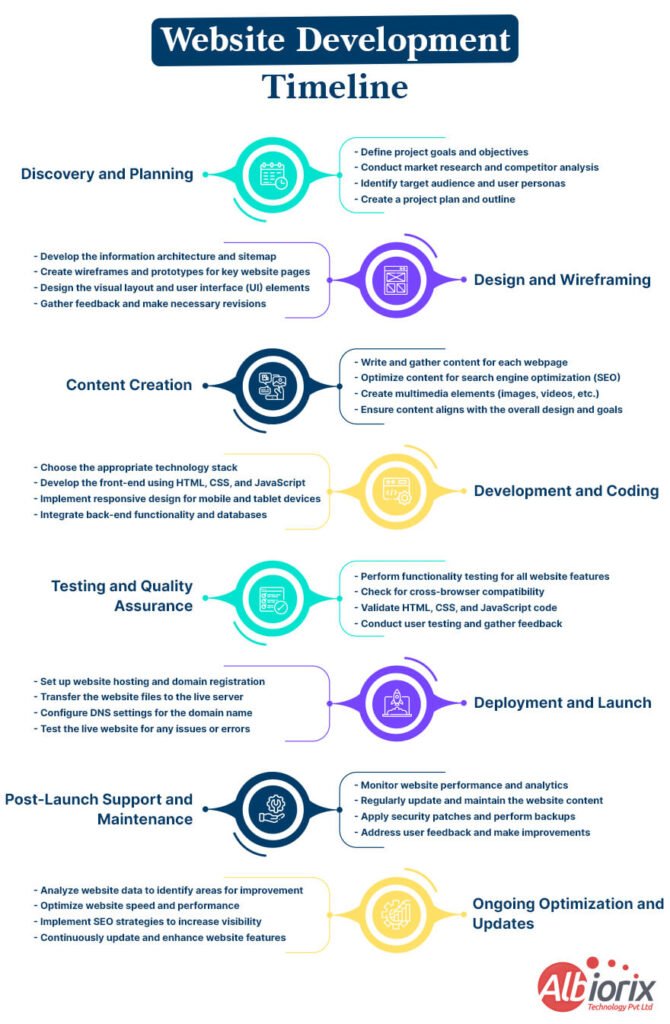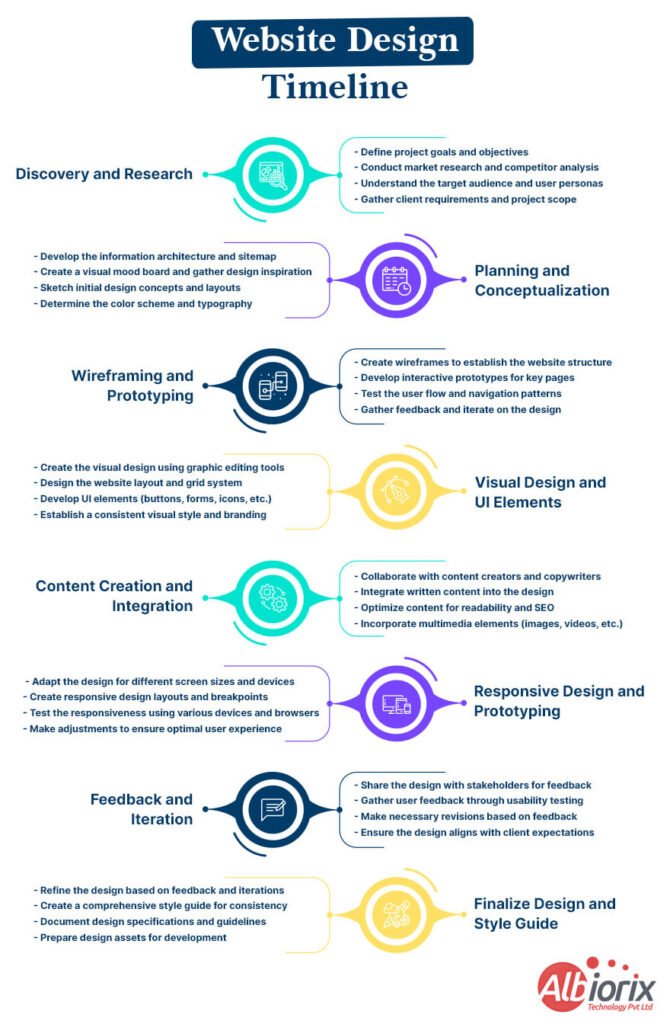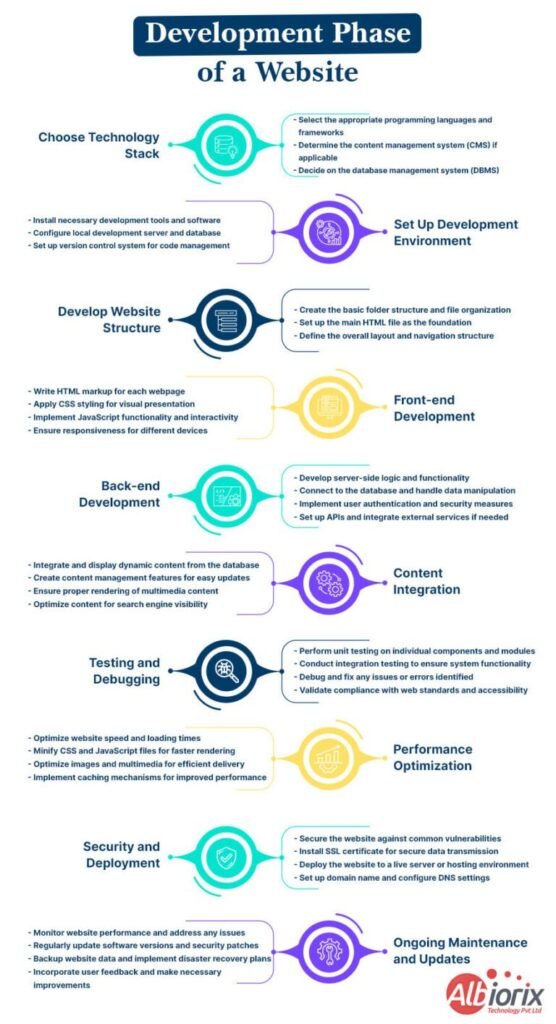






How to Create A Good Web App For Your Business

Web applications have become an integral part of our daily lives. From e-commerce to social media, Web application development has revolutionized the way we interact with each other and conduct business online.

If you’re interested in creating your own web application, you may be wondering where to start and how to navigate the process. In this blog post, we will provide you with a comprehensive guide on how to create web app.

We’ll cover everything from ideation and planning to design, development, and deployment.

Whether you’re a seasoned developer or a beginner, this guide will provide you with the tools and knowledge you need to bring your web application to life. So, let’s get started!

Key Takeaways

  • Understanding the purpose and requirements of your web application before starting the development process is one of the foremost factors that you need to consider.
  • Choose the right web development framework based on your technical skills and project requirements.
  • Create a wireframe and design the User Interface of your web application to ensure an optimal user experience.
  • Use Agile methodology to manage the development process and ensure that your project stays on track.
  • Write clean and maintainable code, and ensure that your web apps are secure and scalable.
  • Conduct thorough testing to ensure that your application is free from bugs and is ready for deployment.
  • Deploy your web application to a reliable hosting service, and ensure that it is regularly maintained and updated.

What is a Web App?

A web application is software you use through a web browser—no need to install anything. It runs on a remote server and works from any device with internet access.

Web application development focuses on creating tools like email platforms, shopping sites, or project trackers that solve real-world needs. These apps are easy to access and update because everything happens online.

They are built using a web development tech stack like HTML, CSS, and JavaScript, making them work well on both computers and phones.

With the right development approach, web apps are secure, scalable, and available anywhere you go.

Web apps have several advantages over traditional desktop applications
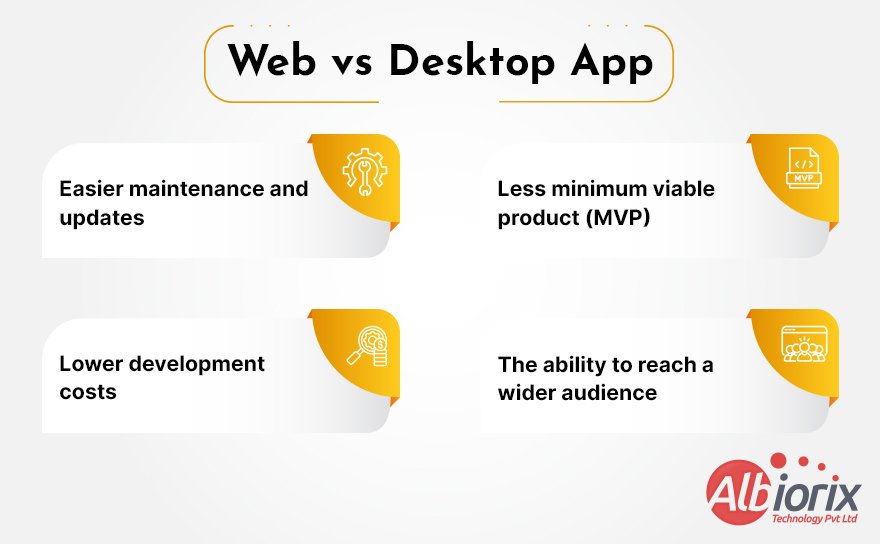
Web vs Desktop App

Additionally, because web apps are accessed through a web browser, they can be easily integrated with other web services and APIs (Application Programming Interfaces), providing users with a seamless experience with secure and instant access across different platforms and devices.

Build Responsive Web Applications With Our Web Development Services

We help you design and build high-performing business websites using leading technology stacks that empower your business productivity.

Consult Us Now

Build Web App Using Low-Code and Slow Code

Low-code and slow-code are two different approaches to website development that differ in terms of the level of programming knowledge required and the speed of development.

Low-code development involves using visual interfaces and pre-built components to develop web apps and websites without requiring extensive coding skills.

On the other hand, slow-code development involves a more traditional, hands-on approach to web development, where developers write custom code to build websites from scratch.

Development Using Low Code & Slow Code
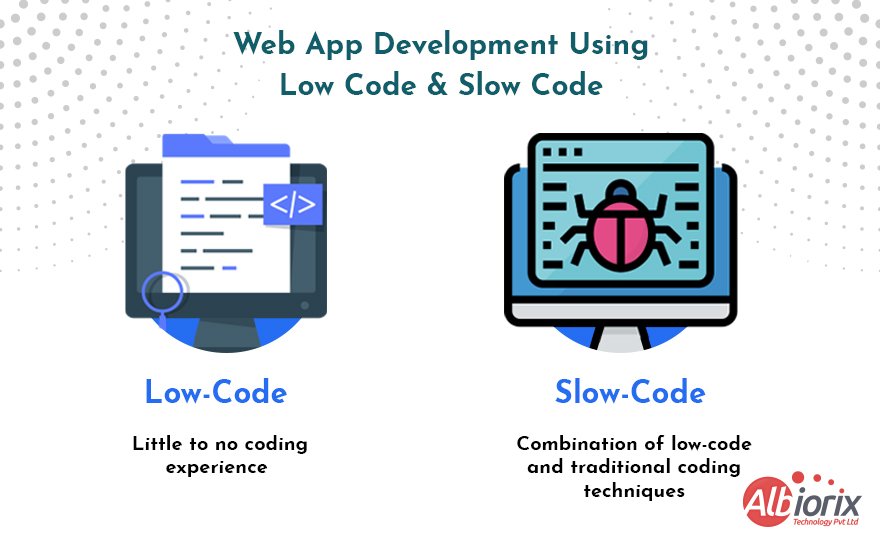
Web App Development Using Low Code & Slow Code

1. Building a web app using low code

A low code is a web app development process that involves using visual interfaces and pre-built components to develop software & web applications quickly and with minimal coding.

This approach allows web developers with little to no coding experience to build functional and feature-rich web applications without the need for extensive programming knowledge.

The low-code approach typically involves using a drag-and-drop interface to design and customize the UI, and pre-built templates to create and configure the underlying application logic.

The low-code platform takes care of the back-end coding, infrastructure, and deployment, allowing web app developers to focus on the front-end user experience using various no-code tools available in the target market.

A forward-thinking software development company can leverage these platforms to deliver rapid, efficient, and scalable web applications tailored to client needs.

To build web app using low code, you can follow these general steps

  • Choose a low-code platform: There are many low-code platforms available, each with its own set of core features and capabilities. Research and select a platform that best suits your needs.
  • Define the requirements: Clearly define the requirements of your web app, including its purpose, features, and target audience.
  • Design the UI: Use the visual interface of the low-code platform to design the UI of your web app, including menus, screens, and forms.
  • Build the application logic: Use pre-built components and templates to build the underlying application logic, such as workflows, integrations, and data models.
  • Test and deploy the app: Test your web app thoroughly to ensure it is functioning correctly and meets all the requirements. Then deploy it to the desired platform or development environment.

Low-code platforms can help streamline the web application development process, reduce development costs, and enable faster time-to-market for web applications.

However, it is still important to have a basic understanding of web development best practices and concepts practices to ensure the final product is secure, scalable, and maintainable.

2. Building a web app using the slow-code approach

It’s basically a method of web development that involves using a combination of low-code and traditional coding techniques.

Slow-code platforms provide a visual interface for web developers to build web apps quickly and efficiently, while also allowing them to add custom code as needed.

Here are the steps to create web app using the slow-code approach:

  • Choose a Slow-Code Platform: There are several slow-code platforms available in the market, including Bubble, Wappler, and Mendix. Choose a platform that fits your requirements and budget.
  • Design Your Web App: Start by designing your web app using the drag-and-drop interface of the slow-code platform. This may include creating the layout, adding text, images, and other components.
  • Configure App Logic: The slow-code platform will have pre-built logic components that you can configure to meet your app’s requirements. This may include setting up database connections, creating data models, and defining workflows.
  • Add Custom Code: If the pre-built logic components do not meet your requirements, you can add custom code to the slow-code platform. This may include HTML, CSS, JavaScript, and other programming languages.
  • Test Your Web App: Once you have configured the app logic and added custom code, you can test your web app to ensure that it is working as expected. Use the testing and debugging features available in the slow-code platform to identify and fix any issues.
  • Deploy Your Web App: Once you have tested and refined your web app, you can deploy it to the production environment. The slow-code platform will have built-in deployment features that will make this web app process straightforward.
  • Monitor and Maintain Your Web App: After deploying your web app, it is important to monitor it for performance and issues. The slow-code platform will have built-in monitoring and maintenance features that you can use to identify and address any problems.

Using the slow-code approach can be an efficient and cost-effective way to build a web app quickly, while also allowing for custom business logic code when needed.

However, it is essential to choose the right platform and to have a clear understanding of your app’s requirements before starting the website development process.

We designed an online platform specifically designed to empower physicians, health institutions, and patients globally through a comprehensive telemedicine platform.

View Project

Essential Prerequisite You Need To Create a Web App

To create web app, there are several prerequisites you need to have

  • A programming language: You need to have a good understanding of at least one programming language used for web development, such as JavaScript, Python, PHP, or Node.js. Each programming language has its own set of syntax and features, so it’s essential to choose the right one for your project.
  • A web development framework: A web development framework is a set of pre-built libraries, tools, and templates that help you build web applications more quickly and efficiently. Examples of web development frameworks include React, Angular, and Django.
  • A database: Most web applications require a database to store and manage data. You need to have a good understanding of database and simplified visual concepts and know how to build a web app and work with databases using SQL or other programming languages.
  • HTML, CSS, and JavaScript: HTML is used for creating the structure of a web page, CSS is used for styling the page, and JavaScript is used for adding interactivity and dynamic core functionality to the page.
  • Understanding of web servers and hosting: You need to know how web servers work and how to deploy your web application to a cloud hosting provider. You should be familiar with web app server software, such as Apache or Nginx, and know how to configure them.
  • Security: Security is essential when developing web applications. You need to have a good understanding of web application security concepts, such as authentication, authorization, and encryption, and know how to implement them in your application.

In addition to these technical prerequisites, it’s also important to have a good understanding of the business requirements and user needs for your web application, as well as strong problem-solving skills and attention to detail.

Easy Steps For Creating a Web App

Let’s explore the easy-to-use steps that will make it easy for you to create a web application for your business needs.

Steps For Creating an App
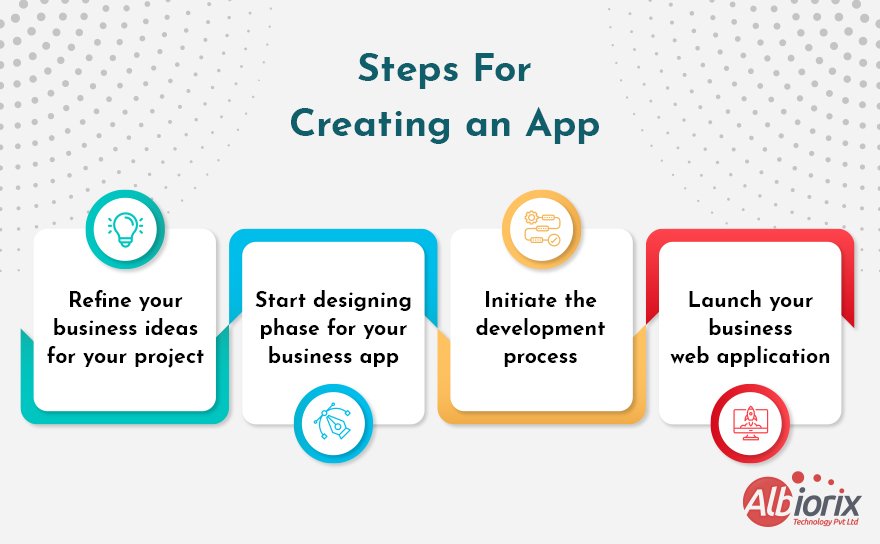
Easy Steps For Creating a Web App

1. Ideation stage

The ideation stage is the first phase in the process of building a web app, and it involves generating and refining web app ideas for the project.

This stage is critical because it lays the foundation for the rest of the development process, and it sets the direction and vision for the project.

The ideation stage typically involves the following steps:

  • Identify the problem or opportunity: Start by identifying the problem or opportunity that your web app is designed to address. Consider what specific pain points or challenges your target users are facing, and how your web app can solve those problems.
  • Research the market: Research the market and analyze the competition. Look for similar web apps that are already available and assess their strengths and weaknesses. Identify gaps in the market that your web app could fill.
  • Define the target audience: Clearly define the target audience for your web app, including their demographics, interests, and behaviors. This will help you create a user-centered design that meets their specific needs and preferences.
  • Brainstorm ideas: Brainstorm as many ideas as possible for your web app. Consider different approaches and all the features that could solve the problem or meet the needs of your target audience.
  • Prioritize ideas: Once you have a list of potential ideas, prioritize them based on their feasibility, impact, and alignment with your project goals.
  • Refine the ideas: Refine the top ideas by fleshing out their details, identifying the key features and functionalities, and creating user personas and user journeys to guide the design process.
  • Create a concept or prototype: Create a concept or prototype of your web app to test the viability of your web app ideas and get feedback from potential users or stakeholders. This can help you identify any flaws or areas for improvement in your specific business idea before investing too much time and resources in the project.

The ideation stage is an iterative process that involves constant refinement and evaluation of ideas to ensure that your web app is viable, user-friendly, and meets the needs of your target audience.

2. Design stage

The design stage is the phase in the process of creating web applications where the UI and user experience are developed.

The design stage is critical because it lays the foundation for the development process and sets the tone for the overall user experience of the web app.

The design stage typically involves the following steps:

  • Wireframing: The first step in the design stage is creating a wireframe. A wireframe is a visual representation of the web app’s UI that outlines the layout and basic functionality of each screen or page.
  • Prototyping: Once the wireframes are created, the next step is creating a prototype. A prototype is an interactive version of the web app that allows users to navigate through the screens and interact with the features.
  • UI Design: After prototyping, the UI (UI) design can be developed. This stage involves designing the look and feel of the web app, including the colors, typography, icons, and graphics.
  • UX Design: UX design focuses on the user experience of the web app. This includes designing the user flow journey, ensuring the web app is intuitive and easy to use, and identifying and addressing any potential pain points or obstacles users may encounter.
  • Content Creation: Content is a critical component of the web app’s UI. The content should be created with the user in mind, and it should be clear, concise, and engaging.
  • User Testing: Once the design is complete, the next step is user testing. User testing involves testing the web app with real users to identify any usability issues or bugs.
  • Iteration: Based on the feedback received during user testing, the design may need to be iterated on. This can include refining the wireframes, making changes to the UI design, or modifying the user journey.

The design stage is an iterative process that involves constant refinement and evaluation of the UI and user experience to ensure that the web app is user-friendly, aesthetically pleasing, and meets the needs of the target audience.

Let’s Build Something New Together!

We have a strong web development team that helps you provide a cost-effective solution unique to your business requirements.

Let’s Connect!

3. Development stage

The development stage is the phase in the process of building web apps where the actual coding and development of the application takes place.

This stage is critical because it turns the design concepts into a functional web application that can be tested and refined.

The development stage typically involves the following steps:

  • Choosing a Development Approach: The first step is to choose a development approach that is best suited for the project. This may include using a programming language or framework that is best suited for the project.
  • Database Design: The database design is critical to the functionality of the web app. During this stage, the database schema is created, tables and fields are defined, and relationships between data are established.
  • Front-end Development: The frontend development involves the coding of the visual aspects of the web app. This includes implementing the design created in the previous stage using HTML, CSS, and JavaScript.
  • Back-end Development: The backend development involves the coding of the server-side of the web app. This includes writing code to process data, handle user authentication, and interact with the database.
  • Integration: Once the front-end and back-end are developed, they need to be integrated into a complete web app. This involves connecting the server-side code with the client-side development code and ensuring that all the components work together seamlessly.
  • Testing: Testing is a critical component of the development stage. Testing should be performed to ensure that the web app works as expected, is secure, and is scalable.
  • Deployment: Once the testing is complete, the web app can be deployed to the production environment. This involves configuring the server, deploying the code, and setting up any necessary infrastructure.

The successful development stage involves interactive elements, constant refinement and evaluation of the code to ensure that the web app is functional, secure, and meets the needs of the target audience.

4. Launch stage

The launch stage is the final phase in the process of creating a web app, and it involves preparing the web app for public release and making it available to users.

This stage is critical because it can have a significant impact on the success of the web app, and it requires careful planning and execution to ensure a successful launch.

The launch stage typically involves the following steps:

  • Pre-Launch Preparation: The pre-launch preparation involves creating a launch plan, setting goals, defining metrics for success, and developing a marketing strategy.
  • Quality Assurance: Before launching the web app, it is essential to perform a final round of quality assurance testing to ensure that the app works correctly and is bug-free.
  • Hosting and Infrastructure: The hosting and infrastructure for the web app should be set up and configured before launching the app. This may include configuring servers, databases, and cloud infrastructure.
  • Content and SEO Optimization: Content optimization and SEO (search engine optimization) are critical to ensuring that the web app is visible to potential users. This includes optimizing the content on the website and ensuring that the web app is optimized for search engines.
  • Public Launch: The public launch of the web app involves making it available to users. This can involve a soft launch to a limited audience or a full launch to the general public.
  • Monitoring and Maintenance: After the launch, it is essential to monitor the web app’s performance, track metrics, and address any issues that arise. This may include bug fixes, security updates, and performance improvements.

The launch stage is critical to the success of a web app, and it requires careful planning and execution to ensure that the app is launched successfully and is well-received by users.

Conclusion

Building web application requires careful planning, design, development, and testing to ensure a high-quality end product.

By following the key takeaways outlined in this blog post, developers can ensure that they are on the right track and are using the most effective tools and techniques to create a successful web application.

While the process may seem daunting, a well-planned and executed project can result in a web application that is both user-friendly and efficient.

If you’re stuck or planning to create a new web application for your business needs, share your business ideas with us, we are here to convert it into reality.

What’s New in Node.js 20? Everything You Need To Know

Node.js is a popular open-source, cross-platform, server-side runtime environment that allows developers to build fast and scalable applications using JavaScript.

With the latest node version 20, there are several new features and improvements that are worth exploring. In this blog post, we will take a closer look at some of the key updates included in Node.js v20 and how they can benefit developers.

Node.js version 20 has the latest experimental features to enhance debugging and diagnostics tools. It plays a vital role in the life of developers to create better and more efficient applications.

So, whether you are a seasoned Node.js developer or just getting started, read more about the exciting new updates in Node.js v20.

Key Takeaways

  • Node.js 20 is the latest release of Node.js, which includes significant improvements in performance, security, and stability.
  • Node.js 20 has upgraded V8 to version 9.4, which provides better performance, memory management, and debugging capabilities.
  • Node.js developers can take advantage of these Node.js 20 features to build more scalable and efficient applications.

What is Node.js?

Node.js is a popular runtime environment that lets developers build fast and scalable server-side applications using JavaScript.

Originally introduced in 2009 by Ryan Dahl, it uses Google’s V8 engine to convert JavaScript into high-speed machine code, making execution quick and efficient.

What sets Node.js apart is its non-blocking I/O and event-driven architecture. This allows it to manage many requests at once without slowing down—ideal for real-time features like chat apps or live data streaming.

Companies often hire Node.js developers to build web application development projects that need performance and real-time interaction.

Thanks to its active community, Node.js offers thousands of ready-to-use modules that speed up development. It’s commonly used to build APIs, web servers, and even tools for the command line.

Whether it’s powering social platforms, online games, or real-time dashboards, Node.js is trusted for its reliability and speed.

For developers and businesses alike, Node.js remains a top choice for building modern web solutions efficiently and effectively.

Build Web Apps Using Node.js Development Services

We are among the top Node JS development companies that build real-time, function-rich, scalable web and mobile apps.

Contact Us

Features Introduced in Node.js 20

Let’s explore the primary features introduced in the latest version of Node.js.

1. New Permission Model in Node.js Version 20

Node.js 20 introduces a new permission model that provides better control over what resources an application can access.

This new model is designed to address some of the security concerns that have been raised about Node.js development services in the past, particularly with regards to the risk of malicious code executing with elevated privileges.

The new Node.js permission model is based on the principle of least privilege. This means that by default, Node.js applications are only granted access to the specific resources they need to function, and no more.

If an application needs access to additional resources, it must explicitly request them.

The new permission model is implemented using a set of new APIs that allow applications to request access to resources such as files, network interfaces, and environment variables. These APIs are organized into modules based on the type of specific resources being accessed.

For example, there is a fs.promises module for accessing the file system, a net module for network access, and a process module for environment variables.

Each module has its own set of methods for requesting access to resources. For example, the fs.promises module has methods such as access(), read(), and write() that allow applications to request read or write access to specific files or directories.

When an application requests access to a resource, Node.js checks to see if the requested access is allowed based on the permissions currently granted to the application.

If the access is allowed, the application is granted the necessary permissions and can proceed with its operation. If the access is not allowed, the application is denied access and an error is returned.

The new (experimental) mechanism named Node.js Permission Model restrict access the usage of traditional script. You just have to push the command –experimental-permission flag your node command line followed by:

–allow-fs-read to grant read-access to files.

In addition, you can can set the limit read-access to:

  • specific directories: –allow-fs-read=/tmp/
  • specific files: –allow-fs-read=/path-to-data/.json
  • or wildcard file patterns: –allow-fs-read=/path-to-data/*.json
  • writing permission: Grant writing permission to files with matching directory, file, or wildcard patterns by using the –allow-fs-write option.
  • Child Process: Enabling the –allow-child-process option allows a child process, including running other scripts that may have been written in different programming languages.
  • Allow Worker Option: Enabling the –allow-worker option allows the use of worker threads, which can execute Node.js code concurrently with the main processing and dedicated main thread.

In the following example, somescript.js can read files in the /path-to-data/ directory:

node –experimental-permission –allow-fs-read=/path-to-data/ somescript.js

Any attempt to write a file, execute another process, or launch a web worker raises a ERR_ACCESS_DENIED error.

The new process.permission object enables you to examine authorizations within your application. To illustrate, the following is a way to verify if the script has the ability to create files.

Deno initially introduced permission management for JavaScript, which provides detailed regulation over access to multiple functionalities such as files, environment variables, time measurement, operating system information, network, dynamically-loaded libraries, and child processes.

Copy
process.permission.has('fs.write');

Here’s how to check if the script can write to a specific file:

if ( !process.permission.has('fs.write', '/path-to-data/mydata.json') ) {
  console.error('Cannot write to file');
}

Node.js is insecure by default unless you add the –experimental-permission flag. This is less effective, but ensures existing scripts continue to run without modification.

The new permission model is designed to be flexible and extensible, allowing JS team to define their own custom permissions and access control policies if needed.

With the help of its long-term support, it makes it possible to create highly secure applications that are tailored to the specific needs of the organization or use case.

2. Native Test Runner

The Native Test Runner in Node.js is a built-in tool introduced to simplify the testing process. Traditionally, developers needed to rely on third-party libraries like Mocha or Jest for testing their code.

While these tools are powerful, choosing and managing them often added extra steps and complexity.

Starting with Node.js 18, an experimental test runner was introduced, and by Node.js 20, it became stable. This means developers now have a built-in, reliable option to write and run tests without adding external dependencies.

Similar to other modern runtimes like Deno or Go that include native testing tools, Node.js now gives its development community a streamlined way to write tests directly within the runtime environment.

This update helps improve workflow consistency, reduces setup time, and ensures a more standardized development experience.

For teams looking to write efficient, maintainable code, the native test runner makes it easier to test applications using tools already integrated into Node.js.

  • in your project’s /test/ directory
  • by naming the file test.js, mytestfile.mjs, or test.cjs
  • using test- at the beginning of the filename — such as test-mycode.js
  • using test at the end of the filename with preceding period (.), hyphen (-) or underscore (_) — such as mycode-test.js, mycode_test.cjs, or mycode.mytestfile.mjs

You can then import node:test and node:assert and write testing functions:

Copy
/ mytestfile.mjs
import { test, mock } from 'node:test';
import assert from 'node:assert';
import fs from 'node:fs';

test('my first test', (t) => {
  assert.strictEqual(1, 1);
});

test('my second test', (t) => {
  assert.strictEqual(1, 2);
});

/ asynchronous test with mocking
mock.method(fs, 'readFile', async () => 'Node.js test');
test('my third test', async (t) => {
  assert.strictEqual( await fs.readFile('anyfile'), 'Node.js test' );
});

Run the tests with node –test mytestfile.mjs and examine the output:

my first test (0.9792ms)
my second test (1.2304ms)
AssertionError: Expected values to be strictly equal:1 !== 2at TestContext. (mytestfile.mjs:10:10)
at Test.runInAsyncScope (node:async_hooks:203:9)
at Test.run (node:internal/test_runner/test:547:25)
at Test.processPendingSubtests (node:internal/test_runner/test:300:27)
at Test.postRun (node:internal/test_runner/test:637:19)
at Test.run (node:internal/test_runner/test:575:10)
at async startSubtest (node:internal/test_runner/harness:190:3)
Copy
{
    generatedMessage: false,
    code: 'ERR_ASSERTION',
    actual: 1,
    expected: 2,
    operator: 'strictEqual'
  }

✔ my third test (0.1882ms)
ℹ tests 3
ℹ pass 2
ℹ fail 1
ℹ cancelled 0
ℹ skipped 0
ℹ todo 0
ℹ duration_ms 72.6767

For any file changes, you have an option to add a –watch flag to automatically re-run tests when the file system changes:

For example, node –test –watch mytestfile.mjs

With the help of the command: node –test, it becomes easier for you to run all tests found in the project:

The inclusion of native testing in the Node.js runtime is a positive development. It reduces the need to familiarize oneself with various third-party APIs and eliminates any excuses for neglecting to add tests to smaller projects.

Related Post: Best NodeJS Frameworks

3. Compiling a Single Executable Application

In the context of Node.js 20, compiling single executable apps refers to the process of bundling all the necessary dependencies, modules, and code into a single executable app file system that can be run on any system without the need for additional installations or configurations.

Before Node.js 20, creating a single executable file for a Node.js application was a challenging task that required the use of third-party tools and libraries.

However, with the last major release of Node.js 20, this process has become much more straightforward and has a separate scope of development.

The new pkg module, included with Node.js 20, allows developers to create self-contained executable files for their Node.js applications.

The pkg module compiles the entire Node.js application, including its dependencies, into a single binary file that can be executed on any system without requiring additional installations.

To create an executable file using the pkg module, developers simply need to install the module, configure their application’s entry point and any necessary flags, and run the pkg command.

The resulting binary file of a single executable app can be distributed and run on any system, making it a convenient and practical way to package and distribute Node.js applications.

The ability to compile a single executable file for a Node.js application simplifies the deployment process and makes it easier for developers to distribute their applications across different platforms and other Javascript environments.

In Node Version 20, an experimental feature enables the creation of a Single Executable Application (SEA) that can be deployed without dependencies. To create a SEA, your project must have a single entry script that uses CommonJS instead of ES Modules in your SEA config file.

Generate a JSON config file that can be utilized to assemble your script into a blob that executes within the runtime.

For example, sea-config.json:

Copy
{
  "main": "myscript.js",
  "output": "sea-prep.blob"
}

To create the blob, run the command “node –experimental-sea-config sea-config.json”, and depending on your operating system, you will need to perform additional steps such as copying the node executable, removing the binary’s signature, injecting the blob into the binary, re-signing it, and testing the application.

However, this approach has some limitations, such as only being able to target the same OS as the one being used and being restricted to older CommonJS projects.

On the other hand, the Deno compiler is more advanced and can generate an executable for any platform with a single command from JavaScript or TypeScript source files. It is expected that the process of generating single executable applications with Node.js application code will improve.

4. Updated V8 JavaScript Engine

The newest version of the V8 engine is incorporated in Node.js 20 and offers several JavaScript frameworks features, such as:

  • String.prototype.isWellFormed(): returns a boolean value indicating whether a string is well-formed and does not include lone (unpaired) surrogate characters.
  • String.prototype.toWellFormed(): returns a well-formed string that resolves lone surrogate character problems.

A new regular expression v flag that addresses issues related to the casing of Unicode characters.

Hire Node.JS Developers To Create a Robust Back-End Solution

Our team of talented Nodejs developers are proficient in working with Node.js version 20 for all your project requirements.

Hire Node.JS Developers Now

5. Application Performance

Application performance refers to how efficiently a software application runs, especially in handling tasks, user requests, and system resources. In the context of Node.js v20, performance improvements were a key part of the release.

This version introduced optimizations that help applications run faster and handle more users at once with lower latency. These enhancements benefit developers building high-traffic or real-time systems by reducing delays and increasing responsiveness.

Improving application performance in Node.js not only leads to a smoother user experience but also supports scalable, reliable software that performs well under pressure.

Here are some of the highlights:

  • Improved startup time: The V8 engine, the JavaScript engine used by Node.js, now starts up faster due to changes in how it loads code. This can lead to faster startup times for Node.js applications.
  • Improved garbage collection: Garbage collection is the process of freeing up memory no longer being used by an application. The V8 engine in the latest version of Node.js now uses a more efficient garbage collection algorithm that can reduce the impact on application performance.
  • Improved performance for HTTP/2: HTTP/2 is a newer version of the HTTP protocol that can improve website performance. Node.js now includes better official support for HTTP/2, which can lead to faster and more efficient web applications.
  • Improved diagnostics: The latest version of Node.js now includes better tools for diagnosing application performance issues. The new diagnostics capabilities include better tracing and profiling tools, as well as improved official support for debugging.

The improvements in Node.js v20 can help developers build faster and more efficient applications, with better tools for diagnosing and resolving performance issues.

Related Post: Node.js Best Practices in 2023

6. Regular Updates on Web Assembly System Interface (WASI)

The Node.js project is still implementing Web Assembly System Interface, and some noteworthy progress has been made.

One significant advancement is that, although still experimental, WASI can now be enabled without needing a command line option, making it more accessible.

In anticipation of preview 2, the WASI team has made a few changes to prepare for the future, such as adding a version option when calling new WASI(). Starting with the 20.x release, the version is mandatory. It has no default value, which is crucial to ensure that applications do not default to an obsolete version as new versions are supported.

However, it does mean that any code that relied on the default version will need to be updated to specify a particular version.

7. Web Crypto API

The Web Crypto API is a built-in interface in modern web browsers that allows developers to perform cryptographic operations like hashing, encryption, and key generation directly in JavaScript. It plays a key role in securing data for web applications, without needing external libraries.

In recent updates, such as Node.js 20, the Web Crypto API has improved to match WebIDL standards more closely. This means its functions now validate and coerce arguments consistently, ensuring better compatibility across different environments.

These changes enhance the interoperability of Web Crypto API implementations, offering a more stable and trusted foundation for secure web application development. It’s a reliable tool for developers working on projects that require secure data handling in browsers and server-side platforms alike.

Conclusion

Node.js v20 introduces several new language features and improvements that can help developers build faster and more efficient applications.

The update includes application performance enhancements, faster startup times, improved garbage collection, and better support for HTTP/2. Node.js v20 also includes better tools for diagnosing performance issues, with improved tracing and profiling capabilities and enhanced debugging support.

These updates can help developers create better and more efficient applications, making Node.js an even more valuable tool for building server-side applications.

Node.js v20 is a significant update that should be of interest to any developer working with Node.js, and we recommend giving it a try to such future releases and experiencing the new language features of this Node.js 20 release post and improvements firsthand.

9 Better Web App Ideas That You Can Implement

Remember, the success of a web application project not only depends on the idea itself but also on proper planning, effective implementation, and continuous improvement.

Be sure to thoroughly research and understand the requirements of your target audience, stay updated with the latest web development technologies and best practices, and collaborate with a skilled team to bring your project to life.

Whether you’re a seasoned web developer or a newbie looking to make your mark in the industry, the key is to think creatively and strategically.

If you’re looking to create your own web app, you might be wondering where to start or what ideas to pursue.

In this blog, we’ll explore some unique and innovative web app ideas that you can implement to solve real-world problems or meet a specific need in the market.

What is a Web Application?

A web application is a software program that runs in your web browser and is accessed through the internet. Unlike traditional apps, it doesn’t need to be downloaded or installed on your device, making it easy to use on desktops, tablets, or phones.

Web application development involves creating these tools for various uses—from simple contact forms to full e-commerce stores or social media platforms.

Developers use front-end development technologies like HTML, CSS, and JavaScript to build the user interface, while the back-end handles data and logic behind the scenes.

This combination allows web apps to be interactive, responsive, and accessible from anywhere with an internet connection.

Build Responsive Web Applications With Our Web Development Services

We help you design and build high-performing business websites using leading technology stacks that empower your business productivity.

Contact Us

9 Innovative Web App Ideas

1. Developing a Robust CRM for Businesses

A Customer Relationship Management (CRM) system is a software tool that helps businesses manage their interactions and relationships with customers.

So, one of the first web app ideas that you can implement in building a CRM web application can be a valuable project idea for businesses to improve their customer management processes.

The global customer relationship management market was valued at USD 58.82 billion in 2022 and is expected to expand at a compound annual growth rate CAGR of 13.9% from 2023 to 2030.

Here are some features that could be included in a CRM web application as one of the great web app ideas:

  • Contact Management: You can efficiently provide a centralized database to store and manage customer contacts, including their basic information such as name, contact details, and other relevant details directly into such an app.
  • Lead Tracking and Management: The CRM can allow businesses to track and manage leads, including capturing lead information, tracking lead sources, and assigning leads to sales representatives for follow-up.
  • Sales Pipeline Management: The CRM web app can provide a visual representation of the sales pipeline, allowing businesses to track the progress of deals from leads to opportunities to closed sales. It can also include features such as deal stages, probability of closing, and sales forecasting.
  • Task and Activity Management: You’ll get inspiring tools for managing tasks and activities related to customer interactions, such as scheduling appointments, setting reminders, and tracking communication with customers.
  • Communication and Collaboration: You have an option to include features for communication and collaboration among team members, such as shared calendars, messaging, and document sharing, to streamline internal communication and coordination.
  • Customer Interaction Tracking: With the help of CRM app, you can track and store interactions with customers, such as emails, calls, meetings, and notes, to provide a comprehensive history of customer interactions for reference and analysis.
  • Reporting and Analytics: The CRM can generate reports and provide analytics on various aspects of customer management, such as sales performance, lead conversion rates, customer engagement, and other key metrics, to help businesses make data-driven decisions.
  • Customization and Integration: The CRM can allow businesses to customize the system to their specific needs, such as adding custom fields, workflows, and automation rules. It can also provide integration with other business tools, such as email marketing platforms, customer support software, and accounting software, to streamline workflows and data exchange.
  • User Access and Permissions: The CRM can provide role-based user access and permissions to ensure that team members have appropriate access to customer data and functionalities based on their roles and responsibilities.
  • Mobile Access: The CRM web application can be designed to be mobile-friendly, allowing users to access and manage customer information on the go through mobile devices such as smartphones and tablets.

2. Developing a Solid Dashboard For CEO

Developing a solid dashboard for CEOs as web apps can be one of the valuable and the best web app project ideas to provide a comprehensive and visually appealing overview of key business metrics and insights.

Here are some features that could be included in a CEO dashboard web apps:

  • Data Visualization: Easily provide visually appealing charts, graphs, and other data visualizations to display key business metrics and performance indicators. This can help CEOs quickly and easily understand the current state of the business and identify trends or areas that need attention.
  • Customizable Widgets: It allows CEOs to customize the layout and content of the dashboard based on their specific needs and preferences. CEOs can choose which widgets or modules they want to display on their dashboard, such as revenue, expenses, sales, customer data, and other relevant metrics.
  • Real-time Data: You can easily display real-time or near-real-time data to provide CEOs with up-to-date information on the performance of the business. This idea of web apps can help CEOs make timely decisions and take appropriate actions based on the latest data.
  • Key Performance Indicators (KPIs): With the help of the dashboard, you can highlight key performance indicators (KPIs) that are critical to the success of the business. With the help of this web app ideas, CEOs can set targets or benchmarks for these KPIs and track their progress over time to ensure that the business is on track to achieve its goals.
  • Data Integration: Integration with various data sources and systems within the organization, such as financial systems, CRM systems, marketing automation tools, and others, becomes easy to collect and consolidate data in one place. This feature of CEO dashboard app is one of the innovative web app ideas that can provide a unified view of the business performance and help CEOs make data-driven decisions.
  • Alerts and Notifications: You can efficiently provide alerts and notifications to CEOs when certain thresholds or benchmarks are met or when there are significant changes in key metrics. This web app idea can help CEOs stay informed and proactively address any issues or opportunities that arise in your specific web server.
  • Historical Data and Trends: The dashboard can provide historical data and trends for key metrics, allowing CEOs to track the performance of the business over time and identify patterns or trends that may impact future performance.
  • Financial Analysis: The dashboard can include financial analysis tools, such as financial ratios, trend analysis, and cash flow projections, to provide CEOs with insights into the financial health of the business and identify areas for improvement.
  • Collaboration and Communication: It includes collaboration and communication features, such as commenting, sharing, and messaging, to facilitate communication and collaboration among team members and stakeholders using responsive static web apps.
  • Security and User Access: The CEO dashboard web app can provide robust security features, such as user authentication, data encryption, and role-based access control. Such best web app ideas help ensure that sensitive business data is protected and only accessible to authorized users.

Are you planning to design and build a new website?

Albiorix is a custom web development company in Australia that designs and builds high-performing business websites using leading technology stacks that empower your business.

Build Website Now

3. Online Classroom Web Applications

Online classroom web applications are platforms that connect teachers and students in a virtual learning environment. These tools support interactive classes, allow file sharing, assignment submissions, and encourage group learning.

They are designed to make education accessible and engaging from anywhere. As part of modern web application development, these platforms use front-end and back-end technologies to deliver seamless user experiences.

According to Forbes, the online learning market is expected to reach $325 billion by 2025, showing strong growth and adoption worldwide.

Here are some additional unique web application ideas related to online classrooms that you can implement for your growing business:

  • Virtual Whiteboard: You can create an interactive virtual whiteboard where teachers can conduct live classes, write and draw, and students can participate in real-time. For such best web app ideas, try to include features such as different pen colors, shapes, and text input for interactive teaching and learning.
  • Peer-to-Peer Tutoring Platform: You have an option to create portal web app that connects students seeking help with tutors in various subjects. You can even add functionalities like user profiles, scheduling appointments, messaging, and payment integration for a seamless peer-to-peer tutoring experience.
  • Gamified Learning Platform: Build a web application that gamifies the learning process, making it engaging and fun for students. Such web app ideas must be included with the top features like interactive quizzes, rewards, and leaderboards to motivate students to learn and progress through different levels or topics.
  • Virtual Lab: You can efficiently design portal web apps that easily simulates virtual science labs, where students can perform virtual experiments, record data, and learn through hands-on experiences. Include features such as different lab environments, equipment simulations, and data analysis tools for an immersive virtual lab experience.
  • Language Learning Platform: Designing and building a web application that helps students learn different languages through interactive lessons, quizzes, and practice exercises. Speech recognition, vocabulary building, and progress tracking to facilitate language learning are the prime functionalities that you can efficiently implement as hottest web app ideas.
  • Collaborative Coding Platform: Build a web app that allows students and teachers to collaboratively code in real-time. Include features such as code editing, version control, and chat functionality to facilitate collaborative coding projects and programming assignments.
  • Online Exam Platform: One of the simple web app ideas that you can implement is allowing teachers to create and administer online exams for students. Include features such as question bank, randomization of questions, and time-based exams with automatic grading to streamline the exam process.
  • Virtual Classroom Analytics: Design a web application development that provides analytics and insights for teachers to track student engagement, attendance, and performance in virtual classrooms. You can even add attractive features such as dashboards, reports, and visualizations to your web application that help teachers make data-driven decisions.

These are just some of the best web application ideas for online classroom web application projects. You can choose one that aligns with your interests and skills and customize it according to your target audience and requirements.

Related Post: How Much Does it Cost to Build a Website?

4. Building an Online Dating Web App

Building an online dating web application can be an interesting and challenging project that you can adopt as one of the web app ideas.

Yes, it requires careful planning and consideration of various features and functionalities to be included into your web application.

Here are some best web app ideas that you can implement for building an online dating web app for your business.

  • User Profiles: Creating and managing the profiles, including uploading photos, providing personal information, and setting preferences for potential matches.
  • Matchmaking Algorithm: The web app development can implement a matchmaking algorithm that uses user preferences, interests, and other relevant information to suggest potential matches. The algorithm can continuously learn and improve based on user interactions and feedback.
  • Search and Filter: Your end-users should be able to search and filter potential matches based on various criteria on web pages, such as age, location, interests, and other relevant attributes. Such user behavior plays a vital role to make your web application smooth one.
  • Messaging and Communication: You and your users should be able to send messages, chat, and communicate with potential matches within the web app. This can include features like real-time messaging, notifications, and inbox management.
  • Security and Privacy: Ensuring the security and privacy of user data is crucial in an online dating web app. Features such as user authentication, data encryption, and privacy settings to web servers can be implemented to protect user information.
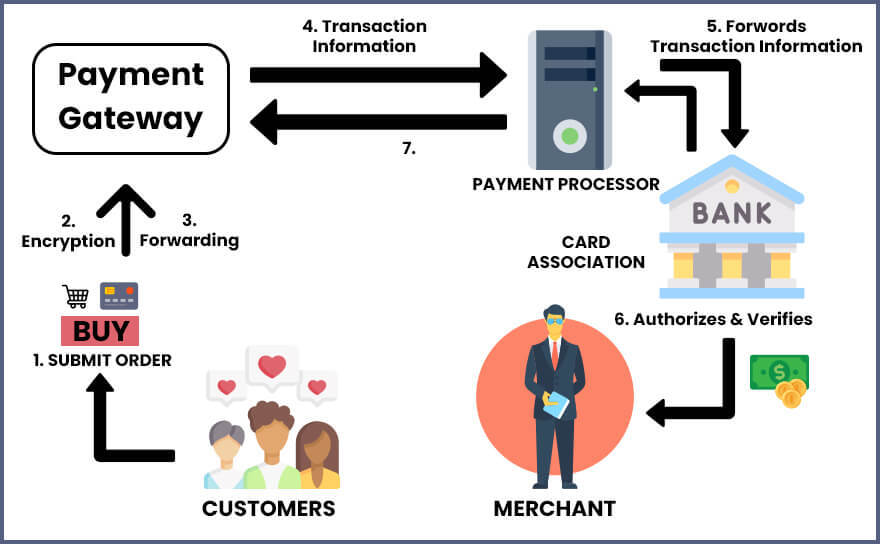
  • Payment Integration: If the web page offers premium features or subscription plans, integrating a secure payment system can be essential. This can include features like subscription management, payment gateway integration processing, and billing on your application software.
  • Social Media Integration: Integrating with social media platforms can allow users to sign up or login using their social media accounts, import photos or information, and share content from the web app on their social media profiles.
  • Admin Dashboard: An admin dashboard can be included to manage user accounts, monitor activity, and enforce community guidelines. You can include features like user moderation, content management, and reporting.
  • Mobile Responsiveness: Considering the increasing use of mobile devices, ensuring that the web app is responsive and user-friendly on different screen sizes and devices is important to provide a seamless experience to users.
  • User Feedback and Ratings: Implementing features for users to provide feedback and ratings on other users can help in building a trusted and reliable online dating community.

Building an online dating app requires careful consideration of user privacy, security, and community guidelines. It’s also important to have proper mechanisms in place for user support, reporting, and moderation for building dynamic web apps.

Developing such web apps can provide a platform for users to connect and potentially find meaningful relationships.

5. Building Crime Alert Web Apps

Creating a crime alert web app is a valuable step in contributing to public safety. These apps enable users to report incidents, receive location-based alerts, and stay informed in real time.

To build one effectively, it’s essential to understand the web development process, including front-end design, back-end functionality, and geolocation integration.

Focus on data security, user consent, and privacy. A well-designed app not only supports public awareness but also strengthens community engagement and trust.

Here’s a high-level overview of what the project might entail:

  • User Registration and Authentication: Create a user registration and authentication system where users can sign up and log in securely to access the Crime Alert Web App.
  • Incident Reporting: Allow users to report incidents such as crimes, suspicious activities, or safety concerns through the web app. Provide a user-friendly form for submitting incident details, including location, date, time, and description.
  • Incident Verification: Implement a system to verify reported incidents to prevent fake or false reports. This could involve manual verification by administrators or using automated tools to filter and validate incident data.
  • Incident Mapping: Use geolocation services to map reported incidents on a map interface. Users should be able to view incidents based on location, filter by incident type, and view incident details.
  • Alert Notifications: Set up an alert system to notify users about incidents in their vicinity or areas of interest. This could be done through push notifications, SMS, or email, depending on user preferences.
  • Community Interaction: Create features that foster community engagement, such as allowing users to comment on incidents, share tips, or discuss safety concerns. Implement a moderation system to ensure respectful and appropriate interactions among users.
  • Data Analytics: Use data analytics techniques to gain insights from reported incidents, such as identifying crime hotspots, trends, and patterns. Present these insights in visualizations or dashboards to provide meaningful information to users.
  • Emergency Contacts and Resources: Provide a directory of emergency contacts, such as local police departments, hospitals, and other relevant resources. Users should be able to easily access this information from the web app in case of emergencies.
  • Mobile Responsiveness: Ensure that the web app is responsive and accessible on different devices, including desktops, tablets, and mobile phones, to accommodate the needs of various users.
  • Security Measures: Implement security measures, such as data encryption, user authentication, and secure communication protocols, to protect user data and ensure the privacy and security of the Crime Alert Web App.
  • Testing and Deployment: Conduct thorough testing of the web app to identify and fix any bugs or issues. Once the app is stable, deploy it to a production environment, ensuring that it is hosted securely and performant.

6. Workflow Management Web Application

One of the good web app ideas that you can implement is building a comprehensive web application designed to help individuals and teams streamline their workflows and improve productivity.

Such web applications provide a user-friendly interface that allows users to create, manage, and track their tasks and projects in a collaborative and efficient manner.

Let’s explore some of the key features that you can implement as your static web app idea.

  • Task and Project Creation: Users can create tasks and projects with detailed information, including task descriptions, due dates, priorities, and assignments to team members. Users can also set up recurring tasks and set reminders for important deadlines.
  • Workflow Templates: With the help of this web app idea, you can offer pre-defined templates for common workflows, such as project management, content creation, and marketing campaigns. Users can choose from these templates or create their own custom templates, making it easy to set up and replicate workflows for different projects
  • Task Assignment and Collaboration: Users can assign tasks to team members, set permissions, and track task progress. Team members can collaborate on tasks, leave comments, and attach files, fostering seamless communication and collaboration within the team.
  • Kanban Board and Calendar View: You can even implement a visual Kanban board view that allows users to drag and drop tasks across different stages of a workflow. Users can also view tasks and deadlines in a calendar view, providing a comprehensive overview of all tasks and projects.
  • Notifications and Reminders: You have an option to send notifications and reminders to users and team members for upcoming deadlines, overdue tasks, and changes in task assignments, ensuring that everyone stays updated and on track.
  • Reporting and Analytics: This web app idea offers reporting and analytics features that provide insights into task and project progress, team productivity, and resource utilization. Users can generate customized reports to track performance and identify areas for improvement.
  • User Management and Authentication: It includes user management features, allowing users to create accounts, invite team members, and set up user roles and permissions to control access to tasks and projects. The application also includes robust authentication and security features to protect user data.

Develop Web Solutions To Advance Your Business!

Our web development team help you craft exceptional user experiences with our custom web development services.

Consult Us Now

7. Virtual Event Hosting Web App

A Virtual Event Hosting web app allows organizers to host and manage events online, making it easier for users to attend from anywhere.

With the growing shift to remote interactions, this kind of app supports live sessions, registrations, networking, and interactive features—all in one place.

Building such a solution requires a thoughtful web development process that focuses on accessibility, real-time functionality, and ease of use. A secure and responsive platform enhances the experience for both organizers and attendees.

It’s time to explore some of the exciting features of this web app idea implementation.

  • Event Creation and Management: Such apps allow event organizers to create and manage virtual events with ease. Organizers can set event details, such as event name, date, time, description, and registration options. They can also customize event branding and set up event registration and ticketing.
  • Virtual Event Spaces: This web app idea provides virtual event spaces where organizers can create customizable virtual environments and on-demand services for their events. These virtual spaces can include features such as stages for presentations, exhibitor booths for sponsors, networking lounges, and interactive chat rooms for attendees.
  • Live Streaming and On-demand Content: It supports live streaming of events, allowing organizers to host webinars, panel discussions, and other live sessions. Additionally, organizers can upload on-demand content, such as pre-recorded videos, documents, and other resources for attendees to access during and after the event.
  • Interactive Networking: Facilitating networking opportunities for event attendees through features such as virtual chat rooms, one-on-one messaging, and attendee profiles is one of the prime of example of such web apps. Attendees can connect with each other, exchange contact information, and network in a virtual environment.
  • Event Analytics and Reporting: It provides analytics and reporting features for event organizers to gain insights into attendee engagement, event performance, and other key metrics. Organizers can track registrations, attendee participation, and other event-related data to make data-driven decisions.
  • Customizable Event Templates: It offers pre-designed event templates for various types of events, such as conferences, workshops, and trade shows. Organizers can customize these templates to match their event’s branding and requirements or create their own custom event templates.
  • Secure and Scalable: Ensuring the security of event data, attendee information, and payment transactions through robust security measures, such as SSL encryption and user authentication. The application is built on scalable technologies to handle a large number of concurrent users and events.

Related Post: Web Application Architecture

8. Telemedicine Applications

Implementing a web application designed to facilitate virtual healthcare services, also known as telemedicine or telehealth is one of the best web app ideas.

The platform aims to connect patients and healthcare providers seamlessly, allowing for remote medical consultations, diagnosis, and treatment in a secure and user-friendly environment.

Key features that you can implement as the best web app ideas.

  • Patient Registration and Profile Management: This web app idea allows patients to register and create profiles with their personal information, medical history, and insurance details. Patients can also update their profiles, upload relevant documents, and manage their appointments and prescriptions.
  • Virtual Consultations: You can efficiently enable patients to schedule virtual appointments with healthcare providers, including doctors, specialists, and therapists. Patients can conduct video consultations, chat with healthcare providers, and share relevant medical information in real-time.
  • Medical Records and Prescription Management: It provides a secure platform for patients and healthcare providers to manage medical records, prescriptions, and other important health information. Healthcare providers can review patients’ medical history, update prescriptions, and provide recommendations remotely.
  • Appointment Scheduling and Reminders: It allows patients to schedule appointments with healthcare providers based on their availability. Patients receive reminders about upcoming appointments via email or SMS, helping them manage their healthcare appointments effectively.
  • Billing and Payment: It facilitates online billing and payment for virtual healthcare services. Patients can view their billing details, make payments securely, and receive invoices for their virtual consultations.
  • Health Monitoring and Remote Patient Care: It supports remote patient monitoring through integrations with health devices, such as wearables or home health kits. Healthcare providers can remotely monitor patients’ health conditions, receive alerts, and provide timely interventions.
  • User Authentication and Security: It ensures the security of patient data and communications through robust authentication measures, data encryption, and compliance with healthcare data privacy regulations, such as HIPAA.

9. Chatbot Hosting App

The next web application idea that you can implement is developing a web application that serves as a one-stop platform for hosting, managing, and deploying chatbots for various business needs.

It provides a user-friendly interface that allows users to easily create, configure, and deploy chatbots, as well as manage their interactions with users in a seamless and efficient manner.

Let’s highlight the prime features that you can include in this web app idea:

  • Chatbot Creation and Configuration: It provides an intuitive interface for users to create and configure chatbots using pre-built templates or custom workflows. Users can define chatbot responses, actions, and logic, and configure integrations with various messaging platforms, such as Facebook Messenger, WhatsApp, or Slack.
  • Conversation Flow Management: It allows users to design and manage the conversation flow of their chatbots using a visual drag-and-drop editor. Users can define conversation paths, prompts, and responses, and manage the chatbot’s behavior based on user inputs and interactions.
  • Natural Language Processing (NLP) Integration: It integrates with popular NLP frameworks, such as Dialogflow or Wit.ai, to enable chatbots to understand and respond to user inputs in a more human-like and intelligent manner. Users can configure NLP models, train them, and fine-tune the chatbot’s language understanding capabilities.
  • Multi-Channel Deployment: It supports deployment of chatbots on multiple messaging platforms, such as Facebook Messenger, WhatsApp, Slack, or custom web chat widgets. Users can easily configure and deploy their chatbots to different channels and manage their interactions with users across these channels.
  • Analytics and Reporting: It provides analytics and reporting features that allow users to track and analyze the performance of their chatbots. Users can view metrics, such as user interactions, response times, user satisfaction, and other custom metrics, to gain insights and make data-driven decisions for chatbot optimization.
  • User Management and Access Control: It includes user management and access control features that allow users to invite team members, manage their roles and permissions, and collaborate on chatbot creation and management. Users can define roles, permissions, and access levels to ensure secure and collaborative chatbot development.
  • Customization and Extensibility: It offers customization and extensibility options for users to tailor their chatbots to their specific business needs. Users can create custom actions, integrations, and plugins to extend the functionality of their chatbots and integrate with other business systems or APIs.

Conclusion

The world of web development is constantly evolving, and with the right web application project idea, you can create something truly innovative and impactful.

From enhancing user experiences to solving real-world problems, web applications have the potential to revolutionize industries and improve our daily lives.

In this blog, we explored some of the best web application project ideas to implement. From e-commerce platforms and social networking sites to educational tools and healthcare solutions, the possibilities are endless.

It’s important to consider factors such as market demand, feasibility, and scalability when selecting a web application project idea to pursue.

Top 5 Best Powerful Programming Languages for Web Apps

In the technological world of enhancement, web applications have become an integral part of our lives, from social media platforms to online shopping sites.

With the ever-increasing demand for web applications, the need for skilled web developers is also on the rise.

To keep up with the changing needs of the industry, web developers must be proficient in programming languages that are popular and trending.

In this blog, we will explore some of the trending web application programming languages that are widely used in web development.

Key Takeaways

  • From JavaScript to Python, we will discuss the advantages and disadvantages of each language and why they are preferred by developers.
  • You will have a better understanding of which programming language to choose for your next web application project.
  • Whether you’re a beginner or an experienced web developer, read on to stay up-to-date with the latest trends in web application programming languages.

What is a Programming Language?

A programming language is a formal language designed to communicate instructions to a computer. It consists of a set of rules and syntax that allows web application developers to write code that can be executed by a computer.

The primary role of the web development programming languages are used to create software applications, websites, and other computer programs.

Nowadays, you’ll come across many programming languages, each with its own strengths and weaknesses, designed for different purposes and used in different contexts.

Some examples of programming languages include Python, C++, JavaScript, Ruby, and PHP.

Web application developers working with the best custom software development company use programming languages to create algorithms, define data structures, and implement various functionalities in software.

Web app developers typically write code in a text editor or an Integrated Development Environment (IDE) and then use a compiler or an interpreter to translate the code into machine-readable instructions that the computer can understand and execute.

How Does a Programming Language Work?

Programming languages work by providing a set of rules and syntax that can be used to write instructions that a computer can execute. These instructions are written in a human-readable format and are known as code.

Once the code is written, it needs to be processed by a program called a compiler or an interpreter. The compiler or interpreter translates the code into machine-readable instructions that the computer can execute.

The process of translating code into machine-readable instructions is known as compilation or interpretation.

After the code is translated into machine-readable instructions, it is executed by the computer. The instructions are executed in a specific order, as determined by the logic of the program.

The computer uses the instructions to perform tasks such as performing calculations, storing and retrieving data, and interacting with other programs and devices.

Programming languages are designed to be flexible and expressive, allowing programmers to create complex programs and algorithms with relatively simple code.

Different programming languages are optimized for different types of applications, and some are better suited for specific tasks than other languages.

Overall, programming languages are the tools that programmers use to communicate their ideas to a computer and create software applications, web development, websites, and other digital tools.

What is Web Application Development?

Web application development is the process of creating software applications that run on web browsers. It involves designing, building, testing, and creating web applications that can be accessed through the internet.

Web applications can be used for a variety of purposes, such as e-commerce, social networking, productivity, and entertainment.

The web application development process typically involves a combination of front-end web development, back-end web development, and even creating full-stack web applications.

What is Front-End Development?

Front-end development involves creating the user interface and designing how the application will look and feel for users.

Front-End development services involve using HTML, CSS, and JavaScript to create the visual elements and interactions to dynamic websites that users will see and interact with.

What is Back-End Development?

Backend web development involves building the server-side components of the application, such as databases, APIs, and server-side scripting languages like PHP, Python, or Ruby.

With the help of Back-End development services, the web developers can eventually use web components to handle tasks like processing user input, accessing and storing data, and communicating with external services.

Web development also involves testing and deployment, which involves ensuring that the web apps works as intended and is accessible to users.

This can involve testing for bugs, optimizing performance, and ensuring compatibility with different devices and browsers.

Once the application is ready, it can be deployed to a web server or cloud platform for public access.

Hire Dedicated Web Developers from Albiorix

Our Web developers having technical expertise and that use smart techniques by leveraging cutting-edge technology to build amazingly creative end applications.

Contact Us

Top 5 Web Development Languages of 2026

Now, let’s highlight the best programming languages that you can utilize to explore web application development services. We have explored the list of the web app programming languages as per the recent survey by Statista.

Most Used Programming Languages

1. Javascript

JavaScript is a high-level, dynamic, and interpreted programming language that is commonly used for client-side web development.

Javascript is an object-oriented language that was originally developed by Netscape in 1995 and has since become one of the most popular web programming languages in use today.

Here are some key aspects of JavaScript:

  • High-level: You can quickly abstract away many of the low-level details of computer hardware and provides programmers with a more intuitive syntax for programming.
  • Dyncamic: JavaScript development allows you to deal with variable types that are determined at runtime rather than being declared in advance. This allows for greater flexibility in programming but can also lead to unexpected bugs.
  • Interpreted: JavaScript code is executed directly by an interpreter rather than being compiled into machine code beforehand. This allows for faster development times and easier debugging but can also result in slower performance.
  • Object-oriented: JavaScript programming language typically uses objects to represent and manipulate data. This popular language allows for greater flexibility in programming and encourages reusable code for building web servers.
  • Client-side scripting: JavaScript is commonly used for client-side web development, meaning that it is executed within a user’s web browser. This allows for dynamic and interactive web pages that can respond to user input in real-time.
  • Functional programming: JavaScript is one of the best web development languages that also supports functional programming paradigms, meaning that it allows for the creation of functions that can be passed around as objects and used as arguments for other functions for building web apps. This allows for more modular and reusable code.

JavaScript is one of the best languages for web development services that can be used for a wide range of applications beyond web development, including server-side scripting language, desktop application development, and even game development.

JavaScript framework popularity and wide adoption have also led to the development of many third-party libraries and frameworks, such as React and Node.js, which make it easier to create web applications for your business needs.

2. TypeScript

TypeScript is a statically-typed programming language that is designed to be a superset of JavaScript. It was first introduced by Microsoft in 2012 and has since gained popularity among developers due to its powerful features and benefits.

Here are some of the key features of TypeScript:

  • Static Typing: TypeScript is one of the most popular web development languages that provides static typing, which allows developers to catch errors at compile time rather than runtime. This helps to reduce bugs and increase the reliability of code.
  • Object-oriented Programming (OOP) Support: TypeScript supports OOP concepts such as classes, interfaces, inheritance, and more. This makes it easier to write and maintain large-scale applications.
  • Type Inference: This web development language has a powerful type inference system that can automatically detect the types of variables, functions, and other elements in code. This helps to reduce the amount of boilerplate code needed for your enterprise app development.
  • Compatibility with JavaScript: TypeScript is a superset of JavaScript, which means that any valid JavaScript code is also valid TypeScript code. This makes it easy to integrate TypeScript into existing JavaScript projects.
  • Tooling Support: TypeScript has excellent tooling support, including code editors like Visual Studio Code and WebStorm. It also has a robust compiler that can transpile TypeScript code into JavaScript code that can run in any browser.
  • Community Support: TypeScript has a large and active community of developers who contribute to the language and provide support to other developers. This makes it easy to for any web developer to find help and resources when needed.

Some of the advantages of using TypeScript include:

  • Increased Reliability: TypeScript’s static typing and type inference systems help to catch errors at compile time, which reduces the likelihood of bugs and improves the reliability of code.
  • Improved Productivity: TypeScript’s powerful features and tooling support help to improve developer productivity, making it easier to write and maintain code.
  • Better Code Organization: With it’s extensive support for OOP concepts, you can efficiently organize code for the entire web development services and make it easier to maintain and scale.
  • Compatibility with JavaScript: TypeScript is compatible with JavaScript, which means that it can be easily integrated into existing projects and libraries.

TypeScript is a powerful and popular programming language that offers many benefits to developers. Its static typing, object-oriented programming support, and compatibility with JavaScript make it a popular choice for building large-scale applications.

In addition, both Javascript and Typescript are the two most prominent web app languages that makes your web development process smoother. However, there exists major differences between TypeScript and JavaScript that you must be aware of.

3. PHP

PHP is a widely used server-side scripting and best programming language designed for web development. It is an open-source language, which means it is free to use and can be modified by anyone.

PHP stands for Hypertext Preprocessor, which refers to its primary purpose of processing HTML files on the server-side to generate dynamic content for web pages.

Here are some key features of PHP:

  • Easy to Learn: PHP is relatively easy to learn compared to other programming languages for web development solutions. Its syntax is similar to C and Java, and it has a vast community of developers who contribute to its documentation and provide support.
  • Server-Side Scripting: PHP development is designed specifically for server-side scripting, which means it runs on the web server and generates HTML pages that are sent to the client’s browser.
  • Cross-Platform Compatibility: PHP can run on a variety of operating systems, including Windows, Linux, Unix, and macOS.
  • Database Integration: PHP can be easily integrated with different types of databases, including MySQL, Oracle, PostgreSQL, and Microsoft SQL Server.
  • Object-Oriented Programming: PHP supports OOP principles, allowing developers to create modular and reusable code.
  • Extension Support: PHP has a large number of extensions and libraries available, making it easy to add additional functionality to your application.
  • Security: PHP has built-in security features that help prevent common security vulnerabilities such as SQL injection and cross-site scripting (XSS).

PHP is commonly used in web development to create dynamic web pages, high-quality web applications, and content management systems (CMS).

It is the only language that is also used in the software development of e-commerce platforms, social networking websites, and online forums.

PHP has a large and active community of developers, making it easy to find support, resources, and code examples.

PHP is considered to be a good programming language for web development that has a vast collection of third-party framework libraries, such as Laravel, CodeIgniter, and Symfony, which help developers build applications quickly and efficiently.

PHP is a powerful and versatile programming language that is ideal for web development. Its simplicity, cross-platform compatibility, database integration, and security features make it a popular choice among developers worldwide.

Enhance Your Online Presence With Our PHP Web Development

We have a team of top-notch and skilled developers that are always ready to help you generate more leads that converts to sales.

Contact Us

4. Python

Python is a popular high-level, interpreted programming language that is designed to be easy to read and write.

It was first released in 1991 by Guido van Rossum and has since become one of the most popular programming languages in the world to deal with web app development.

Python is open-source and has a large and active community of developers that continue to improve and add to the language.

Some key features of Python include:

  • Simple and easy to learn syntax: Python is a strongly-typed language that has syntax designed to be easy to read and write, which makes it an ideal language for beginners.
  • Interpreted language: Python development code can be run without the need for a compiler during your entire software development process.
  • Dynamically typed: Python is a compiled language, meaning that data types are determined at runtime, rather than being explicitly declared.
  • Object-oriented: Python supports OOP, allowing for the creation of classes and objects during your entire software development process.
  • Cross-platform: Python code can be run on multiple platforms, including Windows, macOS, and Linux.

Python has a wide range of applications, including web development, scientific computing, data analysis, artificial intelligence, and automation.

Some popular Python libraries and frameworks include Django and Flask for web development, NumPy and Pandas for scientific computing, TensorFlow and PyTorch for machine learning, and Selenium for web automation.

Here’s an example of a “Hello, World!” program in Python:

print(“Hello, World!”)

This program simply prints the string “Hello, World!” to the console.

Overall, Python is a versatile and powerful programming language that is widely used and loved by developers of all skill levels. Its ease of use, readability, and wide range of libraries and frameworks make it a great choice for a variety of applications.

5. Swift

Swift is a general-purpose, multi-paradigm programming language developed by Apple Inc. for iOS, macOS, watchOS, and tvOS operating systems.

It was first introduced in 2014 as a modern alternative to Objective-C, and quickly gained popularity among Apple developers.

Swift is relatively new programming language that supports multiple programming paradigms and easily combines powerful features from C, Objective-C, and other top web development languages, making it a robust and easy-to-use language for building applications across different Apple platforms.

Some key features of Swift include:

  • Fast and safe: Swift is designed to be fast and safe, with a focus on eliminating common programming errors such as null pointer exceptions and memory leaks.
  • Easy to read and write: Swift’s syntax is designed to be easy to read and write, with a natural language-like syntax and simplified grammar.
  • Interoperability with Objective-C: Swift is fully interoperable with Objective-C, which allows developers to easily mix and match Swift and Objective-C code in the same project.
  • Automatic reference counting: Swift uses automatic reference counting (ARC) to manage memory, which automatically deallocates objects that are no longer in use.
  • Strong typing: Swift is strongly typed, which means that all variables and constants must be declared with a specific type, and type inference is used to determine the type of variables when possible.

Swift has a wide range of applications, including building iOS and macOS apps, server-side development, and building applications for Apple Watch and Apple TV.

Some popular Swift frameworks include SwiftUI and UIKit for building user interfaces, Alamofire for networking, and Core Data for managing data.

Here’s an example of a “Hello, World!” program in Swift:

print(“Hello, World!”)

This program simply prints the string “Hello, World!” to the console.

Swift is a powerful and versatile programming language that is popular among Apple developers due to its speed, safety, and ease of use.

Its interoperability with Objective-C, strong typing, and automatic reference counting make it a great choice for building applications across different Apple platforms.

Conclusion

Web development is a constantly evolving field, and it’s crucial for web developers to stay updated with the latest trends and technologies.

The programming languages discussed in this blog are some of the most popular and trending languages used in web development.

While each language has its advantages and disadvantages, choosing the right one depends on the specific requirements of your project.

So, whether you choose JavaScript, Python, or any other language, it’s important to keep learning and adapting to stay ahead in the competitive world of web development.

A Complete Guide To Outsourcing App Development

In today’s digital age, businesses must stay competitive by providing their customers with the best online experience. This means having a high-quality, user-friendly mobile application that can be accessed anywhere and anytime.

However, creating an app from scratch can be daunting, especially for businesses that need more expertise or resources.

This is where outsourcing app development comes in. By partnering with an experienced app development company, businesses can leverage professionals’ skills and knowledge to create customised apps that meet their specific needs.

In this blog, we will explore the benefits and drawbacks of outsourcing app development and provide tips on how to find the right partner for your project.

Whether you are a startup looking to launch your first app or a large corporation seeking to enhance your digital presence, outsourcing app development can be a smart investment for your business.

Key Takeaways

  • Outsourcing app development refers to the practice of hiring a third-party company or team to build, maintain, and/or update a mobile or web application for a client, typically with the goal of reducing costs, accessing specialized expertise, or increasing development speed.
  • Outsourcing app development can be important for businesses to access specialized skills, reduce costs, and save time in building and maintaining high-quality applications.
  • The key models associated with outsource mobile app development are fixed-price, time and material, dedicated team, and offshore development center (ODC) models.
  • Best practices for outsource app development include setting clear project goals and communication channels, selecting a reliable outsourcing partner, defining project scope and requirements, using agile methodologies, conducting regular quality assurance testing, and maintaining data security and intellectual property protection.

What Is Outsourcing Mobile App Development?

Outsourcing mobile app development means hiring an external team or company to design, build, and deliver your mobile application instead of using in-house developers.

Many businesses choose this approach to save time, reduce costs, and access experienced professionals with specialized skills. It’s especially useful for startups or companies without a full internal tech team.

A trusted software development partner brings technical expertise, clear communication, and a focus on quality.

With the right team, outsourcing helps you launch a well-built, secure, and user-friendly app—without managing every detail yourself. It’s a smart way to scale faster and reduce risk.

The exciting thing to know about the IT service sector!

The IT services market has an estimated CAGR of 8.4% and the ITO market 7.7%. On that basis, the IT services sector is expected to be worth around $1,070.28 billion by 2025 and the ITO market would be valued at around $ 806.63 billion.

IT Outsourcing Statistics


Outsource app development involves finding a reputable third-party vendor who specialises in the outsource app development and who can provide the expertise, resources, and tools needed to build mobile apps for your business needs.

The outsourcing company may be located in the same country as your business or in another part of the world.

Planning to Create Mobile App For Your Business?

We have a team of talented mobile app developers that possesses strong expertise in designing and building mobile apps.

Build Your App Now

What Is the Outsourcing Mobile App Development Process?

The outsourcing process typically involves the following:

  • Defining the scope of the project.
  • Agreeing on the timeline.
  • Determining the budget.
  • Outlining the features and functionalities of the app.

The outsourcing company will then oversee the development process, including coding, testing, and deploying the app.

Outsource development can provide a range of benefits for mobile app development companies, including app development cost savings, access to specialized skills and expertise, faster time-to-market, and reduced risk.

However, evaluating potential outsourcing partners carefully and establishing clear communication channels and expectations is crucial to ensure the project is completed successfully.

Importance of Outsourcing App Development

Outsourcing app development can offer a range of benefits for businesses, including:

Importance of Outsourcing App Development
  • Access to specialized skills: Outsourced mobile app development can give businesses access to technical skills that may not be available in the in-house development team. It is significant for any app development agency that requires expertise in niche areas such as augmented reality, machine learning, or blockchain.
  • Cost savings: Outsourcing development companies typically save on costs, as they do not have to hire and train an additional dedicated team of outsource app developers. It can also help offshore companies to save on outsource app development cost such as office space, equipment, and software.
  • Faster time-to-market: Outsource app development can help businesses bring their products to market faster. Offshore mobile app development companies typically have more experience and outsource full stack developers to deliver projects on time and within budget.
  • Flexibility and Scalability: Outsource app development allows businesses to scale up or down quickly based on changing business needs. App development outsourcing companies can also provide flexible project timelines and resource allocation.
  • Focus on core business activities: Outsourcing mobile application development can free up internal resources, allowing businesses to focus on their core activities and competencies.
  • Quality assurance: Outsourcing app development to experienced vendors can ensure high-quality deliverables, as they have dedicated quality assurance engineers and processes.

However, it’s important to note that outsourcing app development also has potential drawbacks. These can include communication challenges, cultural differences, and data security risks.

Mobile app development companies should carefully consider the pros and cons of outsourcing app development and choose an app development team that aligns with their business goals and values.

Hire Dedicated Mobile App Developers from Albiorix

Our proficient Mobile App developers use smart techniques by leveraging cutting-edge technology to build amazingly creative end applications.

Hire Mobile Developers

Primary Reasons To Outsource Mobile App Development

There are several primary reasons why a company might choose to outsource and how much it cost to deal with mobile app development services:

  • Cost savings: Mobile app development outsource is often more cost-effective than hiring and training an in-house team. Companies can save on salaries, benefits, workspace, and equipment expenses.
  • Access to specialized expertise: Mobile development outsourcing can provide access to a broader range of technical expertise than an in-house team might have. For example, an outsourcing partner might have expertise in programming languages or app development frameworks.
  • Faster time-to-market: Application development outsourcing can help companies get their app to market more quickly. An experienced outsourcing partner can help streamline the development process, resulting in a faster time-to-market.
  • Focus on core competencies: Application development outsourcing companies can free up their project managers and even dedicated team to focus on its core competencies. Companies can concentrate on their core business activities by outsourcing non-core functions such as app development.
  • Scalability: Outsourcing companies can provide the flexibility to scale up or down as needed. Most reliable outsourcing companies can quickly ramp up development resources for a new project or scale back resources when a project is completed.

Mobile application outsourcing can help development teams save money, specialized access expertise, get to market more quickly, focus on core competencies, and scale up or down as per your business project requirements.

What are the Main Concerns of Mobile App Development Outsourcing?

Mobile app development outsource has become increasingly popular as more and more businesses seek to leverage the benefits of mobile technology.

However, like any outsourcing engagement, some concerns must be addressed to ensure success. Here are some of the main concerns of mobile app development outsourcing:

1. Communication

Communication is one of the most critical concerns in outsourced mobile app development. Effective communication between the client and the development team is essential to ensure that the app meets the client’s requirements and expectations.

Misunderstandings can occur without clear communication channels, leading to delays and additional costs.

To address communication concerns, you must establish regular communication channels and ensure that the development team provides regular updates on the project’s progress.

The client should also provide any outsource developers with clear and concise requirements, including a fixed price and feedback. It helps prevent misunderstandings and ensures the MVP app development stays on track.

Another way to address communication concerns is to use project management tools that facilitate collaboration and communication between the client and the development team.

For example, project management tools like Trello, Jira, or Asana can help track the project’s progress and ensure everyone is on the same page.

Yes, We Have Talented Mobile App Developers!

Our expert mobile app development team have created several smart and reliable solutions for all business verticals.

Hire App Developer

2. Quality control

Quality control is another significant concern when outsourcing software development. Ensuring that the software development team adheres to the project’s requirements and standards is essential.

Proper testing and debugging are necessary to ensure the app functions as expected.

Mobile app outsourcing requires sharing sensitive information and intellectual property with the development team.

It is crucial to ensure that the development team has proper security measures to protect the client’s intellectual property.

3. Time and cost management

Managing time and cost is always a concern in outsourcing. The development team must adhere to the project’s timelines and budget to ensure the project’s success.

4. Cultural Differences

Mobile app development outsourcing may involve working with a team from a different culture, which can lead to misunderstandings or miscommunications.

It is essential to be aware of cultural differences and have a plan to address them if they arise.

Key Models of Outsource App Development

There are several key models of outsourcing application development, each with its own advantages and disadvantages.

Models of Outsource App Development

1. Offshore Outsourcing

Offshore outsourcing is when a company hires a team in another country to handle tasks like software or app development.

This approach is often cost-effective, as labor costs can be lower in other regions. It also gives businesses access to a wider talent pool with specialized skills.

However, it’s important to choose a trusted partner, as challenges like time zones, communication gaps, and cultural differences can affect project outcomes if not managed well.

2. Nearshore Outsourcing

Nearshore outsourcing involves outsourcing app development to multiple entities located in a nearby area or region.

This business model is similar to offshore outsourcing but can offer some advantages, such as closer time zones and cultural similarities.

Nearshore outsourcing can also be cost-effective, but the cost savings may not be as significant as with offshore outsourcing.

3. Onshore Outsourcing

Onshore outsourcing involves outsourcing application development to a company located in the same country as the client.

This model can offer several advantages, such as better communication, fewer cultural differences, and easier access to legal and regulatory requirements.

However, onshore outsourcing can be more expensive than offshore or nearshore outsourcing.

4. Hybrid Outsourcing

Hybrid outsourcing is a flexible model that combines offshore, onshore, and nearshore outsourcing to balance cost, quality, and collaboration.

For example, a company might hire an offshore team to develop a mobile app, while using an onshore team for testing and client communication.

This way, businesses benefit from lower costs and still maintain close coordination where needed.

It’s a smart choice when project scope, budget, and timelines vary. Working with an experienced outsourcing development company helps ensure the right balance and smooth project delivery.

Best Practices To Follow For Mobile App Development Outsourcing

Ready to Outsource the Right Way

1. Choose the Right Outsourcing Company

Choosing the right outsourcing development company is crucial to the success of your app development project.

Look for a company with experience in your industry and a proven track record of successful projects. Ask for references and case studies to evaluate the company’s capabilities and reputation.

2. Establish Clear Communication

Establishing clear communication is essential for a successful outsourcing project. Communicate your expectations and requirements clearly and frequently, and establish a system for regular updates and feedback.

The mobile app developers working with the custom software development company must use project management tools and technologies to facilitate communication and collaboration.

3. Protect Your Data

Protecting your data is critical when outsourcing application development. Sign a comprehensive NDA (Non-Disclosure Agreement) with the outsourcing company to protect your confidential information.

Ensure that the outsourcing company has strong security protocols in place to prevent data breaches and other security risks.

4. Define Project Scope and Requirements

For any successful outsourcing project, you must define project scope and requirements before moving it to the further steps.

Clearly define the scope of the project, including timelines, milestones, and deliverables. Develop a detailed project plan and requirements document that outlines your expectations and specifications.

5. Monitor Progress and Quality

Monitoring progress and quality is important to ensure that the app development project is on track and meets your expectations.

Establish a system for monitoring progress and quality, such as regular updates, status reports, and quality assurance testing. Work with the outsourcing company to resolve any issues or concerns that arise during the development process.

Steps To Outsource Mobile App Development

Outsource app development can be a cost-effective and efficient way for businesses to create high-quality applications. To successfully outsource mobile app development, there are several steps that you should take:

1. Define Your Project Requirements

Before outsourcing application development, you must have a clear app idea of what you want to achieve with your app. You must define your app’s purpose, target audience, features, and functionality.

Be sure to create a detailed specification document that includes all the requirements and technical specifications you need for your app.

2. Choose the Right Outsourcing Partner

Once you have defined your requirements, you must find the right outsource partner. Look for a partner with experience in mobile application development and has a portfolio of successful projects.

Consider factors such as the location of the company, expertise, communication skills, and cost.

3. Create a Contract

When you have chosen your outsource partner, you need to create a contract that outlines the scope of work, project timeline, and cost.

Ensure the contract includes details on how the project will be managed, the roles and responsibilities of each party, and any relevant deadlines.

4. Project Management

Once the contract is in place, you must establish a project management plan to ensure the project is completed on time and within budget.

Assign a project manager to oversee the development process and establish regular communication channels to keep track of progress and address any issues.

5. Quality Assurance

Quality assurance is an essential step in outsourcing mobile application development. You need to establish a process for testing the app to ensure it meets your requirements and functions correctly.

Be sure to include testing and bug-fixing in the project timeline, and in the Agile methodology, you must consider using automated testing tools to speed up the process.

6. Launch and Maintenance

Once the app is complete, it’s time to launch it on the market. Create a launch plan that includes marketing, distribution, and customer support.

After the app is launched, you need to provide ongoing maintenance and support to ensure that it continues to function correctly and meets the needs of iOS app and Android devices.

Following these steps, you can successfully outsource mobile app development and achieve your business goals.

Conclusion

Outsourcing application development can be a cost-effective and efficient way to develop high-quality apps.

However, it is essential to carefully consider the advantages and risks of each outsourcing model and work with a reputable outsourcing company with experience in your industry.

By following best practices and communicating clearly with the outsourcing app development team, you can successfully outsource app development and achieve your business goals.

How To Integrate Payment Gateway Into Website & Apps

If you’re an eCommerce business owner or developer looking to enhance your online store payment processing capabilities, you’re in the right place.

In today’s digital world, a seamless and secure payment gateway integration is essential for the success of any online business.

In this blog, we will explore the ins and outs of payment gateway integration, focusing on the benefits, challenges, and best practices to ensure a smooth and secure payment processing experience for your customers.

Whether you’re a small business owner just starting out or an established enterprise looking to optimize your payment processes, you’ll get valuable insights and practical tips to help you navigate the complex world of payment gateway integration.

So, let’s dive in and unlock the power of seamless payment processing for your eCommerce store!

Key Takeaways

  • We will cover everything you need to know about payment gateway integration, from understanding what it is and why it’s important, to exploring different payment gateway options and best practices for seamless integration.
  • You’ll come across the different payment gateway integration methods that will help you select the best one for your business needs.
  • The working of payment gateway is included in the article, which makes it easy to understand the entire payment flow.

What is Payment Gateway?

A payment gateway is a secure technology that processes online transactions between customers and merchants. It acts as a bridge between a website or app and the bank that completes the payment.

When a customer makes a purchase, the payment gateway encrypts sensitive data—like credit or debit card details—and sends it to the bank for authorisation.

Once processed, the gateway shares the result with both the merchant and the customer, confirming if the payment was successful or declined.

Payment gateways are essential for safe and efficient eCommerce. They help protect customer information, prevent fraud, and ensure smooth payment processing. Most providers charge a small fee per transaction or a percentage of the sale.

Using a trusted payment gateway is key for businesses that want to offer secure and seamless checkout experiences.

Payment gateway integration is the process of connecting a payment gateway to an e-commerce website or mobile app. This allows businesses to securely accept online payments from customers.

When a customer completes a purchase, the integrated payment gateway captures and encrypts payment details, such as credit or debit card information.

It then communicates with both the merchant’s and customer’s banks to process the transaction and confirm the payment status.

This integration is done by setting up software connections, often using APIs, that enable the website or app to communicate directly with the payment gateway. It ensures that payments are processed smoothly, securely, and in real time.

For any e-commerce or digital business, integrating a payment gateway is essential to provide customers with a safe, hassle-free online payment experience.

What are the Different Types of Online Payment Gateways?

Types of Online Payment Gateways

There are several types of online payment gateways available that businesses can choose from depending on their requirements. Here are some of the
most popular ones:

1. Hosted Payment Gateways

These are third-party payment gateways that redirect customers to a secure payment page hosted by the payment gateway provider.

A hosted payment gateway is a type of payment gateway that redirects customers to a payment page hosted by a third-party payment gateway processor during the checkout process.

This payment page is typically branded to match the merchant account website, but is actually hosted on the processor’s server.

Let’s see how hosted payment gateway actually works?

How Hosted Payment Gateway Work

When a customer is ready to pay for their purchase, they are redirected to the payment page where they are asked to enter their payment information.

This information is then securely transmitted to the payment processor for authorization request and processing.

Hosted payment gateway are popular among merchants who want to offer a streamlined checkout process without having to worry about the technical details of payment processing flow.

The payment gateway providers also offer increased security since the payment data is transmitted directly to the payment processor and not stored on the merchant’s server.

Examples include: PayPal, Stripe, and 2Checkout.

2. Self-Hosted Custom Payment Gateway

This online payment gateway require businesses to host the payment page on their own merchant account servers. They offer greater control over the checkout process, but require more technical expertise.

Creating a self-hosted custom payment gateway can be a complex and challenging task.

This custom gateway of payment processing involves developing a secure platform for processing payments, integrating with various financial institutions, and adhering to industry standards for security and PCI compliance.

Here are some general steps to consider when creating a self-hosted custom payment gateway:

  • Determine the payment methods: Decide for an appropriate payment method from list of multiple payment methods your custom gateway will support, such as credit/debit cards, PayPal, bank transfers, or digital payments like wallets.
  • Develop the payment processing platform: Design and develop a secure payment processing platform that can accept payments from various sources and process them efficiently.
  • Create a merchant account: Allow merchants to create accounts and configure their payment gateway settings. This will require storing and retrieving sensitive information such as bank account details, credit card data, and transaction histories.
  • Integrate with financial institutions: Establish relationships with banks and other financial institutes that will process customer payments through your platform. This may require integrating with multiple payment processors or dealing with robust integrated payment gateways.
  • Ensure security and PCI DSS compliance: Implement robust security measures to protect sensitive data such as credit card numbers and comply with industry regulations such as PCI DSS compliance (Payment Card Industry Data Security Standard).
  • Test and launch: Thoroughly test the payment gateway in a staging environment before launching it to the public. Monitor the system for issues and make adjustments as needed.
  • Provide customer support: Offer customer support to merchants who use your online payment gateway. This may involve addressing technical issues, responding to inquiries, or resolving disputes.

Keep in mind that creating a self-hosted custom payment gateway determines a significant undertaking that requires a high level of technical expertise and financial resources.

It may be more practical for small businesses to use existing payment gateways that are already established and have a proven track record of security and reliability.

Examples include: Authorize.Net and Braintree.

3. API or Non-Hosted Payment Gateways

These gateways offer businesses the ability to integrate payment processing directly into their website or mobile app using an API. This allows for a seamless checkout experience.

This is the most customizable and online payment gateway integration method, as it enables the merchant to control the payment experience on their website.

With API integration, the customer enters payment data on the merchant’s website, and the payment is processed in the background of payment processing system. API integration requires technical expertise and development resources to implement.

In the context of payment gateways, an API provides a way for merchants to integrate payment processing into their mobile or web application development services.

The API defines a standard set of commands that can be used to authorise and process recurring payments, retrieve transaction data, and perform other related tasks.

The working process of API payment gateway is fairly simple.

  1. When a customer makes a payment through an API payment gateway, the merchant’s website or application sends a request to the payment gateway API.
  2. The API then communicates with the payment providers to complete the payment transaction status.
  3. The payment gateway API returns a response to the merchant’s website or application indicating whether the payment was successful or not.

API payment gateways offer several advantages over traditional payment processing methods. They are faster, more secure, and more flexible.

Because the payment processing is handled off-site, merchants do not need to store sensitive payment information on their own servers, reducing their liability and improving security to the payment solution.

Additionally, because APIs are designed to be flexible and customizable, merchants or any credit card company can easily integrate payment processing into their existing systems and workflows.

Many popular payment gateways, such as Stripe, PayPal, and Braintree, offer API payment gateways for merchants to use. Merchants can choose the payment gateway that best suits their needs and integrate it using the API.

Examples include: Square, Dwolla, and Adyen.

4. Mobile Payment Gateways

These gateways are designed for mobile commerce and allow customers to pay using their mobile devices.

Mobile payment gateways are digital payment systems that allow consumers to make payments through their mobile devices.

They typically involve the use of mobile apps or websites, and allow users to securely and conveniently make recurring payments for goods and services from their mobile devices.

Some popular mobile payment gateways include:

  • PayPal: This is one of the most popular mobile payment gateways, with millions of users worldwide. PayPal express checkout allows users to make payments, receive payments, and transfer funds between accounts.
  • Apple Pay: This is a mobile payment and digital wallet service developed by Apple Inc. It allows users to make payments from their Apple devices, such as iPhone, iPad, and Apple Watch.
  • Google Pay: This is a mobile payment and digital wallet service developed by Google. It allows users to make digital payments from their Android devices and supports digital payments, in-app purchases, and peer-to-peer transactions.
  • Samsung Pay: This is a mobile payment and digital wallet service developed by Samsung Electronics. It allows users to make payments from their Samsung devices, including payments, in-app purchases, and peer-to-peer transaction details.
  • Venmo: This is a mobile payment service that allows users to send and receive payments from their mobile devices. It is primarily used for peer-to-peer transactions, but can also be used for business transactions.
  • Square: This is a mobile payment system that allows businesses to accept money from customers through their mobile devices. It supports contactless payments, chip and PIN payments, and magstripe payments.

5. Redirect Integration Method

In this integration method, when a customer is ready to checkout, they are redirected to the payment gateway’s secure payment page to complete the transaction flow.

After the payment is processed, the customer is redirected back to the merchant accounts website. The merchant does not handle any sensitive payment data, making this method more secure.

The disadvantage of this method is that it can disrupt the user experience.

Integrate Payment Gateways To Your Website Now!

Our talented developers are always ready to help you out in integrating the best payment gateways to your business websites.

Consult Us Now

6. Direct Post Integration Method

Direct Post Integration is a payment gateway integration method where customers enter their payment details directly on the merchant’s website.

The payment data is then securely sent to the payment gateway’s server or the merchant’s own server for processing.

This method offers a seamless user experience since customers complete payments without being redirected to another page.

However, the merchant is responsible for managing and securing sensitive payment information, requiring strict data security standards like PCI compliance.

Direct Post Integration is commonly used in e-commerce websites seeking full control over the payment experience while ensuring a smooth checkout process.

The Direct Post Integration method involves the following steps:

  1. The user initiates a payment transaction on the e-commerce website or application.
  2. The website or application collects the necessary payment information, such as the user’s credit card details, billing information, and also charges transaction fees like setup fees.
  3. The website or application then securely sends the payment information to the payment gateway for processing.
  4. The payment gateway processes the payment and returns a response to the website or application, indicating whether the transaction was successful or not.
  5. The website or application then displays a confirmation message to the user, indicating the status of the transaction like transaction processed data.

Direct Post Integration is a popular integration method for payment gateways because it allows for a seamless user experience, with the user remaining on the website during the payment process.

It is also considered more secure than other integration methods because the payment information is transmitted directly to the payment gateway, without being stored on the website or application.

7. Direct API Integration Method

This is similar to the API integration method, but instead of processing payments in the background, payment data is directly sent to the payment gateway’s server for processing.

This method requires technical expertise and development resources to implement but provides a more seamless checkout experience.

So, Payment gateway integration is essential for any e-commerce business, and choosing the right integration method is crucial. The best integration method depends on the merchant’s technical expertise, budget, and security requirements.

The above-discussed methods are the most commonly used payment gateway integration methods, and merchants should carefully evaluate each method before selecting the most suitable one for their business needs.

Working of Payment Gateway

A payment gateway is a technology that enables online transactions by acting as an intermediary between an e-commerce website and a financial institution that processes the payment.

The payment gateway allows customers to securely and conveniently pay for goods and services online using various available and new payment methods, such as credit cards, debit cards, and e-wallets.

Here is a simplified overview of how a payment gateway works:

How a Payment Gateway Works
  1. The customer initiates a payment by selecting their payment method and entering their payment details on the checkout page of the e-commerce website.
  2. The payment gateway encrypts the payment data to protect it from unauthorized access and sends it securely to the payment processor. It is made possible by using SSL certificate.
  3. The payment processor receives the payment sensitive data and verifies the customer’s payment details, such as the card number and expiry date.
  4. The payment processor then contacts the customer’s bank to verify that the funds are available and reserves them for the transaction. And yes the verification process take some monthly fee.
  5. The payment processor sends a response back to the payment gateway, indicating whether the payment was successful or not.
  6. If the payment was successful, the payment gateway sends a confirmation to the e-commerce website and releases the payment to the merchant’s account.
  7. If the payment was unsuccessful, the payment gateway sends an error message to the e-commerce website, and the customer is prompted to try again or choose another payment method.

Payment gateways help facilitate safe and secure online transactions, data protection practices for both the customer and the merchant from fraudulent activities.

What is Payment Gateway Integration?

Payment gateway integration is the process of connecting a payment gateway to an e-commerce website or mobile app. This allows businesses to securely accept online payments from customers.

When a customer completes a purchase, the integrated payment gateway captures and encrypts payment details, such as credit or debit card information.

It then communicates with both the merchant’s and customer’s banks to process the transaction and confirm the payment status.

This integration is done by setting up software connections, often using APIs, that enable the website or app to communicate directly with the payment gateway. It ensures that payments are processed smoothly, securely, and in real time.

For any e-commerce or digital business, integrating a payment gateway is essential to provide customers with a safe, hassle-free online payment experience.

How To Integrate Payment Gateways To Your Web and Mobile Apps?

Integrating payment gateways to your web and mobile apps can be a complex process, but the following steps can help guide you through the process:

  • Choose a payment gateway: There are many payment gateways available, each with different features and pricing models. Choose a payment gateway that meets your specific needs and budget.

  • Obtain API credentials: Depending on the payment gateway, you may need to register for an account and obtain API credentials, such as an API key or secret. These credentials are necessary for connecting to the payment gateway’s API.

  • Choose an integration method: Payment gateways offer different integration methods, such as Direct Post Integration, Direct API Integration, or Hosted Payment Pages. Choose an integration method that meets your requirements in terms of user experience, customisation, and security.

  • Develop the integration: Depending on the integration method you choose, you will need to develop code to integrate a payment gateway and handle the payment flow. This may involve building forms, creating API requests, and handling responses.

  • Test the integration: Test the payment gateway integration thoroughly to ensure that it works as expected. This may involve testing various payment scenarios, such as successful payments, failed payments, and refunds.

  • Deploy the integration: Once you have tested the payment gateway integration, deploy it to your production environment. Make sure that your website or mobile app is ready to accept money from users.

  • Monitor and maintain the integration: Keep track of payment transactions and monitor the payment gateway for any issues or errors that you receive from payment service providers.

    Stay up-to-date with the payment gateway’s documentation and make any necessary updates to your integration over time.

It’s important to ensure that your payment gateway integration is secure, compliant with regulations, and provides a good user experience for your customers.

Consider working with a payment gateway provider or a hire app developers with experience in payment gateway integrations to ensure that your integration meets these requirements.

Conclusion

Integrating a payment gateway into your business is a crucial step to enable secure, seamless, and efficient online transactions, providing your customers with a convenient and trustworthy payment experience while safeguarding your business from potential fraud and data breaches.

Choose a payment gateway that aligns with your business requirements, and follow best practices for integration to ensure a successful implementation and smooth operation of your online payment processing system.

With the right payment gateway integration, you can enhance customer satisfaction, streamline your payment processes, and drive business growth in today’s digital economy.

So, don’t delay – take the necessary steps to integrate a payment gateway into your business and unlock the full potential of online payments with our payment gateway development services, Let’s Connect!

PHP vs Node.js: Which One Is Right for Your Web Development Needs?

In today’s world, web development has become essential to every business’s online presence. To build efficient and scalable web applications, you must deal with many programming languages and frameworks.

Two of the most popular technologies for web development are Node.js and PHP. Node.js is a cross-platform, server-side JavaScript runtime environment, while PHP is a server-side scripting technology designed for web development.

Both technologies have their strengths and weaknesses, and the choice between them depends on the project’s specific requirements.

This blog post will explore the differences between Node.js and PHP, including their development concepts, coding approaches, speed, and performance.

By the end of this post, you’ll better understand which technology suits your web development needs better.

Key Takeaways

  • Node.js and PHP are both popular programming languages used for web development, but they have different strengths and weaknesses.
  • Node.js is ideal for real-time, data-driven applications that require high levels of concurrency, such as chat applications, multiplayer games, and streaming services.
  • PHP is better suited for applications that rely heavily on server-side processing, such as content management systems, e-commerce sites, and social media platforms.
  • Node.js is faster and more scalable than PHP, but PHP has better compatibility with different operating systems and databases.
  • Node.js is more suited for projects that require frequent updates and changes, while PHP is better for projects that require stability and reliability.
  • The choice between Node.js and PHP ultimately depends on the specific requirements of your project, your development team’s skills, and your budget.
  • Ultimately, both Node.js and PHP are viable options for web development, and the best choice for your project will depend on a variety of factors.

Basic Overview of PHP

PHP (Hypertext Preprocessor) is a widely-used server-side scripting language designed for creating dynamic web pages and web applications.

It is especially popular because it integrates easily with HTML, CSS, and JavaScript, making it a reliable choice for full-stack web development.

Originally developed by Rasmus Lerdorf as a set of CGI scripts written in C, PHP has grown into a powerful programming language.

Over time, it added support for key features like object-oriented programming, database connectivity, and integration with various web services.

PHP works by processing code on the server before sending the final web page to the user’s browser. This allows developers to build pages that respond to user input, retrieve data from a database, and deliver customized content in real time.

Another advantage of PHP is that it’s open-source. This means anyone can use, modify, or distribute it freely, which has led to a strong global community and a wide range of libraries and frameworks that make PHP development faster and more secure.

Enhance Your Online Presence With Our PHP Web Development

We have a team of top-notch and skilled developers that are always ready to help you generate more leads that convert to sales.

Consult Our PHP Experts

Advantages and Disadvantages of PHP

After looking into the basic information of what PHP actually is, let’s dive deep into the advantages and disadvantages of PHP programming language.

Advantages of PHP

PHP Advantages

There are several advantages of using PHP for web development:

  • Easy to learn: PHP is relatively easy to learn and has a syntax similar to C and Perl, making it accessible to many developers.
  • Open-source: PHP is an open-source language that is free to use, distribute and modify.
  • Cross-platform compatibility: PHP can be used on various operating systems like Windows, Linux, macOS, and many others.
  • Large community: PHP has a large and active PHP community of web developers who share their knowledge and contribute to the language’s development.
  • Fast execution: PHP is designed to be quick and efficient, with low overheads, making it suitable for developing high-performance web applications.
  • Easy database integration: PHP has built-in support for many popular databases such as MySQL database systems, PostgreSQL, and Oracle, which makes it easy to develop database-driven web applications.
  • Flexible: PHP can be used to develop a wide range of web applications, including e-commerce sites, content management systems, and social networking sites.
  • The wide availability of resources: There are plenty of tutorials, books, and online resources available for PHP, which makes it easy to learn and develop.

PHP is a powerful and flexible language well-suited for web development and offers many advantages to developers.

Disadvantages of PHP

PHP Disadvantages

While PHP is a popular server-side scripting programming method for web development, it has some disadvantages that developers should be aware of:

  • Security: PHP is vulnerable to security threats if not programmed securely. If not carefully handled, it can expose a web page to attacks, such as cross-site scripting (XSS) and SQL injection.
  • Scalability: PHP’s architecture can lead to scalability issues, especially when developing large-scale applications. More support for multi-threading and multi-processing can limit the ability to handle heavy traffic.
  • Inconsistency: PHP has many functions and features, but many need to be more consistent, which can cause confusion for developers.
  • Maintainability: PHP is an interpreted language, and code changes can lead to unexpected behavior. It makes it challenging to maintain large-scale applications, primarily when different developers work on other parts of the code.
  • Poor performance: PHP is slower than other scripting languages like Java or C++. It can need help to handle high-traffic websites, and optimization can be difficult.
  • Lack of modern features: While PHP is constantly being updated, it must catch up with modern features and standards. It can limit the ability to develop cutting-edge web applications.
  • Limited support for object-oriented programming: Although PHP supports object-oriented programming, it is less robust than other languages like Java or C++. It can make it challenging to write complex, object-oriented applications.

Basic Overview of Node.js

After exploring the core knowledge of PHP, it’s time to go through the basics of what is Node.js.

Node.js is an open-source, cross-platform runtime environment that allows developers to run JavaScript on the server side. Built on Google’s V8 JavaScript engine, Node.js is known for its speed and efficiency in handling web requests.

One of the core strengths of Node.js is its event-driven, non-blocking I/O model. This makes it ideal for real-time applications like chat tools, APIs, and streaming services.

If you’re looking to build such systems, hiring a skilled Node.js developer for hire can help you create fast and scalable solutions.

Node.js development is widely used for creating web servers, command-line tools, and high-performance applications.

With access to thousands of open-source modules through the Node Package Manager (npm), developers can easily add features and functionality to their apps.

Many major companies, including Netflix, LinkedIn, and Uber, rely on Node.js development to support their high-traffic platforms. Its active community and constant improvements make it a reliable choice for modern backend development.

Build Web Apps Using Our Node.js Web Development Solutions

We help you leverage Nodejs development services to build real-time, function-rich, scalable web applications for all your business needs.

Contact Us

Advantages and Disadvantages of Node.js

Let’s explore the advantages and disadvantages of Node.js technology.

Advantages of Node.js

Node.JS Advantages

Node.js is a powerful and popular JavaScript runtime built on Chrome’s V8 JavaScript engine. It has numerous advantages, including:

  • Scalability: Node.js is highly scalable, which means it can handle large volumes of data and user requests without sacrificing performance. It also allows for easy scaling of applications by adding additional web servers or resources.
  • Speed: Node.js is known for its fast execution speed. It achieves this by using a non-blocking I/O model, which means it can handle multiple requests at once without waiting for each one to complete before moving on to the next.
  • Flexibility: Node.js is highly flexible and can be used for both server and client-sides programming. This makes it an ideal choice for full-stack development, as web developers can use the same language and tools for both front-end web development and back-end development.
  • Large and active community: Node.js has a large and active community of developers, meaning it has a vast collection of modules and libraries that developers can use to enhance their applications. Additionally, this community provides a wealth of resources and support for developers, making it easier to learn and use Node.js effectively.
  • Easy to learn: Node JS is based on JavaScript, one of the most popular backend technology languages in the world. This makes it easy for developers to learn and start using Node JS, especially if they already have experience with a specific JavaScript runtime environment.
  • Cross-platform: Node JS is cross-platform, meaning it can run on multiple operating systems, including Windows, macOS, and Linux. This makes it a versatile tool for developers who work on different platforms.

So, I must say that Node JS is a powerful and flexible tool that offers numerous advantages for developers to deal with backend development services.

Its scalability, speed, flexibility, large community, ease of learning, and cross-platform compatibility make it an excellent choice for modern web pages.

Disadvantages of Node.js

Disadvantages of Node.js

Although Node.js has numerous advantages, it also has some potential disadvantages that developers should be aware of.

Here are some of the most commonly cited disadvantages of Node.js:

  • Single-threaded: Node.js uses a single thread to handle all incoming requests, which means that it may not be suitable for applications requiring high concurrency or parallelism levels. However, Node.js addresses this issue using event-driven programming, allowing it to handle multiple requests using asynchronous code.
  • Callback hell: Node.js uses callbacks extensively, which can lead to a situation known as “callback hell.” This occurs when JS code becomes nested and difficult to read due to multiple callback functions. However, developers can mitigate this issue using other patterns, such as promises or async/await.
  • Performance issues with CPU-intensive tasks: Node.js is optimized for I/O operations and may not perform as well with CPU-intensive tasks. This is because Node.js uses a single thread to handle requests, and CPU-intensive tasks can block the event loop, causing delays and slowing down the application. However, developers can mitigate this issue by using worker threads or offloading CPU-intensive tasks to separate processes.
  • Lack of built-in support for some features: Node.js is a relatively young technology, and it may need more built-in support for some features that other languages and platforms provide. However, developers can often find third-party modules or libraries that provide the required functionality.
  • Security concerns: Node.js has potential security issues due to its reliance on third-party modules and libraries. Developers should ensure they use trusted and up-to-date packages and implement security measures such as input validation and authentication.

Overall, Node.js is a powerful and versatile tool, but developers should be aware of its potential drawbacks and use it appropriately for their specific use case.

Looking For the Best Backend Development Services?

Albiorix is a top-notch next-gen back-end development company that provides web app development services for all your business needs.

Contact Us

Head-To-Head Comparison of PHP vs Node.js

It’s high time to deeply analyze the comparison of PHP and Node.js in a detailed manner.

Development Approach in Nodejs and PHP

Node.js and PHP are different technologies with different application development concepts. In this answer, we’ll explore the development concepts of Node.js and PHP and how they differ.

Development concept in Node.js

Node.js is a runtime environment for JavaScript that allows you to build server-side applications using JavaScript.

It follows an event-driven and non-blocking I/O model, which means it can handle many connections concurrently without blocking the execution of other tasks. This makes Node.js highly scalable and efficient for building real-time applications.

In Node.js, you can efficiently use packages and modules available in the Node Package Manager (NPM) to build your business applications.

Moreover, Node.js developers can also create their modules and packages and publish them on NPM for others to use.

Node.js is often used to build real-time web applications, such as chat applications, online gaming platforms, and collaborative tools.

It’s also popular for building microservices and APIs, allowing developers to build lightweight and scalable services that can be easily integrated with other applications.

Development concept in PHP

PHP is a general-purpose scripting language primarily used for building server-side web applications.

It follows a synchronous and blocking I/O model, which means that it executes tasks one at a time and waits for the completion of each task before moving to the next.

This makes PHP less scalable than Node.js for building real-time applications. In PHP, developers can use frameworks and libraries to build their applications.

PHP frameworks, such as Laravel, Symfony, and CodeIgniter, provide a set of tools and libraries that help developers build web applications more efficiently.

In addition, you can effectively make use of libraries, such as Composer, to manage dependencies and integrate third-party packages into their applications.

PHP is often used for building content management systems (CMS), e-commerce platforms, and web applications that require a high level of security. It’s also popular for building APIs, although it may not be as efficient as Node.js for real-time applications.

In summary, Node.js and PHP have different development concepts. Node.js is a runtime environment for JavaScript that follows an event-driven and non-blocking I/O model, making it highly scalable and efficient for building real-time applications.

PHP is a scripting language that follows a synchronous and blocking I/O model, making it less scalable than Node.js for real-time applications.

Both PHP and Node.js have their strengths and weaknesses, and the choice between them depends on the requirements of the project.

Coding Approach in PHP and Node.js

Node.js and PHP have different coding approaches due to their underlying architecture and programming paradigms. In this answer, we’ll explore the coding approach in Node.js and PHP and how they differ from each other.

Coding approach in Node.js

Node.js uses JavaScript as its programming language, which is a high-level language with a functional programming paradigm.

This means that JavaScript allows developers to write server-side code in a concise and expressive way, making it easier to read and maintain.

Node.js also follows an event-driven and non-blocking I/O model, which allows it to handle multiple connections concurrently without blocking the execution of other tasks.

In Node.js, developers can use JavaScript modules to write reusable code that can be easily shared and imported into different parts of the application.

Node.js also has a large collection of open-source modules available through the Node Package Manager (NPM), which allows developers to quickly and easily integrate third-party packages into their applications.

One of the strengths of Node.js is its ability to work with JSON data, which is a lightweight data format commonly used in web applications. Node.js has built-in support for JSON, making it easy to parse and manipulate JSON data.

Hire NodeJS Developers For Your Business Success

Albiorix has a team of highly-qualified NodeJS developers for hire to provide the best client-side applications for all your business needs.

Hire Node.JS Developers

Coding approach in PHP

PHP is a scripting language that is designed for web development. It follows an imperative programming paradigm, which means that developers write code that specifies how the application should execute a series of instructions.

PHP also follows a synchronous and blocking I/O model, which means that it executes tasks one at a time and waits for the completion of each task before moving to the next.

In PHP, developers can use functions and classes to write reusable code that can be easily shared and called from different parts of the application.

PHP also has a large collection of frameworks and libraries available, such as Laravel, Symfony, and CodeIgniter, that provide a set of tools and libraries that help developers build web applications more efficiently.

One of the strengths of PHP is its ability to work with database systems, such as MySQL and PostgreSQL, which are commonly used in web applications.

PHP has built-in support for database connectivity, making it easy to query and manipulate data stored in a database.

Hire PHP Developers From Albiorix

Our PHP development team are proficient in designing and building web app solutions for almost all business verticals.

Hire PHP Developers

Speed

Speed in Node.js

Node.js is designed for building real-time applications that require high performance and scalability. It follows an event-driven and non-blocking I/O model, which allows it to handle many connections concurrently without blocking the execution of other tasks.

This makes Node.js highly efficient for building real-time applications like chat applications, online gaming platforms, and collaborative tools.

Node.js also has a fast startup time, so it can quickly respond to incoming requests and process them without delay. This makes Node.js well-suited for building applications that require high performance and responsiveness.

Speed in PHP

PHP is a server-side scripting language that is designed for web development. It follows a synchronous and blocking I/O model, which means that it executes tasks one at a time and waits for the completion of each task before moving to the next.

This makes PHP less efficient than Node.js for building real-time applications, as it may experience delays when processing large amounts of data.

However, PHP has a mature ecosystem of frameworks and libraries that provide a set of tools and libraries that help developers build web applications more efficiently.

These frameworks and libraries can improve the performance of any specific PHP project by reducing the amount of code that needs to be written and optimizing the execution of code.

Application Performance

Node.js and PHP are two popular server-side languages used for web application development. When it comes to application performance, both PHP and Node.js have their strengths and weaknesses.

Node.js is known for its fast and scalable performance. It is built on the V8 JavaScript engine, which compiles JavaScript code to native machine code, resulting in faster execution times.

Node.js is also designed to handle asynchronous I/O operations efficiently, which can improve application performance in scenarios where a large number of I/O operations are performed.

PHP, on the other hand, has traditionally been associated with slower performance compared to Node.js.

However, with the introduction of PHP 7, there has been a significant improvement in PHP performance. PHP 7 introduced a new version of the Zend Engine, which is responsible for executing PHP code.

This new engine has been optimized for faster execution times and improved memory usage, resulting in significant performance improvements.

In terms of application performance, Node.js and PHP can both be used to build high-performance web applications. However, the choice of language may depend on the specific requirements of the application.

For example, if the application requires handling a large number of concurrent connections and real-time communication, Node.js may be a better choice due to its asynchronous I/O capabilities.

On the other hand, if the application requires more complex data processing and manipulation, PHP may be a better choice due to its extensive library of built-in functions and support for object-oriented programming.

Ultimately, the performance of an application depends on a variety of factors, including the complexity of the code, the efficiency of the algorithms used, and the resources available on the server.

Both Node.js and PHP have their strengths and weaknesses, and the choice of language should be based on the specific requirements of the application.

Frameworks

Let’s take a look at some of the popular frameworks in Node.js and PHP.

Node.js frameworks

  • Express: Express is a minimalist and flexible framework that provides a wide range of features and plugins for building web applications. It is known for its speed and scalability and is widely used in the industry.
  • Koa: Koa is a lightweight and modular framework that is designed to be easily extensible. It is built on top of the same core as Express, but with a more modern and simplified API.
  • Hapi: Hapi is a powerful and extensible framework that is designed for building large-scale web application development. It provides a wide range of features for handling authentication, caching, and error handling, among others.

PHP frameworks

  • Laravel: Laravel is a popular PHP framework that is known for its elegant syntax and expressive code. It provides a wide range of features and tools for building web applications quickly and efficiently, including authentication, routing, and database management.
  • Symfony: Symfony is a robust and scalable PHP framework that is widely used in enterprise applications. It provides a wide range of tools and libraries for building complex web applications, including caching, security, and testing.
  • CodeIgniter: CodeIgniter is a lightweight and easy-to-use PHP framework that is designed for building simple and small-scale web applications. It provides a set of tools and features for routing, database systems management, and templating.

Node.js vs PHP: The Comparison Table

DetailsNode.JSPHP
TypeRuntime environmentScripting language
OriginRyan Dahl in 2009Rasmus Lerdorf in 1995
Execution ModelEvent-driven and non-blocking I/OSynchronous and blocking I/O
LanguageJavascriptPHP
PlatformCross-platformCross-platform
Server-sideYesYes
Client-sideYesYes
ConcurrencyGoodNot good as Node.js
ScalabilityHighly scalableScalability depends on the project
PerformanceFastSlower than Node.js
Learning CurveSteepEasier than Node.js
CommunityLargeLarge
Package managerNPMComposer
FrameworksExpress.js, Meteor.js, Nest.jsLaravel, Symfony, CodeIgniter

Conclusion

The choice between Node.js and PHP for backend technologies ultimately depends on the specific requirements of your project, as both technologies have their strengths and weaknesses.

In summary, if you require a high-performance and scalable application that can handle a large number of concurrent connections, Node.js may be a better choice.

On the other hand, if you require a language with a large community and extensive documentation, PHP may be a better choice.

Ultimately, the choice between Node.js and PHP depends on the specific requirements of your project, and it is important to consider factors such as performance, scalability, language, frameworks, and libraries when making your decision.

Website Development Process: 7 Easy Steps To Create a Website

A website is of prime importance for any business owner who wants to mark their online presence globally. A website is often the first point of contact between a potential customer and a company, and it’s crucial that it leave a positive impression.

However, building a website can be a daunting task, especially for those who are new to the process. In this blog post, we’ll explore the website development process, from planning and design to development and deployment.

We’ll discuss the various stages involved in creating a website and provide tips and tools that can help streamline the process.

Whether you’re a business owner looking to build a website or a developer looking to improve your skills, this guide will provide you with the knowledge and resources you need to create a successful website. So, let’s dive in!

Key Takeaways

  • The website development process typically involves several stages, which may vary depending on the specific requirements and goals of the project.
  • The phases of website development typically includes 7 easy steps, including Planning, Designing, Development, Testing, Launching, and Maintenance.
  • You can effectively use interactive tools like Integrated Development Environments (IDEs), Version Control Systems (VCS), Task Runners, Package Managers, CSS Preprocessors, Frameworks and Libraries, and, most importantly, Code Editors.

What is Website Development Process?

Website development is a multi-step process that requires a range of skills and expertise. Working with a software development company can streamline this process, offering end-to-end solutions.

The stages typically include planning, design, content creation, development, testing, and launch, with ongoing maintenance and updates to ensure the website remains functional.

The process begins with understanding your business needs, followed by designing a user-friendly interface.

Development focuses on building the website’s functionality, while testing ensures it performs well across devices.

Finally, the website is launched and regularly updated to provide a positive user experience and meet evolving requirements.

Searching for The Best Web App Development Services?

Contrive your business ideas using our web development services for innovative and state-of-the-art web applications.

Get Expert Consultation

7 Easy Steps of Web Development Process

The following are the common stages involved in the website development process:

Easy Steps of Web Development Process

Step 1: Make an Appropriate Planning for Your Business Website

The planning stage is the initial website development phases, and it involves identifying the goals, scope, and requirements of the project.

This stage consists of determining the website’s purpose, the website development checklist, the features and functionalities required, the design and layout, and the web content strategy.

The primary purpose of the planning stage is to establish a clear and deep understanding of

  • What should the website accomplish?
  • Who is the target audience?
  • What are your website development checklist?
  • How will the website meet the user’s needs?

So, based on the above questions, you need to focus on the various prime activities mentioned below.

Here are the key activities involved in the planning stage:

  • Determine the purpose and goals of the website: The website’s purpose and goals should align with the client’s overall business objectives. The website’s purpose could be to provide information, promote products or services, or facilitate online transactions.
  • Identify the target audience: Understanding them is critical for website creation that meets their needs. This involves defining the user persona and identifying their interests, needs, and preferences.
  • Develop a content strategy: Content is the backbone of any website. Developing a content strategy involves identifying the type of content writing needed to support the website’s goals and objectives, including text, images, and videos.
  • Determine the website structure: The structure refers to how the content will be organized and the pages will be connected. A well-organized website structure helps visitors navigate the site quickly and easily.
  • Develop a project plan: The project plan outlines the website development timeline, milestones, and deliverables. It helps ensure that the entire project is completed on time and within budget.

The Timeline Of Creating A Successful Website -Influencing Factors

Timeline Of Creating A Successful Website

The planning stage is critical to the success of the website development process.

It lays the foundation for the website’s design, development, and site launch, and it helps ensure that the website meets the client’s goals and objectives while providing a positive user experience for visitors.

Step 2: Take the Next Step To Design Your Business Website

Once the plan is established, the website design can be created. This stage involves creating wireframes and mockups and choosing a color scheme, typography, and other visual elements.

The designing phase is a crucial part of the website development process, as it involves creating the visual and functional elements that will make up the website.

Here are the critical steps involved in the designing phase of website development:

  • Gathering requirements: This involves understanding the client’s needs, target audience, and online business goals. The designer must have a clear idea of the website’s purpose, functionality, and content.
  • Creating wireframes: Wireframes are simple, grayscale sketches representing the website’s layout and basic structure. These sketches help designers to visualize the website’s overall structure and layout.
  • Creating mockups: Mockups are detailed, high-fidelity visual designs that represent the website’s appearance, color scheme, typography, and graphics. They give the client a clear idea of how the website will look and feel.
  • Creating prototypes: Prototypes are interactive, clickable mockups that allow clients and web designers to test the website’s functionality and user experience. They help to identify any usability issues or design flaws before the website is built.
  • Finalizing the design: Once the client approves the mockups and prototypes, the designer finalizes the web design process and prepares it for web development. This involves creating detailed design specs, style guides, and other documentation for the software development team.

Web Design Timeline – The Plan for Successful Web App

Website Design Timeline

Overall, the designing phase is a collaborative process that involves close communication between the client, designer, and software development team.

It lays the foundation for a successful website that meets the client’s needs and delivers a great user experience.

Design Your Business Website Now With Us

We have a team of talented web designers proficient in dealing with latest tools and tech stacks to provide the best web solutions

Contact Us

Step 3: Prepare The Best and Valuable Content For Your Website

The content phase of website development is the stage where the content of the website is created and developed.

This phase is an essential component of the overall project management, as it directly affects the website’s quality, user interface, relevance, and usability.

During the content phase, the website’s content is created and organized based on the website’s purpose, goals, and target audience.

This includes creating text, images, videos, audio files, and other media elements that will be used to convey the website’s message and engage visitors.

The content development process typically involves the following steps:

Content PhaseDescription
Content PlanningDefining the website’s purpose and goals, identifying the target audience, and outlining the website’s content structure and hierarchy
Content CreationDeveloping high-quality, relevant, and engaging content that meets the website’s goals and resonates with the target audience.
Content OrganizationStructuring the content into pages, sections, and categories and creating a clear and logical navigation system.
Content Review and EditingReviewing and editing the content for accuracy, consistency, and readability.
Content OptimizationOptimizing the content for search engines by incorporating relevant keywords and meta descriptions.
Content IntegrationIntegrating content into the website’s design and layout ensures a cohesive and visually appealing website.

The content phase of website development is crucial for creating a successful website that effectively communicates its message, engages visitors, and achieves its goals.

Step 4: Start the Development Phase of Website

The development phase is an essential part of the website development process, where any software developer can quickly transform the website’s design into a fully functional one.

During this phase, developers use various programming languages like HTML, CSS, JavaScript frameworks, and PHP to create the website’s structure and functionality.

The development process typically begins with creating a development environment, which includes setting up a server, installing the necessary software, and creating a database.

Once the web development project environment is set up, developers begin to work on creating the website’s layout, structure, and functionality.

During such web application development stages, any web developer can transform the website’s design into a business logic code that web browsers can understand.

This involves writing HTML code to create the website’s structure, CSS code to style the website’s design elements, and JavaScript programming language to add interactivity and functionality to the good website.

Phases of Website Development

Phases of Website Development

Hiring web developers is crucial for transforming your website design into a fully functional site.

During the development phase, developers create dynamic features such as contact forms, search functionality, and user registration systems.

They also ensure the website works seamlessly across different browsers and devices.

Once the development is complete, the website enters the testing phase, where its functionality, performance, and security are thoroughly checked.

After successful testing, the website is deployed to a production server, making it publicly accessible. This phase ensures that the website is ready for users and operates as intended across all platforms.

Let’s Discuss Your Project

Get a free consultation for web application development, and we will turn your business idea into a unique digital product.

Contact Us Now

Step 5: Test Your Business Website

Testing is a crucial stage in the web development process that helps ensure that the website or web application is functional, usable, and meets the requirements of the stakeholders.

The testing stage typically involves the following steps:

  • Unit testing: This is the first stage of testing, and it involves testing individual components or modules of the website or web application to ensure that they are functioning correctly.
  • Integration testing: In this stage, the individual components are integrated and tested as a whole to ensure that they work together as intended.
  • System testing: It involves testing the entire system, including all the integrated components, to ensure that it meets the functional requirements and specifications.
  • User acceptance testing: You can perform the testing of the website or web application with end-users to ensure that it meets their needs and expectations.
  • Performance testing: Website testing is done for improving performance and scalability, including response time, load handling, and other key performance indicators.
  • Security testing: It performs the testing for potential security vulnerabilities, including data breaches and other security risks.

Tthe testing stage is a critical part of the web development process and helps ensure that the website or web application is of high quality and meets the needs of its users.

Step 6: Launching Your Website

The launching stage of the website development process is the final step before making the website or web application available to the public.

The following are the typical steps involved in the launching stage:

  • Final testing: Before launching the website, it’s essential to conduct final testing to ensure that everything is functioning correctly. This includes testing all the features and functionalities, checking for broken links, and ensuring that the website or web application is optimized for different browsers and devices.
  • Hosting setup: Once testing is successfully complete, the website needs to be hosted on a server. The hosting setup involves choosing a web hosting provider, setting up a server, and configuring the Domain Name System (DNS) to point to the website’s IP address.
  • Content migration: If the website is replacing an existing website, the content from the old website needs to be migrated to the new website. This involves transferring files, databases, and other relevant information from the old website to the new website.
  • Launch announcement: Once the website is ready, a launch announcement is made to inform the public that the website is available. This can be done through various channels, such as social media, email newsletters, or press releases.
  • Maintenance and support: After launching the website, it’s important to provide ongoing maintenance and support to ensure that it continues to function correctly. This includes updating the website regularly, monitoring its performance, and addressing any issues or bugs that may arise.

The launching stage is a critical part of the website development stages, and it’s important to ensure that everything is in order before making the website available to the public.

Step 7: Website Maintenance and Support

After the website is launched, it requires ongoing maintenance and updates to ensure its functionality, security, and optimal performance. This involves fixing any issues that arise, updating the content, and adding new features or functionalities as needed.

The website development process is iterative, meaning that the stages of website development project may overlap or be revisited as needed to ensure that the final product meets the client’s requirements and achieves its goals.

Hire Dedicated Web Developers from Albiorix

We have a team of proficient Web developers that use smart techniques by leveraging cutting-edge technology to build amazingly creative end applications.

Hire Web Developers Now

What is Web Development Life Cycle?

The website development life cycle is the series of phases involved in the creation and maintenance of a website.

It encompasses everything from the initial planning stages through the development, testing, deployment, and ongoing maintenance of the web development project.

The specific steps of the website development life cycle can vary depending on the methodology used by the development team, but the following are the common phases:

  • Planning: This phase involves information gathering, defining project definition, goals and objectives, and creating a plan for your user-friendly website.
  • Analysis: This phase involves the process to carefully analyze the requirements of the website, identifying any potential challenges, requirement of online resources, and proposing solutions.
  • Design: This phase involves creating a design from a professional team that meets the requirements and objectives of the website.
  • Development: This phase involves actually building the website, including coding and programming.
  • Testing: This phase involves testing the website to ensure that it functions as intended and is free from errors and bugs.
  • Deployment: This phase of creating a website involves deploying the website to a live server where it can be accessed by users.
  • Maintenance: This phase of building a website involves ongoing monitoring and maintenance of the website to ensure that it continues to function properly and remains up-to-date.

By following the website development life cycle, full-stack developers can ensure that web applications are built efficiently, with high quality, and that they meet the needs of their intended audience using specific technology stack.

Impressive Tools To Streamline Web Development Process

There are many tools available that can help streamline the web development process. Here are some of the most popular ones:

  • Integrated Development Environments (IDEs): IDEs are software applications that provide a comprehensive environment for coding, testing, and debugging. Popular examples include Visual Studio Code, Sublime Text, and Atom.
  • Version Control Systems (VCS): VCS allows you to track changes made to your code, collaborate with others, and revert changes when needed. Git is the most popular VCS.
  • Task Runners: Task runners automate repetitive tasks such as minifying and optimizing code, running tests, and deploying code to production. Popular task runners include Grunt and Gulp.
  • Package Managers: Package managers help manage dependencies and ensure that all the required libraries and packages are installed. Popular package managers include NPM and Yarn.
  • CSS Preprocessors: CSS preprocessors like Sass and Less allow developers to write more modular and maintainable CSS code.
  • Frameworks and Libraries: Web application frameworks and libraries provide pre-written code and components that can help speed up development. Popular examples include React, Angular, and Vue.js.
  • Code Editors: Code editors like Visual Studio Code, Atom, and Sublime Text provide features like syntax highlighting, autocompletion, and debugging tools that can help make coding faster and more efficient.

By using these tools, web developers can streamline their development process, save time, and build better applications.

Conclusion

In conclusion, building a website can seem like a daunting task, but by breaking down the process into manageable steps, anyone can create a successful online presence.

From planning and design to development and deployment, each stage of the website development process plays a crucial role in ensuring that your website meets your goals and serves its intended purpose.

By utilizing the various tips and tools we’ve discussed in this blog post, you can streamline the development process and create a website that stands out from the crowd.

Whether you’re building a website for a business or a personal project, remember to prioritize user experience, accessibility, and functionality.

Consult Albiorix for the website app development as we have the best team to help you out on your business requirements.

Top 9 Best Back-end Frameworks For Better Web Development

As the technology landscape continues to evolve, the demand for high-performance, scalable, and secure web apps has never been greater. With so many backend frameworks available, choosing the right one for your business needs can be overwhelming.

That’s why we’ve researched and analyzed the latest trends and advancements in backend web development to bring you the top-performing backend frameworks in 2026.

In this guide, we’ll explore the features, strengths, and weaknesses of popular backend frameworks such as Django, Node.js, Ruby on Rails, and Laravel and help you select the best one for your next web development project.

So, discover the best backend frameworks to support your business needs, whether you’re building a small startup or large enterprise applications.

Key Takeaways

  • The blog lists the top backend frameworks and technologies for 2025, which include Node.js, Express.js, Ruby on Rails, Django, Flask, Laravel, ASP.NET Core, and others.
  • A brief overview of each backend frameworks and technology, including its features, benefits, and drawbacks, will help you decide which is the best backend frameworks for your business needs.
  • You’ll understand the importance of scalability, performance, and security in backend development and how these frameworks and technologies can help achieve these goals.
  • We have highlighted the popularity of a backend framework depends on factors such as community support, ease of use, and performance, and developers should consider these factors when choosing a framework for their project.

What is a Backend Framework?

A backend framework is a software toolset that helps developers build and manage the server-side part of an application.

It provides structure through reusable code, libraries, and modules for tasks like handling requests, integrating with databases, and managing user authentication.

In web application development, using a backend framework improves efficiency and security by streamlining complex processes.

It also helps ensure that the server-side logic of an application is scalable, maintainable, and easier to update over time.

Understanding the Importance of Backend Framework

Backend frameworks are essential because they provide developers with a standardized structure and pre-built tools for building and deploying web server-side applications.

Here are some reasons why backend frameworks are important:

  • Efficiency: You can efficiently deal with pre-written code modules and libraries for creating web applications more efficiently. Of course, it will save time and reduce the likelihood of errors or bugs.
  • Scalability: You’ll get feature-rich support for scalable and robust web applications. They often include load balancing, caching, and database connection pooling, which are critical for dealing with web application development that can handle large traffic volumes.
  • Security: Backend frameworks often have built-in security features such as cross-site scripting (XSS) prevention, SQL injection prevention, and user authentication. These features help to protect applications from common web application vulnerabilities.
  • Standardization: You can efficiently provide a standardized structure for building server-side applications. It will make it easier for web app developers to collaborate on projects and for new developers to get up to speed quickly.
  • Community: Many backend web development frameworks have large and active communities of developers that enables rapid development of the backend development framework and provide support to other developers. It can be invaluable when troubleshooting issues or finding solutions to complex problems.

Backend frameworks provide you with tools and resources that can help streamline the entire development process and produce more robust and scalable applications.

Search For Backend Development Services Ends Here.

We have experience in building seamless software solutions utilising programming languages, including PHP, Node.js, ASP.NET, and others.

Contact Us

9 Most Popular Backend Frameworks

It’s time to explore the best backend frameworks to make your work much easier in designing and building web applications for your business needs.

As per the survey of January 2023, we’ve highlighted the list of the best backend frameworks that help you make your web development process easier.

top backend frameworks

1. Express

ExpressJS is a lightweight and flexible Node.js framework that simplifies web app development.

This backend framework provides a minimal and robust set of tools and features for building server-side web applications, making it a top backend development framework for web developers.

Some key features of ExpressJS include:

  • Routing: This server-side framework is a robust backend development framework that makes it easy to define and handle routes for incoming HTTP requests. You can define routes for different HTTP methods, such as GET, POST, PUT, and DELETE, and specify the handler functions that should be executed when a particular route is accessed.
  • Middleware: Middleware functions are functions that sit between the client and server and can perform various tasks, such as parsing the request body, authenticating users, and handling errors. ExpressJS provides a simple way to define and use middleware functions, making adding functionality to your web app development accessible.
  • Templating engines: This backend web development framework typically supports various templating engines such as EJS, Pug, Handlebars, and more. Templating engines allow you to generate dynamic HTML pages by injecting data into templates.
  • Static file serving: ExpressJS makes it easy to serve static files, such as HTML, CSS, and JavaScript files, from a directory on the server.
  • Error handling: ExpressJS provides a built-in error handling mechanism that allows you to handle errors in a consistent and organized way. You can define error-handling middleware functions executed when an error occurs, allowing you to customize the error response and log the error details.
  • Database integration: ExpressJS supports functions for accessing relational databases, including MongoDB, MySQL, and PostgreSQL. It provides modules and packages for connecting to databases and executing queries.

ExpressJS is also a highly extensible web framework, allowing backend developers to add custom functionality to their web apps.

In addition, this client-side web framework has a large and active community that provides a wide range of third-party modules and packages that can be used to extend the framework’s capabilities.

ExpressJS is a powerful and flexible backend web framework that provides many features and tools for building scalable and robust web apps.

2. Django

Django is a high-level web framework designed for building secure and scalable applications quickly. Written in Python, it encourages clean and practical code by following the “don’t repeat yourself” (DRY) principle.

Django is widely used in Python development services because it offers built-in features like authentication, admin panels, and database integration ,reducing the need for repetitive tasks.

Its strong community support and comprehensive documentation make it a reliable choice for developers building modern web applications.

Let’s explore the top features of Django.

  • Object-Relational Mapping (ORM): Django provides a high-level API for interacting with databases, which allows developers to work with Python objects instead of writing raw SQL queries. It makes writing database-driven applications easier and helps prevent SQL injection attacks.
  • Built-in Admin Interface: Django has a powerful built-in admin interface, allowing developers to manage their application’s data through a web interface. It saves time and effort in building custom admin interfaces and provides security features like authentication and authorization out-of-the-box.
  • URL Routing: This web framework provides a flexible URL routing system, which allows Python developers to map URLs to specific views or templates. It makes it easy to build complex applications with multiple pages and sections.
  • Template Engine: Django’s template engine provides a simple and flexible way to build HTML templates for web applications. It includes features like template inheritance, context processors, and filters, which help developers to create reusable and maintainable templates.
  • Security Features: Django includes several built-in security features, such as protection against Cross-Site Request Forgery (CSRF) attacks, SQL injection attacks, and clickjacking attacks. It also provides support for user authentication and authorization.
  • Scalability: Django is designed to be scalable and supports building applications that can handle high traffic and large volumes of data. It includes features like caching, database sharding, and load balancing, which help to improve application performance.

The installation of Django is reasonably straightforward; you can efficiently use pip, create a new project using the django-admin command using the command line interface, and start building your business web application by defining models, views, and templates.

Django also has a large and active community, which provides extensive documentation, tutorials, and third-party packages to help developers build web apps quickly and efficiently.

3. Laravel

Laravel is a popular open-source PHP web framework that follows the MVC architecture support pattern.

This most popular backend development framework was created by Taylor Otwell in 2011 and has gained popularity among developers due to its simplicity, flexibility, and rich set of features.

Laravel is known for its elegant and expressive syntax, making it easy for developers to write clean and maintainable code.

It also has a robust ecosystem with a large community of developers who contribute to its Laravel development services, provide support, and create packages to extend its functionality.

Here are some inspiring features of Laravel:

  • Routing: Laravel provides a clean and easy-to-use routing system that allows you to efficiently define application routes to your business web pages concisely.
  • Blade Templating: Laravel’s Blade templating engine makes it easy to create reusable templates that can be used across your entire PHP application development.
  • Eloquent ORM: Laravel’s Eloquent ORM (Object Relational Mapper) makes it easy to work with databases in your application. It provides a simple and intuitive syntax for creating database tables, querying data, and performing other common database operations.
  • Artisan Command Line Interface: Laravel is a PHP framework with a powerful CLI called Artisan. This web framework makes performing standard development tasks like generating code, migrating databases, and running unit tests easy.
  • Middleware: This web framework provides a middleware system that allows developers to add additional layers of functionality to their applications. With the help of this secure framework, middleware can be used for things like authentication, authorization, and input validation.
  • Authentication: The web framework has built-in authentication functionality that makes it easy to implement user authentication and authorization in your application.
  • Queues: This web framework provides a simple and easy-to-use queue system that allows developers to defer long-running tasks to be processed in the background.
  • Events and Broadcasting: Laravel is a web framework that provides a robust event broadcasting system as an essential backend functionality that allows you to broadcast events to other parts of their application or external services.

Laravel is one of the best web frameworks that make building modern, scalable, and secure web apps easy.

Its wide range of features and strong community support make it an excellent choice for developers looking to develop web applications quickly and efficiently.

4. Ruby on Rails

Ruby on Rails, commonly known as Rails, is a popular web application development framework written in the Ruby programming language.

This robust web framework was created by David Heinemeier Hansson in 2004 and has since become one of the world’s most widely used web development frameworks.

Ruby on Rails follows the Model View Controller architectural pattern and emphasizes convention over configuration, which means that it provides a set of default conventions that make it easy for web developers to build Ruby on Rails application development quickly without spending a lot of time configuring them.

Here is an overview of some of the key features of Ruby on Rails:

  • Convention over Configuration: Rails follows the principle of Convention over Configuration, which means that this popular backend framework has a set of conventions that guide the development process. With the help of this web framework, you can smoothly build applications quickly without spending too much time on configuration and setup.
  • MVC Architecture: Ruby on Rails follows the MVC architecture, which helps to keep the application’s code organized and maintainable. The Model represents the data and business logic; the View represents the user interface; and the Controller handles the user input and coordinates communication between the Model and the View.
  • Database Support: Ruby on Rails is an innovative web framework that supports a variety of databases, including MySQL, PostgreSQL, SQLite, and Oracle. It provides a simple and intuitive database interface, making creating, reading, updating, and deleting data easy.
  • Scaffolding: Ruby on Rails includes a feature called scaffolding, which generates a set of templates and code that provide basic functionality for a particular resource (such as a User or a Product). This makes it easy to start building an application and can save time and effort.
  • Testing Framework: Ruby on Rails is a web framework wiith a built-in testing framework that makes it easy to write and run tests for your application. This helps ensure that your code is working correctly and can catch bugs early in development.
  • Routing: Ruby on Rails is a popular backend framework with a powerful routing system that maps URLs to controller actions. This makes it easy to create clean and intuitive URLs for your application.
  • Gems: Ruby on Rails has a large and active community that has created a wide range of open-source gems (libraries) and web services that can be easily integrated into your application. This web development framework makes adding functionality to your application easy without writing all the code from scratch.

5. Node.js

Node.js is an open-source, cross-platform runtime environment that allows developers to run JavaScript on the server side.

Built on the Google Chrome V8 engine, Node.js is known for its non-blocking, event-driven architecture, making it ideal for real-time applications like chat tools, APIs, and streaming services.

One of the strengths of Node.js development is its extensive package ecosystem, accessible via the Node Package Manager (NPM).

This helps developers build scalable and efficient web applications quickly, from web servers to desktop and command-line tools.

Here are some key features and benefits of Node.js:

  • Event-driven and non-blocking I/O model: Node.js uses an event-driven, non-blocking I/O model, which makes it lightweight and efficient. So, you can handle many connections and requests simultaneously without blocking the web server.
  • Single-threaded: Node.js uses an event loop to handle I/O operations asynchronously. It can handle multiple requests without creating new threads or processes, making it more efficient than traditional server-side technologies.
  • Fast performance: Node.js is built on Google’s V8 JavaScript engine, known for its fast performance. This makes Node.js an excellent choice for building high-performance applications.
  • Large ecosystem: Node.js has many modules and packages that help you build applications quickly and efficiently. These modules and packages can be installed using Node Package Manager (NPM), a package manager for Node.js.
  • Cross-platform: Node.js is cross-platform, which means it can be used on various operating systems, including Windows, macOS, and Linux.

Are You Looking For Top-Notch Nodejs Development Services?

We have a team of developers who are experts in delivering customer-centric development services for all business verticals.

Consult Us Now

6. Flask

Flask is a lightweight and flexible Python web application framework designed to make it easy to build web applications quickly and efficiently.

It is classified as a micro-framework because it does not require particular tools or libraries, allowing developers to have more control over the components they use.

Flask was developed by Armin Ronacher and released in 2010 under a BSD license.

Here are some key features of Flask:

  • Routing: Flask provides a routing mechanism to map URLs to view functions that generate responses. Routing allows developers to create multiple pages or endpoints within a single application.
  • Templating: Flask supports several template engines, such as Jinja2, Mako, and Cheetah. Templates are used to create the structure of the HTML pages that will be displayed in the browser. Templating engines allow developers to separate the presentation layer from the business logic.
  • Debugging: Flask provides a built-in debugger that allows developers to quickly identify and fix issues in their code. The debugger provides helpful information such as the traceback, variables, and more.
  • Extensibility: Flask is designed to be easily extended with third-party libraries and tools. This allows developers to leverage existing code to build their applications faster and with less code.
  • RESTful API: Flask is well suited for building RESTful APIs because it provides support for HTTP methods such as GET, POST, PUT, and DELETE. This makes it easy to create APIs that can be consumed by other applications.
  • Testing: Flask provides tools to help developers test their applications. This includes a test client that allows developers to simulate requests to their application and test the responses.
  • Deployment: Flask can be easily deployed to various hosting environments including virtual servers, cloud services, and containerized environments.

Flask is commonly used to build web applications such as blogs, social networks, e-commerce sites, and more. It is also used as a backend for mobile application development and IoT devices.

Flask is an excellent choice for developers who want to build scalable, secure, and maintainable web applications quickly and efficiently.

7. Symfony

Symfony is a popular PHP web application framework designed to accelerate the creation and maintenance of web applications.

It was initially released in 2005 and is widely used by developers around the world to build web applications of various sizes and complexities.

Here are some key features of Symfony:

  • Routing: Symfony provides a powerful routing system that allows developers to map URLs to controllers and actions. This allows for easy management of URLs and ensures that the application is scalable and maintainable.
  • Templating: Symfony development supports several templating engines including Twig and PHP templates. Templating engines provide developers with an easy way to separate the presentation layer from the application logic.
  • Dependency Injection: Symfony provides a robust dependency injection system that allows developers to manage dependencies and services within their applications easily. This allows for greater code reuse and makes the application easier to maintain.
  • ORM: Symfony provides an Object-Relational Mapping (ORM) system called Doctrine. Doctrine allows developers to map database tables to PHP objects, making it easy to interact with databases in an object-oriented way.
  • Security: Symfony provides a comprehensive security system that allows developers to manage user authentication and authorization easily. This includes features such as user management, password hashing, and access control.
  • Console: Symfony provides a console component that allows developers to build command-line applications quickly and easily. This is useful for tasks such as database migrations, data imports, and exports.
  • Testing: Symfony provides tools to help developers test their applications. This includes a testing framework allowing developers to write unit, functional, and acceptance tests.

Symfony is used to build web applications like e-commerce sites, content management systems, and social networks.

It is also used as a backend for mobile applications and API development. Symfony is an excellent choice for developers who want to build scalable, secure, and maintainable web applications quickly and efficiently.

8. CakePHP

CakePHP is a widely used PHP web application framework designed to simplify and speed up web development.

Released in 2005, it follows the Model-View-Controller (MVC) architecture, which helps organize code clearly and efficiently.

Developers often choose CakePHP because of its built-in features like form validation, database access, and user authentication.

This framework promotes clean code and rapid development, making it ideal for projects that need both structure and flexibility.

Its active community and strong documentation further enhance its reliability for building secure and scalable web applications.

Here are some key features of CakePHP:

  • MVC Architecture: CakePHP follows the Model-View-Controller (MVC) architectural pattern, which separates the application logic into three components: the model, the view, and the controller. This allows for a clear separation of concerns and makes the application easier to maintain.
  • ORM: CakePHP provides a robust Object-Relational Mapping (ORM) system called CakePHP ORM. This allows developers to map database tables to PHP objects, making it easy to interact with databases in an object-oriented way.
  • Routing: CakePHP provides a flexible and powerful routing system that allows developers to define custom URLs for their applications. This helps to make the application more user-friendly and easier to navigate.
  • Templating: CakePHP supports several templating engines, including PHP templates, and the popular Twig templating engine. Templating engines provide PHP developers with an easy way to separate the presentation layer from the application logic.
  • Security: CakePHP provides built-in security features to protect against common security threats such as SQL injection, cross-site scripting, and cross-site request forgery. This ensures that applications built with CakePHP are secure by default.
  • Testing: CakePHP provides a framework that allows developers to write unit, functional, and integration tests. This helps to ensure that the application is working as expected and makes it easier to identify and fix issues.
  • Extensions: CakePHP provides a plugin system that allows developers to easily extend the framework with additional functionality. This makes it easy to add new features to the application without writing everything from scratch.

CakePHP is widely used to build web applications like e-commerce sites, content management systems, and social networks. It is also used as a backend for mobile applications and API development.

CakePHP is an excellent choice for web developers who want to build web applications quickly and efficiently while maintaining a high level of quality and security.

9. ASP.NET Core

ASP.NET Core is an open-source, cross-platform framework developed by Microsoft for building modern, cloud-based, and scalable applications. It was first released in 2016 and is an evolution of the .NET framework.

Here are some key features of .NET Core:

  • Cross-platform: ASP.NET Core is a cross-platform framework that runs on Windows, Linux, and macOS. This allows developers to build applications that can run on various platforms.
  • Open-source: ASP.NET Core is an open-source framework, which means that developers can access the source code and encourages rapid development. This has resulted in a large and active community of developers contributing to the framework.
  • High-performance: ASP.NET Core is designed for high performance and can handle large workloads with ease. It achieves this through its Just-in-Time (JIT) compilation and Ahead-of-Time (AOT) compilation.
  • Modular: ASP.NET Core is a modular framework, meaning developers can choose to use only the parts of the framework that they need. This makes the framework lightweight and allows for greater flexibility for ASP.Net Core development services.
  • Cloud-ready: ASP.NET Core is designed to work well with cloud-based services such as Azure. This makes it easy for developers to build cloud-native applications that can scale easily and perform well in the cloud.
  • C# language: ASP.NET Core is built using the C# language, a powerful and modern programming language. C# provides developers with various features, including object-oriented programming, generics, and generating backend functionality like lambda expressions.
  • Libraries and tools: ASP.NET Core provides a wide range of libraries and tools, making it easy for you to build business applications smoothly. These include the .NET Core runtime, the .NET Standard Library, and various development tools such as Visual Studio and Visual Studio Code.

.NET Core is used to build a wide range of applications, including web, mobile, and desktop applications.

It is an excellent choice for developers who want to build modern, scalable, and cross-platform applications using a powerful, flexible framework.

Looking For the Best Backend Development Services?

Albiorix is a top-notch next-gen back-end development company that provides web app development services for all your business needs.

Consult Us Now

How to Choose the Perfect Backend Framework for Your Business Needs?

Choosing the best backend framework for your business needs can be a challenging task.

There are several factors to consider, such as scalability, performance, security, ease of development, and community support.

Here are some steps you can follow to make an informed decision for selecting the right backend framework:

  • Identify your requirements: Determine the specific features and functionalities that your application requires. This will help you to shortlist the most popular backend frameworks that meet your needs.
  • Evaluate the scalability and performance: Consider the scalability and performance of the framework. Ensure the framework can handle the expected load and scale as your business grows.
  • Analyze security features: Security should be a top priority when selecting a backend framework. So, you need to search for the most popular backend frameworks with built-in security features such as authentication, authorization, and encryption.
  • Check ease of development: A backend framework should make development easier and faster. Select the frameworks that have clear documentation, a robust set of tools, and an active community.
  • Consider community support: Community support is crucial when it comes to backend frameworks. Look for the most popular backend frameworks with an active and supportive community that can assist in any issues.
  • Evaluate cost and licensing: Consider the cost and licensing of the framework. Open-source frameworks are generally accessible, but some may require paid support or licensing fees.
  • Test and compare: Finally, test and compare the shortlisted frameworks to determine which best suits your needs. Build a small test application to evaluate the performance, ease of development, and scalability of each framework.

In summary, choosing the best backend framework for your business needs requires careful consideration of your requirements, scalability, performance, security features, ease of development, community support, cost, and licensing.

Conclusion

The choice of backend framework for web development depends on your specific needs and requirements.

Whether you prioritize scalability, security, ease of development, or community support, there are several top-performing options, including Django, Node.js, Ruby on Rails, and Laravel.

By evaluating each framework based on its features, strengths, and weaknesses, you can select the best one to support your web development projects and help you achieve your business goals.