





Web Application Architecture: A Better Guide For 2025

In today’s fast-paced digital era, web applications have become essential, from online shopping to social media networking. But, behind the scenes, an intricate architecture enables these applications to function seamlessly.

Web application architecture is the underlying framework that determines web application structure, behavior, and design.

It includes several structural web components, such as servers, databases, user interfaces, and programming languages, all working together for designing and building web applications for your business needs.

Whether you’re a developer, designer, or business owner, understanding the basics of web application architecture is crucial to building successful and user-friendly web applications.

This blog post will explore the fundamentals of modern web application architecture, including its components, types, and best practices. So, let’s dive in and explore the fascinating world of web application architecture together!

Key Takeaways

  • Web application architecture refers to the structure and design of a web application.

    It involves designing the overall system, the components that make up the application, and how they interact to achieve the desired functionality.

  • A well-designed web application architecture should ensure the application is scalable, maintainable, and secure.

    It should also support the different features and functionalities of the application, such as user management, data storage and retrieval, and user interface design.

  • Some key components of web application architecture include the client-side and server-side components, the application layer, the database layer, and the network layer.

    The client-side components render the user interface, while the server-side components handle the application logic and data processing.

  • The web application architecture should be designed with the specific needs and requirements of the application in mind, as well as the resources and infrastructure available to support it.

What is Web Application Architecture?

Web application architecture is the blueprint for designing and organizing a web application’s components. It defines how different parts of the app interact and which technologies will be used throughout the web application development process.

Typically, this architecture includes three main layers: the presentation layer (what users see), the application layer (the core logic), and the data layer (where information is stored).

Understanding this structure helps developers build scalable, efficient, and maintainable web applications. Clear architecture also ensures smooth communication between layers, improving performance and user experience.

Web App Architecture Layers
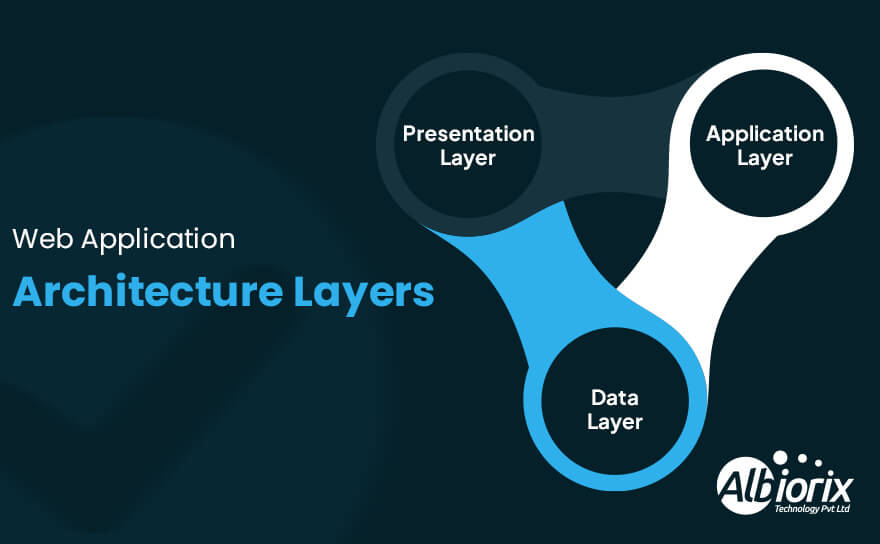
Web Application Architecture Layers
  • Presentation Layer: This layer presents the user interface to the user and includes the HTML, CSS, and JavaScript that make up an interactive web page.

    It also consists of server-based components that generate dynamic content, such as server-side scripting languages like PHP, Ruby, or Python.

  • Application Layer: This layer contains the application logic and is responsible for processing user input, interacting with the data layer, and generating output.

    It includes web server-based programming languages and frameworks like Java, .NET, or Node.js.

  • Data Layer: The data access layer is responsible for storing and managing data used by the software development application and includes multiple databases, multiple web servers, file systems, and other data storage systems.

So, I must say that the web application architecture should be scalable, reliable, secure and optimised for performance and usability.

In addition, a well-formatted web application architecture can help ensure that the application is easy to maintain and update and can support the needs of many users.

Importance of Web Application Architecture

Web application architecture is crucial for the success of any business website. Here are some reasons why:

  • Scalability: Your website can efficiently handle many users and requests without slowing down or crashing.

    It is vital for businesses that expect to grow over time and need their website to support increased traffic.

  • Security: You can protect your website from hacking and malware attacks.

    It can ensure that your website complies with industry standards and regulations, such as GDPR and PCI-DSS, and that user data is securely stored and transmitted directly to your web server software.

  • User Experience: Your website is easy to use and navigate, with fast load times and responsive design.

    It can help improve user engagement and increase conversions.

  • Cost-Effectiveness: A web architecture that is modular, reusable, and easily maintainable can help reduce development and maintenance costs, as well as enable rapid prototyping and iteration.

    It plays an essential role in determining the total cost to build a website.

  • Integration: A web architecture that is designed with integration in mind can help your website easily connect to third-party services and APIs, such as social media platforms, payment gateways, and CRM systems.

Web architecture can help your business website achieve its goals and stay competitive in the digital age.

Understanding the Components of Web App Architecture

Web application architecture refers to the various components and subsystems that work together to create a functioning web application.

These web application components can be divided into four main categories: the client, the server, the database, and the application itself.

1. Client-side Components

Client-side components are parts of a web application that run directly on the user’s device, usually within a web browser. These components include the user interface, which users interact with, and the business logic that processes actions on the client side.

Common technologies used for client-side development are HTML, CSS, and JavaScript. Developers often use libraries and frameworks like React, Angular, and Vue.js to build responsive and dynamic interfaces that enhance user experience.

2. Server-side Components

The server-side components serve the client-side components with data and rich and native functionality.

The server-side architecture typically includes a software web server, an application server, and various server-side web application programming languages like PHP, Ruby on Rails, Python, and others.

The server-side components also manage data storage and retrieval, security, and user authentication.

3. Database

The database is a crucial component of web application architecture. It stores and retrieves data used by the application.

The database server (also known as physical server) can be structured or unstructured and use different database management systems (DBMS), such as MySQL, PostgreSQL, MongoDB, etc.

4. Application Components

Application components form the core of a web application. They handle the business logic, data processing, and overall workflow that make the app function smoothly.

These components are usually built with specific programming languages and frameworks. Common examples include APIs, web services, and microservices, which help different parts of the app communicate and perform tasks efficiently.

Together, these components ensure the web application is reliable and responsive. A well-designed architecture supports scalability and flexibility, making it easier to maintain and improve the app over time during web application development.

Make Responsive and Robust Web Applications With Us

We have a team of talented web app developers who are proficient in working with leading web technology stacks.

Contact Us

What is a 3-Tier Architecture?

A 3-tier web application architecture is a popular architectural pattern for developing modern web applications. In this architecture, the application is divided into three layers or tiers, each with responsibilities and functions.

1. Presentation Layer (User Interface Layer)

This tier is responsible for presenting the information to the user in a readable and understandable format. It is the front-end part of the application that the user interacts with.

This layer (most commonly known as front-end development services) can be implemented using various technologies such as HTML, CSS, JavaScript, and other client-side frameworks.

Moreover, you can also deal with developing progressive web applications for your business needs.

2. Application Layer (Business Logic Layer)

This tier is responsible for processing and manipulating the data. It acts as a mediator between the presentation layer and the database layer.

The application layer contains all the application’s business logic, such as validation, calculations, and data transformation. It is implemented using programming languages such as Java, Python, or PHP.

3. Data Layer ( Database Layer)

This tier is responsible for storing and retrieving data from the database. The back-end part of the application is responsible for managing data retrieval and storage.

The data layer can be implemented using multiple databases such as relational databases (e.g., MySQL, PostgreSQL) or NoSQL databases (e.g., MongoDB).

web application architecture diagram that illustrates the 3-tier web application architecture:
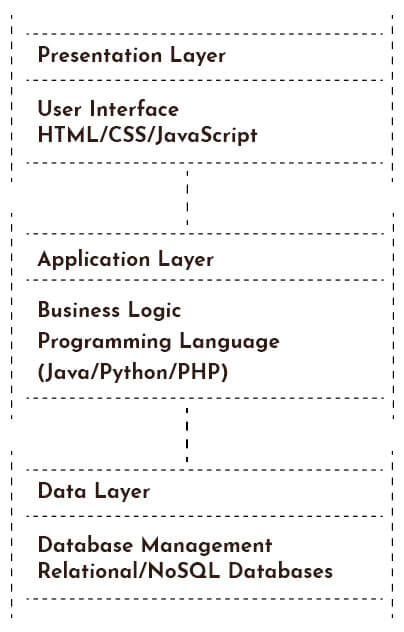
Web Application Architecture Diagram

In this web application architecture diagram, each tier is responsible for its tasks, and secure web-based communication between tiers is done through well-defined interfaces for your business web apps.

For example, the presentation part communicates with the application layer through RESTful APIs or web app server functionalities, while the application layer communicates with the data layer through a database connection.

This modern web application architecture diagram provides several benefits: scalability, modularity, and maintainability.

Separating the application into different tiers makes it easier to scale each tier independently, and changes made to one tier do not affect the other. It also enables a clean separation of concerns, making the application easier to maintain and modify.

Related Post: Difference Between Website and Web Application

How Does Web Application Architecture Work?

Web application architecture refers to designing and organising the various components that make up a web application.

These components include the user interface, server-side code logic, database, and other necessary application software components.

Overview of How Web Application Architecture Works
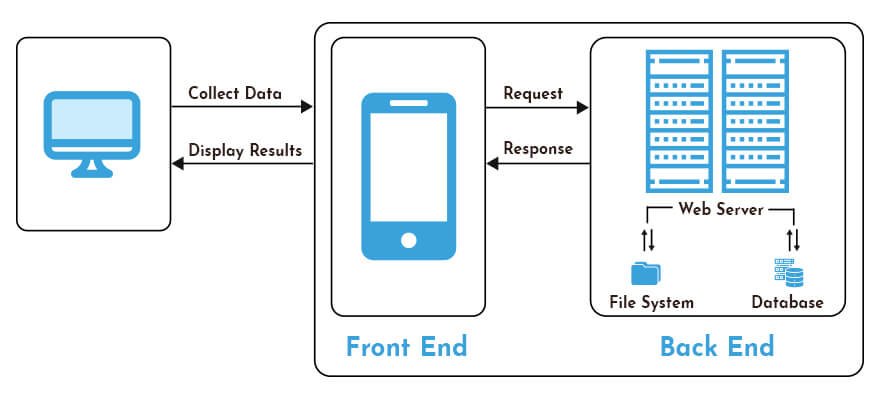
How Web Application Architecture Works

  • Client-Side: The client-side of the application is the part that runs in the user’s web browser.

    It’s typically written using HTML, CSS, and JavaScript and is responsible for rendering the user interface.

  • Server-Side: The server-side of the application is the part that runs on the server. It’s responsible for processing user or client requests, executing business logic, and generating dynamic content.

    It can be written in various web application programming languages like Java, Python, Ruby, PHP, or .NET.

  • Database: The database stores all the data required by the application.

    The database server can be hosted locally or in the cloud using different technologies such as MySQL, MongoDB, or PostgreSQL.

  • APIs: APIs are used to exchange data between different application components, such as between the client side and server side.

    APIs can be created using various protocols such as REST or GraphQL.

  • Middleware: Middleware refers to the software that connects different application components.

    The middleware systems can be used to handle tasks such as authentication, caching, logging, and error handling.

  • Infrastructure: Infrastructure refers to the hardware and software required to host and run the application.

    It can include multiple web servers, load balancers, CDNs, and other necessary components.

So, web architecture is a complex and ever-evolving field that requires a deep understanding of custom software development services, networking, and infrastructure.

In addition, the architecture must be designed to handle large volumes of traffic, ensure high availability, and provide a seamless user experience.

Essential Layers of Web Application Architecture

Web application architecture typically consists of several layers that work together to create a functioning application.
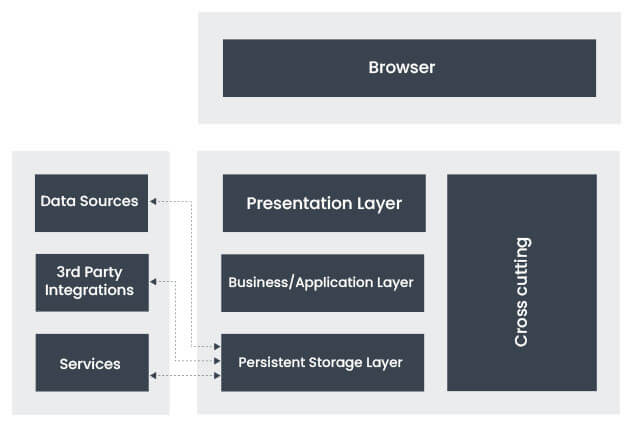
Web Application Architecture Layers

1. Presentation Layer

ChatGPT said:

The presentation layer is the part of a web application that users directly interact with. It includes all front-end components like HTML, CSS, and JavaScript, which work together to create the structure, style, and dynamic behavior of the user interface.

HTML defines the layout and content, CSS controls how the page looks, and JavaScript adds interactivity, such as animations or form validations. This layer is responsible for making the app easy to use and visually appealing.

A well-designed presentation layer ensures the interface is responsive, meaning it works well on different devices, and accessible, so all users can navigate it easily. Many developers use client-side frameworks like React, Angular, or Vue.js to build complex interfaces faster and with better functionality.

In summary, the presentation layer plays a vital role in delivering a smooth, engaging experience, helping users interact with the application confidently and efficiently.

2. Application Layer

This layer contains the business logic of the application. It processes the user requests, performs the necessary calculations, and interacts with the database to retrieve and store data.

The application layer typically consists of a server-based scripting language and same programming language as of presentation layer.

The application layer is the core logic of a web application architecture. It is responsible for processing user requests, performing the necessary calculations, and interacting with the database to retrieve and store data.

The application layer typically consists of server-based scripting languages such as PHP, Python, or Java, which are used to build the application’s business logic.

The application’s business logic defines how it functions, handles user input, performs calculations, and interacts with other systems.

The application layer also includes web Application frameworks and libraries that simplify the development of business logic.

In addition, these frameworks and libraries provide pre-built components and functionalities developers can use to create web applications more efficiently.

The application layer is also responsible for security, including user authentication and authorization, data validation, and preventing unauthorized access to the application’s resources.

Overall, the application layer is a critical component of a web application architecture, and its effectiveness determines the performance, scalability, and reliability of the application.

By ensuring that the business logic is well-designed, efficient, and secure, the application layer creates a foundation for a successful web application.

Related Post: Best Web Development Trends

3. Data Layer

This layer is responsible for storing and retrieving data from the database. It typically consists of a database management system (DBMS) such as MySQL, Oracle, or MongoDB.

The data layer is responsible for managing the storage and retrieval of data in a web application architecture. It consists of a database management system (DBMS) such as MySQL, Oracle, or MongoDB, which provides a structured way to store and retrieve data.

The data layer includes several components, including:

  • Database schema: The database schema defines the structure of the database and includes tables, columns, and relationships between tables.
  • Database server: The database server manages the database’s storage and retrieval operations, including reading and writing data, indexing, and optimizing performance.
  • Database connectors: These software components enable the application layer to connect and interact with the database.

The data layer ensures data integrity, security, and availability. In addition, it provides data backup and recovery mechanisms, security and access control, and scales the application to handle increasing data.

The data layer is also responsible for data consistency, ensuring data is stored and retrieved accurately and without conflicts. The data layer uses techniques such as locking, transactions, and concurrency control to achieve this.

Overall, the data layer is a critical component of a web application architecture, and its effectiveness determines the application’s performance, scalability, and reliability.

By ensuring that data is stored, retrieved, and managed accurately and efficiently, the data layer provides a foundation for a successful web application.

4. Infrastructure Layer

The infrastructure layer is the foundation that supports a web application. It includes all the hardware and software components like servers, storage devices, network equipment, load balancers, and firewalls.

This layer ensures the application remains available and reliable, even during high traffic or technical issues. Load balancers distribute traffic evenly across servers to keep the app running smoothly, while firewalls protect it from security threats.

Together, these components provide a stable and secure environment, allowing the web application to scale and perform well as user demand grows.

Without a strong infrastructure layer, the app’s performance and security could be compromised. The infrastructure layer provides the following functions:

  • Availability: The infrastructure layer ensures the web application is always available to users. It includes mechanisms such as redundancy, failover, and disaster recovery.
  • Reliability: The infrastructure layer ensures the web application performs as expected, without errors or downtime. It includes monitoring, troubleshooting, and performance tuning.
  • Scalability: The infrastructure layer enables the web application to handle increasing traffic and data. It includes load balancing, horizontal scaling, and vertical scaling.
  • Security: The infrastructure layer protects the web application from unauthorized access, attacks, and data breaches. It includes mechanisms such as firewalls, intrusion detection, and access controls.

The infrastructure layer is critical to the success of a web application architecture, as it ensures that the application is available, reliable, scalable, and secure.

It requires specialized skills and knowledge to design, deploy, and maintain, and a dedicated team of IT professionals typically manages it.

Your Search for Bespoke Software Solutions for Your Business Ends Here

We have a strong expertise in designing and building SPAs using ReactJS framework for all business verticals.

Build Your Website Now

Models of Web Applications

Web application architecture refers to the organization and structure of the various components of a web application. A web application comprises three main components: the user interface, application server, and database.

The architecture of a web application determines how these components interact with each other and the user.

There are several models of modern web application architecture, each with its strengths and weaknesses. Some of the most common models of web application architecture are:

1. Client-Server Architecture

In the client-server config architecture, the application logic is divided between a client and a server.
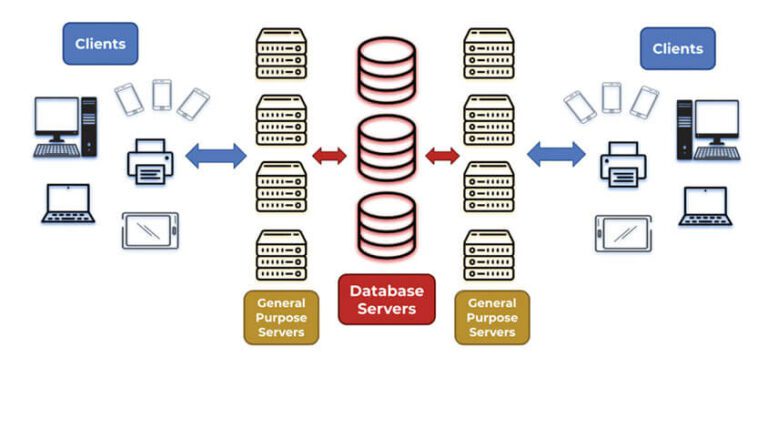
Client Server Config Architecture
Source: Serverwatch

The client is responsible for presenting the user interface to the user, while the web server like a scalable web server, a hardware web server is responsible for handling the application logic and data processing.

The client sends requests to the web server, which processes them and returns the response. This model is commonly used for web apps that require a high level of security or require real-time data processing.

2. Model-View-Controller (MVC) Architecture

In the Model-View-Controller architecture, the application is divided into three components: the model, the view, and the controller.
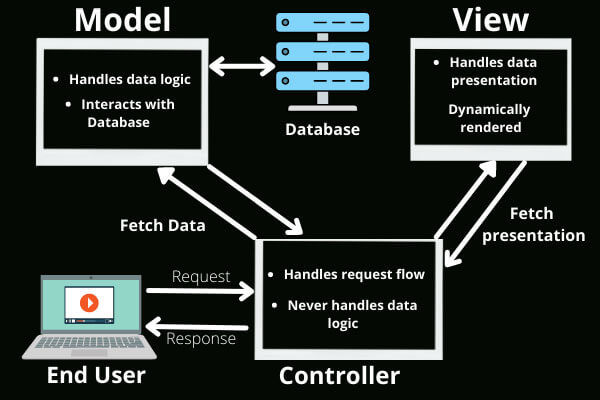
Model View Controller Architecture
Source: geeksforgeeks

The model represents the data and business logic, the view represents the user interface, and the controller handles the interactions between the model and the view.

This architecture allows for separating concerns, making it easier to maintain and modify the application.

3. Microservices Architecture

The microservices architecture is a distributed architecture in which the application is divided into a collection of small, independent services. Each service has its functionality and communicates with other services through APIs.
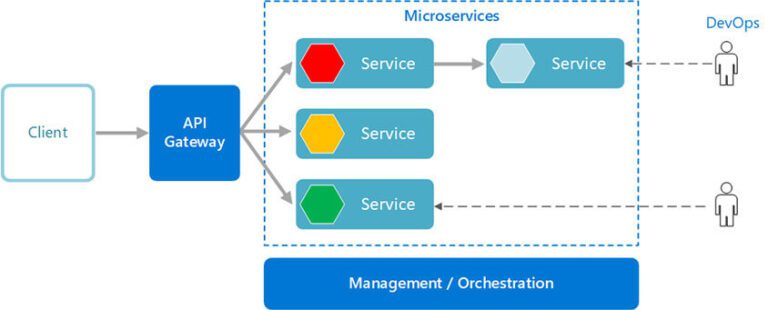
Microservices Architecture
Source: learn.microsoft

This architecture allows for greater flexibility, scalability, and fault tolerance, as each service can be developed, deployed, and scaled independently.

4. Service-Oriented Architecture (SOA)

In the Service-Oriented Architecture, the application comprises a set of services that communicate with each other using standardized protocols.
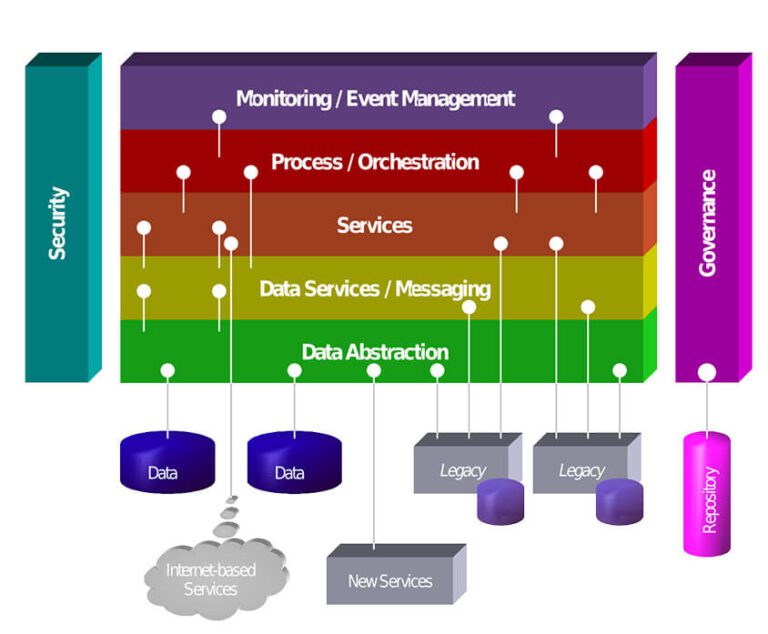
Service Oriented Architecture
Source: Wikipedia

This architecture allows for loose coupling between services, making it easier to modify, replace, or add new services as needed.

This architecture is commonly used in enterprise applications, where different teams or vendors may develop other parts of the application.

5. Single-Page Application (SPA) Architecture

In the Single-Page Application architecture, the entire application is contained within a single web page, which is dynamically updated as the user interacts with the application.
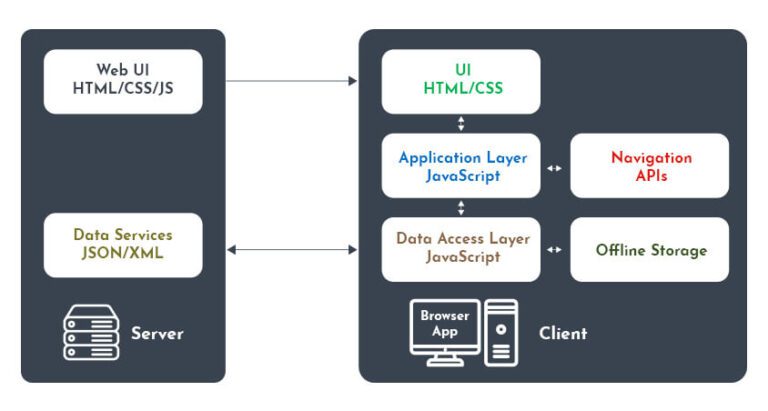
Single Page Application Architecture

In addition, this architecture uses AJAX (Asynchronous JavaScript and XML) to communicate with the web server, allowing for a more responsive and interactive user experience.

Each of these models has its advantages and disadvantages, and the choice of architecture will depend on the application’s specific requirements.

However, a web architecture can significantly improve a web application’s performance, scalability, and maintainability.

We crafted an innovative online car-buying platform using leading techs like Angular and Node.JS that makes it easy for users to purchase a car based on their requirements.


Contact Us

Understanding Different Types of Web Application Architectures

Web application architecture refers to how web applications are designed and structured, both from a technical and functional standpoint.

The architecture of a web application impacts its scalability, reliability, and performance, as well as its ability to meet the needs of its users.

Types of Web Application Architecture
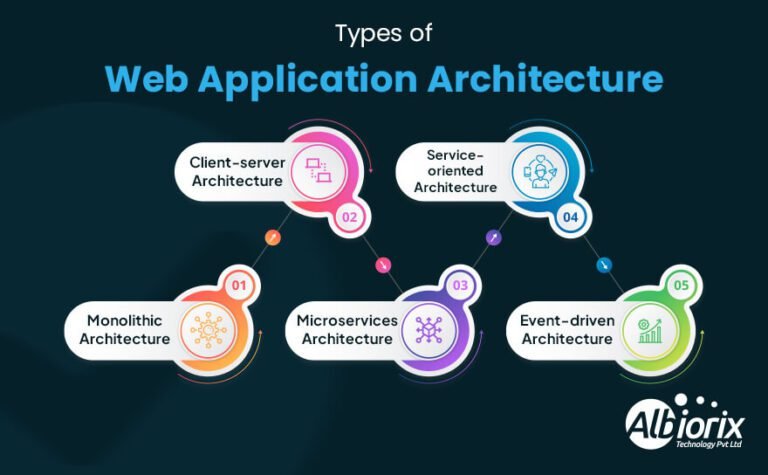
types of web-application-architecture

There are several types of web application architectures, each with advantages and disadvantages. The most common types of interactive web app architecture are:

1. Monolithic Architecture

Monolithic architecture means building a web application as one single unit. All parts of the app, like the user interface, business logic, and data handling, are combined tightly together.

This makes development and deployment straightforward, especially for smaller projects. However, as the app grows, scaling and updating become difficult because changing one part may affect the whole system.

This architecture is less flexible compared to newer approaches.

2. Client-Server Architecture

Client-server architecture divides a web application into two parts: the client, which is the user interface, and the server, which handles data and business logic.

This separation allows the server to be scaled independently, making the system more flexible and efficient than monolithic designs.

While it offers better scalability, developing and maintaining client-server applications can be more complex due to the need to manage communication between the client and server.

3. Microservices Architecture

Microservices architecture breaks an application into a collection of smaller, independent services that communicate with each other through APIs.

Each microservice is responsible for a specific function or feature of the application, making it easier to scale and maintain.

However, this architecture can be more complex to develop and requires a higher level of expertise in software design.

4. Service-Oriented Architecture (SOA)

Service-Oriented Architecture is a type of architecture where the application is built as a collection of services, each with its functionality.

These services communicate using standard protocols such as HTTP requests or SOAP. This architecture is highly scalable and flexible but can be complex to develop and maintain.

5. Event-Driven Architecture

Event-driven architecture is a design where the application reacts to events like user actions or data updates. Instead of a single workflow, the app is made up of multiple services that communicate by sending and receiving these events.

This approach makes the application very scalable and quick to respond, which is great for complex or high-traffic apps. However, developing event-driven systems can be challenging and usually requires experienced developers.

Choosing the right architecture depends on your app’s size, user base, complexity, and the development team’s skills. Event-driven architecture works well when flexibility and responsiveness are priorities.

Best Practices To Follow For Good Web Application Architecture

There are several best practices to follow for good web app architecture, and some of them are:

  • Follow the MVC Architecture Pattern: The Model-View-Controller (MVC) architecture pattern is widely used for web app development.

    It separates the application into three web app components, namely, model, view, and controller, to manage complexity and improve scalability and maintainability.

  • Use a Microservices Architecture: Microservices architecture is a design pattern that divides an application into small, modular, and independent services.

    Each service performs a specific function and communicates with other services via APIs. This architecture pattern improves scalability and fault tolerance and makes it easier to deploy and maintain.

  • Use a Scalable Infrastructure: The architecture should be designed to scale horizontally by adding more servers or nodes to handle increased traffic.

    Cloud computing platforms like AWS, Google Cloud, and Microsoft Azure provide accessible scalability features to manage fluctuations in traffic.

  • Use Caching: Caching can improve application performance by reducing the response time of frequently accessed data.

    Caching stores accessed data in a fast, easily accessible memory, reducing the time it takes to retrieve data from a slower database or file system.

  • Security: Security measures like SSL/TLS, encryption, and authentication mechanisms like OAuth and OpenID Connect can protect user data and secure the application.
  • API-first design: Develop APIs first and then build the front end on top of it.

    This approach provides flexibility, allowing the front end to be changed or updated without affecting the API.

  • Test-Driven Development (TDD): A software development practice where developers write automated tests before writing code.

    This practice helps identify and fix bugs early in development, ensuring a more stable and reliable application.

  • Continuous Integration and Deployment (CI/CD): CI/CD is a set of practices that enable developers to automate application building, testing, and deployment.

    This practice helps ensure the application is continuously tested and deployed, reducing the risk of introducing bugs in production.

By following these best practices, web developers available for hire can design and build web apps that are scalable, maintainable, and secure, meeting the needs of users and businesses alike.

Conclusion

This complete guide on web app architecture provides a comprehensive understanding of the key concepts and best practices to follow in designing and building web apps that are scalable, maintainable, and secure.

By applying the principles outlined in this guide, developers can design and build web applications that meet the needs of users and businesses alike, ensuring the success of their web apps in today’s digital landscape.

So, it becomes your prime duty to have a proper web application architecture to build a robust web application for your business needs.

Still, if you need consulting, contact Albiorix as their development team always strives to provide the best possible IT solutions.

What is The Difference Between Website and Web Application?

When it comes to building an online presence, it’s important to understand the difference between a website and a web application.

While both websites and web apps can be accessed through a web browser, they serve different purposes and offer unique user experiences.

In today’s digital age, having an online presence has become crucial for individuals and businesses alike. However, with the increasing complexity of web technologies, it can be confusing to understand the key differences between a website and a web application.

While both can be accessed through a web browser, they serve different purposes and offer unique user experiences. In this blog post, we’ll explore the difference between website and web application, and help you determine which one is right for your online needs.

Key Takeaways

  • A website is usually a set of web pages and subsequent visual and text content that is identified by a common domain name and published on at least one web server.
  • A web application is a type of software that is accessed through a web browser and hosted on a remote server.
  • The main difference between a website and a web application is that a website is typically static, while a web application is dynamic and interactive.
  • A website is usually designed to be viewed by anyone, while a web application typically requires a user to log in and has a more specific set of users and purposes.
  • Additionally, web applications often have more complex functionality and may involve database interactions, user authentication, and other advanced features.

What is a Website?

A website is a group of connected web pages available under one domain name and hosted on a web server. You view websites through a browser like Chrome or Safari.

Websites display different types of content text, images, videos, and interactive tools like forms. They’re built to inform, promote, sell, or connect.

Businesses use websites to show their services, while others publish blogs, offer learning tools, or run online stores.

Each website is created with a specific goal or audience in mind, whether it’s for e-commerce, education, social networking, or simply sharing information in a useful and accessible way.

Elevate Your Digital Presence With Our Web Solution

Our website development team are always Ready to take your online presence to the next level.

Contact Us Now!

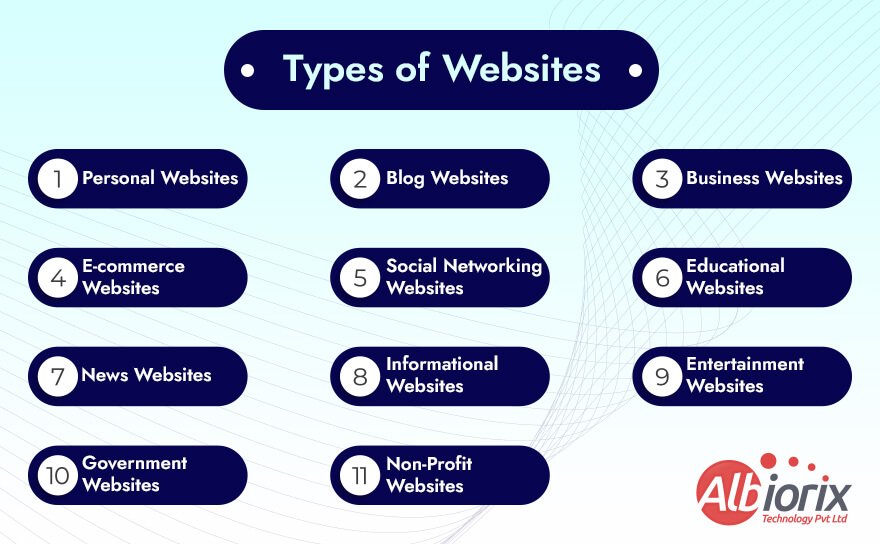
What are the Different Types of Websites?

Explore the various categories that define every type of website, from blogs and eCommerce stores to portfolios and corporate platforms. Understanding each category helps you choose the right structure for your goals and audience.

Different Types of Websites
  • Personal Websites: These are websites created by individuals to showcase their personal interests, hobbies, or achievements.
  • Blog Websites: These are websites that contain a series of posts or articles written by one or more authors. They can cover a wide range of topics, such as news, politics, fashion, food, or travel.
  • Business Websites: These are websites created by businesses or organizations to promote their products or services, provide information to customers, or facilitate online transactions.
  • E-commerce Websites: These are websites that allow customers to purchase products or services online. Examples include Amazon, eBay, and Etsy.
  • Social Networking Websites: These are websites that allow users to connect and share information with each other. Examples include Facebook, Twitter, and LinkedIn.
  • Educational Websites: These are websites that provide educational resources and materials to students, teachers, or other learners. Examples include Coursera, Khan Academy, and edX.
  • News Website: It’s primary aim is to provide up-to-date news and information on current events. Examples include CNN, BBC, and Reuters.
  • Informational Websites: An informational website is a type of website that provides information on a particular topic or subject. Such informational websites are.
  • Entertainment Websites:These are dynamic websites that provide entertainment-related text content, such as movies, music, games, or videos.
  • Government Websites:The websites created by government agencies or departments to provide information and services to citizens. Examples include the White House, the IRS, and the CDC.
  • Non-profit Websites: These are websites created by non-profit organizations to promote their mission and activities, raise funds, or recruit volunteers. Examples include the American Red Cross, Amnesty International, and the World Wildlife Fund.

Related Post: create a web app

Why Do You Need a Website?

Having a website or web portal is essential in today’s digital world, as it allows people to find and learn more about your business, products, and services.

It also serves as an important platform for building relationships with customers, expanding your reach, and increasing brand awareness.

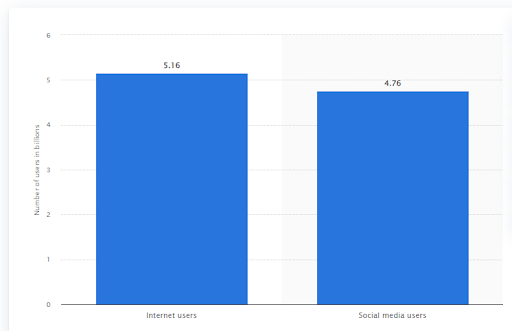
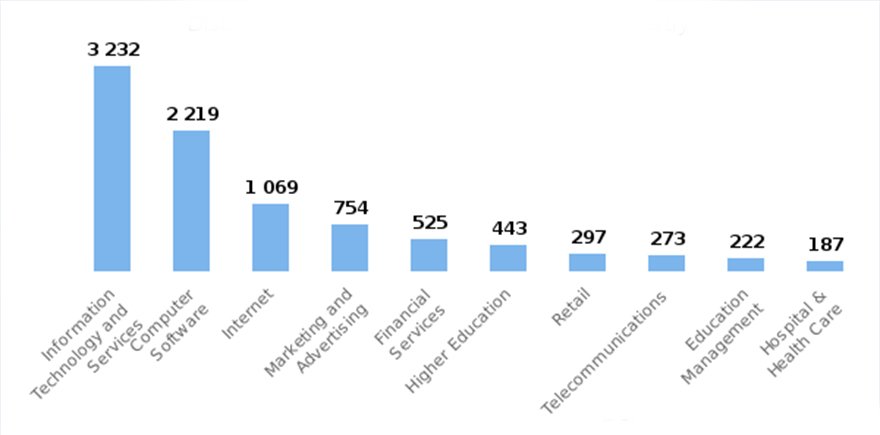
Internet and Social media users Stats

Having a website is an essential part of doing business in today’s digital world. A website allows you to showcase your products and services to a global audience, reach new customers, and build a trusted brand.

It also provides an easy way for customers to contact you and find out more information about what you offer. A web portal is also a great way to increase visibility and establish credibility.

Having a website development helps build trust and credibility with potential customers and can be used to build relationships with existing customers.

  • Increased Visibility: Having an online presence for your business helps you reach more people and become more visible.
  • Accessibility: Your website will be accessible 24/7, so customers can access information about your business at any time.
  • Cost-Effective: Having a website is cost-effective compared to traditional forms of marketing and advertising.
  • Credibility: Having an online presence will give your business credibility and help you stand out from the competition.
  • Customer Engagement: Your website can help you engage with customers and provide them with information and resources.
  • Improved Brand Awareness: Having a website will help you build your brand and create awareness for your business.
  • Customer Support: Your website can provide customers with support, answer their questions, and provide helpful resources.

Related Post: How Much Does it Cost to Build a Website?

Pros and Cons of Website

ProsCons
Accessibility: Can be accessed from anywhere with an internet connectivityUpfront cost: Building a website can be expensive
Cost-effective: Less expensive than other forms of marketingMaintenance: Websites require ongoing maintenance and updates
✅ Credibility: Enhances a company’s reputation and credibility❌Time-consuming: Creating a website can be time-consuming
Increased reach: Reaches a larger audience and expands customer baseTechnical issues: Websites can experience technical issues that impact user experience
24/7 availability: Always available to customers, even outside of business hoursSecurity risks: Vulnerable to hacking and other web application security risks
Analytics: Tracks user behavior and provides valuable insightsDependence on internet: Relies on internet connectivity
Marketing opportunities: Offers many opportunities for marketingCompetition: Challenging to stand out and attract unregistered website visitors

What is a Web Application?

A web application is software that you use through a web browser. Unlike traditional desktop apps, it doesn’t require installation.

It runs on remote servers and lets users interact in real time—from filling forms and making payments to chatting or viewing dashboards.

Web applications are built using standard web technologies like HTML, CSS, and JavaScript. Many are powered by databases and server-side logic to handle complex tasks.

They range from simple tools to advanced platforms that connect with other services or systems.

Popular examples include online banking sites, e-commerce stores, social media platforms, email clients, and cloud-based tools like Google Docs.

What makes web applications valuable is their flexibility. They work across devices—desktop, tablet, or mobile—and don’t require downloads or updates on the user’s end.

In today’s digital world, web application development is a core part of modern software, helping businesses and users stay connected, efficient, and secure on any device.

Take your business to the next level with Albiorix

From concept to launch, we’ll work with you every step of the way to create the perfect web app.

Let’s Get Started!

What are the Different Types of Web Application?

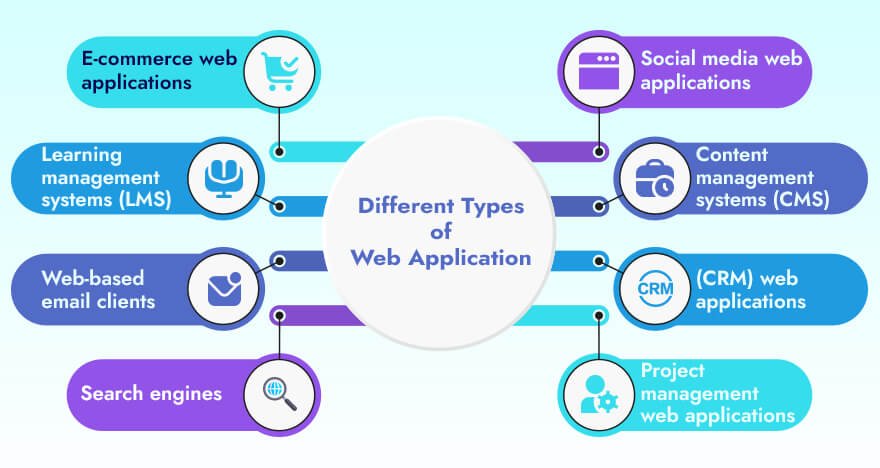
There are many different types of dynamic web applications, each designed to serve a specific purpose. Here are some of the most common types of web applications:

Different Types of Web Application
  • E-commerce web applications: It allows businesses to sell their products or services online, and usually include features like online shopping carts, payment processing, and order tracking.
  • Social media web applications: Such types of web applications allow users to connect with one another, share content, and communicate online. Examples include Facebook, Twitter, and Instagram.
  • Content management systems (CMS): They are specifically used to manage and publish digital content, such as articles, videos, and images. Examples include WordPress development, Drupal, and Joomla.
  • Customer relationship management (CRM) web applications: It is used to manage customer interactions and relationships. Examples include Salesforce and HubSpot.
  • Project management web applications: This type of web applications help teams manage projects and collaborate on tasks. Examples include Asana, Trello, and Basecamp.
  • Learning management systems (LMS): They are used to deliver online training and education. Examples include Moodle and Blackboard.
  • Web-based email clients: They allow users to access and manage their email accounts through modern browsers. Examples of such web applications include Gmail and Yahoo! Mail.
  • Search engines: It allows users to search for and find information on the internet. Examples include Google, Bing, and Yahoo!.

These are just a few web application examples and each type has its own unique features and functions, but all are designed to make life easier and more convenient for users.

Related Post: Web Application Architecture

Why Do You Need Web Application?

There are several reasons why a business may need a web application, including:

  • Accessibility: A web app allows your business to be accessible to your customers and clients 24/7, from anywhere in the world, as long as they have an internet connectivity.
  • Increased Reach: Web applications can help your business reach a larger audience, as it allows you to market your products or services to a global market.
  • Efficiency: A web application can streamline business processes, such as ordering, inventory management, and customer service, resulting in increased efficiency and productivity.
  • Cost-effective: Developing a web application can have a more cost-effective option than building a traditional desktop software application or maintaining a physical store, online store, or office.
  • Competitive Advantage: A web application can give your business a competitive advantage by providing unique features or services of web application development that differentiate your business from competitors using the same content.
  • Analytics: Web applications can provide valuable data and analytics that can be used to improve your business operations and make data-driven decisions.

Overall, a web application can help businesses increase revenue, reach more customers, streamline operations, and gain a competitive advantage in today’s digital age.

Pros and Cons of Web Application

ProsCons
Accessibility: Web applications are accessible from anywhere in the world, as long as the user has an internet connection, making them very convenient.❌ Internet Dependence: Web applications require an internet connection to function correctly. If the internet is slow, it may affect the user experience of web development.
✅ Cross-Platform Compatibility: Web applications can run on any device with modern browser capabilities, making them compatible with various operating systems and devices.❌ Security Risks: Web applications are more vulnerable to cyber-attacks compared to desktop software applications. Proper security measures must be put in place by web developers to prevent data breaches.
✅ Scalability: Web applications can scale up or down easily, making them suitable for businesses with varying demands. Limited Functionality: Web applications may have limited functionality compared to desktop apps, as they may not have access to all the resources of a computer.
✅ Low Maintenance: Web applications are easier to maintain compared to traditional desktop apps, as updates and upgrades can be made in a centralized location, and users can access them without needing to install anything. Dependence on Browser: Web applications rely on the web browser capabilities to function correctly, and any changes made to the browser can affect the user experience.
Cost-Effective: Web applications are more cost-effective than traditional desktop apps as they do not require installation and maintenance, and they can be accessed from any device with a web browser. Performance: Web applications may have performance issues compared to desktop apps, as they depend on the internet connection and web server speed. This can affect the user experience if the entire application is slow to load or respond.

Difference Between Website and Web Application in Detail

Let’s highlight the difference between a website and web app in detail.

Website vs. Web Application: Interactivity

Websites and web applications differ mainly in how users interact with them. A website offers basic interactivity—think clicking links, submitting forms, or browsing pages. These actions are mostly one-way and centered around delivering information.

A web application, by contrast, allows deeper interaction. It responds to user input in real time, supports tasks like dragging and dropping elements, updating dashboards, or visualizing data instantly. You’re not just viewing content—you’re actively working with it.

In short, websites are often built for static content and simple user actions, like reading or subscribing. Web applications are dynamic tools built for doing—processing data, managing content, or completing tasks.

Understanding this difference helps you choose the right solution for your business or project, based on how much user interaction you need.

Web Application vs Website: Integration

When it comes to integration, web applications and dynamic websites can differ significantly in their level of integration with other systems and services.

A website typically provides basic integration with external systems through features such as email signup forms, social media sharing buttons, and other third-party plugins.

However, the integration is usually limited to simple actions and does not involve complex data collection or application-level functionality.

In contrast, dynamic web applications are designed to integrate more deeply with external systems, services, and databases to provide advanced functionality and data processing capabilities.

For example, a web app may integrate with a payment gateway to process online transactions, or integrate with a CRM system to manage customer data.

Static web applications are also typically built with APIs (Application Programming Interfaces) that allow other systems to integrate with them and access their data or functionality.

This enables the web application to be integrated with other systems and services, such as mobile apps or other web apps.

In summary, while a website may provide basic integration with external systems, web apps are designed to offer more advanced integration capabilities through APIs and other means, enabling them to be more tightly integrated with other systems and services, making it complex functionality to such static web applications.

Website vs Web Application: Authentication

When it comes to integration, the key difference between a website and a web application lies in how deeply they connect with other systems.

A typical website might offer basic integration—like newsletter sign-ups, contact forms, or social media share buttons. These are useful but limited to simple tasks and don’t usually involve handling complex data or workflows.

In contrast, web applications are built for deeper, more advanced integration. They often connect to external systems like payment gateways, CRM platforms, or third-party APIs.

For example, a web app might process payments, manage user profiles, or sync data with external services in real time.

Many modern web apps use APIs (Application Programming Interfaces) to both receive and share data with other tools—including mobile apps, internal dashboards, and external platforms.

In short, websites provide surface-level interaction, while web applications are designed for powerful, multi-system functionality.

If your project needs dynamic features and integration with external services, a web application is the better choice.

Website vs. Web App: Costing

The cost of developing a website or web application can vary widely depending on various factors such as the complexity of the project, the web application development approach, the platform used, and the level of customization required.

A website is typically less expensive to develop than a web application because websites are usually simpler and require less functionality.

Websites often consist of static pages, basic features such as contact forms, and simple web design with interactive elements.

Developing a website can be relatively straightforward and can be done using a variety of platforms by web developers, including static content management systems such as WordPress or using SEO as an online tool.

In contrast, web applications are typically more complex and require more advanced functionality and customization, which can increase the cost of development.

Web applications are built to handle more advanced features such as data processing, real-time updates, and complex user interaction.

They often require more advanced and same programming languages such as Python, JavaScript or Ruby and may require integration with other systems or APIs with interlinked web pages.

The cost of developing a web application can also be affected by the need for ongoing maintenance and updates to ensure that the application remains functional and secure.

Website vs Web Applications: Security

Security is a critical consideration for any online platform, including websites and web applications. Both websites and web apps can be vulnerable to a range of security threats, such as hacking, data breaches, and other types of attacks.

However, web apps generally require more advanced security measures than websites due to their increased complexity and the greater potential for web application security vulnerabilities.

Moreover, interlinked web pages may require more robust authentication mechanisms, such as two-factor authentication or biometric authentication, to protect against unauthorized access.

They may also require more granular access controls to restrict access to sensitive data and features based on user roles, permissions, and other interactive elements.

Web apps also need to be designed with security in mind, with secure coding practices and rigorous testing to identify and fix potential security vulnerabilities.

This can include measures such as user input validation, encryption of sensitive data, and secure storage of user credentials.

In contrast, websites may require less sophisticated security measures, although they still need to be designed with security in mind.

Basic security measures such as SSL certificates to encrypt user data and protect against phishing attacks are often used in websites.

Related Post: Best Web Development Trends

Website vs Web Application: The Comparison Table

FeaturesWebsiteWeb Application
DefinitionA collection of interlinked web pages.It is written in JavaScript language.
PurposeTo provide informationIt is written in JavaScript language.
User interactionLimitedInteractive and dynamic
Database integrationMinimal or noneCommonly used to online store data and also offline data
User managementLimited or noneCommonly used for user registration and authentication
Data processingLimitedHeavy processing may be required
Offline functionalityNoneMay offer some limited offline capabilities
TechnologyHTML, CSS, JavaScriptAdditional programming languages and web application frameworks are used
ExamplesNews sites, blogs, information sitesE-commerce sites, social media platforms, online banking

Conclusion

In this blog post, we have explored the web app and website differences in more detail, including their web design, functionality, development requirements, and user experiences.

Whether you’re a business owner looking to establish an online presence or a developer seeking to build a web-based application, this post will help you determine which one is right for your needs.

We have a team of talented web developers who are proficient in designing best online presence of your business. If you’re planning to build websites for your business needs, feel free to contact us.

12 Best Web Application Frameworks To Use For Your Business

As the world becomes increasingly digital, having a strong online presence is essential for any successful business. However, developing a web application from scratch can be time-consuming and costly.

This is where web app frameworks come in. Such web frameworks provide a foundation for building web apps quickly and efficiently. With so many best frontend frameworks available, choosing the right one can be overwhelming.

In this blog, we’ll explore some of the best web application frameworks for businesses and help you make an informed decision that meets your specific needs.

Key Takeways

  • A web framework is a software tool or library that provides you with tools, components, and patterns to simplify the web development process.
  • With the help of web framework, you can efficiently speed up development time, improve code quality, and make it easier to maintain and scale web applications.
  • Web frameworks help you reinvent the wheel by leveraging pre-built components and architectures.
  • Popular web frameworks include Angular, React, Vue, Node.JS, Django, Ruby on Rails, Flask, Laravel, and Express.js, among many others.

What is a Web Framework?

A web framework is a software framework that is designed to support the web application development for your business needs.

The web development framework provides a set of libraries, tools, and reusable templates that help developers to build web application development services more quickly and efficiently by providing pre-built components and a standardized way of organizing code.

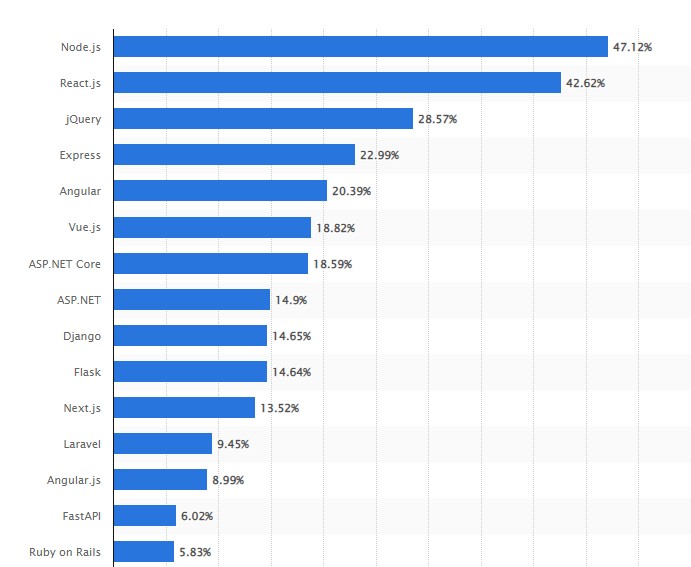
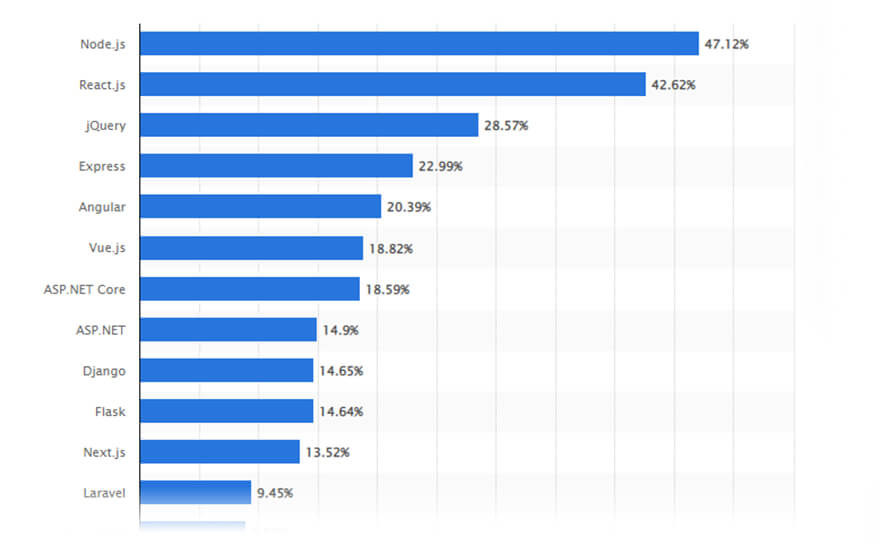
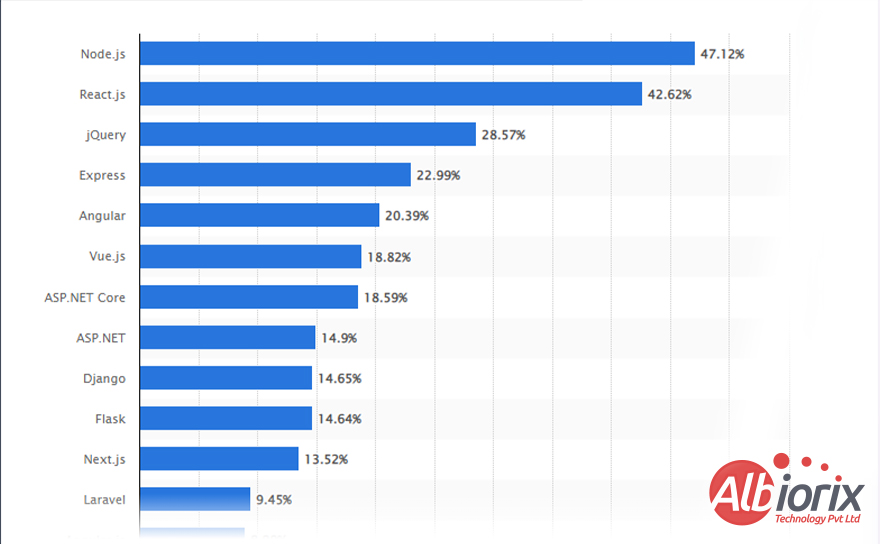
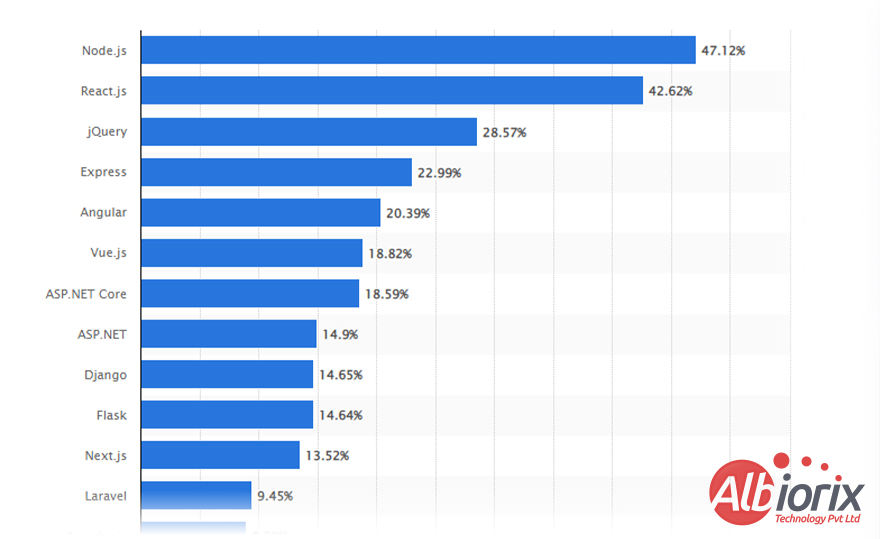
Most used web frameworks among developers worldwide, as of 2022 is Node.js: 47.122%, React.js: 42.62% and jQuery: 28.57% – Source Statista

web frameworks among developers worldwide
Image Source: Statista

Web frameworks help you speed up development time and improve the overall quality of the web app by providing a consistent structure and set of best practices.

According to a survey by Stack Overflow, 50.7% of developers use web frameworks to speed up development time.

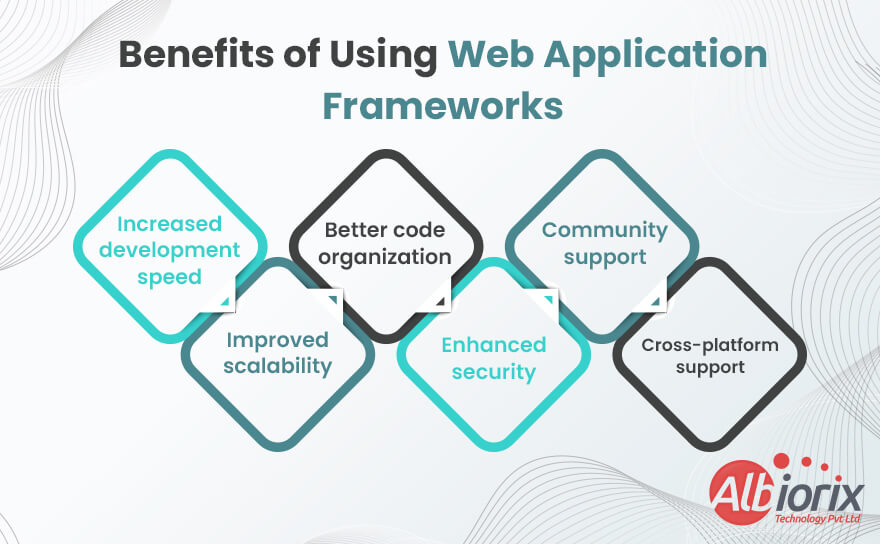
What are the Benefits of Using Web Application Frameworks?

Web app frameworks provide several benefits for developers and organizations looking to build dynamic web applications.

Benefits of Using Web Application Frameworks

Some of these benefits include:

  • Increased development speed: Web App frameworks provide pre-built components and tools that can be used to speed up the development process. Hire web developers can focus on building application-specific features instead of writing common code from scratch for the web application development process.
  • Improved scalability: Many web application frameworks are designed to be scalable, making it easier to add new features and scale the application as the user base grows and a smooth and rapid development process.
  • Better code organization: Web development frameworks typically provide a structured approach to building applications, which can help developers organize their code and make it easier to maintain over time for web development services.
  • Enhanced security: Web app frameworks often provide built-in security features, such as user authorization, authentication and access control, which can help protect applications from common web security threats.
  • Active developer community support: Popular web frameworks have large communities of developers who share knowledge and contribute to open-source projects. This can provide valuable web resources, including documentation, tutorials, and code samples.
  • Cross-platform support: Many web application best frameworks support multiple web programming languages and platforms, making it easier to build applications that can run on a variety of mobile devices and platforms.

Overall, using a web app framework plays an essential role in building dynamic websites faster, more efficiently, and with better security and scalability.

Building Intuitive Web Applications!

Our team of skilled developers can craft unique and scalable web apps.

Contact Us

Top 12 Web Application Frameworks to Consider for Your Next Project

There are many web application frameworks available for developers, each with their own unique features and benefits. Here are some of the most popular web frameworks available in the market for web development that you may consider:

1. Ruby on Rails

Ruby on Rails is an open-source web application framework written in the Ruby programming language.

Ruby on Rails is one of the leading web frameworks that follows the Model-View-Controller (MVC) architectural pattern and emphasizes convention over configuration, which means that Rails provides default solutions and conventions that enable web developers to write less code and focus more on application logic.

Ruby on Rails development includes a number of built-in features and tools, such as scaffolding, database access, database migrations, and automated testing.

This web application development framework also includes an extensive collection of third-party libraries and gems that can be easily integrated into web apps.

Rails has gained popularity for its ability to quickly prototype and develop web and mobile apps, and is used by many popular companies and websites such as Basecamp, GitHub, Shopify, and Airbnb.

Top Features of Ruby on Rails

  • Convention over Configuration
  • MVC Architecture
  • Active Record
  • Scaffolding
  • Routing
  • Security
  • Testing

Let’s build your next great idea with Ruby on Rails!

Our Ruby on Rails developers are passionate about delivering quality code and results.

Schedule a Call

As per the recent survey by Statista, we will now cover the list of top web app frameworks that will make it easy for you to select the best one for your business needs.

Top Web App Frameworks
Image Source Statista

2. Node.js

Node.js is an open-source, cross-platform, JavaScript runtime environment, specifically built on Google Chrome’s V8 JavaScript engine.

With the help of Node.js development , you can efficiently use JavaScript on the server-side to build dynamic web apps that are purely scalable and high-performing.

Node.js is an innovative web development framework that provides an event-driven, non-blocking I/O model that makes it ideal for real-time web, mobile and desktop applications.

With its large and active community, Node.js is the best JavaScript framework that supports vast ecosystem of modules and packages available through its package manager, npm, making it a popular choice for building web and mobile applications, web APIs, and microservices.

Top Features of Node.js

  • Asynchronous and event-driven APIs
  • Node.js apps are very fast
  • Node Package Manager (NPM)
  • Highly scalable
  • Improved performance

    3. ReactJS

    ReactJS, developed and maintained by Facebook, is a popular open-source JavaScript library for building user interfaces for your business applications.

    With the help of this React UI Frameworks, any web developer can efficiently create reusable UI components that can be used to build complex web apps.

    ReactJS is a dynamic web application framework that uses a declarative syntax and a virtual DOM, which allows for efficient updates and rendering of components.

    In addition, ReactJS is a server-side framework that supports server-side rendering, which improves the performance and SEO of web app development.

    ReactJS development process includes flexible and software bundle framework is commonly used in combination with other libraries and frameworks, such as Redux for state management and Next.js for server-side rendering and routing.

    lets explore the top features of ReactJS

    Top Features of ReactJS

    • Virtual DOM (VDOM)
    • One-way Data binding support
    • Component-based and push-based architecture
    • Enhanced the application performance
    • JSX

    Related Post: Web Application Architecture

    4. jQuery

    jQuery is a popular open-source JavaScript library that simplifies HTML document manipulation, event handling, and animation.

    It provides a set of easy-to-use methods and syntax that enable developers to write concise and efficient code to manipulate HTML web elements on a web page.

    jQuery is compatible with all modern web browsers and can be used to build dynamic web pages, responsive designs, and interactive user interfaces.

    It also includes features such as AJAX, which allows developers to send and receive all your data from a server asynchronously without hot code reloading the web page.

    jQuery has been widely adopted by developers and is used on millions of websites around the world.

    Top Features of jQuery Framework

    • Animations and AJAX support
    • Cross-browser support
    • DOM manipulation
    • Search engine optimized framework
    • CSS manipulation
    • JSON parsing

    Related Post: jQuery vs Angular

    5. ExpressJS

    ExpressJS is a popular open-source web application framework for Node.js.

    It provides a set of features and utilities for building web applications and API (Application Programming Interface), such as middleware for request and response handling, and even routing for mapping HTTP requests to controller functions.

    This web app framework support for various HTTP methods and content types. ExpressJS is known for its simplicity and flexibility, allowing developers to build applications with fewer lines of code and more easily customize the behavior of their application.

    It also has a vast ecosystem of plugins and modules available through its package manager, npm, which makes it easy to integrate with other libraries and tools.

    ExpressJS is widely adopted by developers and is commonly used to build scalable and robust web apps and APIs.

    Top Features of Express.js Framework

    • Faster server-side development
    • Debugging process made much more easier
    • Rich set of layout templates
    • Middleware platform support
    • Routing functionality

      6. Angular

      Angular is a popular open-source web application framework developed by Google. It is used for building dynamic, single-page web applications (SPAs) and mobile applications.

      Angular uses a declarative approach to building User Interface components and provides a complete set of tools and services for building complex applications.

      It uses TypeScript, a statically-typed version of JavaScript, which helps developers working in AngularJS development company to catch errors at compile time rather than run time.

      Angular also includes features such as data binding, dependency injection, and a powerful template engine for building reusable components.

      It is commonly used in combination with other libraries and MVC frameworks, such as RxJS for reactive programming and NgRx for state management to create single-page applications for your business needs.

      Angular has a large number of advantages and active community of developers and is widely adopted by organizations to build enterprise-grade applications.

      Top Features of Angular Framework

      Here are the top Angular frameworks features that helps angular developers

      • Cross-platform support
      • High-speed and optimum performance
      • Angular app for everyone
      • Efficient two-way data binding
      • Supports dependency injections
      • Typescript-based framework

      Drive Business Growth With Angular JS Development Services

      Angular development company Albiorix has experienced Angular developers who can build single-page applications using optimal structure.

      Get in Touch Now!

      7. Vue.js

      Vue.js is an open-source JavaScript framework used for building user interfaces and single-page applications. It was created by Evan You and first released in 2014. Vue.js is designed to be simple, lightweight, and flexible.

      This pivotal software development framework uses a component-based architecture and provides a reactive data binding system that makes it easy for Vue.js developers working in best Vue.JS development company to create dynamic and responsive applications.

      Vue.js is one of the top-rated client-side frameworks that is also highly customizable, with many features and options that can be used to build complex applications with ease.

      This flexible and right framework can be used in combination with other libraries and framework architectures, such as Vuex for state management and Vue Router for routing.

      As compared to Vue vs React, Vue.js has a growing community of developers and is increasingly being used to build web apps of all types and sizes.

      Top Features of Vue.js

      • Reactive Data Binding
      • Component-Based Architecture
      • Directives
      • Template-Based Syntax
      • Virtual DOM
      • Vuex
      • Vue CLI

        8. ASP.NET

        ASP.NET is a web application framework developed by Microsoft. It is a part of the .NET Framework and is designed to help developers build dynamic and interactive web applications.

        ASP.NET is a software development framework that includes a set of libraries, tools, and programming languages that can be used to create web apps, web services, and other types of web-based systems.

        It uses a server-side approach to building web apps, which means that the application code runs on the web servers before it is sent to the client’s default browser settings.

        ASP.NET is the leading client-side and server-side framework that allows developers to build powerful, scalable, and high-performance web applications that can handle high traffic and complex business logic.

        ASP.NET supports a variety of web application programming languages, including C#, Visual Basic, and F#.

        Top Features of ASP.NET

        • Server-side scripting
        • MVC architecture
        • Cross-platform support
        • Supports browser compatibility
        • Integration with other Microsoft technologies
        • Security
        • Scalability
        • Web services
        • Extensibility

          9. Django

          Django is one of the best web development frameworks that allows for rapid web development and clean, pragmatic design. Django framework is a high-level, open-source web framework for building web apps with Python.

          It was created in 2003 by Adrian Holovaty and Simon Willison, and named after the Belgian jazz guitarist Django Reinhardt.

          Django is one of the best backend frameworks that provides a robust set of tools and libraries that help developers build web applications quickly and efficiently.

          This right Python development framework typically follows the Model-View-Controller (MVC) architectural model pattern, and its core components include:

          • Object-relational mapper (ORM):Django provides an abstraction layer for working with databases, allowing developers to interact with the database management using Python objects instead of SQL statements.
          • URL routing:Django has a built-in URL router system that allows developers to map URLs to views, which are Python functions that handle HTTP and users requests and generate HTTP responses.
          • Template engine: Django provides a template engine that allows developers to create HTML templates with placeholders for dynamic content, which are filled in by Python code at runtime.
          • Authentication and authorization: This software platform has built-in support for user authentication and authorization, including user registration, login, and password management.

          Top Features of Django

          • Open-source backend framework
          • Object-relational mapping (ORM)
          • Admin interface
          • URL routing
          • Templating engine
          • Robust database management system
          • Security
          • Scalability
          • Third-party package support
          • Internationalization
          • Testing framework

            10. Flask

            Flask is a lightweight open-source web application framework for Python. It is designed to be simple, flexible, and easy to use.

            Flask is built on the Werkzeug toolkit and uses Jinja2 templating for rendering web pages. Flask is well-suited for building small to medium-sized web apps, prototypes, and APIs.

            Flask is one of the leading client-side frameworks that typically provides a variety of features and utilities, including a built-in web development server, support for HTTP methods and content types, and extension support for adding additional functionality.

            Top Features of Flask

            • Lightweight, flexible, and secure framework
            • Minimalistic
            • URL router system
            • Templating engine
            • Integration with other libraries
            • Testing framework
            • Scalability
            • RESTful API support

              11. Next.JS

              Next.js is an open-source web application framework for building server-side rendered (SSR) and statically generated web apps using React. It is designed to make it easy for developers to build high-performance web apps with minimal configuration.

              Next.js provides a set of features and utilities, including automatic code splitting, server-side rendering, static exporting, and file-based routing. It also includes features such as built-in support for CSS modules, TypeScript, and hot module replacement.

              If we talk about Next.js vs React, Next.js is one of the top-rated programming languages frameworks that are highly extensible and can be used in combination with other libraries and web development frameworks, such as Redux for state management and GraphQL for data fetching.

              Top Features of Next.js

              • Server-side rendering
              • Automatic code splitting
              • Hot module replacement
              • Static site generation
              • TypeScript support
              • Automatic optimization
              • CSS-in-JS
              • Dynamic imports
              • API routes
              • Customizable configuration

                12. Laravel

                Laravel is an open-source web app framework for building modern, scalable, and secure PHP-based web apps. It was created by Taylor Otwell in 2011 and has since become one of the most popular PHP frameworks.

                Laravel is designed to be elegant, expressive, and intuitive, allowing web developers to build complex web apps with ease.

                Laravel development services provides a rich set of features and tools, including a powerful ORM (Object Relational Mapping) system, a robust routing system, built-in authentication, and authorization functionality, and a wide range of pre-built components and packages.

                Laravel also includes features such as Blade templating engine, Artisan command-line interface, and Eloquent ORM. It is highly extensible and can be used in combination with other PHP libraries and other frameworks.

                Top Features of Laravel

                • Model-View-Controller (MVC) architecture
                • Artisan command-line interface
                • Object-relational mapping (ORM)
                • Routing
                • Blade templating engine
                • Authentication and authorization
                • Security
                • Middleware
                • Testing framework
                • Eloquent ORM

                  So, these are the common and most popular frameworks that are used by leading organization to design and build web apps for your business needs.

                  Conclusion

                  In conclusion, there are many powerful web application frameworks available today that provide web developers with the tools they need to build robust, scalable, and secure web applications.

                  The best framework for your project will depend on a variety of factors, including your single programming language preference, project requirements, and web development goals.

                  Depending on your requirements and preferences, you can choose from web development frameworks like ASP.NET, Django, Flask, Next.js, and Laravel to build your next web app with confidence.

                  Still confused with which web app frameworks is best for your business needs? Feel free to contact Albiorix, as we have the best team to provide the optimum business solutions.

                  Top 7 Angular Component Libraries That You Need To Know

                  Building modern and responsive web applications using Angular can be challenging, but with the right component library, it becomes much easier.

                  Angular component libraries can save you a lot of time and effort when building web applications. Whether you’re a beginner or a seasoned Angular developer, using a component library can help you build applications faster and with more consistency.

                  Here are seven of the most popular Angular component libraries that can help you create beautiful, responsive, and interactive web apps for your business needs.

                  What is Angular?

                  Angular is an open-source web application framework developed by Google. It allows developers to build dynamic and robust websites using HTML, CSS, and JavaScript/TypeScript.

                  Angular provides a complete set of angular development tools for building complex single-page applications (SPAs) and is known for its ability to create scalable, maintainable, and testable code.

                  Some of the key features of Angular include:

                  • Dependency injection, which allows components to be easily reused and tested, even by using third-party dependencies.
                  • Two-way data binding, which automatically synchronizes data between the Model and View.
                  • Directives, which are HTML attributes that extend the functionality of standard HTML elements.
                  • Routing, which allows developers to define navigation paths and load different views based on the current URL.
                  • RxJS, a library for reactive programming that makes it easy to manage asynchronous data streams.

                  Angular is widely used in enterprise applications and has a large community of developers contributing to its ongoing development and improvement.

                  What is An Angular Component Library?

                  An Angular component library is a collection of reusable UI components built using the Angular framework.

                  These components—like buttons, forms, tables, and modals—are designed, tested, and packaged to help developers build user interfaces faster and more consistently.

                  Popular libraries such as Angular Material or NG Bootstrap provide ready-made components that follow best practices and accessibility standards, saving time and ensuring the UI works smoothly across different devices.

                  Many businesses also create custom Angular component libraries that reflect their unique brand styles, ensuring a consistent look and feel across all projects.

                  This approach not only improves development speed but also makes applications easier to scale and maintain.

                  If you’re looking to streamline your app development with the help of experts, partnering with an AngularJS development company can ensure you make the most of component libraries for building reliable and high-quality web applications.

                  7 Popular Angular Component Libraries of 2026

                  Here are seven top Angular component libraries that are popular and widely used in 2026.

                  1. Angular Material

                  Angular Material is a UI component library for building web applications using Angular framework.

                  This Angular UI component provides a set of reusable and responsive UI components that typically implements Google’s Material Design guidelines, which is a lightning design system language developed by Google.

                  Angular Material is one such Angular UI framework that includes a range of Angular UI components such as buttons, cards, dialog boxes, icons, form controls, and data tables, which can be easily integrated into an Angular project.

                  These components of Angular Material are designed to be responsive, accessible, and performant.

                  In addition to the UI components, Angular Material is one such Angular UI framework that also provides services such as theming and typography, which makes it easy for you to customize the look and feel of your business application.

                  Using Angular Material can speed up the development process by reducing the need for writing custom CSS and JavaScript code inside the Angular UI components.

                  With the help of Angular Material, it also ensures a consistent and modern design language throughout the application, making it easier for users to navigate and understand the interface.

                  Top Features of Angular Material

                  • Google’s Material Design
                  • Pre-built UI components
                  • Accessibility
                  • Responsive Layouts
                  • Theming
                  • Animations
                  • Internationalization (i18n)
                  • Testing

                  2. PrimeNG

                  PrimeNG is a powerful library of user interface (UI) components built for Angular applications. It offers more than 80 ready-to-use components like buttons, forms, data tables, menus, charts, and calendars.

                  These components help developers create web and hybrid apps faster and more consistently.

                  One of the key benefits of PrimeNG is its flexibility. All components are fully customizable, allowing developers to adjust styles, behaviors, and layouts to match specific project needs.

                  This ensures apps not only look modern but also provide a smooth user experience across devices.

                  PrimeNG also includes advanced features such as lazy loading, virtual scrolling, and internationalization support.

                  These features help optimize performance, especially in data-heavy applications, and ensure the app is accessible to a global audience.

                  To get the most from PrimeNG and customize components effectively, many businesses choose to hire AngularJS developers who can implement these tools efficiently and align them with the app’s design and performance goals.

                  Top Features of PrimeNG

                  • Rich set of UI components
                  • Responsive design
                  • Accessibility
                  • Extensive documentation
                  • Easy integration
                  • Customizable themes
                  • Internationalization (i18n)
                  • Testing
                  • Community support

                  3. Ng Bootstrap

                  Ng Bootstrap is a library of UI components for building web applications using Angular framework.

                  This is a top Angular component library that is built on top of Bootstrap, a popular front end web development, and provides a set of native Angular directives, extends bootstrap component capabilities, and services that enable Angular team to use Bootstrap’s UI components (Angular components library) in their Angular projects.

                  Once you install Ng Bootstrap in your application, you can include over 70 UI components such as modals, alerts, buttons, carousels, forms, and navigation bars, among other common interaction patterns.

                  All stateless functional components of Ng bootstrap are designed to be responsive, accessible, and customizable.

                  Moreover, Ng Bootstrap is one of the best AngularJS frameworks that typically offers a set of features such as support for multiple themes, keyboard navigation, bootstrap library components, and ARIA attributes, which can improve the accessibility and usability of the Angular apps.

                  One of the main advantages of best angular component library The Ng Bootstrap is its seamless integration with Angular.

                  Developers can use the components directly in their templates using Angular directives, which makes the code more readable and maintainable.

                  Ng Bootstrap provides a set of services and APIs that enable advanced features such as dynamic component creation, create own custom components like ng bootstrap components, and manipulation.

                  Ng Bootstrap is developed and maintained by a team of developers and is distributed under an open-source license. It is available for free on GitHub and can be easily installed using npm or yarn.

                  Top Features of Ng Bootstrap

                  • Bootstrap 5 compatibility
                  • Pre-built UI components
                  • Accessibility
                  • Responsive design using Ng Bootstrap components
                  • Theming
                  • Extensive documentation
                  • Easy integration
                  • Internationalization (i18n)
                  • Testing
                  • Community support

                  Have a Web App Idea But Confused Where to Start?

                  Book a free 30-minute consultation with our expert.


                  Contact Us

                  4. NGX Bootstrap

                  NGX Bootstrap is a popular library of user interface (UI) components designed specifically for Angular applications.

                  Built on top of the well-known NG Bootstrap framework, it provides native Angular directives that allow developers to use Bootstrap’s UI elements directly within Angular projects, ensuring seamless integration and consistent design.

                  This library includes a wide range of components such as modals, alerts, buttons, carousels, forms, and navigation bars.

                  All components are responsive, accessible, and customizable, making them suitable for building modern web, mobile, and desktop applications.

                  One of the key benefits of NGX Bootstrap is its advanced features, including support for lazy loading, internationalization, and theming.

                  These features help improve the performance and user experience of the application, especially for complex, content-rich apps.

                  NGX Bootstrap is maintained by an active community of developers and is available as an open-source project on GitHub. It can be easily installed using npm or yarn.

                  For businesses seeking reliable UI solutions in Angular, NGX Bootstrap is often recommended by teams offering front end development services, as it streamlines development while ensuring code quality and maintainability.

                  Top Features of Ngx Bootstrap

                  • Bootstrap 4 compatibility
                  • Pre-built and responsive User Interface components
                  • Accessibility
                  • Theming
                  • Extensive and detailed documentation
                  • Easy integration
                  • Internationalization (i18n)
                  • Testing
                  • Community support

                  5. NG-ZORRO

                  Ng-Zorro is an Angular library of User Interface components for building web apps using Angular framework.

                  It is based on Ant Design, a popular design system for web development, and provides a set of native Angular ui library that follows the Ant Design guidelines and is fully compatible with Angular.

                  Ng-Zorro includes over 70 User Interface components such as buttons, forms, data tables, menus, and modals, among others. All components are flat and material designs to be mobile-friendly, accessible, and customizable.

                  Additionally, Ng-Zorro offers a set of features such as internationalization, theming, and responsive layout, which can improve the performance and user experience of the application.

                  One of the main advantages of Ng-Zorro is its seamless integration with Angular.

                  Developers can use the components directly in their templates using Angular directives, which makes the code more readable and maintainable.

                  Furthermore, Ng-Zorro provides a set of services and APIs that enable advanced features such as dynamic angular component library creation and manipulation.

                  Ng-Zorro is developed and maintained by a team of developers and is distributed under an open-source license. It is available for free on GitHub and can be easily installed using npm or yarn.

                  Top Features of Ng-Zorro

                  • Ant Design compatibility
                  • Pre-built User Interface components
                  • Accessibility
                  • Responsive design
                  • Theming
                  • Extensive documentation
                  • Easy integration
                  • Internationalization (i18n)
                  • Testing
                  • Community support

                  Related Post: Angular Best Practices

                  6. Nebular

                  Nebular is an Angular ui components library of User Interface components for building web apps using the Angular framework.

                  It is based on Angular and provides a set of customizable user interface components and services that enable developers to build responsive and modern progressive web apps.

                  Nebular includes over 40 User Interface components such as forms, cards, modals, tables, and menus, among others to build progressive web apps.

                  All such clarity components are designed to be mobile-friendly, accessible, customizable, and dynamic Javascript files.

                  Additionally, Nebular offers a set of features such as theming, authentication, and security modules, which can improve the security and user experience of the application.

                  One of the main advantages of Nebular is its seamless integration with Angular.

                  Developers can use the components directly in their templates using Angular directives, which makes the code more readable and maintainable.

                  Furthermore, Nebular provides a set of services and APIs that enable advanced features such as dynamic component creation and manipulation.

                  Top Features of Nebular

                  • Pre-built User Interface components
                  • Theming
                  • Accessibility
                  • Responsive design
                  • Authentication and Security
                  • Extensive documentation
                  • Easy integration
                  • Internationalization (i18n)
                  • Testing
                  • Community support

                  7. Kendo UI

                  Kendo UI is a commercial UI component library designed for building modern web applications using HTML, CSS, and JavaScript.

                  It offers more than 70 ready-to-use components like grids, charts, buttons, calendars, and menus, all built to be customizable, mobile-friendly, and accessible across different devices.

                  One of Kendo UI’s strengths is its flexibility to work with multiple frameworks, including Angular and jQuery, React, Vue, and ASP.NET.

                  This makes it a valuable choice for projects that require integration with various technologies.

                  Kendo UI also comes with advanced features like theming, globalization, and powerful data visualization tools, helping developers create web apps that are both user-friendly and high-performing.

                  Its drag-and-drop Kendo UI Builder further simplifies app creation, especially for those working in complex enterprise environments.

                  Developed and maintained by Telerik, a trusted software development company, Kendo UI is available under a commercial license with a free trial option.

                  This ensures businesses and developers get professional support, regular updates, and a reliable UI toolkit for their projects.

                  By combining ease of use with robust capabilities, Kendo UI supports teams in delivering responsive and scalable web applications efficiently.

                  Top Features of KendoUI

                  • Large selection of User Interface components
                  • Built-in theming engine
                  • Accessibility
                  • Mobile-friendly and responsive design
                  • Data visualization
                  • Built-in data management
                  • Seamless integration with Angular, React, and Vue
                  • Internationalization (i18n)
                  • Testing
                  • Community support

                  So, theses are the top Angular component libraries that are popular and widely used in 2026 .

                  Conclusion

                  In conclusion, incorporating one of the best libraries for Angular component can greatly improve your web development workflow, allowing you to create beautiful, responsive, and interactive web apps faster and with more consistency.

                  If you’d like expert help choosing or implementing the right libraries, Contact Us to get started.

                  So, whether you’re a beginner or a seasoned developer, be sure to explore these top Angular UI component Angular libraries to find the one that best fits your needs and takes your web development skills to the next level.

                  Angular Frameworks to Actually Consider in Building Better Front-end Apps

                  AngularJS is an popular open-source JavaScript framework used for building dynamic web applications. With its robust features, such as two-way data binding and dependency injection, AngularJS has gained immense popularity among web developers.

                  However, building complex web applications with AngularJS can be time-consuming and challenging, which is why developers often turn to AngularJS frameworks to simplify the development process.

                  In this blog, we will explore some of the top AngularJS frameworks available today and how they can help you streamline your development process and create better web applications.

                  Whether you’re a seasoned AngularJS developer or just starting, this guide will help you make an informed decision when choosing a web development framework for your next project.

                  Key Takeaways

                  • AngularJS is a JavaScript-based open-source framework developed by Google. It aims to simplify the development of web applications by providing a structured framework and a set of tools.
                  • We have highlighted various frameworks built on top of AngularJS, which extend its functionality and offer additional features.
                  • These top AngularJS frameworks enhance Angular development by providing additional functionality, improved user experience, and simplified development processes. They can be used to accelerate the development process and create robust web and single-page applications.

                  What is AngularJS Framework?

                  AngularJS is an open-source JavaScript framework developed by Google to build dynamic single-page web applications. It simplifies web development by offering tools for creating responsive and interactive UIs.

                  Built on the Model-View-Controller (MVC) architecture, AngularJS helps developers separate concerns—presentation, logic, and data.

                  One of its standout features is two-way data binding, which keeps the UI and data model in sync automatically.

                  Trusted by developers for its reliability and backed by Google’s expertise, AngularJS remains a strong choice for building maintainable and scalable front-end applications with less code and more efficiency.

                  Transform your web app with the power of Angular

                  Experience the power of Angular with our top-notch development services. Let’s work together to build something amazing.

                  Contact Us

                  Top 8 AngularJS Frameworks in 2026

                  Here are some of the best AngularJS frameworks for building dynamic web apps.

                  1. Angular Material

                  Angular Material is a UI-based component library for Angular applications, developed by Google. Angular Material is the best AngularJS framework that provides a set of pre-built UI components, such as buttons, cards, forms, dialogs, and more.

                  This is one of the popular AngularJS frameworks that adhere to the Google Material Design guidelines, Google’s design language to develop user interfaces that are consistent and visually appealing.

                  Top Features of Angular Material

                  Angular Material is a comprehensive UI component library for Angular applications that offers a wide range of features to help Angular developers build high-quality user interfaces.

                  Let’s explore Angular Material powering features:

                  • Material Design:Angular Material strictly adheres to Google’s Material Design guidelines, providing a consistent and visually appealing design language for creating modern and interactive user interfaces.
                  • Responsive Layout:The web based components are designed to be responsive, irrespective of device independence, ensuring that they look great on all devices and screen sizes.
                  • Accessibility: It includes ARIA attributes and keyboard navigation, to ensure that your web pages and reusable Angular components are accessible to all users.
                  • Theming: You can efficiently customize the look and feel of your HTML apps with pre-built themes, HTML elements, Bootstrap CSS elements, and the ability to create your own custom themes.
                  • Animations: This agnostic framework includes a powerful animation system that can be used to add engaging and create dynamic animations to your user friendly UI.
                  • Comprehensive Component Library: You’ll find list of pre-built components, such as buttons, forms, dialogs, and navigation components, making it easy to add common UI elements to your application.
                  • Performance: Angular Material components are optimized for performance, with lazy loading and modular design to reduce the size of your application.
                  • Internationalization (i18n): This best Javascript framework provides built-in support for internationalization, making it easy to createintuitive apps using leading web technologies and that support multiple languages.

                  2. Mobile Angular UI

                  Mobile Angular UI is a front-end framework that helps web developers build responsive, mobile-friendly, and dynamic web applications using the AngularJS framework.

                  The key features of Mobile Angular UI include:

                  • Bootstrap 3: This web development framework is built on top of Bootstrap 3, which is a popular front-end framework that provides a responsive grid system, pre-built User Interface components and CSS-layered elements and its related styles for your business mobile applications and website.
                  • AngularJS integration: It easily integrates seamlessly with AngularJS, allowing you to leverage its powerful features such as two-way data binding, directives and services for your mobile applications.
                  • Touch-enabled UI components: This framework provides a set of touch-enabled UI-based component library and web components that are optimized for mobile devices, including buttons, forms, menus, and more.
                  • Responsive design: It provides a responsive grid system that makes it easy to create responsive layouts for your business mobile applications that adapt to different screen sizes.
                  • Customizable: Mobile Angular UI is highly customizable and provides a set of Sass variables and mixins that allow you to easily change the look and feel of your web apps, AngularJS apps, and even hybrid apps.
                  • Community: This Javascript framework has an active community of developers who contribute to its software development and provide support for other developers.

                  Mobile Angular UI is a powerful framework for building responsive and mobile-friendly web applications using the AngularJS framework.

                  It provides a set of pre-built User Interface components, directives and services that make it easy to create professional-looking mobile responsive interfaces.

                  If you’re looking to develop mobile-friendly web apps and hybrid apps, this Angular JS framework is definitely worth considering.

                  Looking to build a web presence for your business?

                  Get the frontend development expertise you need to stand out from the competition.

                  Let’s discuss

                  3. Radian

                  Radian is a front-end framework for building web apps with Angular. It is an open-source framework that provides a set of reusable components and tools to simplify the AngularJS development services.

                  Radian includes features such as:

                  • Radian provides reusable UI: Radian provide rich set of reusable UI components that can be easily customized to fit your web application needs. These components include buttons, forms, tables, modals, and more.
                  • Built-in support for i18n and a11y: Radian includes built-in support for internationalization (i18n) and accessibility (a11y), making it easier to develop highly dynamic online applications that are accessible to a wider audience.
                  • Code generation tools: Radian includes a command-line interface (CLI) and code scaffolding tools that can help speed up the web app development process. These tools make it easy to generate new components, modules, services, and more.
                  • Integration with popular libraries and tools: Radian integrates with popular libraries and tools such as RxJS, NgRx, and Firebase, making it easy to use these tools in your web app.
                  • Flexibility and scalability: Radian is designed to be flexible and scalable, making it suitable for projects of any size. It supports a wide range of use cases, from small applications to large enterprise-level projects.
                  • Active community: Radian has an active community of contributors who are constantly working to improve the framework and add new features. This means that developers can rely on Radian for ongoing support and updates.

                  Radian is designed to be scalable and flexible, making it suitable for projects of any size. It is also actively maintained and has a growing community of contributors.

                  Note that while Radian is built on top of Angular, it is not an official part of the Angular ecosystem.

                  4. Angular Foundation

                  Foundation is a popular front-end web development framework that is used to create responsive and mobile-first websites and applications.

                  Angular Foundation is developed by Zurb, and it provides a set of pre-built HTML elements, CSS definitions, and JavaScript with CSS components, as well as a powerful central grid module system that makes it easy to create responsive layouts.

                  Such a robust central grid module of Angular Foundation plays a vital role in enhancing your Angular application more securely.

                  The key features of Foundation include:

                  • Responsive design:Angular Foundation is one such Angular framework built with a mobile-first approach, which means that it’s designed to work well on mobile devices and smaller screens. It uses a flexible grid system that makes it easy to create responsive layouts that adapt to different screen sizes.
                  • Pre-built components: This Angular framework includes a variety of pre-built HTML, CSS components, and JavaScript components that you can use to quickly create common UI elements, such as navigation menus, buttons, forms, and more in your web application development.
                  • Customizable: Foundation is highly customizable and comes with a set of Sass variables and mixins that allow you to easily change the look and feel of your website or application.
                  • Accessibility: Foundation is designed to be accessible and includes features such as ARIA roles and attributes to help ensure that your website or application is usable by people with disabilities.
                  • Active development:Foundation is actively maintained and developed by Zurb and has a large community of developers contributing to its AngularJS development.

                  Foundation is a powerful framework that can help you create responsive and mobile-first websites, web pages, and applications quickly and easily.

                  It’s a great choice for web developers who want to create modern and responsive designs that work well across all devices.

                  5. Angular UI Bootstrap

                  Angular UI Bootstrap is a popular open-source front-end framework that provides a set of Angular directives for the Bootstrap UI framework.

                  It is developed and maintained by the Angular UI team, and it’s built to work seamlessly with Angular.

                  The key features of Angular UI Bootstrap include:

                  • Angular directives: The framework provides a set of directives that make it easy to use Bootstrap components in your Angular applications. These directives allow you to use Bootstrap components, such as modals, dropdowns, and tooltips, without writing any JavaScript code.
                  • Mobile-first design: It is built with a mobile-first approach, which means that it’s designed to work well on mobile devices and smaller screens.
                  • Customizable: Angular UI Bootstrap is highly customizable and allows you to easily modify the look and feel of your Bootstrap components using Sass variables and mixins.
                  • Accessibility: Angular UI Bootstrap is designed to be accessible and includes features such as ARIA roles and attributes to help ensure that your website or application is usable by people with disabilities.
                  • Large community:Angular UI Bootstrap has a large community of developers contributing to its web application development and providing support for other developers.

                  Angular UI Bootstrap is a powerful framework of Angular UI suite that can help you build responsive and mobile-first Angular applications quickly and easily.

                  If you’re already using Bootstrap as a part of Angular UI suite in your application, using Angular UI Bootstrap can save you a lot of time and effort by providing you with pre-built Angular directives for external bootstrap markup elements.

                  Are You Planning To Build a Single Page Application For Business?

                  Take your user experience to the next level with our frontend development expertise.

                  Let’s Talk

                  6. Supersonic

                  Supersonic is a front-end framework designed for building high-performance hybrid mobile apps. Developed by AppGyver, it’s built on top of AngularJS and offers a powerful set of tools.

                  It includes pre-built UI components like ng-grid, making mobile app development faster and more efficient. Supersonic is trusted for creating responsive, cross-platform apps with a native-like experience.

                  The key features of Supersonic include:

                  • High performance: Supersonic is designed to deliver fast and smooth performance on mobile devices. It uses a custom software development kit or feature-rich app development that is optimized for mobile performance and provides tools to help you optimize your app’s performance.
                  • Customizable: Supersonic is highly customizable and provides a set of pre-built components that can be customized to match your app’s branding and style.
                  • Cross-platform support: Supersonic supports both iOS and Android platforms, and allows you to develop your app once and deploy it on both iOS and Android platforms.
                  • Native functionality: Supersonic provides access to native device functionality, such as the camera, GPS, and accelerometer, through a set of Javascript functions.
                  • Community:Supersonic has an active community of developers who contribute to its AngularJS development and provide support for other web app developers.

                  Supersonic is a powerful framework for developing high-performance hybrid mobile applications.

                  It provides a set of pre-built UI semantic HTML components and tools that make it easy to develop cross-platform mobile apps that look and feel like native apps.

                  If you’re looking to develop a hybrid mobile application, Supersonic is definitely worth considering.

                  Related Post: Best Front End Frameworks

                  7. LumX

                  LumX is a front-end framework for developing responsive and user-friendly web applications.

                  It was created by LumApps, a company that specializes in developing enterprise solutions and social networks.

                  The LumX framework is built on top of Google’s AngularJS framework and provides a set of pre-built UI components, guidelines and tools that make it easy to create professional-looking websites.

                  The key features of LumX include:

                  • Material Design: LumX is based on Google’s Material Design guidelines, which provide a set of Model-View-Controller – MVC design patterns principles and best practices to create intuitive apps and user-friendly interfaces for your web development project.
                  • Responsive design: LumX provides a responsive grid system that makes it easy to create responsive layouts that adapt to different screen sizes.
                  • Pre-built components: LumX provides a set of pre-built web UI components that can be easily customized to match your app’s branding and style. These web components include buttons, forms, menus, cards, and more.
                  • Accessibility: LumX is designed to be accessible and includes features such as ARIA roles and attributes to help ensure that your website or application is usable by people with disabilities.
                  • Customizable: LumX is highly customizable and provides a set of Sass variables and mixins that allow you to easily change the look and feel of your website or application.
                  • Community: LumX has an active community of developers who contribute to its development and provide support for other front-end web developers.

                  LumX is a powerful framework for developing responsive and user-friendly web applications. It provides a set of pre-built components, guidelines and tools that make it easy to create professional-looking websites.

                  If you’re looking to develop a web application that is based on Google Material Design practices, LumX is definitely worth considering.

                  We designed an online car-buying site that allows users to buy a new car with varied features like financing, and leasing, and even supports home delivery.


                  View Project

                  8. Angular UI Grid

                  Angular UI Grid is an open-source UI framework for AngularJS that helps developers build powerful, data-rich grids and tables with ease.

                  It offers native Angular directives and advanced features like sorting, filtering, and pagination—ideal for business web applications. Trusted for its flexibility and performance, it’s a go-to solution for managing large data sets in AngularJS.

                  The key features of Angular UI Grid include:

                  • Flexibility: Angular UI Grid is one of the best Angular UI frameworks that is highly flexible and can be used to display data in a variety of ways. This mobile Angular UI framework provides a range of pre-built templates and allows you to customize the look and feel of your grid using a CSS file.
                  • Sorting and filtering: This is one of Angular frameworks that provides built-in support for sorting and filtering data in your grid. You can sort by multiple columns, and filter by string, number, or date values.
                  • Pagination: It allows you to easily paginate your data, so that only a subset of your data is displayed on each web application page.
                  • Customizable cells: It allows you to customize the cells in your grid using custom templates. This makes it easy to display complex data, such as images or charts, within your grid.
                  • Large datasets: This Angular CSS framework is designed to handle large datasets and provides features such as virtual scrolling and dynamic loading to help improve performance.
                  • Accessibility: This Angular JS framework is designed to be accessible and includes features such as ARIA roles and attributes to help ensure that your grid is usable by people with disabilities.

                  So, this Angular JS framework is a powerful and flexible grid framework that can help you build sophisticated and feature-rich grid-based layouts in your AngularJS applications.

                  So, these are the list of the best Angular JS frameworks that play an essential role in designing and building web, mobile, and single-page applications for your business needs.

                  Conclusion

                  In conclusion, when it comes to choosing the popular AngularJS frameworks, it ultimately depends on the specific needs and goals of your project.

                  However, the different frameworks we’ve discussed – Angular Material CSS library, UI Bootstrap, and Supersonic – are all popular choices that offer a range of features and benefits to enhance your development experience and improve the performance and functionality of your application.

                  Vue vs Angular : Which JS Framework To Choose for your next project?

                  Summary: Angular and Vue are both powerful JavaScript frameworks, but they cater to different needs: Angular is a full-featured, opinionated framework best for large, complex enterprise applications, while Vue is a lightweight, progressive framework ideal for smaller to medium projects and rapid development.

                  The world of front-end web development is constantly evolving, and with so many options, it can take time to figure out where to start.

                  Two of the most popular JavaScript frameworks in the field today are Vue and Angular, each with its strengths and weaknesses.

                  Angular and Vue sit on opposite ends of the complexity spectrum, but React changes the equation entirely. Explore our Angular vs React vs Vue in-depth guide to make a fully informed framework decision.

                  In this blog, we’ll take an in-depth look at these two frameworks by comparing their features, performance, and scalability to help you make an informed decision for your next project.

                  Key Takeaways

                  • Vue and Angular are both popular JavaScript frameworks for building web applications.
                  • Vue is known for its simplicity, ease of learning, and flexible integration with existing projects.
                  • Angular is a comprehensive framework developed by Google, providing a complete solution for large-scale applications with robust features. Whereas Vue follows a more lightweight and incremental approach, allowing developers to add it to existing projects gradually.
                  • Angular has a steeper learning curve but offers a powerful ecosystem, including a robust CLI, extensive documentation, and well-defined architecture.
                  • Vue relies on a virtual DOM for efficient rendering and updates, while Angular uses a two-way data binding system for automatic synchronization between the view and the model.
                  • Ultimately, the choice between Vue and Angular depends on the project’s size, complexity, development team’s preferences, and existing infrastructure.

                  What is Vue?

                  Vue.js is an open-source JavaScript framework for building user interfaces and single-page applications. This JS framework helps you build lightweight, easy-to-learn, and highly performant Web Application Development for your business needs.

                  Vue.js uses a component-based architecture and provides two-way data binding, reactive data, and a virtual DOM (Document Object Model), making it an excellent choice for creating dynamic, interactive UIs.

                  Additionally, Vue.js has a large and supportive open-source community, which has contributed a wealth of tools, plugins, and libraries to the framework, making it a popular choice for developers working with a renowned Vue.js development company of all skill levels.

                  Related Post: Differences Between Vue 2 and Vue 3

                  What is Angular?

                  Angular is a JavaScript-based open-source front-end web application framework developed and maintained by Google. It is used to build dynamic SPAs and provides several features for creating complex user interfaces.

                  Angular uses a component-based architecture, enabling Angular developers working with a reputed AngularJS development company to create reusable components and manage the instance data flow between various visual components.

                  This progressive JavaScript framework also uses two-way data binding, which allows changes in the model to be automatically reflected in the view, and vice versa.

                  Compared to other frameworks, Angular has a large and active community, contributing to its ongoing web development project and improvement.

                  And if I talk about the most used web frameworks by the developers in 2023, the below figure says it all.

                  Vue vs Angular Frameworks Usage Graph

                  Top Features of VueJS Framework

                  Vue.js is a popular JavaScript framework for building UIs and single-page applications. Here are some of the top features of the Vue.js framework:

                  • Reactive Data Binding: Vue.js uses a reactive data binding system that automatically updates the view when the data changes, making it easier to build dynamic user and web interfaces.
                  • Components: Vue.js is a lightweight framework that typically uses a component-based architecture, which allows Vue.js developers to split their enterprise-level web in-built solutions into reusable and modular components.
                  • Virtual DOM:Vue.js uses a virtual DOM (Document Object Model), a lightweight in-memory representation of the actual DOM elements. With the help of Virtual DOM. you can update the view efficiently without re-rendering the entire page.
                  • Template Syntax: Vue.js uses a template-based syntax similar to HTML, making it easy for Vue developers to get started and reducing the curve for learning.
                  • Performance: Vue.js is designed for performance, and its lightweight design makes it fast and efficient to build robust user dynamic interface logic, or we can say application data logic layer for your business web app.
                  • Ecosystem: Vue.js has a growing ecosystem of plugins, built in core libraries, and tools, including the Vue CLI (Command Line Interface), Vue Router, and Vuex, which make it easier for developing complex applications.
                  • Community:Vue.js has a solid and active community of Vue developers who contribute to the customizable framework and its ecosystem, ensuring that it continues to evolve and improve over time.

                  Vue.js is a versatile and performant framework well-suited for building a specific user interface layer and single-page applications.

                  Top Features of Angular Framework

                  Angular is a popular JavaScript framework for building web applications. Here are some of the top features of the Angular framework:

                  • Component-based architecture:Angular uses Model-View-Controller (MVC) and is a component-based defined Angular app architecture that allows developers to split their applications into reusable and modular components.
                  • Two-way data binding: Angular uses a two-way data binding system that automatically updates the view when the data changes and updates the data when the view changes, making it easier to build dynamic UIs.
                  • TypeScript: Angular is built using TypeScript, a statically-typed programming language that supersets JavaScript. TypeScript provides features like classes, interfaces, and type annotations, making writing robust and well structured application code easier.
                  • Modules: Angular uses a modular structure that allows developers to organize their code into reusable and self-contained modules.
                  • Router:Angular includes a powerful router that allows developers to define the routes for their Angular application and navigate between different parts of the application.
                  • Templates:Angular uses a template-based syntax similar to HTML templates, making it easy for developers to get started and reducing the Angular’s learning curve.
                  • Performance: Angular is designed for performance and includes features like ahead-of-time (AOT) compiling, state management library, and lazy loading, which help optimise large applications’ performance.
                  • Ecosystem: Angular is a complete framework package that has a large ecosystem of plugins, libraries, and tools, including the Angular Command Line Interface, Angular development tools, Angular Material, and Angular Universal, which make it easier to build complex web apps and even mobile apps.
                  • Community: Angular is a typescript structured framework that has a large and active community of developers who contribute to the frontend framework and its ecosystem, ensuring that it continues to evolve and improve over development time.

                  Vue vs Angular: The Detailed Comparison

                  1. Popularity: Angular vs Vue

                  Vue and Angular are both popular front-end JavaScript web frameworks that play an essential role in designing and building web applications.

                  Angular is a progressive framework that provides a rich set of powerful web tools and features for building complex, large-scale applications. Its popularity is primarily due to its ability to handle complicated web apps and its strong backing from Google.

                  Angular has a large community of developers and a rich ecosystem of plugins, libraries, and tools, making it a perfect choice for enterprise-level projects.

                  On the other hand, Vue JS is a newer and monolithic framework that was first released in 2014.

                  Despite its relatively short history, Vue has quickly gained popularity among developers for its simplicity and ease of use.

                  Comparing Angular with Vue, you can efficiently develop Vue applications that can efficiently range from small to medium-sized projects.

                  It has a growing community of developers and a rich ecosystem of plugins and libraries. Vue’s popularity is also growing due to its relatively low curve for learning, making it an excellent choice for developers new to front-end development.

                  Angular and Vue are both popular front-end frameworks with their strengths and weaknesses. Angular is a more established and feature-rich framework that is well suited for large-scale applications.

                  At the same time, Vue JS is a newer, more straightforward, and more flexible framework that is well-suited for smaller projects.

                  Ultimately, the choice between the two frontend frameworks comes from personal preference and web development project requirements.

                  2. Learning Curve: Angular vs Vue

                  The learning curve of Vue vs Angular is a critical consideration for web developers who are looking to adopt a new Javascript front-end framework.

                  Angular has a steep curve of learning than Vue that’s why we normally use Angular as it supports a lot of built-in features and concepts, such as hierarchical dependency injection, data binding, and a modular structure, which can make it difficult for new developers to learn and understand.

                  Angular also has a large API and requires a strong understanding of TypeScript, which can further increase the curve for learning.

                  Additionally, Angular is a Typescript-based JavaScript framework that typically uses a template-based syntax, which can take some development time to get used to if you’re unfamiliar with it.

                  Vue JS, on the other hand, has a relatively low curve for learning compared to Angular. With its steep learning curve, Vue is a simpler and more flexible framework designed to be easy to learn and understand.

                  Vue uses a component-based structure and a template engine syntax similar to HTML components, making it easy for developers to get started.

                  Comparing Angular with Vue, this frontend framework also has a small API and does not require a strong understanding of TypeScript, making it accessible to developers with a wide range of backgrounds and experience levels.

                  If you’re less experienced developers or looking for a more straightforward framework to learn, Vue may be a better choice for you due to its relatively steep learning curve.

                  If you’re an experienced developer or looking for a more feature-rich framework to work with, Angular may be a better choice for you despite its steeper curve for learning.

                  3. Performance Speed: Angular vs Vue

                  Performance, or speed, is an important factor to consider when choosing between Vue and Angular. Both frontend frameworks are designed to be fast and efficient, but they approach default performance optimized configuration differently.

                  Vue is a lighter-weight framework that prioritizes simplicity and a smaller footprint. It achieves fast performance by keeping the framework itself minimal, while still providing a powerful set of features.

                  This allows it to have a smaller codebase in your pure Javascript file and consume fewer resources, resulting in faster initial load times and smoother runtime performance.

                  Vue also offers a “lazy-loading” feature that allows Vue components to be loaded only when needed, further improving performance.

                  Angular, on the other hand, is a heavily weighted framework. While it offers a more comprehensive set of tools and features, it also means a larger codebase and more overhead.

                  However, Angular makes up for this by using multiple performance optimization techniques, such as Ahead-of-Time (AoT) compiling, tree shaking, and lazy loading.

                  These optimizations help Angular achieve fast performance despite its larger application code and make it well-suited for larger and more complex applications.

                  So, both Angular and Vue can deliver fast and efficient performance, but each framework has its own strengths and weaknesses. If you’re looking for a lighter-weight and simpler framework with a smaller codebase, Vue may be a better choice.

                  4. Application Security: Angular vs Vue

                  Security is important to consider when developing web applications. Both Angular and Vue have security features built into their frameworks, but they differ in terms of their approach to security.

                  Vue is designed to be a flexible and lightweight framework, which means it has limited security features built into the core library. However, Vue provides a strong ecosystem of plugins and core libraries that can help enhance security in a Vue application.

                  For example, Vue has many plugins for handling authentication and authorization, as well as plugins for preventing cross-site script inclusion like XSS and cross-site request forgery (CSRF) attacks.

                  Angular, on the other hand, takes a more comprehensive approach to security. Angular is built with security in mind and includes features such as Content Security Policy (CSP) enforcement, cross-site scripting, and XSS protection.

                  With Angular universal support for OAuth 2.0 and OpenID Connect, it becomes easy for Angular developers to implement secure authentication and authorization in an Angular app.

                  Additionally, Angular has a strict templating engine that helps prevent XSS attacks by escaping untrusted inputs.

                  Compared to other frameworks, both Angular and Vue have security features built into their frameworks, but each framework approaches security differently. If you’re looking for a framework with a comprehensive set of security features, Angular may be a better choice.

                  5. Syntax: Angular vs Vue

                  Vue and Angular are both best front-end JavaScript frameworks for building web applications, but they have different syntax styles.

                  Vue uses a template-based syntax, where templates are written in HTML and data is bound to the templates using directives.

                  Directives in Vue are prefixed with the v- symbol, and they allow a specific web developer to deal with the data rendering process to specific elements in the template.

                  Angular is one of the front-end Javascript frameworks that uses a component-based syntax, where Angular application components are written in TypeScript and include a combination of HTML, CSS, and pure JavaScript.

                  Different components in Angular are used to build reusable User Interface and Angular HTML elements, and they provide a way to manage complex application state.

                  Angular’s syntax is more complex than Vue’s, and even the framework requires a deeper understanding of component-based architecture and TypeScript programming language.

                  However, Angular’s syntax provides more power and flexibility, allowing freshers and experienced developers to create complex Angular apps with reusable components.

                  So we can say that the syntax of Vue and Angular frameworks differ in their approach and complexity.

                  Vue’s template-based syntax is simple and accessible to developers who are familiar with HTML, while Angular’s component-based syntax is more complex but provides more power and flexibility for building complex applications.

                  We designed an online platform to empower physicians, health institutions, and patients globally through a comprehensive telemedicine platform.


                  Contact Us

                  6. Complexity: Angular vs Vue

                  Vue and Angular are both popular JavaScript frameworks for building web applications, but they have different levels of complexity.

                  Vue: Vue is considered to be a relatively simple framework, and it is easy to learn for developers who are familiar with HTML and JavaScript.

                  Vue’s simplicity is reflected in its small size and lightweight nature, making it a popular choice for small to medium-sized projects. Vue’s modular design and clear documentation also contribute to its ease of use.

                  Angular is considered to be a more complex framework, with a steeper learning curve compared to Vue. Angular has a robust set of features and a rich ecosystem of libraries and tools, making it a popular choice for large-scale apps.

                  However, this complexity can make it more challenging for developers who are new to Angular or who are working on a large project for the first time.

                  Angular’s complexity can also make it more difficult to debug and maintain, as the codebase can become large and difficult to manage.

                  Both Angular and Vue have their strengths and weaknesses regarding complexity. Vue is a simple and accessible framework, making it a good choice for small to medium-sized projects, while Angular is a complex and powerful framework, making it a good choice for large-scale projects.

                  However, it’s important to keep in mind that the complexity of a framework can impact the application development process, and developers should choose the framework that best fits their needs and experience level.

                  7. MVC/MVVM: Angular vs Vue

                  Vue.js and Angular are both popular JavaScript frameworks used for building web applications. Both frameworks follow the Model-View-ViewModel (MVVM) design pattern, which is a variant of the Model-View-Controller (MVC) pattern.

                  In Vue, the Model View View Model layer pattern is implemented by having a clear separation between the model (data), the view (template) and the view model (Vue instance).

                  The view model acts as the mediator between the model and the view, updating the view whenever the model changes and vice versa.

                  Angular, on the other hand, is a typescript-based JavaScript framework that typically uses a more traditional implementation of Model View Controller architecture, where the model represents the data, the view is the template and the controller acts as the mediator between the model and the view.

                  Compared to other existing frameworks, Angular uses the controller that is replaced by a component, which is a class with an associated template language and styles.

                  Both Vue and Angular have data binding, meaning that changes in the model will be automatically reflected in the view and vice versa. This makes it easier to build dynamic, responsive user interfaces.

                  In terms of architecture, Vue is generally considered to be lightweight and easier to learn than Angular. This is because Vue has a smaller API surface and a simpler design, making it more accessible to developers who are new to the MVVM pattern.

                  Angular, on the other hand, is a more feature-rich framework that includes a lot of built-in functionality for building large-scale apps.

                  In conclusion, both Angular and Vue are great choices for building web applications and both follow the MVVM design pattern. The choice between the two largely depends on the specific requirements and preferences of the application development team.

                  8. Community Support: Angular vs Vue

                  Community is an important factor to consider when choosing between Vue.js and Angular. Both Angular and Vue are the leading frameworks that have large, active communities of developers who contribute to their development and provide official support to others.

                  However, there are some differences to be aware of.

                  Vue.js was first released in 2014 and has rapidly grown in popularity. The Vue community is known for being friendly, welcoming, and inclusive. There are a large number of resources available for learning Vue, including online tutorials, video courses, and books.

                  Angular, on the other hand, is a more mature framework that has been around since 2010. The Angular community is larger and more established, with a wealth of resources available for learning and developing with the framework.

                  Angular is also backed by Google, which provides a significant level of support and resources for the framework.

                  In terms of community support, both Angular and Vue have strong communities that provide ample resources and help for developers.

                  However, the Angular community may be better equipped to handle larger, more complex projects due to its long history and more extensive resources.

                  Ultimately, the choice between Vue and Angular in terms of community support will depend on your specific needs and preferences.

                  Both Angular and Vue are the frameworks that have strong, active communities that are eager to help and support each other, so you can’t really go wrong with either choice.

                  Comparison Table Of Vue vs Angular

                  Here is a comparison table between Vue and Angular:

                  FeaturesVueAngular
                  Learning CurveShallowSteep
                  SizeLightweight (approx. 20 KB)Heavier (approx. 500 KB)
                  PerformanceFasterSlower
                  FlexibilityHighly CustomizableLess Customizable
                  CommunityGrowingEstablished
                  Use CasesSmall to Medium-sized AppsLarge-scale Apps
                  Data BindingTwo-WayTwo-Way
                  TemplatingSimple Templating SystemComplex Templating System
                  DebuggingSimple DebuggingComplex Debugging
                  DocumentationGood DocumentationExtensive Documentation

                  Conclusion

                  The choice between Vue.js and Angular for web development ultimately depends on the specific requirements of the project and the preferences of the dev team.

                  Vue.js is a lightweight and flexible JavaScript framework known for its simplicity and ease of integration with other libraries or existing projects. It is a good choice for small-to-medium sized projects and can be quickly set up and developed.

                  Angular, on the other hand, is a full-fledged framework developed by Google and is suitable for complex, large-scale projects.

                  It offers a comprehensive set of features and a well-defined structure, allowing for scalable and maintainable code. Angular also has a larger open-source community and a more robust ecosystem.

                  In summary, Vue.js may be the way to go if you need a quick and simple solution for a small project, Vue.js may be the way to go. If you are looking to build a complex and scalable web application, Angular is a better choice.

                  Best React Native App Development Practices for Business Apps

                  React Native is an excellent tool for building native mobile apps, but certain best practices should be followed to ensure a smooth development process.

                  React Native is a great platform for building mobile apps, but certain best practices should be followed to create high-quality apps. This article will discuss some of the standard React Native best practices that will help you create better apps.

                  Key Takeaways

                  • Using state management libraries like Redux or MobX can help manage the application’s state effectively and avoid prop drilling.
                  • Employ techniques such as component lifecycle methods, shouldComponentUpdate, and memoization to optimize rendering and improve overall performance.
                  • Leveraging native components provided by React Native, such as FlatList or ScrollView, instead of custom implementations can enhance performance and user experience.
                  • Implementing robust error handling mechanisms, including try-catch blocks and error boundaries, helps prevent app crashes and provides a better user experience.
                  • Keeping up with the latest React Native updates, libraries, and tools is essential to benefit from new features, bug fixes, and performance improvements.
                  • These React Native best practices aim to enhance the development process, maintain code quality, and optimize the performance and user experience of React Native applications.

                  What is React Native?

                  React Native is a pure JavaScript framework that makes it easy to write real, natively rendering mobile applications for iOS and Android.

                  Typically based on Facebook’s JavaScript library, React Native helps you build user interfaces,but instead of targeting the browser, it targets iOS and Android platforms .

                  React Native Best Practices to Follow

                  After looking at the basics of what is React Native, it’s high time to explore the react native best practices that you must follow. Such react native style best practices help you design and build robust mobile applications for your business needs smoothly.

                  1. Implementing an Innovative Design System for React Native Application

                  One of the most challenging factors for developing React Native application is selecting the perfect and regular styling for your business application.

                  In the React Native app development, you’ll come across the terminology “Design System”, which typically manages the rules and techniques to implement the best apps.

                  However, to implement the best design system for React Native apps, you need to consider the following factors: Space, Color, and Typography.

                  • Analyzing the space for your application: As you’re working on a cross-platform application, it’s quite apparent that the components will have different screen sizes. So, it becomes mandatory to take care of the spacing between them to get the best possible outcome.
                  • Selecting the preferred and right colour: Colour selection is the primary option you need to choose when identifying how to use them. The best alternative is to utilise Color Palettes, which make it easy to identify your colours according to your chosen naming standards and streamline your workflow.
                  • Typography: One of the best practices of React Native application that we need to follow is working hard on how typefaces affect our application’s performance appearance in the results. So, keep minimized font families, weights, and sizes to get a responsive and unified design.

                  Develop Robust Mobile Apps using React Native

                  We have a team of top-notch mobile app developers that are experts in building engaging cross-platform mobile apps for your business.

                  Contact Us

                  2. Make a Habit of Using TypeScript Programming Language

                  TypeScript is nothing but an extended language of JavaScript that includes only type definitions. So, if you’re designing and building React Native applications using TypeScript, it helps reduce the dependency on PropTypes validation and lets you validate any possible errors on time.

                  PropTypes validation typically occurs only during the runtime component rendering. Also, if a function component receives an incorrect prop, it may cause bugs and errors in your app.

                  Unfortunately, such errors often remain undetected in the initial stage of building an app in React Native. In addition, Typescript is solely responsible for solving this particular issue while autocompleting the valid values for the components.

                  Related Post: React vs React Native

                  3. Use Platform-Centric Styles

                  One of the common best practice React Native that you can implement is styling your React Native app better. And how is that possible? It’s due to an in-built API (Application Programming Interface) of React Native that helps you write platform-centric codes.

                  How can you define the platform compatibility for your React Native application? The answer lies in the command “Platform.OS”. It automatically detects a specific OS like Android or iOS and applies suitable styles for that particular platform.

                  Let’s explore an example to demonstrate the usage of platform-centric styles for your business application.

                  Copy
                  flex: 1,
                  
                  ...Platform.select ({
                  
                  ios: {
                  
                  fontFamily: 'Arial',
                  
                  },
                  
                  android: {
                  
                  fontFamily: 'Roboto',
                  
                  },
                  
                  }),
                  
                  },
                  
                  });


                  4. You Must Follow Strict Naming Conventions

                  In react coding standards naming styles and practices are essential factors you must consider while building robust React Native applications for your business needs.

                  The primary goal of strictly following the naming practices is to provide a smooth mobile app development experience.

                  But how do you achieve such a smooth development experience? You just need to take care of the following parameters with react best practice and you’re good to go.

                  • Always use small letters to provide a name to folders and sub-folders.
                  • Use a pascal case to give the files’ names inside the folders.
                  • You must adopt the path-based function component naming system. It means you need to name the component regarding the relative path of the folder component or to the application directly.
                  • If you have files and folders with the same name, you are not required to name them again. For example, the file path components/user/register/Register.js can be efficiently written as UserRegister.js.
                  • Always make a habit of giving a class component name and file name the same, as it will help you import.

                  5. Implementing Static Image Resources

                  One of the standard best practices of React Native application is managing your static image resources the right way.

                  In simple words, we can say that your React Native applications need to be capable of handling static image resources as there are more chances of utilizing a lot of time to work with static files.

                  How would you add a static image to your React Native application? The best react native practices to include the static image in your application is that the image name required is defined statically.

                  Copy
                  //An incorrect way: 
                  var icon = this.props.active ? 'icon-active' : 'icon-inactive';
                  ;
                  
                  
                  //The Correct Way
                  var icon = this.props.active 
                  ? require('./icon-active.png')
                  ? require('./icon-inactive.png');
                  ;


                  6. Creating Aliases in Your Coding Structure

                  One of the common issues that many React developers face while developing mobile application is dealing with nested imports. So, the best way to eliminate that particular issue is to create aliases in your React Native application.

                  For example, using ActiveButton from ‘../../Components/Buttons’. Moreover, you can use babel-plugin-module-resolver to create such aliases.

                  Related Post: Best React UI Frameworks and Component Libraries

                  7. Always Assign a Unique Key to Each Element

                  In React or React Native, assigning a unique key can solve many issues that make it harder to work with applications containing React Native components such as Lists.

                  Now, let us go through a simple example of assigning a unique key to every element mentioned in the React Native application.

                  Copy
                  const todoItems = todos.map((todo) =>

                  {todo.text}

                  );

                  8. Dividing Components

                  Before deep diving into dividing functional components sections, let’s understand what functional components are. It’s a JSX code that depicts what you want to display on your screen.

                  If you’re dealing with React Native application, one of the standard best practices that you must follow is splitting the platform specific code components into two separate directories: Container component and Plain.

                  Apart from this common practice, you must instruct your React Native or React Developers to utilize redux hooks and even import components. This is done to deal with styles, types, and, most importantly, reusable components.

                  Moreover, it is not advisable to import JSX codes directly from RN components into your React Native application. But, the high-order components typically associated with the Redux store and its related elements must be included inside the container component.

                  Conclusion

                  You must adopt React Native best practice to develop a top-notch React Native application for your business needs.

                  Moreover, learning, practising, and implementing mobile applications using React is an easy process, if you strictly follow the React Native best practice.

                  Still, if you find any challenges in designing and react native app development for your business needs, feel free to contact Albiorix. We’ll provide you with the best possible IT solutions to enhance your business productivity.

                  Node JS Best Practices That You Need To Know

                  Node.js is a web app development framework that is specifically built on the Chrome V8 engine, provides caching of single modules works as a Javascript runtime environment that helps in developing scalable apps easily.

                  Many times, it happens that this cross-platform and open-source technology might create complex errors if you’re not strictly following Node JS best practices.

                  Big names like Netflix, Uber, Twitter, and Trello are using the Node.js framework as their first choice for backend development services and get tremendous improvement in their software services. You need to know Nodejs best practices to achieve such results.

                  Let’s explore Node.js best practices in 2026 that help you design and create robust web applications for your business needs.

                  Node JS Best Practices in 2026 To Follow

                  It’s time to explore Node.js best practices that you must implement in developing robust web application for your business needs.

                  1. Initiate Your Node.js Development using npm init

                  Starting your Node.js project with npm inite is a recommended and simple practice. This command sets up a package.json file, which helps manage your project’s dependencies, scripts, and metadata.

                  Using npm, you can easily add the packages your application needs. It also allows you to keep track of versions and configurations in one place.

                  Whether you’re building a small app or a large system, npm init keeps your Node.js development organized and consistent.

                  Initiate Your Node.js Development Using NPM Init

                  It will be helpful to you, as it provides you with a new bundle for every project you create. In addition, with JSON, you may include a ton of metadata that will be useful to other Node.js developers working on the same project.

                  With the help of Node.js, it becomes easy to add versioning-compliant updates of Node.js within the same package. This is among the most critical Node JS best practice.

                  Are You Looking For Top-Notch Node JS App Development Solutions?

                  Our Javascript developers are well versed in building web applications and delivering the best possible software solutions utilizing Node.JS development.

                  Schedule a Consultation

                  2. Setup .npmrc For Your Node.js Development

                  The .npmrc file is the essential file, especially for Node.js developers. Do you know why?

                  It is the sole responsibility of the .npmrc file to ensure that the npm install always updates the package.json and requires an exact match for the installed dependency’s version.

                  Setup .npmrc for Your Node.js Development

                  So, just mention your script object and property in your node.js project’s package and a start key in the JSON file.

                  Copy
                  {
                    "name": "albiorixtech",
                    "version": "1.0.0",
                    "description": "Project description",
                    "main": "main.js",
                    "scripts": {
                      "test": "node main.js"
                    },
                    "author": "albiorix",
                    "license": "ISC"
                  }


                  Now, everything is ready, and you need to push the command “npm start”. All the dependencies from node modules/.bin will be redirected to the $PATH, and you won’t need to install dependencies using NPM globally.

                  Related Post: NodeJS vs Python

                  3. Use Environment Variables

                  Using environment variables in Node.js is a reliable way to manage configuration settings during the web development process, whether you’re working in development, testing, or production.

                  Instead of hardcoding sensitive data like API keys or database credentials, you can store them in a .env file and access them using process.env in your code.

                  For example, checking NODE_ENV helps determine if your app is running in a development or production environment. This approach improves security and keeps your codebase clean and adaptable throughout the web development process.

                  Tools like nvm can assist in managing different Node.js versions and streamline workflows. Environment variables are also widely supported by cloud hosting providers, making them ideal for scalable deployment.

                  Overall, using environment variables is a fundamental best practice for secure and efficient Node.js development.

                  Copy
                  //main.js
                  console.log("Server is Running at "  + process.env.NODE_ENV);
                  

                  4. Use Components For Better Application Structure

                  One of the most challenging part for large applications is to prepare and maintain a huge coding structure with multiple dependencies.

                  Such code complexity results in slowing down the developer’s skills and they cannot include new features in the existing Node.js applications.

                  To overcome such a situation, the best option is to perform the code partitions into components. In simple words, we can say that every components will have its own dedicated folders/codebase, resulting in keeping every unit small and simple.

                  Let’s explore an example of proper Node.Js folder structure.

                  Nodejs Best Practices Steps

                  5. Making Appropriate Usage of Style Guide

                  The next in our list of best Node.js practices that you must follow is selecting an existing Node.js coding rule and ensuring code readability throughout the entire project chain.

                  Let’s say your defined Javascript coding style differs from the developers who have previously worked on the project; what would you do?

                  No worries at all!!! You need to replace the spaces with tabs or adjust the position of the braces, and you’re good to go. Yeah, it’s a time-consuming activity and is actively responsible for making your task tedious.

                  I would like to personally highlight some of the code styles guides that are specifically adopted by global tech behemoths:

                  • Airbnb – https://github.com/airbnb/javascript
                  • Google – https://google.github.io/styleguide/javascriptguide.xml
                  • jQuery – https://contribute.jquery.org/style-guide/js/

                  Trust me; it’s among the innovative and most preferred node.js development best practices.

                  Related Post: jQuery vs Angular

                  Albiorix have developed a social media platform that empowers people to build communities and bring the world closer together.

                  View Our Work

                  6. Avoid synchronous functions

                  Using synchronous functions in a Node.js application can block the entire web development process by halting other operations until the current task is finished. This can lead to performance issues, especially in high-traffic applications.

                  To catch these problems early, it’s helpful to use the –trance-sync-io flag. This flag warns you whenever synchronous code is detected, allowing you to spot and replace it with asynchronous alternatives.

                  Asynchronous APIs allow multiple tasks to run without waiting for each to finish, keeping your application responsive. While async functions may seem complex at first, they’re essential for smooth logic flow in modern Node.js apps.

                  During testing, async functions help expose potential performance bottlenecks by showing warnings and stack traces.

                  In short, avoiding synchronous functions improves performance, scalability, and overall user experience—key aspects of a professional Node.js web development process.


                  Related Post: Best NodeJS Frameworks

                  7. Handle inaccuracies

                  A minor inaccuracy is solely responsible for getting bad feedback for your entire Node.js development process. It will eventually throw multiple errors on your business application, and there are more chances of losing your app’s customer experience.

                  An application relies heavily on accurate exception management. And the easiest way to cope with the many programming faults is to adopt the asynchronous code structures while writing asynchronous code for your Node.js application.

                  For example, promises provide you with a.catch() handler that will elegantly propagate all possible code errors to be dealt with.

                  Copy
                  //main.js
                  doSomething()
                  .then(doNextStage)
                  .then(recordTheWorkSoFar)
                  .then(updateAnyInterestedParties)
                  .then(tidyUp)
                  .catch(errorHandler)


                  So, even in the case of failure of the previous function, you’ll get the error Handler option that will prompt you with the results to manage the error handling process smoother.

                  And yes, it’s one of the NodeJS best practices that every Node.js developer or business owner should adopt. Therefore, you must be following these Node JS best practice for product development.

                  8. Confirm that your app restarts automatically

                  Your web application can be efficiently affected by the slight mistake of dependency, even if you’re dealing with the perfect error-handling standards.

                  So I recommend you opt for the process manager to ensure that the app recovers successfully from a runtime fault or when the server fails.

                  Apart from this, the best option is to restart your program if you feel that your entire service fails. Your program needs to continue as soon as possible for this particular case. PM2 KKeymetrics is the perfect option for process management.

                  Build High-Performance Web Apps Using Our Node.js Web Development Solutions

                  We help you leverage development services to build real-time, function-rich, scalable web applications for all your business needs.

                  Get in Touch Now!

                  9. Use the latest stable version of Node.js

                  One of the Node best practices that you need to take care of is always keep your Node.js version up to date to benefit from the latest features, bug fixes, and security patches. Till date, Node.js 20 is the stable version of Node.js development.

                  10. Use package.json for dependency management

                  Utilize the package.json file to manage your project dependencies and specify their versions. This helps ensure consistent and reproducible builds.

                  11. Use npm or Yarn

                  Use package managers like npm (Node Package Manager) or Yarn to install and manage your project dependencies. They provide helpful features like dependency resolution, version management, and script execution.

                  12. Modularize your code

                  Break your code into smaller, reusable modules with clear responsibilities. This improves maintainability, testability, and business logic code reusability.

                  13. Follow the Single Responsibility Principle (SRP)

                  Each module or function should have a single responsibility, making it easier to understand, test, and maintain. Avoid creating monolithic functions or modules that perform multiple tasks.

                  14. Handle errors gracefully

                  To handle errors gracefully, use reliable methods like try-catch blocks or error-first callbacks. These help catch issues without crashing your application.

                  Create and use custom error objects to provide clear context about what went wrong. This makes debugging easier and more accurate.

                  Also, implement proper logging to record the error details and send a user-friendly error response. This builds trust, improves user experience, and keeps your application stable even when things go wrong.

                  15. Implement logging and debugging

                  Incorporate logging statements strategically throughout your codebase to aid in debugging and dealing with any robust monitoring system. Tools like Winston or Bunyan can be used for more advanced logging needs.

                  16. Implement proper security measures

                  Follow security best practices to protect your Node.js applications. This includes sanitizing input, validating user input, using parameterized queries or prepared statements to prevent SQL injection, and applying security headers.

                  17. Implement automated testing

                  Write unit tests, integration tests, and end-to-end tests to ensure the correctness of your Javascript code and detect regressions. Popular testing frameworks for Node.js include Jest, Mocha, and Chai.

                  18. Utilize static code analysis and linting

                  Use tools like ESLint or TSLint to enforce code style and catch common errors or specifically anti-patterns for built-in error object. This helps maintain a consistent codebase and plays an essential role to improve code quality using various leading static analysis tools.

                  19. Optimize performance

                  Identify and optimize performance bottlenecks in your application, such as database queries, network requests, or CPU-intensive operations. Use tools like profiling, load testing, and caching to enhance performance.

                  20. Implement proper logging and monitoring

                  Monitor the health and performance of your Node.js applications using logging, metrics, and tracing. Tools like Prometheus, Grafana, or New Relic can assist in monitoring and diagnosing issues.

                  21. Regularly update dependencies

                  Regularly updating dependencies in your Node.js project helps keep your application secure, stable, and efficient. Updates often include important bug fixes, security patches, and performance improvements.

                  It’s a good practice to review dependencies regularly and check for compatibility issues before upgrading. This ensures your project doesn’t break with new versions.

                  By staying current with updates, you show responsibility as a developer and help protect your users from potential vulnerabilities, which builds trust and supports long-term application health.

                  To regularly update dependencies in a Node.js application, you can follow these steps:

                  • Understand your project’s dependencies: Review the package.json file in your Node.js project to identify the dependencies and their versions. Note down any specific version constraints or compatibility requirements.
                  • Monitor for updates: Regularly check for updates to your project’s dependencies. One way to do this is by using tools like npm-check or npm outdated. These tools provide information about outdated packages and their available updates.
                  • Evaluate the updates: Assess the updates based on their release notes, changelogs, and documentation. It’s essential to understand any breaking changes, new features, or bug fixes introduced in the updated versions.
                  • Update one dependency at a time: To minimize potential issues, update one dependency at a time instead of updating all dependencies simultaneously. This allows you to isolate and troubleshoot any compatibility or regression issues that may arise.
                  • Update the package.json file: Manually update the version numbers of the dependencies you want to update in your package.json file. Alternatively, you can use the npm update command followed by the specific package name(s) to update them automatically.
                  • Run tests and perform integration checks: After updating a dependency, run your application’s tests and perform integration checks to ensure everything still functions as expected. This step helps catch any compatibility or regression issues early on.
                  • Resolve conflicts and compatibility issues: In case of conflicts or compatibility issues, you may need to adjust your application’s code to work with the updated dependency. This can involve making code flow changes, updating config files, or finding alternative packages that are compatible with your project.
                  • Repeat the process: Regularly repeat steps 2 to 7 to keep your dependencies up to date. This helps ensure your application benefits from the latest features, bug fixes, and security patches.

                  Conclusion

                  To conclude, I must say that you need to follow the NodeJS best practices discussed in the article to ease the work of developers and business owners.

                  Furthermore, following such practices for your business application development can efficiently boost business productivity.

                  By adequately implementing such Node best practices, your business application can automatically minimize JavaScript runtime errors and turn into a high-performance, robust node.js application and node process.

                  Still, if you’ve any queries regarding the Node.js development, feel free to contact Albiorix. We have a strong team of talented Node.js developers to help you build innovative and robust web applications.

                  Vue vs React: Compare Which one is Best JavaScript Framework

                  Summary: Choosing between Vue and React depends heavily on project requirements and team expertise; React offers a vast ecosystem and is backed by Meta, making it ideal for large, complex applications, while Vue provides an easier learning curve and a more integrated, performant solution for smaller to medium-sized projects.

                  What’s your business’s primary goals? To develop robust and high-quality web app development solutions for your business needs?? Right? And if I am not wrong, you want to achieve your best result in a short time.

                  To simplify your work, you now have a bundle of JavaScript libraries and frameworks available in the market.

                  But the main question arises which one is the best? Which JS framework will help you achieve the highest goals for your business? Among such leading JavaScript frameworks, Vue and React are the leading frameworks that are hitting the current software development industry.

                  So, what’s the fundamental and technical difference between Vue vs React? The answer lies in the article that we have covered here.

                  Vue and React are both excellent choices, but you might be missing a key contender in your decision. Check out our complete Angular vs React vs Vue comparison before you finalize your pick.

                  What is Vue?

                  Vue.js is a powerful and flexible open-source JavaScript framework that has been maintained and updated by a team of professional Vue developers from leading organizations forming the core team and a large and growing international community.

                  Vue.js includes the core module that allows you to build reusable components, but it also has a set of opinionated external libraries built by the Vue.js team. Some of the best libraries are

                  You’ll be surprised to know many small and large-scale businesses are now migrating to adopt VueJS to build their front-end user interfaces and websites for the best web development project.

                  Companies using Vue.js
                  Image Source: Enlyft

                  What is React?

                  Open-source JavaScript library like React plays a vital role in creating interactive user interfaces for your business application.

                  ReactJS is a popular JavaScript library for creating user interfaces and plays an essential role in continuing to be a valuable skill for web developers.

                  Many companies, experienced developers and new developers widely use it to create complex, high-performance web applications.

                  Supported by Facebook, React helps you to stay updated and improved in the future. Many available resources, tutorials and job opportunities for developers with React skills also evidence React’s popularity.

                  React is not limited to web application development; you can efficiently build cross-platform applications or mobile apps using React Native and desktop apps using Electron.

                  So, React is a powerful and widely-used tool for building web applications and mobile applications using React Native, and it will continue to be in high demand in 2023. So if you are interested in web development, learning React could be a great choice.

                  Most Used Web Frameworks
                  Image Source: Statista

                  After having a basic information of React and Vue, it’s time to explore the top features of React and Vue, making it easy for you to select the best one as per your business needs.

                  In this article on Vue.js vs React, it’s time to highlight the top features of both React vs Vue.js frameworks.

                  Amazing Features of Vue

                  As we have seen earlier, Vue plays an essential role in building robust web user interfaces for your business applications. Let’s explore some of the inspiring benefits of using Vue.js in comparison to other JavaScript frameworks.

                  1. Vue Supports Composition API

                  Composition API is a new and innovative approach that allows you to write components based on functions, and the good part is that React Hooks inspire it.

                  The primary role of the Composition API functions is to embrace business code logic and reuse it across single-file components.

                  In simple words, we can say that this component-based structure is an alternative way where you can efficiently write parent component states and logic compared to Options API.

                  This is because composition API typically make use of imported functions, while Options API requires declaring options.

                  Composition API entirely changes the scenario of the usage of the Vue application. It means that it brings more flexibility and scalability to your business application. Still, options-based API help you use the new approach, and your code will still be compatible with older projects.

                  So, if you’re planning to implement Composition API in Vue.js development, the best way is to use it with the plugin.

                  Also, you can even deal with the leading Composition API libraries like VueUse, Vue Composable, and VueHooks to improve business app performance.

                  With the help of Composition API, you can efficiently improve the development solution, while options API will not be deprecated.

                  2. Using Vite To Bundle Your Project

                  Vite is a lightweight build toolchain that typically powers the Vue 2 official build set-up. Inside the Vite, you’ll find an approachable module bundler actively responsible for bundling your business application.

                  In simple laypeople’s terms, Vite is a replacement of Vue-CLI (Vue Command Line Interface). In fact, it plays an essential role in starting your project using create-vue based on Vite. In addition, it helps you rely on specific webpack and complex features.

                  So, why Vite came into existence?

                  Vite was developed with an aim to enhance the performance of the hire VueJS developers, especially in terms of speed and performance. In addition, the server starts promptly, as Vite has native browser support for JavaScript modules.

                  The below figure depicts the highest retention and interest rates of Vite as per the State of JavaScript 2022.

                  3. Pinia – Intuitive & Fully-Typed State Management Library

                  Pinia is a default state management library that is 100% compatible for both Vue 2 and Vue 3. With the help of Pinia library, you can efficiently declare a state among components and pages for your business application.

                  Pinia is nothing but a replacement of Vuex that is responsible for dealing with state management. You can still use Vuex, but it is in maintenance mode. So, it will not gain new features. The recommendation is to use Pinia for new web and complex apps.

                  • Smaller Vue core: It is especially needed to deal with the code modularity, smaller core runtime, and a tree-shaking-friendly compiler for your Vue.js application.

                  • Virtual DOM rewrite: Nowadays, Portals are officially replaced by the name “Teleports”.

                    It helps you to render functions and components within the Virtual DOM tree to different places.

                    The primary use of Teleport is to work with elements sensitive to placement in the Virtual DOM tree.

                    Some best examples are popups, notifications, and models.

                  4. New Vue 3 Improvements

                  It’s essential to understand the difference between Vue 2 vs Vue 3. But, for now, let us focus on the new improvements that are introduced in the version 3.

                  Apart from such primary benefits of using Vue.js for your business web apps, let’s explore some additional advantages that make it easy for you to decide the best option for your business requirements.

                  • Easy to learn: Any new developers or experienced developers with JavaScript frameworks expertise can quickly learn Vue.js framework. The overall simplicity lies in its syntax.

                  • Reactive Components: You can efficiently and automatically update components, especially for the data that needs constant changes.

                    So you can quickly build dynamic, responsive user interfaces.

                  • Small size: Vue.js is a lightweight and core library, making it easy to include in your web projects and ensuring that your business application loads much faster.

                  • High performance: Vue.js is a fast and progressive JavaScript framework that supports a virtual DOM that minimizes the number of DOM manipulations required to update the view.

                    In addition, Virtual DOM gives a smooth, responsive performance, even in large, complex applications.

                  • Flexible: You can use Vue.js for different purposes, including building small, self-contained components to building full-featured single-page applications.

                    Moreover, you can even integrate it with other third-party libraries and frameworks, which in turn allows you to build custom solutions easily.

                  • Good documentation: Vue.js has excellent documentation, with clear and concise explanations of how to use the library and its various features.

                    This makes it easy for developers to get up and running with Vue.js quickly.

                  Inspiring Features of React

                  Get ready to be amazed by the powerful and inspiring features of the ReactJS framework, which has revolutionized the way we build user interfaces for web apps.

                  1. React Truly Supports Concurrency Feature

                  As the name suggests, Concurrency allows you to perform two tasks subsequently. React version 18 will enable you to deal with two tasks, whether in progress at once or prioritized depending on urgency.

                  If I talk about the previous version of React, it took a lot of work for the hire ReactJS developers to perform only one task at a time.

                  Not only this, you were not allowed to interrupt the process once the task had been initiated from your end. This process was referred to as the blocking rendering process.

                  To solve that particular issue, the concurrent mode came into existence, making it easy for you to interrupt and resume tasks smoothly for your existing apps.

                  From React version 18, the concurrent mode was replaced with concurrent features, and yes, they are the primary base for dealing with the concurrent rendering process.

                  These features play an essential role in enhancing your business application’s and regular web page performance.

                  2. ReactJS Supports Automatic Batching

                  The batching process was made possible for event handlers, along with the versions before React 18. But now, the scenario is entirely different.

                  You can deal directly with innovative features like batch promises, React component, timeouts, and native event handlers automatically.

                  With the help of Automatic batching, you can efficiently group state updates in a single re-render functionality. Thus, automatic batching help you streamline the business app to update with new data recently and improves the app’s performance.

                  3. Concept of React Transitions

                  React Transition is a new concept that defines how objects can behave in the app. It comes as urgent or non-urgent, meaning a user expects or does not expect an immediate change for ReactJS applications.

                  Let’s take a simple example to make it clear to understand. Once we click a button, you or the end-user are waiting for an instant response in your application’s user interface.

                  Subsequently, there comes some sort of delay for every page change, and that’s where transitions are expected.

                  The primary usage of React transitions is to inform the application about the updates start, how the updates have recorded any change, and the results to show.

                  One of the essential factors for React transition is to alert the users about non-urgent events that can efficiently be interrupted by urgent ones.

                  For instance, once the end-user make a click on the button, React framework will directly stop the non-urgent work and render only the latest updates.

                  And if you find the data has not been stopped, it is the sole responsibility of the transitions to display the current content while delivering the transition content simultaneously.

                  Related Post: React UI Frameworks

                  4. Introducing New React APIs: Suspense, client-side, and server-side

                  React 18 is the latest version (as of now) that typically comes up with impressive features that makes it easy for you to deal with concurrent states. Moreover, it is vital to even for weak devices and poor connections.

                  While a user waits to load content, the Suspense API lets them know the content is on the way.

                  The Suspense API allows developers to create React app that has more responsive UI components and take less browser capacity. In the latest React JS version, Suspense works best with transitions.

                  5. ReactJS Applies New Strict Mode Behaviors

                  Strict mode in ReactJS Development is a development-only check, which helps you destructure and restructure React components. Moreover, it provides an option to restore previous states the second time efficiently with the React components.

                  Let’s highlight the core benefits of using Strict mode in React apps.

                  • Eliminating data modification that typically leads you to different results after each render.
                  • Reducing work with the code that other developers already write.
                  • Detecting programming bugs.
                  • By strictly following React best practices, you must ensure clean code for your business complex apps.

                  Last but not least, the strict mode always shows issues in the programme and helps you streamline the web app development solution.

                  Planning to Develop ReactJS Application?

                  We have a team of experienced ReactJS developers who specialize in creating high-performance web applications.

                  Contact Us

                  So, these are the exciting features of React vs Vue that you need to follow to enhance the business growth.

                  Which are the Popular Web Apps Built with Vue and React?

                  Angular, React and Vue are one of the best Javascript frameworks and libraries that many businesses for almost all business verticals use in their custom software development process.

                  React is one such inspiring web-based framework that helps you deliver accurate search results on websites, making it easy to handle enormous data like social media.

                  With the help of ReactJS development, you can efficiently create complex websites with high startup speed and runtime performance. Moreover, the library also allows you to enhance the website development process and deliver a native user experience.

                  Vue framework allows you to create websites that can automatically tag and find pictures, responsive administration, and content management platforms. But remember that they are simply a few use cases for the versatile Vue framework.

                  Let’s highlight the list of websites in terms of React vs Vue.

                  popular websites built using react and vue

                  What are the Advantages of React Over Vue?

                  React and Vue are both popular JS frameworks for building web applications, but React has advantages over Vue. I’ll highlight some of the key benefits of React vs Vue and explore how React creates efficient and scalable web applications.

                  Advantages of React and Vue
                  Image Source: Statista

                  Now, it’s time to seee the comparison of React and Vue disadvantages.

                  Comparison of React and Vue Disadvantages
                  Image Source: Statista

                  React vs. Vue: The Detailed Comparison

                  Explore the differences between two of the most popular JavaScript frameworks, React vs Vue, in this detailed comparison of their features, performance, and use cases.

                  1. Virtual DOM (Document Object Model)

                  Let’s start by understanding the concept of Virtual DOM in the Vue.js framework. It is an innovative approach that Vue specifically implements.

                  Instead of adjusting to the DOM, a virtual duplicate of the DOM is constructed and presented in JS (JavaScript) data structures.

                  So, first of all, you need to be ready to define the changes you are planning in the JavaScript data structures, and then you can move ahead to match the same with the initial data structure.

                  And if we talk about the ReactJS framework, Virtual DOM helps you in speeding up and agility of the application development process. Moreover, it allows you to recreate a web page in React’s virtual memory and efficiently utilize a VDOM primarily to mimic the actual DOM.

                  Virtual DOM is essential in generating complete UI repeatedly whenever there is an upgraded application. It is made possible by restoring the components that need constant changes in the application. Eventually, it cuts down on the time and money it takes to develop something.

                  2. Learning Curve

                  If we compare all the leading JS frameworks available in the market, Vue is the simplest to study and understand.

                  You just need a basic understanding of how ES6 works and basic knowledge of JavaScript programming.

                  Vue’s documentation is also simple to grasp since it is not as extensive as other JS frameworks.

                  And if you’re comfortable with JavaScript before, React JS framework is the best option.

                  The formation of a team becomes more straightforward due to the lower curve, as any beginning or professional web developer can engage. Unfortunately, only the releases following 16.0 are up to date.

                  As a result, new developers may need help implementing the more complicated functionalities.

                  3. Application Performance (Speed)

                  Once more components are added to your Vue.js application, it’s apparent that the application loading becomes faster.

                  With this virtual DOM functionality, the Vue framework plays an essential role in enhancing the speed of your business applications. One such notable characteristic of the VueJS framework is lazy loading which helps you in reducing application load time.

                  ReactJS application performance is faster as it comes up with an innovative customer experience and discrete components that operate well together.

                  In addition, the component-based structure of React apps helps you in developing more powerful single-page applications, while reusability reduces code complexity and decreases DOM interaction, accelerating page loading.

                  Furthermore, the library focuses on making essential website modifications without reloading the full page. As a result, it avoids wasteful page loading but refreshes the content.

                  4. Components and Extensibility

                  When it comes to developing component-based user interfaces, the extensive libraries of components in Vue and React make it easier to reuse code, increase developer productivity, and accelerate the development process.

                  I recommend expanding your Vue or React application with leading third-party libraries to improve business performance. However, many source code libraries of React frameworks are merely components that will enhance the existing components.

                  For example, several third-party libraries in Vue are plugins that use the built-in plugin system.

                  5. State Management

                  In ReactJS development, state data is immutable. It means that you are not allowed to do any modifications immediately. Instead, you must use the setState() function (or useState() hook to update anything in the local state.

                  However, because the data object attribute of the VueJS framework works as the application data collector, there’s no reason to execute a method like setState() to change the state in Vue.

                  6. Tools and Templates to Simplify Development

                  React offers a robust third-party CLI tool named create-react-app that helps you complete your development tasks like creating an app, performing scripting, deploying the app, and so on.

                  While in the previous versions of React, you needed to replicate files from earlier apps or start from the ground up, and it was not time-consuming but a tedious effort.

                  On the other hand, Vue typically uses the Vue CLI tool that allows for rapid project building. In addition, Vue CLI has several advantages, including adding plugins at any point during the project and simple modifications.

                  7. Security

                  Vue and React have security flaws, although Vue applications are slightly easier to protect than React-based apps.

                  While automatic defences against XSS issues are not available, Vue programmers can clean HTML code before implementing it or use additional libraries to help prevent assaults.

                  In addition, you can directly generate web pages and secure the applications before and after developing when you know the HTML is safe.

                  React security depends on the programmer following security standards to guard against XSS vulnerabilities, SQL injections, and other threats. While React is simple to use, ensuring that React projects are secure requires many skills and experience.

                  8. Mobile Development

                  React Native integrates the most excellent features of native development and React, a top-of-the-line JavaScript toolkit for creating user interfaces.

                  As a result, react Native app development helps you deal with preexisting Android and iOS applications, or you can build a brand-new application from scratch smoothly.

                  With React Native’s React-like components, you can repurpose up to 99% of your JS code across Android and iOS. Consequently, a cross-platform application that appears and functions like a pure iOS/Android app has been created.

                  You can efficiently develop widgets per your business needs that are completely native and have complete control over their application appearance.

                  The React Native framework handles the presentation layer as just a perfect state output, making it simple to create iOS/Android partner applications with a natural appearance and intuitive feel.

                  9. Support and Community

                  Facebook, the most prominent social networking site, always backs React. The most significant advantage is that Facebook has a committed team working on creating and refining React regularly.

                  However, Vue isn’t backed by a major corporation and lacks community support or isn’t popular. Instead, the Vue community isn’t as large as the React community.

                  Vue vs React: The Comparison Table

                  Vue and React are the most popular JavaScript frameworks for building web applications. However, both frameworks have their unique features and advantages.

                  This comparison table will highlight the key differences between Vue and React and help you decide which framework best fits your project.

                  FactorsVue.JSReactJS
                  Developed and maintained byEvan YouFacebook
                  TypeFeature-rich libraryA robust library to build UI
                  Learning curveVue JS has a small learning curveEasy to access as it is entirely based on JavaScript programming language.
                  ModelVirtual DOM (Document Object Model)VIrtual DOM
                  Lanugage preferenceIt uses HTML templates and JavaScriptIt uses JSX (JavaScript XML)
                  Ideal forWeb development and single-page applicationsModern web development and native-rendered apps for Android and iOS
                  Data flowBi-directional data flowUnidirectional data flow

                  What are the Similarities between Vue and React framework?

                  If we compare Vue with React, both Vue and React JS comes up with some similarities as mentioned below:

                  • Good documentation
                  • Component-based structure
                  • Written in JavaScript programming language
                  • Based on Virtual DOM
                  • Responsible for enhancing the app performance
                  • Supports server-side rendering
                  • Easily build complex apps using the same component code
                  • Follows clean data-flow architecture to deal with data-binding functionality

                  Conclusion

                  Vue and React are both popular JS frameworks for building web applications.

                  They both have their own set of features and advantages, and the choice between them often depends on the specific requirements of a project and the developer’s personal preferences.

                  Both React and Vue are capable of building high-quality, production-ready progressive web applications, so the choice between them often comes down to personal preference and the specific requirements of your project.

                  When it comes to choosing a JavaScript framework for building web applications, two of the most popular options are Vue and React.

                  Both frameworks have their own unique features and advantages, but which one you choose will depend on the specific needs and goals of your project.