Hardik Thakker is a Co-Founder & CEO at Albiorix Technology. Having more than 12+ years of experience in handling the development team at a pace, he is totally involved in managing the overall aspects of the full-stack development processes. He possess strong expertise in writing the technical articles and completely believes in following Agile methodology.
With more than 5.2 billion active internet users globally, taking your business online is an excellent idea.
A modern business website, a customer-centric mobile app, or tailor-made software can enhance your online presence, make it easy to engage with your customers effectively, provide convenient access to your products or services, stay competitive in the digital market, and much more.
There are tons more benefits of taking your business online in the age of the internet, but the real question arises: how will you bring your ideas to life? When it comes to websites, mobile apps, or software development, you have options such as working with a software development team nearby, partnering with an offshore website development company, or hiring a team of developers to power your ideas.
All the options are feasible and guarantee good results, but hiring a team of developers is highly recommended if you are planning for cost-effective and premium-quality digital solutions for your business. When you hire a team of developers, you can have complete control over your project and ensure the project is progressing as per your business requirements.
However, when it comes to hiring developers from an offshore web development company, there are three main hiring models that you should understand so that you get precisely what you want by spending less. Below are the three popular developer hiring models for your business:
Staff Augmentation
Dedicated Team
Extended Team Model
Above mentioned are the three different staffing models for businesses, and we will discuss Staff Augmentation vs. Dedicated Team vs. Extended Team Model in detail to help you make an informed decision for your project. So, let’s get started.
Don’t know how to outsource your web & app development projects?
Staff Augmentation is a flexible web and app development hiring strategy where a company brings in temporary professionals or experts to work on specific projects or fill skill gaps.
Instead of hiring full-time developers, businesses can augment their existing team with specialists for a defined period.
This approach offers flexibility, cost savings, and access to specialized skills when needed. It is a practical solution for addressing short-term needs and ensuring that projects are completed efficiently and successfully.
In short, Staff Augmentation allows companies to scale their workforce up or down as project requirements change, providing adaptability in the ever-evolving business landscape.
Staff augmentation provides a cost-effective and efficient way to bolster your team with the right skills and resources to successfully complete projects, adapt to market changes, and drive business success. There are many benefits of Staff Augmentation, and some of them are listed below for your reference:
Flexibility: Staff augmentation offers the flexibility to quickly scale your team up or down based on project demands. This agility allows you to respond effectively to the changing needs of your project.
Cost-Efficiency: You only pay for the skills and developers you require during a specific project, eliminating the overhead costs of hiring full-time developers, like benefits, training, and downtime. Moreover, you can hire experienced software developers at unbelievable rates.
Access to Specialized Skills: You can easily access specialized skills and expertise that may not be available in your existing team, ensuring that your project benefits from the best talent in the industry.
Faster Project Completion: Augmented software and app developers are typically experienced professionals, which can lead to faster project completion times and improved efficiency.
Lower Long-Term Commitment: Since augmented staff are usually hired for specific projects or durations, you’re not locked into long-term commitments, offering more control over your workforce.
Risk Mitigation: By working with talented professionals, you can reduce the risk of project delays, errors, or quality issues, leading to smoother project execution.
Focus on Core Competencies: It allows your core team to focus on strategic tasks and core competencies while external experts handle specialized aspects of the project.
Scalability: As your project grows, you can easily add more augmented developers to meet increased demands, ensuring you can keep up with your business’s growth.
Global Talent Pool: Staff augmentation enables you to tap into a global talent pool, giving you access to diverse perspectives and expertise from around the world.
Drawbacks of Staff Augmentation and How Albiorix Overcomes Them
After considering the benefits, it’s time to think about the limitations/drawbacks of Staff Augmentation. Below are some of the drawbacks of Staff Augmentations:
Hiring too many experts through staff augmentation can reduce teamwork and make it hard to manage a team with lots of remote workers.
At Albiorix, we make sure you have a single Point of Contact (POC) for multiple resources to communicate and coordinate for project updates.
This method isn’t very flexible. If the project size/scope changes, it can be difficult to hire more augmented staff.
At Albiorix, we are extremely flexible with resource swapping and resource allocation as per the project requirements and skillset needs.
Getting started with this method takes a lot of time.
At Albiorix, once the scope is confirmed, we get started really quickly with the projects. Our on-time project delivery ratio is above 97%.
When to Consider a Staff Augmentation Hiring Model?
Now that you understand what the staff augmentation hiring model is and its benefits let’s talk about when it’s the best choice to use it. This model works best when:
You need experienced and talented programmers/developers.
You are looking for resources with better project understanding and communication skills.
You want to expand your team with expertise in modern tools and technologies.
Confused? Not sure if Staff Augmentation is right for your project or not?
The Dedicated Team Model is when you have a group of professionals exclusively working on your project, almost like they’re part of your own team.
They focus entirely on your project’s needs, providing specialized expertise and commitment. A company with a long-term project can consider this hiring model and hire skilled and talented developers to work on their projects.
This approach is ideal for long-term projects that require a dedicated and specialized team to achieve success.
For instance, if you want to develop an online store for your brick-and-mortar business, then you can hire dedicated eCommerce developers to work on your projects as per your requirements while you supervise them.
These developers also assure long-term support and maintenance services for 100% optimum performance of your online store.
What are the Benefits of the Dedicated Team Model?
The Dedicated Team Engagement Model provides a committed and specialized workforce, making it ideal for long-term, complex projects where focused expertise and reliability are paramount.
Focused Expertise: A dedicated team focuses exclusively on your project, leading to a deep understanding of its goals and requirements.
Long-term Commitment: Team members are committed to your project’s success, aligning with your objectives over an extended period.
Scalability: You can easily adjust the team’s size as your project evolves, ensuring optimal resource allocation.
Efficient Collaboration: Team cohesion and effective communication are fostered, enhancing collaboration and productivity. As and when required, the dedicated team of developers also collaborates with the clients for better execution of the project.
Project Control: You have more control and oversight of the team’s activities, resulting in better project management. You will receive daily, weekly, and monthly updates on project development.
Quality Assurance: The dedicated team’s expertise often leads to higher-quality deliverables and reduced errors. The result is always what you want without any bugs/errors.
Reduced Hiring Hassles: Avoid the time-consuming process of recruiting and onboarding individual team members for each project.
Consistency: A dedicated team ensures consistency in project execution, reducing disruptions caused by changing team members.
Drawbacks of the Dedicated Team Model and How Albiorix Overcomes Them
Along with the benefits, there are some drawbacks of the dedicated team model as well, and they are listed below:
You must stay available to manage your team and the project.
At Albiorix, clients’ availability and input are always welcome. Still, if you are unable to due to some unavoidable reasons or can’t stay available daily, then we will keep you updated by email and project development reports.
You will need an in-house expert of the respective technology to manage the project and updates. At Albiorix, our engagement model is designed in such a way that there won’t be any need for experts from your end. We will keep you in the loop with everything related to project development and answer all your questions.
When to Consider Dedicated Team Model?
If you have a long-term project where you will need a team of skilled and talented developers, then you can consider a dedicated team hiring model without thinking twice. To help you out, below are a few more instances where you can consider this model.
Budget and Time Constraints: When you can’t afford or don’t have the time to hire local developers.
Lack of Management Experience: If you’re not experienced in managing software projects, this model can help.
Long-term Projects: It’s great for projects that keep going and changing for a long time.
Is the Dedicated Engagement Model Right for Your Project?
The Extended Team Model is a way of working where you join forces with a team from an external partner or company. It’s like having extra teammates who are not in your office but collaborate with you closely to deliver the project on time.
It’s a bit like having a remote branch of your own development team, allowing you to grow your capabilities without the full cost and effort of hiring in-house.
What are the Benefits of the Extended Team Model?
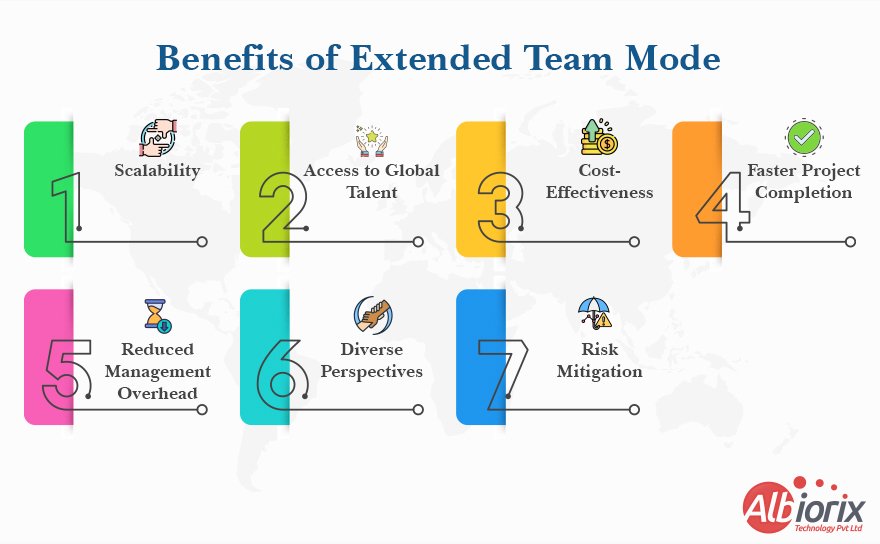
The Extended Team Model offers flexibility, access to global talent, and cost savings, making it a valuable choice for businesses looking to expand their capabilities and complete projects efficiently.
Scalability: You can easily adjust the team’s size to match your project’s changing needs, ensuring efficient resource utilization.
Access to Global Talent: This model allows you to tap into a diverse pool of talent from around the world, bringing in specialized skills and knowledge.
Cost-Effectiveness: It is often more cost-effective than maintaining a large in-house team, as you share expenses with an external partner.
Faster Project Completion: The Extended Team Model can accelerate project timelines by leveraging a larger pool of experts, resulting in quicker delivery.
Reduced Management Overhead: With the external partner handling recruitment and management, you can focus more on your core business activities.
Diverse Perspectives: Accessing talent from different backgrounds and regions can provide diverse perspectives and creative solutions to your projects.
Risk Mitigation: By working with a trusted partner, you can reduce the risks associated with project delays and quality issues, ensuring smoother project execution.
Drawbacks of the Extended Team Model and How Albiorix Overcomes Them
There are no major setbacks with the Extended Team Hiring Model, but below are a few drawbacks of the extended team model:
Coordination Challenges: Managing a distributed team spread across different locations and time zones can be complex and may lead to communication and coordination difficulties.
At Albiorix, project coordination is never an issue. We have different communication channels to coordinate with clients in their preferred time zones.
Data Security Concerns: Sharing project-related information with external team members may raise data security and confidentiality concerns.
At Albiorix, we have many top-security aspects and protocols in place to ensure our client’s data is neither stolen nor misused by any means. Moreover, we also sign NDAs with our clients to keep their data safe and protected from any threats.
Initial Set-Up Time: It may take some time to set up the collaboration and ensure all team members are aligned with your project’s goals and standards.
At Albiorix, we are a software development company with 10+ years of experience; thus, we have everything in place to get started with the project as soon as possible.
When to Consider the Extended Team Model?
The extended team model is like working with an offshore web development team, but it has some differences that might make it a better choice for certain businesses planning custom software development with complex functionalities. It’s especially good when:
You plan to grow your project, and your current team is ready to help with future updates.
You require experts who aren’t available locally.
The local market doesn’t offer affordable rates for the skills you need.
Your company is new to this project, and you don’t want to divert your in-house team’s attention.
Conclusion
Choosing the right hiring model for your project can be challenging, especially when you have multiple options like Staff Augmentation, Dedicated Team, and the Extended Team Model.
It’s natural to have questions and concerns about which business engagement model aligns best with your project’s goals, budget, and timeline.
That’s where we come in. Albiorix is a software development company with more than 10+ years of industry experience, and we are committed to helping businesses flourish online by delivering modern, robust, and scalable software solutions.
If you are not sure which hiring model is perfect for your project, then we can provide guidance and insights (FOR FREE) to help you make an informed decision.
We’ll take the time to understand your project’s unique requirements and recommend the hiring model that suits you best.
Whether you need flexibility, long-term commitment, access to specialized skills, or a combination of these, we’ll tailor a solution that fits your needs like a glove.
Reach out to us for a free consultation, and let’s discuss your project’s staffing needs. We’re here to support your success every step of the way.
To get in touch, you can either call us at (+61) 489-940-484 / +1 (912) 528-5566 or send us your contact details using the contact us form on the website. You can also share your questions/queries with us on LinkedIn and Facebook.
In the world of software development, Rapid Application Development (RAD) is a methodology that emphasises speed and flexibility in building applications.
As we move towards 2026, RAD is constantly evolving, providing more efficient ways to create software solutions that meet the changing needs of businesses and users.
This guide offers a comprehensive understanding of RAD, including its principles, best practices, and the latest tools and technologies available.
What is Rapid Application Development (RAD)?
Rapid Application Development (RAD) is a software development method that focuses on building applications quickly through short, iterative cycles.
Instead of detailed upfront planning, RAD encourages early prototyping and continuous user feedback to shape the final product.
It supports close collaboration between developers and users, allowing for flexible changes during development.
RAD is especially useful when time is limited and requirements may evolve, making it a more adaptable alternative to the traditional Waterfall approach.
RAD Key Characteristics
Iterative and Incremental: RAD divides the project into smaller iterations, each delivering a functional component of the final system for quick feedback and adjustments.
Prototyping: RAD commonly uses prototypes, simplified functional versions of the final product, to clarify requirements and provide a tangible vision for stakeholders.
User Involvement: RAD involves end-users and stakeholders throughout development, ensuring their feedback is incorporated into each iteration for a final product that meets their needs.
Rapid Development Tools: RAD utilises tools and frameworks to expedite app development, including visual environments, code generators, and pre-built components.
Flexible and Adaptive: RAD is ideal for projects with evolving or uncertain requirements, as it enables seamless adjustments and enhancements during development.
Phases of Rapid Application Development
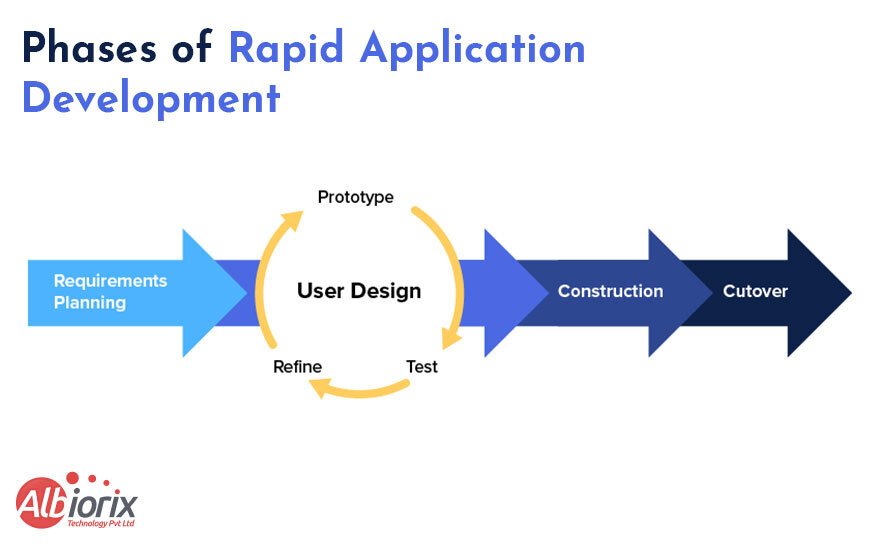
The Rapid Application Development lifecycle is a structured process your product will undergo. This application development method involves several steps, which can be broadly categorised into five major phases of rapid application development.
The five main stages of rapid application development:
Defining Project Requirements: The initial step in the rapid application development methodology involves establishing and solidifying the project’s objectives, timelines, and budget in collaboration with all stakeholders. Once you have meticulously identified and outlined each project requirement, you can seek approval from management.
Creating Prototypes: Once the project has been accurately scoped, you can kickstart the rapid web app development or mobile app development. Designers and developers will work closely with clients to create and enhance software prototypes until the final product is ready.
Gathering User Feedback: During the third phase of rapid application development, developers transform prototypes and beta systems into functional models. After collecting user feedback, making any required adjustments to the prototypes becomes essential to crafting the ultimate, optimal product.
Testing, Testing, Testing: During this stage, it is crucial for your software testers to thoroughly assess your product, ensuring that all its components function correctly and align with the client’s expectations. You must consistently incorporate customer feedback as you test and refine the code to achieve a seamless, fully functional end product.
Finalising and Cutover: During this stage, developers bring the final product to life and initiate its launch. This phase encompasses all last-minute adjustments, system switchover, data conversion, and comprehensive testing. Furthermore, user training is also conducted during this period.
Advantages:
Speed: RAD allows for faster delivery of working software, making it ideal for industries that require rapid deployment.
Customer Satisfaction: Continuous user involvement and feedback ensure that the final product meets user expectations, leading to higher customer satisfaction.
Cost-Efficiency: RAD can lower development costs and allocate resources more effectively by reducing time spent on planning and documentation.
Flexibility: RAD is suitable for dynamic or uncertain environments due to its adaptability to changing project requirements.
Risk Mitigation: Prototyping and getting early feedback can identify issues and prevent late-stage project failures.
Disadvantages:
Scope Creep: The flexibility of Rapid Application Development (RAD) can sometimes cause scope creep, which is when the project’s scope expands beyond the initial plan, potentially leading to delays and increased costs.
Not Suitable for All Projects: RAD is best for smaller, well-defined projects but not significant, complex systems.
Dependency on Skilled Teams: RAD necessitates agile development teams that adeptly respond to evolving requirements and efficaciously produce prototypes.
Documentation Challenges: Due to RAD’s focus on speed and prototyping, there may be insufficient documentation, leading to maintenance and development issues in the future.
Limited Reusability: RAD may create project-specific components that could be more easily reusable.
Principles of RAD in 2026
Rapid Application Development (RAD) principles have remained unchanged over the years, focusing on quick prototyping and development. However, it is essential to recognise that software development methodologies and practices can evolve.
In 2026, RAD principles will continue emphasising rapid prototyping and development.
User-Centered Design: Understanding the end-users needs, preferences, and pain points is crucial in RAD. User feedback should inform the development process to deliver a product that meets their expectations.
Iterative Development: RAD involves rapid iterations. Shorter cycles in 2025 allow quicker adaptations to changing requirements and technologies.
Collaboration and Communication: Effective communication and collaboration among cross-functional teams, including developers, designers, business analysts, and end-users, will continue to be essential. Clear communication in a rapidly changing technological landscape can help ensure everyone is aligned with project goals and changes.
Prototyping: Prototyping continues to be crucial in the Rapid Application Development (RAD) process. In 2025, low-code or no-code platforms and advanced prototyping tools and techniques have become more widespread, facilitating the quick production of functional prototypes for user testing and validation.
Reusable Components: In RAD, time and effort can be saved by developing and maintaining reusable components, leveraging open-source libraries, and utilising microservices. In 2025, more focus will be on these practices to accelerate development.
It’s worth noting that RAD practices are now being combined with other agile methodologies, such as Scrum or Kanban, to achieve both rapid development and structured project management.
It’s essential to remember that implementing RAD principles may differ from one organisation to another and could evolve to accommodate new technologies and industry trends.
So, staying current with the latest software development methodologies is crucial to effectively applying the most relevant principles.
Need a custom web application to achieve your business goals? Our experienced web developers can help.
In 2026, the Rapid Application Development process is still a flexible and efficient way to develop software.
It prioritises collaboration, prototyping, and iterative development to deliver a functional product quickly. Let’s take a quick look at the different phases of the RAD process in 2026.
Requirements Gathering: To start the project, we first gather and comprehend the requirements of stakeholders, which include end-users, clients, and other relevant parties. In 2025, this phase may involve advanced techniques such as user interviews, surveys, and data analysis to understand the project’s goals and needs comprehensively.
Rapid Prototyping: At RAD, creating prototypes or mockups of the software in the early stages of development is crucial. This usually involves utilising cutting-edge prototyping tools and technologies to visualise and swiftly demonstrate the software’s core functionalities. These prototypes are vital for obtaining stakeholder feedback and fine-tuning the project’s course.
Iterative Development: At RAD, development is done through an iterative approach. Teams work in brief cycles called sprints, usually lasting a few weeks. They continuously improve their work by building on previous iterations and incorporating feedback. In 2026, the process is often automated and streamlined through continuous integration and delivery (CI/CD) pipelines.
Testing and Quality Assurance: As a crucial aspect of the RAD process, testing and quality assurance play a vital role. By 2025, automated testing tools, artificial intelligence, and machine learning could improve testing procedures. To ensure superior software quality, testing is conducted consistently throughout the development cycle to detect and resolve problems as early as possible.
Deployment and Maintenance: The software deployment to production once sufficient functionality and quality are achieved. With the prevalence of cloud-based infrastructure and containerisation technologies in 2026, deployment and scaling have become more efficient. It is crucial to provide ongoing maintenance and support after deployment to address issues, implement updates, and ensure the long-term reliability and performance of the software.
In 2026, RAD continues to be a viable approach for projects that require rapid development and frequent adaptations to changing requirements due to advancements in technology and development methodologies.
Tools and Technologies for RAD in 2026
Here are some of the most popular tools and technologies for RAD in 2026:
1. Low-code and No-code Platforms: You can develop applications without coding using low-code and no-code platforms, making them more accessible to non-technical users and speeding up the development process. Popular tools include:
AppSheet
Bubble
OutSystems
Mendix
Zoho Creator
2. Modern IDEs and Frameworks: Modern IDEs and frameworks offer a comprehensive coding environment to enhance productivity and code quality. Popular tools include:
Visual Studio Code
IntelliJ IDEA
Eclipse
NetBeans
Sublime Text
3. Cloud Services and PaaS: Host your applications reliably and at scale. Popular cloud services and PaaS providers can also reduce infrastructure costs. Popular tools include:
AWS
Azure
Google Cloud Platform
IBM Cloud
Alibaba Cloud
4. DevOps and CI/CD Integration: It can automate the development and deployment process, improving release speed and quality. Popular tools include:
Jenkins
CircleCI
Travis CI
GitLab CI/CD
Azure Pipelines
5. Data analytics and AI/ML Integration: This helps you to make better decisions by providing insights into your data. They can also be used to automate tasks and improve the performance of your applications. Popular tools include:
Jenkins
CircleCI
Travis CI
GitLab CI/CD
Azure Pipelines
It is important to remember that the tools and technologies utilised in your project may differ based on your project’s needs, your team’s skills, and budget limitations. Be informed about technological advancements to make informed decisions when undertaking your RAD projects.
We create engaging custom mobile apps for all platforms and devices with the help of our experienced team of developers.
RAD projects are a great starting point as they emphasise speed and flexibility, which align well with the approach. Here’s a detailed breakdown of each best practice:
1. Clear Project Scope and Objectives
To start a RAD project, the initial step is establishing its scope and objectives. This involves clearly defining the software’s purpose and the reason for its development. The project scope should be precise and agreed upon by all stakeholders involved.
2. Cross-Functional Teams
To ensure the success of RAD projects, it is essential to have cross-functional teams with members who possess various skills such as business analysis, development, testing, and design.
This approach guarantees efficient project completion and satisfies the requirements of all parties involved.
3. Agile Project Management
Agile project management methodologies are commonly utilised in the management of RAD projects. These methods involve breaking down the project into more minor, more manageable phases, which are iterative and incremental.
This approach enables quick and easy adaptation to changes, a critical aspect in RAD projects where requirements frequently evolve.
4. Continuous Testing and Feedback
Continuous testing and feedback are crucial to ensure the success of Rapid Application Development (RAD) projects. The software must undergo testing at every stage of development, and stakeholders should provide feedback regularly.
This approach helps identify and resolve issues at an early stage and guarantees that the end product satisfies the requirements of all parties involved.
5. Version Control and Collaboration
Having version control and collaboration tools is crucial when managing projects that use RAD (Rapid Application Development). By using version control tools, you can easily keep track of any changes made to the software throughout the project.
Collaboration tools also play a vital role in helping you work effectively with your team members. These tools are essential in RAD projects, where the software constantly evolves.
To improve the success of your next RAD project, it’s crucial to comprehend the RAD methodology and select appropriate tools and technologies. Along with these practices, you can boost your chances of success.
Here are some additional tips for successful RAD projects:
Begin by creating a prototype. These working models can gather feedback from stakeholders, clarify requirements, and identify potential problems early on.
Visual modelling tools can effectively communicate requirements and designs to stakeholders, improving collaboration and reducing misunderstandings.
Automated testing can speed up software testing, freeing time for other tasks like development and design.
Consider utilising a project management tool to track progress, manage tasks, and communicate with your team, keeping the project on schedule and avoiding delays.
These tips can help you increase your chances of success on your next RAD project.
RAD in Various Industries
Rapid Application Development is commonly utilised in industries that require fast development and deployment of new applications, including healthcare, finance, e-commerce, education, and government.
Here are some specific examples of how RAD is being used in these industries:
Healthcare: RAD is used for healthcare software solutions to develop new medical devices, such as robotic surgery systems and wearable health monitors. It is also being used to create electronic health records (EHRs) and other software applications that can help improve patient care.
Finance: RAD is used for finance software solutions to develop new trading platforms, risk management tools, and customer relationship management (CRM) systems. It also automates back-office processes, such as compliance and reporting.
Retail & E-commerce: RAD is used for retail software solutions to develop new online shopping platforms, marketing campaigns, and customer support systems. It is also being used to personalise the shopping experience for each customer.
Education: RAD is used for education software solutions to develop new online courses, learning management systems, and assessment tools. It also creates virtual learning environments that can help students learn independently.
Government: RAD is used to develop new e-government applications, such as online tax filing systems and social services portals. It is also being used to improve efficiency and transparency in government operations.
We offer custom software solutions for all Industries and needs.
RAD can offer several benefits to organisations, including:
Faster time to market: RAD can help organisations develop and deploy new applications faster than traditional development methods.
Increased flexibility: RAD allows organisations to make changes to applications more efficiently, which can help them adapt to changing business needs.
Reduced costs: RAD can help organisations reduce the cost of software development by eliminating the need for extensive planning and documentation.
However, RAD also has some drawbacks, such as:
Increased risk: RAD can be more risky than traditional development methods, as there is less time for testing and debugging.
Lack of documentation: RAD can lead to a lack of documentation, making it easier to maintain and update applications.
Only suitable for some projects: RAD is only suitable for some projects, such as those requiring a lot of custom coding or strict security requirements.
Rapid Application Development can be helpful for organisations seeking to create and launch new applications promptly. However, it is crucial to thoroughly assess RAD’s pros and cons before determining if it is the appropriate method for a specific project.
Future Trends and Challenges in RAD
As we witness the rapid evolution of technology, we must prepare ourselves for the upcoming trends and challenges in RAD.
1. Automation and AI in RAD
Automation and artificial intelligence (AI) are transforming Rapid Application Development (RAD) by speeding up repetitive tasks and improving accuracy.
Automation tools handle activities like code generation, testing, and deployment, allowing developers to focus on design and user feedback.
AI enhances RAD by analyzing data patterns, predicting project risks, and suggesting improvements during development cycles. This integration helps teams quickly adapt to changes and deliver better software faster.
Using automation and AI in RAD not only boosts efficiency but also reduces errors, making the development process smoother and more reliable.
This combination supports continuous collaboration and quick iterations, ensuring the final product meets user needs effectively.
2. Security in Rapid Development
Rapid development can also lead to security vulnerabilities because RAD often involves cutting corners and skipping traditional security practices.
In the future, it will be essential to find ways to address these security challenges without sacrificing the speed and flexibility of RAD.One way to do this is to adopt a DevSecOps approach to security.
DevSecOps is a methodology that integrates security into the development process. It helps ensure that security is not an afterthought and that vulnerabilities are caught early on.
3. Scaling RAD for Enterprise-Level Applications
RAD is typically used to develop small-scale applications. However, there is a growing demand for RAD to develop enterprise-level applications. This is because enterprise-level applications are often complex and require a lot of flexibility
In the future, finding ways to scale RAD for enterprise-level applications will be necessary. It will require finding ways to automate tasks, improve communication, and manage complexity.
4. Integration with IoT and Edge Computing
The Internet of Things (IoT) and edge computing are changing how software is developed and used. Rapid Application Development (RAD) fits well with these technologies because it supports fast adjustments to changing needs.
By integrating RAD with IoT and edge computing, developers can create applications that use real-time data and local processing power effectively. This means faster responses and better performance, especially for devices connected to the internet.
Incorporating these technologies in the RAD process helps build smarter, more efficient applications that meet the demands of modern users and devices. This integration is becoming essential for future software projects.
These are just some of the future trends and challenges in RAD. As the software development landscape evolves, RAD must adapt to remain relevant.
RAD vs. Other Development Methodologies
Let’s compare RAD with other popular development methodologies: Waterfall, Agile, and DevOps.
1. RAD vs. Waterfall
There are two main approaches regarding software development: the waterfall methodology and RAD. The waterfall method is a linear approach where each action stage must be completed before moving on to the next.
However, this can make changes to the requirements easier once the project has started.
On the other hand, RAD is an iterative approach where the project is broken down into more miniature, more manageable stages, allowing for greater flexibility and faster changes.
Overall, RAD is typically quicker than the waterfall methodology.
2. RAD vs. Agile
The Agile methodology is a modern approach that emphasises continuous development and improvement. Agile projects are divided into short sprints, each dedicated to delivering a functional product.
This enables greater flexibility and collaboration between the development team and the client. RAD (Rapid Application Development) methodology shares similarities with Agile in that it is iterative.
However, RAD is generally more structured and less adaptable than Agile. RAD is also typically used for smaller projects, while Agile is more commonly used for larger projects.
3. RAD vs. DevOps
Rapid Application Development (RAD) and DevOps are both aimed at speeding up software delivery, but they work differently. RAD focuses on quick prototyping and iterative feedback to build applications rapidly. It is more of a traditional development approach.
DevOps, on the other hand, combines development, operations, and security teams to automate and streamline the entire software delivery process. This helps reduce the time to market by improving collaboration and using automation tools.
While RAD and DevOps are distinct, some RAD teams adopt DevOps tools to enhance their workflow and increase efficiency. Both approaches can complement each other depending on project needs.
Conclusion
In conclusion, if you want to stay ahead of the game, consider the potential benefits of RAD for your business. RAD is still a young technology, and many challenges must be addressed before it can be widely adopted.
However, the potential applications of RAD in various industries are vast and promising. As the technology continues to develop, we can expect to see even more innovative and groundbreaking applications for RAD in the years to come.
Here are some final thoughts and recommendations:
RAD is still a young technology, and many challenges must be addressed before it can be widely adopted. However, the potential benefits of RAD are vast, and it is worth investing in research and development to overcome these challenges.
Governments and funding agencies should support research into RAD. This will help accelerate the technology’s development and ensure it is available to everyone who needs it.
Companies should start exploring the potential applications of RAD in their industries. This could lead to new products and services that improve our lives.
Individuals should stay informed about the latest developments in RAD. This will help them understand the technology’s potential benefits and make informed decisions about its use.
I hope this helps! And you can Contact us for Rapid Application Development.
Albiorix’s focus on quality and innovation and its commitment to delivering exceptional results set them apart as the premier choice for businesses seeking rapid and effective application development solutions.
Get in touch with us for Rapid Application Development Services and empower your business in a competitive business landscape, or send us your details using the contact us form.
In the fast-paced world of mobile app development, building applications that seamlessly run on multiple platforms has become a necessity.
With the ever-growing demand for both iOS and Android apps, businesses and developers are constantly seeking efficient and cost-effective solutions.
This is where cross-platform app development frameworks come into play, offering a streamlined approach to creating robust applications that can reach a broader audience.
However, with a plethora of cross-platform app development frameworks available in the market, choosing the right one can be a daunting task. Each framework comes with its own set of features, capabilities, and trade-offs.
To help you navigate through this maze of options, we have compiled a comprehensive guide to the best cross platform app development frameworks.
Key Takeaways
Cross-platform app development has gained significant traction in recent years as businesses strive to reach a wider audience with their mobile applications.
Leveraging the power of frameworks specifically designed for cross-platform development can save time, effort, and resources.
In this blog summary, we will explore some of the best cross-platform app development frameworks available in the market today.
When it comes to cross-platform app development, choosing the right framework is crucial. React Native, Flutter, Xamarin, Ionic, and NativeScript are among the best cross-platform app development frameworks available today.
Each framework has its strengths and capabilities, catering to different development preferences and project requirements. By leveraging these frameworks, businesses can streamline their app development process, reach a broader audience, and maximize their return on investment.
What is Cross Platform App Development Framework?
A cross-platform app development framework is a software tool or platform that enables developers to create mobile applications that can run on multiple operating systems, such as iOS and Android, with a single codebase.
Instead of building separate applications for each platform using different programming languages and tools, developers can use a cross-platform framework to write the code once and deploy it on multiple platforms.
Cross platform app development frameworks provide a set of libraries, tools, and APIs that abstract the underlying platform differences, allowing developers to create consistent user interfaces and access device-specific features.
These mobile app development frameworks typically use web technologies like HTML, CSS, and JavaScript to develop mobile apps. The code is then compiled into a native executable that can run on different platforms.
Searching For the Prominent Cross-Platform Development Company?
Your search ends here. We have a team of passionate app developers having specialized skills in building robust business mobile apps.
Benefits of Cross-Platform App Development Frameworks
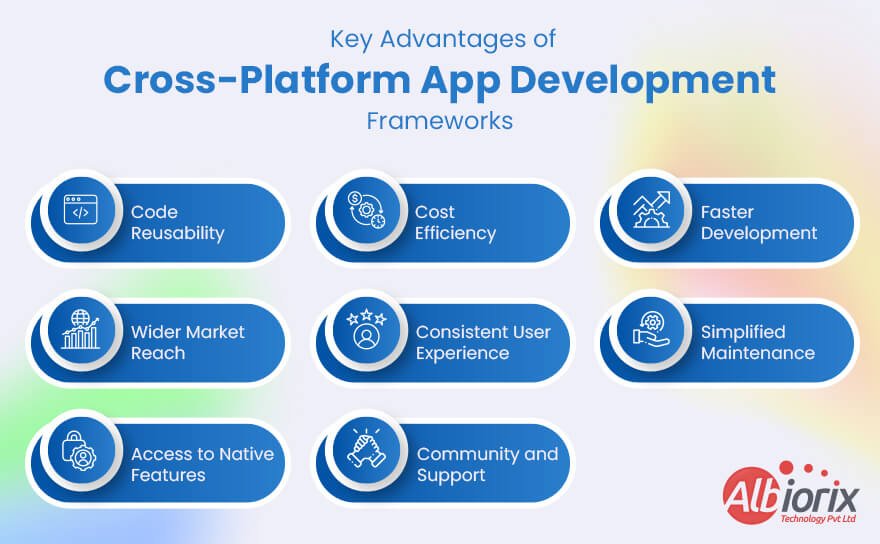
Cross-platform app development frameworks offer several benefits for developers and businesses.
Code Reusability: Cross-platform frameworks enable developers to write code once and deploy it across multiple platforms, such as iOS, Android, and web. This reduces development time and effort as the majority of the codebase can be shared across platforms, leading to faster time-to-market.
Cost Efficiency: Developing separate native apps for each platform can be expensive. Cross-platform frameworks significantly reduce costs as developers can leverage a single codebase for multiple platforms. This approach requires fewer mobile app developers, less time, and lowers maintenance expenses.
Faster Development: With cross-platform frameworks, developers can simultaneously develop apps for multiple platforms. This streamlines the mobile development process and ensures consistent functionality and user experience across different devices. It also simplifies updates and bug fixes, as changes can be applied universally.
Wider Market Reach: By targeting multiple platforms, businesses can reach a larger audience. Cross-platform apps can be deployed to both iOS and Android users, capturing a broader user base. This can be especially beneficial for startups or businesses looking to expand their customer base quickly.
Consistent User Experience: Cross-platform frameworks often provide tools and libraries that allow developers to create a unified user experience across platforms. This means that users will have a consistent look and feel, regardless of the device they are using. Maintaining a cohesive brand identity and user experience is crucial for user satisfaction and engagement.
Simplified Maintenance: Managing a single codebase is generally easier than maintaining separate codebases for each platform. Cross-platform frameworks simplify the maintenance process, as updates and bug fixes can be applied universally. This leads to faster deployment of improvements and ensures a smoother user experience.
Access to Native Features: Cross-platform frameworks typically provide access to native device features through plugins or APIs. Developers can leverage these resources to access device-specific capabilities such as camera, GPS, contacts, and push notifications. This allows them to create feature-rich apps that utilize the functionalities of each platform.
Community and Support: Popular cross-platform frameworks have vibrant and active communities. Developers can benefit from a wealth of online resources, forums, and libraries contributed by the community. This support ecosystem helps developers overcome challenges, find solutions, and stay updated with the latest mobile app development trends and best practices.
However, the choice of any particular cross-platform app development framework should be based on the specific requirements and constraints of the project.
7 Best Cross-Platform App Development Frameworks
As per the recent survey by Statista, Flutter is the most popular cross-platform mobile framework used by global developers, according to a 2022 developer survey.
Let’s explore some of the best cross-platform app development frameworks that will help you design and build robust mobile apps for your business needs.
1. Ionic
Ionic is an open-source framework for building cross-platform mobile applications using web programming languages such as HTML, CSS, and JavaScript.
It provides a set of tools and UI components that allow developers to create mobile apps that can run on multiple platforms, including iOS, Android, and the web, using a single codebase.
Here are some key aspects of Ionic:
Hybrid App Development: Ionic uses a hybrid app development approach, where the core of the application is built using web technologies and then wrapped in a native container. By comparing Native app with Hybrid app, it allows developers to reuse their existing web development skills and code to create mobile apps that can be deployed on various platforms.
UI Components: Ionic comes with a rich set of pre-designed UI components that follow the native look and feel of each platform. These components include buttons, lists, forms, navigation menus, modals, tabs, and more. Developers can easily customize the appearance and behavior of these components to match their app’s design requirements.
Cordova Integration: Ionic integrates with Apache Cordova, a platform that provides access to native device features using JavaScript APIs. Cordova allows developers to access device capabilities such as the camera, contacts, geolocation, file system, and more. Ionic provides a simplified and unified interface to interact with Cordova plugins, making it easier to add native functionality to your app.
Angular Integration: Ionic is built on top of Angular, a popular JavaScript framework for building web applications. Angular provides a powerful and structured way to develop complex web applications, and Ionic leverages its capabilities to create mobile apps with a component-based architecture, data binding, dependency injection, and other Angular features. However, Ionic also supports other frameworks like React and Vue.js.
Themability and Styling: Ionic apps can be easily customized and styled to match the desired look and feel. Ionic provides a theming system that allows Ionic app developers to define color schemes, typography, and other visual aspects of their app. Additionally, CSS classes can be used to style individual components, or developers can use their own custom CSS to achieve the desired styling.
App Deployment: Ionic apps can be deployed as native apps through app stores like the Apple App Store and Google Play Store. The Ionic CLI (Command Line Interface) provides commands to build, package, and deploy the app to these platforms. Additionally, Ionic apps can also be deployed as web apps, allowing users to access the app through a web browser on any device.
Community and Ecosystem: Ionic has a large and active community of developers who contribute to its development, share knowledge, and provide support. The Ionic community has created a wide range of plugins, themes, and starter templates that can be used to enhance and accelerate the app development process.
Ionic is a powerful framework for building cross-platform mobile applications using web technologies.
It allows developers to leverage their existing skills and codebase to create apps that can run on multiple platforms, while providing a rich set of UI components, native device access, theming options, and an active community for support and resources.
Build Highly-Scalable Mobile App For Your Business With Ionic.
Albiorix is a one-stop solution for designing and building mobile applications using the Ionic framework for all your business needs.
Flutter is an open-source UI (User Interface) software development kit (SDK) developed by Google. It allows developers to create high-quality, native-looking applications for mobile, web, and desktop platforms from a single codebase.
Flutter was first introduced in 2015 and has gained significant popularity among developers due to its simplicity, performance, and fast development cycle.
Key Features of Flutter:
Single Codebase: Flutter uses a single codebase to develop applications for multiple platforms, including Android, iOS, web, and desktop. This significantly reduces development time and effort, as developers don’t need to write separate code for each platform.
Dart Programming Language: Flutter uses the Dart programming language, which is also developed by Google. Dart is an object-oriented language that is easy to learn and offers features like just-in-time (JIT) compilation and ahead-of-time (AOT) compilation. It provides a modern syntax, garbage collection, and a large set of libraries, making it well-suited for building mobile apps.
Widget-Based UI: Flutter uses a declarative approach to building user interfaces. It has a rich set of customizable UI components called widgets, which are the building blocks of the user interface. Widgets can be arranged and combined to create complex UI layouts. Flutter provides a wide range of pre-built widgets for common use cases, as well as the ability to create custom widgets.
Hot Reload: One of the most powerful features of Flutter app development is its hot reload capability. It allows developers to see the changes they make in the code immediately reflected in the app, without having to restart or rebuild the entire application. This significantly speeds up the development process and enables rapid iteration and experimentation.
High Performance: Flutter delivers high-performance applications with native-like speed and smoothness. It achieves this by using its own rendering engine called Skia, which provides a consistent UI experience across platforms. Flutter apps are compiled directly to native machine code, eliminating the need for a JavaScript bridge, resulting in improved performance and reduced startup times.
Rich Ecosystem and Community: Flutter has a vibrant and active community of developers, which contributes to its ecosystem of packages and plugins. There is a wide range of third-party libraries and tools available to enhance the capabilities of Flutter applications, making it easier to integrate with other services, handle state management, manage databases, and more.
Platform Integration: Flutter provides seamless integration with platform-specific features and APIs. It allows developers to access device features such as camera, geolocation, sensors, and storage through platform channels. Additionally, Flutter offers a set of Material Design and Cupertino (iOS-style) widgets that match the native look and feel of each platform.
Testing and Debugging Tools: Flutter provides a comprehensive set of testing and debugging tools. It includes a rich set of unit testing and integration testing frameworks, as well as tools for inspecting and debugging the UI layout, performance profiling, and logging. These tools help developers ensure the quality and reliability of their applications.
Versatile Deployment: Flutter supports the deployment of applications to various platforms. It allows developers to package their apps into standalone executables for Android, iOS, web, and desktop platforms. Flutter also supports continuous integration and delivery (CI/CD) workflows, enabling developers to automate the building, testing, and deployment of their applications.
Growing Popularity: Flutter has gained significant traction in the developer community due to its advantages and ease of use. It is backed by Google, which provides strong support, regular updates, and an active developer community. Many companies and startups have adopted Flutter for their app development, making it a popular choice for building cross-platform applications.
In summary, Flutter is a powerful SDK that enables developers to create high-performance, cross-platform applications with a single codebase.
Create a Robust and Responsive Mobile App With Flutter
Albiorix is a one-stop solution for mobile app development as we have a team of Flutter experts to provide you with cost-effective solutions.
React Native is an open-source framework developed by Facebook for building mobile applications. It allows developers to use JavaScript and React, a popular JavaScript library for building user interfaces, to create native-like apps for both iOS and Android platforms.
The key concept behind React Native is that it enables developers to write code once and then deploy it on multiple platforms, rather than having to write separate code bases for each platform. It achieves this by using a combination of JavaScript and native components.
Key Features of React Native
Cross-platform development: React Native allows developers to build applications for both iOS and Android platforms using a single codebase. This reduces development time and effort, as there is no need to maintain separate codebases for each platform.
Native-like performance: React Native uses native components and APIs, which enables apps to achieve high performance and responsiveness. It leverages the device’s GPU (Graphics Processing Unit) for rendering, resulting in smooth animations and a native-like user experience.
Hot-reloading: React Native supports hot-reloading, which means developers can see the changes they make in real-time while the app is running. This feature significantly speeds up the development process by eliminating the need for full app recompilation after every code change.
Code reusability: With React Native best practices, developers can reuse a significant portion of their code across different platforms. This includes components, business logic, and utility functions, leading to faster development cycles and easier code maintenance.
Third-party library ecosystem: React Native has a thriving ecosystem of third-party libraries and packages. These libraries provide additional functionality and help developers address common requirements such as navigation, data storage, authentication, and more. This vast ecosystem allows developers to leverage pre-built solutions and speed up development.
Live updates: React Native enables developers to push updates directly to users’ devices without going through the app store update process. This feature is particularly useful for fixing bugs or introducing small changes without requiring users to download a new version of the app.
Developer community and support: React Native has a large and active community of developers. This community provides support, shares knowledge, and contributes to the improvement of the framework. The availability of resources, tutorials, and community-driven tools makes it easier for developers to learn and work with React Native.
4. NativeScript
NativeScript is an open-source framework that allows developers to build native mobile applications using JavaScript or TypeScript.
It enables developers to write code once and deploy it on multiple platforms, including iOS and Android, without sacrificing performance or user experience.
With NativeScript, developers can create mobile apps using familiar web technologies like HTML, CSS, and JavaScript, leveraging their existing skills.
NativeScript provides a bridge between the JavaScript code and the native APIs of the underlying platform, allowing access to device features and native UI elements.
Key features of NativeScript include:
Native Performance: NativeScript applications are compiled into native code, providing performance similar to that of applications developed using platform-specific languages like Java or Swift. This ensures fast and responsive user experiences.
Cross-Platform Development: With NativeScript, developers can write code once and deploy it on multiple platforms, including iOS and Android. This saves time and effort by eliminating the need to develop separate codebases for each platform.
Access to Native APIs: NativeScript provides direct access to native APIs, allowing developers to utilize platform-specific features and capabilities. This includes accessing device hardware, sensors, camera, contacts, geolocation, and more.
Native UI Components: NativeScript offers a rich set of UI components and layout containers that are mapped directly to their native counterparts. This ensures that the user interface of the application looks and feels native on each platform.
Support for JavaScript and TypeScript: NativeScript supports both JavaScript and TypeScript development as programming languages, giving developers flexibility in their choice of language. TypeScript provides static typing and enhanced tooling, making it easier to build scalable applications.
Integration with Popular JavaScript Frameworks: NativeScript integrates seamlessly with popular JavaScript frameworks like Angular, Vue.js, and React. This allows developers to leverage the power and ecosystem of these frameworks while building native mobile apps.
Hot Module Replacement: NativeScript enables developers to make changes to the code and see the results immediately, without the need to rebuild the entire application. This speeds up the development and testing process.
Extensibility and Plugin Ecosystem: NativeScript offers a plugin ecosystem that allows developers to extend the functionality of their applications with ready-made plugins. These plugins cover a wide range of features, including analytics, push notifications, social sharing, and more.
Open-Source and Community-Driven: NativeScript is an open-source framework backed by a vibrant community. The community actively contributes to the framework’s development, provides support, and shares code samples and best practices.
NativeScript simplifies the development process by providing a unified approach to building native mobile apps, reduces code duplication, and allows for a faster development cycle across multiple platforms.
5. Xamarin
Xamarin is a platform that allows developers to build cross-platform mobile applications using the C# programming language. It was acquired by Microsoft in 2016 and is now part of the .NET framework.
With Xamarin, developers can write a single codebase in C# and share it across multiple platforms, including iOS, Android, and Windows. This approach saves time and effort compared to developing separate applications for each platform.
Xamarin offers two main approaches for building applications. The first is Xamarin.Forms, which provides a UI toolkit that enables developers to create a single user interface that can be shared across platforms.
The second approach is Xamarin.iOS and Xamarin.Android, which allow developers to build native user interfaces using the respective platform-specific tools and APIs.
Some of the key features of Xamarin include:
Cross-platform development: Xamarin allows developers to write code in C# and share it across multiple platforms, including iOS, Android, and Windows. This means that a single codebase can be used to build applications for different platforms, saving time and effort.
Native-like performance: Xamarin enables developers to access and utilize the full power of the underlying platform by providing bindings to the native APIs. This allows developers to create high-performance applications that have a native look and feel.
Native user interfaces: Xamarin provides two approaches for building user interfaces. Xamarin.Forms allows developers to create a single UI codebase that can be shared across platforms, while Xamarin.iOS and Xamarin.Android allow developers to build platform-specific, native user interfaces using the respective tools and APIs.
Access to platform-specific APIs: Xamarin provides access to platform-specific APIs, enabling developers to leverage the unique features and capabilities of each platform. This allows for deep integration with device functionality, such as camera, GPS, and sensors.
Code sharing and reuse: Xamarin promotes code sharing and reuse through its shared codebase approach. Developers can share business logic, data access, and networking code across platforms, reducing development time and effort.
Integration with existing code: Xamarin seamlessly integrates with existing code written in C# and .NET, making it easier to migrate and extend existing applications to mobile platforms. It also supports popular development environments like Visual Studio, enabling a familiar and productive development experience.
Robust ecosystem: Xamarin has a rich ecosystem of libraries, plugins, and tools, including NuGet package manager, Xamarin.Forms controls, and Xamarin Component Store. These resources provide additional functionality and help streamline the development process.
Xamarin Test Cloud: Xamarin Test Cloud is a cloud-based testing platform that allows developers to test their applications on hundreds of real devices. This helps ensure the quality and performance of the app across different devices and platforms.
Xamarin provides access to the full functionality of the underlying platforms, allowing developers to create high-performance, native-like applications.
It also provides a rich ecosystem of libraries, plugins, and tools, making it easier to integrate with existing code and third-party services.
Xamarin is a powerful platform for developing cross-platform mobile applications, enabling developers to leverage their existing skills in C# and .NET to build native-like apps for multiple platforms.
Run Your Enterprise-Grade Apps Seamlessly on iOS and Android Platforms.
Our top-notch and skilled developers are always ready to leverage full-platform functionality and amazing native controls provided by the Xamarin framework.
PhoneGap, now known as Apache Cordova, is an open-source mobile application development framework. It allows developers to create mobile apps using standard web technologies such as HTML, CSS, and JavaScript.
PhoneGap bridges the gap between web development and native mobile app development by providing a platform for building apps that can run on multiple mobile operating systems, including iOS, Android, and Windows.
With PhoneGap, developers can write their app’s code using web technologies and then package it as a native app for various platforms.
PhoneGap uses a WebView component to render the app’s user interface, which enables it to access device features and capabilities using JavaScript APIs.
This approach simplifies cross-platform development, as developers can reuse a significant portion of their codebase across different platforms.
Here are some of the top features of PhoneGap (Apache Cordova):
Cross-platform Development: PhoneGap allows developers to write their app’s code using web technologies (HTML, CSS, JavaScript) and deploy it across multiple platforms, including iOS, Android, Windows, and more. This saves time and effort by reducing the need for platform-specific development.
Access to Native Features: PhoneGap provides a wide range of plugins that enable access to native device features and capabilities. Developers can utilize these plugins to incorporate functionalities such as camera, contacts, geolocation, file system, accelerometer, and more into their applications.
Web Standards: PhoneGap is based on web standards, making it easy for developers familiar with web development technologies to get started. Existing web skills can be leveraged to build mobile apps without the need to learn platform-specific languages.
Simplified Development Process: PhoneGap streamlines the mobile app development process by allowing developers to use a single codebase. This codebase can be shared across different platforms, reducing the need to write separate code for each platform.
Developer Community and Ecosystem: PhoneGap has a vibrant and active community of developers. This community provides support, resources, and plugins that extend the capabilities of PhoneGap. The availability of a robust ecosystem helps developers overcome challenges and find solutions more efficiently.
Debugging and Testing: PhoneGap offers tools and frameworks for debugging and testing mobile applications. Developers can use the integrated debugging tools and simulators/emulators to test their apps during development, ensuring better app performance and stability.
Integration with Third-Party Tools: PhoneGap can be easily integrated with various third-party tools, libraries, and frameworks. This allows developers to leverage additional functionalities and extend the capabilities of their apps.
Offline Functionality: PhoneGap enables the development of offline-capable applications. By leveraging local data storage capabilities, developers can create apps that can function without an internet connection and sync data when a connection is available.
Native-Like User Interface: PhoneGap applications can be designed to offer a native-like user experience. By utilizing CSS frameworks and design techniques, developers can create visually appealing and responsive user interfaces.
Continuous Updates and Improvements: PhoneGap is an open-source framework actively maintained by a community of contributors. Regular updates and improvements are made to enhance its capabilities, fix bugs, and support the latest mobile platforms and technologies.
PhoneGap provides a set of pre-built plugins that allow developers to access native device functionality, such as the camera, contacts, accelerometer, and more.
Additionally, developers can create custom plugins to extend the framework’s capabilities and interact with native APIs.
7. Kotlin
Kotlin is a statically typed programming language that runs on the Java Virtual Machine (JVM) and can also be compiled to JavaScript or native code.
It was developed by JetBrains and first announced in 2011, with its official stable release in 2016 Kotlin is designed to be concise, expressive, and interoperable with existing Java code, making it a popular choice for Android app development.
One of the main goals of Kotlin is to address common pain points of Java and improve developer productivity.
It achieves this through features such as null safety, type inference, smart casts, extension functions, coroutines for asynchronous programming, and more. Kotlin also introduces functional programming concepts, including lambda expressions and higher-order functions.
Top features of Kotlin
Concise Syntax: Kotlin’s syntax is designed to be more concise and expressive than Java. It reduces boilerplate code and eliminates many common sources of errors, making code more readable and maintainable.
Null Safety: Kotlin’s type system includes built-in null safety. It helps prevent null pointer exceptions by distinguishing nullable and non-nullable types, reducing the risk of null-related bugs.
Interoperability: Kotlin is fully interoperable with Java, allowing developers to call Java code from Kotlin and vice versa. This means Kotlin can be gradually introduced into existing Java projects without requiring a full rewrite.
Extension Functions: Kotlin allows developers to extend existing classes with new functions without modifying their source code. This feature enables adding functionality to classes from external libraries or APIs.
Data Classes: Kotlin provides data classes that automatically generate commonly used methods like equals(), hashCode(), and toString(). These classes are particularly useful for modeling data and reducing boilerplate code.
Higher-Order Functions: Kotlin supports higher-order functions, which means functions can be passed as parameters or returned from other functions. This allows developers to write more functional and expressive code.
Coroutines: Kotlin introduces coroutines, which are lightweight threads for asynchronous programming. Coroutines simplify asynchronous code and make it easier to write and understand asynchronous tasks, such as network requests or database operations.
Smart Casts: Kotlin’s type system includes smart casts that automatically cast objects to more specific types based on certain conditions. This eliminates the need for explicit type checks and type casting in many cases, reducing code verbosity.
Ranges and Progressions: Kotlin provides a concise syntax for defining ranges of values and iterating over them. This feature simplifies common tasks like looping and iterating over collections.
String Templates: Kotlin supports string templates, allowing variables and expressions to be directly embedded in strings. This feature enhances string manipulation and makes it more readable.
Kotlin for Android development empowers developers to write cleaner and more readable code with fewer boilerplate elements and reduced null pointer exceptions.
It offers seamless integration with Java, allowing developers to interoperate between the two languages within the same project. This makes it easy to adopt Kotlin gradually in existing Java codebases.
Conclusion
In conclusion, when it comes to cross-platform app development frameworks, several options have proven to be reliable, efficient, and developer-friendly.
After exploring some of the best frameworks available, it’s clear that each one has its strengths and weaknesses, and the choice ultimately depends on the specific requirements and preferences of the project at hand.
Still, confused with which is the best cross-platform app development framework for your business needs? Feel free to contact Albiorix for your optimum business IT solutions.
Front-end frameworks are essential for shaping user experience and driving the success of modern mobile and web applications.
With the demand for fast, interactive, and visually stunning interfaces, choosing the correct framework is significant for developers and businesses.
In 2023, the web development ecosystem offers powerful frameworks that empower developers to create cutting-edge digital experiences.
These frameworks provide a solid foundation for responsive designs, efficient data management, and seamless routing.
In this blog post, we’ll explore the top frontend frameworks of 2023, discussing key features, benefits, and use cases. We will highlight frameworks offering distinct advantages, from well-established leaders to up-and-coming players.
Explore the best frontend frameworks for web development in 2023, unlocking the power to create stunning, responsive, and immersive user experiences that captivate visitors and drive engagement.
Key Takeaways
This blog covers frontend frameworks like React, Angular, Vuejs, jQuery, Emberjs, Backbonejs, Semantic-UI, Foundation, Svelte, and Preact are all included in our list.
We provide a brief overview of each frontend framework and its advantages and disadvantages to help you make the best decision for your business needs.
You’ll gain an understanding of roles, components, frontend development’s state, and how these frameworks can help achieve these goals.
The popularity of a frontend framework depends on factors such as community support, ease of use, and performance. Developers should consider these factors when choosing a framework for their project.
What is a Front-End Framework?
A front-end framework is a set of tools and pre-written code that helps developers build user interfaces quickly and efficiently.
It combines essential technologies like HTML, CSS, and JavaScript to create interactive and visually appealing websites and applications.
For a software development company, using a front-end framework means speeding up the web development process by reusing ready-made components such as buttons, forms, and navigation menus.
These frameworks ensure that websites look good and work well on different devices, thanks to their focus on responsive design.
By relying on a front-end framework, developers can avoid repetitive tasks and focus more on customizing the app’s features.
It also solves common challenges like form validation and client-side routing, making the development smoother and more reliable.
The Role of Front-End Frameworks in Web Development
Frontend frameworks play a crucial role in web development by providing developers a structured and efficient way to build user interfaces for websites and applications.
These frameworks are collections of pre-written code, libraries, and tools that facilitate the creation of interactive and responsive UI components.
Here are some key roles and benefits of front-end frameworks in web development
Efficient Development: Front-end frameworks offer web developers a wide range of reusable UI components, templates, and layout systems that simplify the website and application development process. By providing a solid code foundation and essential functionalities, they eliminate the requirement for redundant code, leading to accelerated and streamlined development.
Consistency and Maintainability: Frameworks ensure code consistency by implementing conventions and best practices. They offer guidance on code structure, separation of concerns, and organisation of files and folders. This consistency simplifies collaboration among developers and facilitates long-term code maintenance.
Responsive and Mobile-Friendly Design: With the widespread use of mobile devices, responsive web design has become crucial. Front-end frameworks include responsive design features and tools for optimising layouts on mobile devices. They enable web app developers to create websites that adapt to various screen sizes and devices.
Cross-Browser Compatibility: Front-end frameworks assist in resolving browser compatibility concerns by offering abstractions and polyfills. They manage browser-specific quirks and discrepancies, enabling web developers to write code that maintains consistent functionality across various browsers.
Performance Optimization: Numerous front-end frameworks incorporate performance optimisation techniques like lazy loading, code splitting, and caching tools. These capabilities effectively decrease page load times and elevate the overall user experience.
Community and Ecosystem: Front-end frameworks like React, Angular, and Vue.js have active communities that provide developers with abundant resources. These resources include comprehensive documentation, tutorials, plugins, and libraries, enabling developers to tackle challenges, acquire skills, and speed up their workflow.
Integration with Backend Services: Front-end frameworks integrate with back-end services and APIs, providing features for data fetching, state management, and form validation. It empowers developers to create dynamic and interactive web applications that interact with server-side functionalities.
Code Reusability: Front-end frameworks promote code reusability through component-based architectures. Developers can create modular UI components that are easily reused across different sections of web applications, improving maintainability and development efficiency while minimising code duplication.
Every framework has its strengths, features, and learning curves. When choosing a frontend framework for complex development projects, developers should consider project requirements, team expertise, and community support.
Search For Frontend Development Services Ends Here
Our expertise allows us to develop flawless software solutions utilizing various frameworks, including React, Angular, Vue.js, and more.
Frontend components are modular building blocks used in web development to create UIs. They are implemented with HTML, CSS, and JavaScript, encapsulating specific functionality and visual presentation.
Front-end components enhance code reusability, maintainability, and scalability by dividing the user interface into smaller parts.
They can be easily reused across pages and web applications, enabling developers to build intricate and dynamic user interfaces.
Here are some commonly used front-end components
Buttons: Buttons work as interactive elements that allow users to initiate actions by clicking or tapping. They come in various styles, sizes, and states, including disabled and active.
Forms: Form components capture user input through input fields, checkboxes, radio buttons, and dropdowns, with built-in validation.
Navigation: Navigation components like menus, navigation bars, breadcrumbs, and tabs facilitate seamless navigation across different sections or pages of a website or app.
Cards: Cards are flexible containers that elegantly display various types of content, such as articles, products, or user profiles.
Modals: Modals provide a seamless interruption to showcase information or prompt user actions. They are commonly presented as pop-up windows or dialogue boxes.
Sliders: Sliders let users choose values within a range by dragging a handle. They are commonly used in settings, volume controls, and filters.
Tabs: Tab components help organise content into distinct sections, displaying only one area simultaneously. Users can effortlessly switch between tabs to access different sets of information.
Tooltips: Tooltips provide contextual information through small pop-ups when users interact with elements.
Alerts: Alert components display important messages or notifications to users and can be customised as success messages, warnings, errors, or information notices.
Carousels: Carousels allow users to navigate through content items, like images or testimonials, in a slideshow format. They include navigation controls and autoplay.
These examples represent only a fraction of the vast array of front-end components, with numerous others tailored to meet specific project requirements.
Top frontend frameworks and libraries like React, Angular, and Vue.js offer extensive pre-built components, empowering developers to accelerate the UI development process.
The State of Best Front-End Frameworks
The graph below illustrates the popularity of the best frontend frameworks. Our team has accurately assessed the popularity of different frontend frameworks by analysing usage percentages.
React, Vue.js, and Angular has emerged as the industry’s top frontend frameworks. These frameworks garnered substantial attention and adoption within the web developer community from 2016 to 2017.
Acknowledging that the frontend development landscape extends beyond these three frameworks is essential. Other contenders, such as Svelte, Preact, and Ember, have also gained considerable traction and caught the attention of developers worldwide.
Svelte, in particular, experienced a remarkable surge in popularity during 2019-20 and has consistently grown, establishing itself as a noteworthy player in the field. Preact witnessed a notable increase in popularity from 2018-19 but gradually declined after 2020.
Nonetheless, Preact has significantly impacted frontend development and has made a lasting impression on the community.
Ember was once a significant player in the frontend development industry but has faced challenges maintaining its position.
Despite a decline, it remains one of the six best frontend frameworks thanks to its unique features and a dedicated community of developers and users who appreciate it.
The frontend development industry constantly evolves as different frameworks interact and shape it. While React, Vue.js, and Angular are still dominant, Svelte, Preact, and Ember have significantly impacted the industry.
It will be interesting to see how these frameworks continue to adapt and innovate to meet developers’ changing needs and preferences worldwide as the industry progresses.
Best Front-End Frameworks List
When it comes to front-end frameworks, some names stand out based on developer feedback and usage trends. According to a recent State of JavaScript report, React leads the way with 64% favorable ratings, making it the most popular choice among developers
It also has the highest retention rate, with 57% of users planning to continue using it.
Close behind are Svelte and Vue.js, with 62% and 53% positive ratings respectively. Developers appreciate how these frameworks help create fast, interactive web applications with less effort.
Looking ahead, many developers are interested in learning newer frameworks like Solid, Qwik, and Svelte, which show growing popularity.
On the flip side, some frameworks like Ember, Alpine.js, and Preact have lower engagement, indicating they are less favored by the developer community.
This data helps developers and companies choose the right tools based on community support and future potential.
Additionally, the thickness of the bars corresponds to the number of respondents familiar with each technology.
Now, let’s delve into a comprehensive analysis of the best frontend frameworks:
React
React, the brainchild of Facebook, is a powerful open-source JavaScript library renowned for its ability to construct captivating UIs.
Operating on a component-based architecture, React framework enables developers to break down the user interface into reusable building blocks known as components.
Leveraging the expertise of a Virtual Document Object Model (DOM), React efficiently updates and renders these components, ensuring optimal performance and seamless user experiences.
Advantages of React
One of the critical advantages of React is the ability to easily collaborate and reuse components throughout different sections of an application.
React ensures consistent and smooth performance by utilising a virtual DOM (Document Object Model), delivering an optimised user experience.
For those seeking an alternative to writing components using React hooks, it provides the convenience of building components without the need for classes, making the learning process of React more accessible.
Moreover, React dev tools offer advanced functionality, enhancing the development experience with impressive capabilities.
Disadvantages of React
The frequent and numerous updates within the framework pose challenges in creating comprehensive documentation, affecting beginners’ learning curve.
Developers often require assistance in grasping the intricacies of JSX when they embark on their journey with the framework.
It primarily focuses on providing solutions for frontend development.
When to use React
React is a powerful tool for constructing user interfaces, particularly in the context of developing single-page applications. It stands out as the most reliable frontend framework for creating interactive interfaces efficiently, thanks to its component reusability.
You can significantly save time by utilising React while building a compelling and engaging user experience.
When not to use React
If you need to gain practical knowledge in JavaScript, choosing React as your go-to option is not advisable. Additionally, inexperienced developers might find the learning curve of JSX to be challenging.
Vue.js is a widely-used Javascript framework for creating UIs and single-page applications. It offers progressive adoption, allowing developers to use it in existing projects.
Vue.js focuses on the view layer, providing flexibility and efficiency in building dynamic web pages.
With a robust reactivity system, the UI updates automatically as the application state changes. Vue.js boasts a rich ecosystem of libraries and plugins, catering to various needs such as routing and state management.
Its simplicity, ease of learning, and extensive documentation contribute to its popularity among developers. Vue.js is suitable for projects of all sizes, from small-scale to enterprise applications.
Advantages of Vue.js
Vue.js provides comprehensive and well-documented resources, enabling developers to access extensive information and guidance.
With its straightforward syntax, programmers familiar with JavaScript can swiftly get started with Vue.js.
Vue.js offers flexibility in designing the application structure, allowing developers to tailor it to their needs and preferences.
Furthermore, Vue.js includes support for TypeScript, providing an additional layer of type safety and enhancing the development experience.
Disadvantages of Vue.js
Components may need more stability at times, posing potential challenges for developers.
The community surrounding Vue.js, while growing, is relatively minor compared to other frameworks.
A potential language barrier can arise when working with plugins and components, as a significant portion is primarily documented and written in Chinese.
When to use
Vue.js is an ideal choice for creating flexible design structures. It empowers developers to craft customised solutions from the ground up, making it equally effective for small-scale projects and large-scale endeavours.
When not to use:
If you rely on a solid support community to address complex issues, alternative options better suit your needs than Vue.js.
Additionally, Vue.js may not be the most suitable choice for applications that demand durable components, as the framework has exhibited challenges in maintaining component stability.
jQuery is a popular JavaScript library used for HTML document manipulation and web development. Since its release in 2006, it has helped developers simplify tasks like changing page content, handling events, and creating animations.
One of jQuery’s strengths is its easy-to-understand syntax, which makes coding faster and less complex. It also helps manage AJAX requests smoothly, allowing parts of a webpage to update without reloading.
While newer frameworks have gained popularity, jQuery remains useful, especially for maintaining older websites and smaller projects. Its reliability and broad browser support make it a trusted tool in many software development companies.
Advantages of jQuery
The DOM provides flexibility for adding or removing elements with ease.
Sending HTTP requests becomes more straightforward and more streamlined.
It enables the creation and management of dynamic content effortlessly.
HTTP requests are simplified, enhancing the development process.
Disadvantages of jQuery
The operating speed of jQuery is relatively slower in comparison to other alternatives.
Numerous advanced alternatives to jQuery offer enhanced capabilities.
The Document Object Model (DOM) APIs need updates and improvements.
When to use
jQuery is a popular choice for developing JavaScript applications, particularly for desktop environments. The framework excels at keeping the code concise and straightforward, making it easier to manage.
Its capabilities extend to event handling and performing smooth animations.
When not to use
When building a large-scale application, using jQuery becomes impractical as it adds excessive JavaScript code, resulting in a heavier application.
The framework cannot rival modern frameworks that offer advanced JavaScript capabilities, reduced coding requirements, and component reusability.
Angular is a popular open-source web framework developed and maintained by Google. It helps developers create dynamic single-page applications (SPAs) using TypeScript, HTML, and CSS.
One of the key advantages of the Angular framework is its adherence to the Model-View-Controller (MVC) pattern, which organizes code efficiently and makes applications easier to maintain.
Angular also offers powerful tools like two-way data binding, dependency injection, and a modular architecture. These features enable developers to build scalable, high-performance applications quickly and with confidence.
Because of its strong community support and Google’s backing, Angular is trusted by many developers worldwide for reliable and smooth web development.
Advantages of Angular
It incorporates built-in functionality to ensure seamless synchronisation between the model and the view, facilitating bidirectional updates.
Offering essential features like two-way data binding out of the box reduces the amount of code required.
The framework promotes component decoupling from dependencies by defining them as external elements.
Components can be easily managed and reused using dependency injection.
A vast and supportive community exists, providing ample opportunities for learning and obtaining assistance.
Disadvantages of Angular:
Angular offers a comprehensive and dynamic solution, allowing you to approach tasks in multiple ways, albeit with a steeper learning curve.
Fortunately, the extensive Angular community provides ample support and resources for newcomers to grasp the concepts and technology.
Complexity and size can sometimes affect the performance of dynamic applications. However, these challenges can be mitigated effectively by employing code optimisation techniques and following Angular’s best practices.
When to use Angular
Angular significantly enhances the performance of browser-based applications’ performance by efficiently implementing two-way data binding, ensuring quick content updates.
It is the optimal choice for developing enterprise-grade and dynamic web applications.
When not to use Angular
Angular is a comprehensive frontend framework offering a complete solution for building applications. If you are working on projects with narrower scopes, it is beneficial to seek assistance in utilising the abundant resources of Angular.
Alternatively, opting for a smaller framework with simpler syntax and fewer complexities can be more suitable for smaller teams and projects.
Are You in Search of High-Quality Angular Development Services?
Our company boasts a talented team of developers specialising in providing customer-centric development services for various business verticals.
Ember.js is a JavaScript framework introduced in 2011 that helps build ambitious web and mobile applications.
It uses a component-based structure and supports two-way data binding, similar to Angular, making it easier to sync data between the user interface and the application.
While Ember.js offers a powerful and efficient architecture, it has a steeper learning curve due to its strict conventions.
The developer community is smaller compared to other frameworks, but those who invest time in learning Ember.js often find it a reliable tool for complex projects.
Advantages of Ember.js
Ember.js is a framework with a well-organized architecture that makes development more accessible and efficient.
It is known for its exceptional performance, which results in fast and responsive web applications.
Ember.js also simplifies keeping the model and view in sync with built-in two-way data binding.
It offers comprehensive and reliable documentation that helps developers effectively utilise its features.
Disadvantages of Ember.js
It has a smaller and less popular community compared to other frameworks.
The syntax of Ember.js can be complex, and updates may not occur as frequently as desired.
Learning Ember.js can be difficult due to its steep learning curve.
Due to its robust nature, the framework may introduce unnecessary overhead for small-scale applications.
When to use
Ember.js is an ideal framework for building modern applications like LinkedIn, offering a rich user interface and excellent routing capabilities.
It provides a complete front-end solution for large-scale projects, with ready configurations, robust data binding, and customisable properties to efficiently render pages.
When not to use
Ember.js may not be suitable for small teams due to its complexity and higher initial cost. Better options for simple Ajax functionalities and straightforward user interfaces may also exist.
Backbone.js
Backbone.js is an accessible framework for the rapid development of single-page applications. It follows the MVC architecture, with the View as the component logic implementation.
Compatible with engines like underscore.js and Moustache, Backbone.js can be enhanced with tools like Thorax, Marionette, Chaplin, Handlebars, and more.It simplifies handling projects with different user types using arrays to differentiate models.
Backbone.js is a versatile choice for frontend and backend development, providing seamless REST API synchronisation.
Advantages of Backbone.js
Backbone.js stands out as a high-speed JavaScript framework.
With its user-friendly nature, Backbone.js is easily approachable for developers.
The lightweight nature of Backbone.js makes it an excellent choice for efficient web development.
Disadvantages of Backbone.js:
The framework offers essential tools for creating the application structure, although it needs to provide a ready-made design out of the box.
However, it does require writing boilerplate code to enable communication between the view and the model, both for the view-to-model and model-to-view interactions.
When to use
Backbone.js finds its application in dynamic applications like Trello. It empowers developers to construct their client-side model, facilitating rapid updates and code reuse.
As a result, Backbone.js efficiently handles updates, maintains client-side state, and ensures consistent synchronisation with the server.
When not to use
While Backbone.js offers a minimalist approach to web application development compared to other MVC client-side frameworks, it provides the flexibility to extend functionalities through plugins and extensions.
However, if your development team seeks a comprehensive solution within a single framework, Backbone.js may not be the optimal choice.
Semantic-UI
Semantic UI is an open-source front-end framework that helps developers build clean and responsive user interfaces. It uses simple, readable class names based on natural language, making the code easier to understand—even for beginners.
Developers can use pre-built components like buttons, forms, menus, and grids to design functional and visually balanced layouts without starting from scratch. These components are customizable and adapt well to different screen sizes.
With a focus on clarity and ease of use, Semantic UI can be a helpful choice for creating user-friendly websites and interfaces efficiently.
Advantages of Semantic-UI:
Stay ahead with one of the most cutting-edge frontend frameworks available.
Enjoy hassle-free development with its ready-to-use functionality right out of the box.
Simplify your workflow with its user-friendly and intuitive approach.
Unleash the potential of your user interfaces with a wide range of visually appealing and responsive components.
Disadvantages of Semantic-UI
Large package sizes may impact loading times.
Requires familiarity with JavaScript, making it less beginner-friendly.
Proficiency in development is necessary to meet business requirements.
When to use
Enhance your user interface with Semantic-UI, a framework that offers a seamless and visually captivating experience. Achieve the ideal blend of lightweight functionality and sleek design, ensuring a professional touch to your interface.
When not to use
If your team comprises beginners with limited JavaScript experience, consider alternatives to Semantic-UI. This framework demands the ability to develop customisations independently without relying heavily on pre-built functionalities.
Searching For the Best Frontend Development Services?
Albiorix is a leading next-generation frontend development company offering web development services to meet all your business needs.
Foundation framework, crafted by ZURB, is a renowned frontend framework designed to create responsive and mobile-first websites. With its extensive CSS and JavaScript components, developers can effortlessly construct dynamic, contemporary, and inclusive web interfaces.
Foundation adheres to the mobile-first methodology, prioritising optimising sites for smaller screens before progressively enhancing them for larger screens.
Advantages of the Foundation:
Harness the power of flexible grids that adapt effortlessly to various screen sizes.
Craft visually stunning websites that captivate and impress your audience.
Leverage the HTML5 form validation library for seamless and reliable form handling.
Tailor the user experience perfectly across different devices and media, ensuring optimal engagement.
Disadvantages of the Foundation:
It may pose an abrupter learning curve for beginners due to its complexity.
Limited availability of community forums and support platforms for troubleshooting and assistance.
Twitter Bootstrap, a competing framework, enjoys more popularity and widespread usage than Foundation. Twitter Bootstrap, a competing framework, enjoys more popularity and widespread usage than Foundation.
When to use
The Foundation is a leading open-source, mobile-friendly frontend framework known for its styled CSS components that set it apart from competitors.
When not to use
Due to its advanced customisation capabilities and intricate code modifications, Foundation may pose challenges for beginners, making it less suitable for those new to the framework.
Svelte
Experience the power of Svelte, a cutting-edge frontend framework that revolutionises the creation of UIs. By embracing a component-based approach, Svelte empowers developers to build reactive web applications with unparalleled accessibility and efficiency.
Its unique compilation process differentiates Svelte from renowned frameworks like React or Vue. During the build stage, Svelte compiles the application code, generating highly optimised and efficient JavaScript code that executes directly in the browser.
Embrace Svelte and unlock the potential of seamless, high-performing web applications.
Advantages of Svelte
Enhanced reactivity for seamless user experiences.
Unparalleled speed, surpassing other frameworks such as Angular or React.
At the forefront of innovation, they are keeping you up-to-date with the latest advancements.
A scalable framework accommodating projects of any size.
Lightweight, simplicity at its core, and built upon existing JavaScript libraries.
Disadvantages of Svelte
Limited community size.
Insufficient support availability.
They have limited tooling options.
Currently lacking popularity in comparison to other frameworks.
When to use
The framework is most suitable for small-scale app projects that involve smaller teams. Given the absence of a robust support community, it is advisable to refrain from using it for complex projects.
When not to use
For larger projects, it is advisable to explore alternatives to Svelte due to the need for additional tooling and more extensive community support.
The smaller community may encounter challenges in finding answers to questions or resolving bugs that may arise during later stages of development.
Preact is a small and fast JavaScript framework designed as a lightweight alternative to React. At just 3kB when gzipped, it offers the same modern API and core features found in React, making it ideal for projects where performance and size matter.
It uses one of the fastest Virtual DOM libraries available, which helps speed up rendering. Preact is also compatible with many existing React components using its preact-compat layer.
This allows developers to reuse React code easily, making Preact a practical and efficient choice for modern web development.
Advantages of Preact
Streamlined library code reduces bundle sizes, resulting in faster load times and enhanced user experience.
Achieve highly interactive applications and pages in under 5 seconds with a single round trip time (RTT), making it an ideal choice for Progressive Web Apps (PWAs).
Portable and easily embeddable, making it a versatile option for building specific components within an application without complex integration.
Utilise the power of a dedicated CLI to expedite project creation and streamline development workflows.
Seamless integration with numerous libraries in the React ecosystem, expanding your possibilities and compatibility.
Disadvantages of Preact
Limited support from a smaller community, lacking the backing of a major tech company like React has with Facebook.
The absence of synthetic event handling can lead to potential performance and maintenance challenges when using React for development and Preact for production due to differences in their implementations.
When to use
Preact’s small size makes it an excellent fit for building web components, small web widgets, landing pages, and PWAs that wish to load and become interactive quickly or render complete applications and individual parts of a page.
It is also a good choice for small projects, prototyping, and targeting web users with slow internet.
When not to use
Opting for Preact means sacrificing certain React features. Thus, it may not be suitable for building heavy, complicated, or large-scale projects as there is no point if it requires installing additional 5-10 npm packages to ship different functionalities.
Conclusion
Based on my extensive experience developing projects of various scales, I have compiled a list of recommended frontend frameworks.
However, it is essential to assess your project requirements to make an informed decision on the most suitable framework for your needs.
At Albiorix, we greatly value our talented frontend developers’ insights when selecting the optimal UI framework for projects built from the ground up. The best part is that most frameworks can be quickly learned, even for beginners.
Choose the best front-end framework and consider hiring a skilled frontend developer from Albiorix to assess the advantages and disadvantages effectively.
Don’t hesitate to contact Albiorix for a comprehensive discussion on frontend frameworks! You can also contact us directly
NativeScript and React Native are both widely used for building cross-platform mobile apps. NativeScript lets you use Angular, Vue, or JavaScript to access native APIs directly, offering deeper integration with device features.
Many businesses choose to Hire React Native Developer when they want to build scalable apps with JavaScript and React, since React Native, developed by Meta, creates a native-like user experience while reusing code across platforms.
If you prefer a flexible tech stack and full native access, NativeScript might be ideal. But if you value community support, fast development, and a rich ecosystem, React Native is a strong choice.
Key Takeaways
NativeScript and React Native are both popular frameworks for building cross-platform mobile applications.
React Native uses JavaScript and React, a popular JavaScript library for building user interfaces. On the other hand, NativeScript supports multiple native languages, including JavaScript, TypeScript, and Angular.
React Native uses native UI components provided by the platform (such as UIButton on iOS or Button on Android) and renders them using JavaScript.
NativeScript, on the other hand, allows developers to build UI components using native platform APIs (iOS and Android APIs) directly, offering more control over the UI and potentially better performance.
We’ve covered general points of differentiation, and it’s essential to consider specific project requirements, development team expertise, and the target platforms when choosing between NativeScript and React Native.
What is NativeScript?
NativeScript is a free and open-source mobile app development framework that lets you build native apps for iOS and Android using web technologies like JavaScript, TypeScript, and CSS.
It’s especially helpful for developers who already have experience with web development and want to expand into mobile app development services without learning a completely new language.
One of NativeScript’s key features is its ability to access native device APIs directly, without using a WebView. This means the apps you create feel and perform like real native apps, offering smoother user experiences and better performance.
Another strength of NativeScript is its flexibility. It supports popular frameworks like Angular, Vue.js, and even React, so you can work in an environment you’re already comfortable with.
You also get access to a wide range of UI components and plugins, making it easier to build feature-rich apps.
If you’re exploring mobile app development services and want a versatile mobile app development framework that bridges web and native capabilities, NativeScript is worth considering. It blends the ease of web coding with the power of native performance.
Planning To Build A Mobile App For Your Business?
Our mobile application development team is proficient in designing and building robust mobile apps for your business needs.
React Native is an open-source framework for building mobile applications using JavaScript and React, a popular JavaScript library for building user interfaces.
It allows React Native developers to create native mobile apps that can run on both iOS and Android platforms using a single codebase.
It achieves this by translating the JavaScript code into native code, which provides a high-performance user interface and access to device features such as mobile device camera, GPS, and accelerometer.
The core idea behind React Native is “learn once, write anywhere.” Developers familiar with React can use their existing skills to deal with mobile development, eliminating the need to learn a platform-specific programming language or framework.
React Native offers a powerful solution for developing cross-platform mobile applications, combining the benefits of native performance and code reusability, while providing a familiar and productive development experience for JavaScript developers.
React Native vs NativeScript: Advantages and Disadvantages
NativeScript and React Native frameworks are popular for building cross-platform mobile applications. While they have similarities, there are also distinct advantages and disadvantages to consider when choosing between them.
Let’s explore each framework:
Advantages of React Native Framework
Wide Community Support:React Native has a vast and active community of developers, which means you can find extensive documentation, tutorials, and even third-party libraries. This support network can be helpful when troubleshooting issues or seeking advice.
Code Reusability: React Native allows you to write code once and deploy it on both iOS and Android platforms. This code reusability can significantly reduce development time and effort.
Hot Reloading: React Native offers hot reloading, which enables mobile app developers to see the changes they make in real-time without recompiling the entire application. It enhances the development experience and speeds up iteration cycles.
Performance: React Native bridges the gap between native and web development. It utilizes native components and optimizes performance, providing an experience similar to that of a native application.
Third-Party Component Ecosystem: React Native has a robust ecosystem of third-party components and libraries, allowing developers to leverage existing solutions and save development time.
Disadvantages of React Native
Native Dependencies: While React Native supports many native features out of the box, there may be cases where you need to integrate specific native components or write Native modules quickly.
This mobile app development process can be challenging for React Native developers and may require additional setup and configuration for developing React Native apps.
Limited Custom UI Components: While React Native provides a wide range of UI native platform components, there might be instances where you require custom UI elements. Building such components might be more complex and time-consuming.
Performance Limitations: Although React Native is a cross-platform app development that offers excellent performance for most applications.
But React Native lacks certain resource-intensive tasks or complex animations might not perform as well as in fully native applications.
Advantages of NativeScript
Full Native API Access: NativeScript provides full access to build native mobile apps with APIs (iOS and Android APIs) and capabilities of the underlying platforms, allowing developers to create highly customized and performant native mobile app development.
Native UI Components: With NativeScript, you can use native UI components directly in your Native app development. This allows you to take advantage of the platform-specific look and feel, resulting in a more seamless user experience.
Code Sharing: NativeScript enables code sharing between web and mobile applications by leveraging existing web development skills. This can be particularly beneficial if you have an existing web application and want to extend it to mobile platforms.
Angular and TypeScript Support: NativeScript has excellent integration with Angular and TypeScript, providing a structured and scalable approach to mobile app development for developers familiar with these technologies.
Disadvantages of NativeScript
Smaller Community: Compared to React Native, NativeScript has a smaller community, which means you might find fewer resources and community support.
Learning Curve: NativeScript requires developers to have a good understanding of the platform-specific APIs and concepts, which might have a steeper learning curve compared to React Native.
Performance Optimization: While NativeScript apps can achieve seamless app performance, optimizing performance might require additional effort and expertise, as you have direct access to the native iOS and Android apps.
Ultimately, the choice between React Native and NativeScript depends on your specific project requirements, existing skill set, and preferences.
React Native apps are more suitable if you prioritize code reusability and a larger community, while NativeScript might be a better fit if you require fine-grained control over the native APIs and a seamless integration with Angular and TypeScript.
NativeScript and React Native are both popular frameworks for building mobile applications. While React Native uses JavaScript and React, NativeScript allows you to build mobile apps using JavaScript, TypeScript, or Angular.
When it comes to project setup, there are some differences between NativeScript and React Native. Let’s go through the basic steps for setting up a project in each framework:
NativeScript Project Setup
Step 1: Install Node.js
Ensure that Node.js is installed on your system as NativeScript requires it to run. You can download Node.js from the official website and follow the installation instructions.
Step 2: Install NativeScript CLI
Open a terminal or command prompt and install the NativeScript command line interface globally by running the following command:
npm install -g nativescript
Step 3: Create a new NativeScript project
Once the CLI is installed, you can create a new NativeScript project using the following command:
tns create my-app-name
This will create a new directory named my-app-name containing the basic project structure.
Step 4: Select project template
NativeScript provides different project templates to choose from, such as “Blank,” “SideDrawer,” “TabView,” etc. After creating the project, you will be prompted to select a template.
Step 5: Navigate to project directory
Change your current directory to the project directory you just created:
cd my-app-name
Step 6: Add platform(s)
NativeScript allows you to create apps for multiple platforms. You can add the desired platform(s) using the following command:
tns platform add
Replace with the desired platform, such as Android or iOS.
Step 7: Build and run the app
Finally, you can build and run your NativeScript app on a connected device or emulator using the following command:
tns run
Replace with the target platform (e.g., android or ios).
React Native Project Setup
Step 1: Install Node.js
Ensure that Node.js is installed on your system, as React Native requires it to run. You can download Node.js from the official website and follow the installation instructions.
Step 2: Install React Native CLI
Open a terminal or command prompt and install the React Native CLI globally by running the following command:
npm install -g react-native-cli
Step 3:Create a new React Native project
Once the CLI is installed, you can create a new React Native project using the following command:
npx react-native init my-app-name
This will create a new directory named my-app-name containing the basic project structure.
Step 4: Navigate to project directory
Change your current directory to the project directory you just created:
cd my-app-name
Step 5: Start the development server
Run the following command to start the Metro Bundler, which is the development server for React Native:
npx react-native start
Step 6: Add platform(s)
React Native allows you to develop for multiple platforms. You can add the desired platform(s) by following the platform-specific setup instructions provided by React Native.
Step 7: Build and run the app
Once the platform-specific setup is complete, you can build and run your React Native app using the commands provided in the React Native documentation for each platform.
These are the basic steps for setting up a project in NativeScript and React Native. Remember to consult the official documentation and platform-specific guides for more detailed instructions and additional configuration options.
Develop High-Performing Apps using React Native
Our skilled mobile app developers expert in building engaging cross-platform mobile apps that are tailored to business goals.
NativeScript vs. React Native: The Comparison Table
Features
NativeScript
React Native
Platform Support
Android, iOS, and web (experimental)
Android, iOS, and web (experimental)
Language
JavaScript, TypeScript
JavaScript, TypeScript
UI Framework
Native UI components
Native UI components
Performance
Native-like performance
Native-like performance
Development Speed
Fast development cycle
Fast development cycle
Code Sharing
High code sharing potential
Moderate code sharing potential
Developer Community
Growing community
Large and mature community
Plugins and Libraries
Wide range of third-party plugins and libraries
Vast ecosystem of plugins and libraries
Access to Native APIs
Full access to native APIs
Access to most native APIs
Development Experience
Native development experience
Hybrid development experience
Tooling and IDE Support
CLI-based and integrated with popular IDEs
CLI-based and integrated with popular IDEs
Learning Curve
Moderate to steep learning curve
Moderate learning curve
Documentation
Good documentation and guides
Comprehensive documentation and guides
Debugging and Testing
Built-in debugging and testing tools
Built-in debugging and testing tools
Market Adoption
Growing adoption, but smaller compared to React Native
Widespread adoption and large developer base
Conclusion
In 2026, both NativeScript and React Native remain strong options for mobile app development. React Native, backed by Meta, offers a large community, strong ecosystem, and faster development using React and JavaScript.
It’s ideal for teams familiar with web technologies.
NativeScript, on the other hand, gives direct access to native APIs without using a WebView, resulting in better performance for complex apps. It supports Angular, Vue, and JavaScript.
If your project requires deep native integration, NativeScript may be the better fit. For broader support and quicker development cycles, React Native stands out. Choose based on your team’s skills and project needs.
Consider your project requirements, team expertise, and long-term goals to make an informed decision.
At Albioirx Technology, we focus on understanding the basic requirements of our global clients and render them suitable NativeScript or React Native app development solutions.
Get in touch with our mobile app developers to get best app development solutions.
In today’s digital world, where speed and scalability are paramount, web developers are constantly seeking innovative technologies to build efficient and high-performing applications.
One such technology that has gained tremendous popularity in recent years is Node.js. If you’re new to the world of web development or simply curious about this powerful runtime environment, you’ve come to the right place.
Here, we will delve into the fundamentals of Node.js, exploring its key features, advantages, and use cases. So, if you’re ready to unlock the potential of Node.js let’s dive in and discover the limitless possibilities that await you!
Key Takeaways
Node.js is an open-source, cross-platform JavaScript runtime built on Chrome’s V8 JavaScript engine. You can quickly run JavaScript code outside of a web browser, enabling server-side and networking applications.
Node.js is well-suited for building real-time web applications, APIs (Application Programming Interfaces), microservices, and even desktop applications. Its non-blocking I/O model makes it ideal for handling asynchronous operations, such as handling multiple requests simultaneously or streaming data.
Learning Node.js opens up numerous career opportunities, as it is in high demand by businesses seeking scalable and high-performing applications.
What is Node.js?
Node.js is an open-source, server-side runtime environment that allows developers to build scalable and high-performance network applications using JavaScript.
It uses an event-driven, non-blocking I/O model, which makes it efficient and suitable for handling concurrent operations.
Traditionally, JavaScript was primarily used for client-side scripting in web browsers. However, Node.js development enables you to write JavaScript code to run on the server-side, which opens up a wide range of possibilities.
It is built on Google Chrome V8 JavaScript engine and provides an event loop that handles asynchronous operations efficiently.
Node.js has a vast ecosystem of modules and libraries available through the Node Package Manager (NPM), which allows developers to easily integrate various Node functions into their applications.
This rich ecosystem and the ease of sharing and reusing server-side code have contributed to the popularity and rapid growth of Node.js.
Build High-Performance Web Apps Using Node.js Development Services
We are among the top Node JS development companies that leverage development services to build Real-Time, Function-Rich, Scalable Web, And Mobile Applications.
Node.js is a popular cross-platform runtime environment for executing JavaScript code outside of a web browser. It has gained significant traction in web development for several reasons:
You Can Effectively Use JavaScript on the Server-Side
Node.js is a programming language that allows developers to use JavaScript both on the front-end and back-end, making it a full-stack development platform.
This enables full-stack JavaScript development, allowing developers to use the same language and share code between the client and node server sides of an application.
This eliminates the need to switch between different programming languages, enhancing productivity, callback function, and code reuse.
Node.js Developers can use the same language and code structure across the entire application stack, from the server to the client, which can simplify development and maintenance.
Node.JS Strictly Supports Asynchronous and Event-Driven
Node.js utilizes an event-driven, non-blocking I/O model. This means that it can handle a large number of concurrent connections efficiently without blocking the execution of other code.
It is well-suited for applications that involve real-time data streaming, chat applications, or handling many simultaneous client requests, such as in social media platforms or gaming servers.
Node.js leverages this engine to execute JavaScript code rapidly, making it well-suited for applications that require high-speed processing.
Node.JS Supports Large Ecosystem and Package Manager
Node.js has a vast ecosystem of open-source libraries and modules available through its appropriate package manager, npm (Node Package Manager).
This extensive collection of modules provides developers with ready-made solutions for common tasks, making development faster and more efficient.
Node.JS is Best For Developing Scalable Applications
Node.js is designed to scale easily, allowing applications to handle a large number of concurrent connections with low memory consumption.
Its non-blocking, event-driven, single-threaded architecture enables efficient utilization of system resources, making it ideal for building scalable and high-performance applications.
This active community ensures regular updates, bug fixes, and the development of new tools and Node.js Frameworks that further enhance the Node.js ecosystem.
Asynchronous and Non-blocking
One of the key strengths of Node.js is its event-driven, non-blocking I/O model. This means that Node.js can handle concurrent requests efficiently, allowing developers to build scalable and high-performance applications.
The non-blocking nature of Node.js enables it to handle multiple connections concurrently without getting blocked, making it ideal for applications with heavy I/O operations.
Large Package Ecosystem
Node.js has a vast and vibrant package ecosystem called npm (Node Package Manager). npm provides a rich repository of open-source libraries, JS files, and modules, allowing developers to easily integrate pre-built functionalities into their applications.
This extensive ecosystem of over a million packages provides solutions for various tasks and significantly accelerates the development process.
Lightweight and Scalable
Node.js is known for its lightweight architecture. It uses a single-threaded event loop, which consumes minimal resources and enables efficient utilization of hardware.
This makes it highly scalable, allowing applications built with Node.js to handle a large number of simultaneous connections with relatively low memory footprint.
Additionally, Node.js supports horizontal scalability through its ability to scale across multiple servers.
Real-time Applications
Node.js excels in building real-time applications that require instant data synchronization between the web server and clients.
Its event-driven architecture and support for WebSockets make it an excellent choice for applications such as chat platforms, collaborative tools, online gaming, and live streaming.
The ability to push data to clients in real-time without relying on constant polling can greatly enhance user experience.
Microservices Architecture
Node.js is well-suited for developing microservices-based architectures. Its lightweight nature, modularity, and ability to handle concurrent requests make it an excellent choice for building and scaling microservices.
Node.js allows developers to break down complex applications into smaller, independent services that can be developed, deployed, and managed separately, promoting agility and scalability.
While Node.js may not be suitable for every use case, it excels in scenarios where real-time, high-performance, scalable, and event-driven applications are required, making it a popular choice among developers.
With the help of Node environment, you can efficiently build server-side and networking applications using JavaScript. It utilizes an event-driven, non-blocking I/O model, making it lightweight, efficient, and scalable.
To understand the concept of Node.js architecture, let’s explore its key components:
V8 Engine: Node.js is built on Google’s V8 JavaScript engine, which compiles JavaScript into machine code for fast execution. V8 provides a runtime Node environment for executing JavaScript code outside the browser environment.
Event Loop: The event loop is at the core of Node.js architecture. It enables Node.js to handle concurrent operations efficiently. The event loop is responsible for managing I/O operations, timers, and callbacks. It continuously checks for events and executes the associated callback functions when an event occurs.
Callbacks: Node.js extensively uses callbacks to handle asynchronous operations. When an asynchronous operation, such as reading a file or making an HTTP request, is initiated, a callback function is provided. Node.js is a programming language that continues executing the rest of the program while waiting for the operation to complete. Once the operation finishes, the callback function is called to handle the result.
Event Emitters: Node.js follows an event-driven programming model, where certain objects known as event emitters emit named events, and listeners subscribe to these events. When an event occurs, all subscribed listeners are notified, and their associated callback functions are executed.
Modules: Node.js has a modular architecture, and its functionality is organized into modules. Modules encapsulate related code and provide a way to organize and reuse code across different applications. The built-in modules, such as http module, fs, and path, provide functionalities for handling HTTP, file system operations, and file paths, respectively.
Non-blocking I/O: Node.js uses non-blocking I/O operations to achieve high concurrency and efficiency. It allows a larger number of I/O operations to be executed concurrently without waiting for the completion of each operation. This enables Node.js to handle a large number of concurrent requests without blocking the execution of other code.
Single-Threaded: Node.js runs in a single-threaded program, which means it executes JavaScript code in a single sequence. However, it employs asynchronous I/O and non-blocking operations to handle concurrent requests efficiently. While the event loop is single-threaded, Node.js can scale across multiple cores by using child processes or worker threads.
NPM (Node Package Manager): NPM is the default package manager for Node.js, allowing developers to install and manage external libraries, Node.js frameworks, and dependencies for their projects. NPM provides access to a vast ecosystem of open-source modules that can be easily integrated into Node.js applications.
Node.js architecture revolves around its event-driven, non-blocking nature, which enables efficient handling of concurrent operations and scalability.
By leveraging these architectural principles, developers can build high-performance, scalable server-side applications using JavaScript.
Hire NodeJS Developers For Your Business Success
We have a strong expertise in designing and building SPAs using ReactJS framework for all business verticals.
To install Node on your system, follow these steps:
Visit the official Node.js website: https://nodejs.org
On the homepage, you’ll see two versions: “LTS” (Long-Term Support) and “Current.” The LTS version is recommended for most users, as it provides a stable and well-tested release. Click on the “LTS” button to download the installer for the LTS version.
On the downloads page, you’ll see different installers for various operating systems (e.g., Windows, macOS, Linux). Choose the installer that corresponds to your operating system. For example, if you’re on Windows, download the Windows Installer (.msi) file.
Once the installer is downloaded, double-click on the installer file to run it.
Follow the installation wizard’s instructions. The default settings are usually fine, so you can proceed by clicking “Next” or “Continue” on each step.
At one point during the installation, you may be prompted to choose optional features or customize the installation. Unless you have specific requirements, you can usually leave the default options selected.
On the final step, click the “Install” or “Finish” button to complete the installation process.
After installation, you can verify if Node.js was installed successfully by opening a command prompt or terminal window and running the following command:
node –version This command will display the installed Node.js version if the installation was successful.
Additionally, the Node.js installer typically includes npm (Node Package Manager), which is a package manager for installing and managing Node.js modules. You can verify the npm installation by running the following command:
npm –version This command will display the installed npm version.
That’s it! You have now installed Node.js on your system. You can start using Node.js to run JavaScript applications or build web servers and other projects.
Node.js Use Cases
Node.js is a powerful Javascript runtime environment for executing JavaScript code on the server-side.
It has gained significant popularity due to its non-blocking, event-driven architecture, which allows it to handle a large number of concurrent connections efficiently.
Web Application Development
You can often use Node.js to build a server-side application. It provides a robust set of libraries and frameworks, such as Express.js and Koa.js, which facilitate the development of scalable and high-performance web servers.
Node.js is particularly well-suited for real-time applications, chat applications, collaborative tools, and CPU intensive applications requiring frequent data updates.
API Development
Node.js is commonly used to build APIs (Application Programming Interfaces) that enable communication between different software systems.
Its lightweight and efficient nature make it an excellent choice for creating RESTful APIs or GraphQL APIs, allowing clients to interact with traditional servers and exchange data seamlessly.
Microservices Architecture
In a microservices architecture, applications are broken down into small, independently deployable services.
Node.js is often used to build microservices due to its modular design, lightweight nature, and ability to handle multiple concurrent connections efficiently.
It enables developers to create scalable, loosely coupled services that can be easily managed and scaled individually.
Real-time Applications
Node.js excels in building real-time applications that require instant data updates and bidirectional communication between the server and clients.
It utilizes technologies like WebSockets and Server-Sent Events to establish persistent connections and enable real-time data streaming.
This makes it suitable for chat applications, collaborative editing tools, gaming applications, stock trading platforms, and other real-time systems.
Command Line Tools
Node.js provides a rich set of built-in modules that make it convenient to build command-line tools and utilities.
It allows developers to create custom scripts, automate repetitive tasks, perform file system operations, and interact with external APIs, databases, or network resources.
Many popular command-line tools, build systems, and task runners are built using Node.js, such as npm, Gulp, and Grunt.
Internet of Things (IoT)
Node.js can be used to develop applications for IoT devices. Its lightweight footprint and event-driven architecture make it a suitable choice for resource-constrained devices.
It can facilitate communication between IoT devices and cloud services, process data from sensors, and control actuators.
These are just a few examples of Node.js use cases. Its versatility and broad range of libraries and frameworks make it a flexible choice for a wide variety of applications and development scenarios.
Node.js has become a game-changer in the world of web development. Its ability to bring JavaScript to the server-side has transformed the way developers build applications, improving performance, scalability, and productivity.
With its asynchronous, event-driven architecture and extensive package ecosystem, Node.js empowers developers to create a wide range of applications, from real-time chat applications to scalable API servers.
By embracing Node.js, developers can unlock the full potential of JavaScript, leveraging their existing skills to create robust and efficient applications.
As the Node.js community continues to grow, the possibilities for innovation and development are limitless.
So, if you’re looking to take your web development skills to the next level, feel free to consult Albiorix for the best Node.js development solutions.
In the ever-evolving landscape of web development, staying ahead of the curve is crucial to create cutting-edge and user-centric websites and applications.
As technology continues to advance at a rapid pace, one revolutionary tool has emerged, empowering developers to take their projects to new heights: Artificial Intelligence (AI).
AI has permeated numerous industries, revolutionizing the way tasks are performed, and web development is no exception.
With its ability to analyze vast amounts of data, learn patterns, and make intelligent decisions, AI has opened up a world of possibilities for web developers seeking to enhance user experiences, streamline processes, and unlock unparalleled insights.
In this blog, we will delve into the realm of AI in web development, exploring the various ways it can be harnessed to create intelligent, dynamic, and personalized websites.
Key Takeaway
Incorporating AI into web development processes offers significant advantages for businesses aiming to provide exceptional user experiences, optimize performance, and boost efficiency.
From personalized user experiences and advanced data analytics to NLP capabilities, automated testing, and enhanced security, AI technologies have the potential to transform the way websites are built and managed.
By harnessing the power of AI, businesses can stay ahead in the competitive digital landscape, offering a seamless and intelligent web experience to their users.
What is Artificial Intelligence?
Artificial Intelligence (AI) refers to the development and use of computer systems that can perform tasks that typically require human intelligence.
AI encompasses a broad range of techniques and approaches aimed at enabling machines to simulate or replicate human cognitive processes, such as learning, problem-solving, reasoning, perception, and decision-making.
As per the recent survey by Statista, the global market for artificial intelligence (AI) is expected to show strong growth in the coming decade. Its value of nearly 100 billion U.S. dollars is expected to grow twentyfold by 2030, up to nearly two trillion U.S. dollars.
AI systems are designed to analyze and interpret vast amounts of data, identify patterns, and make autonomous or semi-autonomous decisions.
They can be trained on large datasets and learn from experience, improving their performance over time.
What are the Types of Artificial Intelligence?
AI can be classified into two main types: narrow AI and general AI.
Narrow AI
Narrow AI, also known as weak AI, focuses on specific tasks or domains. These AI systems are designed to excel at a particular function, such as image recognition, natural language processing, voice recognition, or playing chess.
Narrow AI, also known as weak AI, refers to artificial intelligence systems that are designed to perform specific tasks or solve particular problems, rather than possessing general intelligence.
General AI
General AI, also referred to as strong or human-level AI, aims to possess the ability to understand, learn, and perform any intellectual task that a human being can do.
This level of AI is still largely theoretical and does not currently exist in practical form. Achieving general AI remains a significant challenge for researchers.
AI techniques can be categorized into various subfields, including machine learning, deep learning, natural language processing, computer vision, robotics, and expert Artificial Intelligence systems.
Machine learning, in particular, is a fundamental approach within AI that focuses on developing algorithms that allow machines to learn from all the data and make predictions or take actions without being explicitly programmed.
However, AI also presents ethical and societal challenges for any specific software developer or web designers that need to be addressed, such as privacy concerns, algorithmic bias, and the impact on employment.
We’re Expert in Creating AI-Based Web Application
Our talented web app development team is expert in creating web apps that are maturely AI-based as per the business needs.
Using AI in web development offers several advantages and disadvantages. Let’s explore the pros and cons:
Pros of using AI in web development
Automation and Efficiency: AI can automate repetitive tasks, such as code generation, testing, and even easily debug web pages. This saves time and effort, allowing web developers to focus on more complex and creative aspects of website development.
Enhanced User Experience: AI-powered algorithms can analyze and collect valuable consumer data and behavior to enhance customer experience to a great level. This AI system includes recommendations, content filtering, and adaptive interfaces, leading to improved user satisfaction and engagement.
Intelligent Chatbots: An AI-powered chatbot can provide real-time customer support, answer queries, and assist users with their needs. Such AI-based software can handle multiple requests simultaneously, improving customer service, understand customer demand, and helps in reducing response time.
Data Analysis and Insights: AI algorithms can process vast amounts of data quickly, extracting valuable insights and patterns. This AI tool information can be used to optimize e-commerce websites, improve proper market analysis & strategies, enhance customer interaction, and improve decision-making.
Improved Security: AI can help detect and mitigate security threats by analyzing network traffic, identifying patterns of suspicious activity, and preventing attacks in real time. It enhances web development security by identifying vulnerabilities and strengthening defenses.
Cons of using AI in web development
Lack of Creativity: AI, while efficient in automating tasks, may lack the creative and intuitive thinking that human developers possess. It might struggle with solving novel or complex problems that require human ingenuity.
Dependence on Data Quality: AI algorithms heavily rely on quality data for training and decision-making. If the input data is biased, incomplete, or inaccurate, it can lead to biased outcomes or erroneous predictions, impacting the overall performance of AI systems.
Initial Development Complexity: Implementing AI in the entire web development process requires specialized skills and knowledge. Developers need to understand AI and Machine Learning algorithm, web application frameworks, and technologies, which can be complex and time-consuming to learn and apply effectively.
Ethical Concerns: AI systems can raise ethical issues related to privacy, data protection, and algorithmic bias. Care must be taken to ensure AI applications comply with legal and ethical standards, and that they do not infringe on user rights or discriminate against certain groups.
Maintenance and Updates: AI systems require continuous monitoring, maintenance, and updates to remain effective. Training data needs to be regularly updated, and AI models may need retraining to adapt to changing user preferences or market conditions.
It’s important to carefully consider the pros and cons of AI in web design and development and assess the specific needs and constraints of each web app development project before deciding to incorporate AI technologies while developing websites and mobile apps.
Elevate Your Digital Presence With Web Development Company
Get a free consultation for custom web app development services, and enhance your digital presence with our web application development services.
AI (Artificial Intelligence) can be utilized in various ways to enhance web application development. Here are some common ways to incorporate AI into web applications:
1. Natural Language Processing (NLP)
NLP enables web applications to understand and respond to human language. It can be used to develop chatbots, voice assistants, or language translation features for your business web pages.
NLP libraries like NLTK (Natural Language Toolkit) or spaCy can be integrated into the web application’s backend to process and analyze text data.
2. Recommendation Systems
AI can power recommendation systems that provide personalized suggestions to website users based on their preferences and behavior.
By analyzing user data from leading AI tools, such as browsing history or previous interactions, the system can suggest relevant products, articles, or content.
One of the best recommendations is that any web developer can quickly adopt AI as a website development tool or use impressive techniques like collaborative filtering or content-based filtering can be employed to build recommendation engines.
3. Image and Video Recognition
AI enables web applications to recognize and understand visual content.
By leveraging machine learning models like convolutional neural networks (CNNs), web applications can analyze and process images or videos.
This can be useful in applications like object recognition, facial recognition, or content moderation.
4. Predictive Analytics
AI techniques can be employed to predict user behavior or future outcomes based on historical data. This can assist in making data-driven decisions.
For example, predictive analytics can be utilized in e-commerce applications to forecast customer demand, optimize pricing strategies, or identify potential fraud.
5. Sentiment Analysis
AI can be used to analyze and interpret user sentiments from text data, such as reviews or social media posts. This can help web applications gauge public opinion about products, services, or brands.
Sentiment analysis can be implemented using machine learning algorithms that are trained on labeled datasets.
6. User Personalization
AI can be employed to provide personalized customer experience on web applications.
By analyzing user behavior, preferences, and historical data, the application can tailor content, recommendations, or any efficient user interface to individual users.
This can enhance user engagement and satisfaction.
7. Chatbots and Virtual Assistants
AI-powered chatbots or virtual assistants can automate customer support or provide interactive conversational experiences.
Natural language understanding and generation techniques are used to enable human-like interactions and provide relevant information or assistance to users.
To implement AI in web application development, you can leverage existing AI frameworks and libraries such as TensorFlow, PyTorch, or scikit-learn.
These web app development frameworks provide pre-trained models and Artificial Intelligence tools for developing custom AI solutions.
Additionally, cloud-based AI services like Google Cloud AI, Azure Cognitive Services, or AWS AI services offer APIs and ready-to-use AI capabilities that can be easily integrated into web applications.
Conclusion
Artificial Intelligence (AI) has revolutionized numerous industries, and web development is no exception.
The integration of AI technologies in web development methodology has opened up a plethora of possibilities for businesses to enhance user experiences, improve efficiency, and boost productivity.
If you have any web app idea where you want to utilize AI into your business application, consult Albiorix. You’ll get the best consultation advice on creating web application from scratch.
Businesses and individuals alike are constantly seeking ways to enhance their online presence and create engaging websites.
However, not everyone possesses the technical skills or resources to develop a website from scratch. This is where outsourcing web development becomes a valuable solution.
The Global IT Outsourcing Market size was estimated at USD 413.80 billion in 2021, USD 440.41 billion in 2022, and is projected to grow at a CAGR 6.68% to reach USD 610.12 billion by 2027
Outsourcing web development involves delegating the task of designing, developing, and maintaining a website to a third-party vendor or a team of professionals.
Key Takeaways
When outsourcing web development, businesses can significantly reduce costs compared to hiring an in-house team.
Outsourcing allows for lower labor expenses, as companies can choose from a pool of skilled professionals in regions with lower wages.
This cost-effectiveness enables businesses to allocate their resources more efficiently, investing the saved funds in other critical areas of growth.
Outsourcing web development can be a strategic decision that provides cost savings, access to diverse talent, and increased efficiency.
What is Web Development Outsourcing?
Web development outsourcing is the practice of hiring external individuals or companies to handle the development, design, and maintenance of a web project or web application.
Instead of building an in-house team, organizations opt to outsource these tasks to specialized service providers or freelancers.
When a company decides to outsource web development, they delegate the responsibility of creating and managing their outsource web development projects to a third-party entity.
This outsourcing can be local or international, depending on the company’s preferences and budget.
It’s important to note that while outsourcing website development can bring many benefits, it also requires careful selection and management of the service provider.
Clear communication, well-defined project requirements, and regular updates are crucial to ensure successful outcomes when outsourcing web app development.
Are You Planning To Outsource Web Development?
Consult Albiorix as we have a dedicated team of experienced web developers to provide you with the best possible outsourcing solutions for your business needs.
Cost saving in the context of outsourcing web development refers to the practice of hiring external web developers or companies, often located in countries with lower labor costs, to handle the development of a website or web application.
This approach is chosen by web development outsourcing companies to reduce expenses associated with in-house development while still achieving high-quality results.
Let’s explore some of the best ways outsourcing web development can lead to saving web development costs:
Best Ways Outsourcing Web Development Can lead to saving web development costs
Labor cost differentials: One of the primary drivers for outsourcing is the wage disparity between countries. Many developing countries offer highly skilled web development experts at significantly lower rates for outsourcing web development services compared to developed countries.By leveraging this wage difference, businesses can access cost-effective talent without compromising on quality.
Reduced infrastructure expenses: When you outsource web development services, you eliminate the need to invest in additional infrastructure, such as office space, workstations, hardware, and software licenses. The outsourcing partner is responsible for providing the necessary resources, saving you the upfront and ongoing costs associated with infrastructure maintenance.
Flexible workforce: Outsourcing allows you to scale your web development team according to project needs. You can easily ramp up or down the team size based on workload, eliminating the need to hire and train new employees or bear the costs of retaining a full-time, in-house team during periods of low demand.
Time zone advantages: Outsourcing to regions with a significant time zone difference can be advantageous. While your in-house team rests, the outsourced team can continue working, ensuring round-the-clock development progress. This can lead to faster project completion and potentially quicker time-to-market.
Access to specialized expertise: Outsourcing provides access to a diverse talent pool, often with specialized skills and experience in specific tech stack or industries. Instead of investing in training or hiring experts in-house, you can leverage the expertise of the outsourced team, reducing costs associated with skill acquisition.
Lower operational costs: Outsourcing web app development services can help reduce operational expenses of any outsourced company, such as employee benefits, insurance, taxes, and administrative overhead. These costs of web development outsourcing company are typically the responsibility of the outsourcing partner, allowing you to focus on your core business functions.
Avoidance of recruitment costs: Hiring and retaining skilled web developers can be time-consuming and costly. By outsourcing, you eliminate expenses related to recruitment, onboarding, training, and employee turnover. The outsourcing company takes care of these website development process, allowing you to allocate resources more efficiently.
It’s important to note that while cost saving is a significant benefit of outsourcing web development, it’s equally essential to consider other factors like quality, communication, and the reputation of the outsourcing partner.
Careful evaluation and selection of the right outsourcing web development company can ensure cost savings without compromising on the final outcome of your web development project.
2. Access to specialized skills
Access to specialized skills for outsourcing web development refers to the ability to tap into a pool of highly skilled professionals or teams who possess the specific expertise required for developing websites.
Outsourcing web development involves hiring external individuals or companies to handle the design, development, and maintenance of websites instead of relying solely on in-house resources.
The concept revolves around the web application ideas that by outsourcing web development, businesses can gain access to specialized skills that may not be readily available within their own web development company.
This is particularly beneficial when a company lacks the necessary expertise or wants to expedite the development process by leveraging the proficiency of professionals who are well-versed in the latest web development trends, technologies, frameworks, and design practices.
Factors For Accessing Specialized Skills
Here are a few key aspects of access to specialized skills for outsourcing web development:
Diverse skill sets: Outsourcing web development allows businesses to choose from a wide range of experts with various specialized skills. This includes web designers, front-end developers, back-end developers, full-stack developers, UX/UI designers, database administrators, and more. By accessing this diverse talent pool, businesses can assemble a team with the precise skills required for their specific project.
Cutting-edge technologies: The field of web development is constantly evolving, with new technologies, programming languages, and frameworks emerging regularly. By outsourcing web development, businesses can benefit from professionals who stay up to date with the latest trends and possess expertise in using cutting-edge technologies. This ensures that the developed websites are modern, functional, and optimized for performance.
Cost-effective solutions: Outsourcing web development can be cost-effective compared to hiring and maintaining an in-house development team. It eliminates the need for recruitment, training, salaries, benefits, office space, and infrastructure expenses associated with an internal team. Additionally, outsourcing allows businesses to scale their development efforts up or down as needed, avoiding the fixed costs of maintaining a full-time team during periods of lower demand.
Flexibility and scalability: This provides businesses with the flexibility to scale their outsourcing web development projects and resources as required. Whether it’s a small-scale website or a complex web application, outsourcing enables businesses to quickly ramp up or down their development efforts based on project needs, deadlines, and budget constraints.
Focus on core competencies: By outsourcing web development, businesses can focus on their core competencies and strategic initiatives, leaving the technical aspects to the experts. This allows any specific outsourcing web development company to allocate more time, resources, and attention to their primary business goals while ensuring the web development process is handled by skilled professionals.
To ensure successful outsource website development, it is essential to choose a reputable and reliable outsourcing partner, conduct thorough evaluations, establish clear communication channels, define project requirements, and set measurable goals and deadlines.
By leveraging access to specialized skills through outsourcing, businesses can accelerate web development, enhance the quality of their websites, and achieve their digital objectives efficiently.
Hire Dedicated Full-Stack Developers from Albiorix
Our in-house developers use smart techniques by leveraging cutting-edge technology to build amazingly creative web application development.
Speeding up development time for outsourced web development can be achieved through several strategies. Here are some effective ways to streamline the outsource web development process:
Clear Project Requirements: Clearly define and document your project needs, including features, functionality, and design specifications. This will help the outsourcing team working with an outsource web development company understand your expectations from the outset and reduce the need for revisions and rework later on.
Effective Communication: Establish effective channels of communication with the outsourcing team. Regularly communicate your goals, provide clarifications, and promptly address any queries or concerns they may have. This ensures smooth collaboration and minimizes misunderstandings or delays.
Agile Development Methodology: Implement an agile web development methodology, such as Scrum or Kanban. This approach breaks down the project into smaller, manageable tasks or sprints, allowing for iterative development and frequent feedback. It facilitates faster development cycles and enables adjustments based on evolving requirements.
Prioritize Features: Identify the critical features or functionalities that are essential for the initial release. By prioritizing these features, you can focus on delivering a minimum viable product (MVP) within a shorter time frame, allowing you to launch sooner and gather user feedback early on.
Use Rapid Prototyping: Consider using rapid prototyping techniques to quickly create functional prototypes or mockups of your web application. These prototypes can be shared with the outsourcing team and stakeholders for feedback and validation, reducing the risk of significant design changes during the development phase.
Leverage Frameworks and Libraries: Utilize established web application frameworks and libraries to accelerate development. These tools provide pre-built components, templates, and functionality, reducing the time required to develop common features. For web development, frameworks like React, Angular, or Laravel can significantly speed up the process.
Regular Code Reviews: Conduct regular code reviews to ensure quality and maintain consistency in the codebase. Code reviews help identify potential bugs, improve performance, and enforce coding standards. They also enable knowledge sharing between team members and reduce the likelihood of rework or debugging later on.
Test Automation: Implement automated testing frameworks to streamline the testing process. Automated tests can quickly verify the functionality and identify any issues or regressions, reducing the time spent on manual testing. Continuous integration and deployment (CI/CD) pipelines can further automate the deployment process.
Collaborative Tools: Utilize collaborative tools and project management software to facilitate efficient communication, task tracking, and documentation. Any specific custom software development company typically using platforms like Jira, Trello, or Asana can help manage the software development process, assign tasks, and monitor progress in real-time.
Establishing Trust and Long-term Partnerships: Building a strong relationship with your own web development team based on trust and open communication can lead to faster development cycles in the long run. By fostering a collaborative environment and nurturing a long-term partnership, you can achieve better synergy and improve development speed over time.
Remember, while these strategies can help expedite development, it’s crucial to balance speed with quality and ensure that the outsourcing team working with a website development outsourcing company understands your expectations and delivers a robust web application.
4. Time efficiency
Time efficiency in outsourcing web development refers to the ability to complete web development projects within the desired timeframe or deadline.
It involves optimizing the allocation of time and resources to ensure efficient project execution and timely delivery of the final product.
Factors that Affect Time Efficiency
Clear Project Needs
Efficient Communication
Expertise and Experience
Agile Project Management
Time Zone Considerations
QA and Testing
Transparent Project Tracking
When outsourcing web development, there are several factors that contribute to time efficiency:
Clear project needs: Before outsourcing, it is crucial to define and communicate the project needs clearly to the development team. Well-defined requirements help minimize confusion and rework, ensuring that the project progresses smoothly and stays on track.
Efficient communication: Effective communication between the outsourcing client and the development team is essential for time efficiency. Regular and timely communication helps address any questions, provide clarifications, and resolve issues promptly. Tools like project management systems, instant messaging, and video conferencing can facilitate efficient communication.
Expertise and experience: Choosing an outsourcing partner with the necessary expertise and experience in web solutions is vital. Experienced web developers are more likely to have a streamlined development process, a well-defined workflow, web development best practices and efficient coding practices. Their expertise allows them to complete tasks faster and deliver high-quality results.
Agile project management: Adopting an agile project management approach can significantly improve time efficiency in web development outsourcing. Agile methodologies, such as Scrum or Kanban, promote iterative development, regular feedback, and continuous improvement. These methodologies allow for flexibility in adapting to changing requirements and ensure that the development process stays on track.
Time zone considerations: When outsourcing web development to a team located in a different time zone, careful consideration of the time difference is necessary. Overlapping work hours can enable real-time collaboration and faster issue resolution. However, even with time zone differences, effective project planning and communication can still ensure efficient progress.
Quality assurance and testing: Allocating sufficient time for quality assurance (QA) and testing is crucial to avoid delays caused by debugging and fixing issues later in the development cycle. Establishing a well-defined testing process and conducting regular QA checks throughout the project can help identify and rectify any problems early on, ensuring a smoother and timely delivery.
Transparent project tracking: Employing project tracking and management tools can provide transparency into the progress of the outsourced web development project. These tools allow both the client and the development team to monitor tasks, milestones, and overall progress. Transparency helps identify any bottlenecks or delays early on, allowing for prompt resolution.
By considering these factors and implementing effective strategies, outsourcing web development can be optimized for time efficiency, ensuring that web projects are completed within the desired timeframe and delivered on schedule.
5. Scalability
Outsourcing provides scalability options, as businesses can easily expand or reduce their web development resources based on project demands. They can adjust the outsourcing arrangement as needed, without the limitations of hiring process and firing in-house staff.
6. Risk mitigation
Web development service providers often have established processes, quality assurance measures, and experience in handling various challenges. By outsourcing, companies can mitigate risks associated with technical issues, delays, or project failures.
How To Select The Best Outsourcing Partner?
Selecting the best outsourcing partner requires careful consideration and evaluation of various factors. Here are some steps to help you in the process:
Define your requirements: Clearly articulate your project requirements, goals, and objectives. This will help you identify the specific expertise, skills, and resources you need from an outsourcing partner.
Determine your budget: Establish a budget for your outsourcing project. This will help you narrow down your options and identify partners that align with your financial constraints.
Research potential partners: Conduct thorough research to identify potential outsourcing partners. Look for companies or individuals with a proven track record, positive client reviews, and relevant experience in your industry or niche.
Assess expertise and experience: Evaluate the expertise and experience of the outsourcing partners you are considering. Review their portfolios, case studies, and client testimonials to determine if they have successfully completed similar web projects in the past.
Consider cultural fit and communication: Assess the cultural fit and communication capabilities of potential partners. Ensure that they understand your business values, work ethics, and communication requirements. Effective communication and a shared understanding are crucial for successful collaboration.
Check references: Ask for references from the outsourcing partners and reach out to their past clients. Inquire about their experiences, satisfaction levels, and any challenges they faced while working with the partner. This will provide insights into the partner’s reliability, professionalism, and ability to deliver results.
Evaluate technical capabilities: If your project involves technical aspects, evaluate the technical capabilities of the outsourcing partner. Assess their infrastructure, technology stack, security measures, and data protection policies to ensure they can meet your requirements.
Consider scalability and flexibility: Assess the partner’s ability to scale their operations and accommodate future growth or changing project needs. A flexible partner can adapt to your evolving requirements and provide ongoing support.
Discuss project management and quality control: Inquire about the partner’s project management methodologies and quality control processes. Understand how they ensure timely delivery, manage risks, and maintain quality standards throughout the project lifecycle.
Consider the location and time zone: Consider the location and time zone of the outsourcing partner. Depending on your project needs and preferences, you may choose to work with a partner in a similar time zone for easier collaboration and communication.
Contracts and legal considerations: Review the contracts and legal agreements carefully. Ensure that they address crucial aspects such as intellectual property rights, confidentiality, liability, termination clauses, and dispute resolution mechanisms.
Start with a pilot project: If possible, start with a smaller pilot project to assess the outsourcing partner’s capabilities, reliability, and compatibility with your organization. This will allow you to evaluate their performance before committing to a long-term partnership.
Remember to conduct due diligence and exercise caution throughout the selection process. Taking the time to find the right outsourcing partner can significantly contribute to the success of your project and enhance your business operations.
Consult Us Today For Outsourcing Web Development
Our talented web development team is proficient in dealing with providing the best possible web solutions for your business needs.
How to Outsource Web Development: A Step-by-Step Guide
Here is a step-by-step guide on how to outsource web development:
Step 1: Define your project requirements
Start by clearly defining your project needs and objectives. Identify the specific features, functionalities, and design elements you need for your website. This will help you communicate your needs effectively to potential outsourcing partners.
Step 2: Prepare a detailed project brief
Create a comprehensive project brief that outlines your project scope, goals, and expectations.
Include information about your target audience, desired technology stack, project timeline, and budget constraints.
The more detailed your project brief, the better understanding potential outsourcing partners will have.
Step 3: Research and shortlist potential outsourcing partners
Conduct thorough research to find potential outsourcing partners.
Look for companies or freelancers with experience in web development and a strong portfolio of previous projects. Consider factors such as their expertise, reputation, client reviews, and pricing models.
Shortlist a few candidates that seem to align with your requirements.
Step 4: Evaluate and interview shortlisted candidates
Reach out to the shortlisted candidates and evaluate their suitability for your project. Ask for their portfolios, client references, and case studies.
Review their previous work to assess their technical skills and design capabilities. Conduct interviews or meetings with the candidates to discuss your project in detail and clarify any questions or concerns.
Step 5: Check references and reviews
Request references from the candidates and contact their previous clients to get feedback on their work. This will help you gauge their reliability, professionalism, and ability to deliver quality results.
Additionally, check online reviews and ratings to gather more insights about their reputation and track record.
Step 6: Define the project scope and timeline
Once you have selected an outsourcing partner, work closely with them to define the project scope and timeline.
Clearly communicate your expectations regarding deliverables, milestones, and deadlines. Ensure that both parties have a shared understanding of the project requirements and timeline.
Step 7: Establish clear communication channels
Set up effective communication channels with your outsourcing partner to ensure smooth collaboration.
Determine the preferred methods of communication, such as email, project management tools, or video conferencing.
Regularly communicate and provide feedback to keep the project on track.
Step 8: Create a legally binding agreement
To protect both parties, create a legally binding agreement that outlines the project scope, timelines, payment terms, and any other relevant details.
It’s advisable to involve legal professionals to ensure the contract is comprehensive and enforceable.
Step 9: Monitor the progress and quality
Throughout the development process, monitor the project’s progress and quality of the work being done.
Regularly review and provide feedback on the completed milestones of web and mobile development to ensure they meet your expectations.
Address any issues or concerns promptly to avoid delays or misunderstandings.
Step 10: Test and launch the website
Once the development is complete, thoroughly test the website for functionality, compatibility, and user experience.
Conduct various tests, including usability testing, cross-browser compatibility testing, and performance testing.
Address any bugs or issues identified during the testing phase. Finally, when everything is ready, launch your website.
Step 11: Maintain ongoing support and updates
After the website is launched, discuss ongoing support and maintenance with your outsourcing partner.
Determine the terms of post-launch support, including bug fixes, updates, and maintenance tasks.
Establish a clear process for addressing future enhancements or changes to the website.
By following these steps, you can effectively outsource web development successfully and collaborate with a reliable web development partner or outsourcing development team to developed a successful website, web portals or create a web app for your business.
Conclusion
Outsourcing web development can be a beneficial strategy for businesses looking to create a strong online presence.
It offers several advantages, including cost savings, access to a global talent pool, and increased efficiency for outsourced website development services.
However, it is crucial to approach outsourcing with careful consideration and take steps to ensure successful collaboration with the outsourcing partner.
If you’re searching for the best outsourcing vendor, feel free to consult Albiorix. We have a team of passionate web development experts to help you out in outsourcing web development services.
Almost, companies of all sizes are continually seeking ways to optimize their operations, improve productivity, and drive growth.
One powerful strategy that has gained considerable popularity is outsourcing. Outsourcing web developmnet involves delegating specific tasks, functions, or processes to external third-party providers.
This blog explores the key reasons why outsourcing web developmnet services has become a game-changer for businesses worldwide, enabling them to focus on core competencies, increase efficiency, reduce operating `, and stay competitive in a dynamic marketplace.
Key Takeaways
Outsourcing web developmnet has evolved into a strategic business practice that offers numerous advantages for companies seeking growth, cost savings, and improved operational efficiency.
Whether it’s cost reduction, accessing specialized expertise, focusing on core competencies, achieving scalability, or enhancing service quality, outsourcing provides a compelling solution for modern businesses.
By carefully evaluating the specific needs and aligning them with the right web developmnet outsourcing partner, organizations can unlock the full potential of this powerful strategy and thrive in a competitive marketplace.
7 Primary Reasons For Outsourcing Web Development
There are several primary reasons why companies outsource web development. These reasons can vary depending on the industry, company size, and specific goals, but here are some common motivations for outsourcing:
1. Cost reduction
One of the primary reasons outsourcing agencies opt for the outsourcing process is the potential for cost saving activities.
By outsourcing web development , businesses can often access lower-cost labor markets or take advantage of economies of scale offered by specialized service providers.
According to Clutch, 37% of small businesses have opted to outsource at least one business process, while 59% of global companies have resorted to outsourcing non-core business functions to reduce costs.
This can lead to reduced operational expenses, overhead costs, and investments in infrastructure or technology for production or service delivery.
By outsourcing non-core activities, outsourcing companies easily eliminate the need to invest in infrastructure, technology, and specialized resources required to perform services and its associated tasks in-house.
Cost Reduction Strategies in Outsourcing
Choose the Right Location
Consider outsourcing to countries with lower labor costs and favorable exchange rates.
Look for regions with a stable political and economic environment to minimize risks.
Define Clear Objectives
Clearly define your outsourcing goals and expectations to avoid unnecessary expenses.
Focus on specific tasks or processes that can be outsourced effectively.
Effective Web Development Company Selection
Conduct a thorough evaluation of potential vendors based on their expertise, experience, and pricing models.
Request and compare multiple quotes to negotiate better deals.
Negotiate Favorable Contracts
Negotiate pricing structures, payment terms, and service level agreements (SLAs) to achieve cost savings.
Consider long-term contracts or volume-based pricing for additional discounts.
Optimize Workforce Allocation
Align internal resources efficiently by reallocating employees to more strategic roles.
Ensure that the outsourced tasks complement the skills and expertise of your in-house team.
Leverage Technology
Implement collaboration and project management tools to streamline communication and reduce coordination costs.
Automate repetitive tasks through software solutions to improve efficiency and lower labor costs.
Continuous Performance Monitoring
Regularly assess the performance of the outsourcing partner against agreed-upon metrics.
Address any inefficiencies or deviations promptly to maintain cost-effectiveness.
Quality Assurance and Risk Management
Implement quality control measures to minimize rework and associated costs.
Develop contingency plans to mitigate potential risks and disruptions in the outsourcing process.
Employee Training and Knowledge Transfer
Invest in training programs to enhance the skills of both your in-house team and the outsourced workforce.
Encourage knowledge sharing between internal and external teams to improve efficiency and reduce errors.
Periodic Contract Renegotiation
Review and renegotiate outsourcing contracts periodically to adapt to changing business needs.
Explore opportunities for further cost reduction or process improvements.
Outsourcing also allows organizations to tap into economies of scale, benefiting from the provider’s expertise and shared employees, resulting in saving money per unit of output.
Lower operational expenses translate into improved financial efficiency and profitability, empowering most companies to allocate full-time employees strategically and invest in core business areas.
Start Building Your Custom Software Solution Now
Enhance your business performance with our expert web development team. Let’s get started today!
Outsourcing non-core activities allows companies to concentrate on their core competencies and strategic objectives.
By delegating routine or specialized outsourced tasks to external vendors, businesses can free up internal resources and expertise to concentrate on key areas where they have a competitive advantage or can add the most value.
Outsourcing non-core business functions allows businesses to concentrate their resources and energy on core competencies that drive their competitive advantage.
By delegating peripheral tasks to external providers, companies can streamline their internal operations and shift their focus to activities that directly impact their value proposition.
Core Competencies for Outsourcing
Technical Expertise
Specialized knowledge in the required domain
Proficiency in relevant technologies and tools
Ability to handle complex technical challenges
Strong problem-solving and analytical skills
Cost Efficiency
Ability to deliver cost-effective solutions
Expertise in optimizing resource utilization
Knowledge of cost-saving measures and strategies
Experience in achieving operational efficiency
Quality Assurance
Strong focus on quality standards and processes
Implementation of quality control measures
Adherence to industry best practices and guidelines
Continuous monitoring and improvement of quality
Scalability and Flexibility
Capability to scale operations up or down quickly
Adaptable to changing business requirements
Availability of necessary infrastructure and resources
Ability to handle variable workloads efficiently
Communication and Collaboration
Effective communication skills, both verbal and written
Understanding of cultural and language differences
Collaborative approach and teamwork capabilities
Regular and transparent reporting and feedback mechanisms
Risk Management
Identification and assessment of potential risks
Development of risk mitigation strategies
Implementation of robust security measures
Compliance with data protection and privacy regulations
Project Management
Proven project management skills and methodologies
Timely delivery of projects within allocated budgets
Efficient resource allocation and task prioritization
Clear communication of project goals and expectations
Service Level Agreements (SLAs)
Adherence to SLAs and performance metrics
Timely resolution of issues and escalations
Transparency in reporting and service delivery
Continual service improvement initiatives
Vendor Management
Effective selection and onboarding of vendors
Regular evaluation of vendor performance
Strong vendor relationship management skills
Compliance with contractual agreements and terms
This strategic allocation of resources enhances efficiency and effectiveness, leading to improved performance and customer-centricity.
Additionally, concentrating on core competencies fosters innovation and agility, enabling companies to adapt swiftly to market changes and seize new opportunities.
3. Access to specialized skills and expertise
Outsourcing can provide access to specialized skills and expertise that may not be available in-house team.
It allows many outsourcing companies to tap into the knowledge and world-class capabilities of service providers who specialize in specific functions, technologies, or industries.
The major reason that you must choose to outsource is leading to improved quality, efficiency, and innovation in those market areas.
One of the most effective options where you can utilize such impressive skills is hiring web developers from leading organizations.
External providers often have extensive experience and knowledge in their respective domains, enabling businesses to leverage their skills to deliver high-quality outcomes.
Whether it’s IT services, customer support, marketing, or legal core business processes, outsourcing provides access to professionals who possess industry-specific knowledge and web development best practices.
This access to specialized talent helps companies stay at the forefront of innovation, improve the quality of deliverables, and enhance client satisfaction.
4. Scalability and flexibility
Outsourcing can provide businesses with the ability to scale their operations up or down quickly and cost-effectively.
For example, during periods of growth or seasonal demand, outsourcing can provide additional resources and capacity without the need for permanent hires or significant investments.
Conversely, during economic downturns or market fluctuations, outsourcing allows to save money and resources without major disruptions.
Outsourcing web and mobile app development provides organizations with the flexibility to scale their operations quickly in response to fluctuating market skyrocketing demand.
Whether it’s seasonal peaks, sudden growth, or changing customer preferences, outsourcing process for both mobile and web development allows most businesses to gain access to additional resources and capabilities without the burden of long-term commitments.
This scalability empowers companies to remain agile and responsive, ensuring they can meet customer needs promptly and maintain a competitive edge in dynamic industries.
5. Risk mitigation
Outsourcing can help mitigate certain risk management activities associated with core business operations.
Service providers may also assume some operational risks and provide guarantees or warranties for their app development processes.
Risk Mitigation for Outsourcing
Conduct Thorough Due Diligence
Evaluate the outsourcing vendor’s reputation and track record
Assess their financial stability and business continuity plans
Verify their compliance with relevant legal and regulatory requirements
Review their data security and privacy practices
Define Clear and Comprehensive Contracts
Clearly define the scope of work, deliverables, and timelines
Specify performance metrics, service level agreements (SLAs), and penalties for non-compliance
Include provisions for intellectual property rights and confidentiality
Establish dispute resolution mechanisms
Implement Robust Security Measures
Require the vendor to have appropriate data security certifications
Define data protection and privacy requirements
Establish access controls and encryption protocols
Regularly audit and monitor security practices
Establish Effective Communication Channels
Maintain regular and open communication with the outsourcing vendor
Establish clear reporting structures and escalation procedures
Conduct periodic review meetings to address concerns and ensure alignment
Foster a collaborative and transparent working relationship
Plan for Business Continuity and Disaster Recovery
Ensure the vendor has documented business continuity and disaster recovery plans
Define recovery time objectives (RTO) and recovery point objectives (RPO)
Regularly test and validate the effectiveness of the plans
Establish protocols for seamless transition in case of vendor disruptions
Implement Vendor Performance Monitoring
Regularly evaluate vendor performance against agreed-upon metrics
Conduct periodic audits or assessments of their processes and deliverables
Provide feedback and address any performance issues proactively
Identify opportunities for continuous improvement
Maintain Internal Competency and Governance
Retain in-house expertise to oversee and manage the outsourcing relationship
Develop governance frameworks to ensure compliance and risk management
Foster a culture of accountability and oversight within the organization
Continuously monitor and assess the impact of outsourcing on internal capabilities
Plan for Exit Strategy and Transition
Include provisions for contract termination and transition in the initial agreement
Define knowledge transfer and documentation requirements
Establish a plan for the transfer of services or processes back in-house or to another vendor
Minimize the risk of vendor lock-in by ensuring data and system compatibility
Stay Up-to-Date with Regulatory Changes
Monitor changes in relevant laws, regulations, and industry standards
Stay informed about data protection and privacy requirements
Ensure the vendor’s compliance with changing regulatory landscape
Update contracts and agreements to reflect any regulatory changes
Outsourcing web development can help mitigate various risks associated with business forward operations.
External providers often assume responsibility for managing and minimizing risks related to compliance, security, and regulatory frameworks of web application development.
By leveraging the expertise and robust processes of reputable outsourcing partners, businesses can reduce the likelihood of errors, breaches, or non-compliance issues.
Furthermore, outsourcing enables companies to diversify their supplier base, reducing dependence on a single vendor or geographic location, thus minimizing potential disruptions to the supply chain.
Secure Your Business Web Application With Albiorix
Our web development team is proficient in building your website more secure and robust.
Outsourcing certain customer-facing functions, such as call centers or customer support, can enhance service quality and responsiveness.
Specialized outsourcing providers often have the necessary resources, technologies, and expertise to deliver efficient and personalized customer experiences, resulting in increased customer satisfaction and loyalty.
7. Global expansion and market presence
Outsourcing can facilitate global expansion by leveraging the capabilities and networks of offshore vendors.
It enables companies to establish a presence in new markets, access international talent pools, navigate local regulations and cultural nuances, and gain a competitive edge in a globalized economy.
It’s important to note that while outsourcing offers various benefits, it also comes with potential challenges and considerations, such as managing vendor relationships, maintaining data security, ensuring quality control, and addressing communication and cultural differences.
Therefore, businesses should carefully assess their outsourcing web and mobile app development needs and develop a strategic approach that aligns with their overall objectives.
Conclusion
Outsourcing web development has emerged as a powerful business strategy that enables companies to optimize their operations, enhance efficiency, and foster growth.
By capitalizing on the cost advantages, specialized expertise, and flexibility provided by outsourcing, businesses can streamline their processes, deal with core competencies, and remain agile in an ever-changing marketplace.
Outsourcing web development is a best solution for business of all sizes and domains looking to cut down web development service costs, concentrate on core business functions, and swiftly find custom web development expert.
However, before contacting any outsourcing partner, ensure that the web app development company is a reliable agency that can develop and deliver robust web development solutions within the given time frame and budget.
If you cannot find one, you can get help from some of the famous, reliable B2B marketplaces like Design Rush, Clutch, and more. Business listing websites like Design Rush are the most trusted online medium for finding the best offshore development companies.
Are you looking for a custom web development company , then it’s worth considering Albiorix. Our web developers have years experience in developing web solutions for businesses from various industry verticals.