




Angular 15: Everything You Need To About

Angular is an in-demand and open-source framework that has come up with astonishing updates of the new version. Yes, you read it right.

Angular 15 is now live.

After the successful launch of Angular 14, Angular 15 is back with more and more exciting updates and allowing Angular developers in building robust applications.

Yeah, I know you all are too enthusiastic to see what’s new in Angular 15. So, let’s start to see what new updates have been introduced in the latest Angular version 15.

Key Takeaways

  • Angular, the most popular front-end framework, has officially jumped into the new version of Angular 15.
  • The Angular development team has primarily focused on stability concepts.
  • We’ve highlighted a detailed overview of the latest features of Angular 15 along with the new updates that the Angular team at Google has included in the Angular 15 release.
  • A step-by-step guide to upgrading from Angular 14 to Angular 15 is shown with an example.

What is New in Angular 15?

Angular 15 was released on 16th November 2022 and brought several useful improvements that developers had been hoping for.

One of the most notable updates is the simplified standalone components, which reduce the need for NgModules, making code cleaner and easier to manage. Angular 15 also improved server-side rendering and made the CLI faster and more efficient.

These updates help developers build more efficient applications with less setup. For anyone working with Angular, these changes make the framework easier to use and more powerful for modern web development.

Angular 15 came with some limelight and interesting new features like

  • Stable standalone components API
  • Develop a multi-route application
  • Directive Composition API
  • Stable “NgOptimizedImage” Image Directive
  • Easily Reduce Boilerplate in Guards
  • Better Stack Traces For Debugging Process
  • CDK Listbox
  • ESBuild Support of Angular 15

Sounds interesting, Right. These are the major updates that are introduced in the Angular 15 version. We’ve highlighted detailed information on all such major features of Angular latest version 15.

In this article, I hope that you have a clear idea of what is Angular and what it’s main used for.

Develop User-Friendly Web Applications with Angular 15

We have a team of Angular developers who are proficient in developing web and mobile apps using Angular version 15.

Contact Us

What are the Angular 15 Features?

Yeah! I know you all are too much excited to know about the inspiring features that are introduced in Angular 15. Let’s get a deep dive into all the technical aspects of current Angular version 15.

1. Stable Standalone Components API

Angular 15 introduced the Stable Standalone Components API, making it easier to build applications without using NgModules. This is a big change because it simplifies how developers structure and start Angular apps.

With this update, you can now bootstrap an Angular app using just one component, which makes development cleaner and faster. The standalone components also work fully with Angular features like HttpClient, routing, and Angular elements.

This update is ideal for both beginners and experienced developers. It provides a smoother learning path and reduces complexity in building modern Angular applications.

By becoming a stable feature in Angular 15, standalone components reflect the framework’s focus on performance and flexibility, and they are now supported across the entire ecosystem.

This means you can confidently use them in real-world projects, backed by Angular’s official guidance and documentation—making your development experience more efficient and reliable.

Copy
import {bootstrapApplication} from '@angular/platform-browser';
import {ImageGridComponent} from'./image-grid';

@Component({
 standalone: true,
 selector: 'photo-gallery',
 imports: [ImageGridComponent],
 template: `
   ... <image-grid [images]="imageList"></image-grid>
 `,
})
export class PhotoGalleryComponent {
 // component logic
}

bootstrapApplication(PhotoGalleryComponent);

In the above code, you can see that it mentions “standalone: true”. That’s an example of a standalone component API.

So, you do not have to declare components, directives, and pipes into NgModule. If you do that mistake, get ready to receive a big error on your screen.

With the help of stable Standalone APIs, you can effectively create Multi-Route Application

  • By using the new router standalone APIS, it becomes easy for you to design and build a multi-route application for your business needs.
  • Moreover, bundlers in Angular 15 are solely responsible for reducing the bundle size by reducing the unused features of the router, especially at the build time.

In case, if you want to import NgModule in your standalone component APIs of Angular application, do it by simply writing import: [module_name] and you are good to go.

Often, there exist many advantages to using the Angular framework, but Angular 15 possess more functionalities as compared to previous versions.

2. You Can Now Easily Develop a Multi-Route Application

Yes, you read it right. Angular 15 is now ready with an essential functionality named router standalone API that makes it easy for you to build multi-route applications.

First, let’s declare the root route for your Angular application.

Copy
export const appRoutes: Routes = [{
 path: 'lazy',
 loadChildren: () => import('./lazy/lazy.routes')
   .then(routes => routes.lazyRoutes)
}];

Next, you can declare lazyRoutes as:

Copy
import {Routes} from '@angular/router';

import {LazyComponent} from './lazy.component';

export const lazyRoutes: Routes = [{path: '', component: LazyComponent}];

Remember that you have to register the appRoutes in the bootstrapApplication method and call it using the ProvideRouter API, which is tree-shakable!

Copy
bootstrapApplication(AppComponent, {
 providers: [
   provideRouter(appRoutes)
 ]
});

3. Angular 15 Comes With Directive Composition API

All Angular developers working with leading AngularJS development company, including me, were waiting for a feature where we could easily reuse the directives.

And that’s what the Angular team made possible for us by including Standalone Directive Composition API and made our development experience smooth.

Want to know how? Directive Composition API makes code usability enhancement and boosts host elements with directives. However, always remember that Directive Composition works only with standalone directives.

Copy
@Component({
 selector: 'mat-menu',
 hostDirectives: [HasColor, {
   directive: CdkMenu,
   inputs: ['cdkMenuDisabled: disabled'],
   outputs: ['cdkMenuClosed: closed']
 }]
})
class MatMenu {}

You can see from the above code that the “MatMenu” selector has two hostDirectives: HasColor and CdkMenu.

It means that MatMenu can reutilize all the properties from these two directives. Simply put, it can be inherited with the inputs, outputs, and logic associated with the HasColor directive and only logic and input from CdkMenu.

4. Stable “NgOptimizedImage” Image Directive

In the Angular 14 version, we’ve seen that one of the best ways to load image performance was by using the NgOptimizedImage directive. But it’s good news for Angular developers that the option of Image directive has become stable now.

With the launch of Angular 15, there are some minor updates in NgOptimizedImage

  • Automatic srcset Generation: You can now automatically generate srcset for uploading an appropriately sized image when requested. It’s going to minimize the image download time.
  • Fill Mode [experimental]: This feature of Angular 15 eliminates the need for declaring image dimensions and will fill an image to its parent container. Trust me; it’s a pretty compelling model when the i image dimensions are unknown to web developers or you need to migrate the CSS background image to use the image directive.

Now, let’s see how we can use the standalone NgOptimizedImage directive.

You can use NgOptimizedImage inside your Angular component or NgModule.

Copy
import { NgOptimizedImage } from '@angular/common';

// Include it into the necessary NgModule
@NgModule({
 imports: [NgOptimizedImage],
})
class AppModule {}

// ... or a standalone Component
@Component({
 standalone: true
 imports: [NgOptimizedImage],
})
class MyStandaloneComponent {}

You just have to replace image src with ngsrc, especially when you’re using an Angular image directive within a specified component. It plays a vital role in determining the priority attribute to optimize the speed for the LCP images.

5. Easily Reduce Boilerplate in Guards

It’s a practical concept. So, let’s dive deep into the example without taking much time. First, we’ve defined guards to verify whether the user has logged in.

Copy
@Injectable({ providedIn: 'root' })
export class MyGuardWithDependency implements CanActivate {
 constructor(private loginService: LoginService) {}

 canActivate() {
   return this.loginService.isLoggedIn();
 }
}

const route = {
 path: 'somePath',
 canActivate: [MyGuardWithDependency]
};

Here, you can see that LoginService contains the main logic, wherein the guard – only isLoggedIn() is one trigger invoked. As many boilerplates are included in this code segment, need to reduce it to the maximum.

Thanks to Functional Router Guards, you can easily refactor code into the given-below code with the necessary boilerplates.

Copy
const route = {
 path: 'admin',
 canActivate: [() => inject(LoginService).isLoggedIn()]
};

One of the excellent parts about Functional Guards is that they are purely compostable.

So, it brings convenience to you in many ways, including building robust functionalities like factor-like functions, accepting a given configuration and returning a guard or function that resolves a matter.

6. Better Stack Traces For Debugging Process

Angular’s latest version has made debugging much easier by improving how stack traces are shown.

Now, when an error occurs, developers see clearer and more helpful messages that directly point to the problem in their own code, not in third-party libraries. This saves time and reduces confusion during development.

Previously, Angular’s stack traces often showed long and complex outputs, making it hard to spot the actual issue.

With this improvement, developers can now identify and fix bugs more quickly and confidently, making the development process smoother and more reliable.

First, let’s see the snippet for previous error indications:

Copy
ERROR Error: Uncaught (in promise): Error
Error
   at app.component.ts:18:11
   at Generator.next (<anonymous>)
   at asyncGeneratorStep (asyncToGenerator.js:3:1)
   at _next (asyncToGenerator.js:25:1)
   at _ZoneDelegate.invoke (zone.js:372:26)
   at Object.onInvoke (core.mjs:26378:33)
   at _ZoneDelegate.invoke (zone.js:371:52)
   at Zone.run (zone.js:134:43)
   at zone.js:1275:36
   at _ZoneDelegate.invokeTask (zone.js:406:31)
   at resolvePromise (zone.js:1211:31)
   at zone.js:1118:17
   at zone.js:1134:33

Developers were not able to understand the ERROR snippets due the following reasons:

  • Third-party dependencies were solely responsible for such error message inputs.
  • You were not getting any information related to where such user interaction encountered this bug.
  • With an active and long collaboration with the Angular and Chrome DevTool team, it was pretty useful for the Angular community to perform integration with third-party dependencies (with the help of node_modules, zone.js, etc.); and thus, could achieve linked stack traces.

Now, with Angular 15, you can see the improvement in the stack traces as mentioned below:

Copy
ERROR Error: Uncaught (in promise): Error
Error
   at app.component.ts:18:11
   at fetch (async) 
   at (anonymous) (app.component.ts:4)
   at request (app.component.ts:4)
   at (anonymous) (app.component.ts:17)
   at submit (app.component.ts:15)
   at AppComponent_click_3_listener (app.component.html:4)

The above code shows that error message information from where it got encountered,, so developers can directly go to that code part and fix it immediately.

7. Stable MDC-Based Components

MDC stands for Material Design Components, which are pre-built UI components that implement the Material Design specification. Angular provides a way to use MDC-based components in your application through the Angular Material library.

Angular Material is a UI component library for Angular that is built with Material Design principles in mind.

It provides a set of building UI components that can be easily integrated into your Angular application.

Angular Material design components typically uses MDC web components under the hood, which means that the components are built using the same CSS and JavaScript as the MDC components.

Some of the Angular Material components include buttons, cards, menus, dialogs, and many others. These components are fully customizable and can be styled to fit the look and feel of your application.

To use Angular Material in your application, you need to install the @angular/material package and automatically import components and the required modules in your application module. Here’s an example:

Copy
import { NgModule } from '@angular/core';
import { MatButtonModule } from '@angular/material/button';
import { MatCardModule } from '@angular/material/card';

@NgModule({
  imports: [
    MatButtonModule,
    MatCardModule
  ],
  exports: [
    MatButtonModule,
    MatCardModule
  ]
})
export class MaterialModule { }

8. CDK Listbox

CDK (Component Dev Kit) offers different behavior user interface primitives that help you build UI components.

The Angular v15 gets a new primitive called CDK Listbox, making it easy for the Angular developers to customize Listbox interactions drawn up by the WAI-ARIA Listbox pattern based on requirements.

CDK Listbox angular 15

Here, the behavioral interactions have impressive features like keyboard interactions, bidi layout support, lazy loading, and focus management.

Moreover, it does not matter what you use; every directive creates associated ARIA roles with respective host Angular elements.

9. ESBuild Support of Angular 15

In the previous version of the Angular framework, you can efficiently support esbuild to effectively build a faster javascript bundler, enabling quick build done by simplifying the server-side rendering pipeline.

The Angular 15 comes up with new experimental support for the ng build –watch support, Sass, SVG template, and file replacement.

Now, let’s see the command for upgrading the angular.json builder is:

“builder”: “@angular-devkit/build-angular:browser-esbuild”

10. Functional Router Guards

Functional Router Guards in Angular help reduce boilerplate code by using a more streamlined and flexible approach to route protection.

Introduced with the standalone router APIs, these guards are tree-shakable, which means unused code is automatically removed—helping you keep the final bundle size smaller.

They also allow for easier refactoring and cleaner syntax, making your Angular applications more efficient and maintainable.

Related Post: Resolver in Angular

How to Install Angular 15?

Angular is one such robust framework that comes up with multiple Angular development tools. Installing Angular 15 on your system is very easy, you just need NPM installed in your system.

Command to install Angular 15: npm install – global @angular/cli@latest

How Can You Upgrade to Angular 15?

If you’re already using Angular version 14 or lower, and you want to upgrade to Angular 15, you need to type the following command.

Command: ng update @angular/cli @angular/core

Please follow Angular Update Guide

Upgrading from Angular 14 to Angular 15

  • If you want to use Angular 15, the foremost thing to perfect is updating Node.js versions to either of the 14.20.x, 16.13.x and 18.10.x.
  • Apart from Node.js updates, you need to mandatorily update the TypeScript version to 4.8 or later before approaching upgrading to Angular version 15.
  • Simply provide the command: ng update @angular/core@15 @angular/cli@15 in the application project directory to make your Angular 15 application update.
  • You can simply run ng update @angular/material@15 to update the Angular Material components.
  • For Angular version 15, the primary role of the Angular compiler is to prefix your @keyframes in CSS with the component’s scope. So, it becomes essential to update all such instances to specifically define Keyframes programmatically using Angular compiler. To do that, you just need to use global stylesheets, or simply update or make minor change in the component’s view encapsulation.
  • Removing enableIvy from the tsconfig.json file is an essential factor, as it is the only rendering engine in Angular 15, so it is not required.
  • Angular 15 developers can effectively use decorators in base classes with child classes. It will simply inherit constructors and use Dependency Injection for the Angular app. So, you need to decorate the base classes with either @Injectable or @Directive otherwise, else get ready to view the error from the compiler.
  • In Angular latest version 15, you can effectively call the setDisabledState, especially when a ControlValueAccessor is attached. It is made possible using FormsModule.withConfig or ReactiveFormsModule.withConfig.
  • You just need to ensure that all ActivatedRouteSnapshot objects have a title property in your Angular code. In v15 of Angular, ActivatedRouteSnapshot’s required property typically requires the title property.
  • In version 15 of Angular, you cannot configure relativeLinkResolution in the Router. It is primarily used to opt-out of the previous bug fix in the Angular 15 application that is now standard.
  • It’s mandatory for you to simple update instances of the DATE_PIPE_DEFAULT_TIMEZONE token to use DATE_PIPE_DEFAULT_OPTIONS for time zone configuration. The DATE_PIPE_DEFAULT_TIMEZONE token is deprecated In Angular version 15.
  • Existing instances of <iframe> may have security-sensitive attributes applied to them as an attribute or property binding. These security-sensitive attributes can appear in a template or in the host bindings of a directive. You need to such occurrences with regular updates for ensuring compliance with the new and stricter rules for <iframe> binding of the Angular 15 app.
  • Injector.get() instances that use an InjectFlags parameter should be updated to use an InjectOptions parameter. Injector.get(InjectFlags )’s parameter is deprecated in v15.
  • You need to change the instances of TestBed.inject() to use an InjectOptions parameter in Angular application. In Angular 15, the InjectFlags parameter of TestBed.inject() is deprecated.
  • In Angular 15 version, you will find deprecation in using providedIn: ngModule for an @Injectable and InjectionToken. And also in using providedIn: ‘any’ for an @Injectable or InjectionToken.
  • Likewise, you can effectively use the RouterLink directive for updating instances of the RouterLinkWithHrefdirective. In Angular 15, you’ll find deprecation with RouterLinkWithHref directive.
  • In Angular Material v15, the refactorization of many Angular web components has been performed on the official MDC. It eventually affects the DOM and CSS classes of many components available in the Angular app 15.
  • Once you upgrade your web application to Angular 15, you can quickly review your business application and its interactions to cope with the smooth functioning of all the application features including lazy loading functionality.

Related Post: Angular Best Practices

Conclusion

What are you waiting for? Upgrade to Angular 15 and grab the Angular 15 new features to build a robust and secure web application for your business needs.

Angular 16 is now available, and you can install it without obstructions. Still, if you find any issue in installing or planning to develop front-end development services, consult Albiorix now.
9 Best JavaScript Frameworks You Need To Know in 2025

JavaScript is one of the most popular and in-demand JavaScript frameworks designed especially for front-end development, as well as for creating mobile games.

Nowadays, you’ll come across different types of best javascript frameworks with unique benefits and features.

But the main question arises: Which is the best JavaScript framework you should select for your project in 2025? Choosing the most popular javascript frameworks for your project can be difficult.

However, based on your project size, scope, and personal preferences, you can narrow down the field and choose the top JavaScript Frameworks for your needs.

What is a JavaScript Framework?

A JavaScript Framework is a collection of JavaScript libraries and other additional libraries that provide a predetermined structure to work with when designing and developing web applications for your business needs

I believe the Javascript frameworks aren’t meant explicitly for creating apps, but they offer a model for handling frequent programming patterns, making it “easier” for building Web apps.

JavaScript frameworks come up with specific rules and guidelines, like the majority of Programming Frameworks.

As a result, any developer could create complicated programs using them quicker and more effectively than they could if they opted to start from scratch.

Related Post: JavaScript Data Grid Libraries

Best 9 JavaScript Frameworks That You Should Opt For in 2026

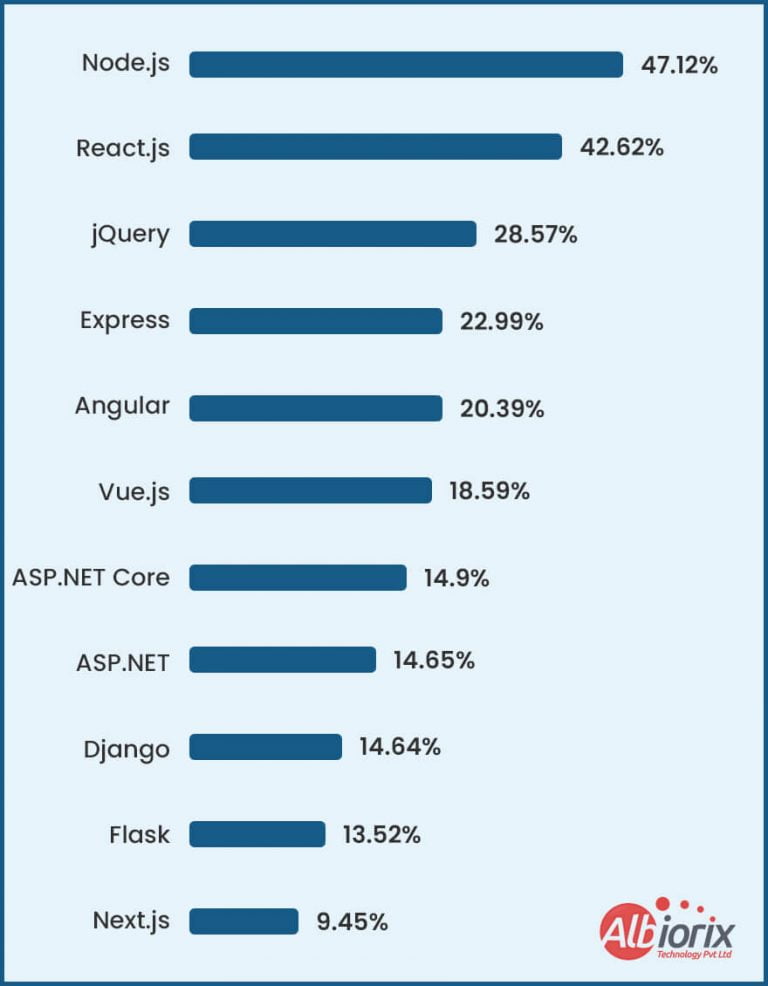
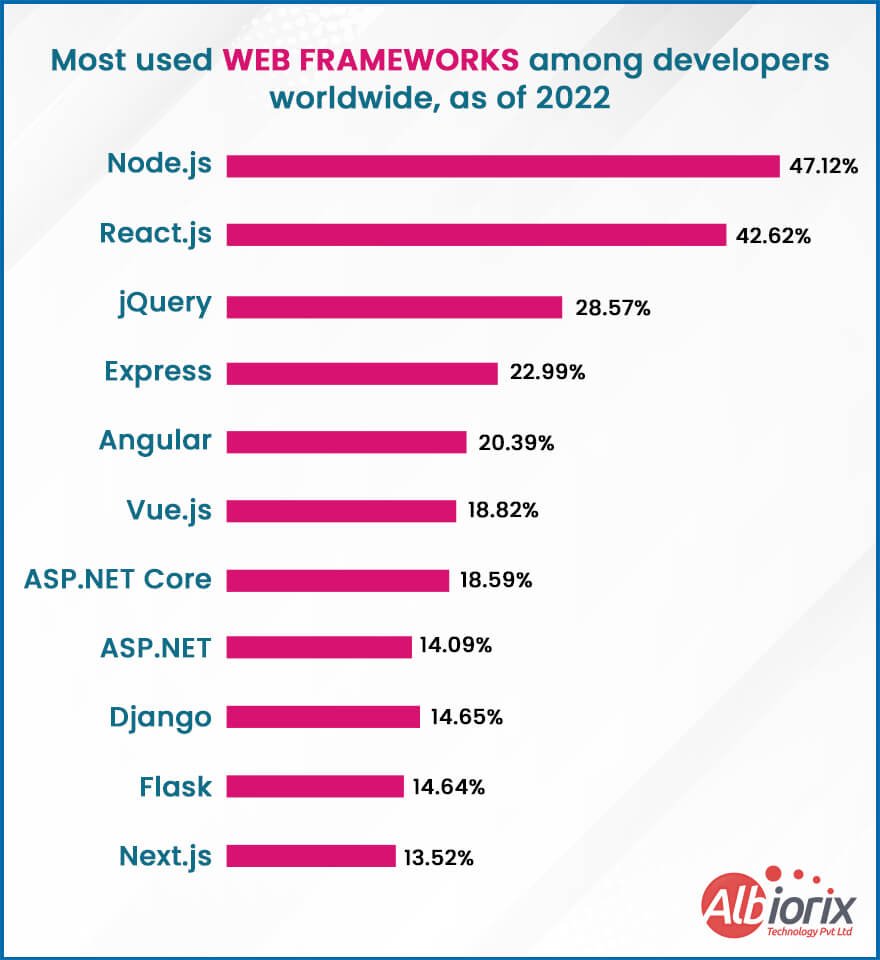
And if I talk about the most used web frameworks among developers worldwide, as of 2025, the below image depicts your answer.

Best JavaScript Frameworks that You Should Select in 2023

Although 2026 is still a long way off, we can start thinking about which JavaScript frameworks will be the best to use then. So here are the top JavaScript frameworks in 2025:

1. Angular

Angular is an open-source and JS-based software engineering platform for building user interfaces (front-end).

In simple words, if I talk about what is Angular, it’s a Javascript framework that allows for the scalable AngularJS development of web applications.

In addition, it will enable you to reuse pre-written code across multiple deployment targets – rather than having to write it all from scratch every time.

Angular provides you with an opportunity to create two-way data binding approach. Both ways allow a user to exchange data between apps and views.

In addition, Angular enables the development of single-page applications (SPAs) through component-based architecture and tree-view structure.

Top Features of Angular framework

  • Document Object Model (DOM)
  • TypeScript-based framework
  • High speed & optimum performance
  • Efficient Two-way data binding
  • Less code framework
  • Enhancement to Angular testing functionality
  • 100% Ivy-supported framework
  • No support for View Engine
ProsCons
✅ Angular applications (SPAs) allow us to load new pages without requesting the server, giving a more dynamic and interactive elements to get a unique experience.❌ The Angular framework comes up with limited SEO and modern web platform capabilities. But it has an active option where you can prerender Angular using Angular Universal.
✅ Angular is cross-platform, allowing you to develop PWAs, Native apps, and Desktop applications smoothly.❌ With its steep learning curve, Angular is a popular Javascript framework that supports more challenging factors.
✅ Angular typically optimizes your templates into code execution that’s highly optimized for today’s JavaScript virtual machines.❌ Angular typically optimizes your templates into code execution that’s highly optimized for today’s JavaScript virtual machines.
✅ With its MVC (Model View Controller)  Architecture, makes it easy to bifurcate development styles from business logic.❌ Angular provides low ranking as per the developer’s point of view. On the state of JavaScript, and Angular has highly negative opinions.

Albiorix is expert in developing an online platform that can easily empower physicians, health institutions, and patients through a comprehensive telemedicine platform.

View Our Work

2. React

React.js is a well-known JavaScript framework for displaying user interfaces.

Try React, as it is one of the popular JavaScript frameworks specifically developed by a team of Facebook developers.

React uses functional, declarative and component-based styles to create rich user interface logic for your business needs. 

One of the most essential benefits of ReactJS is to provide high-speed renders with virtual Document Object Model (DOM).

Furthermore, it is relatively difficult for new web developers to understand, use, and learn – but there is plenty of community support!

Top Features of React Framework

  • Document Object Model (DOM)
  • JavaScript XML or JSX
  • One-way data binding
  • Supports declarative UIs
  • Component-based architecture
  • Boosts the application performance
  • Facilitates creation of custom and reusable Components
  • Quick application rendering
  • SEO-friendly

Related Post: React UI Frameworks

ProsCons
✅ A JavaScript framework that is easy to learn and code. It eventually has less coding and provides you with more functionality.❌ Since the web application environment changes so fast, some developers feel uncomfortable relearning new ways of doing things regularly.
✅ A ReactJS web application comprises multiple web components, which are responsible for outputting a small, reusable piece of HTML code that you can reuse.❌ As React technologies are upgrading at a pace level, you’ll need more time to prepare proper documentation.
✅ With the help of DOM, the performance of ReactJS applications is improved to the next level, making it easy for you to deal with the web app process.❌ ReactJS is equipped with user interface (UI) Layers of web apps. However, it would help if you still chose some other frameworks or tech to help you deal with a complete tooling set for web application development.
✅ ReactJS overcomes the problem of reading JavaScript-heavy applications. It has become a boon for navigating various search engines quickly.❌ ReactJS uses a syntax extension (JSX) that typically allows HTML with JavaScript to be mixed. This approach has benefits, but some development community members consider JSX a barrier.

We crafted a compliant TV platform that is specifically built on a multi-tenant cloud middleware TV platform.

3. Vue

Vue.js is a Progressive JavaScript Framework that has recently gained popularity in the web development community support.

Vue.js is one of the versatile front-end JavaScript frameworks that is progressive and you can use it for technical web applications that require server-side rendering a vast amount of data for the user.

Vue.js is a framework or JS library (core library) that supports high application performance as per your business needs.

Vue.js follows the MVVM architecture pattern, which means it has restricted scope, and simplicity and is easy to adopt (no custom build requirements).

Just because of Vue.js’s modern architecture, the normal setup of the application is not going to take longer time as per expectations.

Related Post: Vue2 vs Vue3

Top Features of Vue.js Framework

  • Virtual DOM
  • Data binding
  • Reusable Components
  • Event handling
  • Templates
  • Computed properties
  • Vue-CLI
  • Runtime performance
ProsCons
✅ The Vue.js framework is intended to be performance without the need for additional optimisations; the majority of Vue’s APIs are tree-shakable.❌ Vue has a high degree of flexibility, which allows for a wide range of approaches. However, large projects can cause issues with code consistency.
✅ Vue is not a framework but an approach that easy to understand and absorb. The learning curve is less steep, and development concepts are simple to understand.❌ Compared to React, Vue.js developers can feel a lack of plugins and other libraries. Of course, the Vue version has the most crucial ones, but more precise specifications can solve issues with establishing appropriate open-source JavaScript library.
✅ Vue is easy to integrate. It can be used to construct universal apps as well as additional web components to ones that already exist.❌ One of Vue’s issues is that the majority of its users are from China, which can be troublesome for specific products or studies.
✅ Vue 3 introduces a feature – Composition API- similar to React Hooks. You do not need to use Vuex as Composables can manage state management.❌ Because Vue.js allows the developers to start from scratch, the immediate gain is more flexibility for implementing new advanced features.

4. Node.js

Node.js is a 2009 open-source JavaScript runtime Environment designed to run JavaScript outside a browser. Let’s be clear about something. Compared to the others, this is a server-side framework, a back-end framework.

Node.js plays an essential role to develop standard web pages and back-end API services. It helps you to create apps with Node.js development services that support real-time, push-based architectures.

Therefore, this basic framework is designed for the development of large network applications.

The Node Package Manager (NPM), a catalogue of over a million JavaScript feature-oriented modules, is the ultimate feature of Node.

Top Features of Node.js Framework

  • NodeJS is based on Google Chrome’s JavaScript engine
  • Node uses asynchronous API loading
  • Node.js is distributed under the MIT license
  • Data is never buffered in Node.js apps
  • Easily perform Data binding
ProsCons
✅ Node.js framework usually deals with asynchronous event-driven IO and helps concurrent request handling.❌ When dealing with a relational database, Node.js can become a challenging factor.
✅ Node.js is a framework that typically uses JavaScript, which is easy to learn.❌ If you’re working with a callback function, it can become challenging, especially when ending up with multiple nested callbacks.
✅ With the help of the Node.js framework, you can efficiently share the same piece of code with both the server and client sides.❌ If you’re entirely new to JavaScript technology, you may face a conceptual problem.
✅ Npm (Node Package Manager), the Node-packaged modules have already become huge and still growing.❌ Node.js is not suited for CPU-intensive common tasks. So instead, it is done for I/O stuff only (like web servers).

Related Post: Digital Transformation Trends 2025

5. EmberJS

Ember.js is one of the leading JS frameworks that come up with code reusability to build high-performance web applications and mobile applications of the highest quality while writing less and doing more.

Similar to the Vue.js framework, Ember.js also follows the MVVM (Model-View-ViewModel) architecture pattern that helps you in designing and building fast web apps for your business needs.

The one thing that makes Ember.js a powerful and mature framework is its own command line interface tool.

Top Features of EmberJS

  • Creating reusable and maintainable JavaScript web applications
  • Enhances the app performance irrespective of reloading the whole page.
  • It supports two-way data binding.
  • Determines routes and controls as well as allows shareable URLs.
  • Provides Ember Inspector tool for debugging Ember applications
ProsCons
✅ Ember CLI is a command line tool that allows you to deal with a project structure featuring great add-ons, thus making certain fast rebuilds and live reloads.❌ If you are creating a JavaScript application using EmberJS, remember that you’ll find a steep learning curve.
✅ It supports a large and well-developed ecosystem, making it easy for you to select the proper ones to solve your problems.❌ Ember.JS typically lacks the functionality of component service pattern reuse, especially when working at the Controller level.
✅ Ember’s extensive documentation comes up with detailed information, making it easy for you to deal with application complexity.❌ Ember is not suitable for smaller projects. It gets overblown.
✅ EmberJS is a framework that is equipped with a list of different Javascript framework packages, including NPM packages.❌ With its object model implementation, itgets bloated by its huge size and while debugging it call stack.

Have a Web App Idea But Confused Where to Start?

Book a free 30-minute consultation with our expert. Get your web app idea.

6. Meteor

Created by Meteor Software, this JavaScript Framework was given a fitting name. This framework is mainly used for quick prototyping and making cross-platform applications. It is easy to understand and provides many conveniences.

The good part about Meteor.js is that it is free and open-source framework.

Top Features of Meteor

  • Easily build web and mobile apps in JavaScript for a web browser, application server, and mobile environment.
  • Comes up with several built-in features like hot code reload, automatic CSS & JS minification, and reactive templates.
  • The app is created using JavaScript so you can use the existing code on both the client and server sides.
  • Meteor JS allows you to efficiently develop and deploy mobile apps like Android and iOS apps through the Cordova PhoneGap alliance.
  • It provides helpful client-side technologies such as helpers, events, and templates.
ProsCons
✅ Meteor.JS provides a better way of integrating the database in MongoDB, making the high-performance applications (web and mobile applications) as practical as possible.❌ It supports only MongoDB as the primary database and limits some linguistic integrations for code development process.
✅ You’ll get multiple packages that can work as per your needs. Furthermore, the entire stack is JS-based, so you only need single-language knowledge.❌ The first time it can be a bit difficult if you are unfamiliar with the command line tools; however, once you have mastered it, you can streamline work with that framework.
✅ With this framework, you can create multiplatform applications (web and mobile applications) with simple javascript. Moreover, with only some knowledge of node.js, you can develop all kinds of Javascript projects quickly and easily.❌ They release updates very often, and it isn’t easy to understand if you do not have the necessary programming skills.
✅ The app has an extensive Javascript Framework that you can reuse to develop an app for your business needs. Blaze is a blast. Deployment is a breeze.❌ Meteor allows you only to create a non-relational database like MongoDB, which is not recommended for large projects.

Related Post: Best Front End Frameworks

7. Svelte

Svelte JS is a front-end development framework that makes web application development process more accessible and efficient.

The word “svelte” is a synonym for “sleek” or “thin.” It’s written in Typescript and open-sourced and was launched in 2016. 

Svelte JS is one of the best JS frameworks as it offers a revolutionary approach to creating Progressive Web App Development. Unlike Vue or React, Svelte JS doesn’t need to process content inside HTML templates or DOM document.

One benefit of using this application framework is that it doesn’t require high processing power from the browser.

Top Features of Svelte

  • Less boilerplate code to write, so your JavaScript developers can focus on creating solutions.
  • No more virtual DOM render functions available, so apps perform faster and more reliably.
  • Instead of CSS, many developers use scoped styling with JavaScript, which allows them to include styles mid-document that target specific custom elements and its children.
  • Svelte wants to provide an awesome web development experience and output code that performs well by default.
  • Svelte’s aesthetics feel like a warm cozy blanket on the stormy web.
ProsCons
✅ Zero traces of the Javascript framework within the compiled applications.❌ A much smaller community than other popular frameworks.
✅ Includes its own minimal state management solution.❌ Lack of IDE support.
✅ Reactive variables can be easily created by simply adding $: at the beginning of the declaration.❌ Very small open-source ecosystem.
✅ Svelte’s server-side rendering mode compiles components to simple string concatenation for big performance gains.❌ Few Svelte dev toolkits are available.

8. Next JS

The Next JS framework is based on React and it plays an essential role for Web Application Development , Mobile App Development , and also Progressive Web Apps.

The excellent part about this web application frameworks is the many major companies are using this Javascript framework for building robust apps.

Next JS is the best option for building user interfaces that can be beneficial for your business applications in many ways.

The primary goal for creating this robust tool was to use it everywhere and it also meet SEO requirements as well to make your business on the top of search engine.

Top Features of NextJS

  • You can efficiently import CSS records from a JavaScript file, without facing any complexity.
  • Post launch of the Next.JS 10.0.0, you can avail the features of an inherent Image Component and Automatic Image Optimization.
  • You can effectively deal with static documents, just like images, and that too under the root index folder called “public”.
  • You’ll get TypeScript experience out of the box, like an IDE that makes your work easier.
  • It comes up with the great supports for modern browsers like IE11, Chrome, Firefox, Safari, Edge, Opera, and many others.

Related Post: Next JS vs React

ProsCons
✅ Next.js is a framework that builds quick static websites that simply behaves like creating dynamic web application.❌ The framework typically requires more web development with an aim to make changes in the web application.
✅ Excellent performance in terms of load times.❌ The framework comes up with a poor plugin ecosystem.
✅ Next JS provides “lazy loading” and automatic code splitting.❌ You’ll not find any specific built-in state manager.
✅ The framework is well-equipped with robust and built-in CSS and Sass support.❌ It does not support any visual editing or direct publishing, especially for non-technical users.

Related Post: Software Development Trends 2025

9. ExpressJS

The last most popular JavaScript framework to choose in 2025 on our list is ExpressJS. If you’re planning to develop Node.js web application for your business needs, ExpressJS is the best choice to move ahead.

ExpressJS is one of the most popular back-end Javascript frameworks among developers just because of its open-source, minimalistics back-end support,  modularity and comprehensible HTML-based template syntax.

Moreover, you can quickly design and build Angular’s intuitive API as well as create web applications for your business purpose.

Top Features of ExpressJS

  • ExpressJS is the best framework for creating single-page, multi-page, hybrid, and deploying web applications for your business needs.
  • Quickly set up middleware to respond to HTTP Requests for your business applications.
  • The framework comes up with a routing table with simple client routing requests that typically supports different actions based on HTTP method and URL.
  • Easily renders HTML Pages based on passing arguments to templates.
  • Seamless integration with template engines such as Jade, Vash, EJS, etc. is made easier with this framework
  • The framework allows you to easily perform database linking with MongoDB, Redis, and MySQL.
ProsCons
✅ Easy to customize and configure for certain demands as per your business needs.❌ You’ll face various client request problems, especially with framework’s middleware system.
✅ Based on URL and HTTP methods, it is possible to define the routes of the existing app.❌ There are several issues with the callbacks.
✅ The framework provides integration with EJS, Vash, Jade and other template engines efficiently.❌ Express does not strictly follows any specific structure, making it difficult for developers work on different app functionalities.
✅ This JavaScript framework typically supports strong connection with leading databases like MySQL, Redis, and even MongoDB.❌ Callbacks are major challenging factors with this framework as you might need to deal with complicated writing style.

Conclusion

The web frameworks that I had mention in this post, which include AngularJS, ReactJS, Vue.JS, EmberJS, Backbone JS, and a few more.

However, understanding these technologies and your custom project requirements will assist you in choosing the best website framework.

Once you have made a sound decision, get the necessary technical help by hiring dedicated web developers for your business.

That’s the basic overview of all these frameworks that are more popular and you’ll want to be wandering about to use for building web applications for your business needs.

How To Choose The Right Tech Stack For Your Project?

With every new year, thousands of new apps are developed all over the world, amounting to millions of dollars, and with every new advancement, new tech stacks become in demand.

Are you interested in knowing more about tech stack meaning?

The term “tech stack” is a buzzword frequently used in technical contexts, although its exact meaning is not always evident.

For example, when you enquire about someone’s stack, they might disclose the programming languages or development environments they employ.

What does it mean, then?
By reading our guide, learn what is popular tech stacks and how to choose one for your next project.

Key Takeaways

  • A technology stack is a set of software tools and frameworks used to build and run a web or mobile application.
  • A technology stack is typically made up of four layers: the operating system, server-side programming language, database, and client-side programming language.
  • Choosing the right technology stack depends on various factors such as project requirements, budget, team skills, and scalability needs.
  • Some popular technology stacks used in web development include LAMP (Linux, Apache, MySQL, PHP), MEAN (MongoDB, Express.js, Angular, Node.js), and MERN (MongoDB, Express.js, React, Node.js).
  • A technology stack can have a significant impact on the performance, scalability, and security of an application, so it’s crucial to choose wisely.
  • Technology stacks evolve over time, so it’s important to keep up with the latest tools and frameworks and be open to change.

What is a Tech Stack?

A tech stack is the collection of tools, programming languages, and technologies used to build a software application. It typically includes both front-end (what users see) and back-end (server-side) components.

For example, a common tech stack might use HTML, CSS, and JavaScript for the front end, while the back end uses Node.js and MongoDB. Together, these tools work as a system to deliver the app’s functionality.

Choosing the right tech stack is important—it affects how well your application performs, how easily it can grow, and how secure it is. Developers select stacks based on the project’s goals, budget, and timeline.

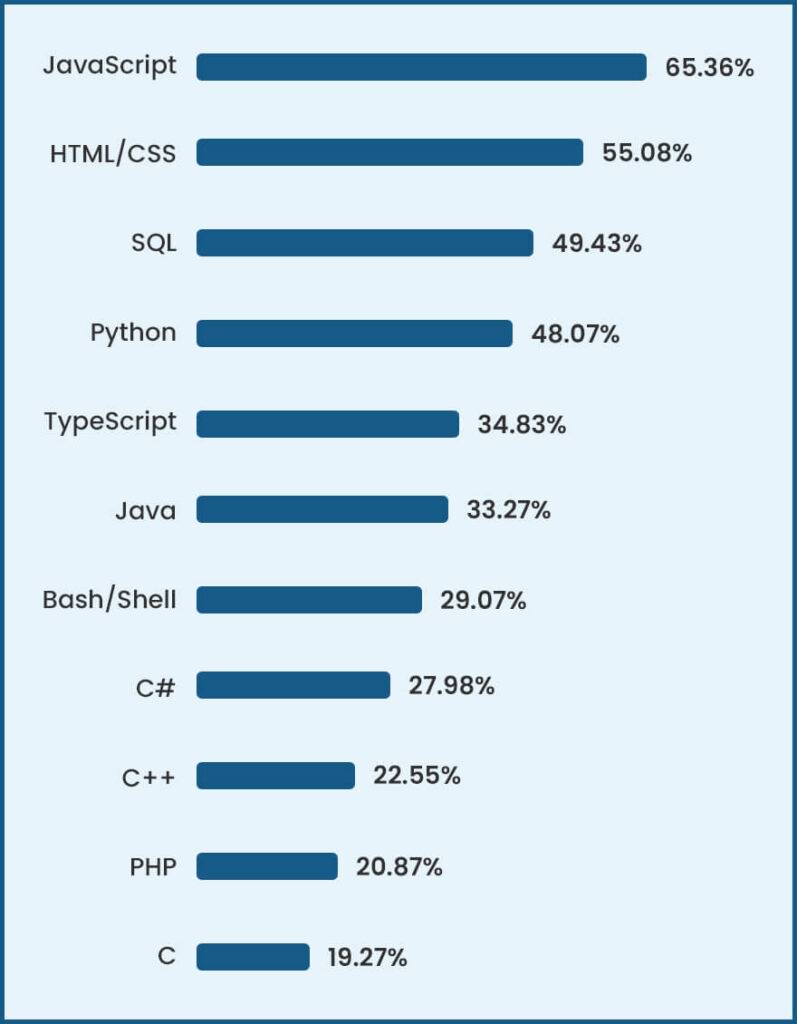
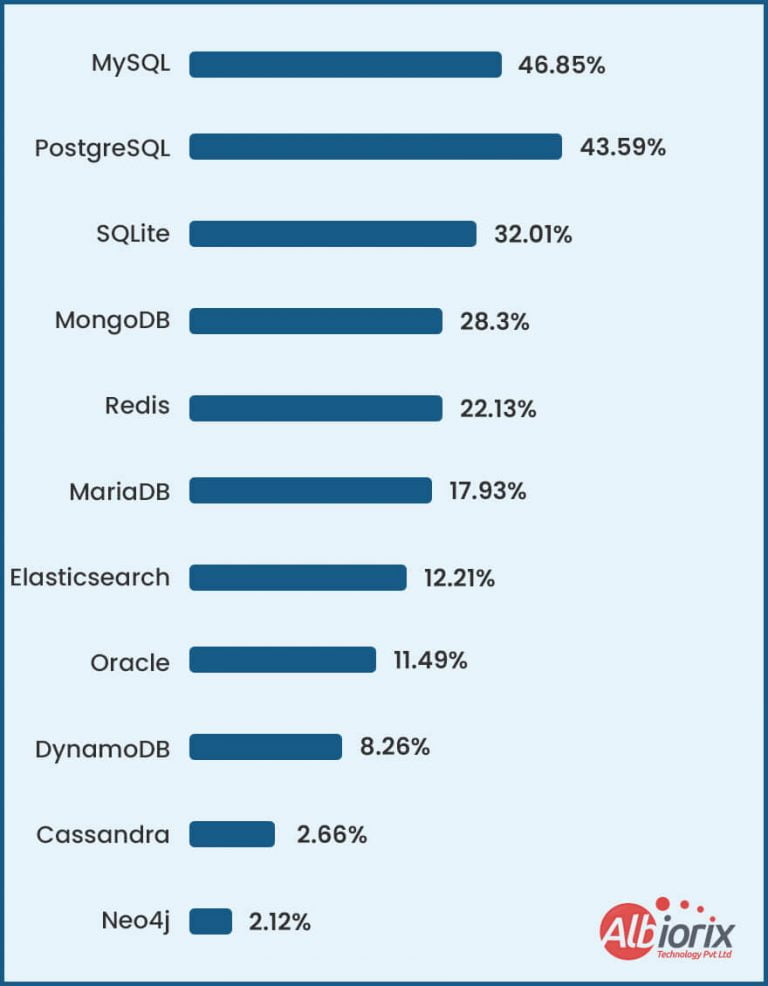
But before that let me make you go through the data for the most popular technologies being used globally.

What are the Essential Components of Tech Stack?

In this article on what is a tech stack, we’ll now focus on understanding the concept of tech stack components and technology stack examples.

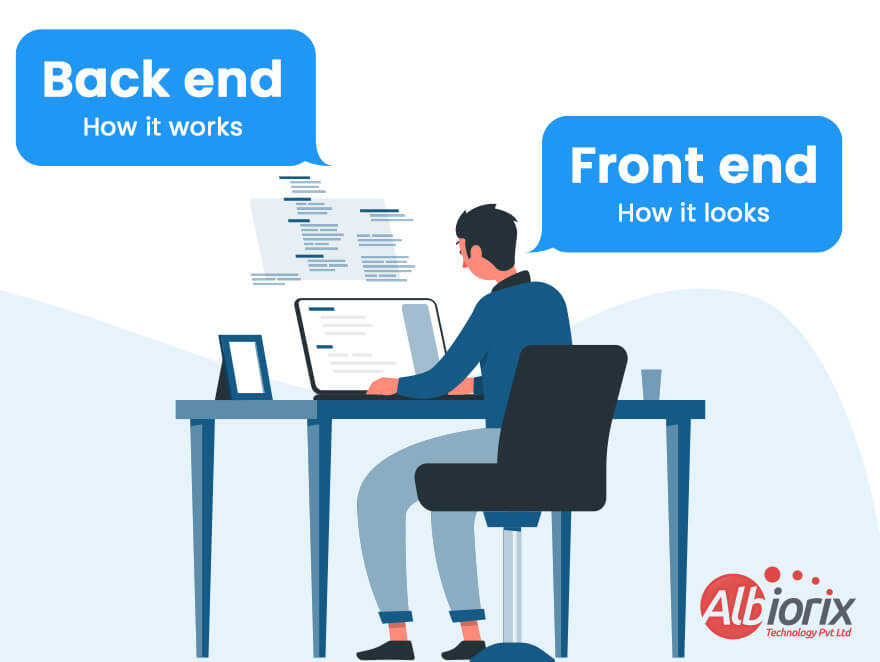
There are two major components needed when creating a web-based application: front-end development and back-end development.

Essential Components of Tech Stack

The front end consists of everything that the customer will see when they interact with the application through their device, whether it be a desktop computer, tablet or mobile phone.

The back end consists of everything that happens behind the scenes to make the application work. The terms “front end” and “back end” may be interchanged with “client-side” and “server-side”.

Let’s now take a look at the main components of a technology stack.

1. Front-End Technology Stacks

Front-end specifically deals with client-side technology and it is not having a connection with server-side terminologies. In simple words, we can say that the front end is what exactly users see when they open any website.

Front-end development services focus on graphics, buttons, and how things behave when someone interacts with them.

Frontend VS Backend Technology

1. HTML (Hypertext Markup Language):

  • It’s one of the standard markup languages used for creating web pages.
  • It is primarily used for structuring and placing content on your web apps.
  • You can imagine it as the framework that tells everything where to go.

2. CSS (Cascading Style Sheets)

  • It’s the language that determines the style of your web page.
  • This technology specifically describes how HTML elements are to be displayed on the screen, on paper, or in other media.
  • It is solely responsible for handling colours, fonts, layout, etc. to beautify your web application as per your needs.
  • Think of this as the paintbrush that tells everything how to look.

3. JavaScript

  • It is a scripting language that helps you to implement complex features on web pages.
  • Enables interactivity and enhances the functionality of a website or app.
  • This technology is responsible for performing advanced functionalities like displaying timely content updates, interactive maps, animated 2D/3D graphics, scrolling video jukeboxes, etc.
  • This is the part that tells everything that you need to do.


    Related Post: Angular Development Tools

2. Back-End Tech Stack

A back-end tech stack refers to the group of technologies used to build and run the server-side of a web application—the part you don’t see but rely on every time you interact with a site or app.

It powers everything behind the scenes, from storing data to handling user requests securely and efficiently.At its core, a back-end stack includes four main components:

  • Programming Languages like JavaScript (Node.js), Python, PHP, or Java. These are used to write the logic that drives your application.
  • Frameworks such as Django, Laravel, or Spring, which offer pre-built components and a structured way to build applications faster.
  • Databases like PostgreSQL, MySQL, or MongoDB, which store your application’s data.
  • Servers that host your application and respond to user requests.

Choosing the right back-end stack depends on your project goals, scalability needs, and developer expertise. A well-chosen stack ensures performance, security, and long-term maintainability—key factors trusted by developers and businesses alike.

Diversity in top web frameworks and technologies

Top Web Frameworks and Technologies

Database like MySQL, PostgreSQL, or MongoDB. This is where your code lives. Databases are an integral part of a tech stack.

Whether your application is simple or has many workflows, you need a place to store all your information. Some popular databases are MongoDB and MySQL.

Modern data platforms like MongoDB further enhance the functionality of a database by providing intelligent querying, aggregation, and transformation features, in addition to data storage and retrieval.

Diversity in top Databases

diversity-in-databases

Runtime environment is the terminology by which an application is run. Runtime provides cross-platform compatibility. Java Runtime Environment (JRE), Node.js, and Common Language Runtime (CLR) are examples of runtime environments.

There are many other components—like APIs, analytics tools, BI tools, cloud services, and microservices—that can enhance the functions of an application.

Are You Planning To Build a Single Page App for Business?

We Have An Expertise in Building Front-End and Back-End Development Services.


Contact Us

What is a Tech Stack Used For?

The primary aim of creating popular tech stacks for your application is to

  • Maximize the application efficiency
  • Enhance the productivity of your application
  • Improve the performance and security of the application

Selecting the perfect tech stack for your application is an essential factor that you need to consider for your entire website or app development process.

Moreover, the selection of the right tech and BI tools makes it easy for you to build faster and more responsive apps.

  • You can use the most popular tech stack.
  • You can use the latest and fanciest frameworks.
  • You can use the best design practices.

What is the Difference Between Web and Mobile App Tech Stack?

After having a look at the basic concept of what is a tech stack, let’s focus on understanding the difference between web and mobile application tech stacks.

1. Mobile App Tech Stacks

For developing a mobile application for your business, you need to take into account various user perspectives. In simple words, you need to make applications for different devices as day by day new devices are getting launched in the market.

And if we talk about mobile app development, you need to be ready with various mobile apps platforms like Android and iOS.

Let’s start by understanding the Android tech stack.

Programming LanguageiOS App Development ToolsUI Framework
– Objective-C is the original language used to build the iOS app.

– Nevertheless, building an app with Objective-C isn’t easy, and developers are prone to make mistakes with it.
Xcode – An official development tool by Apple, and it’s your easy-to-use platform whether you’re using Swift or Objective-C.

– It comes up with all the features needed to build the native iOS mobile application, including a visual interface builder.
UIKit – UIKit is the basic framework for building graphical components in the iOS app.

– It contains templates defining the UI elements which form the building blocks of the app.
– Swift is a relatively newer language and developers are favouring it over Objective-C.

– With its safer syntax, fewer mistakes are committed and apps are developed in much less time.

– It’s also easier to find developers adept in Swift as it’s easier to learn and master.
– AppCode – Developed by a 3rd party, AppCode is an open-source alternative to XCode.

– While it enables iOS mobile application development, it lacks the features of XCode and to an extent, is still dependent on the latter.
– SwiftUI – SwiftUI is a newer framework that offers a more efficient way of designing UI elements in iOS apps.

– However, it only works for IOS13 and above, and there are limited resources as it was just launched in 2019.


Apart from Android and iOS app development, there exists an option where you can write the same code for both technologies and that’s what is called cross-platform technologies.

Let’s focus on the cross-platform tech stacks.

  • React Native (JS) – For designing and building cross-platform applications for your business needs, React Native is a one-stop solution for developers too.

    It is entirely based on JavaScript programming language and provides you with the basic building blocks that work efficiently on both platforms.

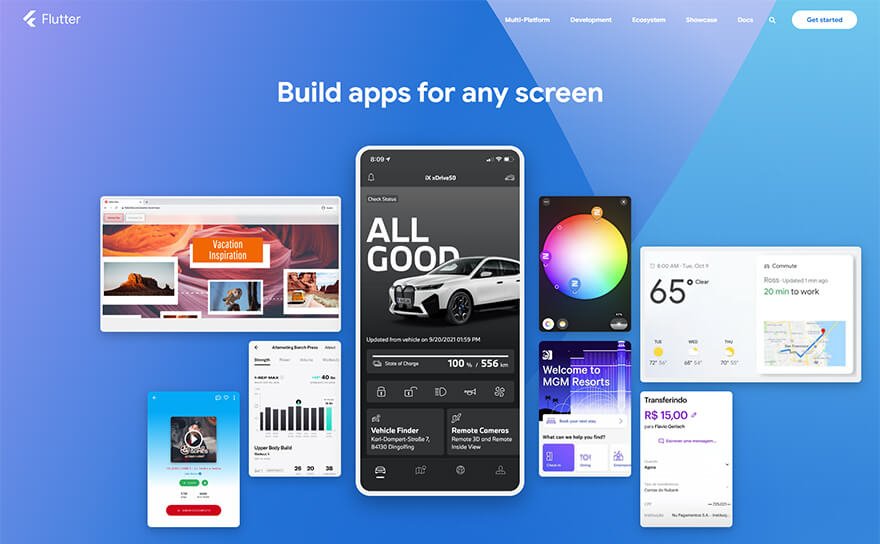
  • Flutter (Dart) – Flutter is one of the leading and most-used cross-platform development tools and is developed by Google.

    With its ‘hot reload’ feature, it helps you from getting rid of wasting time on emulators and simulators while its expressive widget promises native performance monitoring.

  • Xamarin (C#) – Developers proficient in C# programming language will find Xamarin a natural choice for building cross-platform apps. Codes written in C# are cross-compiled to native programs for both Android and iOS platforms.

2. Web App Tech Stack


A web app tech stack is the combination of tools and technologies used to build web applications that run directly in a browser—no downloads needed. These stacks typically include front-end frameworks, back-end services, and databases.

Since users access web apps through various browsers like Chrome, Safari, or Firefox, it’s important to ensure your stack supports cross-browser compatibility.

Always test your web app on popular browsers to ensure consistent performance and a smooth user experience.

Importance of Tech Stack for Your Project

The importance of the technology stack meaning is to help you build apps with fewer roadblocks and also bring convenience in predicting the time and budget required for your application needs.

You need to make the perfect decision of different tech stacks for your project needs as they directly impact the following (but are not limited to) parameters.

  • How your application runs now and how it will be affected in the future perspectives.
  • How you can efficiently maintain and scale your application to enhance your business performance.
  • You need to decide whether your business or application objectives are met or not.
  • How you are going to store your application data, whether it may be local or cloud.

First, you need to consult developers or hire full-stack developers from the best custom software development company where you get assured of your business objectives and how you need to deal with them.

In addition, selecting the right open-source tools and services for your project needs will save you from many existing or upcoming development risks.

What are the Benefits of Using Tech Stacks?

Selecting the perfect tech stack for your application plays a major role in determining how it is going to be affecting your business perspectives.

So, you need to understand how such different development stack are essential for your business needs after having a deep understanding of what is a tech stack definition.

1. Easily Scale Your Application

Selecting the right tech stack for your application typically makes it easy for you to design and build an application without worrying about the maximum number of people using your application.

So, it becomes essential for you to select the framework and database that can efficiently scale well for your application.

In simple words, we can say that your selected tech stack will definitely save you from horizontal and vertical scaling issues as and when there is an increase in your user base.

2. Enhance the Development Speed

A proper technology stack will also help speed up the development process because you have an option where you can easily hire full-stack developers or experts in individual technologies.

Moreover, you can also choose a specific technology stack to capitalise on the expertise of your current team. It is also easier for developers to communicate about how the application works.

3. Project Management Becomes Easier

When you plan a technology stack ahead of time, you will already be aware of the resources, technology infrastructure, automation, hardware, and other project requirements, saving both money and time.

4. Deciding on Stack Complexity

Finally, because you know the goal and size of the project/web application you’re going to build, you can decide on the complexity of the technology stack and avoid using a set of technologies and operations that aren’t really necessary for your project, as well as bulky resources.

How to Choose a Tech Stack For Your Project?

Tips to Choose the Best Tech Stack

1. Define Your Application Purpose

One of the foremost things to do before planning to start an application is to prepare yourself for your application purpose. It means that you have to ask the following questions in mind.

  • What do you want to make your web application perform?
  • How is your application going to perform the integrations with other systems?
  • What are your target audience and user expectations from your application?
  • How many web pages are you planning to include in your application?

Depending on your project needs, such questions are not just limited to the above points.

If you’re planning to build a single-page application for your business, you can opt for easy and lightweight technologies like Angular or React.

Both of these are referred to as front-end frameworks, but still, there exists some difference between Angular Vs React.

On the other hand, if you have an application with multiple functionalities, you must select sophisticated other tools and the best Javascript frameworks that usually follow different workflows and integration between various other systems.

2. Design and User Experience

Once you’ve finalised the purpose of your application, you need to move ahead with the designing phase trust me, it’s one of the essential factors that need to be considered.

It plays a significant role in identifying and attracting more traffic to your application. You must select the robust open-source tools that typically serve the purpose of your user interface.

And it’s one of the most effective ways to justify the design team’s expectations. If your website relies on content, go with server-side rendering-compatible technology infrastructure.

3. Time to Production

Your application should be launched as soon as you can. Consequently, make investments in technologies that provide services and answers for typical use cases and functions.

Additionally, if technology has strong open-source software development community support, it can assist bring new features to market more quickly, especially if the project requires additional personnel.

Finally, choose technologies that are simple for engineers to test and learn.

4. Costing

You can save money on deployment and maintenance by incorporating a cloud solutions stack (like MongoDB Atlas or AWS) into your IT stack. Select technologies that are easy to incorporate. 

You will have to pay more for the developer’s compensation as well as the maintenance of the programme if you select more specialised or advanced technology.

Choosing easy-to-learn technologies or ones that your team is already familiar with can save on development time and project costs overall.

5. Scaling Your Application

In practice, scalability is difficult to achieve. Most of the time, it isn’t easy to scale and optimise the database system or queries.

However, modern NoSQL databases, such as MongoDB, provide a wide range of scaling options, making them an excellent choice for data-intensive applications.

Similarly, a good framework design (such as the Model-View-Controller) aids in writing correct code, making future expansion easier.

6. Security

While no technology can guarantee complete security, always choose technologies that adhere to best practices to ensure maximum data storage and transaction security while minimising vulnerabilities.

We crafted an all-in-one tool For Amazon Sellers to deal with business needs like inventory management, invoicing, follow-up, tracking orders, profit, sales volume, etc. using Angular Technology


View Our Work!

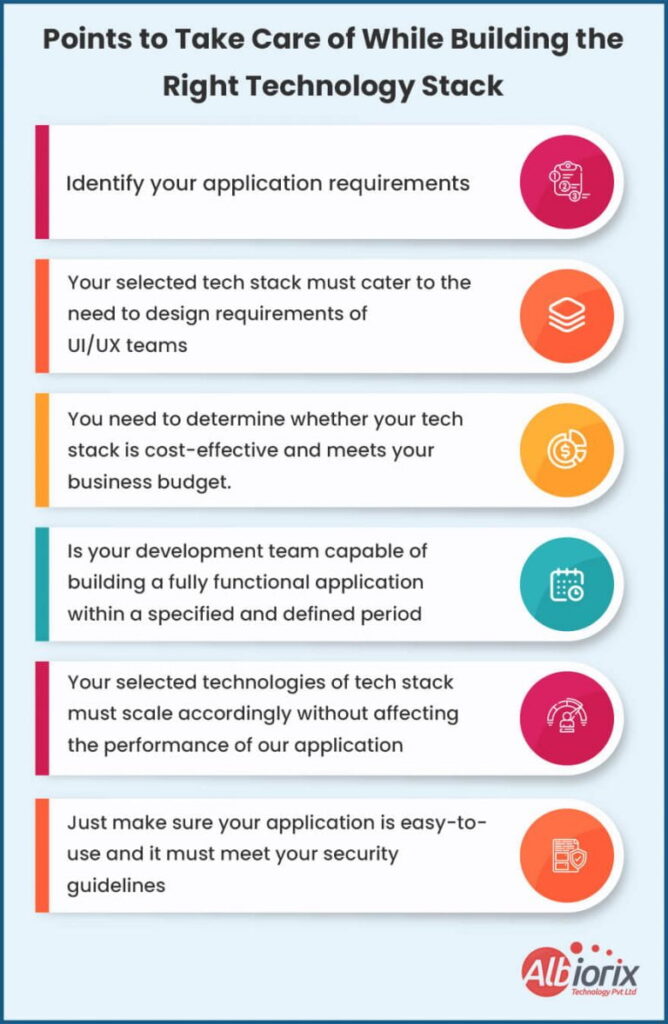
Primary Factors That You Need To Take Care of While Selecting Tech Stack

Because it is what you use to create open-source software applications, the tech stack is important. Therefore, when choosing the appropriate collection of tools, don’t undervalue the importance of study and analysis.

Making the wrong technology option can cost your project money, time, and other valuable resources. To prevent hazards while selecting your tech stack, you’ll need a solid business analyst and skilled engineers.

Here is a list of requirements to take into account while selecting a useful tech stack.

1. Defining the Platform

What goals does the initiative hope to achieve? This is a crucial reminder. Choosing a stack is only worthwhile if you know what you want the project to do for you.

You should now ask yourself: Who is my target audience? How, when, and where will they use your open-source software? Which of them is the most popular active device? Is it a traditional PC or a cell phone?

For instance, a web application needs a different set of tools and frameworks than a mobile application. Moreover, the tech stacks required for Android and iOS development differ even inside mobile applications.

The optimal tech stack should then be planned based on your responses, including whether you require a single- or multi-platform solution.

Remember this if you are creating an MVP first. It is preferable to make it on a well-known Analytics platform well-liked by your target audience to save software development expenses and quickly obtain user feedback.

It makes no difference if it is an online or mobile application. The development process and the success of a project depend on the MVP.

After designing the platform, consider all of the functional and non-functional requirements for the launch of the project.

A set of clearly defined MVP requirements will identify the tools you need to accomplish your goal and any additional tech stack you might require for the market version.

2. Defining the Project Type

After you’ve defined the platform, you’ll need to conduct additional research before deciding on a tech stack. First, you will evaluate the project based on its size and complexity, processing strength, and business objectives.

For example, if your application requires multiprocessing or low latency for better responsiveness, you must consider the relative tech stack that provides such support.

Small Projects

They are typically delivered quickly due to simple requirements and can be implemented using less sophisticated technologies such as CMS or WordPress in the case of web projects.

Mid-Size Projects

There is a higher level of technological commitment for mid-size projects. Depending on the requirements and platforms, they may require the use of a variety of programming languages and tools.

Such projects necessitate the use of technologies with more sophisticated and diverse functionalities and integrations.

Complex Projects

If you want to build a social network, online marketplace, CRM, or order management system, you’re in for a difficult task. The use of multiple programming languages is unavoidable in such cases.

This is similar to a mid-sized project, but with more complex features. You require multiple functions, integrations, and increased sophistication, so your tech stack must be of the highest calibre.

3. Scalability Requirements

Scalability requirements refer to how well your application can grow with user demand. A good tech stack helps your app handle more users, new features, and traffic spikes without slowing down or crashing.

There are two main ways to scale:

  • Horizontal scaling means adding more servers to share the load, while
  • Vertical scaling involves upgrading servers to handle more tasks.

Your developers should choose technologies that support both, ensuring smooth performance—even during high traffic.

4. Technology and Team Expertise

Unless you are looking to outsource web development, you should weigh the expertise of your team and use it as a basis to judge your choice of tech stack.

Developers working with a leading software company typically have a stronger command of certain programming languages and tools than others, so it all comes down to how skilled your team is.

You must be confident that your team can successfully implement a tech stack, or else there is no reason to use one. You can train them instead of hiring an expert to compensate for the lack of all the technology services on your team.

That is, if you have the luxury of time; if you are under time constraints, simply outsource the project. As a result, it is critical to match your team’s skills and experience with the technology of choice.

In this case, platforms like Design Rush can be extremely useful in locating the best agency.

Also, make sure your chosen technology has a large developer community and reference documents available, such as on GitHub and Stack overflow. This would prevent your team from becoming reliant on a single tool or all the technology services.
5. Maintenance

You must consider your team’s ability to maintain the application after it is released. This is the next lane after you’ve developed your app, and it’s also related to your tech stack selection.

6. Codebase

If you want feasible and ongoing maintenance, your choice of tech stack should be motivated by software architecture and existing codebase.

Choose effective coding languages with short, reusable, and easy-to-maintain codes. Your codebase should be straightforward and of average length. It allows developers to spend a limited amount of time reviewing, debugging, and processing code.

7. Software Architecture

Software architecture is vital in enabling application scalability, portability, and reusability. Therefore, your software architecture should guide your choice of the technology stack.

As a result, you should look into open-source technologies that support static and dynamic component configurations. It ensures that the application runs smoothly even as the number of users grows or new features are added.

Related Post: Web Application Architecture

7 Most-Popular Tech Stacks That You Should Opt For

1. MEAN Tech Stack

The MEAN tech stack is a popular set of technologies used to build dynamic and responsive web applications. It stands for MongoDB, Express.js, Angular, and Node.js—all built around JavaScript.

MongoDB handles the database, Express.js manages the server-side logic, Angular powers the front end, and Node.js runs the server environment.

Because the entire stack uses JavaScript, developers can reuse code across the front and back end, speeding up development.

MEAN is trusted for building fast, scalable apps, making it a smart choice for modern web and mobile projects.

What are the benefits of using the MEAN tech stack?

  • The technologies are widely used, open source, and cost nothing.
  • The database can readily withstand consumption spikes and can scale as needed.
  • Since they have their server, MEAN-created apps may be hosted in the cloud and are more adaptable and expandable solutions stack.
  • It contains several plugins and technologies that can significantly reduce the time and cost of developing web apps, websites, and APIs.
  • MEAN-built applications can efficiently integrate with Apache HTTP server panels more quickly.

2. MERN Tech Stack

MERN has unquestionably earned a spot on the list of popular tech stacks that will be most in demand in 2026. It resembles MEAN in many ways.

The main distinction between these two leading web development technology stacks is that MERN is made up of React rather than Angular JS.

And it’s one of the most significant advantages because it offers a robust library source, can also be used for front-end tech stack and back-end tech stack development projects and can be used on both web servers and browsers simultaneously.

Additionally, all component work and updates can be implemented without difficulties because React employs JavaScript XML and Virtual DOM.

It is a versatile tool that works well for user interfaces, and most of its features are performance- and cost-oriented, making it especially beneficial for smaller-scale projects.

Why MERN is considered to be one of the most popular tech stacks?

  • You don’t need to start from scratch because of its open-source code, which can be regularly enhanced and altered by hiring developers from leading organizations worldwide.
  • The availability of comprehensive templates online, which can significantly speed up creation.
  • The abundance of available documentation makes it simpler to comprehend, utilise, and deploy, which can be very helpful for beginning developers.

3. MEVN Stack

One of the top web development technology stacks for 2026 is a variant of the MEAN stack called MEVN, in which Vue.js, a framework that combines some of the most significant features of Angular and React framework, basically takes the role of Angular.js as the front-end framework.

Despite being less complex than what is Angular, this MEVN stack solution offers a wide range of additional tools depending on creative capabilities that can be enhanced with the help of outside cost-efficient services.

For example, prototypes, interactive visuals, and animations can all be handled with Vue without any issues.

Related Post: vue 3 vs vue 2

What are the biggest advantages of adopting the MEVN tech stack?

Using Javascript, one of the most well-liked website programming languages worldwide, at every stage of web development makes the entire development process more effective and straightforward.

Because the MVC architecture organises the server component of the project, backend development is simpler to complete.

The framework is ideal for online projects and is simple to learn and use.

4. Ruby on Rail Stack

In 2021, Ruby was one of the most widely used programming languages, and in 2026, it is still in high demand as a component of the Ruby on Rails (ROR) stack.

Ruby on Rails is an open-source framework for developing web applications that can be used to develop a wide variety of front- and back-end apps. It offers a pre-built framework with all the components necessary to create any kind of online application.

It also collaborates with JSON and XML for data transport and HTML, CSS, and JS to create interactive user interfaces.

It is one of the most well-known Ruby libraries, perfect for projects with intricate business logic and a tight budget that require quick delivery of a web application.

What are the benefits of the ROR tech stack?

  • The tool comes up with many reliable safety features built in.
  • Its availability for free and its effortless compatibility with the Linux operating system.
  • Other third-party libraries can be easily coupled with Ruby, which can be very helpful in developing functionality quickly.
  • Internal testing of the complete code without the aid of other software.

5. Flutter

Without adding Flutter, the top web technology stacks list for 2026 would be incomplete. This free user interface development tool is excellent for creating any kind of mobile applications because it can handle everything from a single codebase.

‍The Flutter engine, the Foundation Library, the Dart development language, and design widgets are all components of this stack.

This ground-breaking framework offers a number of advantages, including the ability to add new features and correct faults without slowing down websites. It is also simple to use with IntelliJ, Visual Code Studio, or Android Studio.

Flutter has improved upon some of the drawbacks of existing stacks like LAMP stack or MERN because it is a relatively young stack, which adds to its appeal.

But because it’s so young, Flutter still only has a few Analytic tools and libraries, and it doesn’t support password managers. However, this tool will unquestionably enable you to develop high-end integrations and high-quality apps in less time.

6. LAMP Tech Stack

One of the most popular stacks for web development is LAMP stack, which has practically taken over the market.

LAMP stack, which stands for Linux as the operating system, Apache as the web server, MySQL as the database management application, and PHP as the primary programming language, is open source and available for free.

It is a superb tool in terms of performance, versatility, and maximize efficiency and can simply run on any operating system.

One of the best things about this tech stack is how interchangeable the parts are. Instead of using the Linux operating system, you can use macOS (MAMP) or Microsoft Windows (WAMP), and you can replace PHP with Perl or Python.

The stability, dynamism, dependability, and user-friendliness of LAMP are some of its main advantages. There are also numerous documents to assist hiring developers and enterprises in navigating and fully utilising its possibilities.

7. Django Tech Stack

Python, one of the top programming languages, the Django framework, the Apache web server, and MySQL for database administration make up Django’s top web development stack.

This tech stack encourages rapid web development and has a clear, logical architecture.

It has several fantastic benefits for development, such as the ability to run independently on Linux, Mac, or Windows, many security layers to keep your enterprise-level projects entirely safe and hidden from prying eyes, and excellent documentation.

Conclusion

Even if money is not an issue, picking the appropriate technology services depends on the needs of the project and the team that will build it. This choice has the power to succeed or fail a project.

To learn how other goods of a comparable nature to the one you intend to create were constructed, you need to conduct the study.

You can consult your business analysts, project managers, and developers to choose which coding frameworks and various technologies are ideal for the desired project. If your team is lacking, you may hire new web developers or train the current ones.

Albiorix Technology will be happy to offer you advice and support for your software projects. The best suitable tech stack and project management techniques that ensure successful project delivery will be recommended to you.

Contact us right away to learn more about our software development services.

Top Way Better Frameworks to Consider for Mobile App Development

Nowadays, the demand for mobile app development is increasing day by day. So, it becomes of prime importance to understand the concept behind the mobile app development process and which is the best convenient technique to make mobile apps.

You’ll be surprised to know there will be around 7.33 billion smartphones globally by 2025. Sounds astonishing?

Generally, you’ll come across mobile apps for various categories, including gaming, music, calendars, and communication apps. And it entirely depends on your business needs and how you want to make a mobile application.

Creating an app is a great business decision. But one of the essential factors you need to consider is opting for the framework for creating a mobile app.

To make it easy for you, we’ve identified a list of the best mobile app development frameworks that will help you make the development process easier.

What is Mobile App Development?

Mobile application development is the collection of processes and procedures specifically involved in creating software for small, wireless computing devices, such as smartphones and other hand-held devices.

Similar to web application development, mobile application development has its roots in standard software development. Of course, it’s nothing, but the subcategory of software development specifically refers to applications that run on mobile devices.

The primary goal of mobile apps is to deal with various operating systems, like iOS and Android. Mobile apps typically offer an enhanced user experience compared to mobile web browsing by simply leveraging the built-in features of smartphones.

What is Mobile App Development Framework?

In simple terms, a mobile app development framework is a set of tools that makes it easy for you to design and build mobile applications.

The framework allows you to deal with the standard structure that plays an essential role in improving the mobile app development process. Moreover, it typically supports app development strategies to build robust mobile apps for your business needs.

You can opt for mobile development frameworks that are specifically designed to support mobile app development.

It’s a software library that provides a fundamental structure to support the development of applications for a specific environment.

Frameworks can be in three categories:

  • Native frameworks for platform-specific development
  • Mobile web app frameworks
  • Hybrid apps, which combine the features of both native and mobile web app frameworks

Related Post: Best Front End Frameworks

Essential Factors to Consider Before Selecting Mobile App Development Framework

One of the biggest questions that come up in your mind when planning for creating a mobile app are

  • Which is the best mobile app framework that you should opt for?
  • What is the perfect mobile app UI framework that will work out for you?
  • How can you select the best mobile app framework?
  • What is the best mobile app development framework?

Before deciding on one, thoroughly examine your company’s requirements. Here are some pointers to help you choose the best mobile app development framework:

Design & UI for Your Mobile Apps

Before selecting a mobile app development framework, consider the type of user interface you require.

Different business setups have varying UI parameter requirements; therefore, analysing your business first will provide you with a clear direction on the best mobile app development framework.

Mobile App Development Partner

The types of partners are essential when deciding on the best mobile app development framework. Numerous vendors in the market provide various services and support for the framework you select.

Therefore, conducting a market analysis and selecting the framework that will positively impact your business is advisable.

Closed or Open Ecosystem

During the mobile app development process, you can use a variety of platforms. You will most likely require a platform that is adaptable, fast, and simple to control.

Keeping these factors in mind will lead you to choose either an open or closed ecosystem, depending on your business’s functionalities.

Skilled Personnel

Any app development process necessitates the use of skilled technical personnel. Before deciding on a mobile app development framework for your company, examine your team of experts and determine their level of expertise.

You must choose a framework that your team can work with without encountering any problems along the way.

Evolution of Ecosystem

Consider whether the framework you want will allow you to choose new platforms and tools during the app development process. Choose a framework that will evolve as technology advances.

So, these are the primary factors that you need to consider before selecting the mobile app development framework that suit the best for your needs.

Design and Build Mobile Apps Using Deep-Dive Technologies

Albiorix’s mobile app development team strives to delight the users with expressive and feature-rich native iOS / Android, cross-platform or Progressive Web Apps.

Contact us

Top 11 Mobile App Development Frameworks

Sr. NoMobile App Development FrameworkTop Features
1Flutter– Hot reload
– Cross-platform development
– Widget library
– Native performance
– Open-source.
2Swiftic– Intriguing push notifications
– Advanced analytics
– App publication assistance
– Third-party integration
– Build your mobile store
3React Native– Open-source
– Backed by Facebook
– Modular and Responsive
– Enhance the Development Speed
– Community Driven
– Live Reload
4Xamarin– cross-platform and open
– source app-building platform
– Native multiplat form support
– Close development deadlines
– Easy to maintain
– Code reusability
– Highly safe and secure
5Ionic– Cross-platform framework
– Responsive design
– Supports Cordova plugin
– Feels like React-Native
– Browser reload is live
-Online Community
6Onsen UI– Open source
– HTML5 hybrid app framework for Phone
-Gap & Cordova
-Mobile-optimized HTML5, CSS and JavaScript
– JavaScript framework agnostic
UI framework
7Adobe PhoneGap– Open-source
– Flexible and full-fledged framework
– Compatible on all platforms
– Ease of development
– Better Access to Native APIs
8Corona– Cross-platform framework to create 2D games and apps for mobile, TV, and desktop.
– Enables super-fast development – up to 10x faster than other platforms.
– Supports all major platforms
– Leverage industry standards
9Mobile Angular UI– Build HTML5 hybrid desktop & mobile apps
– No jQuery dependencies
– Build fully responsive interfaces with a super-small CSS file
10Sencha Ext JS– Customizable UI widgets
– Code compatibility of new versions with the older one.
– It is protocol agnostic, and can access data from any back-end source.
– Customizable Themes Ext JS widgets are available
11Jquery Mobile– Built on JQuery Core Light weight size
– Configured with HTML5 Automatic initialization Simple API

After having a look at the factors for selecting the mobile app development framework, it’s high time to understand some of the frameworks which make your app development simple.

1. Flutter

Flutter Mobile Development Framework

Launched by Google, Flutter is a mobile UI SDK framework for building beautiful, responsive, and high-quality natively compiled apps for both mobile & web applications.

Being one of the best mobile app development frameworks, Flutter is solely responsible for simplifying the development process by crafting excellent native interfaces on Android and iOS.

Generally, Dart is an object-oriented programming language that is being used by Flutter to write programs that work with existing code and has become a boon for flutter app developers in mobile app development.

Using a single codebase fully compiles the apps to native code and exploits Google’s 2D rendering engine for developing visuals.

ProsCons
Allows you to make instant changes in the app, especially when dealing with bug-fixing scenarios.The Flutter apps tend to be weighty ones.
Apps are very smooth in their performance which makes for great UX.There exist no web browsers. So, as of now, there is no chance for web app development with the Flutter framework.
Quality Assurance and testing usually take much less time.Flutter framework does not come up with a huge resource base. So, you need to write a lot of stuff from scratch.
Development is very fast and efficient.You must learn Dart before making an application using the Flutter framework.

2. Swiftic

Swiftic Top Mobile App Development Framework

Swiftic is an easy-to-use mobile app development framework that typically deals with your existing online content and builds your mobile applications in no time. With its unique auto-discovery technology, Swiftic allows you to efficiently create, publish, and promote your application from one control panel.

The most exciting feature of the Swiftic framework is that it allows you to easily build a user-friendly interface, making it one of the best mobile app development frameworks. It’s also a popular choice for any custom software development company looking to deliver quick and effective mobile solutions.

It has remarkable features like push notifications, app promotions, in-app coupons, scratch cards, social media feeds, and many convenient options.

ProsCons
The App Building Platform is free to use – You need to pay only during the application launch.Lacks advanced features such as an API that can become a headache for many developers.
Really intuitive system that allows tech novices to build an appNo team management login facility (one member only)
Launch assistance, even for the Apple app store (which is notoriously difficult)Email responses to issues can take a day or more
Advanced analytics to see how your customers are responding.

3. React Native

React Native Mobile App Development Frameworks

React Native is a framework for developing mobile applications natively for iOS and Android platforms. Developed by Facebook, React Native is a robust framework in that you create rich & beautiful mobile apps built on top of ReactJS & Javascript.

React is well-known for its native-like and elegant user interfaces, which have become an aid for hire mobile app developers to reduce their development costs and time.

This framework for React Native App development utilizes native platform-specific built-in interface components to give mobile apps a natural look with great performance.

ProsCons
Speeds up app development processSomewhat complex to perform debugging process
Lowers app development costsIt doesn’t speed up the testing process
Ensure stable growth of mobile appInferior Android support
Easily integrates with the native applicationsIt’s harder to build a cross-platform team

You May Also Like To Read: Best React UI Frameworks

Develop High-Performing Mobile Apps using React Native

We have a team of top-notch and skilled mobile app developers that are expert in building engaging cross-platform mobile applications tailored to your unique business goals.

Contact us

4. Xamarin

Xamarin Mobile App Framework

Xamarin is a .NET-based framework that helps you design and build Windows, Android and iOS mobile apps for your business needs.

It’s an abstraction layer that efficiently controls the communication between shared code and underlying platform code.

As the Xamarin framework is supported by C# with .NET, the apps developed with Xamarin App Development can be created for any mobile platform with

  • 96% of the source code reusability
  • Fastens the development speed
  • Alleviates the need to switch between different development environments

Xamarin is the most popular framework for its friendly development environment, and it allows you to create native apps by using shared UI code written in C# or XAML.

In addition, Xamarin offers a development ecosystem with a backend, API, components, etc.

ProsCons
It comes up with Full hardware support (i.e. camera, GPS)Familiarity with platform-specific code might be needed
Compatibility with MVC and MVVM architecturesMinimal community support
Complete development ecosystem (C#, .NET and Visual Studio)Not a great choice for apps with complex UI
The Xamarin Component Store which provides a lot of componentsUI development is time-consuming and not mobile-friendly

Related Post: Software Development Trends 2023

5. Ionic

Ionic Top Mobile Framework

Ionic is a top mobile application development framework that helps you to build interactive hybrid and Progressive Web Applications along with cross-platform applications.

Ionic is one such premium mobile app development framework that provides core services for creating mobile apps for the web, Android, and iOS platforms.

Besides, working in Ionic app development company, you can constantly create and ship applications to the server. Just to update you, the lightning version of Ionic is Ionic Studio, and that is pretty robust and secure.

The installation of the Ionic framework is fairly simple; you just have to have an easy visual development environment on the local server.

ProsCons
Ionic framework is entirely developer-friendlyThe debugging process is somewhat challenging
The framework allows you to develop Native and web-optimized appsThe framework possesses vulnerability of local storage
You can easily deal with Platform-specific adaptive stylesThe framework does not supports hot reloading
Wide range of integration capabilities and pluginsLarge application size

6. Onsen UI

Onsen-UI Best Mobile Development Frameworks

Onsen UI is an open-source UI framework specifically designed to create complex mobile applications. Moreover, it is a component of HTML5 for creating beautiful and responsive mobile apps for your business needs.

This robust framework typically supports standard libraries like Angular JS1, Angular 2+, React, and Vue. The exciting part of Onsen UI is its competency in the app’s appearance, depending on the platforms.

Onsen UI sets the base as a hybrid app development framework by bringing the tools and UI framework together for creating hybrid apps based on PhoneGap using HTML5.

Onsen UI is an easy-to-use platform but powerful to create some genuinely prominent applications.

For instance, it utilises automatic styling on the UI components if we wish to have a native look for iOS and Android. Its rich UI components include tabs, stack navigation, lists, forms, etc.

ProsCons
Support for multiple languages and frameworks like Angular, jQuery, and ReactIt comes up with limited components
Collection of UI components to develop your mobile application in a customized wayOnsen UI is limited to hybrid apps.
Develop once and deploy in multiple platforms.Does not involve the support for Material Design.
Best support for Cordova.Supports the use of PhoneGap or Cordova builder, but does not include it.

7. Adobe PhoneGap

Adobe-Phonegap Mobile App Development Framework

Developed by Nitobi, Adobe PhoneGap is a cross-platform app development framework that allows you to build robust mobile apps using JavaScript, HTML5, and CSS.

It is also known as Apache Cordova and is considered the most reliable mobile app development framework.

The excellent part of the PhoneGap framework is that it offers you

  • Best-in-class app performance
  • Building mobile apps irrespective of facing any hardware restrictions
  • Supports inbuilt hardware features such as Camera, Storage, Accelerometer, GPS, etc.
ProsCons
Release uniform products across all platformsIt doesn’t support Plugins with hooks
Apps developed with PhoneGap behaves like native appsNot suitable for hardware intensive apps
Backed by Apache, Powered by Apache CordovaNeed a Mac for developing iOS apps
Easy to work pluginsPlugins could be outdated

8. Corona

Corona – App Development Framework

Corona is an open-source, cross-platform framework that creates not only apps but also games for mobile devices, desktops, tablets & smart TV.

Powered by a Lua-based framework, Corona supports a lightweight scripting language that offers speed, ease of usage and flexibility to develop apps.

Many game developers working with the best mobile app development company typically use Corona SDK, making it the best framework for hybrid mobile app development.

With the help of Corona SDK, you can easily see changes instantly in the simulator, whether you develop business apps or games, for iterating exceptionally quickly.

Corona, also known as the 2D game engine, enables you to make an application for both mobile and desktop.

This platform supports iPhones, iPad, tablets, Amazon Fire, Android phones, Mac Desktop, Windows Desktop, etc. Not only this, you can build compatible applications for Fire TV, Apple TV, and Android TV.

ProsCons
Faster development as compared to other mobile app frameworkNo visual editor for GUI
Lua language is easy to understandOnly 2D games are developed using this framework
Support large communityNeed to face some challenges while developing business apps
Framework supports simple API to make it easy for the developersNo support for any third-party tools

9. Mobile Angular UI

Licensed under MIT, Mobile Angular UI is a free and open-source mobile UI framework that typically uses Angular framework in combination with Twitter Bootstrap to simplify the mobile app development process.

Mobile Angular UI is a feature-rich mobile app development framework that provides numerous UI components like switches, overlays, scrollable areas, and navbars to build a seamless, intuitive and attractive user interface for mobile applications.

Moreover, it relies on rich libraries like overthrow.js and fastclick.js for delivering a seamless mobile experience.

ProsCons
Easy to create hybrid appsIt comes up with potential security vulnerabilities
Use ionic components along with Mobile Angular UI components.The debugging process is quite challenging
The framework typically make use of robust libraries to create fast appsYou need to deal with various dependencies
Easily integrates with other mobile app frameworksIt does not include detailed documentation

10. Sencha Ext JS

Sencha Ext JS App Development Frameworks

Sencha Ext JS is a high-performance mobile app development framework that comes up with HTML5 technology that is centred entirely towards JavaScript app development.

This robust framework includes a feature-rich tool for cross-platform RIA (Rich Internet Applications) that enables world-class user experiences, intuitive touch, and dynamic interfaces.

Sencha is the most preferred framework that deals with hybrid mobile app development, especially when it’s the best time to build enterprise application development.

Packed with various ready-to-use widgets, the Sencha framework allows you to deal with the most popular platforms like iOS, Android, and Windows.

In addition, there are different visual components that sencha offers, along with solving cross-browser rendering issues.

ProsCons
You can easily manage Millions of data with this frameworkIt’s a light-weight framework
It supports Robust data analyticsSteep learning curve
You can easily deal with the adjustable layout systemSencha uses EXT js which is not much user friendly as compared to other frameworks
Advanced data-steered documents package (D3)Too expensive comparing to some other controls

Related Post: Digital Transformation Trends 2023

11. Jquery Mobile

jQuery Best Mobile App Development Frameworks

JQuery Mobile is a user interface system based explicitly on HTML5. Typically built on the top of the jQuery Core JavaScript framework, it allows you to efficiently develop responsive mobile apps for smartphones, tablets, and desktops.

In addition, JQuery mobile has ThemeRollar offering highly customizable themes.

Moreover, it is usually built on jQuery and jQueryUI, helping you provide API features for mobile web applications by keeping the single code version.

Using the Jquery Mobile framework, the code execution can be effectively performed for almost all devices like Windows Phones, Symbian and Blackberry.

It is considered one of the most popular hybrid mobile app development frameworks due to its user-friendliness and interactive web pages.

Related Post: jQuery vs Angular

ProsCons
Easily deals with cross-platform and cross-deviceFor custom-based them designs, you need to deal with multiple things, making your application more complex.
Adapts the page to different Android devices with different screen sizes and resolutionsMany times, original design didn’t fit with any of the default themes
You can create your own theme using the ThemeRollerThe biggest drawback is when you need to perform jQuery Mobile’s interaction with .NET.
jQuery Mobile uses HTML5 along with JavaScript for ease of development.Using AJAX for page navigation may be challenging aspect.

Which is the Best Framework for Mobile App Development?

To summarize, we have come up with plenty of different applications and the ways they run.

Based on this, you can select among the mobile application development frameworks that can help accelerate the app creation process during the project discovery or planning phase.

The paths will differ depending on the desired outcome.

And if you’re in search of a trustworthy partner to give you a hand with your custom mobile application, feel free to contact Albiorix, we’ll be glad to assist!

Web Application Development:A Complete Guide For Beginners In 2025

Nowadays, almost all businesses and enterprises are greatly interested in web development investment. The primary reason behind this is its vast scope for growth.

The future of web development is increasing rapidly as almost every business sector needs a robust website. It may be in any form, like taking its goods and services online, so web development definitely plays a vital role in this context.

Companies are searching for the best professionals with expertise in building websites to improve their global website presence.

And it’s because an excellent team of web designers and developers effortlessly personifies their technical skills with creativity to craft captivating sites that would surely excite online users.

What is a Web Application?

A web application sometimes referred to as a web app, is nothing but a computer program that uses a web browser to deal with a particular function. A web application is a client-server program comprising client and server sides.

Do you know that there are about 1.5 billion active websites available globally and still counting?

The user enters data through the client-side (front-end), while the server-side (back-end) of the application stores and processes the information.

Some of the leading examples of typical web apps are

  • Shopping carts
  • Content management systems
  • Online forms
  • Google Docs

Both enterprise businesses and individuals usually develop web applications to fulfil different purposes. Web apps help integrate the tailored experience of native apps and hybrid apps with easy access on a website browser from any device.

For example, LinkedIn, Basecamp, MailChimp, and even Facebook, have web apps that provide immersive and tailored experiences like a native app directly from the browser.

Hence, web application development is gaining popularity in almost all industries, including banking, eCommerce, education, healthcare, and more.

Searching for Bespoke Software Solutions for Your Business?

Albiorix has a team of dedicated and talented web app developers that are always ready to provide the best possible web solutions for business needs.

Contact Us

How Does a Web Application Work?

Web applications are typically accessed over a network and you do not need to download any specific software or tool. Instead, you have an option to access web applications through browsers like Google Chrome, Mozilla Firefox, Opera, or Safari.

Generally, a web application has three essential components:

  • Web Server
  • Application Server
  • Database

The web server manages requests from the client, the application server processes requests, and the database stores the information.

The working of a web application goes like this:

how does a web application work

Web apps or websites are generally coded with the help of JavaScript, HTML, or Cascading Style Sheets (CSS) for client-side programming (front-end). On the other hand, ASP.NET, PHP, Java, and Ruby are commonly used for server-side functionality.

Want To Make a Responsive Website?

Albiorix is a web development company that builds high-performing web apps that empowers your business.

Contact Us

What is Web Application Development?

Web application development is nothing but the process to develop an application using client-side and server-side programming that is accessible over the web browser.

And, if we talk about the development process of the web application, then you need to understand the following flow of web application development:

  • The developer tries to find a solution to a specific problem.
  • Designing the web app by choosing the appropriate web development framework.
  • Next, the developer tests the solution.
  • Finally, deployment of the web application takes place.

What are the Different Types of Web Applications?

types of web applications

Static Web Application

There is no interaction between the user and the server is known as a static web application. It will simply display the content directly to the user’s browsers irrespective of fetching data from the server side.

Static web apps are developed specifically using simple HTML, CSS, and JavaScript to display relevant content.

To put it simply, GIFs, videos, and animations are the best examples of attracting and engaging visitors for robust web application development. Static web apps are pretty simple and easy to manage.

A company website or a person’s portfolio website are examples of static web apps

Dynamic Web Application

An application that directly interacts with the client to generate real-time data based on the user’s request is referred to as a dynamic web application.

The dynamic web application has multiple interactive elements and functions to enhance user engagement. However, compared to static web applications, web apps that are dynamic are more complex, especially on a technical level.

You’ll come across different platforms that play an essential role in building web apps that are purely dynamic. Some of the common technologies are PHP, ASP.NET, and others.

Facebook is the best example of a dynamic web application. It allows you to log in, communicate with friends, and use the application efficiently.

eCommerce Web Application

An application that takes the form of a store or shop typically promoting buying or selling products online is an eCommerce Web Application.

Some of the core features of an eCommerce web application include:

  • Electronic payment integration
  • Transaction integration
  • Effective management panel for administrators where you can efficiently perform operations like listing/updating/deleting products and managing orders/payments
  • Personal cabinet for potential users

In addition, eCommerce apps are typically centred around leading web technologies like electronic payment gateways, inventory management systems, mobile commerce, supply chain management, and the internet market.

Best examples of eCommerce websites include Amazon, eBay, Walmart, Swiggy, Zomato, etc.

CMS Web App

With the help of content management system (CMS) software, you can quickly create, manage, and modify content on a website, portal, or any other digital platform.

However, it does not require any specific technical knowledge of web programming languages or markup languages.

CMS is the best option for creating personal blogs, corporate blogs, media sources, etc. Let’s highlight the most commonly used content management systems:

  • WordPress: is a well-known and trusted option among individuals and professionals for developing a website. Multiple plugins, themes, and online tutorials are available to build unique and responsive traditional websites irrespective of backup of any technical support.
  • Joomla: is an open-source CMS platform with an intuitive interface that plays a significant role in helping users create, manage, and modify content on a website and blogs.
  • Drupal: is a free CMS with an adaptable interface for designing and building online communities in the application. You can widely use this platform for making personal blogs, online news pages, media, corporate blogs, professional blogs, etc.

Portal Web Application

An application that only allows authenticated and authorized users to access the company’s data is known as a Portal web application.

First of all, let’s understand what a portal is.

Portals allow you to create a personal profile where you can easily add multiple details like chats, emails, comments, and forums with the aim of publishing content on the website. It is the best option for various businesses and enterprises.

The members of the portal are only allowed to access data. So, once the users sign into the portal, the service provider tracks the user’s website activity.

You’ll come across multiple types of web portals that are often associated with different industries.

  • Education portals
  • Student portals
  • Employee portals
  • Banking portals
  • Patient portals

Related Post: Difference Between Website and Web Application

Single-Page Application

A dynamic application that allows you to communicate within a browser without any obstruct directly is a Single-Page Application (SPA).

As compared to standard web applications, requests and responses typically occur quickly. It is made possible by SPA, which executes business logic on the internet browser rather than the server.

During the application deployment process, the SPAs are easy to debug and build the application. While browsing an email app, the headers and sidebars stay intact while accessing your inbox.

Most social network sites, emails, and online video/audio players benefit swiftly from single web applications and agility. Gmail, Paypal, Netflix, Twitter, Google Maps, etc., implement single-page applications.

Are You Planning To Develop Web Application?

Create seamless one-page web applications with Albiorix web development solutions.

Contact Us

Multi-Page Application

As the name suggests, Multi-page applications or MPAs include multiple pages for the application. It simply reloads the complete web page directly from the server whenever a user navigates to a different page.

MPAs are specifically developed using different languages like HTML, CSS, JavaScript, AJAX, jQuery, etc. Moreover, such applications play an essential role in their scalability with no entire page limits and provide vast information about company products.

Examples of MPA s include catalogues, web portals, business web applications, and online stores.

Related Post: jQuery vs Angular

Rich-Internet Web Applications

An application with the same features and appearance as a desktop application is Rich Internet Application.

Such applications primarily include multiple functionalities and are more engaging and faster than standard web-based applications. However, such apps depend on customer-side plugins due to browser limitations.

These applications are built using tools like AJAX, Java, JavaFX, Adobe Flash, and Adobe Flex, the topmost tools used to make Rich Internet applications. The excellent part of this application is that you can use it offline.

Rich internet web apps are visually appealing and provide a great user experience.

Examples of rich-internet web applications are Google Docs, Youtube, and Google Maps.

Progressive Web Apps

A well-known type of web app that looks similar to mobile apps is Progressive Web App (PWA). It is also known as cross-platform web applications.

It uses the latest browser Application Programming Interfaces (APIs) and progressive enhancement methods to offer a native mobile development experience.

PWA’s primary goal is to enhance mobile applications and web applications’ speed and versatility in the face of slow internet connections or lacking internet access. So, you need a stable internet connection for better productivity.

Some notable examples of progressive web applications are MakeMyTrip, Forbes, OLX, and Starbucks.

We Follow Agile Methodology For Web App Development

We offer end-to-end services across a range of platforms, web technologies, and design methodologies to Transform Your Business Through Technology.

Contact Us

Top Benefits of Web Application Development

benefits of web application development

Web application comes along with an array of benefits for businesses and users.

Speed and Costs

Compared to building a robust native application, the web application development process is faster and more economical. So, web application development for building native apps is the preferred choice for many businesses involved in accelerating time-to-market.

Cross-Platform Capabilities

The applications developed for web browsers can efficiently run on any operating system. The good part of typical web application development is that it supports cross-platform capabilities.

Web applications can quickly adapt well to Android, iOS, Mac OS, Windows, and other mobile phones. In addition, the user’s device responsiveness to web applications helps eliminate OS dependencies.

Browser Compatibility

A web application will have its own accessible URL that allows you to run the app on the device’s browser.

Nowadays, you’ll come across many modern web applications that are compatible with all browsers, such as Google Chrome, Internet Explorer, Firefox, and Bing. Hence, software compatibility challenges are never roadblocks.

Reduced Operating Costs

The first question that generally hits on our mind is how much does it cost to build a website. The answer is that it entirely depends on your business requirements and the number of web app developers you want to hire for your needs.

Web app development is an excellent choice for many business owners as it is solely responsible for reducing operating costs.

Moreover, it eliminates unnecessary expenses such as hardware purchases, constant device updates, and maintenance of numerous systems.

Customization

Custom web application development typically comes up with various benefits that can easily be the best features for other users.

In addition, such apps are accessible via browsers and help reduce unnecessary expenses and save time as only required features need to be developed.

Moreover, it helps you improve business processes, transactions and brand awareness, communicate your brand ideology and help you gain a competitive edge in the chosen target market of the digital world.

Easy to Update

Updating the web application, it’s an easy and ongoing process as it involves only servers to upgrade your website services. There is no involvement in the usage of the front-end development to update.

Expanded Security

You can effectively deal with deploying and building web applications on dedicated servers, and also you can monitor and manage the server by only experienced server administrators.

Similar to desktop applications, monitoring hundreds or thousands of client computers is made easy for you. Moreover, it ensures tighter security and identifies any potential breaches that could slip off.

Zero Downloads

You do not have to go to any app store, such as Apple App Store or Google Play Store, to download web applications. Eventually, it helps save money since having a direct link through a web app is free.

Related Post: Web Application Architecture

Tech Stack For Web Application Development

Tech Stack For Web Application Development

Client-Side Programming

  • AngularJS:A popular front-end framework by Google, Angular JS is suitable for building dynamic web apps and mobile apps, using HTML for static web pages. Many leading AngularJS development company typically uses this technology to create robust and secure web applications for your business needs.
  • ReactJS:This is a robust and widely used JS and web application framework for developing large-scale and complex dynamic web apps and mobile apps.
  • Vue JS: Fairly new, this JS framework does wonders for applications. Vue JS provides an ecosystem of assisting libraries and an affordable primary library for applying huge complex web page apps.
  • Node JS: It is a cross-platform, open-source JS runtime that runs on the V8 engine and is designed to build scalable network applications.

Server-Side Programming

  • PHP: A popular general-purpose scripting language that helps you build dynamic and interactive websites for your business needs. Moreover, it is a robust tool that is fast, flexible, and pragmatic, designed explicitly for web app development.
  • Java: Leveraged especially for Android app development, desktop app, and web app development. It is a multi-purpose programming language that typically offers excellent security and stability to your web project.
  • Ruby on Rails: An open-source, general-purpose, object-oriented programming language that plays an essential role to build highly secure and fast web applications.
  • Django & Python: Python is flexible, advanced, and has a low learning curve. This programming language covers back-end web app development. Python, along with its framework Django, can meet backend development tasks efficiently.

Database Technology

MySQL is one of the most preferred databases used by multiple developers globally for web application development.

Apart from MySQL, other well-known database technologies like Oracle Database, PostgreSQL, Microsoft SQL Server, Microsoft Access, MongoDB, and RavenDB are currently hitting the market.

Concept of Web Application Development Process

web application development process

Suppose you plan to design and build web applications for your business needs.

In that case, whether it may be in-house or outsourced to a company like Albiorix, it’s important to understand the web application development functionality involved in detail.

Website development becomes easy once you have a basic understanding of the web development flow. Let’s explore the steps of the web app development process, and remember that steps may vary depending on your business needs.
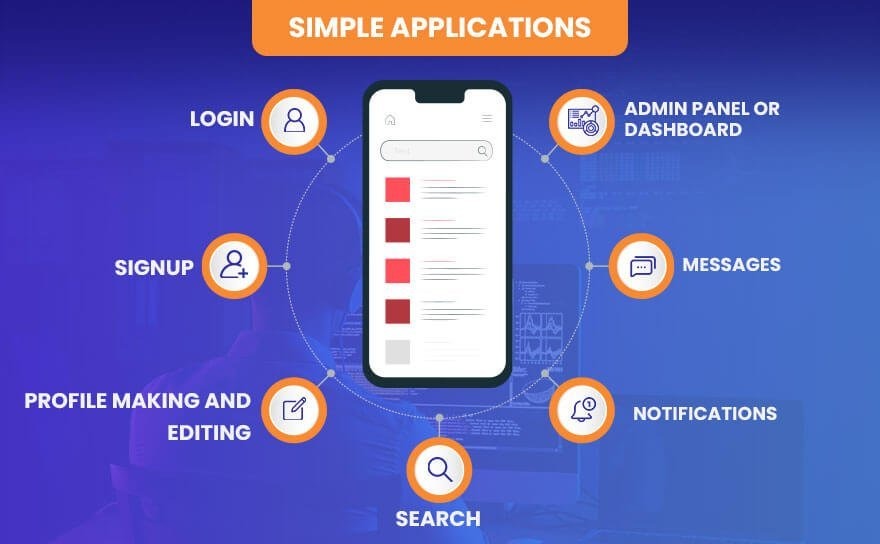
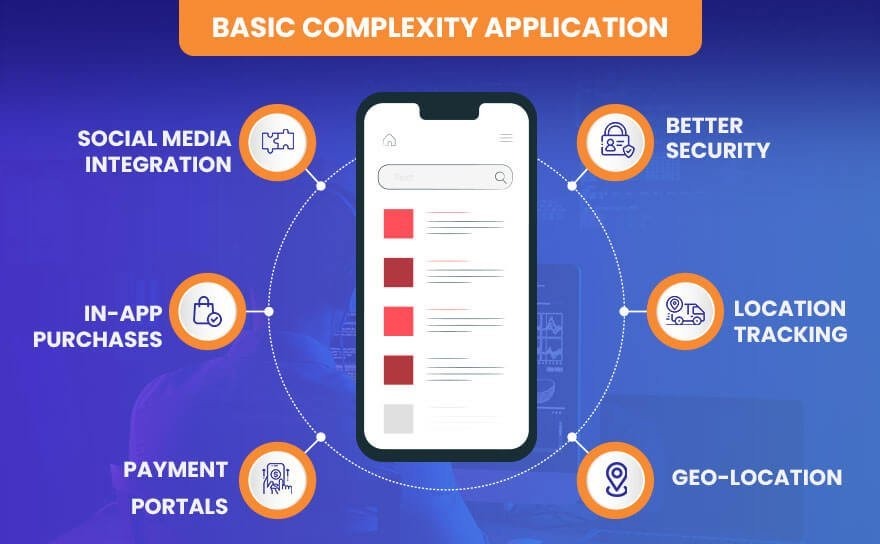
Step 1: Defining The Problem

First, you need to be ready with all your project requirements. Such requirements should meet the basic needs of your web application and acquire all the essential information for your business needs.

A common problem will opt for a good head-start to the project, and it becomes a boon to help you identify the best solution for your needs. Moving further, you must clarify the website’s purpose and end goals.

The web developers need to answer the below questions for the planning phase of the web application functionality.

  • What is the basic need of the app you want to build?
  • Have you identified the features and functions that should be integrated into your web application?
  • Who will be the target audience of your product?

Step 2: Creating a WireFrame

The next step is developing a robust wireframe, or we can say a detailed prototype, that helps you to communicate the solution to specific target users.

So, the developers need to start by preparing the blueprint of design elements of the web apps, especially to target a specific audience. Such wireframe plays a vital role in getting a mesmerizing user experience to the web application.

The wireframe is then made available to intended users, taken their feedback into consideration, and finally iterated until they’re satisfied. Once you’ve finalized the design process, the next step is to build the application.

The subsequent steps will happen in this essential phase.

  • The developers have to identify the details of data and data types required for the application to create a database for storage.
  • The developers create the front-end applications, typically based on the parameters approved by the users interact during the wireframing process. It becomes essential for the developers to determine the framework for front-end development.
  • The web app developers create user interaction with the server.
  • Developers, especially during web app development, either code from scratch or use web application frameworks like front-end and back-end development frameworks to make responsive websites. Such web application frameworks plays a vital role to design and build web solutions for your business needs.
  • Based on the application type, that is, client-side/ server-side/ single-page, programming is done.

Step 3: Testing an Application

One of the primary steps of the web application development process is testing an application. Moreover, it’s an essential step of the software development lifecycle and is considered an inevitable part of the software development functionality.

The testing of the web application is generally performed for usability, compatibility, functionality, security, and, most importantly, app performance by the testing (QA) crew.

The primary role of the QA (Quality Assurance) squad is to eliminate bugs and ensure that the application works without any glitches.

The Testing process determines any possible improvements and upgrades to make in the future to make the application more responsive. Once you’re done with the testing process, the final implementation of the web application starts.

At Albiorix, we help you perform all the mandatory software and usability testing to ensure that your web app functions seamlessly. We also provide training and support to use the apps effectively.

Step 4: Web Application Hosting

You must buy a domain and choose a hosting provider to create a server location for the app. We help you choose shared hosting, dedicated hosting, or cloud hosting based on your requirements.

Be it a simple website or a complex web application, every digital product needs routine checks and enhancements.

Maintenance of the application or website includes:

  • Ongoing QA testing
  • Bug fixes and improvements
  • Addressing changes and adding features based on user feedback
  • Providing regular updates and technical support

Hire Web Developers from Albiorix

We have a team of dedicated web developers who are experts in analyzing and deploying the need for complex web development projects.

Contact Us

Conclusion

Hope you got a clear vision of the in-depth guide about web application development.

To summarize, Web application development is an essential aspect for any organization to lead the digital space and reach out to more customers in the future.

Albiorix is a custom software development company that comprises multiple development services ranging from software customization to building Web, Mobile, Enterprise, and Cloud applications across various industries.

What’s New in Node.js 19? Features & Updates That You Must Know

Node.js 19 is now live!

And I know you’re too much excited to know the features and major updates that are introduced in Node.js 19.

If you ask me about what’s exciting about Node.js 19, then I must say that you can expect new releases approximately every two weeks. Since this is an odd-numbered release line, Node version 19 will not be promoted to LTS. Let’s move ahead with your question about what’s new in Node.js 19.

Overview of Node.js 19

With the release of Node.js 19 in the market, a big convenience for Node.js developers came where they can easily deal with early feature testing.

Some of the key highlights that are introduced with Node.js 19 include the update of the V8 JavaScript engine to 10.7 and HTTP(s)/1.1 KeepAlive enabled by default.

Node.js 19 will effectively become the “Current” release line and is going to replace Node.js 18 definitely when it enters long-term support (LTS). So, till then, Node.js 19 will officially be the ‘Current’ release for the next six months, until April 2023.

Build High-Performance Web Apps Using Our Node.js Web Development Solutions

We help you build Node.js development services to build real-time, function-rich, scalable web applications for all your business needs.

What are the Updates on Node.js 19?

Node.js is going to benefit you in many ways especially for dealing with back-end development services. It’s time to explore the major updates that have been introduced the Node.js 19 version.

1. node –watch (experimental)

Support for running in “watch” mode using the node —watch option is an intriguing new feature recently added to the runtime. It will restart when an imported file is updated while your application is running in “watch” mode.

$ node –watch index.js

This feature is available in v19.0.0 and v18.11.0+.

Let’s explore this feature with an example.

In our server/index.js:

const express = require("express");
const path = require("path");
const app = express();
app.use(express.static(path.join(__dirname, "../build")));

app.listen(8080, () =>
  console.log("Express server is running on localhost:8080")
);

So, we were using a nodemon tool to run the server and to make instant file changes whenever we restarted our application. We were using the “nodemon server” command to apply the effect for the same.

Now, with the release of node.js 19, you do not need to type such a command or install the additional tool. Instead, just execute the command “node –watch” to automatically restart the application when file changes are detected.

% node --watch server
(node:67643) ExperimentalWarning: Watch mode is an experimental feature. 
This feature could change at any time
(Use `node --trace-warnings ...` to show where the warning was 
created)
Express server is running on localhost:8080

2. HTTP(S)/1.1 KeepAlive by default

Node.js 19 sets keepAlive to true by default. This means that any outgoing HTTP(s) connection will automatically use HTTP 1.1 keepAlive. The default keepAlive duration is 5 seconds.

If we consider the same example,

const http = require('node:http');
console.log(http.globalAgent);
const https = require('node:https');
console.log(https.globalAgent);

And if we use Node.js 16 to run the file using the command “nvm use 16”, you’ll see that HTTP.globalAgent and HTTPS.globalAgent set keepAlive false.

But that’s not the case with Node.js 19. If you execute the server with “nvm use 19”, the output goes something like this.

  • HTTP.globalAgent sets keepAlive true, and the default keepAlive duration is 5 seconds (5000 ms).
  • HTTPS.globalAgent sets keepAlive true, and the default keepAlive duration is 5 seconds (5000 ms).

Keeping keepAlive to true will generally deliver better throughput as connections are reused by default.

3. Stable WebCrypto

The WebCrypto API is a feature-rich interface that helps you build systems using cryptography. With node.js 19, the WebCrypto API is stable (by excluding the algorithms: Ed25519, Ed448, X25519, and X448).

To access this module, you can use globalThis.crypto or require(‘node:crypto’).webcrypto. Let’s go through an example where we will perform a number of low-level cryptographic functions:

const { subtle } = globalThis.crypto;

(async function() {

  const key = await subtle.generateKey({
    name: 'HMAC',
    hash: 'SHA-256',
    length: 256
  }, true, ['sign', 'verify']);

  console.log('key =', key);

  const enc = new TextEncoder();
  const message = enc.encode('I love cupcakes');

  console.log('message =', message);

  const digest = await subtle.sign({
    name: 'HMAC'
  }, key, message);

 console.log('digest =', digest);

})();

(The above code is taken from GitHub)

If you run the server, the output goes like this.

% node server
key = CryptoKey {
  type: 'secret',
  extractable: true,
  algorithm: { name: 'HMAC', length: 256, hash: [Object] },
  usages: [ 'sign', 'verify' ]
}
message = Uint8Array(15) [
   73, 32, 108, 111, 118,
  101, 32,  99, 117, 112,
   99, 97, 107, 101, 115
]
digest = ArrayBuffer {
  [Uint8Contents]: <30 01 7a 5c d9 e2 82 55 6b 55 90 4f 1d de 36 d7 89 dd fb fb 1a 9e a0 cc 5d d8 49 13 38 2f d1 bc>,
  byteLength: 32
}

4. Custom ESM Resolution Adjustments

Node.js has removed the –experimental-specifier-resolution flag. Its functionality can now be achieved via custom loaders.

5. Dropped DTrace/SystemTap/ETW Support

For the following two reasons, Node.js has dropped the support for DTrace/SystemTap/ETW:

  • There are no clear indicators anyone is using DTrace, SystemTap, or ETW.
  • The complexity of maintaining and supporting these tools has proved not worth the effort.

6. V8 JavaScript engine is updated to V8 10.7

Node.js 19 has updated the V8 JavaScript engine to V8 10.7, which includes a new function, Intl.NumberFormat, for language-sensitive number formatting.

Intl.NumberFormat(locales, options)

locales is an optional parameter, which is a BCP 47 language tag or an array of such strings.

These are the major changes that have been introduced in Node.js version 19. If you need any help regarding Node.js installation or upgradation, hire Node.js developers on part-time or full-time basis.

Upgrade to Node.js 19 Now!

What are you waiting for?

Go ahead and download Node.js 19.0.0 today.

Being a Node.js development company Australia, we have a team of expert Node.js developers for hire who are proficient in dealing with application testing and modules in the Node.js 19 version.

And yes, by selecting Node.js as your preferred technology for your project needs, you can efficiently build responsive web apps.

find the release post of Node v19.0.0 (Current) which contains the full list of commits included in this release.

React vs React Native: Key Differences That You Need To Know

A big confusion exists in the mind about React and React Native and whether both are the same or not.

To clear the confusion about React and React Native, it becomes of prime importance to understand the basic concept of React Vs React Native in detail.

As per the recent survey by Stack Overflow, it has been estimated that ReactJS is the most popular web framework that is used by many developers.

Key Takeaways

  • React is a JavaScript library used for building user interfaces (UIs) for web applications, while React Native is a framework that allows you to build mobile applications using React and native components.
  • React is primarily designed for web development and can be used to build applications that run in web browsers. React Native, on the other hand, is used for building mobile applications that run natively on iOS and Android devices.
  • React allows code reuse to some extent, as components can be shared between different parts of a web application. However, React Native provides a higher degree of code reuse, as a significant portion of the codebase can be shared between iOS and Android platforms.
  • React utilizes HTML tags and CSS for rendering UI elements in web applications, while React Native uses native components provided by the underlying mobile platforms. This allows React Native apps to have a more native look and feel, closely resembling applications built using native languages like Swift (for iOS) or Java/Kotlin (for Android).
  • React Native apps generally offer good performance due to the use of native components and optimized rendering. However, compared to fully native applications, React Native apps may experience some performance limitations, especially in scenarios requiring complex animations or heavy computational tasks.
  • React development typically requires knowledge of JavaScript, HTML, and CSS, while React Native development requires these skills along with familiarity with the platform-specific languages and tools, such as Objective-C/Swift for iOS or Java/Kotlin for Android.
  • React has a large and mature ecosystem with a wide range of libraries, tools, and resources available for web development. React Native also has a growing ecosystem and community, but it may have fewer options compared to React when it comes to certain web-specific features or libraries.

What is React?

React, or ReactJS is an open-source JavaScript library specifically used to build the user interface for Web Apps. It takes sole responsibility for only the view layer of the application.

In addition, we can say that ReactJS is

  • A library that typically supports both front-end development and server-based configurations.
  • Created by Jordan Walke and his team from Facebook.
  • A new way of rendering pages, leading to responsive and dynamic user input.
  • Responsible for the rendering of UI components.

Planning To Build Feature-rich, Applications?

Albiorix has a team of top-notch app developers that are always ready to build client-centric solutions.

Contact Us

React is beneficial for developers working with a reputed ReactJS development company in many ways, including

  • Developing fast, adaptive, and intuitive mobile and web applications.
  • They can quickly automate the entire design process.
  • They are not bound to strict rules; instead, they can work according to their convenience.
  • Easily plugins and libraries integrations are made possible with existing code.
  • Enables developers to develop fast, scalable, and simple web applications.

Hope you got a clear vision of what is ReactJS. Now, we’ll come across the concept of React Native.

What is React Native?

React-Native is a ReactJS-based framework designed explicitly to develop robust and responsive mobile apps. It is designed to build native mobile applications using reusable components and their react native best practices which will help you create better applications.

Moreover, we can say that React Native is:

  • Used to develop rich mobile UI from declarative components using only JavaScript.
  • A hybrid mobile app development framework that allows you to build mobile apps only with a single code base.
  • A framework that allows building mobile apps natively across different platforms like Android and iOS.

React Native is beneficial for developers working in a React Native App development company in many ways including

  • They can use ReactJS to create mobile apps and web apps.
  • It allows them to easily compile native app components enables them to build mobile applications that can efficiently run on Android, iOS, and Windows devices.
  • The syntax and workflow remain similar to ReactJS, but the components are different.
  • The developers can only target mobile platforms rather than web browsers.

Develop High-Performing Apps using React Native

Our team having expertise in building cross-platform mobile apps that are tailored to your business goals.

Contact Us

Working of React Native Vs React

Now it’s time to explore the working process of the leading technologies: React and React Native. First, let’s start with React framework. To make it concise, ReactJS uses VDOM, while React Native uses API for its working process.

ReactJS’ Virtual DOM

ReactJS typically uses VDOM (Virtual DOM) to create an application’s inspiring user experience (UX). The representation of the web document and its content is done correctly with the help of an external programming interface named DOM.

One effective way to perform DOM management has greatly impacted how libraries and frameworks are used to make the application more secure and robust.

But in the case of React application, Virtual DOM has changed the entire scenario. VDOM is nothing but a visual representation of the real DOM.

While creating dynamic UIs for your application, the primary role of the VDOM is to manage quick updates.

What is the importance of virtual DOM as compared to real DOM?

Importance-of-Virtual-DOM ReactJS

React Native’s API

React Native’s API plays a key role in building strong user interfaces for both Android and iOS apps. For Android, React Native relies on Java APIs to render native components, while for iOS, it uses native APIs and Objective-C to display UI elements.

JavaScript is used to handle the rest of the app’s code, making it easier to customize the app for each platform. This approach helps maximize code sharing and component reuse across Android and iOS.

Unlike ReactJS, React Native does not use HTML or CSS. Instead, styling is done through JavaScript by creating style sheets specifically for React Native components.

Also, React Native uses different component tags compared to ReactJS to fit the mobile environment, making it distinct but efficient for mobile app development.

Let’s see the example of ReactJS.

Copy
function sampleapp ()
{
const element = (
<div>
<p> Welcome to the World!!! </p>
</div>
ReactDOM.render(element, document.getElementById('root'));
}
setInterval (sampleapp,1000);

Now, see the example of React Native.
import React, { component } from ‘react’;
import {text, view} from “react-native”;

Copy
export default class SampleApp extends component
{
render()
{
return 
{
<view>
<text> Welcome to the World!!! </text>
</view>
}
}
}

Related Post: What are the Differences between Vue and React?

Advantages of React Native Vs React

After having a basic understanding of React VS React Native differences along with its working, it’s time to explore how React and React Native will be helpful to you in developing web applications and mobile applications.

Top Advantages of Using React

Top Advantages of Using React
  • DOM (Document Object Model) is a viewing agreement between data inputs and outputs. It works faster than another conventional full refresh model, as virtual DOM refreshes only parts of the page. Moreover, it plays a vital role in enhancing the performance of web applications.
  • With the help of ReactJS, you can effectively use code components multiple times. Such reusable components help you in saving a lot of time in web and mobile application development.
  • The applications developed with the ReactJS framework will make your application SEO-friendly. The rendering of your web pages is performed directly from the server to render browser code, which eventually improves the SEO of your web app.
  • React plays an essential role in the life of developers as it is solely responsible for improving the debugging speed of mobile and web applications.
  • React coding standards are very familiar, even for non-familiar users. It often happens that some framework needs you to learn multiple concepts that are only useful within the framework.

We Have Talented ReactJS Developers For Business App

Albiorix has a certified ReactJS developers that will make your mobile app move to the next level.

Contact Us

Top Advantages of Using React Native

Top Advantages of Using React Native
  • React Native is vital in improving the application’s performance and is made possible with its Native Modules and Native components. React Native renders specific code components with native APIs, which is not possible with other cross-platform frameworks like Cordova or PhoneGap that typically render code via WebView.
  • React Native is a robust framework that usually comes with all the advantages of React.js. As we know, React.js is a master in dealing with providing a better UI, so those benefits remain.
  • The excellent part about React Native app is that the developers don’t have to develop the same application for iOS and Android separately. It’s because they need to reuse the common logic layer directly.
  • The component-based structure of React Native app typically allows developers to build mobile apps by strictly following a more agile, web-style approach to development than most hybrid frameworks and without any web development at all.
  • If you have a basic understanding of JavaScript technology, React Native will be easy to learn. Moreover, it allows most front-end web developers to be mobile developers. By knowing JavaScript, platform APIs, some native UI components and elements, and any other platform-specific design patterns, you can efficiently adopt React Native platform.
  • With the help of this robust framework, you do not have to refurbish your old app. Instead, add React Native UI components to your existing app’s code without having to rewrite the entire code. Isn’t it great?
  • What’s the primary role of Native app development? Inefficiency, slower time to deployment, and less developer productivity. React Native brings high speed, responsiveness, and agility of web app development along with effectual processing and the best user experience to the hybrid space, to provide your users with a native app experience.

Disadvantages of React VS React Native

After exploring the advantages of React Vs React Native, it’s time to see the drawbacks of both technologies.

Top Disadvantages of Using React

Disadvantages of React
  • Complexity of JSX
    React utilizes JSX (JavaScript XML), an extension or plugin that allows the developers to code HTML programming language in React applications. So, it becomes challenging for the developers to prefer JSX proper documentation, especially for freshers working with React web development.
  • Frequent Library Updates
    With the constant changes in the library for React applications, it becomes pretty difficult for developers to deal with application speed. Moreover, such React improvements are generally occupied by specific libraries and other updates, making the development code less robust.
  • Learning Curve
    Compared to React Native, React takes much more time for developers to learn in a short amount of time. In simple words, the learning curve of React is definitely more, making it a challenging factor for new developers to create an application using React UI Frameworks.
  • Third-Party Integration
    As we know, React comes up with various third-party plugins and modules, and it possesses only a few native modules. Using third-party integration support makes it challenging for the developers to combine HTML and CSS code directly into JSX, along with its code complexity.
  • Overhead Cost & Time
    It becomes of prime importance to download another react-enabled library, and that plays an essential role in increasing overall cost and time overheads. Let’s say you are using the Carbon framework for UI experience; then it becomes crucial to download Carbon components with react.

Top Disadvantages of Using React Native

Disadvantages of React Native
  • Lowers Development Speed
    The development speed of React Native applications lowers as the application is loaded with multiple features and modules. In addition, with the shortage of native modules and third-party libraries dependencies, React Native applications’ development speed is lowered too.
  • Constant Updates
    The developers are constantly working on providing better development of React Native applications. So, with such constant updates, it becomes pretty challenging for the developers to deal with new native render components, improved performance, and custom components.
  • Lacking Native Libraries
    React Native is solely responsible for slowing down the entire development process if your application is bound with multiple heavy functionalities. The primary reason is that it lacks native libraries and is dependent on external, third-party libraries.
  • Loosely Held Abstraction Layer
    React Native programmers can easily fetch tags like HTML, stylesheets like CSS, and code from Javascript. And that’s what the loosely held abstraction layer is about. It provides more freedom to the developers, but at the same time, it poses challenges as well.
  • Lacking Security Robustness
    React Native is solely responsible for creating a gap in security robustness when you create banking and financial apps where data is highly confidential; experts advise not to choose React Native application development.

Want to Create a Robust Mobile App?

Albiorix is a one-stop solution for mobile app development as we have expert mobile app developers to provide you with cost-effective solutions.

Contact Us

Technical Difference Between React and React Native

It’s time to see the differences between React Vs React Native.

1. Installation Scenario

As we all know, React is a JS library, so it becomes essential to import or integrate React library into the HTML page.

Copy
<script src="https://unpkg.com/react@18/umd/react.development.js" crossorigin></script>
 <script src="https://unpkg.com/react-dom@18/umd/react-dom.development.js" crossorigin></script>

Likewise, you can start by creating your first components in the ReactJS application.

On the other hand, to create an app using React Native framework, you must first have Android Studio (for Android applications) and Xcode (for iOS applications) in your system.

Not only this, you must install other essential tools like Node, React Native CLI, and others depending on your project needs.

Once the installation is done, you can start creating new React Native components by using React Native CLI and directly executing it on a mobile emulator.

2.Developer Efficiency

Developer efficiency is an important factor when choosing between React and React Native.

ReactJS helps developers build user interfaces quickly by allowing efficient client-side rendering while still supporting server-side rendering.

This balance gives developers more control and flexibility to create powerful web applications.

React Native, however, takes a slightly different route. It focuses on improving developer efficiency by using reusable native components that compile directly into native code.

This approach helps apps run smoothly and feel more responsive on mobile devices.

Both frameworks aim to simplify development, but React is better suited for web applications with more customization options, while React Native excels in building fast, responsive mobile apps.

Understanding these differences helps developers choose the right tool for their project and work more effectively.

3. Technology Basics

As React is a JavaScript-based framework, it’s quite apparent that you must have a basic knowledge of JavaScript technology.

However, if you have good expertise in JavaScript, you can easily become a ReactJS developer in a short period.

React Native is a cross-platform mobile framework that typically utilizes ReactJS to create mobile interactive user interfaces for cross-platforms apps on a large scale.

But, as React Native is not a pure JavaScript framework, combining Java, Objective-C, Objective-C++, and C++ code is mandatory for you to learn this framework.

4. Achievability

React is a framework that typically combines HTML and CSS for designing and building robust web applications. Moreover, it’s possible to integrate CSS, eliminating multiple challenges associated with CSS development.

React Native help you add additional components and features to the existing applications without making drastic changes in the coding. For example, let’s say your mobile application is created using a hybrid framework like Ionic and Cordova.

It becomes easy for you to reuse that Ionic-based code smoothly with simple plugin integrations.

Related Post: NativeScript vs React Native

5. Syntax

Syntax in React and React Native differs based on their platforms. ReactJS uses JavaScript along with JSX, a special syntax that looks like HTML but allows you to write components efficiently.

This makes building responsive web pages easier and more intuitive for developers familiar with HTML.

On the other hand, React Native does not use HTML or JSX in the same way. Instead, it relies on its own set of native components like <View>, <Text>, and <Image> to create mobile app interfaces.

This means React Native syntax is tailored specifically for mobile development and does not support building web applications.

Understanding these syntax differences is key to choosing the right framework for your project, whether it’s web or mobile.

6. Component Creation Method

As ReactJS is a JavaScript and component-based library, you can easily use a JavaScript class or method that specifically delivers a React element. Generally, ReactJS comes up with two main components: function components and class components.

On the other hand, React Native framework has Native components and Native modules to make it easy for developers to develop apps.

7. SEO-Friendly Application

While developing a ReactJS application, you must consider SEO parameters. The primary reason behind SEO perspectives is to rank among the top in the leading search engines.

ReactJS comes up with multiple tools and libraries that easily optimize your applications in terms of search engine optimization (SEO).

But, in the case of React Native, you do not have to deal with SEO. So it ultimately depends on how we build native UIs for our application needs.

8. Navigation

Navigation is the way users move between different screens or components within an app. In React (web development), navigation is usually managed with a library called React Router. This library uses the browser’s history to update the URL and display the right components based on the current route.

React Router includes components like <BrowserRouter>, <Routes>, and <Route>. The <BrowserRouter> wraps your app and enables routing. Inside it, <Routes> looks for the first matching route, and <Route> defines which component should appear for a specific path.

In React Native (mobile apps), navigation works differently because mobile apps don’t have URLs. Here, libraries like React Navigation are used to switch between screens smoothly, offering stacks, tabs, and drawer navigators.

Both React Router and React Navigation provide flexible ways to control how users move through your app, ensuring a smooth experience whether on web or mobile.

9. React Native

React Native, on the other hand, doesn’t have a built-in navigation library like React Router. Instead, it relies on third-party navigation libraries that are specifically designed for mobile app development.

The most popular navigation libraries for React Native are React Navigation and React Native Navigation.

React Navigation is a JavaScript-based library that provides a declarative way to handle navigation in a React Native application. It offers different navigation types, such as stack navigation, tab navigation, and drawer navigation.

With React Navigation, you define a navigation hierarchy using navigators and screens. Navigators represent the overall structure of the app, while screens represent individual screens or components.

React Navigation also provides navigational hooks and a navigation prop that you can use to navigate between screens programmatically.

React Native Navigation, on the other hand, is a native navigation library that uses native navigation components provided by the underlying platform (iOS or Android).

It offers a more performant navigation solution but requires additional setup and configuration compared to React Navigation.

Both React Navigation and React Native Navigation have their own set of APIs and features that allow you to handle navigation, pass parameters between screens, and customize the navigation experience in a React Native app.

Overall, while the concept of navigation is similar in React and React Native, the implementation and available libraries differ due to the different environments (web vs. mobile) and requirements of each platform.

10. Storage

In both React and React Native, the concept of storage refers to the ability to persist and manage data within an application. However, the specific approaches to storage differ between React and React Native due to the distinct environments in which they operate.

In React, which is primarily used for web development, the storage options are typically related to web browser capabilities. There are several methods for storing data in a React application:

  • Local Storage: The Web Storage API provides the ability to store data in the user’s web browser. It allows you to store key-value pairs of data persistently on the user’s device even after the browser is closed. The data is stored as strings and can be accessed using JavaScript.
  • Session Storage: Similar to local storage, session storage allows you to store data persistently within the user’s browser. However, the data stored using session storage is only available for the duration of the browser session and is cleared once the session ends or the browser is closed.
  • Cookies: Cookies are small pieces of data stored by the web browser. They can be used to store user-specific information and are sent with each request to the server. Cookies are often used for authentication, tracking user preferences, and maintaining session state.
  • State Management Libraries: React also offers state management libraries like Redux and MobX, which allow you to manage and store application state in a centralized manner. These libraries provide predictable and scalable ways to manage complex application states. React Native, on the other hand, is a framework used for building native mobile applications. Since it operates within a mobile environment, the storage options different from React.
  • Async Storage: React Native provides an API called AsyncStorage, which is an asynchronous, persistent, key-value storage system. It allows you to store data locally on the device, similar to local storage in web browsers. AsyncStorage is a simple and lightweight storage solution for basic data persistence in React Native applications.
  • Native Storage Solutions: React Native also allows you to leverage native storage solutions provided by the underlying mobile platforms. For example, on iOS, you can use Core Data or SQLite for more advanced data storage needs. On Android, you can utilize SQLite or Android’s SharedPreferences for storing and managing data.
  • Redux or MobX: Just like in React, you can use state management libraries such as Redux or MobX in React Native applications to handle and persist application state across different components.

It’s important to note that while these storage options exist, the choice of storage mechanism depends on the specific requirements of your application.

Factors such as the type of data, its sensitivity, performance considerations, and cross-platform compatibility should be taken into account when selecting a storage approach in both React and React Native.

React Vs React Native: The Comparison Table

Let’s highlight the difference between React and React Native in the form of a comparison table to get more insight into both technologies.

ReactReact Native
With the help of ReactJS development, it becomes easy for developers to create interactive User Interfaces that are high-performant (UI) as their own JS library.With the help of React Native, you need to build the entire framework, whether you want to create Android and iOS apps. It can be efficiently built from a single framework.
In the case of security perspectives, React framework helps developers deal with secure web and mobile applications.Compared to the ReactJS framework, React Native offers fewer security constraints for the entire mobile application development.
ReactJS is a framework that offers better and more animation effects to your applications.React Native is a framework that typically offers less animation functionality than ReactJS.
ReactJS is a base of the Document Object Model for the webReact Native functions as a derivative itself
For ReactJS, code is rendered from the DOMWhile with React Native, APIs are used in mobile applications
ReactJS has a library at its base. It means you can use it to develop a high-performance user interfaceReact Native is the framework and has no language library.

Conclusion

Choosing between React and React Native depends on your development goals. If your focus is on building fast, interactive web applications, then learning React (ReactJS) is a great start.

It helps you create dynamic user interfaces for websites and is widely used in modern web development.

On the other hand, if you’re aiming to develop mobile apps for Android and iOS, then React Native is more suitable. It shares similar concepts with React, so learning one makes it easier to understand the other.

Both are powerful, and your choice should match the platform you want to build for web or mobile.

Everything You Need To Know About Building An App In 2025

One of the common questions that arise in the mind of business owners before developing a mobile app design for their business needs is: how much does it cost to make an app?

As per the recent surveys, it has been estimated that the mobile app development cost may range from $100,000 to $500,000.

To shed some light on how much it costs to create a mobile app for your business, we have come up with an article that will definitely clear all your doubts.

Key Takeaways

  • App complexity level, App design, and selecting appropriate platforms are primary factors that you need to take into consideration before creating a mobile application.
  • You need to define or be ready to deal with hidden costs before starting to create an app for your business.
  • To understand the overall cost of developing a mobile application, you need to consider server fees, account creation process, app maintenance services, and, most importantly, integrating third-party services.

Factors That Impact the Mobile App Development Cost

Generally, there are many factors that you need to take into consideration before creating a mobile application.

  • Analyze the target audience and business objectives
  • Understand how to develop an app
  • Select an appropriate base to code.

Your mobile application can efficiently become more unique, engaging, and convenient by adding attractive buttons, screens, and other elements. However, such additional parameter typically affects the overall app budget.

Therefore, it becomes mandatory for you, as a business owner, to pre-develop a prototype and think over the functionality to the smallest detail. This app functionality influences the following factors that affect the price.

Want to Create a New Mobile App For Your Business?

Albiorix is a leading mobile app development company with top-notch developers to build cost-effective mobile apps.


Contact Us

How much does it cost to build an app usually depends on three essential things:

  • The app’s complexity levels
  • Design and Structure
  • The platform on which the application will run

Let’s explore every parameter in detail to make your application more robust.

Factor: 1 – Complexity Level of App Development

You’ll require less development timeline for the mobile app development process if your application is smaller and simpler. When it comes to the timing of the application development, you need to decide on the scale of the upcoming work.

To understand the app’s complexity in detail, there are some questions that you need to ask yourself:

  • How many features do you want to implement in your mobile application?
  • How many types of screens, buttons, and functions do you want to include in your application?
  • How complex will the application’s business logic be?

The complexity level of the app depends on the features and integrations you choose and how to get an app developed. To simplify, below is the list of characteristics defined for simple, mid-level, and complex apps.

Simple ApplicationMid-Level ApplicationComplex Application
Developed efficiently without any added benefitsIncludes more complicated things.Equipped with multiple functions.
Possess only the core features.Includes API integration support.Includes features such as real-time synchronization, chatbots, media processing, UI animation, and many more.
Include low-tech screens.It will have more screens and also a custom UIThe scaling of the application is too much high.
Will have the necessary UI solutions.Involves features like real-time messaging.Takes more time as compared to other application types.

Who are the supporters for an entire mobile app development team?

  • A project manager
  • A UI/UX designer
  • An iOS or/and Android developer
  • A backend developer
  • A QA engineer

By considering the above mobile app development team, the terms of the app development process in every category goes something like this:

Application TypeApproximate Time Required
Simple App2 – 4 months.
Mid-Level App6 – 10 months.
Complex App8 – 1 year or more

The cost of making mobile apps is highly dependent on the level of complexity and the size of the project. Let’s go through every application type in detail to understand its working.

Type 1. Simple Complexity

The application with simple complexity typically covers basic and new features, approximately three to four screens, simple & ready-to-use functions, and, of course, no data storage. That’s a simple application.

In addition, a simple application will have the following features:

The cost of such a simple application will be done by using the above or related new features.

Some of the best simple app projects are a calculator app, time tracking app, notes app, and even social networks.

Type 2: Basic Complexity

The basic complexity application is referred to as an application that includes database connectivity and API-based applications.

For developing a basic complexity application, you need to deal with adding more features, and obviously, the database will increase the application value.

Compared with basic complexity applications, these applications come up with additional features like

As stated earlier, basic complexity applications include better accessibility and usage of robust infrastructure. Moreover, such applications require storage, retrieval from more than one database, and more synchronization.

If you are planning to develop such an app, it becomes essential for you to analyse in detail how large the customer base is. Furthermore, it is essential in determining the pricing and price range.

Therefore, the cost of the app will rise as complexity and feature count increase.

Type 3. High Complexity: Feature-Rich and Large-Scale Applications

Advanced and feature-rich apps are developed explicitly for large corporations.

In essence, the businesses either construct bespoke software without connectors or employ custom software to connect to already-existing systems.

Because complex apps tend to be legacy or custom software, their custom development expenses are usually bigger.

The overall cost of developing the app with a feature-rich app may be substantially higher than you might expect.

The following image depicts the type of app’s overall development cost variation.

Such applications require a pretty advanced development effort, detailed research, and preparation for the mobile app development project cost estimate.

Different infrastructure components are needed for developing dashboards and visualisations, the complexity of the development platform, and the number of servers and databases.

But on the other hand, the developers working with mobile app development agencies need not mention the demands for redundancy and high availability. These can need extensive modifications; the developers must code most of the functionalities.

It can be challenging to estimate the mobile app cost and scope, especially before holding extensive meetings.

Examples include trading platforms, CRM applications, gaming, and enterprise apps.

Factor: 2 – Application Design Complexity

Basic app design is the next crucial component of how much it costs to make an app. In simple words, we can say that it seems almost impossible to have a development step without considering the design phase.

Minor differences exist between these two essential parameters, which play an indispensable role in determining mobile app development costs.

The designing phase is similar to the development phase in that the cost rises proportionately as additional features are added.

If you decide to create utilising templates, the price estimate will be limited as well; however, further changes will increase the cost and lengthen the process.

There are a few other issues that we must consider.

1. User Experience (UX)

    UX is concerned with how the application functions. UX entails creating screens on paper or in a design base.

    Finally, it influences how much it costs to develop a mobile app. Again, the goal is to make the application as simple to use as possible for the end user.

    To create that experience, you must first understand the market, the user, and your goals and objectives.

    The cost of creating a mobile app from scratch will vary depending on the level of engagement and the app’s complexity of the design.

    It needs to consider the following parameters:

    • Button placement
    • Colour psychology
    • Observing the user’s eye movement

    2. User Interface and Visuals

      There are numerous intricacies to application design. However, it all starts with the basic user interface or how the application will appear to the viewer.

      You can estimate the cost based on the use of various visual elements. It has an impact on the cost of MVP design. The better design does not only imply a more positive outlook.

      After designing an application, mockups are created to represent the solution visually.

      Your objectives will also determine the design. So, it becomes essential to determine the factors that you need from your enterprise app. It can be in any form like:

      • Engagement
      • Sales
      • Information

      Furthermore, the type of application you are developing will influence app development costs.

      • The fundamental app
      • Authentication
      • Social media networking
      • On-demand
      • E-commerce
      • Marketplace
      • IoTB

      Different applications necessitate different design solutions.

      Examples:

      • Layout
      • Screen
      • Colours
      • Typography
      • Shapes
      • Elements
      • Items

      3. Branding

      What thoughts do you have in mind when you consider:

      • Apple
      • Nike
      • Reebok
      • Volkswagen
      • McDonald
      • Dominos

      These are the leading firms that have brand equity. Their names and logos stand out among the thousands of other identical brands. What’s the reason behind it? It’s just because of the money spent on branding.

      Now that you are creating a mobile app, you might not be interested in brand promotion due to the expense. You incorporate branding into your business concept.

      Therefore, it is clear whether or not branding should be incorporated into the application development process.

      However, branding will ultimately determine how much it will cost to make an app, so you must keep initial development costs low.

      4. UX Writing

      When creating an app for a user, copywriting should be included in the overall cost.

      The target users must be persuaded to interact and engage more with your solution by compelling copy for other users too. Therefore, the combination of effective copy and striking design is essential for an app’s success.

      You cannot ignore the fact that a good copy costs good money when it comes to the price.

      Factor: 3 – Selecting an Appropriate Platform on Which App Will Run

      We move on to the base once we know how much it will cost to construct the app by considering complexity and design.

      Then, you must choose between two options: Hybrid App development/Cross-platform or Native App development.

      Option 1. Hybrid or Cross-Platform App Development

      The term “hybrid” denotes that the application can be used with iOS apps or Android smartphones. This inquiry is crucial during the discovery phase, which helps you to determine how much an app costs.

      Think over the following three points before settling on one platform:

      • Market share
      • Mobile Device fragmentation
      • Prevalence

      All of these are based on the original market you plan to target.

      Knowing the market might help you determine how much it will cost to design an iOS app development.

      In addition, it would help if you comprehended the areas where the iPhone app is more common than the Android app; the same argument holds for Android smartphones.

      Although the app creation costs differ for the two platforms, the process of developing an app is the same for both.

      As a result, cross-platform programmes can exploit platform-specific capabilities and benefit from easy integration and smooth functioning.

      It improves the user experience and lowers an app’s “how much does it cost” response.

      A native app value more productive than a hybrid one. And it makes sense why this would be. To start, it takes twice as much time and labour to simultaneously develop two apps.

      Option 2. Native App Development

      Compared with hybrid app development, a native application runs only on a single platform: iOS and Android apps.

      For building Android and iOS applications using native frameworks and uploading it to respective Google Play Store or App Stores, you’ll need to hire mobile app developers.

      One to create an Android version and another to create an iOS version that should be compatible with almost all iOS devices. You get the idea.

      The pricing factor affects the principle on which different app users opt for other platforms. But, in this case, there are more chances of getting the double cost for any mobile app developer.

      Now, the question arises: how much will an iPhone or Android app development cost for any business owner?

      Generally, the price will be the same for both iOS and Android platforms. Yeah, the technologies, SDK, databases, frameworks, and quality assessment systems are completely different, but the price is the same.

      Planning to Create a Robust and Responsive Mobile App?

      Albiorix has a team of mobile experts who help you design and build a mobile app for all your business needs with cost-effective solutions.


      Contact Us

      How Much Does It Cost to Make an App?

      When developing an app, you shouldn’t just be thinking about design and development costs; there can be many hidden costs while deciding for the cost of app development.

      In addition, it becomes essential to understand other detailed costing parameters that you need to consider.
      Some of them are

      1. Developer accounts
      2. Data storage facilities
      3. updates/maintenance costs
      4. Sales & marketing and
      5. Many others

      Such factors play a vital role in managing overall costs. Many times, it happens that a project may be derailed just because of insufficient funds. Moreover, it might happen if the business or app owners are not interested in such additional costs.

      Let’s highlight the breakdown of the typical amount you could spend when developing an app:

      • Server Fees: $10 – $10, 0000
      • Apple and/or Android Developer Accounts: Google charges $USD25 (one-time payment) for Android developers’ accounts, and Apple charges $USD99/membership year to register for the Apple developer program.
      • App Maintenance: App Maintenance costs would depend on a host of factors like user feedback, Google or Apple OS updates, etc.
      • Third-party Services: For example, automated in-app chat services, collaborative tools, DNS services, etc. Usually, you could get some of these services sorted out with as low as $100 – it could be as high as $500 per month.

      The final amount required for your project will depend on a variety of factors, and the expenses shown above may differ significantly;

      For instance, the biggest banks in Australia do not spend $10,000 a year on hosting fees; they spend much more than that.

      The complexity and usefulness of your app, whether you need to support iOS or Android and iOS apps, if you need to keep adding basic features or need to “keep the lights on,” will all affect how different your Android or iOS app is.

      What are the Hidden App Development Costs?

      It’s time to explore some extra costs that you can add to determine how much it costs to develop an effective app:

      • Functional costs include the cost of third-party integrations like SMS or push notifications, geolocation, app maintenance, or payment gateways.
      • Admin or management costs like content manager salary.
      • Infrastructural costs like server, CDN, and integrations like Redis.
      • Support charges include additional costs that help to update an application, fix bugs or make future improvements.

      Let’s look at the details. For example, developing a mobile app from scratch might cost you $75,000 approximately.

      • Depending on the number and load of integrations, they can cost anywhere from $5,000 to $20,000 per year.
      • Maintaining the application would cost 20% per year of the original development cost, i.e. $15,000.
      • App marketing would cost 50%-100% per year of the original development cost, i.e. $75,000-$150,000.

      Selecting the Best Option For Your Mobile App Development

      The team you select is the last factor to consider when figuring out how much it costs to make an app.

      The notion that the type of development one selects is irrelevant is invalid. On the other hand, picking the right team has several advantages. Lower prices and improved quality are one of them.

      As a startup, you have a small budget but must have a unique product. So, pick the team carefully to obtain the most value for your money. Here are some recommendations from experts to assist you in determining an app’s price.

      The choice of a team will significantly influence how much it costs to build an app.

      Option 1: Hiring a Local Organization

      You can always go with a reputable local medium-sized business that offers various services, including SEO optimization.

      To develop an app, the average development cost by the local app development companies will be higher.

      Depending on the country you are starting your startup in, the per-hour rates of a development team and a design team can range between $150 to $250 per hour per specialist.

      So, if the total work is for 400 hours and takes an average rate of $100, you are looking to spend $80,000.

      That is the simple app development cost breakdown.

      Option 2: Build Your Own In-House Team

      Small businesses or mobile app development companies with full-time IT staff that can manage both support and development of internal information systems are the most suitable candidates for an in-house app development or app maintenance team.

      If you are someone who wants complete transparency, communication, and a trustworthy solution, hire your in-house team.

      However, if you ask how much it costs to develop an app by an inhouse team, the answer is quite shocking.

      Here, the cost is even higher than contracting the work to a local agency.

      Let’s see:

      1. Full stack developer = $98,000 per year.
      2. Designer = $85,000 per year
      3. Mobile app developer (Android or iOS) = $85,000 per year.

      However, if the professional app developers working with a mobile app development company will work for equity from the very start, a founder could save the app budget.

      So, the in-house team and maintenance cost twice as much as the local agency – $40,000.

      Option 3: Take Help From Freelancers

      You can engage with independent employees (freelancers) if you need to test or complete a short project quickly. If you go this route, keep in mind that supervising the project and coordinating with contractors will require much of your time.

      There are two ways you can go ahead with a freelancer.

      1. Hire them on a contract basis
      2. Hire them on an hourly basis

      Plus, there are plenty of platforms to find freelancers. Websites like Upwork, Fiverr, PeoplePerHour, Toptal, and so on.

      The average hourly price of a freelancer again depends on the country you are hiring from.

      • US: $50/hour
      • Australia: $30/hour
      • Asia: $15 to $25/hour
      • Ukraine: $25/hour
      • Latin America: $20/hour

      These are the starting rates, and they can climb as per the experience.

      So, to figure out the cost of building a useful and excellent app, consider the hours.

      Conclusion

      So, hope you got a clear answer to two main questions: (1) What is the average cost of app development? And (2) How much does it cost to create an app?

      Lots of different factors impact the total cost of mobile application development. It depends on who builds your app, how it gets built, and what you want your app to do.

      A mobile app development company with years of experience building simple apps might be the best option for some of you. Others might benefit from a smaller development team or single app developer/mobile app developer.

      As you can see from this guide, building an app isn’t cheap compared to the cost of building a website. $1,000 can’t get you much. An app like Uber or WhatsApp will obviously cost much more than a flashlight app.

      But if you’ve got $10,000 to spend, you can definitely get started and build something that’s functional.

      A Complete Guide To Website Development Cost

      Over the past few years, we’ve seen significant changes in how we live and do business online. These changes have led to substantial shifts in the internet landscape and have brought about many new trends that show no signs of slowing down anytime soon.

      That’s why it can be tough to keep track of what’s happening behind the scenes and make smart decisions about what type of website you need going forward and how much does it cost to build a website.

      Key Takeaways

      • Using an appropriate Website builder, adopting the best web development technologies, and hiring a professional website developer from a best web design and development company are the three basic options that help you build a website.
      • Generally, you require domain name, website builder, and most importantly, web hosting services before building a website for your business.
      • The website cost typically depends on the complexity, functionality and size.
        You need to take into account multiple factors that will increase the total cost of the website.

      What are the Ways of Building a Website?

      Generally, there are three ways to build a website:

      • Using a website builder
      • Using WordPress
      • By hiring a professional website designer

      If you are planning to create your own website using a website builder, the cost to build even a simple website primarily depends on the type of website builder prices you select for your business professional website.

      So, if we select any website builder, the pricing may range from $0 to more than $500 per month with annual website maintenance services costs of $0 to $5400 per year.

      Once you make a selection of any of your own website builder of your choice, further the cost may increase or decrease depending on the advanced features you include in your pricing plans.

      Pricing FactorCost
      Website builder subscription plan$0 – $500 / month
      Plugins or app$0 – $200 / one-time or recurring
      Themes$0 – $500 / month
      Hosting$24 – $10,000 / year
      SSL certificates$0 – $1,500 / year
      Marketing (Search Engine Optimization, PPC,..)$500– $10,000 / month

      Whatever route you select for your business will affect the overall cost of building your website. Opting for an advanced website builder might cost you a minimum of $6 per month.

      On the other hand, WordPress’s monthly price may range between $11 and $50.

      One expensive option for building a website is hiring a website, which may lead to an upfront price of over $10,000.

      However, many corporate companies are available in the market that provides hire web developers services part-time or contractual.

      Essential Tools Required To Build a Website

      Hiring professional web designers or developers from leading web design agency with technical knowledge is not always a perfect choice for creating a website.

      However, many inspiring and helpful tools are available in the market that you can quickly utilize by experienced web designers to build a DIY (do-it-yourself) website.

      Selecting a perfect tool for your business or personal website creation must be your priority. In addition, you can even opt for leading front-end and back-end frameworks to create websites.

      Such a framework plays a vital role to to deal with web design costs and build best web applications development for your business needs.

      Some of the most common front-end framework includes: Angular, React, and Vue. While Node.js is the most popular back-end framework.

      If we talk about the front-end framework, the leading one is the Angular framework. Many times, a question strikes the mind of the front-end developers about what is Angular framework.

      To make it easy, it’s one of the most robust and mostly used by a professional web developer globally.

      To make it easy, we have developed a list of tools to help you in determining how much does a website cost.

      Here are three things any web developer need no matter which type of website you’re making:

      • Domain Name
      • Website Builder
      • Web Hosting

      1. Domain Name

      A domain name is a website address that end-users normally type on browsers. Some examples are www.yourdomain.com or www.MonsterInsights.com.

      We can also say that the URL appears in search engines or results when people look up your website.

      Domain name registration is the next step you need to perform once you’ve ready with your free domain name. The users can effectively use the same name during the domain name registration for a year.

      When selecting or buying a domain name, selecting the correct extensions for your specific WordPress site is essential. Some examples are .com, .au, .org, .co, or .net.

      Let’s say .org will come for the organizational website. But a study found that 52% of websites have a .com extension, which shows they are more popular and relatable with users.

      FactorCost
      Domain Name$0.95 – $12
      SSL Certificate$0 – $1,500
      Website Hosting$24 – $10,000
      Style or Theme$2,000 – $15,000
      Responsive Design$3,000 – $25,000
      Interactive Media$250 – $10,000
      Content Management System (CMS)$2,000 – $25,000
      Database Integration$2,000 – $25,000
      Pages (1 to 250 pages)$1,000 – $10,000

      Note: Your domain name registration is valid for only one year. If you forget to renew, there are chances of losing your domain name, and other users might take it up.

      2. Website Builder

      Once you’re ready with the domain name for your website, you need to opt for a website builder. Whether you’re a beginner or an expert professional in creating websites, website builders make it super easy for you to create a website.

      AA website builder typically comes up with different customization options and lets you make a website the way you desire. It also helps to add essential features like premium WordPress plugins and SEO tags.

      There are different website builders you can use:

      Best Website Builder
      • WordPress.org – WordPress is an easy-to-use platform that gives developers convenience when designing and website building process.

        It is an open-source and free platform that typically provides free SSL certificates and powers over 40% of all websites.

        Moreover, you can efficiently control the overall aspects of the website using most free WordPress plugins and premium WordPress themes.

      • Shopify: It is the best option for designing and building robust eCommerce websites. It usually comes up with attractive themes, including paid and free.

        In addition, it has an easy interface that helps developers to set up storefronts and shopping carts.

      • Web.com: is one of the small businesses’ original and most basic website builders. For decades, they’ve helped 3 million customers build a lower-price website.

        It includes an intuitive drag-and-drop builder and tons of ready-made and custom website templates to get you started quickly.

      Make Responsive and Robust Web Application With Us

      Albiorix is a web application development company that designs and builds high-performing web apps that empowers your business.

      Contact us

      3. Web Hosting

      Your web hosting service is essential in determining how much it costs to build a website. Now, let’s explore in detail what Web hosting is.

      It’s nothing but a place where you can efficiently store all your images, videos, files, and other website content. Simply put, we can say it is a home for your website.

      For example, if a user views the website and its related types in the domain name in the browser, then they are directed towards the dedicated hosting server, where all your site content is stored.

      In addition, it is made possible through the internet connectivity of Web hosting that the website is available to users globally around the clock from the officially recommended hosting provider, and anyone can access it from anywhere.

      You’ll come across different web hosting services during the website-building process. Some best examples are shared hosting, managed hosting, cloud hosting, and more.

      So which type of web hosting should you choose? Let’s find out.

      Shared Hosting

      As the name suggests, Shared hosting is the concept where your website typically shares a virtual private server with many other websites.

      One of the biggest advantages of utilizing such hosting is its affordability and, yes, ease of managing the website, domain, and, most importantly, emails.

      Shared hosting is the best option for users if they are specifically having a small business, personal blog, or website with low traffic. But, there exist some downside effects of shared self-hosted WordPress sites. Let’s explore it in detail.

      • Shared hosting pretends to be not as fast or secure as compared to other web hosting.
      • The users might experience website downtime.
      • There exist chances of slow page loading due to slow server response time.
      • The security and premium features are not as robust as expected.

      Managed Hosting

      Managed hosting is an essential concept that typically manages web hosting requirements, especially for a hosting company.

      Compared to shared hosting, Managed hosting is more robust and somewhat different.

      The primary role of the hosting company is to handle the functionality of the WordPress website’s security using SSL certificate, regular updates, and, most importantly, backup files and data.

      Moreover, you’ll come across many companies that provide dedicated or premium customer support, so they can efficiently reach out and resolve any problem at any time.

      This hosting has a higher hosting cost than shared hosting.

      However, the excellent part of Managed web host is that it works well with WordPress websites, and some organizations restrict you from using free plugins that could slow down your website.

      They only prefer to use premium plugins only.

      Managed WordPress hosting is one such type of web hosting that is well suited to deal with medium to large-scale businesses, WordPress websites with a lot of traffic, or organizations looking for an enterprise web WordPress hosting service.

      Now that you know about the tools you’ll need, let’s look at how to estimate the cost of building a website.

      Related Post: Difference Between Website and Web Application

      What is the Average Cost To Build a Website?

      Websites are an integral part of any business, whether large or small. However, to be successful, you need a responsive and optimised WordPress website for mobile devices.

      So, the question arises in the mind: how much does a total website cost?

      The cost of creating a WordPress website and maintaining it properly will vary depending on the complexity, functionality and size.

      However, in summary, we can say that you can efficiently build the complex websites anywhere from $2,000-$10,000+.

      What are the Factors To Consider for Website Development Cost?

      Many factors influence the cost of building a website. The size and scope of your project, the complexity of your design, and how quickly you want your site up all factor into how much you’ll spend.

      factors affect Cost of Developing Website

      Many factors influence the cost of building a website. The size and scope of your project, the complexity of your design, and how quickly you want your site remain functional by setting up all factor into how much you’ll spend.

      Here are some questions to help determine which website will work best for you.

      1. What is my budget?

      It might seem an obvious question, but deciding how much money you can spend on your website is essential before deciding on any other features.

      If you don’t have any money budgeted for your site, think about what features are most important to you and cut back elsewhere to save up enough money.

      2. What do I need my site to do?

      Ask yourself, What does my site need to be able to do for me to accomplish my goals with this website? For example, if you want your site visitors to be able to register for an account or purchase something from your online store, then those functions would be necessary components of the website.

      But if all you want is a blog or static information pages that never change once they go live, those components may not be necessary.

      Remember that whatever you decide now will dictate the complexity and cost of your website moving forward.

      3. What type of content does my site need?

      The purpose of your professional site also dictates which type of content you should include.

      Will there be text, images, video or audio files? If so, make sure to consider how these elements will affect the way people interact with your site.

      Once you know what kinds of media you’d like to include on your site, consider whether they should link offsite to external WordPress sites or appear as embedded files within your own domain.

      Having a personal URL (or domain) is usually more expensive than using another provider’s URL (or subdomain).

      Related Post: Popular Angular Websites

      Essential Factors That Could Increase the Total Cost Of A New Website

      • Make Changes in Website Design: You might want to change your website’s professional web design or function.

        However, such changes in the website design service may affect the total cost of web development.

      • Updating New Features: Your website may need to be updated with new features like an e-commerce store.

        However, by including new features, you might need to deal with the factors that significantly impact the web development cost.

      • Site Re-Designing: If you’re planning on redesigning your site, you’ll need more time and more people on the project.

        Re-designing is a concept that allows you to design from scratch and import new functionality to the current website.

      • Include New Website Services: A larger business will have higher overhead website costs than a smaller organization and thus charge more for its services.

        With the inclusion of new services like web design costs, you need to consider the overall costing factor of the website development.

      • Adopting Advanced Technologies: With the ever-increasing demand for technological inventions, using different technologies makes the work easier for developers.

        On the other hand, more advanced technology, such as HTML5,can make building small business websites more expensive.

      Quick Tips To Keep Web App Development Costs Low

      1. Search for the Website Builder

      Find an online business type web design, such as Wix or Weebly. These platforms provide all the necessary tools you need to build your website, and they don’t charge any monthly fees.

      2. Hire Freelancers or Web Developers

      Hire freelancers on business websites like Upwork or Fiverr who can offer quick web development at affordable rates.

      Be sure to check their reviews before hiring anyone! You can even hire web developers from a reputed custom software development company.

      3. Try For Free Options

      WordPress is a great place to start when you want to create your own site or upgrade existing site, and Google has plenty of tutorials for free.

      4. Make a Habit to Use Ready Templates

      The cost of templates can be pretty high, and the one way to control this is by using a ready template. For example, the WordPress platform has many free premium theme and free plugins.

      You can mix, match, and add the premium plugins you want to keep website maintenance costs low.

      5. Include Limited & Important Website Pages

      Every page you build takes time, and time is money. Even if it is a secondary or tertiary page, you still need to write copy, select images and populate the page.

      Therefore, when planning the structure of your site, consider reducing the number of just a few pages to only the most important. This typically save money and time.

      Always Stay Current With Industry Standards

      The internet is an incredible tool for businesses, and many companies are taking full advantage by website building option.

      The business world is changing rapidly with more and more people going online or opting for online store for their shopping needs. Websites help you reach this new market and compete with other businesses who are also using them.

      The cost to build a small business website varies from business to business, but there are some general guidelines that can be used as a starting point.

      Conclusion

      A lot can happen in 10 years. Technology evolves, new platforms emerge and competition becomes more fierce.

      There are many ways you can go about building your website, but for some small businesses, it’s best to take things one step at a time.

      This is where we come in. We’re here to help you build your small business website from scratch with no pre-made templates or cookie-cutter designs.

      We want you and your business to stand out from the crowd so that you’re never drowned out by any other businesses trying to get attention online.

      If you need help getting started on your new site, contact Albiorix team today!